How To Setup Dual-Boot on Acer Aspire

airywind

New member
Local time
2:11 AM
Messages
6
Hi!
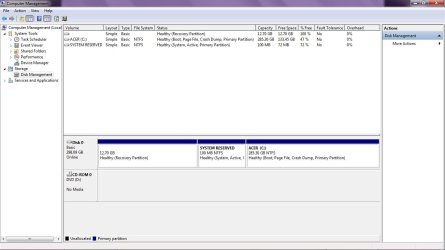
I have an Acer Aspire Laptop which has Win 7 Home Premium 64-bit pre-installed. The HDD is 320Gig and there is only one Drive (C:\ of 285GB size) which has about 150GB free space remaining. Now I want to create a partition and have a dual-boot without disturbing the existing Win 7 and its user configurations. Is there any way I can create a partition to install another OS or is formatting the Hard-drive and starting afresh the only option? Pls Help!
 

My Computer My Computer

At a glance

Windows 7 Home Premium x64
OS
Windows 7 Home Premium x64
Hello Airywind, and welcome to Seven Forums.

Please go ahead and post a screenshot of your Disk Management (diskmgmt.msc) window showing the full layout of your HDD. This way we will be able to give you the proper advice. :)
 

My Computer My Computer

At a glance

64-bit Windows 11 Pro for WorkstationsIntel i7-8700K OC'd to 5 GHz64 GB (4x16GB) G.SKILL TridentZ RGB DDR4 3600...ASUS ROG-STRIX-GTX1080TI-O11G-GAMING
Computer type
PC/Desktop
Computer Manufacturer/Model Number
Self built custom
OS
64-bit Windows 11 Pro for Workstations
CPU
Intel i7-8700K OC'd to 5 GHz
Motherboard
ASUS ROG Maximus XI Formula Z390
Memory
64 GB (4x16GB) G.SKILL TridentZ RGB DDR4 3600 MHz
Graphics Card(s)
ASUS ROG-STRIX-GTX1080TI-O11G-GAMING
Sound Card
Integrated
Monitor(s) Displays
2 x Samsung Odyssey G7 27"
Screen Resolution
2560x1440
Hard Drives
1TB Samsung 990 PRO M.2,
4TB Samsung 990 PRO PRO M.2,
TerraMaster F8 SSD Plus NAS
PSU
Seasonic Prime Titanium 850W
Case
Thermaltake Core P3
Cooling
Corsair Hydro H115i
Keyboard
Logitech wireless K800
Mouse
Logitech MX Master 4
Internet Speed
2 Gb/s Download and 100 Mb/s Upload
Antivirus
Malwarebyte Anti-Malware Premium
Browser
Google Chrome
Other Info
Logitech Z625 speaker system,
Logitech BRIO 4K Pro webcam,
HP Color LaserJet Pro MFP M477fdn,
APC SMART-UPS RT 1000 XL - SURT1000XLI,
Galaxy S23 Plus phone
Thanks a lot!!
This is how the Disk Management screen looks :

DiskMgmt ScreenShot.jpg
 
Last edited by a moderator:

My Computer My Computer

At a glance

Windows 7 Home Premium x64
OS
Windows 7 Home Premium x64
You want to dual boot with win8, vista,linux or ......?

First step is to make C a little bit smaller so shrink it. Shrink it for example with 100GB so there will be 100GB unallocated space afterwards. Size depends on how large you want the other OS to be. Shrinking can be done in disk management. Just right click on C and do "shrink volume". If you can't shrink it enough, defragment C first.

Post results
 

My Computer My Computer

At a glance

Microsoft Windows 7 Home Premium 64-bits 7601...Intel(R) Core(TM) i3 CPU M 370 @ 2.40GHz4,00 GBATI Mobility Radeon HD 5400 Series
Computer type
Laptop
Computer Manufacturer/Model Number
ACER ASPIRE 5742G
OS
Microsoft Windows 7 Home Premium 64-bits 7601 Multiprocessor Free Service Pack 1
CPU
Intel(R) Core(TM) i3 CPU M 370 @ 2.40GHz
Motherboard
Acer Aspire 5742G
Memory
4,00 GB
Graphics Card(s)
ATI Mobility Radeon HD 5400 Series
Sound Card
(1) AMD High Definition Audio Device (2) Realtek High Defi
Screen Resolution
1366 x 768 x 32 bits (4294967296 colors) @ 60 Hz
Hard Drives
WDC WD5000BEVT-22ZAT0
Airywind,

As Ron posted above, you want to shrink your C: drive by how much you want for the other OS to create unallocated space.
Next, just create a new simple volume with the "unallocated" space to format it. It will be a logical partition afterwards since you already have 3 primary partitions.
Afterwards, just boot from the installation media of the other OS, and select the new partition to install it to. How this is done will depend heavily on what OS you are installing though, so please post back with what OS you are wanting to install for a dual boot first. This way we can help make sure it will go trouble free.
 

My Computer My Computer

At a glance

64-bit Windows 11 Pro for WorkstationsIntel i7-8700K OC'd to 5 GHz64 GB (4x16GB) G.SKILL TridentZ RGB DDR4 3600...ASUS ROG-STRIX-GTX1080TI-O11G-GAMING
Computer type
PC/Desktop
Computer Manufacturer/Model Number
Self built custom
OS
64-bit Windows 11 Pro for Workstations
CPU
Intel i7-8700K OC'd to 5 GHz
Motherboard
ASUS ROG Maximus XI Formula Z390
Memory
64 GB (4x16GB) G.SKILL TridentZ RGB DDR4 3600 MHz
Graphics Card(s)
ASUS ROG-STRIX-GTX1080TI-O11G-GAMING
Sound Card
Integrated
Monitor(s) Displays
2 x Samsung Odyssey G7 27"
Screen Resolution
2560x1440
Hard Drives
1TB Samsung 990 PRO M.2,
4TB Samsung 990 PRO PRO M.2,
TerraMaster F8 SSD Plus NAS
PSU
Seasonic Prime Titanium 850W
Case
Thermaltake Core P3
Cooling
Corsair Hydro H115i
Keyboard
Logitech wireless K800
Mouse
Logitech MX Master 4
Internet Speed
2 Gb/s Download and 100 Mb/s Upload
Antivirus
Malwarebyte Anti-Malware Premium
Browser
Google Chrome
Other Info
Logitech Z625 speaker system,
Logitech BRIO 4K Pro webcam,
HP Color LaserJet Pro MFP M477fdn,
APC SMART-UPS RT 1000 XL - SURT1000XLI,
Galaxy S23 Plus phone
Airywind,
Next, just create a new simple volume with the "unallocated" space to format it. It will be a logical partition afterwards since you already have 3 primary partitions.
Hi Brink. As far as I know win7 makes the physical disk "dynamic" of you make a 5th partition.
He is making the fourth partition.. it should make it primary... are you sure win7 does it as you told?

update: You are right!! Sorry
 
Last edited:

My Computer My Computer

At a glance

Microsoft Windows 7 Home Premium 64-bits 7601...Intel(R) Core(TM) i3 CPU M 370 @ 2.40GHz4,00 GBATI Mobility Radeon HD 5400 Series
Computer type
Laptop
Computer Manufacturer/Model Number
ACER ASPIRE 5742G
OS
Microsoft Windows 7 Home Premium 64-bits 7601 Multiprocessor Free Service Pack 1
CPU
Intel(R) Core(TM) i3 CPU M 370 @ 2.40GHz
Motherboard
Acer Aspire 5742G
Memory
4,00 GB
Graphics Card(s)
ATI Mobility Radeon HD 5400 Series
Sound Card
(1) AMD High Definition Audio Device (2) Realtek High Defi
Screen Resolution
1366 x 768 x 32 bits (4294967296 colors) @ 60 Hz
Hard Drives
WDC WD5000BEVT-22ZAT0
If the 4th partition is created from Airywind's 3rd partition, then Disk Management will only make it a logical partition by default.

If he already had 4 primary partitions, then he would have to use a different method with Partition Wizard to create a new logical partition without converting the disk to dynamic instead.

Yeah, you don't want to convert the disk to dynamic.
 

My Computer My Computer

At a glance

64-bit Windows 11 Pro for WorkstationsIntel i7-8700K OC'd to 5 GHz64 GB (4x16GB) G.SKILL TridentZ RGB DDR4 3600...ASUS ROG-STRIX-GTX1080TI-O11G-GAMING
Computer type
PC/Desktop
Computer Manufacturer/Model Number
Self built custom
OS
64-bit Windows 11 Pro for Workstations
CPU
Intel i7-8700K OC'd to 5 GHz
Motherboard
ASUS ROG Maximus XI Formula Z390
Memory
64 GB (4x16GB) G.SKILL TridentZ RGB DDR4 3600 MHz
Graphics Card(s)
ASUS ROG-STRIX-GTX1080TI-O11G-GAMING
Sound Card
Integrated
Monitor(s) Displays
2 x Samsung Odyssey G7 27"
Screen Resolution
2560x1440
Hard Drives
1TB Samsung 990 PRO M.2,
4TB Samsung 990 PRO PRO M.2,
TerraMaster F8 SSD Plus NAS
PSU
Seasonic Prime Titanium 850W
Case
Thermaltake Core P3
Cooling
Corsair Hydro H115i
Keyboard
Logitech wireless K800
Mouse
Logitech MX Master 4
Internet Speed
2 Gb/s Download and 100 Mb/s Upload
Antivirus
Malwarebyte Anti-Malware Premium
Browser
Google Chrome
Other Info
Logitech Z625 speaker system,
Logitech BRIO 4K Pro webcam,
HP Color LaserJet Pro MFP M477fdn,
APC SMART-UPS RT 1000 XL - SURT1000XLI,
Galaxy S23 Plus phone
If the 4th partition is created from Airywind's 3rd partition, then Disk Management will only make it a logical partition by default.

If he already had 4 primary partitions, then he would have to use a different method with Partition Wizard to create a new logical partition without converting the disk to dynamic instead.

Yeah, you don't want to convert the disk to dynamic.
Sorry, I did remember I was wrong already. Updated my post.
 

My Computer My Computer

At a glance

Microsoft Windows 7 Home Premium 64-bits 7601...Intel(R) Core(TM) i3 CPU M 370 @ 2.40GHz4,00 GBATI Mobility Radeon HD 5400 Series
Computer type
Laptop
Computer Manufacturer/Model Number
ACER ASPIRE 5742G
OS
Microsoft Windows 7 Home Premium 64-bits 7601 Multiprocessor Free Service Pack 1
CPU
Intel(R) Core(TM) i3 CPU M 370 @ 2.40GHz
Motherboard
Acer Aspire 5742G
Memory
4,00 GB
Graphics Card(s)
ATI Mobility Radeon HD 5400 Series
Sound Card
(1) AMD High Definition Audio Device (2) Realtek High Defi
Screen Resolution
1366 x 768 x 32 bits (4294967296 colors) @ 60 Hz
Hard Drives
WDC WD5000BEVT-22ZAT0
No problem mate. :)
 

My Computer My Computer

At a glance

64-bit Windows 11 Pro for WorkstationsIntel i7-8700K OC'd to 5 GHz64 GB (4x16GB) G.SKILL TridentZ RGB DDR4 3600...ASUS ROG-STRIX-GTX1080TI-O11G-GAMING
Computer type
PC/Desktop
Computer Manufacturer/Model Number
Self built custom
OS
64-bit Windows 11 Pro for Workstations
CPU
Intel i7-8700K OC'd to 5 GHz
Motherboard
ASUS ROG Maximus XI Formula Z390
Memory
64 GB (4x16GB) G.SKILL TridentZ RGB DDR4 3600 MHz
Graphics Card(s)
ASUS ROG-STRIX-GTX1080TI-O11G-GAMING
Sound Card
Integrated
Monitor(s) Displays
2 x Samsung Odyssey G7 27"
Screen Resolution
2560x1440
Hard Drives
1TB Samsung 990 PRO M.2,
4TB Samsung 990 PRO PRO M.2,
TerraMaster F8 SSD Plus NAS
PSU
Seasonic Prime Titanium 850W
Case
Thermaltake Core P3
Cooling
Corsair Hydro H115i
Keyboard
Logitech wireless K800
Mouse
Logitech MX Master 4
Internet Speed
2 Gb/s Download and 100 Mb/s Upload
Antivirus
Malwarebyte Anti-Malware Premium
Browser
Google Chrome
Other Info
Logitech Z625 speaker system,
Logitech BRIO 4K Pro webcam,
HP Color LaserJet Pro MFP M477fdn,
APC SMART-UPS RT 1000 XL - SURT1000XLI,
Galaxy S23 Plus phone
Thank U all for the replies n wonderful support. :) As suggested, I did perform the 'shrink' on Drive C: and the maximum free space I could get was only 90GB. So I started with the next step. I wanted to install the Windows Server 2003 on the new partition first because I have a licensed copy and then upgrade to Server 2008 later on. But now I have another problem as the Server 2003 OS is not getting installed. I tried to install by booting from the CD but every-time I end up with a BSOD giving error code 0x0000007B with a message 'Inaccessible Boot Device'.
So now I have the partition created and I have the Installation disk for Server 2003 OS but I'm unable to install it. I read in one forum that 'since server 2003 is an older OS, the installation cannot happen'. However, I'm installing it on an entirely different new partition so I don't understand why it is not possible to install..
 
Last edited:

My Computer My Computer

At a glance

Windows 7 Home Premium x64
OS
Windows 7 Home Premium x64
Thank U all for the replies n wonderful support. :) As suggested, I did perform the 'shrink' on Drive C: and the maximum free space I could get was only 90GB. So I started with the next step. I wanted to install the Windows Server 2003 on the new partition first because I have a licensed copy and then upgrade to Server 2008 later on. But now I have another problem as the Server 2003 OS is not getting installed. I tried to install by booting from the CD but every-time I end up with a BSOD giving error code 0x0000007B with a message 'Inaccessible Boot Device'.
So now I have the partition created and I have the Installation disk for Server 2003 OS but I'm unable to install it. I read in one forum that 'since server 2003 is an older OS, the installation cannot happen'. However, I'm installing it on an entirely different new partition so I don't understand why it is not possible to install..
0x0000007B is a "boot device inaccessable" error.

Normally easy to fix. Boot inot win7 and goto "device manager". Which IDE ATA/ATAPI controller do you have?
 

My Computer My Computer

At a glance

Microsoft Windows 7 Home Premium 64-bits 7601...Intel(R) Core(TM) i3 CPU M 370 @ 2.40GHz4,00 GBATI Mobility Radeon HD 5400 Series
Computer type
Laptop
Computer Manufacturer/Model Number
ACER ASPIRE 5742G
OS
Microsoft Windows 7 Home Premium 64-bits 7601 Multiprocessor Free Service Pack 1
CPU
Intel(R) Core(TM) i3 CPU M 370 @ 2.40GHz
Motherboard
Acer Aspire 5742G
Memory
4,00 GB
Graphics Card(s)
ATI Mobility Radeon HD 5400 Series
Sound Card
(1) AMD High Definition Audio Device (2) Realtek High Defi
Screen Resolution
1366 x 768 x 32 bits (4294967296 colors) @ 60 Hz
Hard Drives
WDC WD5000BEVT-22ZAT0
Intel ICH9M-E/M SATA AHCI Controller
 

My Computer My Computer

At a glance

Windows 7 Home Premium x64
OS
Windows 7 Home Premium x64
In WIN7:
Because you have an acer just like me, i hope folder scturcture is almost the same(?)

Do you have a folder called C:\OEM in win7? It can be an hidden folder!! So display hidden folders as well!!

C:\OEM\Preload\Autorun\DRV you have that folder? At least try to find a folder DRV under C:\OEM
In that DRV folder is something like "Intel AHCI"?
Anyway search for a folder called "f6flpy-x64" or "f6flpy-x86" somewhere on pc.
Do you try to install server 2003 32bits or 64bits?
 

My Computer My Computer

At a glance

Microsoft Windows 7 Home Premium 64-bits 7601...Intel(R) Core(TM) i3 CPU M 370 @ 2.40GHz4,00 GBATI Mobility Radeon HD 5400 Series
Computer type
Laptop
Computer Manufacturer/Model Number
ACER ASPIRE 5742G
OS
Microsoft Windows 7 Home Premium 64-bits 7601 Multiprocessor Free Service Pack 1
CPU
Intel(R) Core(TM) i3 CPU M 370 @ 2.40GHz
Motherboard
Acer Aspire 5742G
Memory
4,00 GB
Graphics Card(s)
ATI Mobility Radeon HD 5400 Series
Sound Card
(1) AMD High Definition Audio Device (2) Realtek High Defi
Screen Resolution
1366 x 768 x 32 bits (4294967296 colors) @ 60 Hz
Hard Drives
WDC WD5000BEVT-22ZAT0
Great!! Yes, I was able to locate the "f6flpy-x64" which is actually a ZIP file. What do I do next? There is also a "f6flpy-x32" ZIP file there...
The Server 2003 OS is 32-bit. Would there be any incompatibility issue?
 

My Computer My Computer

At a glance

Windows 7 Home Premium x64
OS
Windows 7 Home Premium x64
use f6flpy-x32 if installing 32 bits version of windows server 2003!
Do you see iaAhci.inf,
iaAhci.cat, iaStor.inf, iaStor.cat, iaStor.sys, and
Txtsetup.oem files in it? Maybe a readme and license as well. If so....

create new folder for example c:\ahcidrivers and copy the files to that folder. So they are unzipped.
on installing windows 2003 server you see a brief message The message "Press F6 if you need to install a third party SCSI or RAID driver..." is briefly flashed on the screen every time Windows Setup starts.

correct? Press it and browse to that folder and click on iaahci.inf
Maybe C drive is called D when installing. This is somehow what to do. Don't know exactly... sorry
 

My Computer My Computer

At a glance

Microsoft Windows 7 Home Premium 64-bits 7601...Intel(R) Core(TM) i3 CPU M 370 @ 2.40GHz4,00 GBATI Mobility Radeon HD 5400 Series
Computer type
Laptop
Computer Manufacturer/Model Number
ACER ASPIRE 5742G
OS
Microsoft Windows 7 Home Premium 64-bits 7601 Multiprocessor Free Service Pack 1
CPU
Intel(R) Core(TM) i3 CPU M 370 @ 2.40GHz
Motherboard
Acer Aspire 5742G
Memory
4,00 GB
Graphics Card(s)
ATI Mobility Radeon HD 5400 Series
Sound Card
(1) AMD High Definition Audio Device (2) Realtek High Defi
Screen Resolution
1366 x 768 x 32 bits (4294967296 colors) @ 60 Hz
Hard Drives
WDC WD5000BEVT-22ZAT0
I wouldn't, but some don't want to let go of XP even though new hardware won't even see it.
 
Hi everyone!
Once again I am thankful to those who have replied and given valuable suggestions. I tried installing the Server 2003 by booting from the disk lot of times and each time the message "Press F6 if you need to install a third party SCSI or RAID driver..." came up I did not get the option to browse to select the 'iaahci.inf' file. Then I checked in the BIOS for the boot menu where the default HDD controller for SATA drive is AHCI and not IDE. So I guess it is an incompatibility issue here. So I changed the default to IDE and then installed the Server 2003 OS on the 90GB partition. But now the problem is that I cannot make this partition as an Active Primary partition so that the Server OS can boot.

Now, I want to know what is the need of the 100MB System Reserved Partition that is created by the manufacturer? What will happen if I delete this partition so that I can make the New Logical Volume as Primary?
 

Attachments

  • DiskMgmt ScreenShot2.jpg
    DiskMgmt ScreenShot2.jpg
    84.9 KB · Views: 8

My Computer My Computer

At a glance

Windows 7 Home Premium x64
OS
Windows 7 Home Premium x64
win7 still boots in IDE mode? I think it does, because you posted screenshot.
You want to keep WIN7 and server2003?

"system reserved" is a special small partition with bootmanager and bootmenu. So I think you want to keep it(?)
If you mark server2003 partition active...bootmenu is gone and win7 doesn't boot!
Waiting for your answers then you get more instructions
 

My Computer My Computer

At a glance

Microsoft Windows 7 Home Premium 64-bits 7601...Intel(R) Core(TM) i3 CPU M 370 @ 2.40GHz4,00 GBATI Mobility Radeon HD 5400 Series
Computer type
Laptop
Computer Manufacturer/Model Number
ACER ASPIRE 5742G
OS
Microsoft Windows 7 Home Premium 64-bits 7601 Multiprocessor Free Service Pack 1
CPU
Intel(R) Core(TM) i3 CPU M 370 @ 2.40GHz
Motherboard
Acer Aspire 5742G
Memory
4,00 GB
Graphics Card(s)
ATI Mobility Radeon HD 5400 Series
Sound Card
(1) AMD High Definition Audio Device (2) Realtek High Defi
Screen Resolution
1366 x 768 x 32 bits (4294967296 colors) @ 60 Hz
Hard Drives
WDC WD5000BEVT-22ZAT0

My Computer My Computer

At a glance

Microsoft Windows 7 Home Premium 64-bits 7601...Intel(R) Core(TM) i3 CPU M 370 @ 2.40GHz4,00 GBATI Mobility Radeon HD 5400 Series
Computer type
Laptop
Computer Manufacturer/Model Number
ACER ASPIRE 5742G
OS
Microsoft Windows 7 Home Premium 64-bits 7601 Multiprocessor Free Service Pack 1
CPU
Intel(R) Core(TM) i3 CPU M 370 @ 2.40GHz
Motherboard
Acer Aspire 5742G
Memory
4,00 GB
Graphics Card(s)
ATI Mobility Radeon HD 5400 Series
Sound Card
(1) AMD High Definition Audio Device (2) Realtek High Defi
Screen Resolution
1366 x 768 x 32 bits (4294967296 colors) @ 60 Hz
Hard Drives
WDC WD5000BEVT-22ZAT0
Back
Top