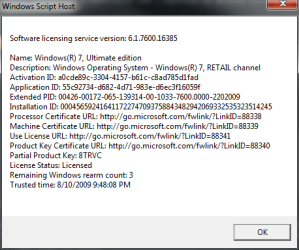
Build from Technet is newer !

pmc

New member
Power User
Local time
2:44 PM
Messages
50
It acepted upgrade from last version we had and the oem patch (Windows6.1-KB972636-x86 ) reported as already instaled.

Rgds

Mine continue to report as 7600.16385 (slmgr.vbs -dlv) :(

Old version= 7600.16385.090713-1255_x86fre_client_en-us_Retail_Ultimate-GRMCULFRER_EN_DVD
Newew Version= en_windows_7_ultimate_x86_dvd_x15-65921

both iso have same hash :(


Running "System Information", it reported this :

Hardware Abstraction Layer Version = "6.1.7600.16399"

Anyone know anything about this ?


Sorry "The Blessed One" english is not my native language,i dont understood/and what you mean :(

A GDR update that upgrades Windows 7 OS Kernel, HAL (Hardware Abstraction Layer), BootEnvironment Core BootManagerPCAT components to 6.1.7600.16399 or 6.1.7600.20495. This update package is responsible for changing the BuildLabEx string to 7600.16399.x86fre.win7_gdr.090722-1835 or 7600.16399.x64fre.win7_gdr.090722-1835 and changing win7_rtm in the BuildLab string to win7_gdr.
* KB972636 (Windows6.1-KB972636-x86.msu or Windows6.1-KB972636-x64.msu)
 
Last edited:

My Computer

Computer Manufacturer/Model Number
Test Computer
OS
Windows 7 X86 SP1 V.741
CPU
Amd Athlon Xp mobile 2500@3200+ (socket 462)
Motherboard
Asrock K7S8XE+
Memory
1 Gb DDR ( GSKILL F1-3200PHU2-2GBZX )
Graphics Card(s)
Asus AH3650 SILENT/HTDI/512M ( agp )
Sound Card
Onboard
Monitor(s) Displays
Benq FP91GP 19"
Hard Drives
OCZ VerteX 2 - 60GB ( SSD )
PSU
Chieftec GPS-450AA
Case
Chieftec GIGA
after downloading 1 update(i dont remember the name) and the build number changed from 7600.16385 to 7600.16399. Nothing else is that i have noticed with the newest updates.
 

My Computer

Computer Manufacturer/Model Number
Samsung NP530U4B-S02IN
OS
Windows® 8 Pro (64-bit)
CPU
Intel® Core™ i5 Processor 2467M (1.60GHz, 3MB L3 Cache)
Motherboard
Samsung Electronics
Memory
6GB DDR3 System Memory at 1,333MHz (on BD 4GB + 2GB x 1)
Graphics Card(s)
AMD Radeon™ HD7550M 1GB DDR3 (Ext. Graphic)
Sound Card
Realtek High Definition Audio
Monitor(s) Displays
35.56cm (14.0) SuperBright 300nit HD LED Display
Screen Resolution
1366x768
Hard Drives
1TB S-ATA II Hard Drive (5400RPM) with ExpressCache 16GB SSD
Internet Speed
sucks
Antivirus
Microsoft Security Essentials
Browser
Google Chrome (Sync enabled)
Newew Version= en_windows_7_ultimate_x86_dvd_x15-65921
65921 is in the name of the Download I think, and i guess it doesnt have any connection with the build number or anything. Check the other Download, it has 8592x something.

Edit : yup its the file name
Win 7 Ultimate x64- File Name: en_windows_7_ultimate_x64_dvd_x15-65922.iso
Win 7 Ultimate x86- File Name: en_windows_7_ultimate_x64_dvd_x15-65921.iso

So its the same ISO image.
On the other hand adding a newer build means Newer files are there, and that means the Hash Must Change. So you can think about it either way. ;)
 

My Computer

Computer Manufacturer/Model Number
Intel
OS
Windows 7 Professional, Windows XP
CPU
Intel Dual Core
Motherboard
Intel D945GCNL
Memory
2GB
Graphics Card(s)
Intel 82945G Express
Monitor(s) Displays
HP Pavilion 1859m
Screen Resolution
1366x768
Hard Drives
Samsung 250GB SATA
Maxtor 80GB SATA
Case
High Tower
Cooling
Air
Keyboard
Delux
Mouse
A4Tech
Internet Speed
512kbps downlink and 128kbps uplink :(
@ pmc

You said you upgraded from a version which already had the new KB972636 installed? Then of course the TechNet or any other will report the new build number. How can you not realise this? :huh:
 
@ pmc

You said you upgraded from a version which already had the new KB972636 installed? Then of course the TechNet or any other will report the new build number. How can you not realise this? :huh:

I think that he has misunderstood the build number with the File name ;)
 

My Computer

Computer Manufacturer/Model Number
Intel
OS
Windows 7 Professional, Windows XP
CPU
Intel Dual Core
Motherboard
Intel D945GCNL
Memory
2GB
Graphics Card(s)
Intel 82945G Express
Monitor(s) Displays
HP Pavilion 1859m
Screen Resolution
1366x768
Hard Drives
Samsung 250GB SATA
Maxtor 80GB SATA
Case
High Tower
Cooling
Air
Keyboard
Delux
Mouse
A4Tech
Internet Speed
512kbps downlink and 128kbps uplink :(
I have KB972636 installed as of Aug 8 2009, it did not change my Build number. so why would it change his Build Number? That does not make since to me.
Update for Internet Explorer 8 Compatibility View List for Windows 7 (KB972636)
Installation date: ‎8/‎7/‎2009 11:19 AM
Installation status: Successful
Update type: Recommended
This Compatibility View List update helps make Web sites that are designed for older browsers look better in Internet Explorer 8. When users install Internet Explorer 8, they will be given a choice about opting-in to a list of sites that should be displayed in Compatibility View. After you install this item, you may have to restart Internet Explorer.
More information:
Description of the Compatibility View list in Windows Internet Explorer 8
Help and Support:
A Compatibility View list update is available for Windows Internet Explorer 8: July 21, 2009
 
I have KB972636 installed as of Aug 8 2009, it did not change my Build number. so why would it change his Build Number? That does not make since to me.


Hmm I would like to know that too, :rolleyes:

@pmc > please dont edit the first post always, Its a bit hard to find new updates that uv posted. hope u get me ;)

Did you use the Updates from a leaked or Any other source or by Windows updates ?
 

My Computer

Computer Manufacturer/Model Number
Intel
OS
Windows 7 Professional, Windows XP
CPU
Intel Dual Core
Motherboard
Intel D945GCNL
Memory
2GB
Graphics Card(s)
Intel 82945G Express
Monitor(s) Displays
HP Pavilion 1859m
Screen Resolution
1366x768
Hard Drives
Samsung 250GB SATA
Maxtor 80GB SATA
Case
High Tower
Cooling
Air
Keyboard
Delux
Mouse
A4Tech
Internet Speed
512kbps downlink and 128kbps uplink :(
The handful of (leaked) updates that are out there will elevate the build to 16399.

I believe only one of them has officially made it to Windows Update so far. KB972636 installs an IE compatibility list update. I don't believe it's the one that updates the build number.

There is not a "newer" build via Technet. It remains the exact same thing MS declared RTM, and has been unaltered since.

Last I checked, KB675605 is the supposed GDR update that changes the kernel, and it's not yet officially out, nor was it incorporated into the (unaltered) Technet release.
 

My Computer

OS
Windows7
Hi again i had 7600.16385.090713-1255_x86fre_client_en-us_Retail_Ultimate-GRMCULFRER_EN_DVD installed + the oem patches.

I upgraded to en_windows_7_ultimate_x86_dvd_x15-65921 ( i was surprised here ) and after installed again the oem patches.

The "Windows6.1-KB972636-x86" was the only one that didnt installed as it was already there.

I dont recall that update coming from windosupdate.
 

My Computer

Computer Manufacturer/Model Number
Test Computer
OS
Windows 7 X86 SP1 V.741
CPU
Amd Athlon Xp mobile 2500@3200+ (socket 462)
Motherboard
Asrock K7S8XE+
Memory
1 Gb DDR ( GSKILL F1-3200PHU2-2GBZX )
Graphics Card(s)
Asus AH3650 SILENT/HTDI/512M ( agp )
Sound Card
Onboard
Monitor(s) Displays
Benq FP91GP 19"
Hard Drives
OCZ VerteX 2 - 60GB ( SSD )
PSU
Chieftec GPS-450AA
Case
Chieftec GIGA
Hi again i had 7600.16385.090713-1255_x86fre_client_en-us_Retail_Ultimate-GRMCULFRER_EN_DVD installed + the oem patches.

I upgraded to en_windows_7_ultimate_x86_dvd_x15-65921 ( i was surprised here ) and after installed again the oem patches.

The "Windows6.1-KB972636-x86" was the only one that didnt installed as it was already there.

I dont recall that update coming from windosupdate.


Can you pls. Explain these,
1. Did you get the Later Download from Technet ?
2. and What do you mean by OEM Patches ? (If its the Crack dont explain about it, just say yes) :rolleyes:
 

My Computer

Computer Manufacturer/Model Number
Intel
OS
Windows 7 Professional, Windows XP
CPU
Intel Dual Core
Motherboard
Intel D945GCNL
Memory
2GB
Graphics Card(s)
Intel 82945G Express
Monitor(s) Displays
HP Pavilion 1859m
Screen Resolution
1366x768
Hard Drives
Samsung 250GB SATA
Maxtor 80GB SATA
Case
High Tower
Cooling
Air
Keyboard
Delux
Mouse
A4Tech
Internet Speed
512kbps downlink and 128kbps uplink :(
TechNet *purchased subscription* - legitimate license - here are my results using the same method as PMC listed:

W7 version.PNG

PMC, please do not discuss any OEM patches that are illegal, as mentioned above - doing so will earn an infraction and possibly more severe penalties.

if these patches are legitimate M$ issued patches that you acquired through legitimate means (being an MVP, TechNet with your own legitimate subscription, MSDN with your own legitimate subscription) then you may continue to discuss them. If not, please notify me by PM so I can close this thread.
 

My Computers

System One System Two

  • Computer type
    PC/Desktop
    Computer Manufacturer/Model Number
    The Beast Model A (homebrew)
    OS
    Windows 11 21H2 Current build
    CPU
    AMD Ryzen 9 3950X
    Motherboard
    MSI MEG X570 GODLIKE
    Memory
    4 * 32 GB - Corsair Vengeance 3600 MHz
    Graphics Card(s)
    EVGA GeForce RTX 3080 Ti XC3 ULTRA GAMING (12G-P5-3955-KR)
    Sound Card
    Realtek® ALC1220 Codec
    Monitor(s) Displays
    2x Eve Spectrum ES07D03 4K Gaming Monitor (Matte) | Eve Spec
    Screen Resolution
    3x 3840 x 2160
    Hard Drives
    3x Samsung 980 Pro NVMe PCIe 4 M.2 2 TB SSD (MZ-V8P2T0B/AM) } 3x Sabrent Rocket NVMe 4.0 1 TB SSD
    PSU
    PC Power & Cooling’s Silencer Series 1050 Watt, 80 Plus Plat
    Case
    Fractal Design Define 7 XL Dark ATX Full Tower Case
    Cooling
    SteelSeries Apex Pro Wired Gaming Keyboard
    Keyboard
    SteelSeries Apex Pro
    Mouse
    Logitech MX Master 3S | MX Master 3 for business
    Internet Speed
    AT&T LightSpeed Gigabit Duplex Ftth
    Antivirus
    Windows Defender + MB 3
    Browser
    Nightly (default) + Firefox (stable),Chrome, Edge
  • Computer type
    PC/Desktop
    System Manufacturer/Model Number
    Dell Latitude E5470
    OS
    ChromeOS Flex Dev Channel (current)
    CPU
    Intel(R) Core(TM) i5-6300U CPU @ 2.40GHz, 2501 Mhz, 2 Core(s), 4 Logical Processor(s)
    Motherboard
    Dell
    Memory
    16 GB
    Graphics Card(s)
    Intel(R) HD Graphics 520
    Sound Card
    Intel(R) HD Graphics 520 + RealTek Audio
    Monitor(s) Displays
    Dell laptop display 15"
    Screen Resolution
    1920 * 1080
    Hard Drives
    Toshiba 128GB M.2 22300 drive
    INTEL Cherryville 520 Series SSDSC2CW180A 180 GB SATA III SSD
    PSU
    Dell
    Case
    Dell
    Cooling
    Dell
    Keyboard
    Dell
    Mouse
    Logitech MX Master 3S (shared w. Sys 1) | Dell TouchPad
    Internet Speed
    AT&T LightSpeed Gigabit Duplex Ftth
PMC, please do not discuss any OEM patches that are illegal, as mentioned above - doing so will earn an infraction and possibly more severe penalties.

I believe he was referring to the zip file with some windows updates that are supposedly meant for testing by OEMs, not the OEM activation cracks.

Those windows updates are bogus/fake/trojans, the KB id's don't exist at microsoft.com which proves they are fake. KB1234567 should be obvious that its fake.

Reformat and reinstall your system and dont install any "updates" that dont come from the official windows update service.

Seriously, people should know better nowadays not to download some zip file with exe files and overwrite windows files with them :shock:
 

My Computer

OS
Windows 7
Better wait for those updates to hit Windows Updates instead of installing leaked files.
 

My Computer

OS
Windows 7 Ultimate X64 RTM
CPU
Q6600 @ 3.4Ghz
Motherboard
Abit IP35-E
Memory
8GB DDR2-800
Graphics Card(s)
GTX285 1GB
Sound Card
Creative X-Fi Extreme Music
Monitor(s) Displays
Samsung T220
Hard Drives
Samsung F1 Spinpoint 1TB
PSU
Silverstone Zues 750ZF
Case
Lian Li PC-P80
Cooling
Thermalright Ultra 120-Extreme
Those windows updates are bogus/fake/trojans, the KB id's don't exist at microsoft.com which proves they are fake. KB1234567 should be obvious that its fake.

how can update SIGNED by MS be fake/trojan whatever? all that updates are REAL updates. Worst they can be is some test updates,they are certanly not fake or include viruses. Reason why there is no KB article is, because they are not released yet...
 

My Computer

Computer Manufacturer/Model Number
Custom
OS
Windows 7 SP1 x64 build 7601.21701
CPU
Intel Q9450 @3608mhz (8x451)
Motherboard
Asus Rampage Formula
Memory
6GB - 2x Corsair CM2X1024-8500C5D and 2x CM2X2048-8500C5D
Graphics Card(s)
Zotac nVidia GTX295
Sound Card
SoundMAX ADI1988B (X-FI MB)
Monitor(s) Displays
LG L227WTP & Samsung LE26R71B LCD TV
Screen Resolution
1680x1050 & 1360x768
Hard Drives
2x Seagate ST3500630NS in RAID0
PSU
Thermaltake Toughpower 750W
Case
Thermaltake
Cooling
Thermalright Ultra-120 Extreme and couple of fans
Keyboard
Logitech G15 v2
Mouse
Razer DeathAdder
Internet Speed
FTTH 50/50 (dualstack IPv4 & native IPv6)
Yes i was refering to that and they arent fakes or trojans.
But now on one of the pcs i have a strange problem with usb not working and i remember another user reporting too.
I loaded winxp (multiboot for diagnostic purpose) and usb working as normal) so it means its related to those patch.

Funny thing i had earlier version installed + patches and no problems, now i have technet version + patches and usb are broken.
 

My Computer

Computer Manufacturer/Model Number
Test Computer
OS
Windows 7 X86 SP1 V.741
CPU
Amd Athlon Xp mobile 2500@3200+ (socket 462)
Motherboard
Asrock K7S8XE+
Memory
1 Gb DDR ( GSKILL F1-3200PHU2-2GBZX )
Graphics Card(s)
Asus AH3650 SILENT/HTDI/512M ( agp )
Sound Card
Onboard
Monitor(s) Displays
Benq FP91GP 19"
Hard Drives
OCZ VerteX 2 - 60GB ( SSD )
PSU
Chieftec GPS-450AA
Case
Chieftec GIGA
how can update SIGNED by MS be fake/trojan whatever? all that updates are REAL updates. Worst they can be is some test updates,they are certanly not fake or include viruses. Reason why there is no KB article is, because they are not released yet...
+1.
 

My Computer

Computer Manufacturer/Model Number
Samsung NP530U4B-S02IN
OS
Windows® 8 Pro (64-bit)
CPU
Intel® Core™ i5 Processor 2467M (1.60GHz, 3MB L3 Cache)
Motherboard
Samsung Electronics
Memory
6GB DDR3 System Memory at 1,333MHz (on BD 4GB + 2GB x 1)
Graphics Card(s)
AMD Radeon™ HD7550M 1GB DDR3 (Ext. Graphic)
Sound Card
Realtek High Definition Audio
Monitor(s) Displays
35.56cm (14.0) SuperBright 300nit HD LED Display
Screen Resolution
1366x768
Hard Drives
1TB S-ATA II Hard Drive (5400RPM) with ExpressCache 16GB SSD
Internet Speed
sucks
Antivirus
Microsoft Security Essentials
Browser
Google Chrome (Sync enabled)
guys, so what is the latest build finally . I'm really confused. (post removed)

Hello Shreen, Please Dont post links to other sites unless relevent. :D
The Latest Official Build is 6.1 Build 7600 - 7600.16385.090713-1255
 
Last edited by a moderator:

My Computer

Computer Manufacturer/Model Number
Intel
OS
Windows 7 Professional, Windows XP
CPU
Intel Dual Core
Motherboard
Intel D945GCNL
Memory
2GB
Graphics Card(s)
Intel 82945G Express
Monitor(s) Displays
HP Pavilion 1859m
Screen Resolution
1366x768
Hard Drives
Samsung 250GB SATA
Maxtor 80GB SATA
Case
High Tower
Cooling
Air
Keyboard
Delux
Mouse
A4Tech
Internet Speed
512kbps downlink and 128kbps uplink :(
Back
Top