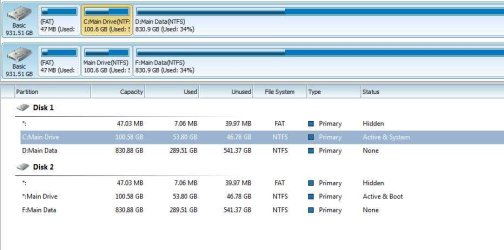
Need help - cloning action has split boot and sys acrsoos 2 disks

mediaman09

New member
Member
VIP
Local time
8:17 AM
Messages
260
Location
Toronto
Need help - cloning action has split boot and sys across 2 disks

Using Win 7 64 bit Home Premium.

This should NOT have happened - but it did!!

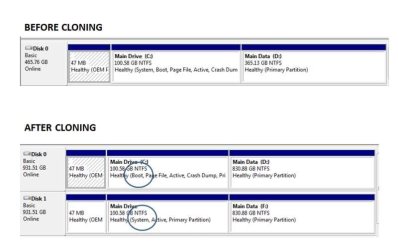
I started off with a perfectly fine MAIN disk, then cloned a new disk for use as a BACKUP (using EaseUs 4.0 and the boot-first-with-Cd method).

All appeared to be fine, but now I see the boot and system files are no longer on my original boot disk, BUT ARE NOW SPLIT ACROSS THE TWO DISKS !!! This is a nighmware as:
-it defeats the whole purpose of having independant MAIN and BACKUP disks
( I am now reliant on both drives all the time)
-it completely slows down perfomance
-it should NOT have happened!!!

How do I fix this???

Is there something I can do (or undo) with Disk Maangement, or, MiniTool PArtition wizard, or EaseUs Partition Magic?

This is a bit a of a disaster- Here I was trying to be more secure by haveing a backup drive...and now this !!
 

Attachments
  • ease_clone.jpg
    ease_clone.jpg
    30.1 KB · Views: 8
Last edited:

My Computer My Computer

At a glance

DELL Win 7 Home Premium 64 BitIntel Core i7-930 (8MB L2, 2.8GHz) // ntel Co...16GB // 18GB DDR3 SDRAM 1333Mhhz 6 DIMMS (3x2...AMD HD7570 // AMD Radeon HD6750 // ATI Radeon...
Computer type
PC/Desktop
Computer Manufacturer/Model Number
DELL XPS 8500 // DELL XPS Studio 9100 // DELL Dim 9200
OS
DELL Win 7 Home Premium 64 Bit
CPU
Intel Core i7-930 (8MB L2, 2.8GHz) // ntel Core 2 Quad Q6600
Motherboard
?? // Dell A02 BIOS // ??
Memory
16GB // 18GB DDR3 SDRAM 1333Mhhz 6 DIMMS (3x2, 3x4) //4 GB
Graphics Card(s)
AMD HD7570 // AMD Radeon HD6750 // ATI Radeon HD5670 1 GB GD
Sound Card
?? // THX TruStudio PC //?
Monitor(s) Displays
Dual Dell 2405 WFP-HC24 //SAmsung 27" // Triple 19" LCD
Screen Resolution
1900 x 1200
Hard Drives
Main :WD Caviar Black 1 TB SATA WD1002FAEX
Backup :WD Caviar Black 1 TB SATA WD1002FAEX
PSU
?? // Ultra 900W // ??
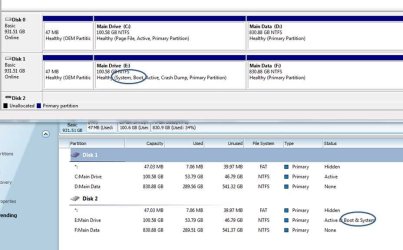
Complicating things further is that mini PW shows the MAIN idsk ( the one with C and D paritions) is "system" and the BACKUP disk is "boot" ... the exact opposite of what WIndwos 7 is reporting (per post 1)
 

Attachments

  • miniPW.JPG
    miniPW.JPG
    44.6 KB · Views: 3

My Computer My Computer

At a glance

DELL Win 7 Home Premium 64 BitIntel Core i7-930 (8MB L2, 2.8GHz) // ntel Co...16GB // 18GB DDR3 SDRAM 1333Mhhz 6 DIMMS (3x2...AMD HD7570 // AMD Radeon HD6750 // ATI Radeon...
Computer type
PC/Desktop
Computer Manufacturer/Model Number
DELL XPS 8500 // DELL XPS Studio 9100 // DELL Dim 9200
OS
DELL Win 7 Home Premium 64 Bit
CPU
Intel Core i7-930 (8MB L2, 2.8GHz) // ntel Core 2 Quad Q6600
Motherboard
?? // Dell A02 BIOS // ??
Memory
16GB // 18GB DDR3 SDRAM 1333Mhhz 6 DIMMS (3x2, 3x4) //4 GB
Graphics Card(s)
AMD HD7570 // AMD Radeon HD6750 // ATI Radeon HD5670 1 GB GD
Sound Card
?? // THX TruStudio PC //?
Monitor(s) Displays
Dual Dell 2405 WFP-HC24 //SAmsung 27" // Triple 19" LCD
Screen Resolution
1900 x 1200
Hard Drives
Main :WD Caviar Black 1 TB SATA WD1002FAEX
Backup :WD Caviar Black 1 TB SATA WD1002FAEX
PSU
?? // Ultra 900W // ??
Update...

I ran the Win 7 system repair disk.. almost there..

I now have sys and boot on the same disk.... and now have WIn 7 and mini PW reporting the same thing.


But I am booting to the backup disk (E/F) intead of to the main disk C/D)


I think the only way to resolve this is two swap open the case, swap the drives and re-label the drive letters.


1) is that correct?

2) what is the lesson learned here ? Is is that its fine to clone a drive, but never ever ever boot your system with both the original and cloned drive in the same system??? Or is it that EaseUs is a bad cloning tool?? Or is it just me??
 

Attachments

  • clone_repair.jpg
    clone_repair.jpg
    49.3 KB · Views: 2

My Computer My Computer

At a glance

DELL Win 7 Home Premium 64 BitIntel Core i7-930 (8MB L2, 2.8GHz) // ntel Co...16GB // 18GB DDR3 SDRAM 1333Mhhz 6 DIMMS (3x2...AMD HD7570 // AMD Radeon HD6750 // ATI Radeon...
Computer type
PC/Desktop
Computer Manufacturer/Model Number
DELL XPS 8500 // DELL XPS Studio 9100 // DELL Dim 9200
OS
DELL Win 7 Home Premium 64 Bit
CPU
Intel Core i7-930 (8MB L2, 2.8GHz) // ntel Core 2 Quad Q6600
Motherboard
?? // Dell A02 BIOS // ??
Memory
16GB // 18GB DDR3 SDRAM 1333Mhhz 6 DIMMS (3x2, 3x4) //4 GB
Graphics Card(s)
AMD HD7570 // AMD Radeon HD6750 // ATI Radeon HD5670 1 GB GD
Sound Card
?? // THX TruStudio PC //?
Monitor(s) Displays
Dual Dell 2405 WFP-HC24 //SAmsung 27" // Triple 19" LCD
Screen Resolution
1900 x 1200
Hard Drives
Main :WD Caviar Black 1 TB SATA WD1002FAEX
Backup :WD Caviar Black 1 TB SATA WD1002FAEX
PSU
?? // Ultra 900W // ??
After cloning the Old HD Drive,Physically disconnect it, boot the new HD Drive.done.
 

My Computer My Computer

At a glance

ME/XP/Vista/Win7
OS
ME/XP/Vista/Win7
After cloning the Old HD Drive,Physically disconnect it, boot the new HD Drive.done.

Not exactly. What you propsoe is fine if all I wanted was tio end up with one drive.

What I want is two drives:
- a bootable main drive (not dependant on the backup)
- a backup drive ( ideally bootable as well so that I can use if the main one fails)
 

My Computer My Computer

At a glance

DELL Win 7 Home Premium 64 BitIntel Core i7-930 (8MB L2, 2.8GHz) // ntel Co...16GB // 18GB DDR3 SDRAM 1333Mhhz 6 DIMMS (3x2...AMD HD7570 // AMD Radeon HD6750 // ATI Radeon...
Computer type
PC/Desktop
Computer Manufacturer/Model Number
DELL XPS 8500 // DELL XPS Studio 9100 // DELL Dim 9200
OS
DELL Win 7 Home Premium 64 Bit
CPU
Intel Core i7-930 (8MB L2, 2.8GHz) // ntel Core 2 Quad Q6600
Motherboard
?? // Dell A02 BIOS // ??
Memory
16GB // 18GB DDR3 SDRAM 1333Mhhz 6 DIMMS (3x2, 3x4) //4 GB
Graphics Card(s)
AMD HD7570 // AMD Radeon HD6750 // ATI Radeon HD5670 1 GB GD
Sound Card
?? // THX TruStudio PC //?
Monitor(s) Displays
Dual Dell 2405 WFP-HC24 //SAmsung 27" // Triple 19" LCD
Screen Resolution
1900 x 1200
Hard Drives
Main :WD Caviar Black 1 TB SATA WD1002FAEX
Backup :WD Caviar Black 1 TB SATA WD1002FAEX
PSU
?? // Ultra 900W // ??
OK all done, Not waht I wanted, but I can take much more of this.

Summary
I started off with two old 500 GB drives ( bootbale main and backup)
I successfully cloned to get to point I where I have two 1 TB drives ( bootabale main and backup)
Main Drive has the sys.boot files (and happened to end up as Disk 0)
Backdrive was simply to stored image and file backups (and happened to end up as Disk 1)

Changes
I should have left good enough alone

But thought I should go one step further and make the Backup drive bootable (in case thw main drive failed, so I cloned from Main to Backup. Big mistake.

From that point on, per post 1, the boot and sys file were spread over the two drives, and performance was dead slow.

I partially corrected (per post 3) but then E/F as the boot drive.

For the laarr few hours I tried to corrected it, but on evert turn I hit roadblock, even when using just one drive at a time and even trying to repair with thw system repair CD or the Win 7 CD. It told me my copy of Win 7 wasn not genuine, or could not find profiles, etc etc.

Current Status
Finally, after a few more combinations, I got to something that works. See below.

Good enough. So I am gonna cut my losses and stop.

Backup drive is still not bootable, and the Drive numbers got reversed , but I am all out of steam, time and patience.

Also I know is to never ever ever to attempt to Clone a drive again for as long as I live ( as it should have only affected the target, but it messed up the soruce).
 

Attachments

  • clone-final.jpg
    clone-final.jpg
    26.3 KB · Views: 9

My Computer My Computer

At a glance

DELL Win 7 Home Premium 64 BitIntel Core i7-930 (8MB L2, 2.8GHz) // ntel Co...16GB // 18GB DDR3 SDRAM 1333Mhhz 6 DIMMS (3x2...AMD HD7570 // AMD Radeon HD6750 // ATI Radeon...
Computer type
PC/Desktop
Computer Manufacturer/Model Number
DELL XPS 8500 // DELL XPS Studio 9100 // DELL Dim 9200
OS
DELL Win 7 Home Premium 64 Bit
CPU
Intel Core i7-930 (8MB L2, 2.8GHz) // ntel Core 2 Quad Q6600
Motherboard
?? // Dell A02 BIOS // ??
Memory
16GB // 18GB DDR3 SDRAM 1333Mhhz 6 DIMMS (3x2, 3x4) //4 GB
Graphics Card(s)
AMD HD7570 // AMD Radeon HD6750 // ATI Radeon HD5670 1 GB GD
Sound Card
?? // THX TruStudio PC //?
Monitor(s) Displays
Dual Dell 2405 WFP-HC24 //SAmsung 27" // Triple 19" LCD
Screen Resolution
1900 x 1200
Hard Drives
Main :WD Caviar Black 1 TB SATA WD1002FAEX
Backup :WD Caviar Black 1 TB SATA WD1002FAEX
PSU
?? // Ultra 900W // ??
As far as I can tell they are the same - both are 'active'. Just a little different wording. I don't see a problem.

'active' means that the bootmgr is in that partition. They should both boot.
 

My Computer My Computer

At a glance

Vista, Windows7, Mint Mate, Zorin, Windows 8from 1.6GHz Duo to i7
Computer Manufacturer/Model Number
HP, Dell, Gateway, Toshiba - 4 laptops and 2 desktops
OS
Vista, Windows7, Mint Mate, Zorin, Windows 8
CPU
from 1.6GHz Duo to i7
Monitor(s) Displays
2x HP w2207
Hard Drives
5x HDD, 7x SSD, 12x Externals
Keyboard
with trackball - no mices
Mouse
Trackball mice
Internet Speed
DSL 6000
They should both boot.

They should, but they don't.. If I remove the main drive, and try to boot off the backup,, I get the " not a genuine Win 7 copy " error message in the bottom right corner.

So as I can't resolve it, I!ll leave sleeping dogs lie, and deal with if I ever lose my main drive.

My data is secure, So i will just need to work at that time, at getting windows to boot, upon that future failure. I do have Ease Us image backups, and I do have my original 500GB bootable standby drive, as well as sys backup and Win 7 DVDs, so I have a good tool suite to work with....would have of course been cleaner if the backup drive was bootable, but as its not, so be it.
 

My Computer My Computer

At a glance

DELL Win 7 Home Premium 64 BitIntel Core i7-930 (8MB L2, 2.8GHz) // ntel Co...16GB // 18GB DDR3 SDRAM 1333Mhhz 6 DIMMS (3x2...AMD HD7570 // AMD Radeon HD6750 // ATI Radeon...
Computer type
PC/Desktop
Computer Manufacturer/Model Number
DELL XPS 8500 // DELL XPS Studio 9100 // DELL Dim 9200
OS
DELL Win 7 Home Premium 64 Bit
CPU
Intel Core i7-930 (8MB L2, 2.8GHz) // ntel Core 2 Quad Q6600
Motherboard
?? // Dell A02 BIOS // ??
Memory
16GB // 18GB DDR3 SDRAM 1333Mhhz 6 DIMMS (3x2, 3x4) //4 GB
Graphics Card(s)
AMD HD7570 // AMD Radeon HD6750 // ATI Radeon HD5670 1 GB GD
Sound Card
?? // THX TruStudio PC //?
Monitor(s) Displays
Dual Dell 2405 WFP-HC24 //SAmsung 27" // Triple 19" LCD
Screen Resolution
1900 x 1200
Hard Drives
Main :WD Caviar Black 1 TB SATA WD1002FAEX
Backup :WD Caviar Black 1 TB SATA WD1002FAEX
PSU
?? // Ultra 900W // ??
Now that's another problem. You need a key for the second OS.

Why don't you just make images and if anything fails, restore the image.
 

My Computer My Computer

At a glance

Vista, Windows7, Mint Mate, Zorin, Windows 8from 1.6GHz Duo to i7
Computer Manufacturer/Model Number
HP, Dell, Gateway, Toshiba - 4 laptops and 2 desktops
OS
Vista, Windows7, Mint Mate, Zorin, Windows 8
CPU
from 1.6GHz Duo to i7
Monitor(s) Displays
2x HP w2207
Hard Drives
5x HDD, 7x SSD, 12x Externals
Keyboard
with trackball - no mices
Mouse
Trackball mice
Internet Speed
DSL 6000
Now that's another problem. You need a key for the second OS.

That would be fine if it prompted me to enter one.

Yup as noted, I also have the images.
 

My Computer My Computer

At a glance

DELL Win 7 Home Premium 64 BitIntel Core i7-930 (8MB L2, 2.8GHz) // ntel Co...16GB // 18GB DDR3 SDRAM 1333Mhhz 6 DIMMS (3x2...AMD HD7570 // AMD Radeon HD6750 // ATI Radeon...
Computer type
PC/Desktop
Computer Manufacturer/Model Number
DELL XPS 8500 // DELL XPS Studio 9100 // DELL Dim 9200
OS
DELL Win 7 Home Premium 64 Bit
CPU
Intel Core i7-930 (8MB L2, 2.8GHz) // ntel Core 2 Quad Q6600
Motherboard
?? // Dell A02 BIOS // ??
Memory
16GB // 18GB DDR3 SDRAM 1333Mhhz 6 DIMMS (3x2, 3x4) //4 GB
Graphics Card(s)
AMD HD7570 // AMD Radeon HD6750 // ATI Radeon HD5670 1 GB GD
Sound Card
?? // THX TruStudio PC //?
Monitor(s) Displays
Dual Dell 2405 WFP-HC24 //SAmsung 27" // Triple 19" LCD
Screen Resolution
1900 x 1200
Hard Drives
Main :WD Caviar Black 1 TB SATA WD1002FAEX
Backup :WD Caviar Black 1 TB SATA WD1002FAEX
PSU
?? // Ultra 900W // ??
Once you cloned the HD the fact C has no System flag tells you that you still need to repair or write the System boot files to it.

To do this unplug the other HD, make sure the clone is set first to boot in BIOS setup, then run Startup Repair - Run up to 3 Separate Times until C holds the System Active flag.

Now you can plug back in the other HD, boot it if needed by tapping the one-time BIOS Boot Menu key at boot. If you want to use it for storage, wipe it with Diskpart Clean Command then partition it in Disk Mgmt.
 
Once you cloned the HD the fact C has no System flag tells you that you still need to repair or write the System boot files to it.

To do this unplug the other HD, make sure the clone is set first to boot in BIOS setup, then run Startup Repair - Run up to 3 Separate Times until C holds the System Active flag.

Now you can plug back in the other HD, boot it if needed by tapping the one-time BIOS Boot Menu key at boot. If you want to use it for storage, wipe it with Diskpart Clean Command then partition it in Disk Mgmt.


Many thanks for the above. Will certainly note if for future reference. Thread bookmarked. Cannot implement it now has that ship has sailed.

BUT I WOULD LOVE TO KNOW WHY it is that when cloning from Soruce to Target, one can be left with a different Source ! To date, I naively assumed this could never happen. To date I thought if I have a perfrect working bootable Source Drive, and cloned it, I would then simply have is a populated target drive (and perhas need to repair to boot it on its own later0. I had never dreamed in a million years that the Source would be affected and my system would no longer boot as it did before, or teh sys and bootmg fiels would move to the target drive. and that I would have to do some heroic expert level gymnastics jsut to get things back too how they were. Is is just a flakey EaseUS cloning processes, or is all cloning like this?


For me, the act of cloning was a death sentence to at least 8 hours of followup work, and even then not quite getting back to wehre you started.

A great lesson learned for me. I will never clone again, unless I tiruly have no use for soruce ( ie clone source to target, remove source, do heroics on the target untul it works)

Bottom line, this is not cool and essentially an impossible task for a casual users, This is 2012. Two year olds can master ipads. It should not have to be this complicated. And this is ust one of a hundred examples. Thnigs should be quantum leaps frendlier than they are. Jsut look at the volume and the details in the tutorials on this forum and the neccesity for them. They are incrediblly done, but OMG, the poor user!!

I've been computing since 1983. Witnessed amazing progress,,, but some things have juat gotten worse, and time is getting way too preciious. I will be staying 1000 miles ways from Windows 8, and I am not looking forward to the day when I need to migrate to Windows 9, 10 or 11. Perhaps by then my 5 home pcs will be a thing of the past, everything will be on iPad-like devices, backed up locally and on secure clouds.

Untill then, its good to be member oof a great forum :)
 

My Computer My Computer

At a glance

DELL Win 7 Home Premium 64 BitIntel Core i7-930 (8MB L2, 2.8GHz) // ntel Co...16GB // 18GB DDR3 SDRAM 1333Mhhz 6 DIMMS (3x2...AMD HD7570 // AMD Radeon HD6750 // ATI Radeon...
Computer type
PC/Desktop
Computer Manufacturer/Model Number
DELL XPS 8500 // DELL XPS Studio 9100 // DELL Dim 9200
OS
DELL Win 7 Home Premium 64 Bit
CPU
Intel Core i7-930 (8MB L2, 2.8GHz) // ntel Core 2 Quad Q6600
Motherboard
?? // Dell A02 BIOS // ??
Memory
16GB // 18GB DDR3 SDRAM 1333Mhhz 6 DIMMS (3x2, 3x4) //4 GB
Graphics Card(s)
AMD HD7570 // AMD Radeon HD6750 // ATI Radeon HD5670 1 GB GD
Sound Card
?? // THX TruStudio PC //?
Monitor(s) Displays
Dual Dell 2405 WFP-HC24 //SAmsung 27" // Triple 19" LCD
Screen Resolution
1900 x 1200
Hard Drives
Main :WD Caviar Black 1 TB SATA WD1002FAEX
Backup :WD Caviar Black 1 TB SATA WD1002FAEX
PSU
?? // Ultra 900W // ??
We don't recommend Easeus cloning here that I've seen. What most often is recommended is free Macrium - Image your system.

I like Acronis free premium cloning/imaging app which comes free with a WD or Seagate HD in the mix. Acronis never fails for me.

Often there is a setting to copy the MBR and Track0, as well as Mark Active and always a primary partition if System Boot files are onboard C. Lacking these settings can cause the clone to not start, although failure to start is common enough we give out the repair steps regularly. I'm just sorry it took so long.
 
We don't recommend Easeus cloning here that I've seen. What most often is recommended is free Macrium - Image your system.

I like Acronis free premium cloning/imaging app which comes free with a WD or Seagate HD in the mix. Acronis never fails for me.

Often there is a setting to copy the MBR and Track0, as well as Mark Active and always a primary partition if System Boot files are onboard C. Lacking these settings can cause the clone to not start, although failure to start is common enough we give out the repair steps regularly. I'm just sorry it took so long.


1) having to work on the cloned drive to make it bootable is one thing, but having the process impact the source drive still irks me.

2) I had used paid version Acronis for quite some time ( for backups), but then the licencesing got a bit out of hand for multiple machines, and I did have an issue it one one occasion where is caused me tons of grief. I has stopped using it at that point.

I think there are still a few free versions still available WD and HD.

However after reading the Acronis user forums, the grass in not much greener there.

EaseUS had been good for backups, (and no licencing issue on the free version), but its not so good for cloning. As I backup every day and only clone once every few years, it has served me well.

I guess I will give Macrium a shot next time around when i need to clone. Thank you for the link and for the info on this thread.
 
Last edited:

My Computer My Computer

At a glance

DELL Win 7 Home Premium 64 BitIntel Core i7-930 (8MB L2, 2.8GHz) // ntel Co...16GB // 18GB DDR3 SDRAM 1333Mhhz 6 DIMMS (3x2...AMD HD7570 // AMD Radeon HD6750 // ATI Radeon...
Computer type
PC/Desktop
Computer Manufacturer/Model Number
DELL XPS 8500 // DELL XPS Studio 9100 // DELL Dim 9200
OS
DELL Win 7 Home Premium 64 Bit
CPU
Intel Core i7-930 (8MB L2, 2.8GHz) // ntel Core 2 Quad Q6600
Motherboard
?? // Dell A02 BIOS // ??
Memory
16GB // 18GB DDR3 SDRAM 1333Mhhz 6 DIMMS (3x2, 3x4) //4 GB
Graphics Card(s)
AMD HD7570 // AMD Radeon HD6750 // ATI Radeon HD5670 1 GB GD
Sound Card
?? // THX TruStudio PC //?
Monitor(s) Displays
Dual Dell 2405 WFP-HC24 //SAmsung 27" // Triple 19" LCD
Screen Resolution
1900 x 1200
Hard Drives
Main :WD Caviar Black 1 TB SATA WD1002FAEX
Backup :WD Caviar Black 1 TB SATA WD1002FAEX
PSU
?? // Ultra 900W // ??
Back
Top