Solved No Wifi or Volume icon in Tray?

JetsonB

Call me Ben
Member
Local time
6:58 AM
Messages
27
Location
SC
In the past week or so, the volume and Wi-Fi icons disappeared from my system tray. The icons didn't show up in notification area settings, or the inactive icons menu. I've tried system restore, and another solution that can be found HERE. Any Ideas?
 

My Computer My Computer

At a glance

Windows 7 Professional 32 bitsIntel Celeron4.00 GB RAM
Computer Manufacturer/Model Number
TOSHIBA Satellite L305-S5955
OS
Windows 7 Professional 32 bits
CPU
Intel Celeron
Memory
4.00 GB RAM
Sound Card
RealTek AC'97
Monitor(s) Displays
Monitor 1 (Elo Touchscreen) - Monitor 2 (Laptop Screen)
Screen Resolution
Monitor 1 (1024x768) - Monitor 2 (1280x800)
Hard Drives
C: (147 GB)
E: (4GB)
Keyboard
Built-In (Laptop)
Mouse
Elo Touchscreen/USB Mouse/Trackpad
Internet Speed
100 Mbps
Other Info
Webcam - Logitech Webcam c210
Graphics Tablet - Manhattan WP8060
I uninstalled the sound card from device manager, and rebooted, and the same MS driver (Hi-Def Audio Device) was reinstalled, sound works fine. But, the icons still aren't in the tray. I scanned the system with the command you gave me, some corrupt files were fixed. I'll find the latest RealTek drivers later tonight and install them.
 

My Computer My Computer

At a glance

Windows 7 Professional 32 bitsIntel Celeron4.00 GB RAM
Computer Manufacturer/Model Number
TOSHIBA Satellite L305-S5955
OS
Windows 7 Professional 32 bits
CPU
Intel Celeron
Memory
4.00 GB RAM
Sound Card
RealTek AC'97
Monitor(s) Displays
Monitor 1 (Elo Touchscreen) - Monitor 2 (Laptop Screen)
Screen Resolution
Monitor 1 (1024x768) - Monitor 2 (1280x800)
Hard Drives
C: (147 GB)
E: (4GB)
Keyboard
Built-In (Laptop)
Mouse
Elo Touchscreen/USB Mouse/Trackpad
Internet Speed
100 Mbps
Other Info
Webcam - Logitech Webcam c210
Graphics Tablet - Manhattan WP8060
I uninstalled the sound card from device manager, and rebooted, and the same MS driver (Hi-Def Audio Device) was reinstalled, sound works fine. But, the icons still aren't in the tray. I scanned the system with the command you gave me, some corrupt files were fixed. I'll find the latest RealTek drivers later tonight and install them.

Right click on the Taskbar and click on Properties. When the window opens click on Customize. Make sure the icons you want are marked to show.
 

My Computer My Computer

At a glance

Windows 7 Home Premium 32-Bit - Build 7600 SP1Intel Core i3-2120 3.30GhzKingston 4 GB DDR3 1333 mhzAMD Radeon HD6670
Computer type
PC/Desktop
Computer Manufacturer/Model Number
Custom Build
OS
Windows 7 Home Premium 32-Bit - Build 7600 SP1
CPU
Intel Core i3-2120 3.30Ghz
Motherboard
Asus P8Z68-V LX Intel Z68 Socket H2 ATX
Memory
Kingston 4 GB DDR3 1333 mhz
Graphics Card(s)
AMD Radeon HD6670
Sound Card
Sound Blaster Audigy SE 24-Bit
Monitor(s) Displays
Asus VE228
Screen Resolution
1440 X 900
Hard Drives
OCZ Vertex 3 120 GB Sata 3 SSD ==
Kingston SH103/S3 120 G Hyper X 120 GB SSD ==
Western Digital 500 GB Caviar Green 7200 RPM ==
PSU
Corsair CX600M == 600 Watt
Case
NZXT Apollo - Silver with Clear Side Panel
Cooling
Three 120 mm Fans
Keyboard
Microsoft Natural 4000
Mouse
Microsoft Custom Optical 3000
Internet Speed
AT&T Fiber Optic Wireless Network
Antivirus
Microsoft Security Essentials
Browser
Chrome
Other Info
120 mm Blue LED Fan -- Three Blue LED Lazer Light Sticks
Do you have a wireless network close to the pc ? If you click on connect or disconnect in network and sharing center do any networks come up ?
 

My Computer My Computer

At a glance

Windows 10 Pro x64Intel Core i7 6700KGSkill TridentZ RGB 16GB 3600 16-16-16-36EVGA GTX 980 Ti SC x2
Computer type
PC/Desktop
Computer Manufacturer/Model Number
Skylake Special #666
OS
Windows 10 Pro x64
CPU
Intel Core i7 6700K
Motherboard
Asus Sabertooth Z170 Mark 1
Memory
GSkill TridentZ RGB 16GB 3600 16-16-16-36
Graphics Card(s)
EVGA GTX 980 Ti SC x2
Sound Card
Realtek High Definition
Monitor(s) Displays
AOC G2460PG
Screen Resolution
1920 x 1080 144Hz
Hard Drives
Samsung 860 Pro 256GB, Seagate Barracuda 4TB x2
PSU
EVGA 1000 P2, EVGA White Custom Braided Cables
Case
Corsair Vengeance C70 Gunmetal Black
Cooling
Corsair H100i v2, Corsair ML120 x2, Thermal Grizzly Kryonaut
Keyboard
Logitech G910 Orion Spectrum
Mouse
Logitech G700s
Internet Speed
Verizon Fios Quantum Gateway 75/75
Antivirus
Windows Defender, Malwarebytes Free 3.8.3
Browser
Chrome
Other Info
Corsair SP120 x4, LG Blu-ray Drive, Durabrand HT-395 100 Watt Dolby Digital Amp, Corsair H2100 Wireless 7.1 Headset
If I press "Connect To" or click "Connect/Disconnect" I get a menu above the notification area, saying I'm connected to my home wireless network. In the room where I typically keep my laptop, I get 3/4 bars, the router about 3 rooms away. Also, due to using VMware, I see their network adapter connected to "Unidentified Network." The sound and network don't show up in the customize notifications window, either.

Also, after a while, the sound stopped working, so this morning I had to do a system restore. After, the icons still were not there.

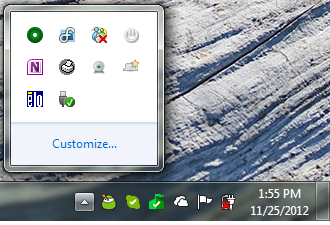
My notification area:

DQw1M.png
 

My Computer My Computer

At a glance

Windows 7 Professional 32 bitsIntel Celeron4.00 GB RAM
Computer Manufacturer/Model Number
TOSHIBA Satellite L305-S5955
OS
Windows 7 Professional 32 bits
CPU
Intel Celeron
Memory
4.00 GB RAM
Sound Card
RealTek AC'97
Monitor(s) Displays
Monitor 1 (Elo Touchscreen) - Monitor 2 (Laptop Screen)
Screen Resolution
Monitor 1 (1024x768) - Monitor 2 (1280x800)
Hard Drives
C: (147 GB)
E: (4GB)
Keyboard
Built-In (Laptop)
Mouse
Elo Touchscreen/USB Mouse/Trackpad
Internet Speed
100 Mbps
Other Info
Webcam - Logitech Webcam c210
Graphics Tablet - Manhattan WP8060
I uninstalled the sound card from device manager, and rebooted, and the same MS driver (Hi-Def Audio Device) was reinstalled, sound works fine. But, the icons still aren't in the tray. I scanned the system with the command you gave me, some corrupt files were fixed. I'll find the latest RealTek drivers later tonight and install them.

Right click on the Taskbar and click on Properties. When the window opens click on Customize. Make sure the icons you want are marked to show.

Seriously, did you try this? Go simple first, then move your way to the harder solutions...
 

My Computer My Computer

At a glance

Microsoft Windows 10 Home Build 15036Intel(R) Core(TM) i7-860 @ 2.80GHz4.00 GBNVIDIA GeForce GTX 750
Computer type
PC/Desktop
Computer Manufacturer/Model Number
iBuyPower NZXT
OS
Microsoft Windows 10 Home Build 15036
CPU
Intel(R) Core(TM) i7-860 @ 2.80GHz
Motherboard
Gigabyte Technology Co., Ltd. P55-UD3L
Memory
4.00 GB
Graphics Card(s)
NVIDIA GeForce GTX 750
Sound Card
(1) Line 6 UX2 (2) Realtek High Definition Audio
Monitor(s) Displays
23" acer
Screen Resolution
1920 x 1080 x 32 bits (4294967296 colors) @ 60 Hz
Hard Drives
(1) WDC WD5000AAKS-00D2B0 ATA Device (2) Seagate FreeAgent Go 250G USB Device
Cooling
Corsair H75 liquid cooler (Very easy to install, actually)
Internet Speed
60M cable modem-->Linksys E1200-->1Gbps net card
Browser
Chrome
Other Info
This is probably the longest I've ever had a Windows machine run without having to restore it to scratch. I'm used to restoring to "factory" about every 2 yrs. I've run with Win7 since new in 2009 and only recently (Nov, '14) restored to clean up the machine from all my 'xperimenting. LOL!! I may never need another machine.

Upgraded to 10 when it was still free, then installed 2017 update.
If I press "Connect To" or click "Connect/Disconnect" I get a menu above the notification area, saying I'm connected to my home wireless network. In the room where I typically keep my laptop, I get 3/4 bars, the router about 3 rooms away. Also, due to using VMware, I see their network adapter connected to "Unidentified Network." The sound and network don't show up in the customize notifications window, either.

Also, after a while, the sound stopped working, so this morning I had to do a system restore. After, the icons still were not there.

My notification area:


DQw1M.png

I see your MSE flag has a red X. Have you checked to see if it's for a definitions update or is there a problem related to it? I know when everything is copasetic the flag is green with no red X.

HTH
 

My Computer My Computer

At a glance

Windows 7 Professional x64Intel i5 quad processor16 GBRadeon HD 5770
Computer type
PC/Desktop
Computer Manufacturer/Model Number
Custom Built
OS
Windows 7 Professional x64
CPU
Intel i5 quad processor
Motherboard
DP67BG
Memory
16 GB
Graphics Card(s)
Radeon HD 5770
Sound Card
Realtek High Definition Audio
Monitor(s) Displays
Samsung SyncMaster
Screen Resolution
1920X1080
Hard Drives
WD 2TB (SATA Internal)
WD 1TB (USB External)
PSU
Corsair GS800
Case
Tower (Generic)
Cooling
3 Internal Fans
Keyboard
MS Wireless
Mouse
MS Optical Wired
Internet Speed
54 mbps
Antivirus
Emsisoft
Browser
IE-Version 9, Palemoon-Version 24.2.0
I see your MSE flag has a red X. Have you checked to see if it's for a definitions update or is there a problem related to it? I know when everything is copasetic the flag is green with no red X.

HUMMM I have never seen mine turn green. There is no red X but it is a white flag. Does anyone else have a green flag?
 

My Computer My Computer

At a glance

Windows 7 Home Premium 32-Bit - Build 7600 SP1Intel Core i3-2120 3.30GhzKingston 4 GB DDR3 1333 mhzAMD Radeon HD6670
Computer type
PC/Desktop
Computer Manufacturer/Model Number
Custom Build
OS
Windows 7 Home Premium 32-Bit - Build 7600 SP1
CPU
Intel Core i3-2120 3.30Ghz
Motherboard
Asus P8Z68-V LX Intel Z68 Socket H2 ATX
Memory
Kingston 4 GB DDR3 1333 mhz
Graphics Card(s)
AMD Radeon HD6670
Sound Card
Sound Blaster Audigy SE 24-Bit
Monitor(s) Displays
Asus VE228
Screen Resolution
1440 X 900
Hard Drives
OCZ Vertex 3 120 GB Sata 3 SSD ==
Kingston SH103/S3 120 G Hyper X 120 GB SSD ==
Western Digital 500 GB Caviar Green 7200 RPM ==
PSU
Corsair CX600M == 600 Watt
Case
NZXT Apollo - Silver with Clear Side Panel
Cooling
Three 120 mm Fans
Keyboard
Microsoft Natural 4000
Mouse
Microsoft Custom Optical 3000
Internet Speed
AT&T Fiber Optic Wireless Network
Antivirus
Microsoft Security Essentials
Browser
Chrome
Other Info
120 mm Blue LED Fan -- Three Blue LED Lazer Light Sticks
I see your MSE flag has a red X. Have you checked to see if it's for a definitions update or is there a problem related to it? I know when everything is copasetic the flag is green with no red X.

HUMMM I have never seen mine turn green. There is no red X but it is a white flag. Does anyone else have a green flag?

As I stated I don't use MSE and I incorrectly identified the flag as being associated with MSE. A fortress is used for MSE not a flag. The flag in your image is for pc issues, not MSE. Sorry about that! However, if you hover over the flag it will give you some cursory info and clicking it will provide more details.

Also, for the color scheme used in MSE, the image below should provide some clarification as to their meaning;

MSE tray icon colors.jpg

HTH
 

My Computer My Computer

At a glance

Windows 7 Professional x64Intel i5 quad processor16 GBRadeon HD 5770
Computer type
PC/Desktop
Computer Manufacturer/Model Number
Custom Built
OS
Windows 7 Professional x64
CPU
Intel i5 quad processor
Motherboard
DP67BG
Memory
16 GB
Graphics Card(s)
Radeon HD 5770
Sound Card
Realtek High Definition Audio
Monitor(s) Displays
Samsung SyncMaster
Screen Resolution
1920X1080
Hard Drives
WD 2TB (SATA Internal)
WD 1TB (USB External)
PSU
Corsair GS800
Case
Tower (Generic)
Cooling
3 Internal Fans
Keyboard
MS Wireless
Mouse
MS Optical Wired
Internet Speed
54 mbps
Antivirus
Emsisoft
Browser
IE-Version 9, Palemoon-Version 24.2.0
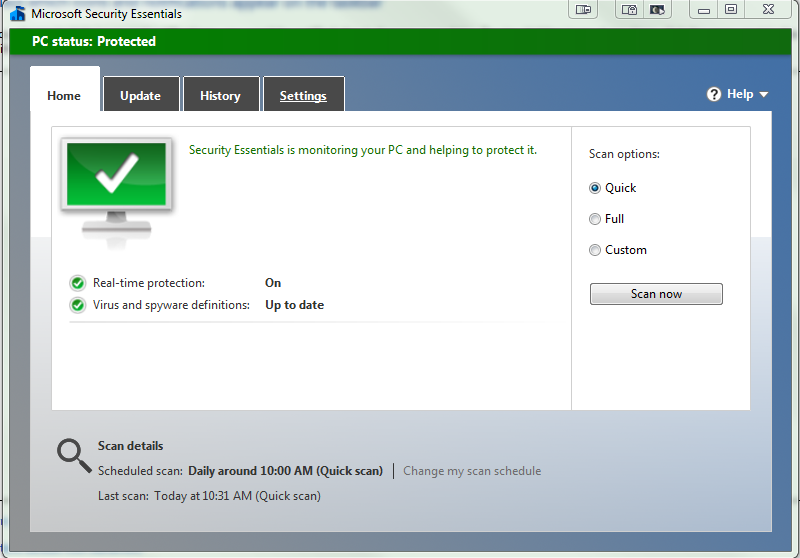
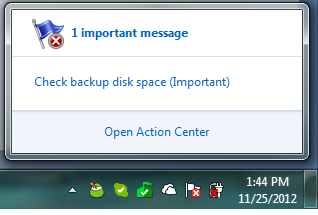
The white flag with the X is the Action center, I ran out of space on my backup flash drive. I open MSE, is says my PC is protected, realtime is on, defenitions are up-to-date.

Action Center:
KR1Kj.png

Microsoft Security Essentials:
wYzuK.png


I uninstalled the sound card from device manager, and rebooted, and the same MS driver (Hi-Def Audio Device) was reinstalled, sound works fine. But, the icons still aren't in the tray. I scanned the system with the command you gave me, some corrupt files were fixed. I'll find the latest RealTek drivers later tonight and install them.

Right click on the Taskbar and click on Properties. When the window opens click on Customize. Make sure the icons you want are marked to show.

Seriously, did you try this? Go simple first, then move your way to the harder solutions...

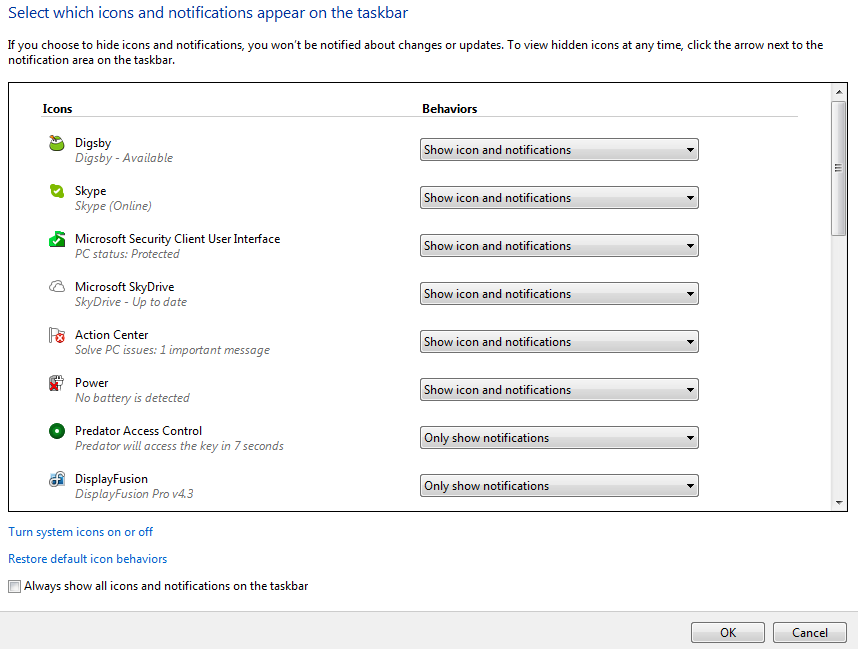
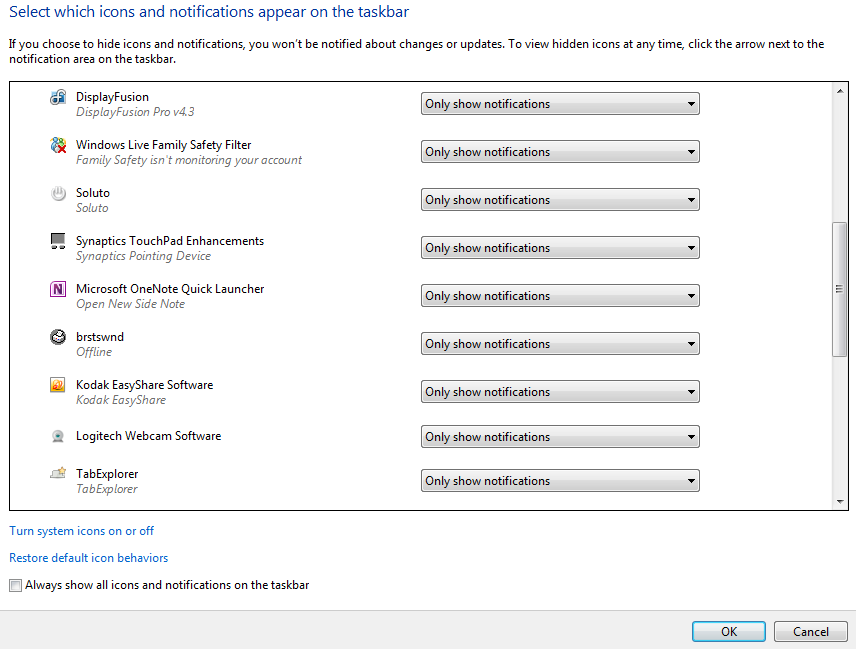
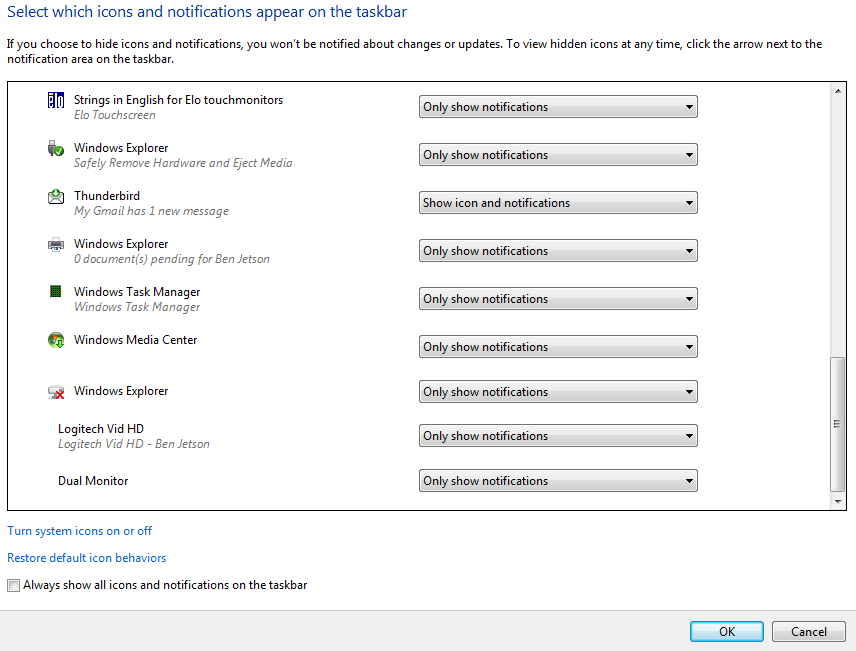
I did try this, and the volume nor wifi icons are in the customize window.

fBDpD.png


6utXT.png


I9J5u.png

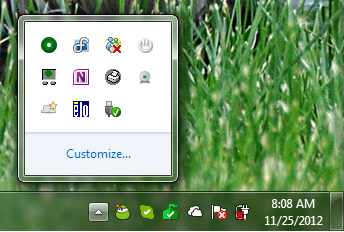
Notification area now:

KCLPf.png
 

My Computer My Computer

At a glance

Windows 7 Professional 32 bitsIntel Celeron4.00 GB RAM
Computer Manufacturer/Model Number
TOSHIBA Satellite L305-S5955
OS
Windows 7 Professional 32 bits
CPU
Intel Celeron
Memory
4.00 GB RAM
Sound Card
RealTek AC'97
Monitor(s) Displays
Monitor 1 (Elo Touchscreen) - Monitor 2 (Laptop Screen)
Screen Resolution
Monitor 1 (1024x768) - Monitor 2 (1280x800)
Hard Drives
C: (147 GB)
E: (4GB)
Keyboard
Built-In (Laptop)
Mouse
Elo Touchscreen/USB Mouse/Trackpad
Internet Speed
100 Mbps
Other Info
Webcam - Logitech Webcam c210
Graphics Tablet - Manhattan WP8060
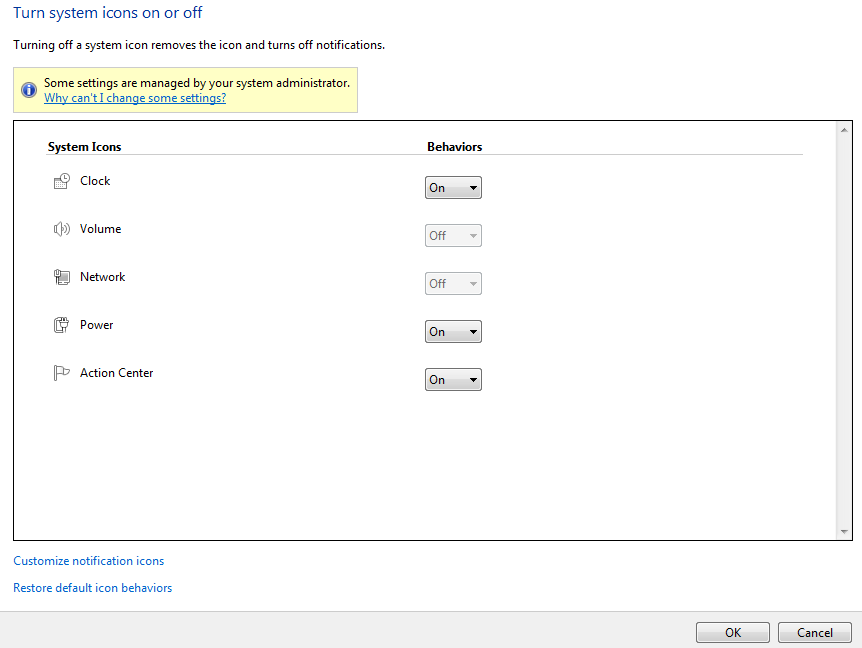
Click on Turn system icons on or off in the Customize window.
Make sure the Clock Volume is set to On.
 
Last edited:

My Computer My Computer

At a glance

Multi-Boot W7_Pro_x64 W8.1_Pro_x64 W10_Pro_x6...AMD Athlon II x4 6206GB GSkill DDR2 800AMD 4670 GPU + AMD 4200 IGP
Computer type
PC/Desktop
Computer Manufacturer/Model Number
home built
OS
Multi-Boot W7_Pro_x64 W8.1_Pro_x64 W10_Pro_x64 +Linux_VMs +Chromium_VM
CPU
AMD Athlon II x4 620
Motherboard
Gigabyte GA-MA785G-UD3H
Memory
6GB GSkill DDR2 800
Graphics Card(s)
AMD 4670 GPU + AMD 4200 IGP
Sound Card
on board Realtek ALC889A
Monitor(s) Displays
RCA 40" LCD TV, Insignia 32" LCD TV, HP 15" LCD monitor
Screen Resolution
1680 x 1050
Hard Drives
OCZ Vertex 3 120GB,
Samsung F3 1TB (3),
Several others - WD, Seagate, Hitachi, ...
PSU
Corsair 500 W
Case
Rosewill mid tower
Cooling
CM 90mm rifle
Keyboard
Gyration wireless, Logitech wireless, Dell USB wired
Mouse
Gyration wireless, Logitech wireless, V7 USB wired
Internet Speed
Spectrum - 100Mbps D / 10Mbps U
Antivirus
Avast, MBAM3, EMET, WinPatrol
Browser
Pale Moon, Firefox, IE
Other Info
2 multi-boot PC's
Mainly HTPC/Office/Gen purpose (no gaming).
Trendnet USB KVM.
LG DVD burner/Blue Ray Player.
Tray system for removable SATA backup drives.

Not currently OCd, under-volted.
I use Hybrid sleep, rarely re-boot or shutdown.

Hauppauge HD-PVR, Avermedia PCIe TV Tuner, Hauppauge PCI TV Tuner.
Why do you have all that crap starting with Windows? Those are freeloaders on your CPU/RAM and startup time which with rare exception don't need to run until you open them. Establish a Clean Boot now as shown in Troubleshooting Steps for Windows 7.

In addition if you have the corrupt Toshiba bloatware preinstall I would strongly consider running a Clean Reinstall - Factory OEM Windows 7 to actually experience Win7 in its native instantaneous state. It will save you many similar problems caused by the crap which OEM's lard onto the system unnecessarily.

At the minimum I'd Clean Up Factory Bloatware
 
The system icons for Volume and Network are "Off", and darkened, is says that admin has disabled them. I am the admin on this computer, and I haven't set any group policy settings that deal with volume or network that I can remember.

3ebtT.png

I had Vista Basic originally on this computer, I later installed 7 when it came out. I have Soluto (Click Here), it delays many of the programs that you see in the tray from starting with Windows.

Is there a group policy setting that has been ticked accidentally?

**EDIT: I did install some of the Toshiba apps back on, since I found them to be useful.
 

My Computer My Computer

At a glance

Windows 7 Professional 32 bitsIntel Celeron4.00 GB RAM
Computer Manufacturer/Model Number
TOSHIBA Satellite L305-S5955
OS
Windows 7 Professional 32 bits
CPU
Intel Celeron
Memory
4.00 GB RAM
Sound Card
RealTek AC'97
Monitor(s) Displays
Monitor 1 (Elo Touchscreen) - Monitor 2 (Laptop Screen)
Screen Resolution
Monitor 1 (1024x768) - Monitor 2 (1280x800)
Hard Drives
C: (147 GB)
E: (4GB)
Keyboard
Built-In (Laptop)
Mouse
Elo Touchscreen/USB Mouse/Trackpad
Internet Speed
100 Mbps
Other Info
Webcam - Logitech Webcam c210
Graphics Tablet - Manhattan WP8060
Click on the link just above the window to see if it will allow you to change those settings.

Soluto is not a solution for best performance, only a resource which itself slows startup so is best uninstalled after studying its results.

But we already know that no startups other than your AV and gadgets/sync if you use them are required so you can uncheck all of them in msconfig>Startup and msconfig>Services after Hiding All MS Services. The only reason not to do this is if you like a lot of programs freeloading on your RAM/CPU for no reason. The tutorial we use here to achieve this Startup Programs - Change has two million views without a single complaint.

If this is an in-place Upgrade from Vista still larded with the Toshiba crapware then you're overdue for a Clean Reinstall - Factory OEM Windows 7 which assures the absolute best performance.
 
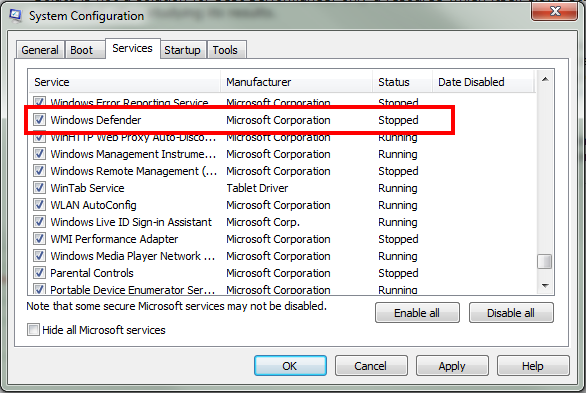
I use MS Security Essentials as my anti-virus program, will disabling Windows Defender in msconfig affect MSE?

QDn9K.png
 

My Computer My Computer

At a glance

Windows 7 Professional 32 bitsIntel Celeron4.00 GB RAM
Computer Manufacturer/Model Number
TOSHIBA Satellite L305-S5955
OS
Windows 7 Professional 32 bits
CPU
Intel Celeron
Memory
4.00 GB RAM
Sound Card
RealTek AC'97
Monitor(s) Displays
Monitor 1 (Elo Touchscreen) - Monitor 2 (Laptop Screen)
Screen Resolution
Monitor 1 (1024x768) - Monitor 2 (1280x800)
Hard Drives
C: (147 GB)
E: (4GB)
Keyboard
Built-In (Laptop)
Mouse
Elo Touchscreen/USB Mouse/Trackpad
Internet Speed
100 Mbps
Other Info
Webcam - Logitech Webcam c210
Graphics Tablet - Manhattan WP8060

My Computer My Computer

At a glance

Multi-Boot W7_Pro_x64 W8.1_Pro_x64 W10_Pro_x6...AMD Athlon II x4 6206GB GSkill DDR2 800AMD 4670 GPU + AMD 4200 IGP
Computer type
PC/Desktop
Computer Manufacturer/Model Number
home built
OS
Multi-Boot W7_Pro_x64 W8.1_Pro_x64 W10_Pro_x64 +Linux_VMs +Chromium_VM
CPU
AMD Athlon II x4 620
Motherboard
Gigabyte GA-MA785G-UD3H
Memory
6GB GSkill DDR2 800
Graphics Card(s)
AMD 4670 GPU + AMD 4200 IGP
Sound Card
on board Realtek ALC889A
Monitor(s) Displays
RCA 40" LCD TV, Insignia 32" LCD TV, HP 15" LCD monitor
Screen Resolution
1680 x 1050
Hard Drives
OCZ Vertex 3 120GB,
Samsung F3 1TB (3),
Several others - WD, Seagate, Hitachi, ...
PSU
Corsair 500 W
Case
Rosewill mid tower
Cooling
CM 90mm rifle
Keyboard
Gyration wireless, Logitech wireless, Dell USB wired
Mouse
Gyration wireless, Logitech wireless, V7 USB wired
Internet Speed
Spectrum - 100Mbps D / 10Mbps U
Antivirus
Avast, MBAM3, EMET, WinPatrol
Browser
Pale Moon, Firefox, IE
Other Info
2 multi-boot PC's
Mainly HTPC/Office/Gen purpose (no gaming).
Trendnet USB KVM.
LG DVD burner/Blue Ray Player.
Tray system for removable SATA backup drives.

Not currently OCd, under-volted.
I use Hybrid sleep, rarely re-boot or shutdown.

Hauppauge HD-PVR, Avermedia PCIe TV Tuner, Hauppauge PCI TV Tuner.

My Computer My Computer

At a glance

Windows 7 Professional 32 bitsIntel Celeron4.00 GB RAM
Computer Manufacturer/Model Number
TOSHIBA Satellite L305-S5955
OS
Windows 7 Professional 32 bits
CPU
Intel Celeron
Memory
4.00 GB RAM
Sound Card
RealTek AC'97
Monitor(s) Displays
Monitor 1 (Elo Touchscreen) - Monitor 2 (Laptop Screen)
Screen Resolution
Monitor 1 (1024x768) - Monitor 2 (1280x800)
Hard Drives
C: (147 GB)
E: (4GB)
Keyboard
Built-In (Laptop)
Mouse
Elo Touchscreen/USB Mouse/Trackpad
Internet Speed
100 Mbps
Other Info
Webcam - Logitech Webcam c210
Graphics Tablet - Manhattan WP8060
You're welcome and glad you got it sorted !
 

My Computer My Computer

At a glance

Multi-Boot W7_Pro_x64 W8.1_Pro_x64 W10_Pro_x6...AMD Athlon II x4 6206GB GSkill DDR2 800AMD 4670 GPU + AMD 4200 IGP
Computer type
PC/Desktop
Computer Manufacturer/Model Number
home built
OS
Multi-Boot W7_Pro_x64 W8.1_Pro_x64 W10_Pro_x64 +Linux_VMs +Chromium_VM
CPU
AMD Athlon II x4 620
Motherboard
Gigabyte GA-MA785G-UD3H
Memory
6GB GSkill DDR2 800
Graphics Card(s)
AMD 4670 GPU + AMD 4200 IGP
Sound Card
on board Realtek ALC889A
Monitor(s) Displays
RCA 40" LCD TV, Insignia 32" LCD TV, HP 15" LCD monitor
Screen Resolution
1680 x 1050
Hard Drives
OCZ Vertex 3 120GB,
Samsung F3 1TB (3),
Several others - WD, Seagate, Hitachi, ...
PSU
Corsair 500 W
Case
Rosewill mid tower
Cooling
CM 90mm rifle
Keyboard
Gyration wireless, Logitech wireless, Dell USB wired
Mouse
Gyration wireless, Logitech wireless, V7 USB wired
Internet Speed
Spectrum - 100Mbps D / 10Mbps U
Antivirus
Avast, MBAM3, EMET, WinPatrol
Browser
Pale Moon, Firefox, IE
Other Info
2 multi-boot PC's
Mainly HTPC/Office/Gen purpose (no gaming).
Trendnet USB KVM.
LG DVD burner/Blue Ray Player.
Tray system for removable SATA backup drives.

Not currently OCd, under-volted.
I use Hybrid sleep, rarely re-boot or shutdown.

Hauppauge HD-PVR, Avermedia PCIe TV Tuner, Hauppauge PCI TV Tuner.
Back
Top