Hello,
We have an issue on a laptop that is belong to somebody.
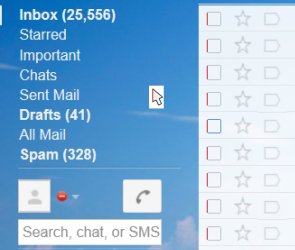
when we tried login into Gmail, the check box remained disabled (grayed out) and not click able as shown in red boxs.
even the drop down menu as in is not functional.

Tried below:
1-We Checked IE9, Internet Option>Security
Put all zones (Internet, Local intranet, Trusted Site) in Low level
and again it did not solved the issue
2-Tried to clear the cache, history, temp, cookies, forum data & active x Filter.
again login in Gmail.
again it did not solved the issue
3-We thought it might be a compatibility view issue, so we tried to put the link into compatibility list, with "Include updated website lists from Microsoft" and "Display all websites in Compatibility View" checked.
did not solved the issue
4-We did at shown in below link:
Using Internet Explorer with Compatibility View enabled - Gmail Help
Please Also Include:
Operating system: Windows 7
Program and version used to access Gmail: Internet Explorer 9
Regards
Phenom
We have an issue on a laptop that is belong to somebody.
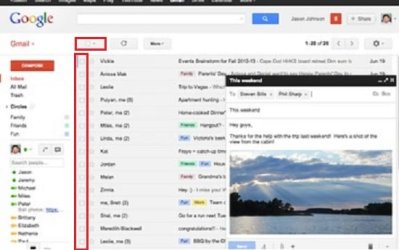
when we tried login into Gmail, the check box remained disabled (grayed out) and not click able as shown in red boxs.
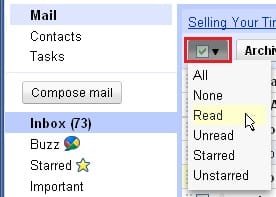
even the drop down menu as in is not functional.
Tried below:
1-We Checked IE9, Internet Option>Security
Put all zones (Internet, Local intranet, Trusted Site) in Low level
and again it did not solved the issue
2-Tried to clear the cache, history, temp, cookies, forum data & active x Filter.
again login in Gmail.
again it did not solved the issue
3-We thought it might be a compatibility view issue, so we tried to put the link into compatibility list, with "Include updated website lists from Microsoft" and "Display all websites in Compatibility View" checked.
did not solved the issue
4-We did at shown in below link:
Using Internet Explorer with Compatibility View enabled - Gmail Help
- In Internet Explorer, open the Tools menu at the top and select Compatibility View Settings.
- Make sure that "google.com" is not in the list called "Websites you've added to Compatibility View." If it is on that list, click Remove.
- At the bottom of the window, make sure that the boxes next to "Include updated website lists from Microsoft" and "Display all websites in Compatibility View" are not checked.
- Click Close. The page you're on will refresh and display in normal mode.
Please Also Include:
Operating system: Windows 7
Program and version used to access Gmail: Internet Explorer 9
Regards
Phenom
Attachments
My Computer
- OS
- windows 7