
xbox 360 not connecting to live through laptop

Statico

New member
Local time
3:15 AM
Messages
6
Ok, so I've been searching how to get this to work but it doesn't
I want to be able to get to Live through my laptops wifi, connecting the xbox via ethernet to my computer

I know i have to bridge the LAN and the wireless network connection but it doesnt work :sick: the "allow other network users to connect through this comp internet..." option is disabled in both

my pc is running the windows 7 RC 7100

here is the status of the bridge connection when the xbox is plugged to my computer
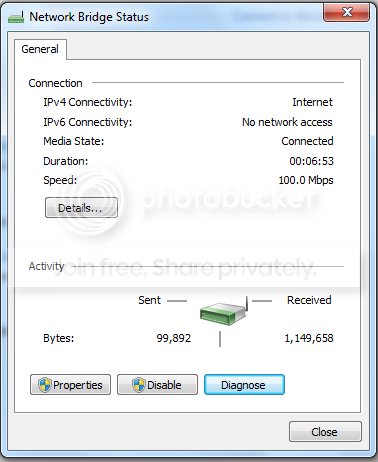
uno.png


clearly it says that does not have internet access, but i don't know how to solve that

tres.png


hope you guys can help me, if you need any detail, let me know
 

My Computer My Computer

At a glance

Windows 7AMD Turion 64x2
Computer Manufacturer/Model Number
HP dv6000
OS
Windows 7
CPU
AMD Turion 64x2
Well, I've found that Windows 7 is somehow quite difficult to set up, maybe I didnt use Vista though. In XP, i didnt even have to bridge connection, just turned on the sharing function, plugged-in the ethernet cable and there you go. It worked the same way in windows 7 until recently it just doesnt work no more. So I tried bridge the connection, and set the ip on XBOX 360 manually. and it worked. funny thing is if i try to test my live connection, it'd connect flawlessly; however I still couldnt sign-in my live account though. I'm updating my dashboard atm, let see what gonna happen. cheers:p:p:p:p
 

My Computer My Computer

At a glance

Windows 7 + Ubuntu 9.04
OS
Windows 7 + Ubuntu 9.04
yeah I know, I have dual-boot pc with Vista and 7
in vista was easy to set up, but I don't use that partition anymore,

so i want to be able to do it in seven :(

anyone that suggest another method?
 

My Computer My Computer

At a glance

Windows 7AMD Turion 64x2
Computer Manufacturer/Model Number
HP dv6000
OS
Windows 7
CPU
AMD Turion 64x2
Why people always try to bridge I'll never know.

Unbridge everything, make it how it was before.

If your laptop connects via wifi constantly (like mine, its my only means of high speed) then follow this;

Step 1:
Left-click this View attachment 22691


Step 2:
Right-Click the Wireless connection that you are connecting to. Then select Status.


Step 3:
Select Properties.
View attachment 22693


Step 4:
Select the Sharing tab and then check off both boxes.
View attachment 22694

-

Hope this helps.
 
Last edited:

My Computer My Computer

At a glance

Windows 7 Ultimate, OS X 10.7, Ubuntu 11.04Intel E6750 @ 3.80GHz2x2GB & 2x1GB (6GB) OCZ Reaper 1066MHz @ 1080MHzEVGA nVidia GTX 260 896mb (216 Core) FTW Edition
Computer Manufacturer/Model Number
Custom | Whitebox
OS
Windows 7 Ultimate, OS X 10.7, Ubuntu 11.04
CPU
Intel E6750 @ 3.80GHz
Motherboard
Gigabyte GA-EP45-UD3L (Revision 1.1)
Memory
2x2GB & 2x1GB (6GB) OCZ Reaper 1066MHz @ 1080MHz
Graphics Card(s)
EVGA nVidia GTX 260 896mb (216 Core) FTW Edition
Sound Card
Realtek ALC888
Monitor(s) Displays
21" VIZIO TV
Screen Resolution
1680x1050 @ 60Hz
Hard Drives
Western Digital WD6401AALS - 640GB
Hitachi HDP725016GLA380 - 160GB
PSU
Corsair 750W
Case
NZXT Nemesis Elite
Cooling
Thermaltake SpinQ
Keyboard
Logitech Wireless S520
Mouse
Logitech Wireless S520 - Microsoft Wireless Arc Mouse
Internet Speed
Download: 20mbps, Upload: 3mbps
Just thought I should add, this is EXACTLY how I connect my Xbox 360 to the internet. So there should be no problems.
 

My Computer My Computer

At a glance

Windows 7 Ultimate, OS X 10.7, Ubuntu 11.04Intel E6750 @ 3.80GHz2x2GB & 2x1GB (6GB) OCZ Reaper 1066MHz @ 1080MHzEVGA nVidia GTX 260 896mb (216 Core) FTW Edition
Computer Manufacturer/Model Number
Custom | Whitebox
OS
Windows 7 Ultimate, OS X 10.7, Ubuntu 11.04
CPU
Intel E6750 @ 3.80GHz
Motherboard
Gigabyte GA-EP45-UD3L (Revision 1.1)
Memory
2x2GB & 2x1GB (6GB) OCZ Reaper 1066MHz @ 1080MHz
Graphics Card(s)
EVGA nVidia GTX 260 896mb (216 Core) FTW Edition
Sound Card
Realtek ALC888
Monitor(s) Displays
21" VIZIO TV
Screen Resolution
1680x1050 @ 60Hz
Hard Drives
Western Digital WD6401AALS - 640GB
Hitachi HDP725016GLA380 - 160GB
PSU
Corsair 750W
Case
NZXT Nemesis Elite
Cooling
Thermaltake SpinQ
Keyboard
Logitech Wireless S520
Mouse
Logitech Wireless S520 - Microsoft Wireless Arc Mouse
Internet Speed
Download: 20mbps, Upload: 3mbps
hey man, thanks for the tip
but it didn't work for me =\

4.png


this comes up on the active networks window
don't they have to be part of the same network to work?
 

My Computer My Computer

At a glance

Windows 7AMD Turion 64x2
Computer Manufacturer/Model Number
HP dv6000
OS
Windows 7
CPU
AMD Turion 64x2
One moment.

EDIT: Okay try doing that, and have an Ethernet cable plugged into your laptop and run it to your 360, it should work. Mine shows it as the same too but I'm on XBL right now.
View attachment 22702

EDIT 2: Okay so it works fine even though it says 'no internet access', all you really need to do is just turn your Xbox 360 on, try connecting to XBL and it SHOULD work. :)

I have to go for a while, so if it doesn't work feel free to leave messages. I am sure others could help! :)
 
Last edited:

My Computer My Computer

At a glance

Windows 7 Ultimate, OS X 10.7, Ubuntu 11.04Intel E6750 @ 3.80GHz2x2GB & 2x1GB (6GB) OCZ Reaper 1066MHz @ 1080MHzEVGA nVidia GTX 260 896mb (216 Core) FTW Edition
Computer Manufacturer/Model Number
Custom | Whitebox
OS
Windows 7 Ultimate, OS X 10.7, Ubuntu 11.04
CPU
Intel E6750 @ 3.80GHz
Motherboard
Gigabyte GA-EP45-UD3L (Revision 1.1)
Memory
2x2GB & 2x1GB (6GB) OCZ Reaper 1066MHz @ 1080MHz
Graphics Card(s)
EVGA nVidia GTX 260 896mb (216 Core) FTW Edition
Sound Card
Realtek ALC888
Monitor(s) Displays
21" VIZIO TV
Screen Resolution
1680x1050 @ 60Hz
Hard Drives
Western Digital WD6401AALS - 640GB
Hitachi HDP725016GLA380 - 160GB
PSU
Corsair 750W
Case
NZXT Nemesis Elite
Cooling
Thermaltake SpinQ
Keyboard
Logitech Wireless S520
Mouse
Logitech Wireless S520 - Microsoft Wireless Arc Mouse
Internet Speed
Download: 20mbps, Upload: 3mbps
Why people always try to bridge I'll never know.

Unbridge everything, make it how it was before.

If your laptop connects via wifi constantly (like mine, its my only means of high speed) then follow this;

Step 1:
Left-click this View attachment 22691


Step 2:
Right-Click the Wireless connection that you are connecting to. Then select Status.


Step 3:
Select Properties.
View attachment 22693


Step 4:
Select the Sharing tab and then check off both boxes.
View attachment 22694

-

Hope this helps.


It stopped working on my 7 recently for some reasons. Anyway, I got it working now by using bridge connection method.

@Statico: Have you tried to config IP on Xbox 360 ??? Set it manually and let see if it worked
 

My Computer My Computer

At a glance

Windows 7 + Ubuntu 9.04
OS
Windows 7 + Ubuntu 9.04
it looks like my lan does not have access to the internet
like if the wireless does not share with LAN

when I click the LAN to see it's properties, it says No internet access
in both IPv4 connectivity and IPv6

when my Wireless shows that it has internet access in the IPv4

i don't know whats the problem here
 

My Computer My Computer

At a glance

Windows 7AMD Turion 64x2
Computer Manufacturer/Model Number
HP dv6000
OS
Windows 7
CPU
AMD Turion 64x2
it looks like my lan does not have access to the internet
like if the wireless does not share with LAN

when I click the LAN to see it's properties, it says No internet access
in both IPv4 connectivity and IPv6

when my Wireless shows that it has internet access in the IPv4

i don't know whats the problem here

well, even your LAN says " no internet access", you still connect to xbox live if you follow one of the above method. good luck...

btw, there are so many cheaters on FIFA 09 servers these days... :mad::mad::mad::mad::mad:
 

My Computer My Computer

At a glance

Windows 7 + Ubuntu 9.04
OS
Windows 7 + Ubuntu 9.04
it looks like my lan does not have access to the internet
like if the wireless does not share with LAN

when I click the LAN to see it's properties, it says No internet access
in both IPv4 connectivity and IPv6

when my Wireless shows that it has internet access in the IPv4

i don't know whats the problem here

In windows yes, it will say there is no internet access. Have you actually tried connecting to XBL with your 360 regardless though?
 

My Computer My Computer

At a glance

Windows 7 Ultimate, OS X 10.7, Ubuntu 11.04Intel E6750 @ 3.80GHz2x2GB & 2x1GB (6GB) OCZ Reaper 1066MHz @ 1080MHzEVGA nVidia GTX 260 896mb (216 Core) FTW Edition
Computer Manufacturer/Model Number
Custom | Whitebox
OS
Windows 7 Ultimate, OS X 10.7, Ubuntu 11.04
CPU
Intel E6750 @ 3.80GHz
Motherboard
Gigabyte GA-EP45-UD3L (Revision 1.1)
Memory
2x2GB & 2x1GB (6GB) OCZ Reaper 1066MHz @ 1080MHz
Graphics Card(s)
EVGA nVidia GTX 260 896mb (216 Core) FTW Edition
Sound Card
Realtek ALC888
Monitor(s) Displays
21" VIZIO TV
Screen Resolution
1680x1050 @ 60Hz
Hard Drives
Western Digital WD6401AALS - 640GB
Hitachi HDP725016GLA380 - 160GB
PSU
Corsair 750W
Case
NZXT Nemesis Elite
Cooling
Thermaltake SpinQ
Keyboard
Logitech Wireless S520
Mouse
Logitech Wireless S520 - Microsoft Wireless Arc Mouse
Internet Speed
Download: 20mbps, Upload: 3mbps
In windows yes, it will say there is no internet access. Have you actually tried connecting to XBL with your 360 regardless though?

yes, connecting through my xbox account and doing the "test connection"
but it does not go online :( :( this is frustrating x
 

My Computer My Computer

At a glance

Windows 7AMD Turion 64x2
Computer Manufacturer/Model Number
HP dv6000
OS
Windows 7
CPU
AMD Turion 64x2
yes, connecting through my xbox account and doing the "test connection"
but it does not go online :( :( this is frustrating x

Alright, sorry I've just seen too many people shun away something based on what it appears to do. =P

I would help you further but I have no knowledge beyond that on what the cause could be, I know I had a similar problem but instead of trying to fix it, I just reinstalled Windows 7. =P
 

My Computer My Computer

At a glance

Windows 7 Ultimate, OS X 10.7, Ubuntu 11.04Intel E6750 @ 3.80GHz2x2GB & 2x1GB (6GB) OCZ Reaper 1066MHz @ 1080MHzEVGA nVidia GTX 260 896mb (216 Core) FTW Edition
Computer Manufacturer/Model Number
Custom | Whitebox
OS
Windows 7 Ultimate, OS X 10.7, Ubuntu 11.04
CPU
Intel E6750 @ 3.80GHz
Motherboard
Gigabyte GA-EP45-UD3L (Revision 1.1)
Memory
2x2GB & 2x1GB (6GB) OCZ Reaper 1066MHz @ 1080MHz
Graphics Card(s)
EVGA nVidia GTX 260 896mb (216 Core) FTW Edition
Sound Card
Realtek ALC888
Monitor(s) Displays
21" VIZIO TV
Screen Resolution
1680x1050 @ 60Hz
Hard Drives
Western Digital WD6401AALS - 640GB
Hitachi HDP725016GLA380 - 160GB
PSU
Corsair 750W
Case
NZXT Nemesis Elite
Cooling
Thermaltake SpinQ
Keyboard
Logitech Wireless S520
Mouse
Logitech Wireless S520 - Microsoft Wireless Arc Mouse
Internet Speed
Download: 20mbps, Upload: 3mbps
no prob man
thanks for your tips and I will keep looking
minhtuanp, thanks to you too

I see that this problem may be diferent and have different solutions for most people
 

My Computer My Computer

At a glance

Windows 7AMD Turion 64x2
Computer Manufacturer/Model Number
HP dv6000
OS
Windows 7
CPU
AMD Turion 64x2
got the same issue, any fixes yet?
 

My Computer My Computer

At a glance

Microsoft Windows 7 Ultimate 64-bit SP1Intel Core i3 2120 @ 3.30GHz6.00GB Dual-Channel DDR3 @ 665MHz (9-9-9-24)1024MB ATI AMD Radeon HD 5700 Series
Computer type
PC/Desktop
Computer Manufacturer/Model Number
Acer Aspire M3970
OS
Microsoft Windows 7 Ultimate 64-bit SP1
CPU
Intel Core i3 2120 @ 3.30GHz
Motherboard
Acer AM3970
Memory
6.00GB Dual-Channel DDR3 @ 665MHz (9-9-9-24)
Graphics Card(s)
1024MB ATI AMD Radeon HD 5700 Series
Sound Card
Realtek High Definition Audio
Monitor(s) Displays
Acer X223W & HP 2511
Screen Resolution
(1920x1080@60Hz) & (1680x1050@60Hz)
Hard Drives
466GB Seagate ST3500320AS ATA Device (SATA)
932GB Seagate ST31000524AS ATA Device (SATA)
PSU
600 Watt ATX Diablotek DA Series
Case
Acer M3970 Default Case
Cooling
CoolerMaster Hyper 101i
Keyboard
Logitech G5
Mouse
Razer Black Widow Ultimate
Internet Speed
20d/2u
Antivirus
Windows Security Essentials & Malwarebytes Anti-Malware
Browser
Firefox
Has anybody figured out any more issues with this? I bridged the local area and my wireless and i could actually get on xbox live. if im on the dashboard there is no problem at all, im online and everything. but as soon as i play a game, after about 5 or ten mintues into it i get disconnected from xbox live. has anyone else had this issue? if so let me know and it would be awesome if someone actually knew how to fix this. reply ASAP
 

My Computer My Computer

At a glance

windows7
OS
windows7
i had the bridge working just by bridging the connections nothing else a while back but i tried again today and it didnt work. i remember i updated the drivers for my nic card few weeks ago so i decided to roll back to the windows update drivers and now everything works again.
 

My Computer My Computer

At a glance

windows 7 X64amd phenom II x4 9408GBintegrated radeon hd3300
Computer Manufacturer/Model Number
TripOG - Kwamathon
OS
windows 7 X64
CPU
amd phenom II x4 940
Motherboard
GIGABYTE GA-MA790GP-UD4H
Memory
8GB
Graphics Card(s)
integrated radeon hd3300
Sound Card
Realtek ALC889A
Monitor(s) Displays
ASUS VH222H
Screen Resolution
1920 x 1080
Hard Drives
PQI DK9320GD3R000A03
Internet Speed
30Mbps down / 2Mbps up
Having similar problems here.
I have tried bridged connection with the xbox set on automatic IP detection and also manually inputting IP.
I have tried non-bridged sharing enabled with automatic and manual.
I get same errors on xbox both ways.
With Automatic I am getting:
Can't obtain IP address from router or modem.
With Manual IP set to 192.168.0.2 I get:
can't connect using static IP, router may be filtering console's MAC address.

I know this may just be something that WIN 7 isn't supporting right now but any help would be appreciated.
 

My Computer My Computer

At a glance

Windows 7
OS
Windows 7

My Computer My Computer

At a glance

Microsoft Windows 7 Ultimate 64-bit SP1Intel Core i3 2120 @ 3.30GHz6.00GB Dual-Channel DDR3 @ 665MHz (9-9-9-24)1024MB ATI AMD Radeon HD 5700 Series
Computer type
PC/Desktop
Computer Manufacturer/Model Number
Acer Aspire M3970
OS
Microsoft Windows 7 Ultimate 64-bit SP1
CPU
Intel Core i3 2120 @ 3.30GHz
Motherboard
Acer AM3970
Memory
6.00GB Dual-Channel DDR3 @ 665MHz (9-9-9-24)
Graphics Card(s)
1024MB ATI AMD Radeon HD 5700 Series
Sound Card
Realtek High Definition Audio
Monitor(s) Displays
Acer X223W & HP 2511
Screen Resolution
(1920x1080@60Hz) & (1680x1050@60Hz)
Hard Drives
466GB Seagate ST3500320AS ATA Device (SATA)
932GB Seagate ST31000524AS ATA Device (SATA)
PSU
600 Watt ATX Diablotek DA Series
Case
Acer M3970 Default Case
Cooling
CoolerMaster Hyper 101i
Keyboard
Logitech G5
Mouse
Razer Black Widow Ultimate
Internet Speed
20d/2u
Antivirus
Windows Security Essentials & Malwarebytes Anti-Malware
Browser
Firefox
Ok so I need to set the static IP on my computer to be the same or different from the one set on the xbox?
 

My Computer My Computer

At a glance

Windows 7
OS
Windows 7
Back
Top