New video card install, but password stops install

dottielove

New member
Local time
1:54 PM
Messages
2
Hi--I hope that title isn't too confusing. My monitor keeps giving me "no signal" messages; also tried another monitor. Both monitors work on other computers w/ same cables. I have a new video card, but I can't install b/c my computer is passworded and I can't see screen to login and install the card. What to do? Thanks in advance.
 

My Computer My Computer

At a glance

Windows 7 64 bit
OS
Windows 7 64 bit
Hello dottielove to assist you further you will need to add as much information as possible to "My System Specs" in the bottom of your post such as the make/model or motherboard of the computer in question and also the make/model of the video card you are attempting to install so proper help can be given to resolve your issue.

Your computer is most likely now using the default onboard video output, a 2nd one connected to motherboard which may also be an older VGA type, If so connect your monitor to the onboard video output and you should be able to log into your computer and install the software for your video card.

Also when your computer first boots up can you see the splash screen to enter your BIOS settings as there is usually a setting to switch from onboard video to PCI-E (your setting may be labelled diferently) which enables use of the video card and would be explained in the user manual for your computer.
 

My Computer My Computer

At a glance

Windows 10 Pro x 2/Windows 11 HomeIntel i7 2600K @ 3.40 GHzCorsair Vengeance 16GB DDR3 1600MHz CL8 Dual ...EVGA GeForce RTX 3080 XC3 ULTRA GAMING 10GB G...
Computer type
PC/Desktop
Computer Manufacturer/Model Number
My own abomination, I call it the Money Pit
OS
Windows 10 Pro x 2/Windows 11 Home
CPU
Intel i7 2600K @ 3.40 GHz
Motherboard
ASUS Sabertooth P67
Memory
Corsair Vengeance 16GB DDR3 1600MHz CL8 Dual Channel Kit
Graphics Card(s)
EVGA GeForce RTX 3080 XC3 ULTRA GAMING 10GB GDDR6X
Sound Card
Onboard Realtek or Nvidia High Definition Audio (HDMI)
Monitor(s) Displays
Samsung JS7000 50" SUHD TV or Samsung 27" FHD 60Hz 8ms GTG V
Screen Resolution
1920 x 1080
Hard Drives
1 x Samsung 870 EVO 250 GB SSD (Windows 10 Pro), 1 x Samsung 850 EVO 250 GB SSD (Windows 10 Pro)
PSU
Corsair AX860 - 860W Modular Power Supply
Case
Phanteks Enthoo Luxe Full Tower Case - Black
Cooling
CORSAIR Hydro Series H150i PRO RGB 360mm Liquid CPU Cooler
Keyboard
Logitech K830 Illuminated Living-Room Keyboard
Mouse
Logitech MX Anywhere 2S Wireless Mouse
Internet Speed
100 Mbps
Antivirus
ESET Internet Security
Browser
Latest Version Of Firefox & Microsoft Edge Chromium Stable
Other Info
LG Super Multi Blue Internal Blu-ray Disk Rewriter - BH10LS30
6x2 HDMI Switcher (6 inputs, 2 outputs) so I can send the output of my Cable Box, Roku, or any my 4 computers to either my TV or Monitor separately or simultaneously.
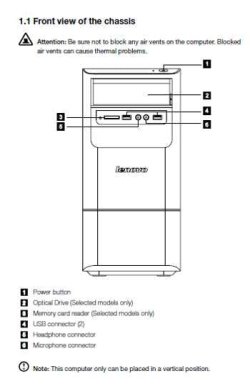
Lenovo H405
CPU AX255
onboard video (no-frills, just use to run my printers)

new video card: no name, from China, APCB M3 94V-0 (pulled it out of my ofc. computer)

I have no video display on either video card.--Dottie
 

My Computer My Computer

At a glance

Windows 7 64 bit
OS
Windows 7 64 bit
Hello again dottielove I couldn't find any relevant information about your video card APCB M3 94V-0 if the video card is very old and was made before 2007 it may only work with Windows XP with no newer drivers available and is not compatible with Windows 7. (IE: how old is the computer it came from)

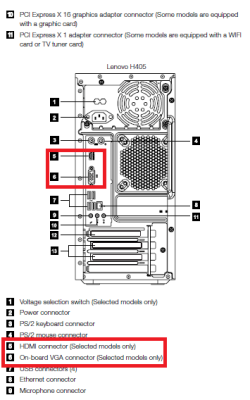
I would recommend first unplugging the computer and removing the card you have tried to install and use the on board video (see diagram below) until either compatible drivers for Windows 7 can be found or you can find a newer (cheap) card that is Win 7 compatible

Just to be sure I am on the right track does your computer look similar to any of the pictures below and please connect your monitor into the onboard video (connections 5 &/or 6) below with just the keyboard, mouse and monitor connected.

Lenovo H405 Desktop front.jpgLenovo H405 Desktop back.PNGLenovo H405 Desktop.PNG

Also you may be able to find more detailed information about your computer by visiting the Lenovo page below. The serial # should be located on a sticker usually placed on the back of the computer.

Lenovo Support - Product Configuration (US)
 

My Computer My Computer

At a glance

Windows 10 Pro x 2/Windows 11 HomeIntel i7 2600K @ 3.40 GHzCorsair Vengeance 16GB DDR3 1600MHz CL8 Dual ...EVGA GeForce RTX 3080 XC3 ULTRA GAMING 10GB G...
Computer type
PC/Desktop
Computer Manufacturer/Model Number
My own abomination, I call it the Money Pit
OS
Windows 10 Pro x 2/Windows 11 Home
CPU
Intel i7 2600K @ 3.40 GHz
Motherboard
ASUS Sabertooth P67
Memory
Corsair Vengeance 16GB DDR3 1600MHz CL8 Dual Channel Kit
Graphics Card(s)
EVGA GeForce RTX 3080 XC3 ULTRA GAMING 10GB GDDR6X
Sound Card
Onboard Realtek or Nvidia High Definition Audio (HDMI)
Monitor(s) Displays
Samsung JS7000 50" SUHD TV or Samsung 27" FHD 60Hz 8ms GTG V
Screen Resolution
1920 x 1080
Hard Drives
1 x Samsung 870 EVO 250 GB SSD (Windows 10 Pro), 1 x Samsung 850 EVO 250 GB SSD (Windows 10 Pro)
PSU
Corsair AX860 - 860W Modular Power Supply
Case
Phanteks Enthoo Luxe Full Tower Case - Black
Cooling
CORSAIR Hydro Series H150i PRO RGB 360mm Liquid CPU Cooler
Keyboard
Logitech K830 Illuminated Living-Room Keyboard
Mouse
Logitech MX Anywhere 2S Wireless Mouse
Internet Speed
100 Mbps
Antivirus
ESET Internet Security
Browser
Latest Version Of Firefox & Microsoft Edge Chromium Stable
Other Info
LG Super Multi Blue Internal Blu-ray Disk Rewriter - BH10LS30
6x2 HDMI Switcher (6 inputs, 2 outputs) so I can send the output of my Cable Box, Roku, or any my 4 computers to either my TV or Monitor separately or simultaneously.
Dottielove: can you share with us why you aren't discussing this with the person who controls the passwords for the PC?

That creates the impression that you're trying to do something that someone (parent?) doesn't want you to do.
 

My Computer My Computer

At a glance

Windows 7 Pro X64 SP1Intel Core I7-3930k16 GB Gskill DDR3-2133eVGA GTX680
Computer Manufacturer/Model Number
homegrown
OS
Windows 7 Pro X64 SP1
CPU
Intel Core I7-3930k
Motherboard
Asus P9X79 Pro
Memory
16 GB Gskill DDR3-2133
Graphics Card(s)
eVGA GTX680
Sound Card
Creative X-Fi Titanium
Monitor(s) Displays
As PA246Q
Screen Resolution
1920 X 1200
Hard Drives
Corsair Force GT, 120 GB
WDC 1.5TB Caviar Black
PSU
PCP&C Silencer 750 Crossfire
Case
Silverstone FT02
Cooling
Noctua NH-D14
Keyboard
cheap Logitech USB
Mouse
Microsoft Intellimouse Explorer (old optical) USB
Internet Speed
6Mb cable
Other Info
Pioneer BDR-205
Samsung SH-203B
Monsoon 5.1 speakers
Dottielove: can you share with us why you aren't discussing this with the person who controls the passwords for the PC?

That creates the impression that you're trying to do something that someone (parent?) doesn't want you to do.

Hi bobkn, I think what the OP means is that she has a black screen and cannot see where/when to input the password :D
 

My Computer My Computer

At a glance

win 7 ultimate32bit, Win8.1pro wmc 32bitamd phenom x4 9600corsair twinxs 2x2gb2x nvidia 1gb 8500gt
Computer type
PC/Desktop
Computer Manufacturer/Model Number
self build
OS
win 7 ultimate32bit, Win8.1pro wmc 32bit
CPU
amd phenom x4 9600
Motherboard
asus m2n32-sli deluxe
Memory
corsair twinxs 2x2gb
Graphics Card(s)
2x nvidia 1gb 8500gt
Sound Card
onboard
Monitor(s) Displays
23" PB Viseo 233d
Screen Resolution
1920x1080
Hard Drives
maxtor sata 500gb
maxtor sata 320gb
fujitsu sata200gb
PSU
oryxx tornado 750w
Case
thermaltake xaser lll
Cooling
artic freezer64 pro + 7 case fans
Dottielove: can you share with us why you aren't discussing this with the person who controls the passwords for the PC?

That creates the impression that you're trying to do something that someone (parent?) doesn't want you to do.

Hi bobkn, I think what the OP means is that she has a black screen and cannot see where/when to input the password :D

Sounds plausible.

It may not have occurred to me because I assumed that the password was relevant. My apologies. I believe that a black screen at that point would mean that Windows would be no go, passworded or not.

I'm not sure that "APCB M3 94V-0" is any sort of graphics card part number. What sort of slot does it use? The Lenovo H405 has a PCI-E 2.0 X16 graphics slot. Are you (Dottielove) using that, or is the graphics card an old PCI one? If the latter, it may or may not be suitable for Windows 7.

Regardless, the graphics card swap procedure is the same:

With the old graphics connected, uninstall the drivers for that.

Shut down rather than rebooting.

Shut off the power, or disconnect the PC from the mains if the power supply has no switch.

Swap the graphics.

Power up again.

Windows will either install the generic VGA drivers, or something more specific to the new graphics card. Either should suffice to get you a display.

When you're back into Windows (he wrote optimistically), install the proper drivers for the graphics card. That'll require that you know what it is. You may be able to get the (hardware) device ID out of Device Manager, and search the Web for that.

Good luck.

 

My Computer My Computer

At a glance

Windows 7 Pro X64 SP1Intel Core I7-3930k16 GB Gskill DDR3-2133eVGA GTX680
Computer Manufacturer/Model Number
homegrown
OS
Windows 7 Pro X64 SP1
CPU
Intel Core I7-3930k
Motherboard
Asus P9X79 Pro
Memory
16 GB Gskill DDR3-2133
Graphics Card(s)
eVGA GTX680
Sound Card
Creative X-Fi Titanium
Monitor(s) Displays
As PA246Q
Screen Resolution
1920 X 1200
Hard Drives
Corsair Force GT, 120 GB
WDC 1.5TB Caviar Black
PSU
PCP&C Silencer 750 Crossfire
Case
Silverstone FT02
Cooling
Noctua NH-D14
Keyboard
cheap Logitech USB
Mouse
Microsoft Intellimouse Explorer (old optical) USB
Internet Speed
6Mb cable
Other Info
Pioneer BDR-205
Samsung SH-203B
Monsoon 5.1 speakers
Back
Top