How do i use Sata 6gb/sn port on Intel HM76 Mobo in HP Pro.4540s

RIDVANBAL

New member
Local time
12:07 AM
Messages
4
Hi there,
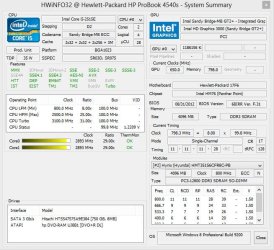
I have HP Probook 4540s Notebook. Its with Intel HM76 Express Mobo and i know it comes with Sata 6gb/sn ports.
But my laptop has Hitachi HDD works with Sata 3gb/sn. Now i want to change it with ocz vertex 4. But im not sure that the port has Sata 6gb/sn capatible.

Anyone knows that notebook, please tell me if its ok with Sata III port.

Or is there any solutions change with Sata 3g/sn port to Sata 6gb/sn port ?

I added my system info to attach...

Thanks for your replys guys!
 

Attachments

  • Capture.JPG
    Capture.JPG
    82 KB · Views: 35

My Computer My Computer

At a glance

Windows 8 Pro. 32bit
OS
Windows 8 Pro. 32bit
help please, im going to buy ocz v4 tomorrow :)
 

My Computer My Computer

At a glance

Windows 8 Pro. 32bit
OS
Windows 8 Pro. 32bit
I don't know if you have sata 3 or 6 GB/s ports on the notebook. If you do there may be an option in your BIOS to switch. But, either way, the Vertex 4 will work fine in the notebook. It is backward compatible, meaning it will work on sata 3GB/s or sata 6GB/s ports.
 

My Computers My Computers

  • At a glance

    Windows 11 ProRyzen 9 5900X32GB G Skill DDR4-3600EVGA RTX 3080 FTW 3 Ultra
    Computer type
    PC/Desktop
    Computer Manufacturer/Model Number
    ALWAYS UNDER CONSTRUCTION
    OS
    Windows 11 Pro
    CPU
    Ryzen 9 5900X
    Motherboard
    Asus X570 Crosshair Viii Hero
    Memory
    32GB G Skill DDR4-3600
    Graphics Card(s)
    EVGA RTX 3080 FTW 3 Ultra
    Sound Card
    On Board/Sennheiser PC37X Headset
    Monitor(s) Displays
    3 X Asus 27"
    Screen Resolution
    2560x1440
    Hard Drives
    2 X 1 TB NVME drives
    PSU
    EVGA 850
    Case
    Phanteks Eclipse P400A
    Cooling
    EVGA 280 AIO
    Keyboard
    Logitech G510s/ Logitech G13
    Mouse
    Logitech G502
    Internet Speed
    24/1
    Antivirus
    ESET/MBAM Pro/SAS Pro
    Browser
    Chrome/ Firefox/ Edge
  • At a glance

    Windows 11 ProIntel Ultra 9 288V32 GB LPDDR5X 8533
    Computer type
    Laptop
    System Manufacturer/Model Number
    Dell 16 Plus
    OS
    Windows 11 Pro
    CPU
    Intel Ultra 9 288V
    Memory
    32 GB LPDDR5X 8533
    Monitor(s) Displays
    16" Mini-LED HDR600 Touch 90 Hz
    Screen Resolution
    2560X1600
    Hard Drives
    1 TB NVME
I just bought a HP 4540S a few days ago.

Mine has the Hitachi HDD same as yours. Mine came from the factory with the Bios set to SATA 6.0Gbs and AHCI mode.
You can go into Bios and make sure the SATA 6.0Gbs button and AHCI button are selected.
This is a very simple Bios and has very few options.

When the laptop boots to first HP screen keep pressing ESC (escape button).
This will give you options to navigate.
Below is a SNIP of the manual for our laptop. How to get to where you need. You still may need to do a little searching once in.
I found it quite easily.
Hope this helps.
 

Attachments

  • HP bios computer setup.PNG
    HP bios computer setup.PNG
    53.6 KB · Views: 40

My Computer My Computer

At a glance

Windows7 Pro 64bit SP-1; Windows XP Pro 32bitIntel Core i7-870 Lynnfield 2.93GHz LGA 1156 ...8GB@1400MHz Crucial Ballistix DDR3-1600 4x2GBASUS ENGTX460 DirectCU/2DI/1GD5 1GB 256-bit G...
Computer Manufacturer/Model Number
Hopalong/ Godzilla
OS
Windows7 Pro 64bit SP-1; Windows XP Pro 32bit
CPU
Intel Core i7-870 Lynnfield 2.93GHz LGA 1156 95W Quad-Core
Motherboard
ASUS P7P55D-E PRO
Memory
8GB@1400MHz Crucial Ballistix DDR3-1600 4x2GB
Graphics Card(s)
ASUS ENGTX460 DirectCU/2DI/1GD5 1GB 256-bit GDDR5
Sound Card
VIA Onboard
Monitor(s) Displays
Asus VS248H-P 24"; Samsung SyncMaster 941BW 19"ws
Screen Resolution
1920x1080; 1440x900
Hard Drives
Samsung 830 120GB SSD
Intel 320 120GB SSD
Western Digital Caviar Black WD7501AALS 750GB 7200 RPM SATA 3.0Gb/s
Western Digital Caviar Black WD6401AALS 640GB 7200 RPM SATA 3.0Gb/s
PSU
COOLER MASTER Silent Pro RS850-AMBAJ3-US 850W Modular

Case
COOLER MASTER HAF 932 RC-932-KKN5-GP Black
Cooling
Scythe "Mugen-2 Rev.B" (2 ScytheKaze-Jyuni PWM fans)
Keyboard
Logitech K-320
Mouse
Kensington
Antivirus
Avast Inernet Suite
Browser
IE 9 ; Chrome
Yes, sata 6.0gbs choosed in bios. But hdd is not working on 6.0gbs mode. Maybe hdd isnt support 6gbs. I hope it will fine with ssd.

Thanks for your replys,
Have a nice day :)

I just bought a HP 4540S a few days ago.

Mine has the Hitachi HDD same as yours. Mine came from the factory with the Bios set to SATA 6.0Gbs and AHCI mode.
You can go into Bios and make sure the SATA 6.0Gbs button and AHCI button are selected.
This is a very simple Bios and has very few options.

When the laptop boots to first HP screen keep pressing ESC (escape button).
This will give you options to navigate.
Below is a SNIP of the manual for our laptop. How to get to where you need. You still may need to do a little searching once in.
I found it quite easily.
Hope this helps.
 

My Computer My Computer

At a glance

Windows 8 Pro. 32bit
OS
Windows 8 Pro. 32bit
I suspected my HDD is SATA 3.0 Gbs. It will work on Sata 3.0 or Sata 6.0 mode.
It can only work at Sata 3.0 speeds as that is what it was designed to do.

The Vertex 4 will be a nice addition to your laptop.

I ordered a Samsung 840 250GB for mine. It should arrive today. :D
Good luck.
Post again if you need more assistance.
 

My Computer My Computer

At a glance

Windows7 Pro 64bit SP-1; Windows XP Pro 32bitIntel Core i7-870 Lynnfield 2.93GHz LGA 1156 ...8GB@1400MHz Crucial Ballistix DDR3-1600 4x2GBASUS ENGTX460 DirectCU/2DI/1GD5 1GB 256-bit G...
Computer Manufacturer/Model Number
Hopalong/ Godzilla
OS
Windows7 Pro 64bit SP-1; Windows XP Pro 32bit
CPU
Intel Core i7-870 Lynnfield 2.93GHz LGA 1156 95W Quad-Core
Motherboard
ASUS P7P55D-E PRO
Memory
8GB@1400MHz Crucial Ballistix DDR3-1600 4x2GB
Graphics Card(s)
ASUS ENGTX460 DirectCU/2DI/1GD5 1GB 256-bit GDDR5
Sound Card
VIA Onboard
Monitor(s) Displays
Asus VS248H-P 24"; Samsung SyncMaster 941BW 19"ws
Screen Resolution
1920x1080; 1440x900
Hard Drives
Samsung 830 120GB SSD
Intel 320 120GB SSD
Western Digital Caviar Black WD7501AALS 750GB 7200 RPM SATA 3.0Gb/s
Western Digital Caviar Black WD6401AALS 640GB 7200 RPM SATA 3.0Gb/s
PSU
COOLER MASTER Silent Pro RS850-AMBAJ3-US 850W Modular
Case
COOLER MASTER HAF 932 RC-932-KKN5-GP Black
Cooling
Scythe "Mugen-2 Rev.B" (2 ScytheKaze-Jyuni PWM fans)
Keyboard
Logitech K-320
Mouse
Kensington
Antivirus
Avast Inernet Suite
Browser
IE 9 ; Chrome
Yes, sata 6.0gbs choosed in bios. But hdd is not working on 6.0gbs mode. Maybe hdd isnt support 6gbs. I hope it will fine with ssd.
afaik, HDDs don't even saturate 3.0 Ggbps (or SATA II) due to mechanical limitations.
Most laptops don't mount SATA III hdds for cost reasons even if their sata ports could do it. Also because you won't notice the difference. SATA III is mainly for SSDs.
 

My Computer My Computer

At a glance

Win 7 Pro 64-bit 7601AMD Phenom 9650 QuadCore, revision DR-B35 GB yes I run 2x 2GB and 1x 1GB, different b...NVIDIA GeForce 9800 GT 512 Mb, unknown manufa...
Computer type
PC/Desktop
Computer Manufacturer/Model Number
custom built
OS
Win 7 Pro 64-bit 7601
CPU
AMD Phenom 9650 QuadCore, revision DR-B3
Motherboard
ASUS M4A78
Memory
5 GB yes I run 2x 2GB and 1x 1GB, different brand, spank me.
Graphics Card(s)
NVIDIA GeForce 9800 GT 512 Mb, unknown manufacturer.
Sound Card
Crappy Realtek Integrated Audio
Monitor(s) Displays
Fujitsu Siemens P19-3P
Screen Resolution
1280 x 1024 x 32 bits @ 60 Hz Oh yeah, 4:3 rocks!
Hard Drives
(1) MAXTOR S TM3320613AS SATA Disk Device (2) STM35004 18AS SATA Disk Device (3) TOSHIBA USB 2.5"-HDD
PSU
whatever, around 450w
Case
Scavenged from old company PC, 10+ years old
Cooling
CPU fan, GPU fan, case fan, nothing fancy
Keyboard
Microsoft, PS/2, white.
Mouse
Optical, logitec.
Internet Speed
effective max speeds: 70-ish kB/s down 30-ish kB/s up
Antivirus
Avira, free edition.
Browser
Firefox with FXChrome to make it look like Google Chrome :P
Other Info
Was discarded by previous owner due to "horrible performance".
Was running Win Xp from a IDE drive. Yeah. Was a pain.
SATA II drive and Win7 and it zips away! Yay!
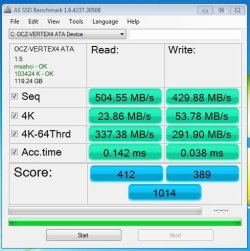
Guys i just changed HDD with OCZ Vertex 4 128gb. Everything gone well and there isnt any problem with SSD. Im gonna replace my HDD with ODD caddy. I will upload SS soon with ODD Caddy.

Also added SS of SSD benchmark results.

System config:
Intel(R) Core(TM) i5-3210M CPU @ 2.50GHz
6.00 GB Ram
OCZ Vertex 4 128gb

Thanks for all
 

Attachments

  • Capture.JPG
    Capture.JPG
    48.6 KB · Views: 11

My Computer My Computer

At a glance

Windows 8 Pro. 32bit
OS
Windows 8 Pro. 32bit
Your welcome.
Excellent numbers. :thumbsup:

My SSD won't be here until Monday. It missed the Saturday mail. :(

My new Ram arrvived. Going from 4GB to 2x4GB made a big improvment.

I hope my new SSD does as well as yours.
Enjoy!!! :D
 

My Computer My Computer

At a glance

Windows7 Pro 64bit SP-1; Windows XP Pro 32bitIntel Core i7-870 Lynnfield 2.93GHz LGA 1156 ...8GB@1400MHz Crucial Ballistix DDR3-1600 4x2GBASUS ENGTX460 DirectCU/2DI/1GD5 1GB 256-bit G...
Computer Manufacturer/Model Number
Hopalong/ Godzilla
OS
Windows7 Pro 64bit SP-1; Windows XP Pro 32bit
CPU
Intel Core i7-870 Lynnfield 2.93GHz LGA 1156 95W Quad-Core
Motherboard
ASUS P7P55D-E PRO
Memory
8GB@1400MHz Crucial Ballistix DDR3-1600 4x2GB
Graphics Card(s)
ASUS ENGTX460 DirectCU/2DI/1GD5 1GB 256-bit GDDR5
Sound Card
VIA Onboard
Monitor(s) Displays
Asus VS248H-P 24"; Samsung SyncMaster 941BW 19"ws
Screen Resolution
1920x1080; 1440x900
Hard Drives
Samsung 830 120GB SSD
Intel 320 120GB SSD
Western Digital Caviar Black WD7501AALS 750GB 7200 RPM SATA 3.0Gb/s
Western Digital Caviar Black WD6401AALS 640GB 7200 RPM SATA 3.0Gb/s
PSU
COOLER MASTER Silent Pro RS850-AMBAJ3-US 850W Modular
Case
COOLER MASTER HAF 932 RC-932-KKN5-GP Black
Cooling
Scythe "Mugen-2 Rev.B" (2 ScytheKaze-Jyuni PWM fans)
Keyboard
Logitech K-320
Mouse
Kensington
Antivirus
Avast Inernet Suite
Browser
IE 9 ; Chrome
Nice scores, RIDVANBAL. Well done. Those are some really good numbers.
 

My Computers My Computers

  • At a glance

    Windows 11 ProRyzen 9 5900X32GB G Skill DDR4-3600EVGA RTX 3080 FTW 3 Ultra
    Computer type
    PC/Desktop
    Computer Manufacturer/Model Number
    ALWAYS UNDER CONSTRUCTION
    OS
    Windows 11 Pro
    CPU
    Ryzen 9 5900X
    Motherboard
    Asus X570 Crosshair Viii Hero
    Memory
    32GB G Skill DDR4-3600
    Graphics Card(s)
    EVGA RTX 3080 FTW 3 Ultra
    Sound Card
    On Board/Sennheiser PC37X Headset
    Monitor(s) Displays
    3 X Asus 27"
    Screen Resolution
    2560x1440
    Hard Drives
    2 X 1 TB NVME drives
    PSU
    EVGA 850
    Case
    Phanteks Eclipse P400A
    Cooling
    EVGA 280 AIO
    Keyboard
    Logitech G510s/ Logitech G13
    Mouse
    Logitech G502
    Internet Speed
    24/1
    Antivirus
    ESET/MBAM Pro/SAS Pro
    Browser
    Chrome/ Firefox/ Edge
  • At a glance

    Windows 11 ProIntel Ultra 9 288V32 GB LPDDR5X 8533
    Computer type
    Laptop
    System Manufacturer/Model Number
    Dell 16 Plus
    OS
    Windows 11 Pro
    CPU
    Intel Ultra 9 288V
    Memory
    32 GB LPDDR5X 8533
    Monitor(s) Displays
    16" Mini-LED HDR600 Touch 90 Hz
    Screen Resolution
    2560X1600
    Hard Drives
    1 TB NVME
Back
Top