
Clean Install with a Upgrade Windows 7 Version

How to Do a Clean Install with an Upgrade Windows 7 Version


   Information
This will show you how to do a Clean Install using a retail Upgrade Windows 7 installation disc.

   Warning
Remember that you need to legally own a valid qualifying previous version of Windows to use a Upgrade Windows 7, and to stop using (or uninstall) the qualifying OS while you have the upgrade installed. Microsoft only made doing a clean install from a upgrade Windows 7 possible to make it more convenient so you do not have to reinstall both the old Windows version (ex: Vista) and upgrade to Windows 7 everytime you needed or wanted to reinstall.

If you do not legally own a valid qualifying previous version of Windows, then you are violating the terms of Microsoft's Windows 7 End User License Agreement and could get your product key number invalidated by Microsoft. Plus, it is considered illegal.

For more about this, please see: Microsoft SMB Community Blog : Regardless of what any hack says, a Windows 7 Upgrade is an Upgrade. What you need to know.


OPTION ONE

A Normal Clean Install


1. Do a clean install at boot without checking the Automatically activate Windows when I'm online box during the installation process.

2. When the installation is finished, then manually activate Windows 7 with your product key number.

3. If your Windows should fail to activate, then pick up at step 2 in OPTION THREE below.


OPTION TWO

Through a Custom Install


   Note
This option will let you do a clean install of Windows 7 without formating the current Windows installation to have your current Windows installation backed up to the Windows.old folder during the installation of your retail upgrade Windows 7. This way you can copy any files back that you want from the C:\Windows.old folder (previous installation) back into your new installation afterwards.

1. Do a custom install at boot or from within your current Windows installation without checking the Automatically activate Windows when I'm online box during the installation process.

2. When the installation is finished, then manually activate Windows 7 with your product key number.

3. Copy any files that you want back from the C:\Windows.old folder into where you want it in you new installation.

4. You can now delete the Windows.old folder using Disk Cleanup to have a clean install now.


OPTION THREE

Clean Install with a Registry Workaround for Error Code 0xc004f061


   Note
If you get a activation error code 0xc004f061 while doing OPTION ONE or OPTION TWO above, then you will need to use this option instead
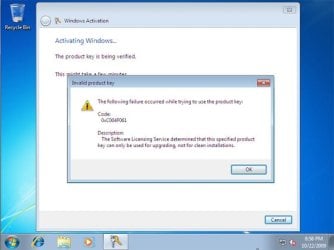
win7_upgrade_media_06.jpg


1. Do a clean install of your upgrade Windows 7 at boot without checking the Automatically activate Windows when I'm online box during the installation process.
NOTE: If you already did this from OPTION ONE above and got a activation error, then skip this step and just proceed to step 2 below instead. There's no need to reinstall again.

2. Click on the Download button below to download the .bat file below, and save it to your desktop.
Activate_Windows_Upgrade_after_Clean_Install.bat


Download


3. Right click on the downloaded .bat file, and click on Run as administrator.

4. If prompted, click/tap on Run and Yes (UAC).
NOTE: If you like, you can stop getting the Run prompt by unblocking the downloaded .bat file.

5. You will now notice a command prompt quickly open and close while applying the changes to your registry.

6. Click/tap on OK. (see screenshot below)
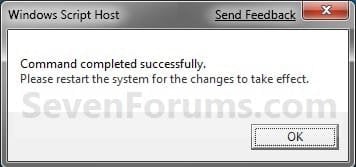
OK.jpg
7. Restart the computer.

8. When the computer is finished restarting, then manually activate Windows 7 with your product key number.


OPTION FOUR

Double Installing Windows 7


   Note
This option is the same that was used to do a clean install of an upgrade copy of Windows 7. It's more work, but if the options above did not work for you, then this should since this is the most reliable option.

1. Do a clean install of your upgrade Windows 7 at boot without checking the Automatically activate Windows when I'm online box during the installation process, and do not activate Windows 7. When finished with the clean install, do not or install any Windows Updates, drivers, or programs yet.

2. When finished with the clean install, start at step 4 at this link to do an in-place "upgrade" install with your upgrade Windows 7 installation disk from within the just now finished clean install of Windows 7.

3. When the in-place upgrade installation is completely finished, then manually activate Windows 7 with your product key number. You can now also install any Windows Updates drivers, and programs you like.
That's it,
Shawn


Attachments

Last edited:
Hello kxracer, and welcome to Seven Forums.

Microsoft allowed being able to do a clean install with a upgrade copy of Windows 7 to allow their customers to be able to reinstall the upgrade copy of Windows 7 if neeeded without having to install say Vista first, then do a upgrade install from Vista to Windows 7. It's a real time saver for this to be allowed. The red warning box in this tutorial on the first page can give you more details about this to help more though.

The red warning box in the tutorial below can help show what editions of Vista can do a upgrade install to what editions of Windows 7. However, if you like, you will still be able to do a clean install with a upgrade copy of Windows 7 as above to not have to upgrade from Vista itself.
http://www.sevenforums.com/tutorials/1818-upgrade-install-windows-7-a.html

Yes, you will be able to upgrade from Windows 7 to Windows 8.
Upgrade Install from Windows 7 or Vista to Windows 8
Hope this helps,
Shawn
 

My Computer My Computer

Computer type
PC/Desktop
Computer Manufacturer/Model Number
Self built custom
OS
64-bit Windows 11 Pro for Workstations
CPU
Intel i7-8700K OC'd to 5 GHz
Motherboard
ASUS ROG Maximus XI Formula Z390
Memory
64 GB (4x16GB) G.SKILL TridentZ RGB DDR4 3600 MHz
Graphics Card(s)
ASUS ROG-STRIX-GTX1080TI-O11G-GAMING
Sound Card
Integrated
Monitor(s) Displays
2 x Samsung Odyssey G7 27"
Screen Resolution
2560x1440
Hard Drives
1TB Samsung 990 PRO M.2,
4TB Samsung 990 PRO PRO M.2,
TerraMaster F8 SSD Plus NAS
PSU
Seasonic Prime Titanium 850W
Case
Thermaltake Core P3
Cooling
Corsair Hydro H115i
Keyboard
Logitech wireless K800
Mouse
Logitech MX Master 4
Internet Speed
2 Gb/s Download and 100 Mb/s Upload
Antivirus
Malwarebyte Anti-Malware Premium
Browser
Google Chrome
Other Info
Logitech Z625 speaker system,
Logitech BRIO 4K Pro webcam,
HP Color LaserJet Pro MFP M477fdn,
APC SMART-UPS RT 1000 XL - SURT1000XLI,
Galaxy S23 Plus phone
Hi Brink,

Although I agree it was a great idea to allow for a clean install with Windows 7 upgrade to avoid having to reinstall the windows you're upgrading from, what I can't understand is why there are no security measures in place to prevent someone who does not have qualifying windows software.

It's illegal yes...but there's no way for microsoft to ever find out if I've understood everything correctly from the links in the red warning box. Why not have windows 7 prompt you to enter your product key from your windows you're upgrading from so it can tie it to the windows 7 upgrade to prevent someone from using the upgrade without qualifying windows software and prevent someone from using their windows they upgraded from at the same time as the windows 7 upgrade.

Microsoft implements things like WGA but they couldn't implement something as simple as above. What am I missing?
 

My Computer My Computer

OS
Vista x64 Ultimate SP2
Not sure why they didn't, but they may have some unknown way of being able to tell later through activation.
 

My Computer My Computer

Computer type
PC/Desktop
Computer Manufacturer/Model Number
Self built custom
OS
64-bit Windows 11 Pro for Workstations
CPU
Intel i7-8700K OC'd to 5 GHz
Motherboard
ASUS ROG Maximus XI Formula Z390
Memory
64 GB (4x16GB) G.SKILL TridentZ RGB DDR4 3600 MHz
Graphics Card(s)
ASUS ROG-STRIX-GTX1080TI-O11G-GAMING
Sound Card
Integrated
Monitor(s) Displays
2 x Samsung Odyssey G7 27"
Screen Resolution
2560x1440
Hard Drives
1TB Samsung 990 PRO M.2,
4TB Samsung 990 PRO PRO M.2,
TerraMaster F8 SSD Plus NAS
PSU
Seasonic Prime Titanium 850W
Case
Thermaltake Core P3
Cooling
Corsair Hydro H115i
Keyboard
Logitech wireless K800
Mouse
Logitech MX Master 4
Internet Speed
2 Gb/s Download and 100 Mb/s Upload
Antivirus
Malwarebyte Anti-Malware Premium
Browser
Google Chrome
Other Info
Logitech Z625 speaker system,
Logitech BRIO 4K Pro webcam,
HP Color LaserJet Pro MFP M477fdn,
APC SMART-UPS RT 1000 XL - SURT1000XLI,
Galaxy S23 Plus phone
I have a question about the red box warning. I upgraded from OEM Vista to Windows 7 with a retail upgrade a few years back, and now I'm planning on switching out my motherboard/CPU/RAM/SSD, of course requiring a clean install of Windows 7 on the new drive.

I know OEM licenses are not transferable, they are tied to the motherboard, but what about my Windows 7 upgrade? According to this thread, I should have no trouble doing a clean install using either option 3 or 4, but I'm still worried about the OEM thing. Did upgrading from OEM Vista "convert" my upgrade into an OEM upgrade that I cannot transfer to a new motherboard? Or does the retail upgrade kind of "override" the OEM Vista?


Also seems like this would that put me in the red box warning category that says I need a qualifying previous OS in order to upgrade. Since my previous OS is OEM, and is tied to an old motherboard, maybe I can't use an upgrade on a new machine?
 

My Computer My Computer

OS
Florida
Hello stealthycrow, and welcome to Seven Forums.

If it's a retail and not OEM Windows 7 upgrade copy you purchased, then you will no issue reinstalling and activating it on your new build. At worse, you may need to do a phone activation if it doesn't activate online as usual.

Upgrading from an OEM installation doesn't make the retail product key (license) you purchased OEM.

Hope this helps, :)
Shawn
 

My Computer My Computer

Computer type
PC/Desktop
Computer Manufacturer/Model Number
Self built custom
OS
64-bit Windows 11 Pro for Workstations
CPU
Intel i7-8700K OC'd to 5 GHz
Motherboard
ASUS ROG Maximus XI Formula Z390
Memory
64 GB (4x16GB) G.SKILL TridentZ RGB DDR4 3600 MHz
Graphics Card(s)
ASUS ROG-STRIX-GTX1080TI-O11G-GAMING
Sound Card
Integrated
Monitor(s) Displays
2 x Samsung Odyssey G7 27"
Screen Resolution
2560x1440
Hard Drives
1TB Samsung 990 PRO M.2,
4TB Samsung 990 PRO PRO M.2,
TerraMaster F8 SSD Plus NAS
PSU
Seasonic Prime Titanium 850W
Case
Thermaltake Core P3
Cooling
Corsair Hydro H115i
Keyboard
Logitech wireless K800
Mouse
Logitech MX Master 4
Internet Speed
2 Gb/s Download and 100 Mb/s Upload
Antivirus
Malwarebyte Anti-Malware Premium
Browser
Google Chrome
Other Info
Logitech Z625 speaker system,
Logitech BRIO 4K Pro webcam,
HP Color LaserJet Pro MFP M477fdn,
APC SMART-UPS RT 1000 XL - SURT1000XLI,
Galaxy S23 Plus phone
Alright, sounds good to me, thanks. It was a retail upgrade and not OEM. It'll be a few more days to get everything, hopefully it all goes smoothly.


Thanks again.
 

My Computer My Computer

OS
Florida
You're most welcome. I hope it goes smoothly as well. :)
 

My Computer My Computer

Computer type
PC/Desktop
Computer Manufacturer/Model Number
Self built custom
OS
64-bit Windows 11 Pro for Workstations
CPU
Intel i7-8700K OC'd to 5 GHz
Motherboard
ASUS ROG Maximus XI Formula Z390
Memory
64 GB (4x16GB) G.SKILL TridentZ RGB DDR4 3600 MHz
Graphics Card(s)
ASUS ROG-STRIX-GTX1080TI-O11G-GAMING
Sound Card
Integrated
Monitor(s) Displays
2 x Samsung Odyssey G7 27"
Screen Resolution
2560x1440
Hard Drives
1TB Samsung 990 PRO M.2,
4TB Samsung 990 PRO PRO M.2,
TerraMaster F8 SSD Plus NAS
PSU
Seasonic Prime Titanium 850W
Case
Thermaltake Core P3
Cooling
Corsair Hydro H115i
Keyboard
Logitech wireless K800
Mouse
Logitech MX Master 4
Internet Speed
2 Gb/s Download and 100 Mb/s Upload
Antivirus
Malwarebyte Anti-Malware Premium
Browser
Google Chrome
Other Info
Logitech Z625 speaker system,
Logitech BRIO 4K Pro webcam,
HP Color LaserJet Pro MFP M477fdn,
APC SMART-UPS RT 1000 XL - SURT1000XLI,
Galaxy S23 Plus phone
Had to do a phone activation, but didn't actually have to talk to anyone, so it wasn't too bad. So everything went fine, windows is activated. Thanks!
 

My Computer My Computer

OS
Florida
They have a smooth talking robot eh? Only 154 numbers later.... :p
 

My Computer My Computer

Computer type
PC/Desktop
Computer Manufacturer/Model Number
Home Built Desktop By DataTech
OS
Windows 7 Ultimate X64 SP1
CPU
Intel i5-2550K, Differing ~4.4-4.8GHz No built in GPU
Motherboard
ASUS P8Z68-V PRO/GEN3
Memory
16GB G.Skill Sniper 1866MHz @ 2133MHz 2x8GB
Graphics Card(s)
ASUS GTX650TIB-DC2OC-2GD5, (650TI Boost)
Sound Card
Onboard Realtek 5-1
Monitor(s) Displays
Samsung P2570HD
Screen Resolution
1920x1080
Hard Drives
Samsung 840 Pro 256GB SSD for OS, 500GB Seagate Constellation (Enterprise drive) for Data
PSU
Corsair HX650W
Case
Inwin Dragon Rider
Cooling
Hyper 212 EVO w/two Noctua fans, push-pull, @1300 RPM
Keyboard
E-Z Eyes, bright yellow keys with large characters
Mouse
steelseries SENSEI Laser Pro Gaming
Internet Speed
48-51Mbs Mbs down, 11 Mbs up Xfinity Cable
Antivirus
Norton Internet Security 2013
Browser
IE 10, Opera, Pale Moon if needed
Other Info
4 case fans, LG BluRay-RE, ASUS DVD-RW, Mr. Fusion power supply, 1.21 gigawatts.
Here is my experience using the Family pack upgrade. I upgraded the hdd at the same time, so thought I'd try a clean, custom install. Well, it would not activate, error was something like 'product key is only valid for an upgrade installation'. So I had to install over the new install. Also, trying to do an upgrade install on the blank new hdd didn't work...the upgrade option can only be executed from within windows.

Don't know if it's different with a single upgrade key, or if Microsoft changed something along the way. A friend told me that he did option one with no problem, but it was a no-go for me.
 

My Computer My Computer

Computer Manufacturer/Model Number
BYO
OS
Windows 7 Home Premium *upgrade*
CPU
AMD A6-3670K
Motherboard
MSI A55M-P33
Memory
4GB DDR3-1333
Graphics Card(s)
Onboard AMD Radeon HD6530D
Sound Card
none
Monitor(s) Displays
Spectre 23"
Screen Resolution
1080p
Hard Drives
500GB W/D
PSU
Ultra 450W
Case
Ultra ULT40278 XT MicroATX Tower
Cooling
1 120mm front, 1 92mm rear
Keyboard
generic ps/2
Mouse
generic ps/2
Internet Speed
DSL 768kbps
Here is my experience using the Family pack upgrade. I upgraded the hdd at the same time, so thought I'd try a clean, custom install. Well, it would not activate, error was something like 'product key is only valid for an upgrade installation'. So I had to install over the new install. Also, trying to do an upgrade install on the blank new hdd didn't work...the upgrade option can only be executed from within windows.

Don't know if it's different with a single upgrade key, or if Microsoft changed something along the way. A friend told me that he did option one with no problem, but it was a no-go for me.


Did you see Option 3? I had to do that with a single upgrade key.
 
Last edited by a moderator:

My Computer My Computer

Computer type
PC/Desktop
Computer Manufacturer/Model Number
Home Built Desktop By DataTech
OS
Windows 7 Ultimate X64 SP1
CPU
Intel i5-2550K, Differing ~4.4-4.8GHz No built in GPU
Motherboard
ASUS P8Z68-V PRO/GEN3
Memory
16GB G.Skill Sniper 1866MHz @ 2133MHz 2x8GB
Graphics Card(s)
ASUS GTX650TIB-DC2OC-2GD5, (650TI Boost)
Sound Card
Onboard Realtek 5-1
Monitor(s) Displays
Samsung P2570HD
Screen Resolution
1920x1080
Hard Drives
Samsung 840 Pro 256GB SSD for OS, 500GB Seagate Constellation (Enterprise drive) for Data
PSU
Corsair HX650W
Case
Inwin Dragon Rider
Cooling
Hyper 212 EVO w/two Noctua fans, push-pull, @1300 RPM
Keyboard
E-Z Eyes, bright yellow keys with large characters
Mouse
steelseries SENSEI Laser Pro Gaming
Internet Speed
48-51Mbs Mbs down, 11 Mbs up Xfinity Cable
Antivirus
Norton Internet Security 2013
Browser
IE 10, Opera, Pale Moon if needed
Other Info
4 case fans, LG BluRay-RE, ASUS DVD-RW, Mr. Fusion power supply, 1.21 gigawatts.
Good catch! I just did the first clean install in another upgrade pc, so I will try that option and see. Looks like it should work, thanks.

Edit to add update:
Option 3 did indeed work as advertised.
 
Last edited:

My Computer My Computer

Computer Manufacturer/Model Number
BYO
OS
Windows 7 Home Premium *upgrade*
CPU
AMD A6-3670K
Motherboard
MSI A55M-P33
Memory
4GB DDR3-1333
Graphics Card(s)
Onboard AMD Radeon HD6530D
Sound Card
none
Monitor(s) Displays
Spectre 23"
Screen Resolution
1080p
Hard Drives
500GB W/D
PSU
Ultra 450W
Case
Ultra ULT40278 XT MicroATX Tower
Cooling
1 120mm front, 1 92mm rear
Keyboard
generic ps/2
Mouse
generic ps/2
Internet Speed
DSL 768kbps
My laptop hard drive give up the ghost, so I purchased a new Seagate Momentus XT 750 gig hybrid drive. This is my second new hard drive installation. The G1S Asus laptop originally came with Vista preinstalled. The original hard drive was a 200 Gig, the one that just crapped out was a 500 Gig Momentus. When Windows 7 was released, my son bought an legitimate upgrade copy from the Texas A&M campus bookstore. I clean installed it via boot-up minus the product key, then installed it as an upgrade from within the OS over that. Prior to this time, no problems whatsoever with activating or anything on the first or 2nd hard drive, which was new. On this new drive, the same process works and it is activating fine, but now, after successful entering the product key and even successful activation, when I run the first major series of Windows Updates, which amounts to 212 Megs or so, I can no longer run Windows Update and I start getting "This copy of Windows in not Genuine." I re-installed fresh twice with the same flawed result. So it is either because I am installing on a hybrid drive, or that with the release of Windows 8, Microsoft has placed something in that first wave of Windows Updates that is invalidating the method that was first discovered with Vista Upgrade disks and worked with Windows 7 Upgrades. I have the original Vista disks that came with the laptop but do not want to upgrade over the top of that. i am in the midst of my third go round / re-installation and may have to do that. If it appears that it is unstable I guess I'll go get a full version of Windows 8 while it is still cheap, which will mean the Microsoft Empire wins!!!
 

My Computer My Computer

Computer Manufacturer/Model Number
Asus
OS
Windows 7 32 bit
CPU
Core 2 Duo 7700
Motherboard
Intel
Memory
3 Gig
Graphics Card(s)
Nividia 8600M
Sound Card
Realtek
Monitor(s) Displays
generic
Hard Drives
Momentus XT 750 Gig Hybrid drive
Something has changed?

I remember way back in the XP days there was a file you could ignore in Windows Update that would keep that Genuine Windows floating mess off your desktop, you had to turn off automatically update for let me choose which updates to install to keep that from stamping itself over your taskbar, I wonder if there is something similar now that is hidden in the Updates....I did not have this problem prior to Windows 8 being released, no problems with this process on my last new hard drive. Or possibly my multiple activations are causing a flag on my product key, but if it is tied to my machine, I can't see why that would happen. i feel like Jim Carrey as the Riddler, "Questions, too many questions!!!" Or, is there something in my chipset and drivers (which are Vista drivers, very few Windows 7 drivers were written for my laptop) causing the issue? I just completed all the Windows Updates and made that current, I shall see what happens after activation.
 
Last edited:

My Computer My Computer

Computer Manufacturer/Model Number
Asus
OS
Windows 7 32 bit
CPU
Core 2 Duo 7700
Motherboard
Intel
Memory
3 Gig
Graphics Card(s)
Nividia 8600M
Sound Card
Realtek
Monitor(s) Displays
generic
Hard Drives
Momentus XT 750 Gig Hybrid drive
Activated successfully, rebooted, and Windows Updates still works. I'm taking installing my chipset drivers very slow this third time around, previously Windows Update died after I installed several ATK utilities. Then began getting the"Windows is not Genuine" prompt even after successful activation.
 

My Computer My Computer

Computer Manufacturer/Model Number
Asus
OS
Windows 7 32 bit
CPU
Core 2 Duo 7700
Motherboard
Intel
Memory
3 Gig
Graphics Card(s)
Nividia 8600M
Sound Card
Realtek
Monitor(s) Displays
generic
Hard Drives
Momentus XT 750 Gig Hybrid drive
Finally, no problems !!

I guess third times a charm. Time will tell. I did not install any chipset software that referenced "ATK." The Windows Update lockout happened right after that before. This time I only installed chipset drivers that referenced specific hardware on the laptop. All seems well after activation, Windows Update is still working, all important drivers and software such as anti-virus and video card are running, I guess I am home free!!
 

My Computer My Computer

Computer Manufacturer/Model Number
Asus
OS
Windows 7 32 bit
CPU
Core 2 Duo 7700
Motherboard
Intel
Memory
3 Gig
Graphics Card(s)
Nividia 8600M
Sound Card
Realtek
Monitor(s) Displays
generic
Hard Drives
Momentus XT 750 Gig Hybrid drive
Great news Callie, and welcome to Seven Forums. :)
 

My Computer My Computer

Computer type
PC/Desktop
Computer Manufacturer/Model Number
Self built custom
OS
64-bit Windows 11 Pro for Workstations
CPU
Intel i7-8700K OC'd to 5 GHz
Motherboard
ASUS ROG Maximus XI Formula Z390
Memory
64 GB (4x16GB) G.SKILL TridentZ RGB DDR4 3600 MHz
Graphics Card(s)
ASUS ROG-STRIX-GTX1080TI-O11G-GAMING
Sound Card
Integrated
Monitor(s) Displays
2 x Samsung Odyssey G7 27"
Screen Resolution
2560x1440
Hard Drives
1TB Samsung 990 PRO M.2,
4TB Samsung 990 PRO PRO M.2,
TerraMaster F8 SSD Plus NAS
PSU
Seasonic Prime Titanium 850W
Case
Thermaltake Core P3
Cooling
Corsair Hydro H115i
Keyboard
Logitech wireless K800
Mouse
Logitech MX Master 4
Internet Speed
2 Gb/s Download and 100 Mb/s Upload
Antivirus
Malwarebyte Anti-Malware Premium
Browser
Google Chrome
Other Info
Logitech Z625 speaker system,
Logitech BRIO 4K Pro webcam,
HP Color LaserJet Pro MFP M477fdn,
APC SMART-UPS RT 1000 XL - SURT1000XLI,
Galaxy S23 Plus phone
Interesting- I just reinstalled my upgrade copy of Win7 Ultimate 64bit on my new SSD, and methods 1,2 and 3 failed to activate. Even after running the .bat file and rebooting I'm still getting the 0xc004f061 error. Anything else I can do short of upgrading over my Win7 install (which I've already started to personalize)?
 

My Computer My Computer

OS
Win7 64
Hello givemereplay,

Did you right click on the .bat file and click on "Run as administrator"?
 

My Computer My Computer

Computer type
PC/Desktop
Computer Manufacturer/Model Number
Self built custom
OS
64-bit Windows 11 Pro for Workstations
CPU
Intel i7-8700K OC'd to 5 GHz
Motherboard
ASUS ROG Maximus XI Formula Z390
Memory
64 GB (4x16GB) G.SKILL TridentZ RGB DDR4 3600 MHz
Graphics Card(s)
ASUS ROG-STRIX-GTX1080TI-O11G-GAMING
Sound Card
Integrated
Monitor(s) Displays
2 x Samsung Odyssey G7 27"
Screen Resolution
2560x1440
Hard Drives
1TB Samsung 990 PRO M.2,
4TB Samsung 990 PRO PRO M.2,
TerraMaster F8 SSD Plus NAS
PSU
Seasonic Prime Titanium 850W
Case
Thermaltake Core P3
Cooling
Corsair Hydro H115i
Keyboard
Logitech wireless K800
Mouse
Logitech MX Master 4
Internet Speed
2 Gb/s Download and 100 Mb/s Upload
Antivirus
Malwarebyte Anti-Malware Premium
Browser
Google Chrome
Other Info
Logitech Z625 speaker system,
Logitech BRIO 4K Pro webcam,
HP Color LaserJet Pro MFP M477fdn,
APC SMART-UPS RT 1000 XL - SURT1000XLI,
Galaxy S23 Plus phone
Back
Top