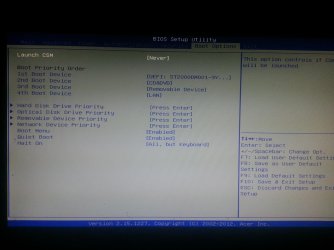
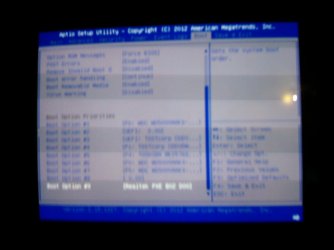
GPT Hard drive issues with installing Windows 7 Ultimate..

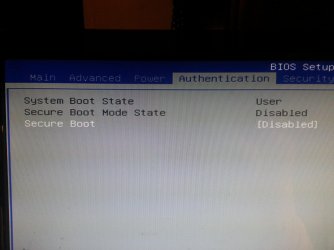
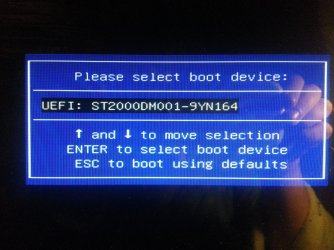
I have disabled secure boot saved changes and still only the HDD shows up when i go into the boot menu, do i have to put the dvd drive at .1 and hdd at .2? Sorry for being such a pain haha
 

My Computer My Computer

At a glance

Winows 8Intel® Core™ i3 Processor4gig DDR3Intergrated Intel Graphics
Computer Manufacturer/Model Number
Packard Bell Imedia
OS
Winows 8
CPU
Intel® Core™ i3 Processor
Memory
4gig DDR3
Graphics Card(s)
Intergrated Intel Graphics
Hard Drives
2 x 1TB Sata 3
NO.

Have you looked at Step four & five?
 

My Computer My Computer

At a glance

ME/XP/Vista/Win7
OS
ME/XP/Vista/Win7
yes and it does not help i still only have the option of booting one the hdd, one option only comes up.
 

Attachments

  • 2012-12-21 22.57.46.jpg
    2012-12-21 22.57.46.jpg
    904.9 KB · Views: 9
  • 2012-12-21 22.58.40.jpg
    2012-12-21 22.58.40.jpg
    970.4 KB · Views: 9

My Computer My Computer

At a glance

Winows 8Intel® Core™ i3 Processor4gig DDR3Intergrated Intel Graphics
Computer Manufacturer/Model Number
Packard Bell Imedia
OS
Winows 8
CPU
Intel® Core™ i3 Processor
Memory
4gig DDR3
Graphics Card(s)
Intergrated Intel Graphics
Hard Drives
2 x 1TB Sata 3
Do you have a BOOT OVERRIDE in your uEFI/BIOS firmware.
 

My Computer My Computer

At a glance

ME/XP/Vista/Win7
OS
ME/XP/Vista/Win7
Not that i can see no, im back in BIOS and nothing there for BOOT OVERRIDE
 

My Computer My Computer

At a glance

Winows 8Intel® Core™ i3 Processor4gig DDR3Intergrated Intel Graphics
Computer Manufacturer/Model Number
Packard Bell Imedia
OS
Winows 8
CPU
Intel® Core™ i3 Processor
Memory
4gig DDR3
Graphics Card(s)
Intergrated Intel Graphics
Hard Drives
2 x 1TB Sata 3
On my test PC, it is on last page.
 

My Computer My Computer

At a glance

ME/XP/Vista/Win7
OS
ME/XP/Vista/Win7
cannot even see test pc on the last page?
 

My Computer My Computer

At a glance

Winows 8Intel® Core™ i3 Processor4gig DDR3Intergrated Intel Graphics
Computer Manufacturer/Model Number
Packard Bell Imedia
OS
Winows 8
CPU
Intel® Core™ i3 Processor
Memory
4gig DDR3
Graphics Card(s)
Intergrated Intel Graphics
Hard Drives
2 x 1TB Sata 3
edit: my test PC.
 

My Computer My Computer

At a glance

ME/XP/Vista/Win7
OS
ME/XP/Vista/Win7
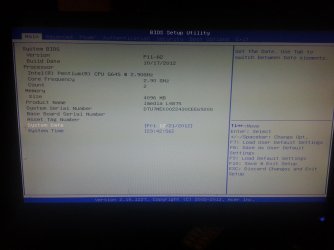
is that on UEFI/BIOS page or on and through somewhere on the desktop, as i cannot see nothing at all in BIOS for my test pc
 

Attachments

  • 2012-12-21 23.42.16.jpg
    2012-12-21 23.42.16.jpg
    421.5 KB · Views: 16

My Computer My Computer

At a glance

Winows 8Intel® Core™ i3 Processor4gig DDR3Intergrated Intel Graphics
Computer Manufacturer/Model Number
Packard Bell Imedia
OS
Winows 8
CPU
Intel® Core™ i3 Processor
Memory
4gig DDR3
Graphics Card(s)
Intergrated Intel Graphics
Hard Drives
2 x 1TB Sata 3
Look in BOOT OPTION, looking at your screenshot.

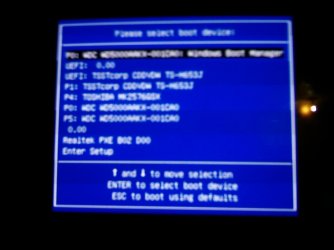
This my test PC with three hd Drives, one DVD Drive, one USB Pendrive (0.00).

IMAG0002.JPG
 

My Computer My Computer

At a glance

ME/XP/Vista/Win7
OS
ME/XP/Vista/Win7
nope not in the boot option nothing!
 

Attachments

  • 2012-12-21 23.55.35.jpg
    2012-12-21 23.55.35.jpg
    626.5 KB · Views: 6

My Computer My Computer

At a glance

Winows 8Intel® Core™ i3 Processor4gig DDR3Intergrated Intel Graphics
Computer Manufacturer/Model Number
Packard Bell Imedia
OS
Winows 8
CPU
Intel® Core™ i3 Processor
Memory
4gig DDR3
Graphics Card(s)
Intergrated Intel Graphics
Hard Drives
2 x 1TB Sata 3
Looking at your screenshot, there is no uEFI support DVD in the DVD drive.

Boot Override.
IMAG0003.JPG

Boot Options
IMAG0004.JPG
 

My Computer My Computer

At a glance

ME/XP/Vista/Win7
OS
ME/XP/Vista/Win7
So what exactly does that mean, what can i do about it? I really cannot make anything out from them shots
 

My Computer My Computer

At a glance

Winows 8Intel® Core™ i3 Processor4gig DDR3Intergrated Intel Graphics
Computer Manufacturer/Model Number
Packard Bell Imedia
OS
Winows 8
CPU
Intel® Core™ i3 Processor
Memory
4gig DDR3
Graphics Card(s)
Intergrated Intel Graphics
Hard Drives
2 x 1TB Sata 3
Listing top tp bottom.

1) HD Drive one: uEFI Windows 8 installed
2) uEFI USB Pendive: uEFI Windows 7 installer.
3) uEFI DVD Drive with uEFI Windows 8 DVD
4) HD Drive two: uEFI Windows 7 installed
5) Not in use
6) HD Drive three: Windows XP install
7) not in use
8) not in use
 

My Computer My Computer

At a glance

ME/XP/Vista/Win7
OS
ME/XP/Vista/Win7
right but where do i go from here? i cannot see my drive in the boot menu. If i just make a usb stick with my win 7 iso disc can i go on from there?
 

My Computer My Computer

At a glance

Winows 8Intel® Core™ i3 Processor4gig DDR3Intergrated Intel Graphics
Computer Manufacturer/Model Number
Packard Bell Imedia
OS
Winows 8
CPU
Intel® Core™ i3 Processor
Memory
4gig DDR3
Graphics Card(s)
Intergrated Intel Graphics
Hard Drives
2 x 1TB Sata 3
as i cannot select my disc to boot from, as the drive does not show up in the menu. I cannot boot the disc from the desktop either. I'm beginning to give up haha
 

My Computer My Computer

At a glance

Winows 8Intel® Core™ i3 Processor4gig DDR3Intergrated Intel Graphics
Computer Manufacturer/Model Number
Packard Bell Imedia
OS
Winows 8
CPU
Intel® Core™ i3 Processor
Memory
4gig DDR3
Graphics Card(s)
Intergrated Intel Graphics
Hard Drives
2 x 1TB Sata 3
the manual has nothing in it really lol
 

My Computer My Computer

At a glance

Winows 8Intel® Core™ i3 Processor4gig DDR3Intergrated Intel Graphics
Computer Manufacturer/Model Number
Packard Bell Imedia
OS
Winows 8
CPU
Intel® Core™ i3 Processor
Memory
4gig DDR3
Graphics Card(s)
Intergrated Intel Graphics
Hard Drives
2 x 1TB Sata 3
made the UEFI USB and that does not even show up in the boot menu!!!
 

My Computer My Computer

At a glance

Winows 8Intel® Core™ i3 Processor4gig DDR3Intergrated Intel Graphics
Computer Manufacturer/Model Number
Packard Bell Imedia
OS
Winows 8
CPU
Intel® Core™ i3 Processor
Memory
4gig DDR3
Graphics Card(s)
Intergrated Intel Graphics
Hard Drives
2 x 1TB Sata 3
Back
Top