GPT Hard drive issues with installing Windows 7 Ultimate..

DrWolfenstein

New member
Member
Local time
2:53 AM
Messages
73
Ok so I bought a new pc the other day it was delivered with Win 8 preinstalled 64 bit version, its a Packard bell Imedia. I've had a play about with it and I hate windows 8, that's why I have my windows 7 ultimate at hand ready to go on there. I've changed the boot priority for dvd drive first and enabled boot mode. Once I've got to boot mode the dvd drive never shows up in the boot menu, just the 1 of 2 1TB hdds I have in there appears. The drive is working as I've tried to run windows 7 install from the desktop though it has failed and I've read a little online to find out its due to the hdd drives being formatted in GPT format? I have never come across this before I know a little about pc's but not enough to know how to solve this issue. I really want to go back to Win 7 as I got on well with it and I hate windows 8 and I don't have a touch screen monitor to go with it either and nor would I want a touch screen monitor YCH!

hope someone here can help me i'm at my wits end haha
 

My Computer My Computer

Computer Manufacturer/Model Number
Packard Bell Imedia
OS
Winows 8
CPU
Intel® Core™ i3 Processor
Memory
4gig DDR3
Graphics Card(s)
Intergrated Intel Graphics
Hard Drives
2 x 1TB Sata 3
Hello DrWolfenstein, and welcome to Seven Forums.

Since this is a new PC and formatted as GPT, then you have a UEFI motherboard.

If you have not already, then I would recommend creating a factory recovery USB to be able to restore Windows 8 back to factory conditions on your PC if you should ever want to in the future.
Next, double check to make sure that there are Windows 7 drivers available for all devices on the PC. There's no sense in installing Windows 7 if you don't have drivers for the PC.

To install Windows 7 on UEFI, you would first need to create a bootable Windows 7 UEFI USB flash drive using the tutorial below.
Next, the tutorial below will show you how to install Window 7 on UEFI with the UEFI USB.
Hope this helps, :)
Shawn
 

My Computer My Computer

Computer type
PC/Desktop
Computer Manufacturer/Model Number
Self built custom
OS
64-bit Windows 11 Pro for Workstations
CPU
Intel i7-8700K OC'd to 5 GHz
Motherboard
ASUS ROG Maximus XI Formula Z390
Memory
64 GB (4x16GB) G.SKILL TridentZ RGB DDR4 3600 MHz
Graphics Card(s)
ASUS ROG-STRIX-GTX1080TI-O11G-GAMING
Sound Card
Integrated
Monitor(s) Displays
2 x Samsung Odyssey G7 27"
Screen Resolution
2560x1440
Hard Drives
1TB Samsung 990 PRO M.2,
4TB Samsung 990 PRO PRO M.2,
TerraMaster F8 SSD Plus NAS
PSU
Seasonic Prime Titanium 850W
Case
Thermaltake Core P3
Cooling
Corsair Hydro H115i
Keyboard
Logitech wireless K800
Mouse
Logitech MX Master 4
Internet Speed
2 Gb/s Download and 100 Mb/s Upload
Antivirus
Malwarebyte Anti-Malware Premium
Browser
Google Chrome
Other Info
Logitech Z625 speaker system,
Logitech BRIO 4K Pro webcam,
HP Color LaserJet Pro MFP M477fdn,
APC SMART-UPS RT 1000 XL - SURT1000XLI,
Galaxy S23 Plus phone
Hello DrWolfenstein, and welcome to Seven Forums.

Since this is a new PC and formatted as GPT, then you have a UEFI motherboard.

If you have not already, then I would recommend creating a factory recovery USB to be able to restore Windows 8 back to factory conditions on your PC if you should ever want to in the future.
Next, double check to make sure that there are Windows 7 drivers available for all devices on the PC. There's no sense in installing Windows 7 if you don't have drivers for the PC.

To install Windows 7 on UEFI, you would first need to create a bootable Windows 7 UEFI USB flash drive using the tutorial below.
Next, the tutorial below will show you how to install Window 7 on UEFI with the UEFI USB.
Hope this helps, :)
Shawn

Hey Shawn thanks for the info, I started to make the back up on my usb over an hour ago of the default backup. Its still not done and seems to be taking ages or stuck at the last section??? I don't see why as I said its a brand new unit haha
 

My Computer My Computer

Computer Manufacturer/Model Number
Packard Bell Imedia
OS
Winows 8
CPU
Intel® Core™ i3 Processor
Memory
4gig DDR3
Graphics Card(s)
Intergrated Intel Graphics
Hard Drives
2 x 1TB Sata 3
Yeah, USB connections can be slow iif it's USB 2.0.

Please let us know if you have any questions, and how it went.
 

My Computer My Computer

Computer type
PC/Desktop
Computer Manufacturer/Model Number
Self built custom
OS
64-bit Windows 11 Pro for Workstations
CPU
Intel i7-8700K OC'd to 5 GHz
Motherboard
ASUS ROG Maximus XI Formula Z390
Memory
64 GB (4x16GB) G.SKILL TridentZ RGB DDR4 3600 MHz
Graphics Card(s)
ASUS ROG-STRIX-GTX1080TI-O11G-GAMING
Sound Card
Integrated
Monitor(s) Displays
2 x Samsung Odyssey G7 27"
Screen Resolution
2560x1440
Hard Drives
1TB Samsung 990 PRO M.2,
4TB Samsung 990 PRO PRO M.2,
TerraMaster F8 SSD Plus NAS
PSU
Seasonic Prime Titanium 850W
Case
Thermaltake Core P3
Cooling
Corsair Hydro H115i
Keyboard
Logitech wireless K800
Mouse
Logitech MX Master 4
Internet Speed
2 Gb/s Download and 100 Mb/s Upload
Antivirus
Malwarebyte Anti-Malware Premium
Browser
Google Chrome
Other Info
Logitech Z625 speaker system,
Logitech BRIO 4K Pro webcam,
HP Color LaserJet Pro MFP M477fdn,
APC SMART-UPS RT 1000 XL - SURT1000XLI,
Galaxy S23 Plus phone
Yeah, USB connections can be slow iif it's USB 2.0.

Please let us know if you have any questions, and how it went.

Its still stuck in the same place. Not moving has been going for about 2 hours odd now, guess i'll have to try again!
 

My Computer My Computer

Computer Manufacturer/Model Number
Packard Bell Imedia
OS
Winows 8
CPU
Intel® Core™ i3 Processor
Memory
4gig DDR3
Graphics Card(s)
Intergrated Intel Graphics
Hard Drives
2 x 1TB Sata 3
HTG Explains: How Windows 8′s Secure Boot Feature Works & What It Means for Linux - How-To Geek

Installing Linux

There’s nothing stopping computers from also shipping with Ubuntu’s certificate. Linux distributions can also publish their own certificate and ask users to install it – or ask them to disable secure boot entirely. Fedora will be paying $99 for Microsoft’s signing services, so Fedora will install on any Windows 8-certified PC with no additional configuration required. Other Linux distributions could also take this route.


Security Advantages

The traditional BIOS will boot any software. Normally, your BIOS boots the Windows boot loader or maybe a Linux boot loader, like GRUB. However, it’s possible for malware, such as a rootkit, to replace your boot loader. The rootkit could load your normal operating system with no indication that anything was wrong, staying completely invisible and undetectable on your system. The BIOS doesn’t know the different between malware and a trusted boot loader, so it allows either to boot.

Windows 8 PCs will ship with Microsoft’s certificate stored in UEFI (and possibly other certificates, depending on the manufacturer). UEFI will check the boot loader before launching it and ensure it’s signed by Microsoft – if a rootkit or another malware program does replace your boot loader, UEFI won’t allow it to boot. This prevents malware from hijacking your boot process and concealing itself from your operating system.


By seting your uEFI/BIOS firmware, to Secure Boot DISABLED, you can install
NOTE: Check your manufacturer's uEFI BIOS manual for settings.

Vista x64
Windows 7 x64
Linux x64
in uEFI mode.
 
Last edited:

My Computer My Computer

OS
ME/XP/Vista/Win7
  • Like
Reactions: Arc
Yeah, USB connections can be slow iif it's USB 2.0.

Please let us know if you have any questions, and how it went.

I let it run all night and it was stuck in exactly the same bloody place all night, so I cant even get a back up done?
 

My Computer My Computer

Computer Manufacturer/Model Number
Packard Bell Imedia
OS
Winows 8
CPU
Intel® Core™ i3 Processor
Memory
4gig DDR3
Graphics Card(s)
Intergrated Intel Graphics
Hard Drives
2 x 1TB Sata 3
You may also need to use a USB 2.0 port to install Win7 as the installer doesn't have full 3.0 driver support yet. You an also supply the 3.0 drivers if prompted when booting into it.
 
I made a back up the otherday on my external, can I just make a disc image now then proceed to go for the install?
 

My Computer My Computer

Computer Manufacturer/Model Number
Packard Bell Imedia
OS
Winows 8
CPU
Intel® Core™ i3 Processor
Memory
4gig DDR3
Graphics Card(s)
Intergrated Intel Graphics
Hard Drives
2 x 1TB Sata 3
Sure, if you aren't particular about having the Factory Recovery image to restore - or you can order those disks later if necessary.

Most tech enthusiasts won't even run the factory Preinstall due to the load of corrupting bloatware which throttles Win7's native performance. Instead they Clean Reinstall - Factory OEM Windows 7 which steps will assure a perfect install.
 
How about Dual booting? easy enough to partition the c drive 1tb and bang win 7 on there aswell? As you can tell im not that savy on the pc haha
 

My Computer My Computer

Computer Manufacturer/Model Number
Packard Bell Imedia
OS
Winows 8
CPU
Intel® Core™ i3 Processor
Memory
4gig DDR3
Graphics Card(s)
Intergrated Intel Graphics
Hard Drives
2 x 1TB Sata 3

My Computer My Computer

Computer Manufacturer/Model Number
Packard Bell Imedia
OS
Winows 8
CPU
Intel® Core™ i3 Processor
Memory
4gig DDR3
Graphics Card(s)
Intergrated Intel Graphics
Hard Drives
2 x 1TB Sata 3

My Computer My Computer

Computer Manufacturer/Model Number
Packard Bell Imedia
OS
Winows 8
CPU
Intel® Core™ i3 Processor
Memory
4gig DDR3
Graphics Card(s)
Intergrated Intel Graphics
Hard Drives
2 x 1TB Sata 3
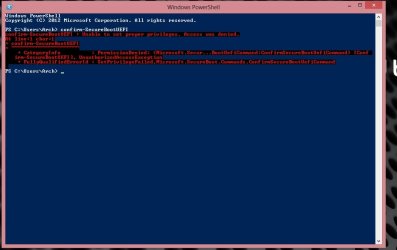
This is what I got buddy, is it because i'm not in admin powershell or something?
 

Attachments

  • UEFI.jpg
    UEFI.jpg
    42.2 KB · Views: 17

My Computer My Computer

Computer Manufacturer/Model Number
Packard Bell Imedia
OS
Winows 8
CPU
Intel® Core™ i3 Processor
Memory
4gig DDR3
Graphics Card(s)
Intergrated Intel Graphics
Hard Drives
2 x 1TB Sata 3
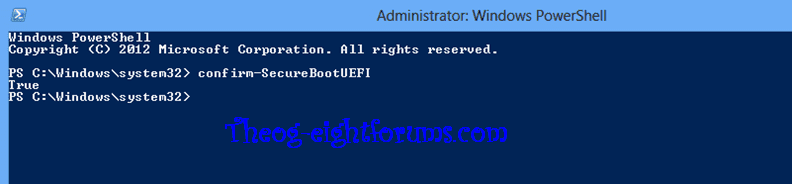
Ok I've done it, and its says TRUE.
Sorry I am full up with a cold and not on top form hahaha
 

My Computer My Computer

Computer Manufacturer/Model Number
Packard Bell Imedia
OS
Winows 8
CPU
Intel® Core™ i3 Processor
Memory
4gig DDR3
Graphics Card(s)
Intergrated Intel Graphics
Hard Drives
2 x 1TB Sata 3
Back
Top