Toshiba Portable 500 Gb Hard Drive Error: Volume is dirty 0x80071AC3

Yankie007

New member
Power User
Local time
8:55 PM
Messages
87
Location
New-Brunswick, Canada
Hi,
My name is Yannik. I have a Toshiba 500 Gb Portable (external) Hard Drive that had information on it but for some unknown reason, when I plugged it, the computer asked me to reformat the drive so I did. After that, I thought it would work fine but when I tried to access the Hard drive,, I couldn't because a message appeared that I needed to check/scan it because there's was a problem: A Hard Drive Error: Volume is dirty 0x80071AC3 If I either try the two option below:
1) Automatically fix file system errors
2) Scan for and attempt recovery of bad sectors
I waited and waited for over 2 hours and nothing happened, it was still at "0" Free cluster processed!
My question is: Do you know how to fix this issue?
 

My Computer My Computer

At a glance

Windows 7 Home Premium 64bit.Intel Core i7 CPU6.00 GB RAMATI Radeon HD 5700 Series
OS
Windows 7 Home Premium 64bit.
CPU
Intel Core i7 CPU
Motherboard
Gigabyte X58A-UD3R
Memory
6.00 GB RAM
Graphics Card(s)
ATI Radeon HD 5700 Series
Sound Card
Creative Sb-X-Fi
Monitor(s) Displays
Acer 24 inch
Screen Resolution
1400 X 1050
Hard Drives
1 Tb
Case
NZXT Mid Tower
Mouse
Kensington Expert Mouse
Internet Speed
Cable
It can take quite some considerable time for this command to complete, particularly with large drives and more so if it has a lot of work to do. Leave it running overnight and see what it has got up to tomorrow.
 

My Computer My Computer

At a glance

Windows 8.1 Pro RTM x64Intel Core-i5-3570K 4-core @ 3.4GHz (Ivy Brid...4 x 4GB DDR3-1600 Corsair Vengeance CMZ8GX3M2...MSI GeForce GTX770 Gaming OC 2GB
Computer type
PC/Desktop
Computer Manufacturer/Model Number
Dwarf Dwf/11/2012 r09/2013
OS
Windows 8.1 Pro RTM x64
CPU
Intel Core-i5-3570K 4-core @ 3.4GHz (Ivy Bridge) (OC 4.4GHz)
Motherboard
ASRock Z77 Extreme4-M
Memory
4 x 4GB DDR3-1600 Corsair Vengeance CMZ8GX3M2A1600C9B (16GB)
Graphics Card(s)
MSI GeForce GTX770 Gaming OC 2GB
Sound Card
Realtek High Definition on board solution (ALC 898)
Monitor(s) Displays
ViewSonic VA1912w Widescreen (VGA)
Screen Resolution
1440x900
Hard Drives
OCZ Agility 3 SSD 120GB SATA III x2 (RAID 0)
Samsung HD501LJ 500GB SATA II x2
Hitachi HDS721010CLA332 1TB SATA II
Iomega 1.5TB Ext USB 2.0
WD 2.0TB Ext USB 3.0
PSU
XFX Pro Series 850W Semi-Modular
Case
Gigabyte IF233
Cooling
1 x 120mm Front Inlet 1 x 120mm Rear Exhaust
Keyboard
Microsoft Comfort Curve Keyboard 3000 (USB)
Mouse
Microsoft Comfort Mouse 3000 for Business (USB)
Internet Speed
NetGear DG834Gv3 ADSL Modem/Router (Ethernet) ~4.0 Mb/s (O2)
Antivirus
Avast! 8.0.1497
Browser
IE 11
Other Info
Optical Drive: HL-DT-ST BD-RE BH10LS30 SATA Bluray
Lexmark S305 Printer/Scanner/Copier (USB)
WEI Score: 8.1/8.1/8.5/8.5/8.25
Asus Eee PC 1011PX Netbook (Windows 7 x86 Starter)
Hi Dwarf,
Thank you for the response. I started a scan to fix the issue but it's 36 hours and it's only at 2% approx! Ii doesn't make sense that it's slow like that or does it? Do you have a suggestion?
Thanks in advance :)
 

My Computer My Computer

At a glance

Windows 7 Home Premium 64bit.Intel Core i7 CPU6.00 GB RAMATI Radeon HD 5700 Series
OS
Windows 7 Home Premium 64bit.
CPU
Intel Core i7 CPU
Motherboard
Gigabyte X58A-UD3R
Memory
6.00 GB RAM
Graphics Card(s)
ATI Radeon HD 5700 Series
Sound Card
Creative Sb-X-Fi
Monitor(s) Displays
Acer 24 inch
Screen Resolution
1400 X 1050
Hard Drives
1 Tb
Case
NZXT Mid Tower
Mouse
Kensington Expert Mouse
Internet Speed
Cable
So it's made some progress. That's good, even though it is slow. Just let it complete. I'm sorry that I can't give you a timescale on this, as it depends on what problems it comes across and how long it takes to correct them (if it can). Just to put this in persepective, the commercial program Spinrite from GRC.com (Steve Gibson) has been known to take a week (or more) to scan a disk.
 

My Computer My Computer

At a glance

Windows 8.1 Pro RTM x64Intel Core-i5-3570K 4-core @ 3.4GHz (Ivy Brid...4 x 4GB DDR3-1600 Corsair Vengeance CMZ8GX3M2...MSI GeForce GTX770 Gaming OC 2GB
Computer type
PC/Desktop
Computer Manufacturer/Model Number
Dwarf Dwf/11/2012 r09/2013
OS
Windows 8.1 Pro RTM x64
CPU
Intel Core-i5-3570K 4-core @ 3.4GHz (Ivy Bridge) (OC 4.4GHz)
Motherboard
ASRock Z77 Extreme4-M
Memory
4 x 4GB DDR3-1600 Corsair Vengeance CMZ8GX3M2A1600C9B (16GB)
Graphics Card(s)
MSI GeForce GTX770 Gaming OC 2GB
Sound Card
Realtek High Definition on board solution (ALC 898)
Monitor(s) Displays
ViewSonic VA1912w Widescreen (VGA)
Screen Resolution
1440x900
Hard Drives
OCZ Agility 3 SSD 120GB SATA III x2 (RAID 0)
Samsung HD501LJ 500GB SATA II x2
Hitachi HDS721010CLA332 1TB SATA II
Iomega 1.5TB Ext USB 2.0
WD 2.0TB Ext USB 3.0
PSU
XFX Pro Series 850W Semi-Modular
Case
Gigabyte IF233
Cooling
1 x 120mm Front Inlet 1 x 120mm Rear Exhaust
Keyboard
Microsoft Comfort Curve Keyboard 3000 (USB)
Mouse
Microsoft Comfort Mouse 3000 for Business (USB)
Internet Speed
NetGear DG834Gv3 ADSL Modem/Router (Ethernet) ~4.0 Mb/s (O2)
Antivirus
Avast! 8.0.1497
Browser
IE 11
Other Info
Optical Drive: HL-DT-ST BD-RE BH10LS30 SATA Bluray
Lexmark S305 Printer/Scanner/Copier (USB)
WEI Score: 8.1/8.1/8.5/8.5/8.25
Asus Eee PC 1011PX Netbook (Windows 7 x86 Starter)
Assuming you're running CHKDSK?

It sounds like it's finding a lot of sector failure & trying to deal with it. A sure sign that the hd is going South.

A faster method, to make sure, is to run the disk manufacturers' bootup diagnostic. With the help of a friend's pc (assuming you don't have two separate working units), download & burn to cd their utility. Report back.
 

My Computer My Computer

At a glance

W7 Home Premium 32bit
Computer Manufacturer/Model Number
8 home-builds from the 80's into 2004
OS
W7 Home Premium 32bit
I've personally run CHDSK on problematic drive and, when it was a simple filesystem corruption error (as in unsafe removal of an external drive), the program ran very quickly -- only took a few minutes.

When I had the program run quickly and then grind to a halt (which sound like what yours is doing), I quit CHKDSK and ran the drive manufacturer's utility on it -- and in all cases, it found serious damage, as in, lots of bad sectors. In some cases the drive utility ran for hours and then simply gave up -- with a message something like too many errors found.
 

My Computer My Computer

At a glance

Win7 Pro 32-bit, Win8 Pro 32-bitAMD Phenom II X6 1090T4GB ddr3 1300AMD HD 4290 onboard
Computer type
PC/Desktop
Computer Manufacturer/Model Number
Custom
OS
Win7 Pro 32-bit, Win8 Pro 32-bit
CPU
AMD Phenom II X6 1090T
Motherboard
Gigabyte
Memory
4GB ddr3 1300
Graphics Card(s)
AMD HD 4290 onboard
Sound Card
Builtin Realtek HD Audio
Monitor(s) Displays
Samsung 24" widescreen, LG 23" widescreen
Screen Resolution
1920x1200/1920x1080
Hard Drives
Kingston 256GB SSD
Keyboard
Logitech Illuminated Keyboard
Mouse
Logitech M705 wireless mouse
Antivirus
Norton Av 2013
Browser
IE v10
Hi and thank you both Dwarf & Pscowboy!
It has been a little over 2 days and the proccess is still going but at a ridiculous low speed and I consider my computer to be quite powerful and up to date. The first time I've wrote to you, ot was at 2% approximately and now, I would estimate it at 4-5%. Like you said Dwarf, it will probably take a week but if it freezes in 6 days or at 90%, I will go nuts, lol :D.

Pscowboy, about running a disk manufacturers' bootup diagnostic, I'm not too familiar how to do that! On my Toshiba 500Gb Portable Hard Drive, I never used their software to backup my data because I found it easier just to drag & drop or cut/paste stuff I like. My tablet was almost full. Few days ago, I went to plugged my tablet to my Desktop Pc and for some reason, there was a problem and I needed to format so I did. When everything was deleted, I tried to send (cut/paste) a file to my Hard drive but it failed due a Drive Error: Volume is dirty 0x80071AC3. I had only two choice: Automatically fix file system errors or Scan for and attempt recovery of bad sectors, so I tried the first one and it's been 2 days but it has not froze nor stopped! It is very bizarre how slow the proccess goes but I kind of don't want to unplug it because it has been so long! Thank you.
 

My Computer My Computer

At a glance

Windows 7 Home Premium 64bit.Intel Core i7 CPU6.00 GB RAMATI Radeon HD 5700 Series
OS
Windows 7 Home Premium 64bit.
CPU
Intel Core i7 CPU
Motherboard
Gigabyte X58A-UD3R
Memory
6.00 GB RAM
Graphics Card(s)
ATI Radeon HD 5700 Series
Sound Card
Creative Sb-X-Fi
Monitor(s) Displays
Acer 24 inch
Screen Resolution
1400 X 1050
Hard Drives
1 Tb
Case
NZXT Mid Tower
Mouse
Kensington Expert Mouse
Internet Speed
Cable
You're welcome, Yannik. Hopefully, everything will turn out fine and you will get your disk back (eventually). Like I said before, a time limit cannot be put on this since it depends on what it finds as it's doing the scan; nor can any guarantee be given as to whether it succeeds or not. I'm afraid it's just a waiting game.
 

My Computer My Computer

At a glance

Windows 8.1 Pro RTM x64Intel Core-i5-3570K 4-core @ 3.4GHz (Ivy Brid...4 x 4GB DDR3-1600 Corsair Vengeance CMZ8GX3M2...MSI GeForce GTX770 Gaming OC 2GB
Computer type
PC/Desktop
Computer Manufacturer/Model Number
Dwarf Dwf/11/2012 r09/2013
OS
Windows 8.1 Pro RTM x64
CPU
Intel Core-i5-3570K 4-core @ 3.4GHz (Ivy Bridge) (OC 4.4GHz)
Motherboard
ASRock Z77 Extreme4-M
Memory
4 x 4GB DDR3-1600 Corsair Vengeance CMZ8GX3M2A1600C9B (16GB)
Graphics Card(s)
MSI GeForce GTX770 Gaming OC 2GB
Sound Card
Realtek High Definition on board solution (ALC 898)
Monitor(s) Displays
ViewSonic VA1912w Widescreen (VGA)
Screen Resolution
1440x900
Hard Drives
OCZ Agility 3 SSD 120GB SATA III x2 (RAID 0)
Samsung HD501LJ 500GB SATA II x2
Hitachi HDS721010CLA332 1TB SATA II
Iomega 1.5TB Ext USB 2.0
WD 2.0TB Ext USB 3.0
PSU
XFX Pro Series 850W Semi-Modular
Case
Gigabyte IF233
Cooling
1 x 120mm Front Inlet 1 x 120mm Rear Exhaust
Keyboard
Microsoft Comfort Curve Keyboard 3000 (USB)
Mouse
Microsoft Comfort Mouse 3000 for Business (USB)
Internet Speed
NetGear DG834Gv3 ADSL Modem/Router (Ethernet) ~4.0 Mb/s (O2)
Antivirus
Avast! 8.0.1497
Browser
IE 11
Other Info
Optical Drive: HL-DT-ST BD-RE BH10LS30 SATA Bluray
Lexmark S305 Printer/Scanner/Copier (USB)
WEI Score: 8.1/8.1/8.5/8.5/8.25
Asus Eee PC 1011PX Netbook (Windows 7 x86 Starter)
You're welcome, Yannik. Hopefully, everything will turn out fine and you will get your disk back (eventually). Like I said before, a time limit cannot be put on this since it depends on what it finds as it's doing the scan; nor can any guarantee be given as to whether it succeeds or not. I'm afraid it's just a waiting game.


As I'm not trying to regain information, but instead I try to repair to error problem so I can reuse my Portable Hard Drive again to backup information, I'm wondering if there is other alternative that would be faster, like a software or something?
 

My Computer My Computer

At a glance

Windows 7 Home Premium 64bit.Intel Core i7 CPU6.00 GB RAMATI Radeon HD 5700 Series
OS
Windows 7 Home Premium 64bit.
CPU
Intel Core i7 CPU
Motherboard
Gigabyte X58A-UD3R
Memory
6.00 GB RAM
Graphics Card(s)
ATI Radeon HD 5700 Series
Sound Card
Creative Sb-X-Fi
Monitor(s) Displays
Acer 24 inch
Screen Resolution
1400 X 1050
Hard Drives
1 Tb
Case
NZXT Mid Tower
Mouse
Kensington Expert Mouse
Internet Speed
Cable
reuse my Portable Hard Drive again to backup information
I would never trust a drive showing such symptoms to ever be safe to use (unless the errors can be traced to the box\connection\interface. Take the drive out of the box and try it in another setup).
 

My Computer My Computer

At a glance

W7, W8.1
Computer type
Laptop
Computer Manufacturer/Model Number
Dell \ Lenovo\ HP \ Toshiba
OS
W7, W8.1
Antivirus
MSE, Malwarebytes
Browser
FF
reuse my Portable Hard Drive again to backup information
I would never trust a drive showing such symptoms to ever be safe to use (unless the errors can be traced to the box\connection\interface. Take the drive out of the box and try it in another setup).


I don't understand what you said about another setup and to take the drive out of the box? It is an error relating to the volume being dirty. The hard drive is not damage I believe, it has something to do with the Dirty Bit probably! The reason I said that is because on this forum, there is another guy who seems to have a similar problem, a Hard Drive Error: Volume is dirty 0x80071AC3 and two members (Jumanji & Tveblen) helped him but I'm not exactly sure if we have the same exact issue. I don't know if I'm allow the put a link so you could check and let me know if what he did could helped me, the link is: http://www.sevenforums.com/hardware-devices/256903-hard-drive-error-volume-dirty-0x80071ac3.html
Thanks,:D
 

My Computer My Computer

At a glance

Windows 7 Home Premium 64bit.Intel Core i7 CPU6.00 GB RAMATI Radeon HD 5700 Series
OS
Windows 7 Home Premium 64bit.
CPU
Intel Core i7 CPU
Motherboard
Gigabyte X58A-UD3R
Memory
6.00 GB RAM
Graphics Card(s)
ATI Radeon HD 5700 Series
Sound Card
Creative Sb-X-Fi
Monitor(s) Displays
Acer 24 inch
Screen Resolution
1400 X 1050
Hard Drives
1 Tb
Case
NZXT Mid Tower
Mouse
Kensington Expert Mouse
Internet Speed
Cable
Yep Yankie007,

Since you had already started checkdisk, I did not want to interfere. After giving it a lot of time, now I think I should.

I agree totally with other people's opinion here that your hard drive problem is so severe that checkdisk is finding it difficult to cope with.

Now it is time to abort it ( you will be none the worse. :)) and get going with other trys. And yes, you are right. Try what I had suggested in the other thread http://www.sevenforums.com/hardware-devices/256903-hard-drive-error-volume-dirty-0x80071ac3.html ( It is unfortunate that the OP did not return to say what happened finally.)

If the HP Tool refuses and then the LLF format tool also fails to identify or having identified throws innumerable errors in the dialog box as it progresses, it is time to say goodbye without wasting any further time and effort.

EDIT: The efficacy of the HP Tool and the LLF tool is proven in http://www.sevenforums.com/hardware...nal-hd-exfat-windows-does-not-read-drive.html where the OP was able to retrieve his messy and fussy HDD - which was good anyway to start with. Only the OP had messed it up.:) )
 

My Computer My Computer

At a glance

Windows 7 Home Premium 32 bit
OS
Windows 7 Home Premium 32 bit
I had a client insist we complete a CHKDSK on a 125g laptop hd once. It took 197 hours. Hundreds of bad sectors. I'm guessing from physical damage. It can take a veeeeery long time. Yours is 500g.

If your hd only had a dirty bit and no physical damage, the scan would have completed in under 24 hours.

I suggested the diagnostic to get you an answer without waiting 7-10 days. Run the quick test. If the disk is seriously failing, that will find it.

You should be able to access the hd from its' bottom compartment to see the brand name. If it's Toshiba, it is rebranded (they don't make hd's). Run the Seagate DOS bootup diagnostic.
 

My Computer My Computer

At a glance

W7 Home Premium 32bit
Computer Manufacturer/Model Number
8 home-builds from the 80's into 2004
OS
W7 Home Premium 32bit
Hi Jumanji & Pscowboy!
First, thank you so much guys for helping me out, I truly appreciated it. If I understand right, my hard drive has too much severe damage that I should stop the scan/check disk! From now on, I'm not sure what to do Jumanji, you said to go to your other thread, is it the post in red below that shows this:
** (if so, my hard drive letter is: H so should I change the letter "m" for "H" which is my drive letter and the one to fix?)**
"To check if this is so, open an elevated Command Prompt and then type " fsutil dirty query m: " (with m being the drive letter for the external drive. This will tell you if the drive is marked dirty.

If it is, then do this: open the Command Prompt and type: " CHKNTFS /X m:
" . This will tell Windows NOT to check the drive on the next restart. Then manually restart the computer (keep the external connected).

You should get into Windows without an messages about the drive.

Once in Windows, now run chkdsk on the drive. At the Command Prompt type: " Chkdsk /f /r m: " . Chkdsk should go through all 5 stages of it's test.

When it's done then check the disk by running " fsutil dirty query m:
" again. If all went well the Windows will confirm that the dirty bit is not set on that drive.

Sometimes chkdsk can not reset the bit. In than case you can go nuclear and copy all the files off the drive and then format it (that will definitely reset the bit).
Or you can do something like this with a Hex Editor:
Manually Reset or Clear Dirty Bit in Windows without CHKDSK"

Or
As I have no clue what HDD LLF means, I see that you have recommended someone in order to format his Hard drive! If the first step doesn't work, do you suggest downloading this software and follow the directions or I'm just confuse, hehe!

Download the HDD LLF Low Level Format Tool ver 4.25 ( Windows executable - needs no installation) HDDGURU: HDD LLF Low Level Format Tool

Ps: Sorry if I'm a bit slow to understand, english isn't my primary language! :D

Again, thank you for your help and patience.

Yannik


My Computer My Computer

At a glance

Windows 7 Home Premium 64bit.Intel Core i7 CPU6.00 GB RAMATI Radeon HD 5700 Series
OS
Windows 7 Home Premium 64bit.
CPU
Intel Core i7 CPU
Motherboard
Gigabyte X58A-UD3R
Memory
6.00 GB RAM
Graphics Card(s)
ATI Radeon HD 5700 Series
Sound Card
Creative Sb-X-Fi
Monitor(s) Displays
Acer 24 inch
Screen Resolution
1400 X 1050
Hard Drives
1 Tb
Case
NZXT Mid Tower
Mouse
Kensington Expert Mouse
Internet Speed
Cable
I don't understand what you said about another setup and to take the drive out of the box?
It's an external\portable, yes? Am therefore supposing\assuming (no info given) it must be in some kind of cabinet, with USB interface\electronics (and it's own power supply if it's a 3,5).

Am suggesting to take it out of there, and connect it directly in a working pc, or use another enclosure, and perform the tests again. Probably the same error would show up, but maybe worth a try. If it fails again under these circumstances, at least you can be sure it's ready for the trash. And should it go well, get a new enclosure\interface. Whatever you try, good luck.
 

Attachments

  • encl.jpg
    encl.jpg
    60.5 KB · Views: 12

My Computer My Computer

At a glance

W7, W8.1
Computer type
Laptop
Computer Manufacturer/Model Number
Dell \ Lenovo\ HP \ Toshiba
OS
W7, W8.1
Antivirus
MSE, Malwarebytes
Browser
FF
I don't understand what you said about another setup and to take the drive out of the box?
It's an external\portable, yes? Am therefore supposing\assuming (no info given) it must be in some kind of cabinet, with USB interface\electronics (and it's own power supply if it's a 3,5).

Am suggesting to take it out of there, and connect it directly in a working pc, or use another enclosure, and perform the tests again. Probably the same error would show up, but maybe worth a try. If it fails again under these circumstances, at least you can be sure it's ready for the trash. And should it go well, get a new enclosure\interface. Whatever you try, good luck.

Thanks 4WD. There is no place to open my Toshiba Portable HD, it's all plastic and there is nothing I can see that will open it. I also don't want to have the waranty cancel. It is truly an issue about the volume being dirty.
 

My Computer My Computer

At a glance

Windows 7 Home Premium 64bit.Intel Core i7 CPU6.00 GB RAMATI Radeon HD 5700 Series
OS
Windows 7 Home Premium 64bit.
CPU
Intel Core i7 CPU
Motherboard
Gigabyte X58A-UD3R
Memory
6.00 GB RAM
Graphics Card(s)
ATI Radeon HD 5700 Series
Sound Card
Creative Sb-X-Fi
Monitor(s) Displays
Acer 24 inch
Screen Resolution
1400 X 1050
Hard Drives
1 Tb
Case
NZXT Mid Tower
Mouse
Kensington Expert Mouse
Internet Speed
Cable
Hi Jumanji,
I started the step by step* tutorial that you have posted earlier and at first it was going fine! I changed the drive letter "m" to "H" which it was my Portable hard drive letter. After the step 2, the result showed the drive H was marked "dirty". When I reached step 3, that where it stops! I'll explain, in command prompt, it says: windows is verifying free space... 0 percent completed. (0 of 3815366 free clusters proccessed), it is not froze but it's not proccessing either!

Since I could not finished verifying or check free space related to dirty drive, should I do this next?? Download the HDD LLF Low Level Format Tool ver 4.25 ( Windows executable - needs no installation) HDDGURU: HDD LLF Low Level Format Tool

If it stopped when I did scan/check disk, should I try to Manually Reset or Clear Dirty Bit in Windows without CHKDSK" ?? I really don't know much about specific technical issue like that!

These are the steps* I was referring to above:

Step 1 - "To check if this is so, open an elevated Command Prompt and then type " fsutil dirty query m: " (with m being the drive letter for the external drive. This will tell you if the drive is marked dirty.

Step 2 - If it is, then do this: open the Command Prompt and type: " CHKNTFS /X m:
" . This will tell Windows NOT to check the drive on the next restart. Then manually restart the computer (keep the external connected).

You should get into Windows without an messages about the drive.

Step 3 - Once in Windows, now run chkdsk on the drive. At the Command Prompt type: " Chkdsk /f /r m: " . Chkdsk should go through all 5 stages of it's test.


Step 4 - When it's done then check the disk by running " fsutil dirty query m: " again. If all went well the Windows will confirm that the dirty bit is not set on that drive.

Step 5 - Sometimes chkdsk can not reset the bit. In than case you can go nuclear and copy all the files off the drive and then format it (that will definitely reset the bit).
Or you can do something like this with a Hex Editor:
Manually Reset or Clear Dirty Bit in Windows without CHKDSK"
 

My Computer My Computer

At a glance

Windows 7 Home Premium 64bit.Intel Core i7 CPU6.00 GB RAMATI Radeon HD 5700 Series
OS
Windows 7 Home Premium 64bit.
CPU
Intel Core i7 CPU
Motherboard
Gigabyte X58A-UD3R
Memory
6.00 GB RAM
Graphics Card(s)
ATI Radeon HD 5700 Series
Sound Card
Creative Sb-X-Fi
Monitor(s) Displays
Acer 24 inch
Screen Resolution
1400 X 1050
Hard Drives
1 Tb
Case
NZXT Mid Tower
Mouse
Kensington Expert Mouse
Internet Speed
Cable
Hi Yankie007, sorry that I couldn't step in earlier since I was otherwise busy.

The procedure you had adopted was not authored by me. Wrong attribute.:)

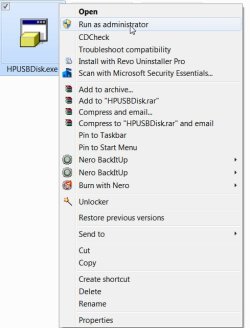
My only recommendations in the post I had linked was to first try to format with HP USB Disk Storage Format Tool. (Since you seem to be confused on clicking on the links and get on to the linked URL, I am providing the direct download link below. Just click on it and save the download)
Download starting... - Softpedia

Right click on the .exe file and run as administrator.

22-12-2012 11-08-56.jpg

Select the correct drive, uncheck Quick Format (so that you can do a full format) and click on Start.

22-12-2012 11-11-12.jpg

If you are unable to format the drive, then we can try the low level format tool. So report.
 

My Computer My Computer

At a glance

Windows 7 Home Premium 32 bit
OS
Windows 7 Home Premium 32 bit
It's got warranty? I'd send it in demanding a replacement or refund.

Generally, when any HD starts acting funny for whatever reason, I immediately save any data and get rid of it. It may have been fixable and working again for some time, but for how long... These days, with prices for TB sized reliable and trouble-free drives being this low > Amazon.com: WD Elements 2 TB USB 2.0 Desktop External Hard Drive: Electronics , IMO no need to spend lots of time battling dying drives or take chances by continuing using them.
 

My Computer My Computer

At a glance

W7, W8.1
Computer type
Laptop
Computer Manufacturer/Model Number
Dell \ Lenovo\ HP \ Toshiba
OS
W7, W8.1
Antivirus
MSE, Malwarebytes
Browser
FF
Hi Yankie007, sorry that I couldn't step in earlier since I was otherwise busy.

The procedure you had adopted was not authored by me. Wrong attribute.:)

My only recommendations in the post I had linked was to first try to format with HP USB Disk Storage Format Tool. (Since you seem to be confused on clicking on the links and get on to the linked URL, I am providing the direct download link below. Just click on it and save the download)
Download starting... - Softpedia

Right click on the .exe file and run as administrator.

View attachment 246609

Select the correct drive, uncheck Quick Format (so that you can do a full format) and click on Start.

View attachment 246610

If you are unable to format the drive, then we can try the low level format tool. So report.


Hi Jumanji,
Thank you so much for your help! I downloaded and installed the little software and ran it as admin, I did what you asked but when I clicked start, it is sooo slooow! :confused: I will wait a few hours to see if it works! If not, I'll let you know ?
 

My Computer My Computer

At a glance

Windows 7 Home Premium 64bit.Intel Core i7 CPU6.00 GB RAMATI Radeon HD 5700 Series
OS
Windows 7 Home Premium 64bit.
CPU
Intel Core i7 CPU
Motherboard
Gigabyte X58A-UD3R
Memory
6.00 GB RAM
Graphics Card(s)
ATI Radeon HD 5700 Series
Sound Card
Creative Sb-X-Fi
Monitor(s) Displays
Acer 24 inch
Screen Resolution
1400 X 1050
Hard Drives
1 Tb
Case
NZXT Mid Tower
Mouse
Kensington Expert Mouse
Internet Speed
Cable
Back
Top