Making a utilitarian USB key, and I'm stuck!

The Tehkwhiz

Supergeek
Member
Local time
3:39 PM
Messages
32
Location
Bowling Green, Ohio
Hello!

I have an 8GB USB key, and I want to put a bunch of software, utilities, etc. on it. So that way, when I go to a friend's house, or my parent's house to fix their computer, or diagnose whatever issue it's having, clean it out, etc., I have a USB key with everything I could ever need (aside from an ISO of Windows) to fix it. :p

But, I can't think of anything - I have writer's block!

All I've thought of is Spybot S&D, Malwarebytes, and DBAN.


If you were to make a utility/repair USB key, what would you put on it? I need ideas, I'd appreciate it!


Happy Holidays!

William
 

My Computer My Computer

At a glance

Windows 8.1 ProIntel Core i7-4770K16GB Kingston HyperX Black DDR3-1333EVGA GeForce GTX 780 Ti w/ ACX cooling
Computer type
PC/Desktop
Computer Manufacturer/Model Number
Custom Build
OS
Windows 8.1 Pro
CPU
Intel Core i7-4770K
Motherboard
ASUS Z87-PRO
Memory
16GB Kingston HyperX Black DDR3-1333
Graphics Card(s)
EVGA GeForce GTX 780 Ti w/ ACX cooling
Monitor(s) Displays
Dell S2440L (HDMI); Apple Cinema Display (DVI-I)
Screen Resolution
1920x1080 (Dell S2440L); 1920x1200 (Apple Cinema Display)
Hard Drives
250GB Samsung 840 EVO SSD
4TB Seagate Barracuda HDD
PSU
Corsair AX860
Case
Fractal Design Define R4
Cooling
Noctua NH-D14; 3 Fractal R2 140mm (2 intake & 1 exhaust)
Keyboard
Corsair Vengeance K70
Mouse
Razer Deathadder 2013 Edition
Internet Speed
50mbps down; 5mbps up
Antivirus
Microsoft Security Essentials + Malwarebytes Anti-Malware
Browser
Google Chrome
Other Info
Actiontec 500AV Powerline Ethernet Kit used for Internet access.
Hi William,

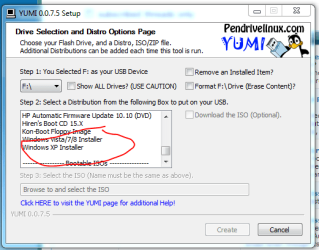
I would use YUMI to create bootable versions of some tools you are considering, in case your friends/famlys computers no longer boot.

I would put PepperMint3 on there, so you can boot into non-bootable computers and copy critical data off it.

Another useful utility is Macrium, for creating and restoring system images - get the ISO here:
https://drive.google.com/#folders/0B6gVug1Gs-l1b1VvWWd6b0dLSE0

A bootable anti-virus utility is also a must. There are links on the YUMI application to download those.

Regards,
Golden
 

My Computer My Computer

At a glance

Windows 10 Pro x64 ; Xubuntu x64Intel i7 860 @ 2.80 GHz O/C'ed to 4.0GHz16GB Corsair Vengance DDR3 @ 661 MHz Dual Cha...EVGA NVidia GTX 560 1024MB
Computer type
PC/Desktop
Computer Manufacturer/Model Number
Golden Mk. I.4
OS
Windows 10 Pro x64 ; Xubuntu x64
CPU
Intel i7 860 @ 2.80 GHz O/C'ed to 4.0GHz
Motherboard
Gigabyte P55A-UD3R Rev.1. Award BIOS F13
Memory
16GB Corsair Vengance DDR3 @ 661 MHz Dual Channel (9-9-9-24)
Graphics Card(s)
EVGA NVidia GTX 560 1024MB
Sound Card
Realtek Integrated
Monitor(s) Displays
Dual Samsung SyncMaster 2494HS
Screen Resolution
1920*1080 and 1920*1080
Hard Drives
1*Samsung 840 EVO 120GB SSD;
1*OCZ Vertex 2 60GB SSD;
2*Samsung F3 SpinPoint 1TB in RAID0;
1*Samsung F1 SpinPoint 1TB;
2*Western Digital 1TB External USB 3.0
1*Western Digital 500GB External USB 3.0
1*Seagate 500GB External USB 2.0
PSU
Thermaltake ToughPower QFan 750W
Case
Thermaltake Element S VK60001W2Z
Cooling
Corsair H60 Water Cooling, 2*230mm and 2*80mm case fans
Keyboard
Logitech G110
Mouse
Logitech MX518
Hi William,

I would use YUMI to create bootable versions of some tools you are considering, in case your friends/famlys computers no longer boot.

I would put PepperMint3 on there, so you can boot into non-bootable computers and copy critical data off it.

Another useful utility is Macrium, for creating and restoring system images - get the ISO here:
https://drive.google.com/#folders/0B6gVug1Gs-l1b1VvWWd6b0dLSE0

A bootable anti-virus utility is also a must. There are links on the YUMI application to download those.

Regards,
Golden

Thanks! But, do you also have any suggestions for programs to put on there, than I can run within the Windows desktop?
 

My Computer My Computer

At a glance

Windows 8.1 ProIntel Core i7-4770K16GB Kingston HyperX Black DDR3-1333EVGA GeForce GTX 780 Ti w/ ACX cooling
Computer type
PC/Desktop
Computer Manufacturer/Model Number
Custom Build
OS
Windows 8.1 Pro
CPU
Intel Core i7-4770K
Motherboard
ASUS Z87-PRO
Memory
16GB Kingston HyperX Black DDR3-1333
Graphics Card(s)
EVGA GeForce GTX 780 Ti w/ ACX cooling
Monitor(s) Displays
Dell S2440L (HDMI); Apple Cinema Display (DVI-I)
Screen Resolution
1920x1080 (Dell S2440L); 1920x1200 (Apple Cinema Display)
Hard Drives
250GB Samsung 840 EVO SSD
4TB Seagate Barracuda HDD
PSU
Corsair AX860
Case
Fractal Design Define R4
Cooling
Noctua NH-D14; 3 Fractal R2 140mm (2 intake & 1 exhaust)
Keyboard
Corsair Vengeance K70
Mouse
Razer Deathadder 2013 Edition
Internet Speed
50mbps down; 5mbps up
Antivirus
Microsoft Security Essentials + Malwarebytes Anti-Malware
Browser
Google Chrome
Other Info
Actiontec 500AV Powerline Ethernet Kit used for Internet access.
Some that come to mind:

CCleaner
Revo Uninstaller
Latest removal tools for Norton, McAfee, AVG and AOL
Tweaking.com - Windows Repair All-In-One
WhoCrashed
BlueScreenView
Farbar Mini Toolbar
SpeedFan
Magic Jellybean Keyfinder
ShellExView
Piriform Speccy
USBDeview
Treesize Free
Lock Hunter and/or Unlocker
TeraCopy

Edit: Most will have to be installed though
 

My Computer My Computer

At a glance

Windows 10 Pro X64Intel Quad Core i7-4770 @ 3.4Ghz16.0GB PC3-12800 DDR3 SDRAM 1600 MHzIntel Integrated HD Graphics
Computer type
PC/Desktop
Computer Manufacturer/Model Number
Lenovo IdeaCenter 450
OS
Windows 10 Pro X64
CPU
Intel Quad Core i7-4770 @ 3.4Ghz
Memory
16.0GB PC3-12800 DDR3 SDRAM 1600 MHz
Graphics Card(s)
Intel Integrated HD Graphics
Sound Card
Realtek HD Audio
Monitor(s) Displays
HP 22" LCD
Screen Resolution
1680 x 1050
Hard Drives
250GB Samsung EVO SATA-3 SSD
2TB Seagate ST2000DM001 SATA-2
1.5TB Seagate ST3150041AS SATA
Keyboard
Dell USB
Mouse
Lenovo USB
Internet Speed
Cable via Road Runner 3MB Upload, 30MB Download
Antivirus
Windows Defender, MBAM Pro, MBAE
Browser
Seamonkey
Other Info
UEFI/GPT
PLDS DVD-RW DH16AERSH

My Computer My Computer

At a glance

Windows 10 Pro x64 ; Xubuntu x64Intel i7 860 @ 2.80 GHz O/C'ed to 4.0GHz16GB Corsair Vengance DDR3 @ 661 MHz Dual Cha...EVGA NVidia GTX 560 1024MB
Computer type
PC/Desktop
Computer Manufacturer/Model Number
Golden Mk. I.4
OS
Windows 10 Pro x64 ; Xubuntu x64
CPU
Intel i7 860 @ 2.80 GHz O/C'ed to 4.0GHz
Motherboard
Gigabyte P55A-UD3R Rev.1. Award BIOS F13
Memory
16GB Corsair Vengance DDR3 @ 661 MHz Dual Channel (9-9-9-24)
Graphics Card(s)
EVGA NVidia GTX 560 1024MB
Sound Card
Realtek Integrated
Monitor(s) Displays
Dual Samsung SyncMaster 2494HS
Screen Resolution
1920*1080 and 1920*1080
Hard Drives
1*Samsung 840 EVO 120GB SSD;
1*OCZ Vertex 2 60GB SSD;
2*Samsung F3 SpinPoint 1TB in RAID0;
1*Samsung F1 SpinPoint 1TB;
2*Western Digital 1TB External USB 3.0
1*Western Digital 500GB External USB 3.0
1*Seagate 500GB External USB 2.0
PSU
Thermaltake ToughPower QFan 750W
Case
Thermaltake Element S VK60001W2Z
Cooling
Corsair H60 Water Cooling, 2*230mm and 2*80mm case fans
Keyboard
Logitech G110
Mouse
Logitech MX518

My Computer My Computer

At a glance

Multi-Boot W7_Pro_x64 W8.1_Pro_x64 W10_Pro_x6...AMD Athlon II x4 6206GB GSkill DDR2 800AMD 4670 GPU + AMD 4200 IGP
Computer type
PC/Desktop
Computer Manufacturer/Model Number
home built
OS
Multi-Boot W7_Pro_x64 W8.1_Pro_x64 W10_Pro_x64 +Linux_VMs +Chromium_VM
CPU
AMD Athlon II x4 620
Motherboard
Gigabyte GA-MA785G-UD3H
Memory
6GB GSkill DDR2 800
Graphics Card(s)
AMD 4670 GPU + AMD 4200 IGP
Sound Card
on board Realtek ALC889A
Monitor(s) Displays
RCA 40" LCD TV, Insignia 32" LCD TV, HP 15" LCD monitor
Screen Resolution
1680 x 1050
Hard Drives
OCZ Vertex 3 120GB,
Samsung F3 1TB (3),
Several others - WD, Seagate, Hitachi, ...
PSU
Corsair 500 W
Case
Rosewill mid tower
Cooling
CM 90mm rifle
Keyboard
Gyration wireless, Logitech wireless, Dell USB wired
Mouse
Gyration wireless, Logitech wireless, V7 USB wired
Internet Speed
Spectrum - 100Mbps D / 10Mbps U
Antivirus
Avast, MBAM3, EMET, WinPatrol
Browser
Pale Moon, Firefox, IE
Other Info
2 multi-boot PC's
Mainly HTPC/Office/Gen purpose (no gaming).
Trendnet USB KVM.
LG DVD burner/Blue Ray Player.
Tray system for removable SATA backup drives.

Not currently OCd, under-volted.
I use Hybrid sleep, rarely re-boot or shutdown.

Hauppauge HD-PVR, Avermedia PCIe TV Tuner, Hauppauge PCI TV Tuner.
I would include CrystalDiskInfo for quick and easy HDD/SSD diagnosis via SMART.
 

My Computer My Computer

At a glance

Windows 7 Ultimate x64 SP1Intel Core i7 2700K @ 3.5GHz (TurboBoost disa...16GB (4x4GB) Kingston HyperX DDR3 1600MHz @ 1...Nvidia EVGA GeForce GTX 1060 6GB
Computer type
PC/Desktop
Computer Manufacturer/Model Number
N/A (custom-built)
OS
Windows 7 Ultimate x64 SP1
CPU
Intel Core i7 2700K @ 3.5GHz (TurboBoost disabled)
Motherboard
ASUS P8Z68-V/GEN3
Memory
16GB (4x4GB) Kingston HyperX DDR3 1600MHz @ 1333MHz
Graphics Card(s)
Nvidia EVGA GeForce GTX 1060 6GB
Sound Card
Realtek High Definition Audio (motherboard integrated)
Monitor(s) Displays
NEC Multisync EX231W
Screen Resolution
1920x1080 @ 60Hz via DVI-D
Hard Drives
2x Western Digital 1TB SATA3 Caviar Black Internal HDD // 1x WD 500GB USB 3.0 "My Passport Essential" External HDD // 1x WD 1TB USB 3.0 "My Passport Essential" External HDD // 2x WD 2TB USB 3.0 "My Passport Essential" External HDD
PSU
Corsair Professional Series Gold AX850
Case
Antec 300
Cooling
Air-cooling
Keyboard
Steelseries 6Gv2
Mouse
Steelseries Sensei RAW Glossy, Logitech M500
Internet Speed
DSL (AT&T)
Antivirus
Microsoft Security Essentials
Browser
Pale Moon, Mozilla Firefox 12, Opera 12, Chromium, IE9
Other Info
Virtual Machines (VirtualBox):
* Japanese Windows XP Professional SP3
* Japanese Windows 7 Professional SP1
I think YUMI is probably the simplest ABC approach but it is geared a bit towards linux (denian etc).
I still use Grub4Dos which Pendrive seem to have ditched. Both this and YUMI are good for running ISOs.

Alternatively I also have a WinPe boot USB. I use Q-DIR as a more flexible Windows Explorer interface and run virtually any portable application. Making a Winpe is really quite straight forward if you download the MS WAIK files (~1.7GB). I would recommend downloading WAIK for Windows 7 before it's pulled.

I'm not sure how easy it is to run a DVD/CD based ISO app from a Winpe boot disk. I'm talking about things like Hirens boot disk etc. One of the members, SIW2, could comment on this.
 

My Computer My Computer

At a glance

Windows 7x64 Home Premium SP1Intel i7 2600kG.Skill Ripjaws (DDR3-1600) 2x4GBNvidia GeForce GTS 450; Intel HD Graphics 300...
Computer type
PC/Desktop
Computer Manufacturer/Model Number
Own build
OS
Windows 7x64 Home Premium SP1
CPU
Intel i7 2600k
Motherboard
ASUS P8Z68 Deluxe
Memory
G.Skill Ripjaws (DDR3-1600) 2x4GB
Graphics Card(s)
Nvidia GeForce GTS 450; Intel HD Graphics 3000(GT2+)
Monitor(s) Displays
Dell Ultrasharp IPS panel U2311H, Samsung SyncMaster P2350
Screen Resolution
1920x1080
Hard Drives
Samsung 850 Pro SSD 256GB, Samsung SSD 840 120GB, Seagates 1TB Barracuda ST31000528AS x2
PSU
Seasonic M12II 520W
Case
Lian Li Lancool PC-K60
Cooling
Case: 1x120mm, 3x140mm CPU: Hyper 212+
Keyboard
Logitech MK520 (wireless)
Mouse
Logitech MK520
Internet Speed
6-7 Mbps
Antivirus
Norton Security Premium, Malwarebytes on 2 (MSE on 3rd PC)
Browser
FireFox
Other Info
Audio: Logitech Z523 2.1
Michael can Yumi boot Win7 installers and most other bootable tools like Partition Wizard, Memtest, etc. all from the same stick?
 
Yes Greg, it most definately does.
 

My Computer My Computer

At a glance

Windows 10 Pro x64 ; Xubuntu x64Intel i7 860 @ 2.80 GHz O/C'ed to 4.0GHz16GB Corsair Vengance DDR3 @ 661 MHz Dual Cha...EVGA NVidia GTX 560 1024MB
Computer type
PC/Desktop
Computer Manufacturer/Model Number
Golden Mk. I.4
OS
Windows 10 Pro x64 ; Xubuntu x64
CPU
Intel i7 860 @ 2.80 GHz O/C'ed to 4.0GHz
Motherboard
Gigabyte P55A-UD3R Rev.1. Award BIOS F13
Memory
16GB Corsair Vengance DDR3 @ 661 MHz Dual Channel (9-9-9-24)
Graphics Card(s)
EVGA NVidia GTX 560 1024MB
Sound Card
Realtek Integrated
Monitor(s) Displays
Dual Samsung SyncMaster 2494HS
Screen Resolution
1920*1080 and 1920*1080
Hard Drives
1*Samsung 840 EVO 120GB SSD;
1*OCZ Vertex 2 60GB SSD;
2*Samsung F3 SpinPoint 1TB in RAID0;
1*Samsung F1 SpinPoint 1TB;
2*Western Digital 1TB External USB 3.0
1*Western Digital 500GB External USB 3.0
1*Seagate 500GB External USB 2.0
PSU
Thermaltake ToughPower QFan 750W
Case
Thermaltake Element S VK60001W2Z
Cooling
Corsair H60 Water Cooling, 2*230mm and 2*80mm case fans
Keyboard
Logitech G110
Mouse
Logitech MX518
Then I've put off trying it too long.

I just got my new Kingston Data Traveler 16gb @ $12 free shipping buy.com.

On it. :geek: Thanks.
 
Then I've put off trying it too long.

I just got my new Kingston Data Traveler 16gb @ $12 free shipping buy.com.

On it. :geek: Thanks.

In that case, here's an early Christmas present for you:

Unzip this and put it in the Unlisted ISO section of YUMI - now you can create/restore images from your USB too.
 

My Computer My Computer

At a glance

Windows 10 Pro x64 ; Xubuntu x64Intel i7 860 @ 2.80 GHz O/C'ed to 4.0GHz16GB Corsair Vengance DDR3 @ 661 MHz Dual Cha...EVGA NVidia GTX 560 1024MB
Computer type
PC/Desktop
Computer Manufacturer/Model Number
Golden Mk. I.4
OS
Windows 10 Pro x64 ; Xubuntu x64
CPU
Intel i7 860 @ 2.80 GHz O/C'ed to 4.0GHz
Motherboard
Gigabyte P55A-UD3R Rev.1. Award BIOS F13
Memory
16GB Corsair Vengance DDR3 @ 661 MHz Dual Channel (9-9-9-24)
Graphics Card(s)
EVGA NVidia GTX 560 1024MB
Sound Card
Realtek Integrated
Monitor(s) Displays
Dual Samsung SyncMaster 2494HS
Screen Resolution
1920*1080 and 1920*1080
Hard Drives
1*Samsung 840 EVO 120GB SSD;
1*OCZ Vertex 2 60GB SSD;
2*Samsung F3 SpinPoint 1TB in RAID0;
1*Samsung F1 SpinPoint 1TB;
2*Western Digital 1TB External USB 3.0
1*Western Digital 500GB External USB 3.0
1*Seagate 500GB External USB 2.0
PSU
Thermaltake ToughPower QFan 750W
Case
Thermaltake Element S VK60001W2Z
Cooling
Corsair H60 Water Cooling, 2*230mm and 2*80mm case fans
Keyboard
Logitech G110
Mouse
Logitech MX518
Thanks, Colin. Do you think my Acronis boot CD ISO would work as well? Does Yumi work with almost any bootable ISO?
 
It may Greg, just dump anything that isn't on the YUMI pre-defined list into the Unlisted ISO. Everything that I have need has worked, but I'm sure there will be a few things that dont.

   Tip
Make sure the ISO's put into Unlisted ISO do NOT have spaces in the name, or they will not boot
 

My Computer My Computer

At a glance

Windows 10 Pro x64 ; Xubuntu x64Intel i7 860 @ 2.80 GHz O/C'ed to 4.0GHz16GB Corsair Vengance DDR3 @ 661 MHz Dual Cha...EVGA NVidia GTX 560 1024MB
Computer type
PC/Desktop
Computer Manufacturer/Model Number
Golden Mk. I.4
OS
Windows 10 Pro x64 ; Xubuntu x64
CPU
Intel i7 860 @ 2.80 GHz O/C'ed to 4.0GHz
Motherboard
Gigabyte P55A-UD3R Rev.1. Award BIOS F13
Memory
16GB Corsair Vengance DDR3 @ 661 MHz Dual Channel (9-9-9-24)
Graphics Card(s)
EVGA NVidia GTX 560 1024MB
Sound Card
Realtek Integrated
Monitor(s) Displays
Dual Samsung SyncMaster 2494HS
Screen Resolution
1920*1080 and 1920*1080
Hard Drives
1*Samsung 840 EVO 120GB SSD;
1*OCZ Vertex 2 60GB SSD;
2*Samsung F3 SpinPoint 1TB in RAID0;
1*Samsung F1 SpinPoint 1TB;
2*Western Digital 1TB External USB 3.0
1*Western Digital 500GB External USB 3.0
1*Seagate 500GB External USB 2.0
PSU
Thermaltake ToughPower QFan 750W
Case
Thermaltake Element S VK60001W2Z
Cooling
Corsair H60 Water Cooling, 2*230mm and 2*80mm case fans
Keyboard
Logitech G110
Mouse
Logitech MX518
Throwing all of my bootable ISO tools on it to test them. I see it doesn't have any Win7 entries in dropdown, so should I add them under Other?
 
Michael can Yumi boot Win7 installers and most other bootable tools like Partition Wizard, Memtest, etc. all from the same stick?
Sorry Greg in terms of multiple Win 7 installers I don't know because I'm not a YUMI user at the moment. I understand it's fine for most other bootable tools - wiser people can comment. I still do system installations from DVDs but everything else works fine for me from Grub4Dos.
With Grub4Dos and possibly YUMI when you have an ISO update the change to the USB Flash drive is trivial. This is why I like it.
 

My Computer My Computer

At a glance

Windows 7x64 Home Premium SP1Intel i7 2600kG.Skill Ripjaws (DDR3-1600) 2x4GBNvidia GeForce GTS 450; Intel HD Graphics 300...
Computer type
PC/Desktop
Computer Manufacturer/Model Number
Own build
OS
Windows 7x64 Home Premium SP1
CPU
Intel i7 2600k
Motherboard
ASUS P8Z68 Deluxe
Memory
G.Skill Ripjaws (DDR3-1600) 2x4GB
Graphics Card(s)
Nvidia GeForce GTS 450; Intel HD Graphics 3000(GT2+)
Monitor(s) Displays
Dell Ultrasharp IPS panel U2311H, Samsung SyncMaster P2350
Screen Resolution
1920x1080
Hard Drives
Samsung 850 Pro SSD 256GB, Samsung SSD 840 120GB, Seagates 1TB Barracuda ST31000528AS x2
PSU
Seasonic M12II 520W
Case
Lian Li Lancool PC-K60
Cooling
Case: 1x120mm, 3x140mm CPU: Hyper 212+
Keyboard
Logitech MK520 (wireless)
Mouse
Logitech MK520
Internet Speed
6-7 Mbps
Antivirus
Norton Security Premium, Malwarebytes on 2 (MSE on 3rd PC)
Browser
FireFox
Other Info
Audio: Logitech Z523 2.1
Put the Windows 7 ISO here:
 

Attachments

  • capture.PNG
    capture.PNG
    21.5 KB · Views: 6

My Computer My Computer

At a glance

Windows 10 Pro x64 ; Xubuntu x64Intel i7 860 @ 2.80 GHz O/C'ed to 4.0GHz16GB Corsair Vengance DDR3 @ 661 MHz Dual Cha...EVGA NVidia GTX 560 1024MB
Computer type
PC/Desktop
Computer Manufacturer/Model Number
Golden Mk. I.4
OS
Windows 10 Pro x64 ; Xubuntu x64
CPU
Intel i7 860 @ 2.80 GHz O/C'ed to 4.0GHz
Motherboard
Gigabyte P55A-UD3R Rev.1. Award BIOS F13
Memory
16GB Corsair Vengance DDR3 @ 661 MHz Dual Channel (9-9-9-24)
Graphics Card(s)
EVGA NVidia GTX 560 1024MB
Sound Card
Realtek Integrated
Monitor(s) Displays
Dual Samsung SyncMaster 2494HS
Screen Resolution
1920*1080 and 1920*1080
Hard Drives
1*Samsung 840 EVO 120GB SSD;
1*OCZ Vertex 2 60GB SSD;
2*Samsung F3 SpinPoint 1TB in RAID0;
1*Samsung F1 SpinPoint 1TB;
2*Western Digital 1TB External USB 3.0
1*Western Digital 500GB External USB 3.0
1*Seagate 500GB External USB 2.0
PSU
Thermaltake ToughPower QFan 750W
Case
Thermaltake Element S VK60001W2Z
Cooling
Corsair H60 Water Cooling, 2*230mm and 2*80mm case fans
Keyboard
Logitech G110
Mouse
Logitech MX518
Yes but could you install multiple Windows installers (W7, W8 - premium, professional,...? I thought that was the question??
 

My Computer My Computer

At a glance

Windows 7x64 Home Premium SP1Intel i7 2600kG.Skill Ripjaws (DDR3-1600) 2x4GBNvidia GeForce GTS 450; Intel HD Graphics 300...
Computer type
PC/Desktop
Computer Manufacturer/Model Number
Own build
OS
Windows 7x64 Home Premium SP1
CPU
Intel i7 2600k
Motherboard
ASUS P8Z68 Deluxe
Memory
G.Skill Ripjaws (DDR3-1600) 2x4GB
Graphics Card(s)
Nvidia GeForce GTS 450; Intel HD Graphics 3000(GT2+)
Monitor(s) Displays
Dell Ultrasharp IPS panel U2311H, Samsung SyncMaster P2350
Screen Resolution
1920x1080
Hard Drives
Samsung 850 Pro SSD 256GB, Samsung SSD 840 120GB, Seagates 1TB Barracuda ST31000528AS x2
PSU
Seasonic M12II 520W
Case
Lian Li Lancool PC-K60
Cooling
Case: 1x120mm, 3x140mm CPU: Hyper 212+
Keyboard
Logitech MK520 (wireless)
Mouse
Logitech MK520
Internet Speed
6-7 Mbps
Antivirus
Norton Security Premium, Malwarebytes on 2 (MSE on 3rd PC)
Browser
FireFox
Other Info
Audio: Logitech Z523 2.1
Formatted the stick FAT32 using YUMI then added a bunch of my bootable tool ISO's. Rebooted to boot the stick and I get Verifying DMI Pool data with a blinking cursor.

Have now formatted and reloaded various ISO's 3 times and can't get past blinking cursor at boot on 2 home PC's - on one the BIOS prompts to Update DMI. I wonder if it has to do with it being a USB 3.0 stick, although it boots on same PC's when formatted nt60 by UltraISO.

Tried formatting NTFS still no luck. I wonder if USB 3 won't work with a SysLinux MBR, whereas it was working fine with nt60 MBR.

Just reformatted and wrote Win7 installer with UltraISO and stick boots normally. I'd really like to make all of my tools bootable on the stick though.

 
Last edited:
Back
Top