Getting Word to Open in Correct Format on "New" Context Menu

chriswchrisw

New member
Local time
1:40 PM
Messages
23
I use Office XP (esp Word 2002, .doc) on my Win7 machine. I use the Office 2007 Compatability Pack to be compatible with Word 2007/2010's .docx. A little clumsy, but it works...I don't want to change to Open Office, et al.

I set the default font in my Word 2002 as Times New Roman-12pt. Every time Word 2002 opens, I get that. Good.

However, every time I open Word using the "New" context menu, it opens as Word 2007 (.docx) in Courier New-10 pt. How do I:

1--have it open in 2002? [I think it's a reg hack, but I haven't found one that works]

2--lacking that, at least have it open in Times New Roman--12pt? [I use the same procedure with 2007/.docx to set the default font as I did with 2002/.doc, but it doesn't "stick".]

Thnx.......
 

My Computer My Computer

At a glance

Win 7 Home Prem 64
OS
Win 7 Home Prem 64
.........every time I open Word using the "New" context menu, it opens as Word 2007 (.docx).........
I've not been able to reproduce this.

I started with W7 pro 64bit SP1 in a virtual machine via VirtualBox and I installed Office 2002 (I tested using right-click > New > Microsoft Word Document and I got a 2002 doc as expected.)

Then I installed the Office Compatibility Pack and tested again - I still got a 2002 doc.

I applied all of the Office updates and tested again - I still got a 2002 doc.

I applied the Office Compatibility Pack SP3 and tested again - I still got a 2002 doc.

I restarted between updates and tests - but no joy (or no sadness :-)

What I've not done is to apply all of the OS patches because I'm on a slow connection to the net - but I don't think that would matter to this problem. All I can suggest is to uninstall the Office Compatibility Pack and test. If "New" still makes a docx, then do a repair on Office 2002 (you might need the CD). Worse comes to worse, uninstall Office 2002 and start fresh.
 

My Computer My Computer

At a glance

W7 Pro SP1 64biti78GBIntel HD Graphics
Computer type
Laptop
Computer Manufacturer/Model Number
Employer provided Dell Latitude
OS
W7 Pro SP1 64bit
CPU
i7
Memory
8GB
Graphics Card(s)
Intel HD Graphics
Hard Drives
crappy SSD
Antivirus
Employer mandated Symantec Endpoint Protection
Browser
Pale Moon 64bit, IE11 64bit & Chrome 64bit
UNI...Very much appreciated, will post you a detailed response later today.
 

My Computer My Computer

At a glance

Win 7 Home Prem 64
OS
Win 7 Home Prem 64
UNI....maybe we can compare registries

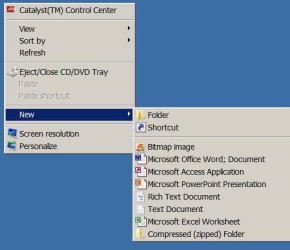
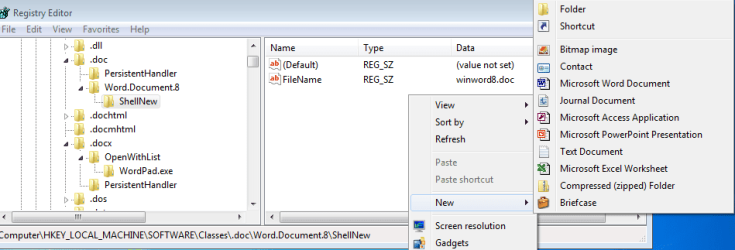
My New menu looks like this:

ScreenShot001.jpg

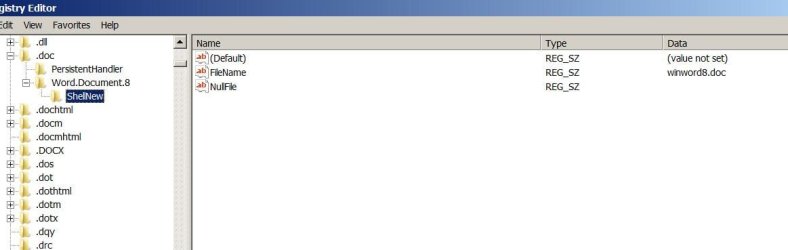
If I go into the ROOTS part of the registry, .doc has these entries:

ScreenShot003.jpg

and its ShellNew shows:

ScreenShot002.jpg

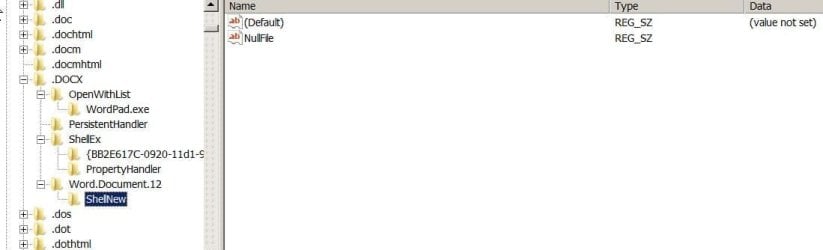
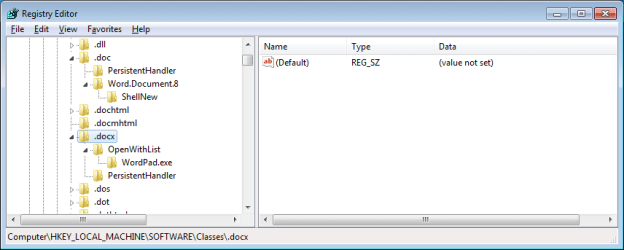
But .DOCX looks different:

The entries for .DOCX are:

ScreenShot005.jpg

and its ShellNew is:

ScreenShot004.jpg

I believe Word.Document 8 is 2002, and 12 is 2007.

Does this give you any clues?
 

My Computer My Computer

At a glance

Win 7 Home Prem 64
OS
Win 7 Home Prem 64
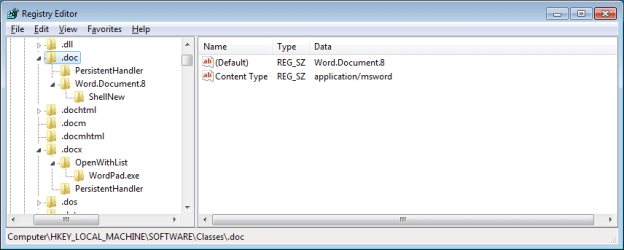
with office 2002 - but before installing the office compatibility pack:
0-reg-before-com-pack.png
1-new&reg-before-com-pack.png
2-reg-before-com-pack.png

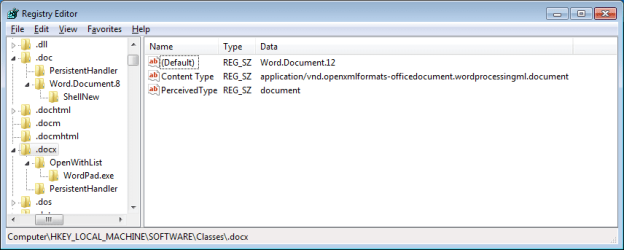
after installing the office compatibility pack:
3-reg-after-com-pack.png

edit the registry at your own risk...
 

My Computer My Computer

At a glance

W7 Pro SP1 64biti78GBIntel HD Graphics
Computer type
Laptop
Computer Manufacturer/Model Number
Employer provided Dell Latitude
OS
W7 Pro SP1 64bit
CPU
i7
Memory
8GB
Graphics Card(s)
Intel HD Graphics
Hard Drives
crappy SSD
Antivirus
Employer mandated Symantec Endpoint Protection
Browser
Pale Moon 64bit, IE11 64bit & Chrome 64bit
Back
Top