Asus M4A785-M On-board graphics help needed please

Peter1967

New member
Local time
3:50 PM
Messages
12
Hello everyone

I built my own system a couple of years ago and I am now facing a technical problem.

My graphics currently rely on the Radeon HD 4770. I decided I would like to display my desktop on my television via HDMI cable.

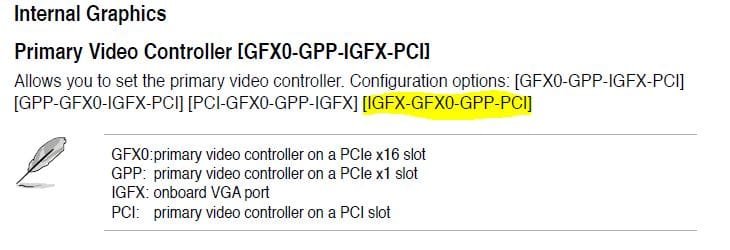
After staring at a blank screen for a while and scratching my head I realised HDMI must rely on integrated graphics. I went into bios, Northbridge, Integrated Graphis which presented 4 configuration options and not knowing what these mean I just chose IGFX-GFX0-GPP-PCI.

This just led to a blank monitor and I had to reset my BIOS via battery removal to get back into my system. What configuration should I choose? How can I get my desktop displayed on my TV?

Your help is really appreciated.

Peter
 

Attachments

  • Capture.JPG
    Capture.JPG
    33.3 KB · Views: 2
  • Capture2.JPG
    Capture2.JPG
    33.7 KB · Views: 3

My Computer My Computer

At a glance

Windows 7 pro x64Processor : AMD Phenom II X4 B50 @ 3100 MHzPhysical Memory : 4096 MB (4 x 1024 DDR2-SDRAM )Video Card : ATI Radeon HD 4770
Computer Manufacturer/Model Number
Home build
OS
Windows 7 pro x64
CPU
Processor : AMD Phenom II X4 B50 @ 3100 MHz
Motherboard
Mainboard : Asus M4A785-M
Memory
Physical Memory : 4096 MB (4 x 1024 DDR2-SDRAM )
Graphics Card(s)
Video Card : ATI Radeon HD 4770
Monitor(s) Displays
Monitor Type : LG Electronics W2241 - 23 inches
Hard Drives
Drive C: (Hard Disk) : 449 GB available on 500 GB
Drive E: (Hard Disk) : 797 GB available on 1000 GB
Are you connecting your TV (HDTV) to your GPU or your mobo? If you could fill in your system specs this will greatly increase you chances for us to properly help you.
 

My Computer My Computer

At a glance

Windows 7 Ultimate 64 bitAMD Phenom II X4 965 Black EditionGSkill 4 X 2 GB PC 8500XFX Radeon HD 6790 D
Computer Manufacturer/Model Number
Custom built
OS
Windows 7 Ultimate 64 bit
CPU
AMD Phenom II X4 965 Black Edition
Motherboard
Gigabyte GA-MA790X-DS4
Memory
GSkill 4 X 2 GB PC 8500
Graphics Card(s)
XFX Radeon HD 6790 D
Sound Card
On board RealTek HD
Monitor(s) Displays
Dual monitors:Samsung SyncMaster S20B300
Screen Resolution
1600 X 900
Hard Drives
Seagate Barracuda 1TB (primary)
Seagate Barracuda 2 X 320 GB
PSU
Ultra X4 750 watt fully modular
Case
Thermaltake Overseer RX 1 full tower
Cooling
Core-Contact 92 mm CPU Cooler
Keyboard
Logitech G510
Mouse
Razor DeathAdder
Internet Speed
50/5 Mbps UL/DL
Other Info
Optical: Super Muliti DVD burner w/lightscribe, Hauppauge WinTV HVR-1800
Hi Bassfisher,

Im connecting to the Mobo as the GPU has no HDMI connector.

Ill work on system specs now

Thanks
 

My Computer My Computer

At a glance

Windows 7 pro x64Processor : AMD Phenom II X4 B50 @ 3100 MHzPhysical Memory : 4096 MB (4 x 1024 DDR2-SDRAM )Video Card : ATI Radeon HD 4770
Computer Manufacturer/Model Number
Home build
OS
Windows 7 pro x64
CPU
Processor : AMD Phenom II X4 B50 @ 3100 MHz
Motherboard
Mainboard : Asus M4A785-M
Memory
Physical Memory : 4096 MB (4 x 1024 DDR2-SDRAM )
Graphics Card(s)
Video Card : ATI Radeon HD 4770
Monitor(s) Displays
Monitor Type : LG Electronics W2241 - 23 inches
Hard Drives
Drive C: (Hard Disk) : 449 GB available on 500 GB
Drive E: (Hard Disk) : 797 GB available on 1000 GB
After looking at the specs of your mobo and checking the drivers for the latest, I see that there is a BIOS update that was released 12/2012 vs 1101. I also see there is an AMD HDMI driver update released 12/2010. Do you have those driver updates?

http://www.asus.com/Motherboards/AMD_AM2Plus/M4A785M/#download
 

My Computer My Computer

At a glance

Windows 7 Ultimate 64 bitAMD Phenom II X4 965 Black EditionGSkill 4 X 2 GB PC 8500XFX Radeon HD 6790 D
Computer Manufacturer/Model Number
Custom built
OS
Windows 7 Ultimate 64 bit
CPU
AMD Phenom II X4 965 Black Edition
Motherboard
Gigabyte GA-MA790X-DS4
Memory
GSkill 4 X 2 GB PC 8500
Graphics Card(s)
XFX Radeon HD 6790 D
Sound Card
On board RealTek HD
Monitor(s) Displays
Dual monitors:Samsung SyncMaster S20B300
Screen Resolution
1600 X 900
Hard Drives
Seagate Barracuda 1TB (primary)
Seagate Barracuda 2 X 320 GB
PSU
Ultra X4 750 watt fully modular
Case
Thermaltake Overseer RX 1 full tower
Cooling
Core-Contact 92 mm CPU Cooler
Keyboard
Logitech G510
Mouse
Razor DeathAdder
Internet Speed
50/5 Mbps UL/DL
Other Info
Optical: Super Muliti DVD burner w/lightscribe, Hauppauge WinTV HVR-1800
Although, it should work using the HDMI cable with your mobo. Once it's connected you have to make sure the windows detects it. Right click any where on the open desktop, then click screen resolution, then click detect and from there you should be able to set it up by extending it.
 

My Computer My Computer

At a glance

Windows 7 Ultimate 64 bitAMD Phenom II X4 965 Black EditionGSkill 4 X 2 GB PC 8500XFX Radeon HD 6790 D
Computer Manufacturer/Model Number
Custom built
OS
Windows 7 Ultimate 64 bit
CPU
AMD Phenom II X4 965 Black Edition
Motherboard
Gigabyte GA-MA790X-DS4
Memory
GSkill 4 X 2 GB PC 8500
Graphics Card(s)
XFX Radeon HD 6790 D
Sound Card
On board RealTek HD
Monitor(s) Displays
Dual monitors:Samsung SyncMaster S20B300
Screen Resolution
1600 X 900
Hard Drives
Seagate Barracuda 1TB (primary)
Seagate Barracuda 2 X 320 GB
PSU
Ultra X4 750 watt fully modular
Case
Thermaltake Overseer RX 1 full tower
Cooling
Core-Contact 92 mm CPU Cooler
Keyboard
Logitech G510
Mouse
Razor DeathAdder
Internet Speed
50/5 Mbps UL/DL
Other Info
Optical: Super Muliti DVD burner w/lightscribe, Hauppauge WinTV HVR-1800
Hi Bassfisher,

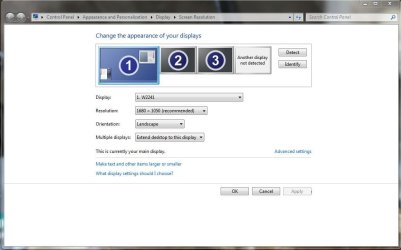
I have the updates you point to, thanks. I clicked in resolution as you said but I have been playing around so much that it now looks very confusing:rolleyes:, please see attachment.

Dont know whats next ?

Peter
 

Attachments

  • Capture3.JPG
    Capture3.JPG
    55.8 KB · Views: 3

My Computer My Computer

At a glance

Windows 7 pro x64Processor : AMD Phenom II X4 B50 @ 3100 MHzPhysical Memory : 4096 MB (4 x 1024 DDR2-SDRAM )Video Card : ATI Radeon HD 4770
Computer Manufacturer/Model Number
Home build
OS
Windows 7 pro x64
CPU
Processor : AMD Phenom II X4 B50 @ 3100 MHz
Motherboard
Mainboard : Asus M4A785-M
Memory
Physical Memory : 4096 MB (4 x 1024 DDR2-SDRAM )
Graphics Card(s)
Video Card : ATI Radeon HD 4770
Monitor(s) Displays
Monitor Type : LG Electronics W2241 - 23 inches
Hard Drives
Drive C: (Hard Disk) : 449 GB available on 500 GB
Drive E: (Hard Disk) : 797 GB available on 1000 GB
Which connection is the TV and which ones are the monitors? Do you have more the one monitor besides the tv?
 

My Computer My Computer

At a glance

Windows 7 Ultimate 64 bitAMD Phenom II X4 965 Black EditionGSkill 4 X 2 GB PC 8500XFX Radeon HD 6790 D
Computer Manufacturer/Model Number
Custom built
OS
Windows 7 Ultimate 64 bit
CPU
AMD Phenom II X4 965 Black Edition
Motherboard
Gigabyte GA-MA790X-DS4
Memory
GSkill 4 X 2 GB PC 8500
Graphics Card(s)
XFX Radeon HD 6790 D
Sound Card
On board RealTek HD
Monitor(s) Displays
Dual monitors:Samsung SyncMaster S20B300
Screen Resolution
1600 X 900
Hard Drives
Seagate Barracuda 1TB (primary)
Seagate Barracuda 2 X 320 GB
PSU
Ultra X4 750 watt fully modular
Case
Thermaltake Overseer RX 1 full tower
Cooling
Core-Contact 92 mm CPU Cooler
Keyboard
Logitech G510
Mouse
Razor DeathAdder
Internet Speed
50/5 Mbps UL/DL
Other Info
Optical: Super Muliti DVD burner w/lightscribe, Hauppauge WinTV HVR-1800
Hi Bassfisher,

I have updated my system specs.

Peter
 

My Computer My Computer

At a glance

Windows 7 pro x64Processor : AMD Phenom II X4 B50 @ 3100 MHzPhysical Memory : 4096 MB (4 x 1024 DDR2-SDRAM )Video Card : ATI Radeon HD 4770
Computer Manufacturer/Model Number
Home build
OS
Windows 7 pro x64
CPU
Processor : AMD Phenom II X4 B50 @ 3100 MHz
Motherboard
Mainboard : Asus M4A785-M
Memory
Physical Memory : 4096 MB (4 x 1024 DDR2-SDRAM )
Graphics Card(s)
Video Card : ATI Radeon HD 4770
Monitor(s) Displays
Monitor Type : LG Electronics W2241 - 23 inches
Hard Drives
Drive C: (Hard Disk) : 449 GB available on 500 GB
Drive E: (Hard Disk) : 797 GB available on 1000 GB
Assuming that 1 is the TV, where it says extend this display, click on it...that should show your desktop on your TV.
 

My Computer My Computer

At a glance

Windows 7 Ultimate 64 bitAMD Phenom II X4 965 Black EditionGSkill 4 X 2 GB PC 8500XFX Radeon HD 6790 D
Computer Manufacturer/Model Number
Custom built
OS
Windows 7 Ultimate 64 bit
CPU
AMD Phenom II X4 965 Black Edition
Motherboard
Gigabyte GA-MA790X-DS4
Memory
GSkill 4 X 2 GB PC 8500
Graphics Card(s)
XFX Radeon HD 6790 D
Sound Card
On board RealTek HD
Monitor(s) Displays
Dual monitors:Samsung SyncMaster S20B300
Screen Resolution
1600 X 900
Hard Drives
Seagate Barracuda 1TB (primary)
Seagate Barracuda 2 X 320 GB
PSU
Ultra X4 750 watt fully modular
Case
Thermaltake Overseer RX 1 full tower
Cooling
Core-Contact 92 mm CPU Cooler
Keyboard
Logitech G510
Mouse
Razor DeathAdder
Internet Speed
50/5 Mbps UL/DL
Other Info
Optical: Super Muliti DVD burner w/lightscribe, Hauppauge WinTV HVR-1800
Which connection is the TV and which ones are the monitors? Do you have more the one monitor besides the tv?

Number 1 is the pc desktop monitor, as for the others I have no idea ?


Peter
 

My Computer My Computer

At a glance

Windows 7 pro x64Processor : AMD Phenom II X4 B50 @ 3100 MHzPhysical Memory : 4096 MB (4 x 1024 DDR2-SDRAM )Video Card : ATI Radeon HD 4770
Computer Manufacturer/Model Number
Home build
OS
Windows 7 pro x64
CPU
Processor : AMD Phenom II X4 B50 @ 3100 MHz
Motherboard
Mainboard : Asus M4A785-M
Memory
Physical Memory : 4096 MB (4 x 1024 DDR2-SDRAM )
Graphics Card(s)
Video Card : ATI Radeon HD 4770
Monitor(s) Displays
Monitor Type : LG Electronics W2241 - 23 inches
Hard Drives
Drive C: (Hard Disk) : 449 GB available on 500 GB
Drive E: (Hard Disk) : 797 GB available on 1000 GB
The only physical connections I have to the system are the monitor and the HDMI cable coming from the tv to the Mobo.
 

My Computer My Computer

At a glance

Windows 7 pro x64Processor : AMD Phenom II X4 B50 @ 3100 MHzPhysical Memory : 4096 MB (4 x 1024 DDR2-SDRAM )Video Card : ATI Radeon HD 4770
Computer Manufacturer/Model Number
Home build
OS
Windows 7 pro x64
CPU
Processor : AMD Phenom II X4 B50 @ 3100 MHz
Motherboard
Mainboard : Asus M4A785-M
Memory
Physical Memory : 4096 MB (4 x 1024 DDR2-SDRAM )
Graphics Card(s)
Video Card : ATI Radeon HD 4770
Monitor(s) Displays
Monitor Type : LG Electronics W2241 - 23 inches
Hard Drives
Drive C: (Hard Disk) : 449 GB available on 500 GB
Drive E: (Hard Disk) : 797 GB available on 1000 GB
Im missing something here Bassfisher,

Could it be that the HD4770 disables integrated graphics and if so then it would explain why I get nothing from the HDMI going to the Mobo?

Peter
 

My Computer My Computer

At a glance

Windows 7 pro x64Processor : AMD Phenom II X4 B50 @ 3100 MHzPhysical Memory : 4096 MB (4 x 1024 DDR2-SDRAM )Video Card : ATI Radeon HD 4770
Computer Manufacturer/Model Number
Home build
OS
Windows 7 pro x64
CPU
Processor : AMD Phenom II X4 B50 @ 3100 MHz
Motherboard
Mainboard : Asus M4A785-M
Memory
Physical Memory : 4096 MB (4 x 1024 DDR2-SDRAM )
Graphics Card(s)
Video Card : ATI Radeon HD 4770
Monitor(s) Displays
Monitor Type : LG Electronics W2241 - 23 inches
Hard Drives
Drive C: (Hard Disk) : 449 GB available on 500 GB
Drive E: (Hard Disk) : 797 GB available on 1000 GB
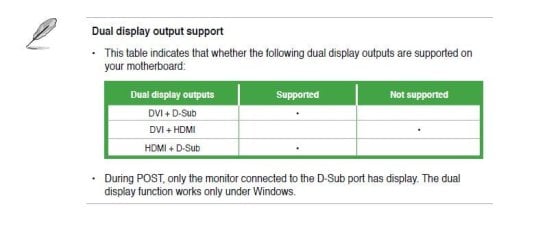
With using the card you want it set to GFXO. Also go back into the bios and make sure that "Surround View" is set to enabled and not auto, as auto doesn't always work. This setting allows you to use the onboard video at the same time as a video card (pretty much any AMD/ATI card will do), and works very well as I have used it in the past.

Another thing while in the bios is to make sure that the "AMD 785 HDMI Audio" is set to enabled if you plan on having audio over the HDMI connection.
 

My Computer My Computer

At a glance

Win 7 Ultimate x64FX-8350 @ 4.6 GHz so farADATA XPG V1 Series Black 8GB DDR3 1600Sapphire R9 270x Dual-X

Computer type
PC/Desktop
Computer Manufacturer/Model Number
Me
OS
Win 7 Ultimate x64
CPU
FX-8350 @ 4.6 GHz so far
Motherboard
Asus M5A97 EVO
Memory
ADATA XPG V1 Series Black 8GB DDR3 1600
Graphics Card(s)
Sapphire R9 270x Dual-X
Sound Card
Xonar DGX w/ Corsair Vengence 1300
Monitor(s) Displays
Acer S232HL Abid
Screen Resolution
1920x1080
Hard Drives
120 GB OCZ Vertex 3
500 GB Seagate 7200.12
PSU
Antec Earthwatts 650W Green
Case
Antec Three Hundred
Cooling
Cooler Master 212 EVO
Keyboard
Logitech G510
Mouse
Logitech G500s
Internet Speed
35000/3000
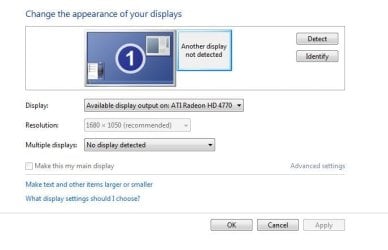
I have removed the other displays and clicked the detect button and it finds no other displays, please see attachment Bassfisher.


Peter
 

Attachments

  • Capture4.JPG
    Capture4.JPG
    33.3 KB · Views: 2

My Computer My Computer

At a glance

Windows 7 pro x64Processor : AMD Phenom II X4 B50 @ 3100 MHzPhysical Memory : 4096 MB (4 x 1024 DDR2-SDRAM )Video Card : ATI Radeon HD 4770
Computer Manufacturer/Model Number
Home build
OS
Windows 7 pro x64
CPU
Processor : AMD Phenom II X4 B50 @ 3100 MHz
Motherboard
Mainboard : Asus M4A785-M
Memory
Physical Memory : 4096 MB (4 x 1024 DDR2-SDRAM )
Graphics Card(s)
Video Card : ATI Radeon HD 4770
Monitor(s) Displays
Monitor Type : LG Electronics W2241 - 23 inches
Hard Drives
Drive C: (Hard Disk) : 449 GB available on 500 GB
Drive E: (Hard Disk) : 797 GB available on 1000 GB
Hi Stormy and Bassfisher,

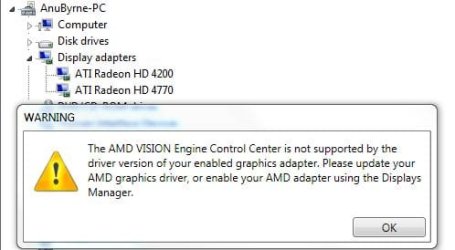
I just enabled surround view in BIOS and when I restarted the system it found new hardware (the onboard graphics :) ) Please see attachment.

There was also a warning from AMD, please see attachment. I have a feeling we are almost there.


Peter
 

Attachments

  • Capture5.JPG
    Capture5.JPG
    26.8 KB · Views: 1
  • Capture6.JPG
    Capture6.JPG
    25.5 KB · Views: 1

My Computer My Computer

At a glance

Windows 7 pro x64Processor : AMD Phenom II X4 B50 @ 3100 MHzPhysical Memory : 4096 MB (4 x 1024 DDR2-SDRAM )Video Card : ATI Radeon HD 4770
Computer Manufacturer/Model Number
Home build
OS
Windows 7 pro x64
CPU
Processor : AMD Phenom II X4 B50 @ 3100 MHz
Motherboard
Mainboard : Asus M4A785-M
Memory
Physical Memory : 4096 MB (4 x 1024 DDR2-SDRAM )
Graphics Card(s)
Video Card : ATI Radeon HD 4770
Monitor(s) Displays
Monitor Type : LG Electronics W2241 - 23 inches
Hard Drives
Drive C: (Hard Disk) : 449 GB available on 500 GB
Drive E: (Hard Disk) : 797 GB available on 1000 GB
Dear helpers,

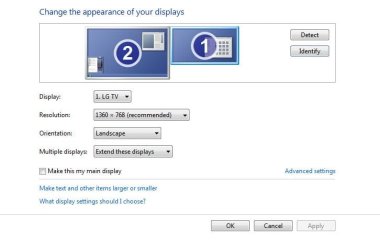
I now have the tv correctly identified by the system. I can even see my desktop on the tv, However it is only displaying the desktop background image, nothing clickable and no mouse cursor :confused:

Peter
 

Attachments

  • Capture7.JPG
    Capture7.JPG
    33 KB · Views: 3

My Computer My Computer

At a glance

Windows 7 pro x64Processor : AMD Phenom II X4 B50 @ 3100 MHzPhysical Memory : 4096 MB (4 x 1024 DDR2-SDRAM )Video Card : ATI Radeon HD 4770
Computer Manufacturer/Model Number
Home build
OS
Windows 7 pro x64
CPU
Processor : AMD Phenom II X4 B50 @ 3100 MHz
Motherboard
Mainboard : Asus M4A785-M
Memory
Physical Memory : 4096 MB (4 x 1024 DDR2-SDRAM )
Graphics Card(s)
Video Card : ATI Radeon HD 4770
Monitor(s) Displays
Monitor Type : LG Electronics W2241 - 23 inches
Hard Drives
Drive C: (Hard Disk) : 449 GB available on 500 GB
Drive E: (Hard Disk) : 797 GB available on 1000 GB
That is normal until you put something on it. Unless you want a mirror image of the desktop (clone mode), leave it in extended mode. You can then put icons on it or move open programs (Windows Media player e.g.), while still using the monitor to work on.

If you plan on gaming on the TV, you will have to set the TV as the primary display or it will only run on the monitor.

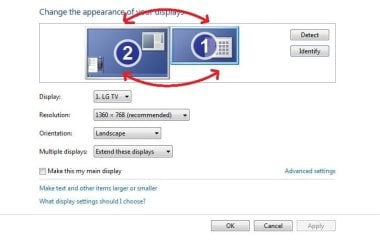
One more thing, neither Windows nor the video card/drivers knows which way you have the displays oriented (TV on right, monitor on left, etc). The fix is easy as all you have to drag one of them to the other side of the other,

Capture7.JPG
 

My Computer My Computer

At a glance

Win 7 Ultimate x64FX-8350 @ 4.6 GHz so farADATA XPG V1 Series Black 8GB DDR3 1600Sapphire R9 270x Dual-X
Computer type
PC/Desktop
Computer Manufacturer/Model Number
Me
OS
Win 7 Ultimate x64
CPU
FX-8350 @ 4.6 GHz so far
Motherboard
Asus M5A97 EVO
Memory
ADATA XPG V1 Series Black 8GB DDR3 1600
Graphics Card(s)
Sapphire R9 270x Dual-X
Sound Card
Xonar DGX w/ Corsair Vengence 1300
Monitor(s) Displays
Acer S232HL Abid
Screen Resolution
1920x1080
Hard Drives
120 GB OCZ Vertex 3
500 GB Seagate 7200.12
PSU
Antec Earthwatts 650W Green
Case
Antec Three Hundred
Cooling
Cooler Master 212 EVO
Keyboard
Logitech G510
Mouse
Logitech G500s
Internet Speed
35000/3000
Stormy and Bassfisher,

I would like to thank you both for sorting out the issues I was facing. Your help has been invaluable and prompt.

Thank you

Peter
 

My Computer My Computer

At a glance

Windows 7 pro x64Processor : AMD Phenom II X4 B50 @ 3100 MHzPhysical Memory : 4096 MB (4 x 1024 DDR2-SDRAM )Video Card : ATI Radeon HD 4770
Computer Manufacturer/Model Number
Home build
OS
Windows 7 pro x64
CPU
Processor : AMD Phenom II X4 B50 @ 3100 MHz
Motherboard
Mainboard : Asus M4A785-M
Memory
Physical Memory : 4096 MB (4 x 1024 DDR2-SDRAM )
Graphics Card(s)
Video Card : ATI Radeon HD 4770
Monitor(s) Displays
Monitor Type : LG Electronics W2241 - 23 inches
Hard Drives
Drive C: (Hard Disk) : 449 GB available on 500 GB
Drive E: (Hard Disk) : 797 GB available on 1000 GB
Back
Top