reinstalled W7 - c drive full

Johneeo

New member
Member
Local time
11:56 AM
Messages
30
I have an HP laptop. I had to reinstall Windows 7.

The hard drive has about 300 GB. After the install, the C drive is showing 39 GB and 99% full.:mad:

HUH? Any ideas?
 

My Computer My Computer

Computer Manufacturer/Model Number
Dell laptop D610
OS
Windows XP Pro
It sounds like you've double installed 7. Why not just use HP's hidden partition/software to reset/restore laptop to factory condition.
 

My Computer My Computer

Computer Manufacturer/Model Number
Custom built
OS
Windows 7 Ultimate 64 bit
CPU
AMD Phenom II X4 965 Black Edition
Motherboard
Gigabyte GA-MA790X-DS4
Memory
GSkill 4 X 2 GB PC 8500
Graphics Card(s)
XFX Radeon HD 6790 D
Sound Card
On board RealTek HD
Monitor(s) Displays
Dual monitors:Samsung SyncMaster S20B300
Screen Resolution
1600 X 900
Hard Drives
Seagate Barracuda 1TB (primary)
Seagate Barracuda 2 X 320 GB
PSU
Ultra X4 750 watt fully modular
Case
Thermaltake Overseer RX 1 full tower
Cooling
Core-Contact 92 mm CPU Cooler
Keyboard
Logitech G510
Mouse
Razor DeathAdder
Internet Speed
50/5 Mbps UL/DL
Other Info
Optical: Super Muliti DVD burner w/lightscribe, Hauppauge WinTV HVR-1800
A screenshot of the full Disk Management would help.
 

My Computer My Computer

Computer Manufacturer/Model Number
HP, Dell, Gateway, Toshiba - 4 laptops and 2 desktops
OS
Vista, Windows7, Mint Mate, Zorin, Windows 8
CPU
from 1.6GHz Duo to i7
Monitor(s) Displays
2x HP w2207
Hard Drives
5x HDD, 7x SSD, 12x Externals
Keyboard
with trackball - no mices
Mouse
Trackball mice
Internet Speed
DSL 6000
It sounds like you've double installed 7. Why not just use HP's hidden partition/software to reset/restore laptop to factory condition.

I tried that, but no go.

So, right now, I am formatting the C drive, and gonna try from scratch.
 

My Computer My Computer

Computer Manufacturer/Model Number
Dell laptop D610
OS
Windows XP Pro
That was going to be my next suggestion....let us know how it goes.
 

My Computer My Computer

Computer Manufacturer/Model Number
Custom built
OS
Windows 7 Ultimate 64 bit
CPU
AMD Phenom II X4 965 Black Edition
Motherboard
Gigabyte GA-MA790X-DS4
Memory
GSkill 4 X 2 GB PC 8500
Graphics Card(s)
XFX Radeon HD 6790 D
Sound Card
On board RealTek HD
Monitor(s) Displays
Dual monitors:Samsung SyncMaster S20B300
Screen Resolution
1600 X 900
Hard Drives
Seagate Barracuda 1TB (primary)
Seagate Barracuda 2 X 320 GB
PSU
Ultra X4 750 watt fully modular
Case
Thermaltake Overseer RX 1 full tower
Cooling
Core-Contact 92 mm CPU Cooler
Keyboard
Logitech G510
Mouse
Razor DeathAdder
Internet Speed
50/5 Mbps UL/DL
Other Info
Optical: Super Muliti DVD burner w/lightscribe, Hauppauge WinTV HVR-1800
That was going to be my next suggestion....let us know how it goes.

Just finished the format, and it tells me that the C drive has 32 GB.:(

Makes no sense.
 

My Computer My Computer

Computer Manufacturer/Model Number
Dell laptop D610
OS
Windows XP Pro
As I said earlier, post a picture of your Disk Management. Without that we are only guessing.
 

My Computer My Computer

Computer Manufacturer/Model Number
HP, Dell, Gateway, Toshiba - 4 laptops and 2 desktops
OS
Vista, Windows7, Mint Mate, Zorin, Windows 8
CPU
from 1.6GHz Duo to i7
Monitor(s) Displays
2x HP w2207
Hard Drives
5x HDD, 7x SSD, 12x Externals
Keyboard
with trackball - no mices
Mouse
Trackball mice
Internet Speed
DSL 6000
As I said earlier, post a picture of your Disk Management. Without that we are only guessing.

I have formatted the C drive, so, I do not know how to get to the Disk Management. If you can advise, I would be happy to do so.

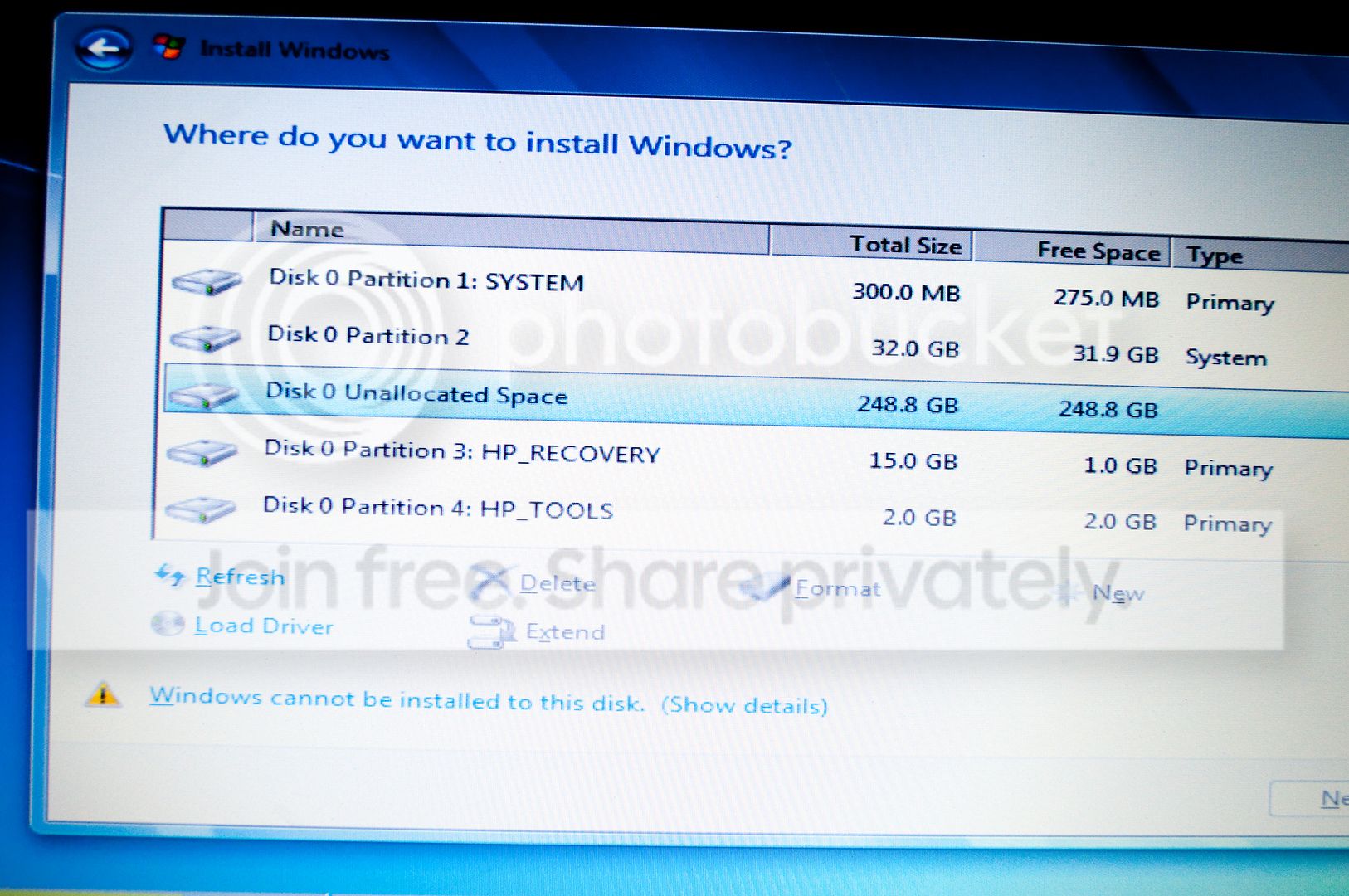
However, I am booting from my W7 installation disk, and this is what I am coming up with:

001_zpsd96dc345.jpg


When I go to do the install, all it allows me to do is to use Disk 0 Partition 2 (31.9 GB free).

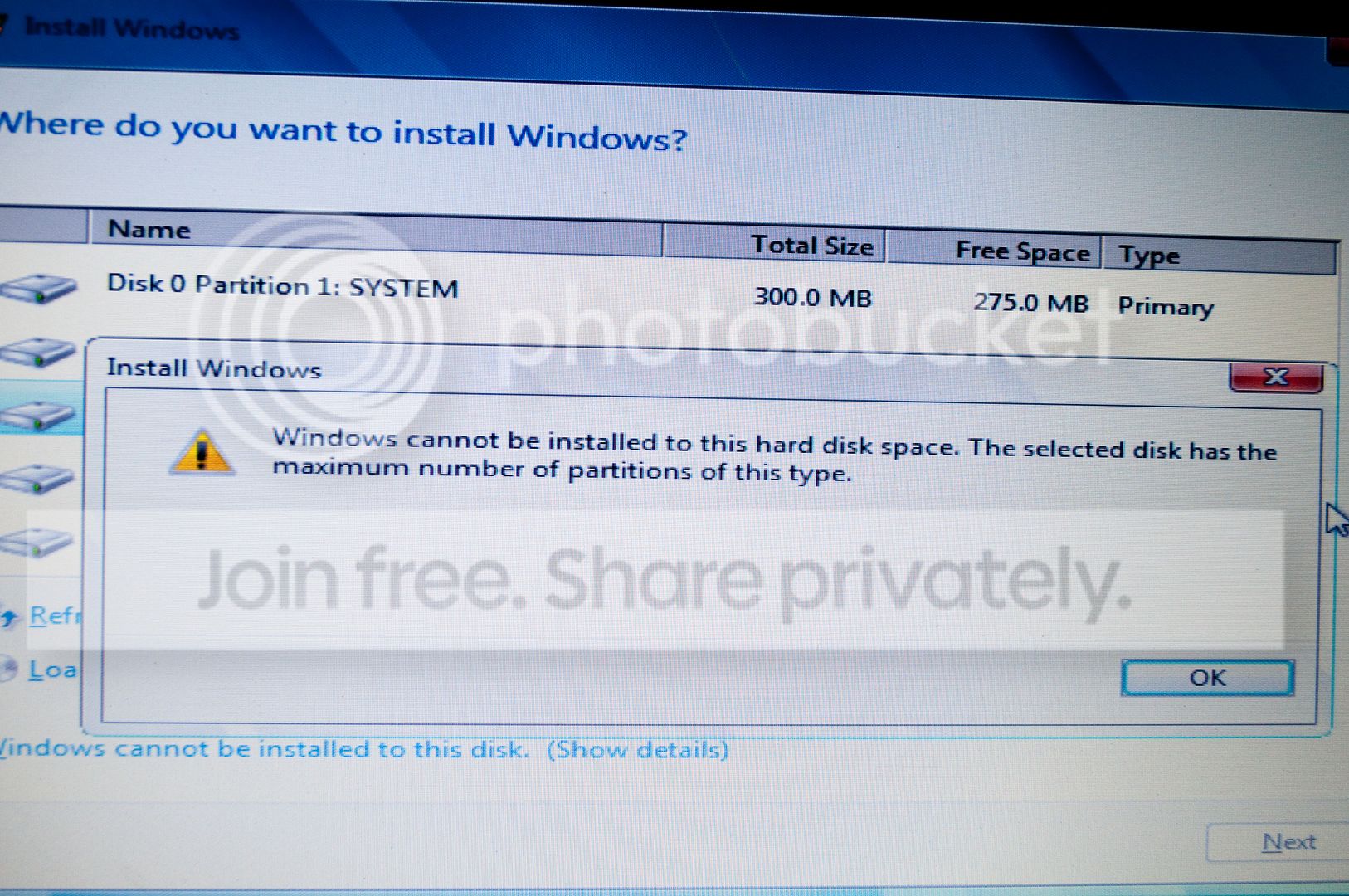
I see that there is 248 GB on Disk 0 unallocated space, but it will not allow me to install there, see below.

002_zps87b553dd.jpg


Thanx for any suggestions, I appreciate the help.
 

My Computer My Computer

Computer Manufacturer/Model Number
Dell laptop D610
OS
Windows XP Pro
Follow these steps to get a perfect Clean Reinstall - Factory OEM Windows 7
reading the Special Notes for HP Owners at end which explains how to decide if you want to keep the Recovery and Tools partitions.

You'll want to boot the installer, during Step 6-7 of Clean Install Windows 7 delete Partitions 1 and 2 at minimum, create a new partition in the space. It will simultaneously create a 100mb System boot partition which you should ignore and install Win7 to the next partition which should be the most sizeable.
 
You have 4 primary partitions on this disk (I assume the partition marked 'System' is also primary). That's the reason why you cannot install. You have to get rid of Partition 1 and Partition 2 and add that to the unallocated space. Use the bootable CD of Partition Wizard for that operation. It is the last entry on this webpage:

Free download Magic Partition Manager Software, partition magic alternative, free partition magic, partition magic Windows 7 and server partition software - Partition Wizard Online
 

My Computer My Computer

Computer Manufacturer/Model Number
HP, Dell, Gateway, Toshiba - 4 laptops and 2 desktops
OS
Vista, Windows7, Mint Mate, Zorin, Windows 8
CPU
from 1.6GHz Duo to i7
Monitor(s) Displays
2x HP w2207
Hard Drives
5x HDD, 7x SSD, 12x Externals
Keyboard
with trackball - no mices
Mouse
Trackball mice
Internet Speed
DSL 6000
Greg / WHS

Thanx, tomorrow I will give it a shot.

Have a great New Year, and wish me luck.
 

My Computer My Computer

Computer Manufacturer/Model Number
Dell laptop D610
OS
Windows XP Pro
You have 4 primary partitions on this disk (I assume the partition marked 'System' is also primary).

This partition with the 32 GB was the only one that would allow the W7 installation, which I did earlier. Obviously, after the install, my C drive was 99% full. Since then, I have formatted the C drive.

So, to be clear, the first thing I am going to do is download MiniTool Partition Wizard Bootable CD, then run that program, to fix the partition problem, then if that works, on to the W7 install?
 

My Computer My Computer

Computer Manufacturer/Model Number
Dell laptop D610
OS
Windows XP Pro
Ok, also, I need to learn/understand about partitions. Obviously, I have no understanding whatsoever. Maybe someone could give a "partitions for dummies" write up. First, why would a computer with a hard drive of 300 GB be set up that the C drive has only 32 GB? Wouldn't it make sense for the C drive to have 200 GB? Also, if you could point me to any more info that explains partitions, I would be very appreciative.

Thanx.
 

My Computer My Computer

Computer Manufacturer/Model Number
Dell laptop D610
OS
Windows XP Pro
1. Well, there is always the Wikipedia that can explain it. Disk partitioning - Wikipedia, the free encyclopedia

2. The size of a partition is the choice of the user. In your case it might have been the manufacturer of your PC.

3. I make my C partitions 50GB because they are only for the OS. My data is in a seperate partition. That is much safer for the data.

4. Try to understand the difference of primary, extended, logical and dynamic partitions in NTFS. You will find the info with Google.
 

My Computer My Computer

Computer Manufacturer/Model Number
HP, Dell, Gateway, Toshiba - 4 laptops and 2 desktops
OS
Vista, Windows7, Mint Mate, Zorin, Windows 8
CPU
from 1.6GHz Duo to i7
Monitor(s) Displays
2x HP w2207
Hard Drives
5x HDD, 7x SSD, 12x Externals
Keyboard
with trackball - no mices
Mouse
Trackball mice
Internet Speed
DSL 6000
OK, here is where I am.

I got throught the W7 install. I got the login screen, selected user "admimistrator" and password.

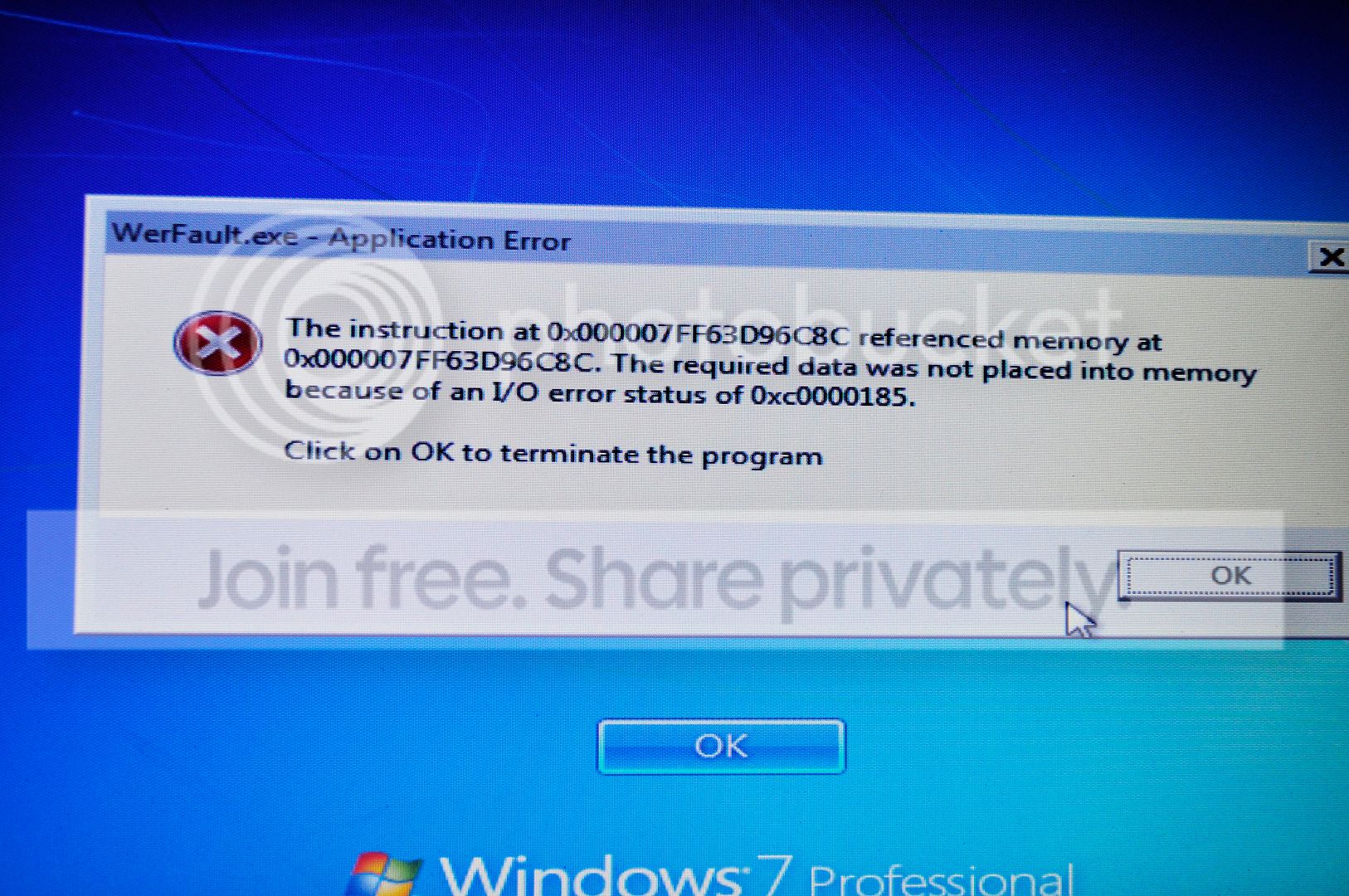
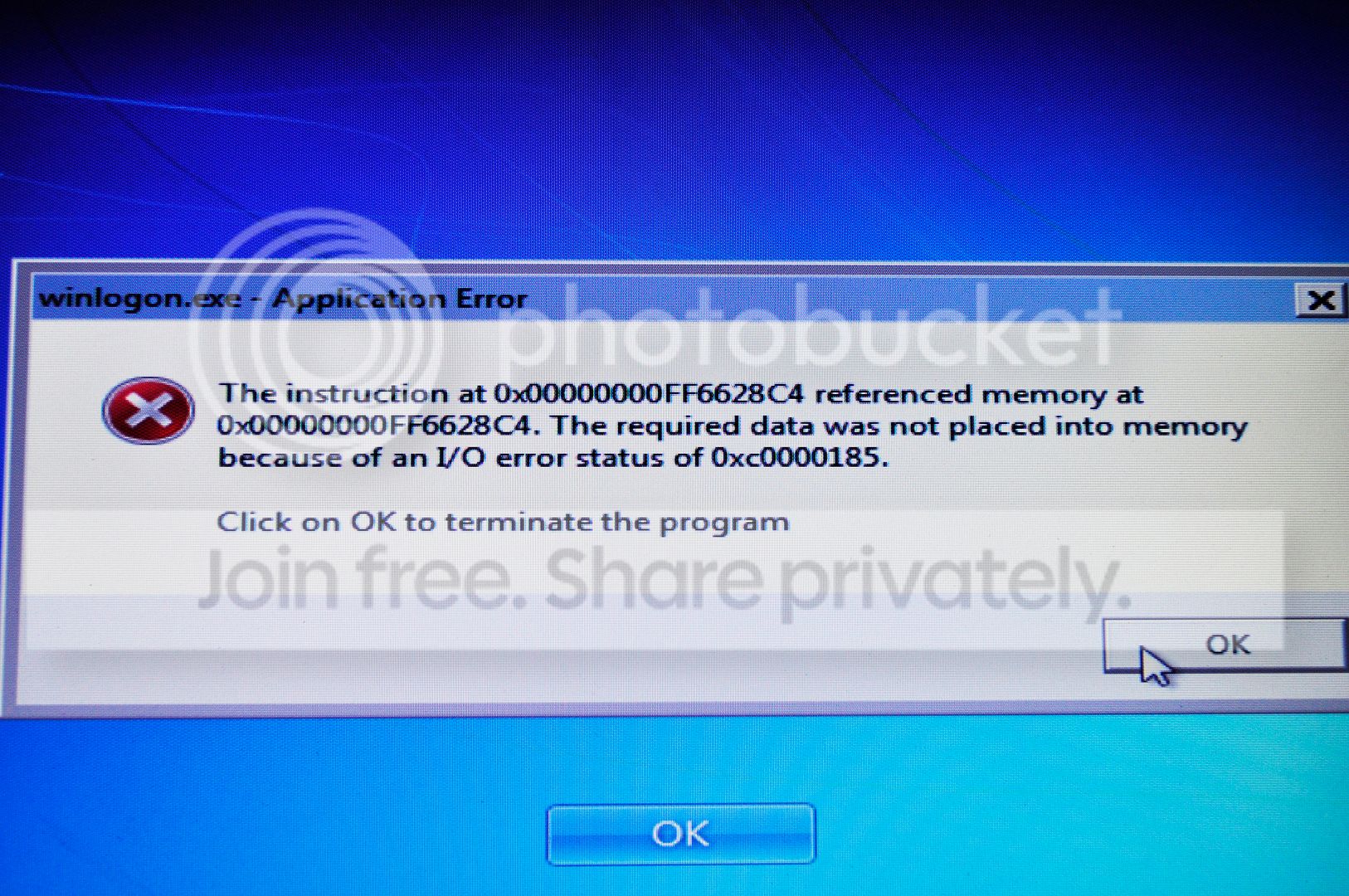
It took it, and I got the "WELCOME" screen with the blue circle spinning, and it has been on that page for over 10 minutes. Finally, this is what I got:

022_zpsd6f3a5b6.jpg


033_zps92bb7633.jpg
 

My Computer My Computer

Computer Manufacturer/Model Number
Dell laptop D610
OS
Windows XP Pro
There was obviously an I/O error. Run a chkdsk C: /r and see whether it can fix it.
 

My Computer My Computer

Computer Manufacturer/Model Number
HP, Dell, Gateway, Toshiba - 4 laptops and 2 desktops
OS
Vista, Windows7, Mint Mate, Zorin, Windows 8
CPU
from 1.6GHz Duo to i7
Monitor(s) Displays
2x HP w2207
Hard Drives
5x HDD, 7x SSD, 12x Externals
Keyboard
with trackball - no mices
Mouse
Trackball mice
Internet Speed
DSL 6000
I thought it had been explained to you in the tutorial linked, that you have the choice to keep the HP Recovery partition even after making your Recovery Disks, and should do so if you place any value on being able to recover to factory condition.

Many tech enthusiasts have no intention of ever running the bloated HP preinstalled Win7 but want just the OS without all the junk. If so then you scan delete all partitions during install after making your Recovery disks. I showed you the illustrated steps to do this. If you'd rather keep the Recovery and Tools (diagnostics) partition then delete the first two and create a new one for C there.

Let us know what Disk Check reports. If there are problems with the HD you should run the maker's HD Diagnostic extended CD scan.

If the HD is okay then I would start over and this time wipe the HD before install with Diskpart Clean Command
 
Back
Top