Apostrophe Key has massive delay on EN-UK Keyboard

inaniloquent

goodbye windows 7
Member
VIP
Local time
10:08 PM
Messages
190
Location
UK
Hi guys,

I made a thread about this before but no one could help me/no one replied so I am making a more updated thread. Basically, on my EN-UK Keyboard layout, the apostophe (and @ sign) have massive delays when I press them. It is purely software related, as when I change to my Japanese layout the key works fine and as normal.

How do I fix my UK layout to make the key work correctly again? :mad:

edit: Since people don`t seem to grasp that this is NOT A HARDWARE ISSUE:

  • I got a new keyboard for Christmas - the problem was carried forward from my old one. I`ve been having this problem for months. It is nothing to do with my keyboard. Stop telling me Logitech have bad wireless connectivity or whatever
  • When I switch to Japanese keyboard layout, the key works as normal. Only on EN keyboards (US & UK) does it not work. I haven`t got any other keyboard layouts currently in use
 
Last edited:

My Computer My Computer

At a glance

Windows 7 Home Premium 64-Biti5-4590Corsair DDR3 8GBGeForce GTX 970
Computer type
PC/Desktop
Computer Manufacturer/Model Number
Custom build
OS
Windows 7 Home Premium 64-Bit
CPU
i5-4590
Motherboard
GIGABYTE H97M-HD3
Memory
Corsair DDR3 8GB
Graphics Card(s)
GeForce GTX 970
Monitor(s) Displays
LG Electronics W1942 - 19 inches
Screen Resolution
1440x900
Hard Drives
Corsair Neutron SSD 119GB, Toshiba External 931GB
PSU
Corsair CX600
Keyboard
Logitech K360 Wireless
Mouse
Logitech Wireless Mouse M325
Browser
Firefox
A bit of a strange problem this one. Have you tried the EN-US layout instead? Does the key work correctly with that layout? Note that the @ and " keys are swapped with this layout, as opposed to the EN-UK one.

Did you try prising the key off and seeing if there was any dust/detritus underneath it which might prevent it from functioning correctly?

The only other thing that I can think of is a possible file corruption. See what http://www.sevenforums.com/tutorials/1538-sfc-scannow-command-system-file-checker.html reports.
 

My Computer My Computer

At a glance

Windows 8.1 Pro RTM x64Intel Core-i5-3570K 4-core @ 3.4GHz (Ivy Brid...4 x 4GB DDR3-1600 Corsair Vengeance CMZ8GX3M2...MSI GeForce GTX770 Gaming OC 2GB
Computer type
PC/Desktop
Computer Manufacturer/Model Number
Dwarf Dwf/11/2012 r09/2013
OS
Windows 8.1 Pro RTM x64
CPU
Intel Core-i5-3570K 4-core @ 3.4GHz (Ivy Bridge) (OC 4.4GHz)
Motherboard
ASRock Z77 Extreme4-M
Memory
4 x 4GB DDR3-1600 Corsair Vengeance CMZ8GX3M2A1600C9B (16GB)
Graphics Card(s)
MSI GeForce GTX770 Gaming OC 2GB
Sound Card
Realtek High Definition on board solution (ALC 898)
Monitor(s) Displays
ViewSonic VA1912w Widescreen (VGA)
Screen Resolution
1440x900
Hard Drives
OCZ Agility 3 SSD 120GB SATA III x2 (RAID 0)
Samsung HD501LJ 500GB SATA II x2
Hitachi HDS721010CLA332 1TB SATA II
Iomega 1.5TB Ext USB 2.0
WD 2.0TB Ext USB 3.0
PSU
XFX Pro Series 850W Semi-Modular
Case
Gigabyte IF233
Cooling
1 x 120mm Front Inlet 1 x 120mm Rear Exhaust
Keyboard
Microsoft Comfort Curve Keyboard 3000 (USB)
Mouse
Microsoft Comfort Mouse 3000 for Business (USB)
Internet Speed
NetGear DG834Gv3 ADSL Modem/Router (Ethernet) ~4.0 Mb/s (O2)
Antivirus
Avast! 8.0.1497
Browser
IE 11
Other Info
Optical Drive: HL-DT-ST BD-RE BH10LS30 SATA Bluray
Lexmark S305 Printer/Scanner/Copier (USB)
WEI Score: 8.1/8.1/8.5/8.5/8.25
Asus Eee PC 1011PX Netbook (Windows 7 x86 Starter)
Hi,

I had this problem with EN-US keyboard (big delay when I press ').
Problem was that default layout was US International and when I changed my layout to US, I didn't noticed problems...

To fix it, click on keyboard image in you system tray and try to select other UK layout if you have it.

Trinty. :)
 

My Computer My Computer

At a glance

Windows 7 Ultimate x64 - Service Pack 1Intel(R) Pentium(R) CPU G620 @ 2.60GHzTranscend Informations - 2*2048GB DDR3 @ 1066MHzATI Radeon HD 5670 - 1024MB DDR5 - Driver : 1...
Computer Manufacturer/Model Number
Trinty Self Build 2011
OS
Windows 7 Ultimate x64 - Service Pack 1
CPU
Intel(R) Pentium(R) CPU G620 @ 2.60GHz
Motherboard
ASUSTeK Computer INC. P8H61-M LX2
Memory
Transcend Informations - 2*2048GB DDR3 @ 1066MHz
Graphics Card(s)
ATI Radeon HD 5670 - 1024MB DDR5 - Driver : 19.04.2011
Sound Card
AMD High Definition Audio Device
Monitor(s) Displays
SAMSUNG SyncMaster 2220LM 22"
Screen Resolution
1680x1050
Hard Drives
SAMSUNG HD503HI ATA Device - 500GB
PSU
Don't know for now !
Case
Case MSI
Cooling
Stock
Keyboard
MS Industrial 2.4GHz Wirelees Keyboard
Mouse
MS Industrial 2.4GHz Wirelees Optical Mouse
Internet Speed
Download speed : 6,5Mbps / Upload speed : 1Mpbs
Other Info
BIOS version : BIOS Date: 02/05/10 19:13:52 Ver: 08.00.10
Prime95 (4h) : max. 65°C
DirectX 11 version.
Logitech G13 Advanced Gaming Keyboard.
Hi,

I had this problem with EN-US keyboard (big delay when I press ').
Problem was that default layout was US International and when I changed my layout to US, I didn't noticed problems...

To fix it, click on keyboard image in you system tray and try to select other UK layout if you have it.

Trinty. :)
Hi,
The only other UK keyboard I have is an "extended version", when I switch to that it did not fix the issue.
 

My Computer My Computer

At a glance

Windows 7 Home Premium 64-Biti5-4590Corsair DDR3 8GBGeForce GTX 970
Computer type
PC/Desktop
Computer Manufacturer/Model Number
Custom build
OS
Windows 7 Home Premium 64-Bit
CPU
i5-4590
Motherboard
GIGABYTE H97M-HD3
Memory
Corsair DDR3 8GB
Graphics Card(s)
GeForce GTX 970
Monitor(s) Displays
LG Electronics W1942 - 19 inches
Screen Resolution
1440x900
Hard Drives
Corsair Neutron SSD 119GB, Toshiba External 931GB
PSU
Corsair CX600
Keyboard
Logitech K360 Wireless
Mouse
Logitech Wireless Mouse M325
Browser
Firefox
A bit of a strange problem this one. Have you tried the EN-US layout instead? Does the key work correctly with that layout? Note that the @ and " keys are swapped with this layout, as opposed to the EN-UK one.

Did you try prising the key off and seeing if there was any dust/detritus underneath it which might prevent it from functioning correctly?

The only other thing that I can think of is a possible file corruption. See what http://www.sevenforums.com/tutorials/1538-sfc-scannow-command-system-file-checker.html reports.
Like I said in the post, it works when I change to Japanese keyboard. This is also a brand new keyboard I got for xmas, I had the same issue on my old keyboard.

EN-US keyboard has similar problem it seems: In FF it only shows up the apostrophe if I press it twice or if I type letters immediately after typing an apostrophe. Annoying. However, it doesn't seem to show up at all on the rest of my PC software (notepad, word, explorer etc)...
 

My Computer My Computer

At a glance

Windows 7 Home Premium 64-Biti5-4590Corsair DDR3 8GBGeForce GTX 970
Computer type
PC/Desktop
Computer Manufacturer/Model Number
Custom build
OS
Windows 7 Home Premium 64-Bit
CPU
i5-4590
Motherboard
GIGABYTE H97M-HD3
Memory
Corsair DDR3 8GB
Graphics Card(s)
GeForce GTX 970
Monitor(s) Displays
LG Electronics W1942 - 19 inches
Screen Resolution
1440x900
Hard Drives
Corsair Neutron SSD 119GB, Toshiba External 931GB
PSU
Corsair CX600
Keyboard
Logitech K360 Wireless
Mouse
Logitech Wireless Mouse M325
Browser
Firefox
Maybe solution is just to always use JP keyboard ^^;
 

My Computer My Computer

At a glance

Windows 7 Home Premium 64-Biti5-4590Corsair DDR3 8GBGeForce GTX 970
Computer type
PC/Desktop
Computer Manufacturer/Model Number
Custom build
OS
Windows 7 Home Premium 64-Bit
CPU
i5-4590
Motherboard
GIGABYTE H97M-HD3
Memory
Corsair DDR3 8GB
Graphics Card(s)
GeForce GTX 970
Monitor(s) Displays
LG Electronics W1942 - 19 inches
Screen Resolution
1440x900
Hard Drives
Corsair Neutron SSD 119GB, Toshiba External 931GB
PSU
Corsair CX600
Keyboard
Logitech K360 Wireless
Mouse
Logitech Wireless Mouse M325
Browser
Firefox
press space after pressing '
Does that fix the problem?
press e after pressing ' does é appear?

How long is the delay btw... one minute or a few seconds?
 

My Computer My Computer

At a glance

Microsoft Windows 7 Home Premium 64-bits 7601...Intel(R) Core(TM) i3 CPU M 370 @ 2.40GHz4,00 GBATI Mobility Radeon HD 5400 Series
Computer type
Laptop
Computer Manufacturer/Model Number
ACER ASPIRE 5742G
OS
Microsoft Windows 7 Home Premium 64-bits 7601 Multiprocessor Free Service Pack 1
CPU
Intel(R) Core(TM) i3 CPU M 370 @ 2.40GHz
Motherboard
Acer Aspire 5742G
Memory
4,00 GB
Graphics Card(s)
ATI Mobility Radeon HD 5400 Series
Sound Card
(1) AMD High Definition Audio Device (2) Realtek High Defi
Screen Resolution
1366 x 768 x 32 bits (4294967296 colors) @ 60 Hz
Hard Drives
WDC WD5000BEVT-22ZAT0
A bit of a strange problem this one. Have you tried the EN-US layout instead? Does the key work correctly with that layout? Note that the @ and " keys are swapped with this layout, as opposed to the EN-UK one.

Did you try prising the key off and seeing if there was any dust/detritus underneath it which might prevent it from functioning correctly?

The only other thing that I can think of is a possible file corruption. See what http://www.sevenforums.com/tutorials/1538-sfc-scannow-command-system-file-checker.html reports.
Image 2013-01-04 at 11.08.36 AM.png
Excuse my forgetting to use ALT-Print Screen, I have to press the function button now and pressing 2 buttons when printscreening now makes me forget to press alt..tiny brain..
 

My Computer My Computer

At a glance

Windows 7 Home Premium 64-Biti5-4590Corsair DDR3 8GBGeForce GTX 970
Computer type
PC/Desktop
Computer Manufacturer/Model Number
Custom build
OS
Windows 7 Home Premium 64-Bit
CPU
i5-4590
Motherboard
GIGABYTE H97M-HD3
Memory
Corsair DDR3 8GB
Graphics Card(s)
GeForce GTX 970
Monitor(s) Displays
LG Electronics W1942 - 19 inches
Screen Resolution
1440x900
Hard Drives
Corsair Neutron SSD 119GB, Toshiba External 931GB
PSU
Corsair CX600
Keyboard
Logitech K360 Wireless
Mouse
Logitech Wireless Mouse M325
Browser
Firefox
press space after pressing '
Does that fix the problem?
press e after pressing ' does é appear?

How long is the delay btw... one minute or a few seconds?
On the EN-UK (using now) keyboard, pressing space does nothing.
The delay is like.. maybe 2 seconds? But because I have to hold it down to get them to show up, it means that a bunch of them come out like this ''''''' because I can`t time when to let go of the key...so it`s basically useless to me. (has been for months, i am so used to using the grave accent as an apostrophe that now when I use PCs that let me use an apostrophe...I forget to use it!)

On the US keyboard (using now) it appears after I type something after it. I think that might be a setting for the keyboard itself, but it's weird that it doesn't seem to work in any other programme than firefox. (yay look i have apostrophes!)

When I press e after pressing ' on my UK keyboard... just e appears, haha
 

My Computer My Computer

At a glance

Windows 7 Home Premium 64-Biti5-4590Corsair DDR3 8GBGeForce GTX 970
Computer type
PC/Desktop
Computer Manufacturer/Model Number
Custom build
OS
Windows 7 Home Premium 64-Bit
CPU
i5-4590
Motherboard
GIGABYTE H97M-HD3
Memory
Corsair DDR3 8GB
Graphics Card(s)
GeForce GTX 970
Monitor(s) Displays
LG Electronics W1942 - 19 inches
Screen Resolution
1440x900
Hard Drives
Corsair Neutron SSD 119GB, Toshiba External 931GB
PSU
Corsair CX600
Keyboard
Logitech K360 Wireless
Mouse
Logitech Wireless Mouse M325
Browser
Firefox
Completely normal Windows behavior:
EN-US keyboard has similar problem it seems: In FF it only shows up the apostrophe if I press it twice or if I type letters immediately after typing an apostrophe. Annoying.
You need to understand that EN-US and EN-US International are two different keyboard layouts; what you describe is exactly how EN-US International should work and is designed to work.

This post has a bit more about differences between EN-US and EN-US International keyboard layouts: http://www.sevenforums.com/hardware-devices/47912-issue-keyboard-input.html#post450833

In FF it only shows up the apostrophe if I press it twice or if I type letters immediately after typing an apostrophe. Annoying. However, it doesn't seem to show up at all on the rest of my PC software (notepad, word, explorer etc)...
The chosen input language and keyboard layout can be set independently for each application and program.

What you describe is typical when, although only one input language (English US), there are more than one keyboard layouts enabled and separately set to be used on different applications. In this case it is quite obvious the EN-US International is set to be used with Firefox, whereas other apps use system default EN-US.

An example:

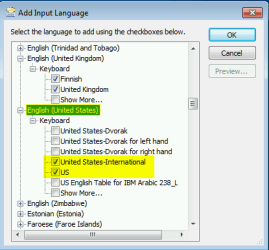
User has selected only one input language to be used, English (US). Within this input language both EN-US and EN-US International keyboard layouts are selected:

EN_US_2.png

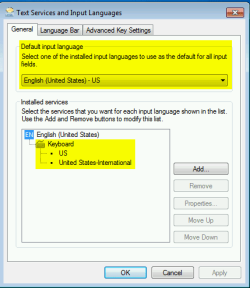
The input language in this case is English, with two different keyboard layouts, default US and alternative US International:

EN_US_3.png

By default the fast keyboard layout switch is ALT + SHIFT.

User opens Firefox and either using above mentioned keyboard shortcut or keyboard / language icon on notification area changes the keyboard layout to US International. From now on every time Firefox is used it uses this layout instead of default US layout. Notice that selecting other than default keyboard layout only affects the application which is currently active. When Firefox is active and keyboard layout is changed, the layout only changes on Firefox.

When user then uses other apps, Word, Notepad and so on, they are still using the default US keyboard layout as long as the layout is not changed to US International for that application.

Let's say user in this example jumps between Firefox and Word. Every time Word is made active, keyboard layout is automatically switched to (default) US, but as soon as user clicks Firefox window to make it active the system automatically switches to US International layout for it is the keyboard layout selected for Firefox. And vice versa; user clicks Word to make it active, layout is again automatically switched to (default) US.

Tutorials:

On the EN-UK (using now) keyboard, pressing space does nothing.
The delay is like.. maybe 2 seconds? But because I have to hold it down to get them to show up, it means that a bunch of them come out like this ''''''' because I can`t time when to let go of the key...
This is a very typical hardware issue, common especially with wireless keyboards. It is normally caused by bad reception, the USB receiver for instance does not pick the keyboard signal as it should causing delays.

One known reason with especially Logitech's wireless keyboards is the frequency the USB receiver uses, it being too close to some other wireless frequencies. In some cases it helps to change wireless routers frequency.

Kari
 

My Computer My Computer

At a glance

Windows 10 Pro x64 EN-GB1.6 GHz Intel Core i7-720QM Processor6 GBATI Mobility Radeon HD 5850 Graphics
Computer type
Laptop
Computer Manufacturer/Model Number
HP ENVY 17-1150eg
OS
Windows 10 Pro x64 EN-GB
CPU
1.6 GHz Intel Core i7-720QM Processor
Memory
6 GB
Graphics Card(s)
ATI Mobility Radeon HD 5850 Graphics
Sound Card
Beats sound system with integrated subwoofer
Monitor(s) Displays
17" laptop display, 22" LED and 32" Full HD TV through HDMI
Screen Resolution
1600*900 (1), 1920*1080 (2&3)
Hard Drives
Internal: 2 x 500 GB SATA Hard Disk Drive 7200 rpm
External: 2TB for backups, 3TB USB3 network drive for media
Cooling
As Envy runs a bit warm, I have it on a Cooler Master pad
Keyboard
Logitech diNovo Media Desktop Laser (bluetooth)
Mouse
Logitech Performance Mouse MX
Internet Speed
50/10 Mbps VDSL
Antivirus
Windows Defender 4.3.9431.0
Browser
Maxthon 3.5.2., IE11
Completely normal Windows behavior:
EN-US keyboard has similar problem it seems: In FF it only shows up the apostrophe if I press it twice or if I type letters immediately after typing an apostrophe. Annoying.
You need to understand that EN-US and EN-US International are two different keyboard layouts; what you describe is exactly how EN-US International should work and is designed to work.

This post has a bit more about differences between EN-US and EN-US International keyboard layouts: http://www.sevenforums.com/hardware-devices/47912-issue-keyboard-input.html#post450833

In FF it only shows up the apostrophe if I press it twice or if I type letters immediately after typing an apostrophe. Annoying. However, it doesn't seem to show up at all on the rest of my PC software (notepad, word, explorer etc)...
The chosen input language and keyboard layout can be set independently for each application and program.

What you describe is typical when, although only one input language (English US), there are more than one keyboard layouts enabled and separately set to be used on different applications. In this case it is quite obvious the EN-US International is set to be used with Firefox, whereas other apps use system default EN-US.

An example:

User has selected only one input language to be used, English (US). Within this input language both EN-US and EN-US International keyboard layouts are selected:

View attachment 248521

The input language in this case is English, with two different keyboard layouts, default US and alternative US International:

View attachment 248522

By default the fast keyboard layout switch is ALT + SHIFT.

User opens Firefox and either using above mentioned keyboard shortcut or keyboard / language icon on notification area changes the keyboard layout to US International. From now on every time Firefox is used it uses this layout instead of default US layout. Notice that selecting other than default keyboard layout only affects the application which is currently active. When Firefox is active and keyboard layout is changed, the layout only changes on Firefox.

When user then uses other apps, Word, Notepad and so on, they are still using the default US keyboard layout as long as the layout is not changed to US International for that application.

Let's say user in this example jumps between Firefox and Word. Every time Word is made active, keyboard layout is automatically switched to (default) US, but as soon as user clicks Firefox window to make it active the system automatically switches to US International layout for it is the keyboard layout selected for Firefox. And vice versa; user clicks Word to make it active, layout is again automatically switched to (default) US.

Tutorials:

On the EN-UK (using now) keyboard, pressing space does nothing.
The delay is like.. maybe 2 seconds? But because I have to hold it down to get them to show up, it means that a bunch of them come out like this ''''''' because I can`t time when to let go of the key...
This is a very typical hardware issue, common especially with wireless keyboards. It is normally caused by bad reception, the USB receiver for instance does not pick the keyboard signal as it should causing delays.

One known reason with especially Logitech's wireless keyboards is the frequency the USB receiver uses, it being too close to some other wireless frequencies. In some cases it helps to change wireless routers frequency.

Kari
A lot of this wasn`t relevant: I want my UK keyboard to work. I do not want to use the US one if I don`t have to. How does this help me fix this one key that refuses to work?

Also, as I have said possibly twice before: it is NOT a hardware issue. Please read my previous posts again if you still don`t believe me...
 

My Computer My Computer

At a glance

Windows 7 Home Premium 64-Biti5-4590Corsair DDR3 8GBGeForce GTX 970
Computer type
PC/Desktop
Computer Manufacturer/Model Number
Custom build
OS
Windows 7 Home Premium 64-Bit
CPU
i5-4590
Motherboard
GIGABYTE H97M-HD3
Memory
Corsair DDR3 8GB
Graphics Card(s)
GeForce GTX 970
Monitor(s) Displays
LG Electronics W1942 - 19 inches
Screen Resolution
1440x900
Hard Drives
Corsair Neutron SSD 119GB, Toshiba External 931GB
PSU
Corsair CX600
Keyboard
Logitech K360 Wireless
Mouse
Logitech Wireless Mouse M325
Browser
Firefox
How is it irrelevant to tell you why Firefox shows up the apostrophe only after another key is pressed? Check you Input Language settings, the EN-US International keyboard layout is the only one from EN-UK & EN-US keyboard layouts that does that.

It is absolutely sure that if you have installed EN-UK keyboard layout from Region and Language settings and are using it, that wont happen. This, having to press a key after apostrophe to get a letter with said apostrophe, is how EN-US International layout works, being the only EN-UK or EN-US layout that behaves so.

Keyboard settings in Windows is one of those Windows elements that really works. En-UK keyboard layout does not act like you said.

I was not saying you must have a hardware issue. I gave you one very common explanation for the delay such as what you described.

With utmost sincerity I want to apologize you for using my free time in trying to help you. Rest assured it will never happen again.

Kari, Windows Langue (Display and Input) expert.
 

My Computer My Computer

At a glance

Windows 10 Pro x64 EN-GB1.6 GHz Intel Core i7-720QM Processor6 GBATI Mobility Radeon HD 5850 Graphics
Computer type
Laptop
Computer Manufacturer/Model Number
HP ENVY 17-1150eg
OS
Windows 10 Pro x64 EN-GB
CPU
1.6 GHz Intel Core i7-720QM Processor
Memory
6 GB
Graphics Card(s)
ATI Mobility Radeon HD 5850 Graphics
Sound Card
Beats sound system with integrated subwoofer
Monitor(s) Displays
17" laptop display, 22" LED and 32" Full HD TV through HDMI
Screen Resolution
1600*900 (1), 1920*1080 (2&3)
Hard Drives
Internal: 2 x 500 GB SATA Hard Disk Drive 7200 rpm
External: 2TB for backups, 3TB USB3 network drive for media
Cooling
As Envy runs a bit warm, I have it on a Cooler Master pad
Keyboard
Logitech diNovo Media Desktop Laser (bluetooth)
Mouse
Logitech Performance Mouse MX
Internet Speed
50/10 Mbps VDSL
Antivirus
Windows Defender 4.3.9431.0
Browser
Maxthon 3.5.2., IE11
I don`t really get why you`re so mad, or what you`re saying..but okay.
 

My Computer My Computer

At a glance

Windows 7 Home Premium 64-Biti5-4590Corsair DDR3 8GBGeForce GTX 970
Computer type
PC/Desktop
Computer Manufacturer/Model Number
Custom build
OS
Windows 7 Home Premium 64-Bit
CPU
i5-4590
Motherboard
GIGABYTE H97M-HD3
Memory
Corsair DDR3 8GB
Graphics Card(s)
GeForce GTX 970
Monitor(s) Displays
LG Electronics W1942 - 19 inches
Screen Resolution
1440x900
Hard Drives
Corsair Neutron SSD 119GB, Toshiba External 931GB
PSU
Corsair CX600
Keyboard
Logitech K360 Wireless
Mouse
Logitech Wireless Mouse M325
Browser
Firefox
I am not mad. I am just apologizing for wasting my time in my effort to help you.

I will repeat this one more time: What you described (apostrophes only typed after another key is pressed) is because of, and can only be because of that Firefox is set to use EN-US International keyboard layout, no other EN-US or EN-UK keyboard layout does this. That is for 100% sure the reason for this kind of behavior in Firefox or any other application.

I your opinion this was irrelevant. I have some difficulties to understand this: You have issues you do not understand. I tell you about the only possible reason for one of your issues (FF & apostrophes), and explain some typical reasons why another issue of yours might occur (delayed typing). You tell me my answer was not relevant.

So be it.

Kari


Kari
 

My Computer My Computer

At a glance

Windows 10 Pro x64 EN-GB1.6 GHz Intel Core i7-720QM Processor6 GBATI Mobility Radeon HD 5850 Graphics
Computer type
Laptop
Computer Manufacturer/Model Number
HP ENVY 17-1150eg
OS
Windows 10 Pro x64 EN-GB
CPU
1.6 GHz Intel Core i7-720QM Processor
Memory
6 GB
Graphics Card(s)
ATI Mobility Radeon HD 5850 Graphics
Sound Card
Beats sound system with integrated subwoofer
Monitor(s) Displays
17" laptop display, 22" LED and 32" Full HD TV through HDMI
Screen Resolution
1600*900 (1), 1920*1080 (2&3)
Hard Drives
Internal: 2 x 500 GB SATA Hard Disk Drive 7200 rpm
External: 2TB for backups, 3TB USB3 network drive for media
Cooling
As Envy runs a bit warm, I have it on a Cooler Master pad
Keyboard
Logitech diNovo Media Desktop Laser (bluetooth)
Mouse
Logitech Performance Mouse MX
Internet Speed
50/10 Mbps VDSL
Antivirus
Windows Defender 4.3.9431.0
Browser
Maxthon 3.5.2., IE11
Same

Hi all,

Chiming in here to say I am also having the same problem.

On my EN-UK keyboard, I am unable to type an apostrophe without holding it down for about 2 seconds.

The problem is not hardware based, as I have tried another keyboard.

Changing the keyboard layout to EN-US allows me to use the apostrophe key. However, this is not an acceptable work-around, as the rest of the keyboard is also different (@ sign, # etc).

Kari - Your post was not relevant given the information that had been provided in previous posts by inaniloquent.

Does anyone else have any ideas, inaniloquent, did you manage to sort this out?

This has only started happening since I reinstalled windows 7 with a new motherboard. :(
 

My Computer My Computer

At a glance

Win 7 x64 Ultimate
OS
Win 7 x64 Ultimate
Kari - Your post was not relevant given the information that had been provided in previous posts by inaniloquent.

Does anyone else have any ideas, inaniloquent, did you manage to sort this out?

This has only started happening since I reinstalled windows 7 with a new motherboard. :(
The information I gave was and is relevant. EN-UK keyboard layout does not work like that, that's a fact.

Most common reason why this happens, and why it so often happens after reinstall is that user accidentally uses US language and input settings when installing simply by clicking Next or hitting Enter on first screen when install is launched. This screenshot from a typical Windows 7 install I just made to a virtual machine an hour ago, install media bought in Europe still defaulting to US:

Win7_Install_1.png

Add the fact that Windows not only allows keyboard layout set independently on each application but also remembers it, and the issues begin. User goes to language settings and switches to EN-UK but forgets to remove the underlying EN-US. When an application is now used which was already used at least once before setting a new default input language, the old setting remains active for that application.

I repeat: EN-UK keyboard layout does not behave like that, it does not wait another key to be pressed after an apostrophe key is pressed. It is always a user fault or a fault in the system which can be fixed by deleting / disabling wrong keyboard layouts, setting applications to use correct ones and setting correct default layout.

Kari
 

My Computer My Computer

At a glance

Windows 10 Pro x64 EN-GB1.6 GHz Intel Core i7-720QM Processor6 GBATI Mobility Radeon HD 5850 Graphics
Computer type
Laptop
Computer Manufacturer/Model Number
HP ENVY 17-1150eg
OS
Windows 10 Pro x64 EN-GB
CPU
1.6 GHz Intel Core i7-720QM Processor
Memory
6 GB
Graphics Card(s)
ATI Mobility Radeon HD 5850 Graphics
Sound Card
Beats sound system with integrated subwoofer
Monitor(s) Displays
17" laptop display, 22" LED and 32" Full HD TV through HDMI
Screen Resolution
1600*900 (1), 1920*1080 (2&3)
Hard Drives
Internal: 2 x 500 GB SATA Hard Disk Drive 7200 rpm
External: 2TB for backups, 3TB USB3 network drive for media
Cooling
As Envy runs a bit warm, I have it on a Cooler Master pad
Keyboard
Logitech diNovo Media Desktop Laser (bluetooth)
Mouse
Logitech Performance Mouse MX
Internet Speed
50/10 Mbps VDSL
Antivirus
Windows Defender 4.3.9431.0
Browser
Maxthon 3.5.2., IE11
EN-UK keyboard layout does not work like that, that's a fact.

I don't care what you think is a fact, I'm not here to argue with you.

You can be a keyboard warrior all you like. The only fact is, I only had the EN-UK keyboard installed, all other types of keyboard were not installed at install time.

I repeat: The only keyboard layout I had installed was the EN-UK one.

I understand what you're saying about having multiple layouts installed, yes I have witnessed that behaviour. But when I experienced the problem to begin with I only had one layout installed.

End of the day, your reply didn't help. And you got all up-tight about it because you were wrong.

I repeat: I'm not here to argue.
 
Last edited:

My Computer My Computer

At a glance

Win 7 x64 Ultimate
OS
Win 7 x64 Ultimate
Shades of Monty Python
"I'm here for an argument"
"No you're not"
"Yes, I AM"
"NO, you're not"
This isn't an argument"
"Yes, it is"
"No, it's not. It is merely a contradiction of Terms"


Anyway, there might be some confusion because there is a lack of hard information needed to help find a solution. Kari provided what he knows - good info.

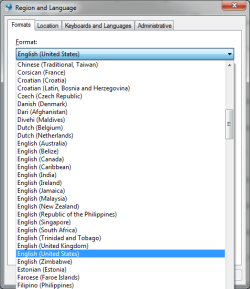
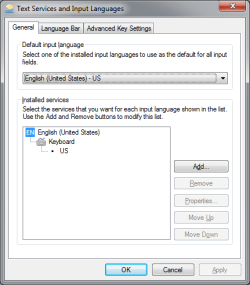
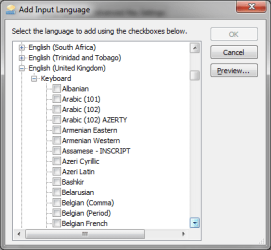
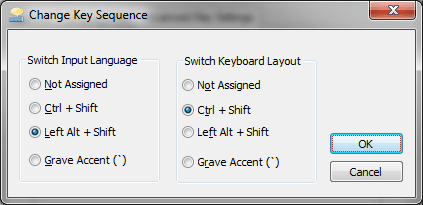
It would help if the language diaglogs were shown so members could actually see how the keyboard and languge selections correspond. You'd be surprised how many things are fixed once members can see what you see. Many times there's a minor chnage that is missed, even by experienced people (I'm guilty)

I'm curious to know what the default keyboard is set to (UK or JP) and if the language bar is being used to switch between the two settings. I'm also curious to see if there are additional languages defined for this system. There is one more itme, I by chance noticed when grabbing my screen shots. The hotkey combination for switching text input.

See attached and please post yours:
 

Attachments

  • Lang-kbFmts.png
    Lang-kbFmts.png
    14.4 KB · Views: 1
  • Lang-kbLoc.png
    Lang-kbLoc.png
    12.8 KB · Views: 1
  • Lang-kb.png
    Lang-kb.png
    11.8 KB · Views: 1
  • Lang-Inpt.png
    Lang-Inpt.png
    10.7 KB · Views: 1
  • Lang-ChgKey.png
    Lang-ChgKey.png
    7.3 KB · Views: 1

My Computer My Computer

At a glance

x64 (6.3.9600) Win8.1 Pro & soon dual boot x6...AMD A6-3420M APU with Radeon(tm) HD Graphics6.00 GBAMD Radeon(TM) HD 6520G
Computer type
Laptop
Computer Manufacturer/Model Number
HP Pavilion dv6-6c10us
OS
x64 (6.3.9600) Win8.1 Pro & soon dual boot x64 (6.1.7601) Win7_SP1 HomePrem
CPU
AMD A6-3420M APU with Radeon(tm) HD Graphics
Motherboard
Hewlett-Packard 1805
Memory
6.00 GB
Graphics Card(s)
AMD Radeon(TM) HD 6520G
Sound Card
(1) AMD High Definition Audio Device (2) IDT High Definiti
Monitor(s) Displays
HP W2072a 20" LCD (1600 x 900) @ 60 Hz
Screen Resolution
1366 x 768 x 32 bits (4294967296 colors) @ 60 Hz
Hard Drives
ST640LM0 00 HM641JI SATA Disk Device
Keyboard
Logitech k520 wireless KB
Mouse
Logitech m320 wireless mouse (bundled with KB)
Internet Speed
15/5 | 54 MB Wireless 'n'
Antivirus
Realtime: Defender or Avast | On-demand: Malwarebytes, ESET
Browser
IE 11 on Win8, IE 10 on win 7
Other Info
Media: [Gimp, Audacity, VLC] || Comm: [WEmail 2012, Skype] || Productivity: [OpenOffice,| Textpad] || Utils: [Sysinternals, cCleaner, Speccy, Defraggler]
Keyboard layout - Wikipedia, the free encyclopedia

wiki said:
United Kingdom extended
Windows XP SP2 and later also offer a "United Kingdom Extended" keyboard layout which allows input on a standard physical UK keyboard for many languages (including Welsh) without changing any of the allocations of frequently used keys (the rarely used grave accent key becomes a dead key). In particular, the apostrophe, double-quote, tilde and caret keys are not changed into dead keys modifying the character generated by the next key pressed, as used by the US International layout. Instead, the additional characters are obtained using the AltGr key. The extended keyboard is software installed from the Windows control panel, and the extended characters are not normally engraved on keyboards.


The layout provides support for adding diacritics to the vowels a, e, i, o, u, w and y (the last two being used in Welsh) as well as capitals:
  • The grave accent key ` (left of 1) becomes a dead key which adds a grave accent to a subsequent vowel, generating à, è, etc. Pressing the key followed by a character which does not take a grave accent behaves as on a standard keyboard; grave followed by spacebar generates a grave accent character.
  • Vowels with acute accents are generated either by pressing AltGr and the relevant character key simultaneously, or AltGr and apostrophe ' (acting as a dead key combination) followed by the character. Some programs use the combination of AltGr and a letter for other functions, in which case the AltGr+' method must be used to generate acute accents.
  • AltGr+6 acts as a dead key combination to add a circumflex to a subsequent vowel (â, ê, etc.). Use of the shifted 6 key is intended to be mnemonic as the key is marked with the caret (^), which looks like a circumflex.
  • AltGr+2 acts as a dead key combination to add a diaeresis/umlaut to a subsequent vowel (ä, ë, etc.). Use of the shifted 2 key is intended to be mnemonic as on UK keyboards the key is marked with the double quote ("), which looks a similar to a diaeresis.
  • AltGr+# (hash) acts as a dead key combination to add a tilde (~) to a subsequent A/a, N/n or O/o (ã, ñ, õ etc.), as used in Spanish and Portuguese. This is mnemonic again; the # key on a UK keyboard is marked with the tilde character (~).
  • With Windows versions newer than Windows XP SP2, AltGr+C generates lower-case c with cedilla (ç), and AltGr+⇧ Shift+C generates the capital letter (Ç).
The UK extended layout is almost entirely transparent to users familiar with the UK layout; a machine with the extended layout will behave exactly as with the standard UK except for the rarely used grave accent key. This makes this layout suitable for a machine for shared or public use by a user population in which some, but not all, are aware of the extended functionality.
 

My Computer My Computer

At a glance

x64 (6.3.9600) Win8.1 Pro & soon dual boot x6...AMD A6-3420M APU with Radeon(tm) HD Graphics6.00 GBAMD Radeon(TM) HD 6520G
Computer type
Laptop
Computer Manufacturer/Model Number
HP Pavilion dv6-6c10us
OS
x64 (6.3.9600) Win8.1 Pro & soon dual boot x64 (6.1.7601) Win7_SP1 HomePrem
CPU
AMD A6-3420M APU with Radeon(tm) HD Graphics
Motherboard
Hewlett-Packard 1805
Memory
6.00 GB
Graphics Card(s)
AMD Radeon(TM) HD 6520G
Sound Card
(1) AMD High Definition Audio Device (2) IDT High Definiti
Monitor(s) Displays
HP W2072a 20" LCD (1600 x 900) @ 60 Hz
Screen Resolution
1366 x 768 x 32 bits (4294967296 colors) @ 60 Hz
Hard Drives
ST640LM0 00 HM641JI SATA Disk Device
Keyboard
Logitech k520 wireless KB
Mouse
Logitech m320 wireless mouse (bundled with KB)
Internet Speed
15/5 | 54 MB Wireless 'n'
Antivirus
Realtime: Defender or Avast | On-demand: Malwarebytes, ESET
Browser
IE 11 on Win8, IE 10 on win 7
Other Info
Media: [Gimp, Audacity, VLC] || Comm: [WEmail 2012, Skype] || Productivity: [OpenOffice,| Textpad] || Utils: [Sysinternals, cCleaner, Speccy, Defraggler]
Back
Top