Windows 7 Wont install. Hanging at various points.

kie79

New member
Local time
8:21 AM
Messages
6
I'm trying to fix my partners laptop.
HP Pavilion G6 -- Pentium P6200 @ 2.13GHz -- 4Gb

I've downloaded a windows 7 64 bit home premium sp1 iso from a link provided on pc world website ( http://goo.gl/uCtJP )
I used the official windows USB/DVD maker and made a USB installation on my 4GB flash drive and Burnt a DVD aswell.

I first tryed installing via USB (I had to go into bios, and make usb primary boot because when i pressed f9 to choose what to boot from i couldnt get usb into the list)

It began installing, i formatted the hard drive, to a blank partition began installing, went through first phase, it restarted and went back and tryed installing from scratch again,so i restarted again,this time choosing the hard drive as boot source, it continued installation, then hung and did nothing for over an hour so i restarted but that version was then corrupt.

Began the process again, this time booting from cd and using the DVD I burnt. Got through the first phase again (expanding files, installing features,installing updates, etc) but this time when it restarts it just hangs on in the microsoft corporation screen with the green bar loading for ever.


At the moment i'm trying again from the dvd at its on the first phase, hung at 70% on expanding windows files :'(

Edit:Just got through the first phase of this attempt, its rebooted and is now telling me \windows\system32\drivers\lsi_fc.sys is missing or corrupt.

status:0xc00000e9

Any idea as to why its not installing!?
 

My Computer My Computer

At a glance

Windows 7 home premium 64 bit
OS
Windows 7 home premium 64 bit
Last edited by a moderator:

My Computer My Computer

At a glance

Windows 7 Ultimate 64 bitAMD Phenom II X4 965 Black EditionGSkill 4 X 2 GB PC 8500XFX Radeon HD 6790 D
Computer Manufacturer/Model Number
Custom built
OS
Windows 7 Ultimate 64 bit
CPU
AMD Phenom II X4 965 Black Edition
Motherboard
Gigabyte GA-MA790X-DS4
Memory
GSkill 4 X 2 GB PC 8500
Graphics Card(s)
XFX Radeon HD 6790 D
Sound Card
On board RealTek HD
Monitor(s) Displays
Dual monitors:Samsung SyncMaster S20B300
Screen Resolution
1600 X 900
Hard Drives
Seagate Barracuda 1TB (primary)
Seagate Barracuda 2 X 320 GB
PSU
Ultra X4 750 watt fully modular
Case
Thermaltake Overseer RX 1 full tower
Cooling
Core-Contact 92 mm CPU Cooler
Keyboard
Logitech G510
Mouse
Razor DeathAdder
Internet Speed
50/5 Mbps UL/DL
Other Info
Optical: Super Muliti DVD burner w/lightscribe, Hauppauge WinTV HVR-1800
Thanks for the response, will download that now and post progress as to what happens.
 

My Computer My Computer

At a glance

Windows 7 home premium 64 bit
OS
Windows 7 home premium 64 bit
Hello kie79, and Welcome to the Seven Forums. . .:thumbsup:

Have you run a check disk on the HDD. Try that to see if the HDD is bad. Sometimes this happens. If you have a 2.5" HDD laying around put that in the Laptop, and try to install again.
 

My Computer My Computer

At a glance

Win 7 Pro x64, VM Win XP, Win7 Pro Sandbox, K...AMD Athlon(tm) II X4 640 @ 3.0 Gbz12GB 1066MHz DDR3 SDRAM - 2x4GB, 2x2GBATI Radeon HD 4350 HD Graphics/Audio with 512MB
Computer Manufacturer/Model Number
HP Pavilion a4302f
OS
Win 7 Pro x64, VM Win XP, Win7 Pro Sandbox, Kubuntu 11
CPU
AMD Athlon(tm) II X4 640 @ 3.0 Gbz
Memory
12GB 1066MHz DDR3 SDRAM - 2x4GB, 2x2GB
Graphics Card(s)
ATI Radeon HD 4350 HD Graphics/Audio with 512MB
Sound Card
Realtek High Definition Audio
Monitor(s) Displays
1. Dell 23" SP2307, 2. Mitsublishi 40" HDTV, Hannspree 25"
Screen Resolution
1. 2048x1152, 2. 1920-1080, 3. 1920x1200
Hard Drives
Int: 1 120 Gig SSD i
1 - 2.5" 500 USB External HDD
1 -1 Tb USB External HDD
Case
Mid Tower
Cooling
Standard Fans - 5 fans (very quiet)
Keyboard
Microsoft Wireless 2000
Mouse
Microsoft Wireless Mouse 5000
Internet Speed
10 Mbit (realistically 500 Kbit - 1.2 Mbit)
Other Info
Speakers - Bose Desktop (Excellent Sound)
1 external CD|DVD\Blue-ray Recorders/Players (Sony)
Thanks for taking a look, I'm currently burning the new iso suggested above, i will run a disc check if this iso fails.
 

My Computer My Computer

At a glance

Windows 7 home premium 64 bit
OS
Windows 7 home premium 64 bit
Unplug all other HD's and peripherals,

Boot into BIOS setup to enable Legacy BIOS if present. Next check BIOS Boot order for an EFI Boot Disk and if present remove it, set DVD drive first to boot, HD second. Then set SATA controller to AHCI. Save changes and Exit.

Then boot into installer DVD or flash stick burned or written using tool and latest ISO for your licensed OS version here.

At first installer screen Press Shift + F10 to open a Command Box, type:

DISKPART
LIST DISK
SELECT DISK 0 (after confirming Windows 7 target HD #)
CLEAN
CREATE PARTITION PRIMARY SIZE=102400 (for 100gb partition, adjust as desired)
FORMAT FS=NTFS LABEL="WINDOWS 7"
ACTIVE
EXIT
EXIT

Next click Install Now, then Custom install to Clean Install Windows 7 to the partition you created. If it fails then report back at which step and the verbatim error message.

In addition read over these steps to understand the tools and methods which work best to get and maintain a perfect Clean Reinstall - Factory OEM Windows 7. The steps are the same for retail.

After install you can adjust partition size or Create new partitions for data, etc. in Disk Mgmt. We are creating the partition here to mark it Active which overcomes certain install failures.
 
Tryed the disk part twice.

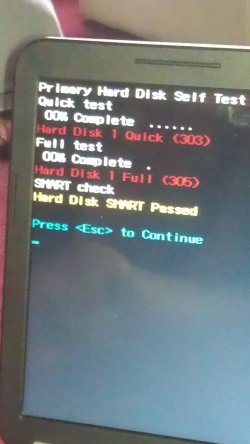
just done a memory test, and got pass.

Then did a hard disk test and got this: (see attatchment)

Says disk 1 quick 303

disk 1 full 305
and then smart passed?

Is it looking like it needs a new hard drive?
 

Attachments

  • IMAG0007.jpg
    IMAG0007.jpg
    329.8 KB · Views: 7

My Computer My Computer

At a glance

Windows 7 home premium 64 bit
OS
Windows 7 home premium 64 bit
Hi,

Upload the image of the SMART results directly to the forum using the PAPERCLIP icon - dont use a 3rd party site.

EDIT : I see the test image now - what software are you using for that? Internal to the laptop?

Regards,
Golden
 

My Computer My Computer

At a glance

Windows 10 Pro x64 ; Xubuntu x64Intel i7 860 @ 2.80 GHz O/C'ed to 4.0GHz16GB Corsair Vengance DDR3 @ 661 MHz Dual Cha...EVGA NVidia GTX 560 1024MB
Computer type
PC/Desktop
Computer Manufacturer/Model Number
Golden Mk. I.4
OS
Windows 10 Pro x64 ; Xubuntu x64
CPU
Intel i7 860 @ 2.80 GHz O/C'ed to 4.0GHz
Motherboard
Gigabyte P55A-UD3R Rev.1. Award BIOS F13
Memory
16GB Corsair Vengance DDR3 @ 661 MHz Dual Channel (9-9-9-24)
Graphics Card(s)
EVGA NVidia GTX 560 1024MB
Sound Card
Realtek Integrated
Monitor(s) Displays
Dual Samsung SyncMaster 2494HS
Screen Resolution
1920*1080 and 1920*1080
Hard Drives
1*Samsung 840 EVO 120GB SSD;
1*OCZ Vertex 2 60GB SSD;
2*Samsung F3 SpinPoint 1TB in RAID0;
1*Samsung F1 SpinPoint 1TB;
2*Western Digital 1TB External USB 3.0
1*Western Digital 500GB External USB 3.0
1*Seagate 500GB External USB 2.0
PSU
Thermaltake ToughPower QFan 750W
Case
Thermaltake Element S VK60001W2Z
Cooling
Corsair H60 Water Cooling, 2*230mm and 2*80mm case fans
Keyboard
Logitech G110
Mouse
Logitech MX518
golden I did use the hard disk check internal to the laptop since i have no OS running on it at the moment, since i can't for the life of me get windows installed

and greg i did do all the steps, i did the disk part and repartion, tryed to reinstall and it just crashed again. Rebooted and was just get bootmng missing error now. :|
 

My Computer My Computer

At a glance

Windows 7 home premium 64 bit
OS
Windows 7 home premium 64 bit
That's what I was waiting for since it clearly says to post back the error and at what step.

Bootmgr is mising means it's not even booting into the installer, just trying to boot a HD with no OS.

Write or burn another installer using the tool and ISO in Clean Reinstall - Factory OEM Windows 7
and start over. This also is in the steps I gave you.
 
I've followed the partition rules outlined above exactly. I get past the updating registry part of the install, the computer reboots & then goes into "zombie" mode. I have a black screen with an active cursor, but nothing happens. It eventually goes to sleep, but will wake up when the mouse is moved. Help?
 

My Computer My Computer

At a glance

Windows 7 Premium 64 bitIntel i5Corsair XMS3-1600 DDR3; 2x2GB sticks
OS
Windows 7 Premium 64 bit
CPU
Intel i5
Memory
Corsair XMS3-1600 DDR3; 2x2GB sticks
Greg, thanks, that did the trick. I had an HDMI cable plugged in to my video card and near as I can figure it was sending the video to my TV. Didn't even think to check that. Thanks for your help!
 

My Computer My Computer

At a glance

Windows 7 Premium 64 bitIntel i5Corsair XMS3-1600 DDR3; 2x2GB sticks
OS
Windows 7 Premium 64 bit
CPU
Intel i5
Memory
Corsair XMS3-1600 DDR3; 2x2GB sticks
Greg, thanks, that did the trick. I had an HDMI cable plugged in to my video card and near as I can figure it was sending the video to my TV. Didn't even think to check that. Thanks for your help!

Same problem you can have Windows 8.
 

My Computer My Computer

At a glance

ME/XP/Vista/Win7
OS
ME/XP/Vista/Win7
Got it running now, just did what i was doing all along, tried to install it again and just left it too it and its worked. Thanks for the advice.
 

My Computer My Computer

At a glance

Windows 7 home premium 64 bit
OS
Windows 7 home premium 64 bit
Back
Top