I have two monitors, and would like to setup a different wallpaper for each monitor while retaining the expanded screen option. How to go about that? I am using a Radeon 4770 HD if that helps.
Thanks
My Computer
OS
Windows 7 64 bit Pro
Sound Card
On board
Monitor(s) Displays
Dual Monitor: Dell U2311H 23" monitor, LG M227WD
Screen Resolution
1920x1080x2 (landscape)
Keyboard
Microsoft Ergonomic Keyboard 4000
Mouse
Logitech M 705
Internet Speed
25mb/1mb
Other Info
Printer: HP F4180
Speakers: Creative Gigaworks T20 Series II
Saphire HD4870 Toxic 1GB /// Intel Mobile GMA X3100
Monitor(s) Displays
Dual Eizo 24" SX2461W /// 12"
Screen Resolution
1920x1200 /// 1400x1050
Hard Drives
Workstation:
5x 750GB Barracuda-11 on Areca ARC-1220;
4x 1.5TB Barracuda-11 on Intel ICH10R;
Volumes:
300GB RAID 0, 2.7TB RAID 10 on Intel;
100GB RAID 0, 1.4TB RAID 10 on Areca ///
Notebook: G.Skill Titan 256GB SSD
PSU
Tagan ITZ 1100
Case
GHS-1500 ///
Cooling
Thermalright IFX-14 + a slew of stealth fans ///
Keyboard
Logitech Edge ///
Mouse
Logitech Wireless Optical Trackball
Internet Speed
5Mbps down / 820Kbps up
Other Info
Main use: photography;
DVD Drive: L.G GGW-H20L Blu-Ray / DVD;
OC: QPI/DRAM @ 1.33v, CPU @ 1.293v, DRAM Bus @ 1.65v, CPU PLL @ 1.88v, CPU mult = 25x, BCLK = 160, DDR3-1604 @ 7-8-7-24
That can done here easy enough with the latest paint.NET on! The other DisplayFusion will given a look as well since the second monitor here allows for monitoring what is running on the XP mode while sometimes reversing displays just to grab a screen or two.
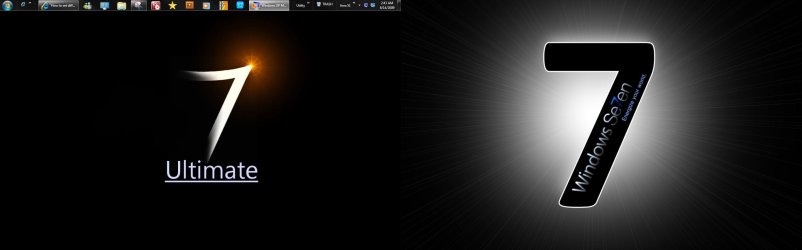
You can see where you can get into a situation rather fast with the Display Fusion if you have anything centered in the particular wallpaper you decide on. That still has to be custom fitted for twin displays.
W7 Ultimate x64/W10 Pro x64/W11 Pro Triple Boot - Main PC W7 Remote PC Micro ATX W7 Pro x64/W11 Pro
CPU
AMD Phenom II X4 975 Deneb 3.6ghz - 965 2nd remote pc
Motherboard
Gigabyte GA-790XTA-UD4-Gigabyte GA-880GM-D2H remote pc
Memory
Kingston Hyper X DDR3 1600 1.5v 16gb - Hyper X Fury 8gb 2nd
Graphics Card(s)
MSI HD Radeon 5750 1gb - MSI HD Radeon 6450 on mini tower
Sound Card
Creative Labs X-Fi Xtreme Audio P - Realtek onooard 2nd case
Monitor(s) Displays
ASUS VW199T-P 19" HP 2082a Main-HP 2082a 20" remote pc
Screen Resolution
Asus 1440x900 - HP 1600x900
Hard Drives
WD Black 1TB HD per OS W7, W10, and pending W11 presently on 500gb OS Drive - Pending Triple 1TB HDs for Spanned Storage/backup volume
Single 2TB external USB enclosure, single 1TB System 7 Host/Boot drive, Pending 8TB external HD for system image b
PSU
Corsair 750TX - primary / Corsair CX600 - second
Case
Antec 900-2 - SSD compatible / NZXT Vulcan mini tower
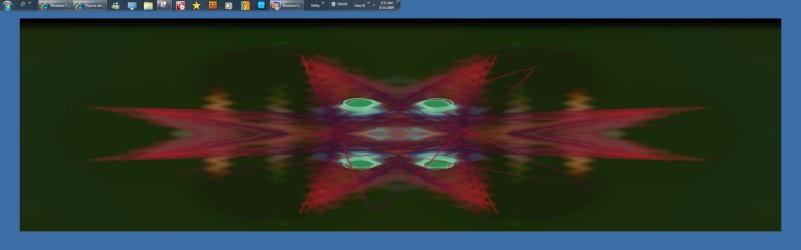
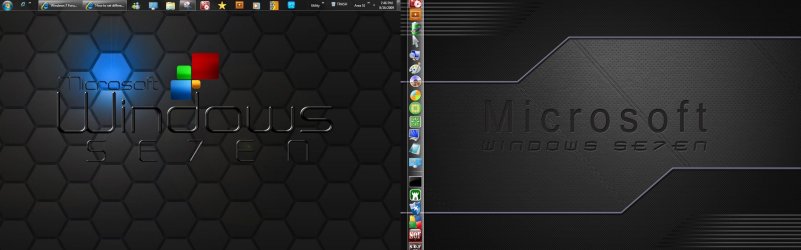
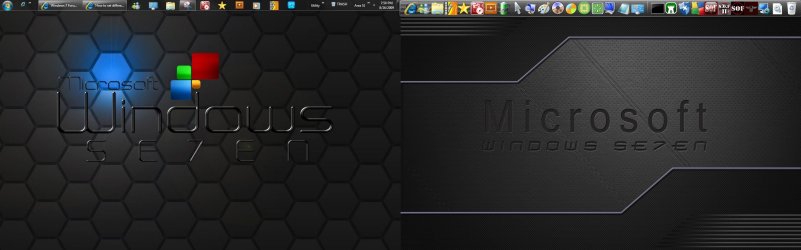
The DisplayFusion has the "stretch" option while you saw the blue border on the first screen I posted there. I have another that shows a new wallpaper made up where the background is one wallpaper set at 2880x900 while the first were at 1440x900 the native for the monitors in use here.
You see how that looks with the 4th image here no longer seeing the 7 stretcheddddd outttt... into a mess while other backgrounds may not suffer the same fate. The second wallpaper will be adjust to fill the screen as long as the wallpaper's items don't suffer from the difference.
W7 Ultimate x64/W10 Pro x64/W11 Pro Triple Boot - Main PC W7 Remote PC Micro ATX W7 Pro x64/W11 Pro
CPU
AMD Phenom II X4 975 Deneb 3.6ghz - 965 2nd remote pc
Motherboard
Gigabyte GA-790XTA-UD4-Gigabyte GA-880GM-D2H remote pc
Memory
Kingston Hyper X DDR3 1600 1.5v 16gb - Hyper X Fury 8gb 2nd
Graphics Card(s)
MSI HD Radeon 5750 1gb - MSI HD Radeon 6450 on mini tower
Sound Card
Creative Labs X-Fi Xtreme Audio P - Realtek onooard 2nd case
Monitor(s) Displays
ASUS VW199T-P 19" HP 2082a Main-HP 2082a 20" remote pc
Screen Resolution
Asus 1440x900 - HP 1600x900
Hard Drives
WD Black 1TB HD per OS W7, W10, and pending W11 presently on 500gb OS Drive - Pending Triple 1TB HDs for Spanned Storage/backup volume
Single 2TB external USB enclosure, single 1TB System 7 Host/Boot drive, Pending 8TB external HD for system image b
PSU
Corsair 750TX - primary / Corsair CX600 - second
Case
Antec 900-2 - SSD compatible / NZXT Vulcan mini tower
The problem there offers some tweaks for the display as well as running into a few drawbacks to make note of here however. Once you have the one or two selected and applied along with the centered or stretched option you will want to right click on the icon in the notification area to exit.
Having the program auto load along with Windows or simply running in the background can interfere with other softwares like tv tuner cards for recording shows or what not. It seems it taps some of the same resources used by both to some extent.
W7 Ultimate x64/W10 Pro x64/W11 Pro Triple Boot - Main PC W7 Remote PC Micro ATX W7 Pro x64/W11 Pro
CPU
AMD Phenom II X4 975 Deneb 3.6ghz - 965 2nd remote pc
Motherboard
Gigabyte GA-790XTA-UD4-Gigabyte GA-880GM-D2H remote pc
Memory
Kingston Hyper X DDR3 1600 1.5v 16gb - Hyper X Fury 8gb 2nd
Graphics Card(s)
MSI HD Radeon 5750 1gb - MSI HD Radeon 6450 on mini tower
Sound Card
Creative Labs X-Fi Xtreme Audio P - Realtek onooard 2nd case
Monitor(s) Displays
ASUS VW199T-P 19" HP 2082a Main-HP 2082a 20" remote pc
Screen Resolution
Asus 1440x900 - HP 1600x900
Hard Drives
WD Black 1TB HD per OS W7, W10, and pending W11 presently on 500gb OS Drive - Pending Triple 1TB HDs for Spanned Storage/backup volume
Single 2TB external USB enclosure, single 1TB System 7 Host/Boot drive, Pending 8TB external HD for system image b
PSU
Corsair 750TX - primary / Corsair CX600 - second
Case
Antec 900-2 - SSD compatible / NZXT Vulcan mini tower
The taskbar in each window option is only available on the Pro edition. That's greyed on the free version.
As far as resources with the slideshow option set there's nothing to worry about there since 7 is quite a bit lighter on resources to start with. If you are running a system with 1gb or less of memory you wouldn't want to intensify things obviously while the average system at this time with 2gb or more won't even notice it.
When mentioning resources for a tv tuner card for some reason any recording ends up in multiple segments rather then one main file for some while the display program is active. Once the background or backgrounds are set you simply right click on the icon in the system tray to choose the exit there while running any recording or capture.
That won't have any effect on the single, dual, or slideshow filler you have set for display. For having the taskbar visible on multiple displays without the Pro then you have to have the two displays mirror each other unless using a utility like RocketDock and having it set to be the right side ending up on the left for the second monitor providing a visible taskbar there.
W7 Ultimate x64/W10 Pro x64/W11 Pro Triple Boot - Main PC W7 Remote PC Micro ATX W7 Pro x64/W11 Pro
CPU
AMD Phenom II X4 975 Deneb 3.6ghz - 965 2nd remote pc
Motherboard
Gigabyte GA-790XTA-UD4-Gigabyte GA-880GM-D2H remote pc
Memory
Kingston Hyper X DDR3 1600 1.5v 16gb - Hyper X Fury 8gb 2nd
Graphics Card(s)
MSI HD Radeon 5750 1gb - MSI HD Radeon 6450 on mini tower
Sound Card
Creative Labs X-Fi Xtreme Audio P - Realtek onooard 2nd case
Monitor(s) Displays
ASUS VW199T-P 19" HP 2082a Main-HP 2082a 20" remote pc
Screen Resolution
Asus 1440x900 - HP 1600x900
Hard Drives
WD Black 1TB HD per OS W7, W10, and pending W11 presently on 500gb OS Drive - Pending Triple 1TB HDs for Spanned Storage/backup volume
Single 2TB external USB enclosure, single 1TB System 7 Host/Boot drive, Pending 8TB external HD for system image b
PSU
Corsair 750TX - primary / Corsair CX600 - second
Case
Antec 900-2 - SSD compatible / NZXT Vulcan mini tower
You have to buy the license for the Pro version in order to stretch or configure the Windows taskbar onto the second monitor like I was saying before since that is greyed out on the free version. So like Mr GRIM pointed out I simply right clicked on the RocketDock bar and selected the display on second monitor option for that.
I still ended up seeing back on the bottom of the screen however since unlike the Start taskbar it doesn't push the top of any Windows down when not set to auto hide or when popping right when you are trying to do something else. A slight drawback while still having a toolbar on that side.
W7 Ultimate x64/W10 Pro x64/W11 Pro Triple Boot - Main PC W7 Remote PC Micro ATX W7 Pro x64/W11 Pro
CPU
AMD Phenom II X4 975 Deneb 3.6ghz - 965 2nd remote pc
Motherboard
Gigabyte GA-790XTA-UD4-Gigabyte GA-880GM-D2H remote pc
Memory
Kingston Hyper X DDR3 1600 1.5v 16gb - Hyper X Fury 8gb 2nd
Graphics Card(s)
MSI HD Radeon 5750 1gb - MSI HD Radeon 6450 on mini tower
Sound Card
Creative Labs X-Fi Xtreme Audio P - Realtek onooard 2nd case
Monitor(s) Displays
ASUS VW199T-P 19" HP 2082a Main-HP 2082a 20" remote pc
Screen Resolution
Asus 1440x900 - HP 1600x900
Hard Drives
WD Black 1TB HD per OS W7, W10, and pending W11 presently on 500gb OS Drive - Pending Triple 1TB HDs for Spanned Storage/backup volume
Single 2TB external USB enclosure, single 1TB System 7 Host/Boot drive, Pending 8TB external HD for system image b
PSU
Corsair 750TX - primary / Corsair CX600 - second
Case
Antec 900-2 - SSD compatible / NZXT Vulcan mini tower
I actually don't mind having just 1 taskbar, but what I do mind is (and this is going out of the topic of the wallpaper) is there a way to make the monitor to not shutdown when Firefox is running flash. I see BBC iplayer, and F1 online, I don't want the screen to shutdown.
I know in Linux there is a tweak code which you can prevent the monitor from turning off when the browser is on, I cannot find the same function for W7
My Computer
OS
Windows 7 64 bit Pro
Sound Card
On board
Monitor(s) Displays
Dual Monitor: Dell U2311H 23" monitor, LG M227WD
Screen Resolution
1920x1080x2 (landscape)
Keyboard
Microsoft Ergonomic Keyboard 4000
Mouse
Logitech M 705
Internet Speed
25mb/1mb
Other Info
Printer: HP F4180
Speakers: Creative Gigaworks T20 Series II
I run everything here without seeing either monitor shutoff or go into sleep mode by simply setting the display settings to "never". That's a simple setting change in the Control Panel>power options for one of the plans included or a custom power scheme you create.
The problem I continue to see with the RCs however is at every startup and reboot the need to back in and reset the setting there on the custom since that will get restored to the default 15 or usually 20 minute. This is another reason why I'll be glad when 10/22 finally arrives here!
W7 Ultimate x64/W10 Pro x64/W11 Pro Triple Boot - Main PC W7 Remote PC Micro ATX W7 Pro x64/W11 Pro
CPU
AMD Phenom II X4 975 Deneb 3.6ghz - 965 2nd remote pc
Motherboard
Gigabyte GA-790XTA-UD4-Gigabyte GA-880GM-D2H remote pc
Memory
Kingston Hyper X DDR3 1600 1.5v 16gb - Hyper X Fury 8gb 2nd
Graphics Card(s)
MSI HD Radeon 5750 1gb - MSI HD Radeon 6450 on mini tower
Sound Card
Creative Labs X-Fi Xtreme Audio P - Realtek onooard 2nd case
Monitor(s) Displays
ASUS VW199T-P 19" HP 2082a Main-HP 2082a 20" remote pc
Screen Resolution
Asus 1440x900 - HP 1600x900
Hard Drives
WD Black 1TB HD per OS W7, W10, and pending W11 presently on 500gb OS Drive - Pending Triple 1TB HDs for Spanned Storage/backup volume
Single 2TB external USB enclosure, single 1TB System 7 Host/Boot drive, Pending 8TB external HD for system image b
PSU
Corsair 750TX - primary / Corsair CX600 - second
Case
Antec 900-2 - SSD compatible / NZXT Vulcan mini tower



 The other DisplayFusion will given a look as well since the second monitor here allows for monitoring what is running on the XP mode while sometimes reversing displays just to grab a screen or two.