Solved upgraded memory and now windows not starting up at all

richarda

New member
Local time
9:34 AM
Messages
6
As a little xmas treat i got my gigabyte GA-H55M-UD2H mb some extra RAM. All had worked perfectly with OCZ 4Gb but when this was replaced with 8 Gb HMD (Crucial i think) i get nothing past the initial black screen loading windows files... not as far as the windows coloured logo. I dont get to safe mode or system repair. All activity stops.

I have swapped the slots the memory is in and swapped the memory in the slots so everything has been everywhere and still windows stalls before it starts at the black screen 'loading windows files' (or something very similar)

Bios reports 8Gb installed with the appropriate manufacturers specified timings etc

I have gone back to the original 4Gb memory and windows works fine after going through system repair and restoring to the last good setup.

If BIOS sees the memory OK should i expect window to as well? Any thoughts welcomed and gratefully received
 

My Computer My Computer

At a glance

windows 7 home premium 64bitIntel(R) Core(TM) i3 CPU 540 @ 3.07GHz4.00 GBATI Radeon HD 5450
OS
windows 7 home premium 64bit
CPU
Intel(R) Core(TM) i3 CPU 540 @ 3.07GHz
Motherboard
Gigabyte Technology Co., Ltd. H55M-UD2H
Memory
4.00 GB
Graphics Card(s)
ATI Radeon HD 5450
Sound Card
(1) ATI High Definition Audio Device (2) Realtek High Defi
Monitor(s) Displays
Benq HD2222
Hard Drives
(1) SAMSUNG HD103SJ ATA Device (2) Generic- Compact Flash USB Device (3) Generic- MS/MS-Pro USB Device (4) Generic- SD/MMC USB Device (5) Generic- SM/xD-Picture USB Device
PSU
Corsair CX 430
Try This...

Start-> Type in 'msconfig' and click the top link.

Goto 'boot' tab

Click 'advanced options'

see if 'maximum memory' is checked, if so, uncheck it


report back
 

My Computer My Computer

At a glance

Windows 7 Ultimate x86Intel Pentium D 925 @ 3.00GHz1GB DDR2 667MHzOverclocked Asus ATI Radeon X1600 Pro 512MB
Computer Manufacturer/Model Number
Packard Bell iMedia 2218 -- Has Been Running For Almost 7 Years!
OS
Windows 7 Ultimate x86
CPU
Intel Pentium D 925 @ 3.00GHz
Motherboard
Socket 775 MCP73VT-PM
Memory
1GB DDR2 667MHz
Graphics Card(s)
Overclocked Asus ATI Radeon X1600 Pro 512MB
Sound Card
Sound Blaster Audigy 570
Monitor(s) Displays
19" LCD Monitor; MW19E-AAA
Screen Resolution
1440 x 900
Hard Drives
500gb 7200rpm (Windows 7) ---
160gb 7200rpm (Backup) ---
1TB Iomega External Drive (7200rpm)
PSU
250w Packard Bell Standard
Case
Packard Bell standard
Cooling
Intel Socket 775 Air Cooler
Keyboard
Wired PS/2 Keyboard
Mouse
Dell Wireless USB Mouse
Internet Speed
Wireles --- Download - 6.63 Mbps Upload - 0.38 Mbps
Other Info
Currently Planning To Build New Computer --- Also Got A Samsung Galaxy Ace II (Plays All Games You Throw At It)
i had a look and max memory was not checked.

Just to be clear from the first post i am unable to get past the black screen whether trying from windows on the HDD or from the installation disk.

thanks
 

My Computer My Computer

At a glance

windows 7 home premium 64bitIntel(R) Core(TM) i3 CPU 540 @ 3.07GHz4.00 GBATI Radeon HD 5450
OS
windows 7 home premium 64bit
CPU
Intel(R) Core(TM) i3 CPU 540 @ 3.07GHz
Motherboard
Gigabyte Technology Co., Ltd. H55M-UD2H
Memory
4.00 GB
Graphics Card(s)
ATI Radeon HD 5450
Sound Card
(1) ATI High Definition Audio Device (2) Realtek High Defi
Monitor(s) Displays
Benq HD2222
Hard Drives
(1) SAMSUNG HD103SJ ATA Device (2) Generic- Compact Flash USB Device (3) Generic- MS/MS-Pro USB Device (4) Generic- SD/MMC USB Device (5) Generic- SM/xD-Picture USB Device
PSU
Corsair CX 430

My Computer My Computer

At a glance

Windows 10 Pro. 64/ version 1709 Windows 7 Pr...Intel i7-6800K @ 4.3Corsair Platinum 16 gig @2400EVGA GTX 1070 OC
Computer type
PC/Desktop
Computer Manufacturer/Model Number
Home made Desktop
OS
Windows 10 Pro. 64/ version 1709 Windows 7 Pro/64
CPU
Intel i7-6800K @ 4.3
Motherboard
ASUS X-99 Deluxe II
Memory
Corsair Platinum 16 gig @2400
Graphics Card(s)
EVGA GTX 1070 OC
Monitor(s) Displays
Asus 27" LED LCD/VE278Q
Screen Resolution
1920-1080 or 1280-720 HDMI
Hard Drives
INTEL SSD 730-240 Gb Sata 3.0/
PSU
EVGA Platium 1200W
Case
Phanteks Luxe Tempered Glass 8 fans/ one radiator
Cooling
XSPC/ Water Cooled CPU
Keyboard
Das 4 Professional
Mouse
Logitech M705/MX Anywhere 2-S
Internet Speed
100 mbits
Antivirus
Microsoft Security Essentials/ Malwarebytes Premium 3.0/ SAS
Browser
I.E. 11 default/Firefox/ ISP Time Warner Cable/Spectrum
Other Info
LG BluRay Burner/
Sound system-KLipsch-THX/
Icy Dock ssd Hot Swap bays.
Hello and welcome to the forums.

If it was me personally I don't trust the bios to automatically set everything, I don't know if you have entered all the values yourself or not, But I would give it a go, make sure all the timings are correct to what it says on the sticker on the ram and also make sure the speed and voltage are correct. Set this all yourself and F10 save and exit.

If that fails then yes perhaps the ram is incompatible with your motherboard but in my experience this is quite rare even if they are not on the list.

Paul
 

My Computer My Computer

At a glance

Windows 7 Professional 64 bit
OS
Windows 7 Professional 64 bit
Yes paul that is rare, try the above as a few months ago this was the case with my friend, he bough new ram and the bios set it wrong and the pc wont boot, after my advice over the phone he managed to set it back to right
 

My Computer My Computer

At a glance

Windows 7 Ultimate x86Intel Pentium D 925 @ 3.00GHz1GB DDR2 667MHzOverclocked Asus ATI Radeon X1600 Pro 512MB
Computer Manufacturer/Model Number
Packard Bell iMedia 2218 -- Has Been Running For Almost 7 Years!
OS
Windows 7 Ultimate x86
CPU
Intel Pentium D 925 @ 3.00GHz
Motherboard
Socket 775 MCP73VT-PM
Memory
1GB DDR2 667MHz
Graphics Card(s)
Overclocked Asus ATI Radeon X1600 Pro 512MB
Sound Card
Sound Blaster Audigy 570
Monitor(s) Displays
19" LCD Monitor; MW19E-AAA
Screen Resolution
1440 x 900
Hard Drives
500gb 7200rpm (Windows 7) ---
160gb 7200rpm (Backup) ---
1TB Iomega External Drive (7200rpm)
PSU
250w Packard Bell Standard
Case
Packard Bell standard
Cooling
Intel Socket 775 Air Cooler
Keyboard
Wired PS/2 Keyboard
Mouse
Dell Wireless USB Mouse
Internet Speed
Wireles --- Download - 6.63 Mbps Upload - 0.38 Mbps
Other Info
Currently Planning To Build New Computer --- Also Got A Samsung Galaxy Ace II (Plays All Games You Throw At It)
Layback Bear said 'mismatched memory for the system' but i have to admit i dont know exactly what that means, the BIOS reports its there and if i were using a DOS based OS feel sure it would work but ....

I checked the settings of both pairs of memory in BIOS
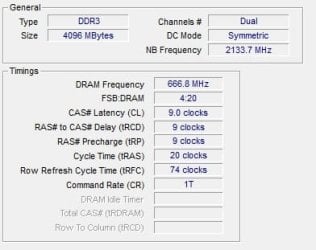
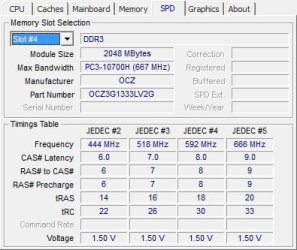
the original 2gb modules [OCZ3G1333L]timing is 9-9-9-20[Tras]......74[Trfc]
and the new 4gb modules 9-9-9-24[Tras].....174[Trfc]

and i'm thinking since the PC gets past the post check to the point of booting into windows these setting differences don't matter, but on the otherhand of course it might. Grateful for further advice
 

My Computer My Computer

At a glance

windows 7 home premium 64bitIntel(R) Core(TM) i3 CPU 540 @ 3.07GHz4.00 GBATI Radeon HD 5450
OS
windows 7 home premium 64bit
CPU
Intel(R) Core(TM) i3 CPU 540 @ 3.07GHz
Motherboard
Gigabyte Technology Co., Ltd. H55M-UD2H
Memory
4.00 GB
Graphics Card(s)
ATI Radeon HD 5450
Sound Card
(1) ATI High Definition Audio Device (2) Realtek High Defi
Monitor(s) Displays
Benq HD2222
Hard Drives
(1) SAMSUNG HD103SJ ATA Device (2) Generic- Compact Flash USB Device (3) Generic- MS/MS-Pro USB Device (4) Generic- SD/MMC USB Device (5) Generic- SM/xD-Picture USB Device
PSU
Corsair CX 430
Welcome richarda,

Download CPU-Z

:ar: |MG| CPU-Z 1.62 Download

Then give us a screen snip of each of you memory slots/tabs
 

Attachments

  • CPU-Z_Memory_n_Slots_Snip.JPG
    CPU-Z_Memory_n_Slots_Snip.JPG
    135.1 KB · Views: 6

My Computer My Computer

At a glance

Win7 Enterprise, Win7 x86 (Ult 7600), Win7 x6...AMD fx8350 4ghz, AMD-32 2400mhz, AMD-64 3200m...2gb, 4gb on the Ult 7600, 4gb on Technet RTM,...Draw my own Graphics, several nVidia cards
Computer type
PC/Desktop
Computer Manufacturer/Model Number
Built them myself, Science Experiments !
OS
Win7 Enterprise, Win7 x86 (Ult 7600), Win7 x64 Ult 7600, TechNet RTM on AMD x64 (2.8Ghz)
CPU
AMD fx8350 4ghz, AMD-32 2400mhz, AMD-64 3200mhz, AMDx64 2.8G
Motherboard
SIS 755, ECS-K8M890M-M (Ult 7600), GigaByte & others
Memory
2gb, 4gb on the Ult 7600, 4gb on Technet RTM, 32gb on FX8350
Graphics Card(s)
Draw my own Graphics, several nVidia cards
Sound Card
on motherboard
Monitor(s) Displays
19" flat scr, 28" I-Inc widescr,22" Emprex Widescr, 23" Acer
Screen Resolution
1280 x 1024, 1440 x 900, 1920 x 1080
Hard Drives
6 pata Ide HD's & 2 Sata HD's
added 80gb external on Ult 7600 computer,
numerous extra 1tb, 2TB, 3Tb SATA HD's
A collection of ext HD Docks w/ HDs
PSU
430w, 550w, 600w, 700, 800, etc
Case
All Generic Full Towers
Cooling
Open Air & a few fans, some w/ colored LEDs
Keyboard
Compaq & Dell recycled from GoodWill
Mouse
Made in China Optical Wired Mouse
Internet Speed
Fast Cable InterNet
Antivirus
AVG Free on 24 different Desktops, NO Problems!
Browser
IE 8 is preferred, but use FireFox sometimes
Other Info
Linksys Routers, switches, & Hubs
Too Many USB Flash Drives to count, Biggest is 64GB !
Eight computers in my home network.
Sixteen computers at my business network.
Linked via TeamViewer !
Lots of old used spare computer parts everywhere!
CPU-z screen grabs for the 2gb modules should be here as an attachment since windows wont start with the new 4gb memory i cant provide screen grabs for that but since the CPU-Z and BIOS agree the 4gb are as previously specified
 

Attachments

My Computer My Computer

At a glance

windows 7 home premium 64bitIntel(R) Core(TM) i3 CPU 540 @ 3.07GHz4.00 GBATI Radeon HD 5450
OS
windows 7 home premium 64bit
CPU
Intel(R) Core(TM) i3 CPU 540 @ 3.07GHz
Motherboard
Gigabyte Technology Co., Ltd. H55M-UD2H
Memory
4.00 GB
Graphics Card(s)
ATI Radeon HD 5450
Sound Card
(1) ATI High Definition Audio Device (2) Realtek High Defi
Monitor(s) Displays
Benq HD2222
Hard Drives
(1) SAMSUNG HD103SJ ATA Device (2) Generic- Compact Flash USB Device (3) Generic- MS/MS-Pro USB Device (4) Generic- SD/MMC USB Device (5) Generic- SM/xD-Picture USB Device
PSU
Corsair CX 430
try uploading screen shots again captured with screensnag.exe
 

Attachments

  • SNAG-12122918512700.jpg
    SNAG-12122918512700.jpg
    17.9 KB · Views: 1
  • SNAG-12122918514300.jpg
    SNAG-12122918514300.jpg
    26.8 KB · Views: 1
  • SNAG-12122918515600.jpg
    SNAG-12122918515600.jpg
    26.9 KB · Views: 0

My Computer My Computer

At a glance

windows 7 home premium 64bitIntel(R) Core(TM) i3 CPU 540 @ 3.07GHz4.00 GBATI Radeon HD 5450
OS
windows 7 home premium 64bit
CPU
Intel(R) Core(TM) i3 CPU 540 @ 3.07GHz
Motherboard
Gigabyte Technology Co., Ltd. H55M-UD2H
Memory
4.00 GB
Graphics Card(s)
ATI Radeon HD 5450
Sound Card
(1) ATI High Definition Audio Device (2) Realtek High Defi
Monitor(s) Displays
Benq HD2222
Hard Drives
(1) SAMSUNG HD103SJ ATA Device (2) Generic- Compact Flash USB Device (3) Generic- MS/MS-Pro USB Device (4) Generic- SD/MMC USB Device (5) Generic- SM/xD-Picture USB Device
PSU
Corsair CX 430
Richarda, I am not familiar with your board. But, you should be able to set your timings frequency and voltage in bios. With you old sticks in, go into bios, set the first 4 timings to 9-9-9-24, set the Command Rate (CR) to 2, set the voltage to 1.5V and set the frequency to 1333. Save and exit. It should still boot into windows, but if not, don't be concerned, just hold the power button down and the computer should shut down. Remove the power cord, remove the old ram and replace it with the new ram. Be sure it is seated properly. Push it down until the clips come up. Push the clips all the way up, just to be sure. Plug the power cord back in and boot up. It should boot unless the ram is bad.
 

My Computers My Computers

  • At a glance

    Windows 11 ProRyzen 9 5900X32GB G Skill DDR4-3600EVGA RTX 3080 FTW 3 Ultra
    Computer type
    PC/Desktop
    Computer Manufacturer/Model Number
    ALWAYS UNDER CONSTRUCTION
    OS
    Windows 11 Pro
    CPU
    Ryzen 9 5900X
    Motherboard
    Asus X570 Crosshair Viii Hero
    Memory
    32GB G Skill DDR4-3600
    Graphics Card(s)
    EVGA RTX 3080 FTW 3 Ultra
    Sound Card
    On Board/Sennheiser PC37X Headset
    Monitor(s) Displays
    3 X Asus 27"
    Screen Resolution
    2560x1440
    Hard Drives
    2 X 1 TB NVME drives
    PSU
    EVGA 850
    Case
    Phanteks Eclipse P400A
    Cooling
    EVGA 280 AIO
    Keyboard
    Logitech G510s/ Logitech G13
    Mouse
    Logitech G502
    Internet Speed
    24/1
    Antivirus
    ESET/MBAM Pro/SAS Pro
    Browser
    Chrome/ Firefox/ Edge
  • At a glance

    Windows 11 ProIntel Ultra 9 288V32 GB LPDDR5X 8533
    Computer type
    Laptop
    System Manufacturer/Model Number
    Dell 16 Plus
    OS
    Windows 11 Pro
    CPU
    Intel Ultra 9 288V
    Memory
    32 GB LPDDR5X 8533
    Monitor(s) Displays
    16" Mini-LED HDR600 Touch 90 Hz
    Screen Resolution
    2560X1600
    Hard Drives
    1 TB NVME
Just like to thank you guys for your help

Solution was to replace the memory with a different manufacturer DIMM and the PC works OK. No idea why the other stuff didn't work. I tried to test with the recommended +memory test from a USB drive but that wouldn't load either.

Thanks
Richard
 

My Computer My Computer

At a glance

windows 7 home premium 64bitIntel(R) Core(TM) i3 CPU 540 @ 3.07GHz4.00 GBATI Radeon HD 5450
OS
windows 7 home premium 64bit
CPU
Intel(R) Core(TM) i3 CPU 540 @ 3.07GHz
Motherboard
Gigabyte Technology Co., Ltd. H55M-UD2H
Memory
4.00 GB
Graphics Card(s)
ATI Radeon HD 5450
Sound Card
(1) ATI High Definition Audio Device (2) Realtek High Defi
Monitor(s) Displays
Benq HD2222
Hard Drives
(1) SAMSUNG HD103SJ ATA Device (2) Generic- Compact Flash USB Device (3) Generic- MS/MS-Pro USB Device (4) Generic- SD/MMC USB Device (5) Generic- SM/xD-Picture USB Device
PSU
Corsair CX 430
Glad you got it sorted in the end Richard.

Paul.
 

My Computer My Computer

At a glance

Windows 7 Professional 64 bit
OS
Windows 7 Professional 64 bit
Just like to thank you guys for your help

Solution was to replace the memory with a different manufacturer DIMM and the PC works OK. No idea why the other stuff didn't work. I tried to test with the recommended +memory test from a USB drive but that wouldn't load either.

Thanks
Richard

Glad you have it working. Well done.
 

My Computers My Computers

  • At a glance

    Windows 11 ProRyzen 9 5900X32GB G Skill DDR4-3600EVGA RTX 3080 FTW 3 Ultra
    Computer type
    PC/Desktop
    Computer Manufacturer/Model Number
    ALWAYS UNDER CONSTRUCTION
    OS
    Windows 11 Pro
    CPU
    Ryzen 9 5900X
    Motherboard
    Asus X570 Crosshair Viii Hero
    Memory
    32GB G Skill DDR4-3600
    Graphics Card(s)
    EVGA RTX 3080 FTW 3 Ultra
    Sound Card
    On Board/Sennheiser PC37X Headset
    Monitor(s) Displays
    3 X Asus 27"
    Screen Resolution
    2560x1440
    Hard Drives
    2 X 1 TB NVME drives
    PSU
    EVGA 850
    Case
    Phanteks Eclipse P400A
    Cooling
    EVGA 280 AIO
    Keyboard
    Logitech G510s/ Logitech G13
    Mouse
    Logitech G502
    Internet Speed
    24/1
    Antivirus
    ESET/MBAM Pro/SAS Pro
    Browser
    Chrome/ Firefox/ Edge
  • At a glance

    Windows 11 ProIntel Ultra 9 288V32 GB LPDDR5X 8533
    Computer type
    Laptop
    System Manufacturer/Model Number
    Dell 16 Plus
    OS
    Windows 11 Pro
    CPU
    Intel Ultra 9 288V
    Memory
    32 GB LPDDR5X 8533
    Monitor(s) Displays
    16" Mini-LED HDR600 Touch 90 Hz
    Screen Resolution
    2560X1600
    Hard Drives
    1 TB NVME
Back
Top