Solved Windows 7 not recognizing Radeon 7800 graphics card

Shelf

New member
Local time
1:36 PM
Messages
5
I've tried clean installing windows 7 multiple times already.

I've been trying to install drivers from the XFX disc that come with the graphics card, i'm informed that:
"We were unable to detect an XFX product at this time. We recommend to click Cancel, restart your computer and try again. If the problem persists, click Ok and continue installing the drivers from the disk."
I have tried both of the suggestions, neither have gotten me anywhere.

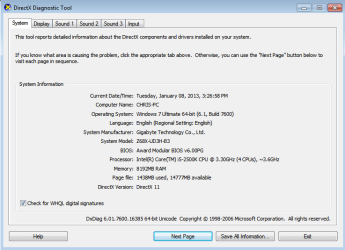
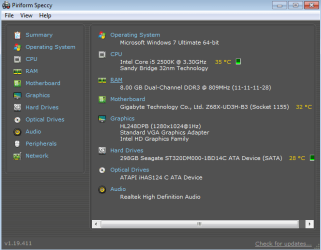
I've looked at other threads and found the programs that are recommended to find system information and i'm posting what i've gathered here, thanks to any and all in advance.
 

Attachments
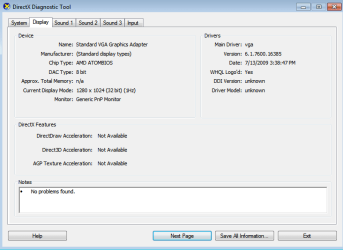
  • dxdiag-Display.png
    dxdiag-Display.png
    11.5 KB · Views: 22
  • dxdiag-system.png
    dxdiag-system.png
    15.9 KB · Views: 18
  • Speccy-summary.png
    Speccy-summary.png
    17.7 KB · Views: 22

My Computer My Computer

At a glance

MN
OS
MN
Have you plugged the juice into your card correctly?

Ok think i have sussed it

You need to switch off your onboard graphics in the bios
 

My Computer My Computer

At a glance

WIN7 Ultimate 64bitAMD FX8150/Trinity A10-5700G-Skill 2400 x2 @ 1866 (both pc's)Sapphire (factory OC version) AMD 7770
Computer type
PC/Desktop
Computer Manufacturer/Model Number
D.I.Y.
OS
WIN7 Ultimate 64bit
CPU
AMD FX8150/Trinity A10-5700
Motherboard
Asus Sabertooth v.1 /Asus F2A85-M Pro
Memory
G-Skill 2400 x2 @ 1866 (both pc's)
Graphics Card(s)
Sapphire (factory OC version) AMD 7770
Sound Card
onboard
Monitor(s) Displays
T260 Samsung
Screen Resolution
1920x1080
Hard Drives
Western Digital Sata 2TB/1TB Caviar Blacks
Buffalo 1TB usb (excellent drive)
PSU
Be-Quiet 700W E-9/Be-Quiet 550W E-9(E-9 = built by FSP)
Case
Antec P183/Antec P180mini
Cooling
x2 Xigmatek SXHH7-U01 + C-Master R4-EXBB-20PK-R0 120mm Fans
Keyboard
Cherry
Mouse
MS Explorer 3.0
Other Info
LG Blu ray combo
Pioneer 207D/208 Blu ray burners
Neo, I don't believe he would get any video signal if he plugged his monitor into the new GPU without switching the graphics output in the BIOS first.

Shelf, are you sure you plugged your monitor into the GPU?

OP, show us a picture of your device manager.
In Win 7 Start--> Control Panel--> Hardware and Sound--> Device Manager.
Select display adapters and take a screencap of that.

If the card appears in the device manager, I would highly recommend that instead of using XFX drivers, you go directly to AMD's website and download the latest driver from them.
 

My Computer My Computer

At a glance

Windows 7 professional X64AMD A10-5800K OC@ 4.4Ghz.8GB Kingston HyperX Blu 1333mhzXFX HD7870 2GB Core Edition
Computer type
PC/Desktop
OS
Windows 7 professional X64
CPU
AMD A10-5800K OC@ 4.4Ghz.
Motherboard
Gigabyte F2A85X-UP4
Memory
8GB Kingston HyperX Blu 1333mhz
Graphics Card(s)
XFX HD7870 2GB Core Edition
Monitor(s) Displays
Acer AL2216W
Screen Resolution
1680x1050
Hard Drives
Seagate Barracuda 500gb 7200rpm
Seagate Barracuda 1.5TB 7200rpm
PSU
Cooler Master Silent Pro M 850W
Case
Thermaltake Commander MS-I
Cooling
Cooler Master N520
Mouse
Logitech M504
Internet Speed
10Mbps
Neo, I don't believe he would get any video signal if he plugged his monitor into the new GPU without switching the graphics output in the BIOS first.

Shelf, are you sure you plugged your monitor into the GPU?

OP, show us a picture of your device manager.
In Win 7 Start--> Control Panel--> Hardware and Sound--> Device Manager.
Select display adapters and take a screencap of that.

If the card appears in the device manager, I would highly recommend that instead of using XFX drivers, you go directly to AMD's website and download the latest driver from them.

+1 to that, good advice. But remove all traces of the XFX drivers first. Then go here:

http://support.amd.com/us/Pages/AMDSupportHub.aspx

- and click "Find Your Driver" (Green box, upper left.) This will allow AMD to foind the Drivers you need automatically. Just read the onscreen instructions carefully and follow them.
 

My Computer My Computer

At a glance

Windows 7/64 HPremium.AMD FX-6300.Corsair (2x4) GB DDR3 CMXGX3M2A1337CL9.NVidia/Gigabyte GT730 (2GB) GDDR5.
Computer type
PC/Desktop
Computer Manufacturer/Model Number
bertison
OS
Windows 7/64 HPremium.
CPU
AMD FX-6300.
Motherboard
Asus M5A78L-M LE/USB3.
Memory
Corsair (2x4) GB DDR3 CMXGX3M2A1337CL9.
Graphics Card(s)
NVidia/Gigabyte GT730 (2GB) GDDR5.
Sound Card
Onboard.
Monitor(s) Displays
Iiyama PLE2407HDS.
Screen Resolution
1920 x 1280
Hard Drives
Desktop: 1TB. WD10EZEX-00BN5A0.
Zyxel nsa310 NAS: 2TB Seagate Barracuda 7200.14.
Cache Drive: Sandisk SDSSDRC032G.
Laptop Lenovo B50/80 128 GB SSD.
PSU
Corsair 750M.
Case
Coolermaster N300.
Cooling
FRONT: (2X) 140mm. TOP: (1x) 120mm. REAR: (1x) 120mm.
Keyboard
Logitech K290
Mouse
Trust Optical Wired
Internet Speed
15 Mb Down, 0.55 Up.
Antivirus
Kaspersky Total Security 2017, Hitman Pro.
Browser
Firefox.
Other Info
NETWORK:
Sky "Q box" and router.
Desktop & NAS - 30 Metres Cat6 Ethernet wired, via TP-Link 4-port switch.
Lenovo B50/80 Laptop, 2x Wileyfox phones, Lenovo TAB3-8 tablet - all wireless.
Grandchildren, their parents and friends as bandwidth 'parasites' at various times!
Thanks everyone for the help. AMD's website was definitely the way to go, I guess I was just confused that the disc they sent with the card wasn't working? But it's working now and I appreciate everyone' help! Happy New Years!
 

My Computer My Computer

At a glance

MN
OS
MN
Thanks everyone for the help. AMD's website was definitely the way to go, I guess I was just confused that the disc they sent with the card wasn't working? But it's working now and I appreciate everyone' help! Happy New Years!

Glad we were able to assist!
Most of the times the best path to install drivers for a new card is to install the drivers directly from AMD.
As far as I know it is best to use the manufacterer disc when you are firing the system up for the first time and you don't have the drivers required for a quick start.
 

My Computer My Computer

At a glance

Windows 7 professional X64AMD A10-5800K OC@ 4.4Ghz.8GB Kingston HyperX Blu 1333mhzXFX HD7870 2GB Core Edition
Computer type
PC/Desktop
OS
Windows 7 professional X64
CPU
AMD A10-5800K OC@ 4.4Ghz.
Motherboard
Gigabyte F2A85X-UP4
Memory
8GB Kingston HyperX Blu 1333mhz
Graphics Card(s)
XFX HD7870 2GB Core Edition
Monitor(s) Displays
Acer AL2216W
Screen Resolution
1680x1050
Hard Drives
Seagate Barracuda 500gb 7200rpm
Seagate Barracuda 1.5TB 7200rpm
PSU
Cooler Master Silent Pro M 850W
Case
Thermaltake Commander MS-I
Cooling
Cooler Master N520
Mouse
Logitech M504
Internet Speed
10Mbps
Back
Top