Solved FLV to MKV converter

Parman

confused.....
Guru
Local time
5:19 AM
Messages
880
Location
Topeka Kansas
Anyone use any good software that can convert FLV's to MKV's. I normally use meGUI to do all my converting but for some reason it crashes when converting the audio.

Freeware is always better but paid software works to.

Thanks.

-update-

I forgot to add that i tried to use FLV extract to get the 264 file, adts audio file, and a text timing file. When i try to mux the 264 file and the adts file the audio is out of sync. I know this is why you have the text timing file but I dont actually know how to add it in to the meGUI, or maybe there is another program that can do it.
 

My Computer My Computer

OS
Windows 7 Ultimate x64

My Computer My Computer

Computer type
Laptop
Computer Manufacturer/Model Number
Hewlett-Packard/G62-107SA Notebook
OS
Microsoft Windows 7 Home Premium 64-bit Service Pack 1
CPU
Intel(R) Core(TM) i3 CPU M 330 @ 2.13GHz
Motherboard
Hewlett-Packard 1425
Memory
8 GB DDR3
Graphics Card(s)
Intel(R) HD Graphics
Sound Card
Realtek High Definition Audio
Monitor(s) Displays
Builtin
Screen Resolution
1366 x 768 x 32 bits (4294967296 colors) @ 60 Hz
Hard Drives
250 GB SATA Hard Disk Drive 7200 rpm
2TB Seagate GoFlex USB 2 Drive
1TB Iomega Prestige USB 2 Drive
1.5TB Iomega Prestige USB 2 Drive (Samsung)
2TB WD MyBook Live NAS.
Mouse
Logitech Anywhere MX
Internet Speed
152 Mbs download 10 Mbs upload
Antivirus
Norton 360
Browser
Chrome

My Computer My Computer

Computer Manufacturer/Model Number
HP, Dell, Gateway, Toshiba - 4 laptops and 2 desktops
OS
Vista, Windows7, Mint Mate, Zorin, Windows 8
CPU
from 1.6GHz Duo to i7
Monitor(s) Displays
2x HP w2207
Hard Drives
5x HDD, 7x SSD, 12x Externals
Keyboard
with trackball - no mices
Mouse
Trackball mice
Internet Speed
DSL 6000
Thanks guys i will test them both out to see which one i like.
 

My Computer My Computer

OS
Windows 7 Ultimate x64

My Computer My Computer

Computer type
Laptop
Computer Manufacturer/Model Number
Hewlett-Packard/G62-107SA Notebook
OS
Microsoft Windows 7 Home Premium 64-bit Service Pack 1
CPU
Intel(R) Core(TM) i3 CPU M 330 @ 2.13GHz
Motherboard
Hewlett-Packard 1425
Memory
8 GB DDR3
Graphics Card(s)
Intel(R) HD Graphics
Sound Card
Realtek High Definition Audio
Monitor(s) Displays
Builtin
Screen Resolution
1366 x 768 x 32 bits (4294967296 colors) @ 60 Hz
Hard Drives
250 GB SATA Hard Disk Drive 7200 rpm
2TB Seagate GoFlex USB 2 Drive
1TB Iomega Prestige USB 2 Drive
1.5TB Iomega Prestige USB 2 Drive (Samsung)
2TB WD MyBook Live NAS.
Mouse
Logitech Anywhere MX
Internet Speed
152 Mbs download 10 Mbs upload
Antivirus
Norton 360
Browser
Chrome
This one too. Output quality is excellent: Format Factory Home Page - Free media file format converter

Here is a little video I made that shows how to use it: https://vimeo.com/9283805

PS: It does do .mkv although it is not listed on the webpage - funny

Nice video Wolfgang.
Although the program is pretty simple, it always helps to have a little guideline to get started. There are a lot more functions that come with that program. I use it a lot to crop videos - works really well. If you want to try it, click on "Option" after you selected the video file. I think I'll make a new video to include that.
 

My Computer My Computer

Computer Manufacturer/Model Number
HP, Dell, Gateway, Toshiba - 4 laptops and 2 desktops
OS
Vista, Windows7, Mint Mate, Zorin, Windows 8
CPU
from 1.6GHz Duo to i7
Monitor(s) Displays
2x HP w2207
Hard Drives
5x HDD, 7x SSD, 12x Externals
Keyboard
with trackball - no mices
Mouse
Trackball mice
Internet Speed
DSL 6000
I have tried it in the past Wolfgang and it was pretty good. maybe I'll give it a try again.
 

My Computer My Computer

Computer type
Laptop
Computer Manufacturer/Model Number
Hewlett-Packard/G62-107SA Notebook
OS
Microsoft Windows 7 Home Premium 64-bit Service Pack 1
CPU
Intel(R) Core(TM) i3 CPU M 330 @ 2.13GHz
Motherboard
Hewlett-Packard 1425
Memory
8 GB DDR3
Graphics Card(s)
Intel(R) HD Graphics
Sound Card
Realtek High Definition Audio
Monitor(s) Displays
Builtin
Screen Resolution
1366 x 768 x 32 bits (4294967296 colors) @ 60 Hz
Hard Drives
250 GB SATA Hard Disk Drive 7200 rpm
2TB Seagate GoFlex USB 2 Drive
1TB Iomega Prestige USB 2 Drive
1.5TB Iomega Prestige USB 2 Drive (Samsung)
2TB WD MyBook Live NAS.
Mouse
Logitech Anywhere MX
Internet Speed
152 Mbs download 10 Mbs upload
Antivirus
Norton 360
Browser
Chrome

This worked perfectly except the file went from 300 MB to 800+ MB. I will try the other one later and report back.

This one too. Output quality is excellent: Format Factory Home Page - Free media file format converter

Here is a little video I made that shows how to use it: https://vimeo.com/9283805

PS: It does do .mkv although it is not listed on the webpage - funny

With Format Factory i get an error. 0x1Incorrect function =(
 

My Computer My Computer

OS
Windows 7 Ultimate x64
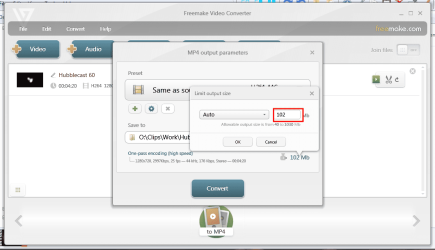
You can actually enter a target size for the video and Freemake will adjust the quality for you.

screenshot232_2013-01-09.png

Please note however that FLV has a far better compression than MKV which is why it is used online. The next best is probably MP4.
 

My Computer My Computer

Computer type
Laptop
Computer Manufacturer/Model Number
Hewlett-Packard/G62-107SA Notebook
OS
Microsoft Windows 7 Home Premium 64-bit Service Pack 1
CPU
Intel(R) Core(TM) i3 CPU M 330 @ 2.13GHz
Motherboard
Hewlett-Packard 1425
Memory
8 GB DDR3
Graphics Card(s)
Intel(R) HD Graphics
Sound Card
Realtek High Definition Audio
Monitor(s) Displays
Builtin
Screen Resolution
1366 x 768 x 32 bits (4294967296 colors) @ 60 Hz
Hard Drives
250 GB SATA Hard Disk Drive 7200 rpm
2TB Seagate GoFlex USB 2 Drive
1TB Iomega Prestige USB 2 Drive
1.5TB Iomega Prestige USB 2 Drive (Samsung)
2TB WD MyBook Live NAS.
Mouse
Logitech Anywhere MX
Internet Speed
152 Mbs download 10 Mbs upload
Antivirus
Norton 360
Browser
Chrome
I did notice that it did create the file at the max value that i had. I'm running the converted MKV though meGUI now and it looks like the (expected size is 159MB atm) if it says down this low i will just double convert all the videos. :confused:
 

My Computer My Computer

OS
Windows 7 Ultimate x64
With Format Factory i get an error. 0x1Incorrect function =(
Hmm, that's something I have never seen. Sorry. I just converted a .flv to .mkv and had no problem. I just cannot play it because I have no program for it.
 

My Computer My Computer

Computer Manufacturer/Model Number
HP, Dell, Gateway, Toshiba - 4 laptops and 2 desktops
OS
Vista, Windows7, Mint Mate, Zorin, Windows 8
CPU
from 1.6GHz Duo to i7
Monitor(s) Displays
2x HP w2207
Hard Drives
5x HDD, 7x SSD, 12x Externals
Keyboard
with trackball - no mices
Mouse
Trackball mice
Internet Speed
DSL 6000
Its alright WHS Freemake did the job. After converting it again with MeGUI it went down to 226 MB which was smaller then the original so i can work with the double convert for this issue.

Thanks both of you.
 

My Computer My Computer

OS
Windows 7 Ultimate x64
As I said you can set a target size in Freemake which will save you the double conversion.
 

My Computer My Computer

Computer type
Laptop
Computer Manufacturer/Model Number
Hewlett-Packard/G62-107SA Notebook
OS
Microsoft Windows 7 Home Premium 64-bit Service Pack 1
CPU
Intel(R) Core(TM) i3 CPU M 330 @ 2.13GHz
Motherboard
Hewlett-Packard 1425
Memory
8 GB DDR3
Graphics Card(s)
Intel(R) HD Graphics
Sound Card
Realtek High Definition Audio
Monitor(s) Displays
Builtin
Screen Resolution
1366 x 768 x 32 bits (4294967296 colors) @ 60 Hz
Hard Drives
250 GB SATA Hard Disk Drive 7200 rpm
2TB Seagate GoFlex USB 2 Drive
1TB Iomega Prestige USB 2 Drive
1.5TB Iomega Prestige USB 2 Drive (Samsung)
2TB WD MyBook Live NAS.
Mouse
Logitech Anywhere MX
Internet Speed
152 Mbs download 10 Mbs upload
Antivirus
Norton 360
Browser
Chrome
As I said you can set a target size in Freemake which will save you the double conversion.


that effects quality correct?

These are cisco training from INE so I need the best quality for when I'm watching them in the CLI.
 

My Computer My Computer

OS
Windows 7 Ultimate x64
Yes it will. It reduces the bitrate. I would think that is what MeGUI does also.
 

My Computer My Computer

Computer type
Laptop
Computer Manufacturer/Model Number
Hewlett-Packard/G62-107SA Notebook
OS
Microsoft Windows 7 Home Premium 64-bit Service Pack 1
CPU
Intel(R) Core(TM) i3 CPU M 330 @ 2.13GHz
Motherboard
Hewlett-Packard 1425
Memory
8 GB DDR3
Graphics Card(s)
Intel(R) HD Graphics
Sound Card
Realtek High Definition Audio
Monitor(s) Displays
Builtin
Screen Resolution
1366 x 768 x 32 bits (4294967296 colors) @ 60 Hz
Hard Drives
250 GB SATA Hard Disk Drive 7200 rpm
2TB Seagate GoFlex USB 2 Drive
1TB Iomega Prestige USB 2 Drive
1.5TB Iomega Prestige USB 2 Drive (Samsung)
2TB WD MyBook Live NAS.
Mouse
Logitech Anywhere MX
Internet Speed
152 Mbs download 10 Mbs upload
Antivirus
Norton 360
Browser
Chrome
I'm not sure what exactly i did with MEgui but i went though a tutorial how to get the lowest size and still have the highest quality, its always seems to worked great.

but...

I will lower the size and see if the quality gets effected to bad.

You win this time kado897. Thanks for setting me straight. I'm not the most knowledgeable about video converting so i was trying to stick with what i knew would work. I lowered the number and the videos seems to be fine.

Thanks again.
 
Last edited:

My Computer My Computer

OS
Windows 7 Ultimate x64
Back
Top