Windows 7 64bit installation with 8GB RAM

Bert101

New member
Local time
9:39 AM
Messages
3
I have a problem to install Windows 7 64bit in my PC. Could it be the problem that I have 8 GR RAM (2 x 4 GB RAM 64) ?
I found that Windows 7 system requirements are: 1 gigabyte (GB) RAM (32-bit) or 2 GB RAM (64-bit) .
Is there any way still to install Windows 7 with this RAM? Os must I change to 1 or 2 GB RAM?

RAM: Crucial Ballistix 8GB DDR3 PC3-10600 CL9 KIT OF 2 BLS2CP4G3D1339DS1S00CEU
Mother board: MSI 760G-P43 FX
Hard drive: Seagate BARRACUDA GREEN 1TB 5900RPM 32MB ST1000DL002
CPU: AMD FX-Series FX-4100 SAM3+ BOX FD4100WMGUSBX

Thanx in advance!


My Computer My Computer

OS
Windows 7 Ultimate x64
What problems do you have installing windows? Post errors and what happens.

It should install fine with 8GB. What version is it (home premium, professional, ultimate)?
 

My Computer My Computer

Computer type
Laptop
Computer Manufacturer/Model Number
ACER ASPIRE 5742G
OS
Microsoft Windows 7 Home Premium 64-bits 7601 Multiprocessor Free Service Pack 1
CPU
Intel(R) Core(TM) i3 CPU M 370 @ 2.40GHz
Motherboard
Acer Aspire 5742G
Memory
4,00 GB
Graphics Card(s)
ATI Mobility Radeon HD 5400 Series
Sound Card
(1) AMD High Definition Audio Device (2) Realtek High Defi
Screen Resolution
1366 x 768 x 32 bits (4294967296 colors) @ 60 Hz
Hard Drives
WDC WD5000BEVT-22ZAT0
It is ultimate. PC is new, I have changed boot sequence settings in BIOS so my 1st boot device is DVD ROM.
When I try to install Win 7, I get past "loading files" and then freeze on "starting windows" screen.

I tried to install MSI drivers first from DVD before WIN7 installation. But the OS system called winki started to boot/install but eventually fails.
 

My Computer My Computer

OS
Windows 7 Ultimate x64
It is ultimate. PC is new, I have changed boot sequence settings in BIOS so my 1st boot device is DVD ROM.
When I try to install Win 7, I get past "loading files" and then freeze on "starting windows" screen.

I tried to install MSI drivers first from DVD before WIN7 installation. But the OS system called winki started to boot/install but eventually fails.
Don't try to load any MSI drivers. Very unlike you need special sata drivers. What do you mean by saying "winki"?
 

My Computer My Computer

Computer type
Laptop
Computer Manufacturer/Model Number
ACER ASPIRE 5742G
OS
Microsoft Windows 7 Home Premium 64-bits 7601 Multiprocessor Free Service Pack 1
CPU
Intel(R) Core(TM) i3 CPU M 370 @ 2.40GHz
Motherboard
Acer Aspire 5742G
Memory
4,00 GB
Graphics Card(s)
ATI Mobility Radeon HD 5400 Series
Sound Card
(1) AMD High Definition Audio Device (2) Realtek High Defi
Screen Resolution
1366 x 768 x 32 bits (4294967296 colors) @ 60 Hz
Hard Drives
WDC WD5000BEVT-22ZAT0
I have a problem to install Windows 7 64bit in my PC. Could it be the problem that I have 8 GR RAM (2 x 4 GB RAM 64) ?
I found that Windows 7 system requirements are: 1 gigabyte (GB) RAM (32-bit) or 2 GB RAM (64-bit) .
Is there any way still to install Windows 7 with this RAM? Os must I change to 1 or 2 GB RAM?

Yes, the requirements of Windows 7 (64-bit) is 2 GB RAM. When they say 2 GB RAM, they actually mean that's the minimal amount of RAM that is needed. If you have more than 2 GB of RAM, it's actually better! :)
 

My Computer My Computer

Computer Manufacturer/Model Number
Acer / PEW76(B)
OS
Microsoft Windows 7 Home Premium 64-bit SP1
CPU
AMD K10 (45nm Technology)
Motherboard
Acer JE51_DN (Socket S1G4)
Memory
4.00 GB Dual-Channel DDR3 @ 536MHz (7-7-7-20)
Graphics Card(s)
ATI Mobility Radeon HD 4200 Series (Acer Incorporated [ALI])
Sound Card
AMD High Definition Audio Device
Monitor(s) Displays
Generic PnP Monitor on ATI Mobility Radeon HD 4200 Series
Screen Resolution
Dual Monitor: 1366x768 / 1440 x 900
Hard Drives
298GB TOSHIBA MK3275GSX SATA Disk Device (SATA)
PSU
6-Cell Li-ion Battery
It is ultimate. PC is new, I have changed boot sequence settings in BIOS so my 1st boot device is DVD ROM.
When I try to install Win 7, I get past "loading files" and then freeze on "starting windows" screen.

I tried to install MSI drivers first from DVD before WIN7 installation. But the OS system called winki started to boot/install but eventually fails.
I search the internet for winki. It's a mini linux to save harddisk files and to boot mini linux
What happens exactly when you do "full featured winki" (not install it)
 

My Computer My Computer

Computer type
Laptop
Computer Manufacturer/Model Number
ACER ASPIRE 5742G
OS
Microsoft Windows 7 Home Premium 64-bits 7601 Multiprocessor Free Service Pack 1
CPU
Intel(R) Core(TM) i3 CPU M 370 @ 2.40GHz
Motherboard
Acer Aspire 5742G
Memory
4,00 GB
Graphics Card(s)
ATI Mobility Radeon HD 5400 Series
Sound Card
(1) AMD High Definition Audio Device (2) Realtek High Defi
Screen Resolution
1366 x 768 x 32 bits (4294967296 colors) @ 60 Hz
Hard Drives
WDC WD5000BEVT-22ZAT0
What's on harddisk now? I mean is it bootbale now? Anyway download partition wizard bootable CD, burn it and boot from it. Does it see the disk and partitions?
Free download Magic Partition Manager Software, partition magic alternative, free partition magic, partition magic Windows 7 and server partition software - Partition Wizard Online (the last one listed)
Do this How to Rebuild MBR with partition magic? Partition Wizard Rebuild MBR Video Help.

Also check your memory for errors Memtest86 - Download Page


Post results
 

My Computer My Computer

Computer type
Laptop
Computer Manufacturer/Model Number
ACER ASPIRE 5742G
OS
Microsoft Windows 7 Home Premium 64-bits 7601 Multiprocessor Free Service Pack 1
CPU
Intel(R) Core(TM) i3 CPU M 370 @ 2.40GHz
Motherboard
Acer Aspire 5742G
Memory
4,00 GB
Graphics Card(s)
ATI Mobility Radeon HD 5400 Series
Sound Card
(1) AMD High Definition Audio Device (2) Realtek High Defi
Screen Resolution
1366 x 768 x 32 bits (4294967296 colors) @ 60 Hz
Hard Drives
WDC WD5000BEVT-22ZAT0
Also make sure it is seeing all memory. Memtest86 should see it

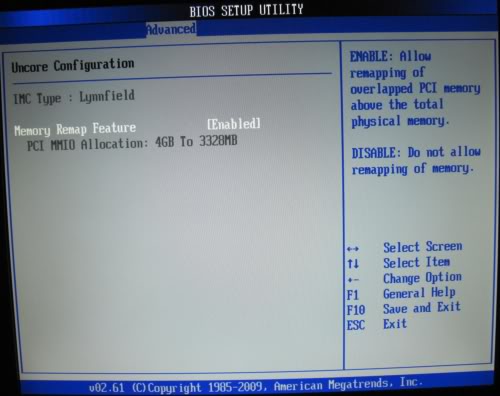
Make sure the Memory Remapping BIOS setting in the Advanced tab is enabled:
RnLHJ.jpg
 

My Computer My Computer

Computer type
Laptop
Computer Manufacturer/Model Number
ACER ASPIRE 5742G
OS
Microsoft Windows 7 Home Premium 64-bits 7601 Multiprocessor Free Service Pack 1
CPU
Intel(R) Core(TM) i3 CPU M 370 @ 2.40GHz
Motherboard
Acer Aspire 5742G
Memory
4,00 GB
Graphics Card(s)
ATI Mobility Radeon HD 5400 Series
Sound Card
(1) AMD High Definition Audio Device (2) Realtek High Defi
Screen Resolution
1366 x 768 x 32 bits (4294967296 colors) @ 60 Hz
Hard Drives
WDC WD5000BEVT-22ZAT0
harddisk is empty, not bootable. thanx for advice, I'll try to burn the suggested CDs and find out whats wrong.
 

My Computer My Computer

OS
Windows 7 Ultimate x64
Pre-SP1 discs occassionally had issues installing on systems with a lot of memory. it's likely a non-issue, as most people have already downloaded the SP1-incorporated discs, but I just thought I'd mention it in case.
 

My Computer My Computer

OS
Windows 7 Ultimate x64 SP1
CPU
Intel Core i7-2600
Motherboard
Gigabyte GA-P67A-UD3P-B3
Memory
12 GB Patriot Extreme DDR3-1333
Graphics Card(s)
Nvidia GTX 470
Monitor(s) Displays
Dell UltraSharp 2209WA
Hard Drives
OCZ Agility3 240 GB, WD5001AALS, WD7501AALS
PSU
OCZ ModStream 700W
Case
CoolerMaster HAF 912 Advanced
Cooling
CoolerMaster Hyper 212 Plus
Back
Top