At wits end with google chrome and facebook videos

Ev0d3vil

New member
Member
Local time
1:10 PM
Messages
25
When i try to watch my facebook videos, all i get is a black screen with flash not loading. Tried it with firefox and the video works fine. IE doesnt work too. Uninstalled and reinstalled Chrome + adobe flash player and no luck. Funny enough, my other PC running chrome is able to view the videos. Any help guys? What can i do? It used to work before though.
 

My Computer My Computer

At a glance

Windows 7 Home Edition 64 bit
OS
Windows 7 Home Edition 64 bit
Welcome to the Seven Forums.

I was under the impression that Chrome had Flash built in - no need to download anything for it.

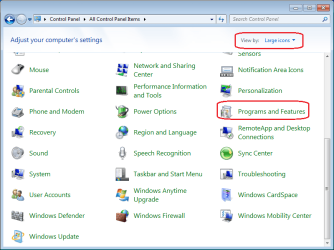
Uninstall all versions of Flash that you see in programs and features and then restart the computer.

For 32bit IE, install 32bit Flash - open IE and visit here...
Adobe - Flash Player
...to make sure that you have no versions of Flash showing.
You can then install Flash from links on that page.

Do the same for Firefox - open Firefox and visit that same website.
 

My Computer My Computer

At a glance

W7 Pro SP1 64biti78GBIntel HD Graphics
Computer type
Laptop
Computer Manufacturer/Model Number
Employer provided Dell Latitude
OS
W7 Pro SP1 64bit
CPU
i7
Memory
8GB
Graphics Card(s)
Intel HD Graphics
Hard Drives
crappy SSD
Antivirus
Employer mandated Symantec Endpoint Protection
Browser
Pale Moon 64bit, IE11 64bit & Chrome 64bit
Welcome to the Seven Forums.

I was under the impression that Chrome had Flash built in - no need to download anything for it.

Uninstall all versions of Flash that you see in programs and features and then restart the computer.

For 32bit IE, install 32bit Flash - open IE and visit here...
Adobe - Flash Player
...to make sure that you have no versions of Flash showing.
You can then install Flash from links on that page.

Do the same for Firefox - open Firefox and visit that same website.

Hmm.. Under control panel you meant? By the way, youtube works fine on chrome and IE too. Only facebook vids dont load for some reason :(
 

My Computer My Computer

At a glance

Windows 7 Home Edition 64 bit
OS
Windows 7 Home Edition 64 bit

My Computer My Computer

At a glance

W7 Pro SP1 64biti78GBIntel HD Graphics
Computer type
Laptop
Computer Manufacturer/Model Number
Employer provided Dell Latitude
OS
W7 Pro SP1 64bit
CPU
i7
Memory
8GB
Graphics Card(s)
Intel HD Graphics
Hard Drives
crappy SSD
Antivirus
Employer mandated Symantec Endpoint Protection
Browser
Pale Moon 64bit, IE11 64bit & Chrome 64bit
Ah nope, both black screens with no flash player coming up.
 

My Computer My Computer

At a glance

Windows 7 Home Edition 64 bit
OS
Windows 7 Home Edition 64 bit
I got a phone call the other day from my parents saying that they can't watch youtube videos anymore. They have a XPPro machine so I went over there and lo and behold the youtube was a black screen and it wanted a flash player. I installed and reinstalled the flash player but still nothing.
Hmmmm..did a little research and came up with Google Chrome Frame plugin. Installed it and now they have youtube again.
I thought it was a XP thing and part of it is the XP is slowly getting grandfathered but it could work..I dunno youtube works on my Windows7 machine.

Google Chrome Frame
 

My Computer My Computer

At a glance

Microsoft Windows 7 Ultimate 64-bitIntel(R) Pentium(R) CPU G2030 @ 3.00GHz12.00 GB Kingston DIMM 3x4 gig sticksAMD Radeon HD 5450
Computer Manufacturer/Model Number
Custom Build
OS
Microsoft Windows 7 Ultimate 64-bit
CPU
Intel(R) Pentium(R) CPU G2030 @ 3.00GHz
Motherboard
ASUSTeK COMPUTER INC. P8H77-V LE
Memory
12.00 GB Kingston DIMM 3x4 gig sticks
Graphics Card(s)
AMD Radeon HD 5450
Sound Card
AMD High Definition Audio Device
Monitor(s) Displays
Dual displays
Screen Resolution
1280 x 1024 x 4294967296 colors
Hard Drives
ST3500320AS 465.76 GB
WDC WD10EZEX-00BN5A0 931.51 GB
WDC WD10 EARS-00MVWB0 USB Device 931.51 GB
PSU
XION SuperNova 600 watt
Keyboard
Razer Tarantula Gaming Keyboard
Mouse
Razer Imperator Gaming Mouse
Internet Speed
DSL 6 down & 1 up with Netgear R6300 Wireless router
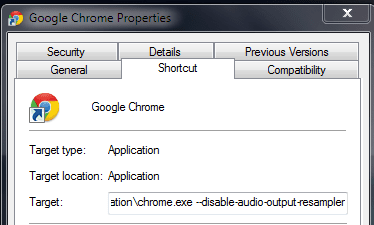
Add this flag to your Chrome shortcut,
Code:
C:\Users\[User]\AppData\Local\Google\Chrome\Application\chrome.exe [B]--disable-audio-output-resampler[/B]
Sometimes the sandboxed version of flash player in Chrome won't load on specific systems with the 'speaker fill' option enabled, on some sound won't play, others might see no video at all. The Chrome support forum is full of people having such issues.
 

My Computer My Computer

At a glance

Windows 10 Pro x64, Arch LinuxIntel Core 2 Quad Q8200 OC'd 3.08GHz8GB DDR2 900MhzMSI GT730 2GB GDDR5 (Kepler)
Computer type
PC/Desktop
Computer Manufacturer/Model Number
Custom Build
OS
Windows 10 Pro x64, Arch Linux
CPU
Intel Core 2 Quad Q8200 OC'd 3.08GHz
Motherboard
Asus Rampage formula LGA775
Memory
8GB DDR2 900Mhz
Graphics Card(s)
MSI GT730 2GB GDDR5 (Kepler)
Sound Card
Supreme FX2
Monitor(s) Displays
Samsung LS22F350 LED
Screen Resolution
1080P
Hard Drives
Kingston SSDNow UV400 120GB, 500GB Hitachi, 2TB Samsung, 500GB Seagate FreeAgent, 640GB Samsung, 160GB Toshiba (Arch)
PSU
AeroCool 500W Bronze
Cooling
Cooler Master V6 + 3X fans
Keyboard
Prolink keyboard
Mouse
Logitech M705
Internet Speed
1MiB/s
Browser
Chrome Beta
Add this flag to your Chrome shortcut,
Code:
C:\Users\[User]\AppData\Local\Google\Chrome\Application\chrome.exe [B]--disable-audio-output-resampler[/B]
Sometimes the sandboxed version of flash player in Chrome won't load on specific systems with the 'speaker fill' option enabled, on some sound won't play, others might see no video at all. The Chrome support forum is full of people having such issues.

After the apostrophe or right after the exe without spaces? Keeps giving me errors.
 

My Computer My Computer

At a glance

Windows 7 Home Edition 64 bit
OS
Windows 7 Home Edition 64 bit
Add this flag to your Chrome shortcut,
Code:
C:\Users\[User]\AppData\Local\Google\Chrome\Application\chrome.exe [B]--disable-audio-output-resampler[/B]
Sometimes the sandboxed version of flash player in Chrome won't load on specific systems with the 'speaker fill' option enabled, on some sound won't play, others might see no video at all. The Chrome support forum is full of people having such issues.

After the apostrophe or right after the exe without spaces? Keeps giving me errors.
One space after the .exe
Capture.PNG

Go in 'chrome://plugins' and check whether the Flash plugin is enabled, check 'Always Allowed'
 

My Computer My Computer

At a glance

Windows 10 Pro x64, Arch LinuxIntel Core 2 Quad Q8200 OC'd 3.08GHz8GB DDR2 900MhzMSI GT730 2GB GDDR5 (Kepler)
Computer type
PC/Desktop
Computer Manufacturer/Model Number
Custom Build
OS
Windows 10 Pro x64, Arch Linux
CPU
Intel Core 2 Quad Q8200 OC'd 3.08GHz
Motherboard
Asus Rampage formula LGA775
Memory
8GB DDR2 900Mhz
Graphics Card(s)
MSI GT730 2GB GDDR5 (Kepler)
Sound Card
Supreme FX2
Monitor(s) Displays
Samsung LS22F350 LED
Screen Resolution
1080P
Hard Drives
Kingston SSDNow UV400 120GB, 500GB Hitachi, 2TB Samsung, 500GB Seagate FreeAgent, 640GB Samsung, 160GB Toshiba (Arch)
PSU
AeroCool 500W Bronze
Cooling
Cooler Master V6 + 3X fans
Keyboard
Prolink keyboard
Mouse
Logitech M705
Internet Speed
1MiB/s
Browser
Chrome Beta
I'm getting the error, the name ........... chrome.exe --disable-audio-output-resampler specified in the Target box is not valid. Make sure the path and file name are correct. Any clue? Cant apply changes.
 

My Computer My Computer

At a glance

Windows 7 Home Edition 64 bit
OS
Windows 7 Home Edition 64 bit
I'm getting the error, the name ........... chrome.exe --disable-audio-output-resampler specified in the Target box is not valid. Make sure the path and file name are correct. Any clue? Cant apply changes.
Try creating another shortcut and add the flag just after the chrome.exe"
 

My Computer My Computer

At a glance

Windows 10 Pro x64, Arch LinuxIntel Core 2 Quad Q8200 OC'd 3.08GHz8GB DDR2 900MhzMSI GT730 2GB GDDR5 (Kepler)
Computer type
PC/Desktop
Computer Manufacturer/Model Number
Custom Build
OS
Windows 10 Pro x64, Arch Linux
CPU
Intel Core 2 Quad Q8200 OC'd 3.08GHz
Motherboard
Asus Rampage formula LGA775
Memory
8GB DDR2 900Mhz
Graphics Card(s)
MSI GT730 2GB GDDR5 (Kepler)
Sound Card
Supreme FX2
Monitor(s) Displays
Samsung LS22F350 LED
Screen Resolution
1080P
Hard Drives
Kingston SSDNow UV400 120GB, 500GB Hitachi, 2TB Samsung, 500GB Seagate FreeAgent, 640GB Samsung, 160GB Toshiba (Arch)
PSU
AeroCool 500W Bronze
Cooling
Cooler Master V6 + 3X fans
Keyboard
Prolink keyboard
Mouse
Logitech M705
Internet Speed
1MiB/s
Browser
Chrome Beta
Alright, added the tag behind, but, only after the apostrophe and then no errors surfaced. tried the fb videos again, still the same thing, bleh, black screen.
 

My Computer My Computer

At a glance

Windows 7 Home Edition 64 bit
OS
Windows 7 Home Edition 64 bit
Ah nope, both black screens with no flash player coming up.
Okay, thanks for going thru those steps.

You might want to try the "Fixit" on this page:
Playing video files crashes or freezes Internet Explorer - Windows
I know that the problems listed are not what you are seeing but one of the things that this particular Fixit tool does is to check for corrupted codecs.

Test all of your browsers using the links below after running that Fixit.

What antivirus and firewall tool are you using?

In Chrome, please open a page in the incognito mode and try those public videos again.
The Things That Connect Us | Facebook
Facebook's Videos | Facebook
 

My Computer My Computer

At a glance

W7 Pro SP1 64biti78GBIntel HD Graphics
Computer type
Laptop
Computer Manufacturer/Model Number
Employer provided Dell Latitude
OS
W7 Pro SP1 64bit
CPU
i7
Memory
8GB
Graphics Card(s)
Intel HD Graphics
Hard Drives
crappy SSD
Antivirus
Employer mandated Symantec Endpoint Protection
Browser
Pale Moon 64bit, IE11 64bit & Chrome 64bit
Ahhh, still no luck :( Whatever google chrome is showing me is what IE is showing me too. Only firefox seems to work for my fb videos..


Edit: Now even firefox has given up on me. Stupid flash.
 

My Computer My Computer

At a glance

Windows 7 Home Edition 64 bit
OS
Windows 7 Home Edition 64 bit
Two things to try:

PROBLEM SOLUTION:
1. Go to any youtube video.
2. When the audio starts playing and you don't see anything click the icon
that says "pop out" which should play the video in its own window.
3. Right click in the new window and select "settings."
4. Click on the tab with the computer screen and uncheck the "Enable Hardware acceleration." option.
5. That's it!

( Source )

Or, try disabling googles built in flash only (2nd link)

http://www.sevenforums.com/browsers-mail/260804-chrome-freezing-up.html#post2153879

A Guy
 

My Computer My Computer

At a glance

Windows 10 Home x64INTEL Core i5-750 Quad-Core 3.37GHzHyperX Fury Black Series 8GB (2 x 4GB) 1866MhzEVGA GeForce GTX 750 Superclocked 1GB 128-Bit...
Computer type
PC/Desktop
OS
Windows 10 Home x64
CPU
INTEL Core i5-750 Quad-Core 3.37GHz
Motherboard
ASUS P7P55D
Memory
HyperX Fury Black Series 8GB (2 x 4GB) 1866Mhz
Graphics Card(s)
EVGA GeForce GTX 750 Superclocked 1GB 128-Bit GDDR5
Monitor(s) Displays
LG 32MA68HY 32" IPS
Screen Resolution
1920 x 1080
Hard Drives
Samsung 840 Evo 120GB, SEAGATE 500GB Barracuda® 7200.12, SATA 3 Gb/s, 7200 RPM, 16MB cache
PSU
ANTEC TruePower New TP-550, 80 PLUS, 550W
Case
ANTEC Three Hundred Illusion
Cooling
COOLER MASTER Hyper 212 Plus, 4 x 120mm 1 x 140mm Noctua's
Internet Speed
85 + Mbps
Antivirus
Avast
Browser
Vivaldi
Ok great. Even restoring my notebook back to factory conditions, the damn video(s) still doesnt work. I assume its a problem with flash no?
 

My Computer My Computer

At a glance

Windows 7 Home Edition 64 bit
OS
Windows 7 Home Edition 64 bit

My Computer My Computer

At a glance

Windows 10 Home x64INTEL Core i5-750 Quad-Core 3.37GHzHyperX Fury Black Series 8GB (2 x 4GB) 1866MhzEVGA GeForce GTX 750 Superclocked 1GB 128-Bit...
Computer type
PC/Desktop
OS
Windows 10 Home x64
CPU
INTEL Core i5-750 Quad-Core 3.37GHz
Motherboard
ASUS P7P55D
Memory
HyperX Fury Black Series 8GB (2 x 4GB) 1866Mhz
Graphics Card(s)
EVGA GeForce GTX 750 Superclocked 1GB 128-Bit GDDR5
Monitor(s) Displays
LG 32MA68HY 32" IPS
Screen Resolution
1920 x 1080
Hard Drives
Samsung 840 Evo 120GB, SEAGATE 500GB Barracuda® 7200.12, SATA 3 Gb/s, 7200 RPM, 16MB cache
PSU
ANTEC TruePower New TP-550, 80 PLUS, 550W
Case
ANTEC Three Hundred Illusion
Cooling
COOLER MASTER Hyper 212 Plus, 4 x 120mm 1 x 140mm Noctua's
Internet Speed
85 + Mbps
Antivirus
Avast
Browser
Vivaldi
Still doesnt play. So i assume its a flash problem. Sigh :(

Edit: Swapped back to an earlier flash version and Mozilla is able to play it again. Chrome and IE still doesnt work.
 
Last edited:

My Computer My Computer

At a glance

Windows 7 Home Edition 64 bit
OS
Windows 7 Home Edition 64 bit
By the way, could it be one of the programs lenovo pre installed conflicting with it? I've installed the same version of flash player as my desktop. Desktop's all browsers work. Laptop's IE and Chrome doesnt..
 

My Computer My Computer

At a glance

Windows 7 Home Edition 64 bit
OS
Windows 7 Home Edition 64 bit

My Computer My Computer

At a glance

W7 Pro SP1 64biti78GBIntel HD Graphics
Computer type
Laptop
Computer Manufacturer/Model Number
Employer provided Dell Latitude
OS
W7 Pro SP1 64bit
CPU
i7
Memory
8GB
Graphics Card(s)
Intel HD Graphics
Hard Drives
crappy SSD
Antivirus
Employer mandated Symantec Endpoint Protection
Browser
Pale Moon 64bit, IE11 64bit & Chrome 64bit
Back
Top