
Solved Windows won't detect internet connection

Johnny8

New member
Member
Local time
8:19 AM
Messages
31
I seem to be having this strange problem lately. I connect, through cable or modem, and the connection works, the internet works but windows thinks there is no internet connection, and doesn't detect the network I have set up for said connection either.
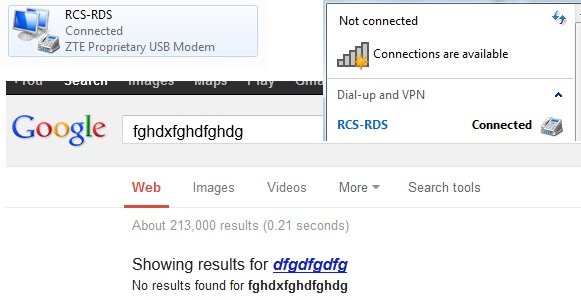
z1Ixe.jpg


Once I disable Microsoft's virtual wifi miniport adapter, the connection works like it should.
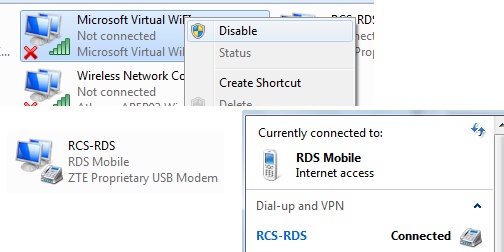
DJKmO.jpg

Even though I think that for cable I have to disable wifi entirely. Windows is clean and up to date. Even went ahead and updated my ethernet card drivers. Any ideas ?

edit: oh and I actually have to enable the virtual wifi before I shut down my notebook so that the next day I can disable it again in order for windows to recognize the connection.
 
Last edited by a moderator:

My Computer My Computer

At a glance

MS Windows 7 Ultimate 32-bitIntel Core i3 330M3 GBATI Mobility Radeon HD 5470
Computer Manufacturer/Model Number
ACER ASPIRE 5740G Notebook
OS
MS Windows 7 Ultimate 32-bit
CPU
Intel Core i3 330M
Motherboard
Aspire 5740 (CPU 1)
Memory
3 GB
Graphics Card(s)
ATI Mobility Radeon HD 5470
Sound Card
Realtek High Definition Audio, AMD High Definition Audio
Monitor(s) Displays
Generic PnP Monitor
Screen Resolution
1366x768 pixels
Hard Drives
Hitachi HTS545032B9A300
Mouse
A4Tech 747H
I've seen the Msoft Virtual WiFi mini port cause connection problems in the past. It seems that with certain drivers the Virtual mini port seems TO confuse Windows on which connection it should be using.

The fact that you appear to be connected to some sort of dial up VPN is the most likely cause of this problem.

It may help to uninstall the mini port completely as it's only required for setting up a hosted wireless connection. It can be reinstalled by just reinstalling the drivers for the wireless NIC.
 

My Computer My Computer

At a glance

Windows 7 Ult, Windows 8.1 Pro,Q9650-4.275GHz, E8600 4.5GHz, E6750-3.8GHzG.Skill PC2 9600 1200Mhz 5 5 5 15 2TGTX480
Computer type
PC/Desktop
Computer Manufacturer/Model Number
Home built
OS
Windows 7 Ult, Windows 8.1 Pro,
CPU
Q9650-4.275GHz, E8600 4.5GHz, E6750-3.8GHz
Motherboard
Evga 780i FTW
Memory
G.Skill PC2 9600 1200Mhz 5 5 5 15 2T
Graphics Card(s)
GTX480
Sound Card
Asus Xonar D2
Monitor(s) Displays
HannsG
Screen Resolution
1680X1050
Hard Drives
GSkill Phoenix Pro 120GB SSD
PSU
ThermalTake Toughpower 1000Watt modular
Case
ThermalTake XaserV
Cooling
Xigmatek S1283
Keyboard
Logitech G15
Mouse
Logitech G9
Internet Speed
T1
I've seen the Msoft Virtual WiFi mini port cause connection problems in the past. It seems that with certain drivers the Virtual mini port seems TO confuse Windows on which connection it should be using.

The fact that you appear to be connected to some sort of dial up VPN is the most likely cause of this problem.

It may help to uninstall the mini port completely as it's only required for setting up a hosted wireless connection. It can be reinstalled by just reinstalling the drivers for the wireless NIC.

Thank you for the reply, can you please detail how I could completely uninstall this ? I have tried but failed on several occasions, as it keeps reinstalling itself upon reboot. Also it's not enough to keep it disabled. It has to be enabled upon boot, and then I have to disable it after connecting. Same case with cable (except right now I'm away from home). In fact it even appears as "Microsoft Virtual WiFi Miniport Adapter #2". Never had this problem before.

edit: the local network admin just enabled wifi, and this has no problem connecting. In fact, I've never seen it connect this fast lol. So the problem is only with cable and usb modem. And another strange thing I just found: upon looking through advanced settings, virtual wifi was on top. I never put it there.
 
Last edited:

My Computer My Computer

At a glance

MS Windows 7 Ultimate 32-bitIntel Core i3 330M3 GBATI Mobility Radeon HD 5470
Computer Manufacturer/Model Number
ACER ASPIRE 5740G Notebook
OS
MS Windows 7 Ultimate 32-bit
CPU
Intel Core i3 330M
Motherboard
Aspire 5740 (CPU 1)
Memory
3 GB
Graphics Card(s)
ATI Mobility Radeon HD 5470
Sound Card
Realtek High Definition Audio, AMD High Definition Audio
Monitor(s) Displays
Generic PnP Monitor
Screen Resolution
1366x768 pixels
Hard Drives
Hitachi HTS545032B9A300
Mouse
A4Tech 747H
Running cmd prompt as Administrator) Type or copy paste without the quotes, "
netsh wlan stop hostednetwork


" hit enter, and "
netsh wlan set hostednetwork mode=disallow

" hit enter again then reboot.

You may need to run these commands more than once after rebooting.
 

My Computer My Computer

At a glance

Windows 7 Ult, Windows 8.1 Pro,Q9650-4.275GHz, E8600 4.5GHz, E6750-3.8GHzG.Skill PC2 9600 1200Mhz 5 5 5 15 2TGTX480
Computer type
PC/Desktop
Computer Manufacturer/Model Number
Home built
OS
Windows 7 Ult, Windows 8.1 Pro,
CPU
Q9650-4.275GHz, E8600 4.5GHz, E6750-3.8GHz
Motherboard
Evga 780i FTW
Memory
G.Skill PC2 9600 1200Mhz 5 5 5 15 2T
Graphics Card(s)
GTX480
Sound Card
Asus Xonar D2
Monitor(s) Displays
HannsG
Screen Resolution
1680X1050
Hard Drives
GSkill Phoenix Pro 120GB SSD
PSU
ThermalTake Toughpower 1000Watt modular
Case
ThermalTake XaserV
Cooling
Xigmatek S1283
Keyboard
Logitech G15
Mouse
Logitech G9
Internet Speed
T1
Thank you for all the useful information, I would however like to know if there is a way to revert this in case something goes wrong, or if it simply doesn't achieve the desired effect; as in, I've got nothing to disable and it won't detect the network in any other way - the only reason that is annoying is because some programs won't work well for me under these circumstances, or at all.
 

My Computer My Computer

At a glance

MS Windows 7 Ultimate 32-bitIntel Core i3 330M3 GBATI Mobility Radeon HD 5470
Computer Manufacturer/Model Number
ACER ASPIRE 5740G Notebook
OS
MS Windows 7 Ultimate 32-bit
CPU
Intel Core i3 330M
Motherboard
Aspire 5740 (CPU 1)
Memory
3 GB
Graphics Card(s)
ATI Mobility Radeon HD 5470
Sound Card
Realtek High Definition Audio, AMD High Definition Audio
Monitor(s) Displays
Generic PnP Monitor
Screen Resolution
1366x768 pixels
Hard Drives
Hitachi HTS545032B9A300
Mouse
A4Tech 747H
Thank you for all the useful information, I would however like to know if there is a way to revert this in case something goes wrong, or if it simply doesn't achieve the desired effect; as in, I've got nothing to disable and it won't detect the network in any other way - the only reason that is annoying is because some programs won't work well for me under these circumstances, or at all.

The Msoft Virtual mini port driver installs with the wireless driver so reinstalling the driver will also reinstall the mini port.
 

My Computer My Computer

At a glance

Windows 7 Ult, Windows 8.1 Pro,Q9650-4.275GHz, E8600 4.5GHz, E6750-3.8GHzG.Skill PC2 9600 1200Mhz 5 5 5 15 2TGTX480
Computer type
PC/Desktop
Computer Manufacturer/Model Number
Home built
OS
Windows 7 Ult, Windows 8.1 Pro,
CPU
Q9650-4.275GHz, E8600 4.5GHz, E6750-3.8GHz
Motherboard
Evga 780i FTW
Memory
G.Skill PC2 9600 1200Mhz 5 5 5 15 2T
Graphics Card(s)
GTX480
Sound Card
Asus Xonar D2
Monitor(s) Displays
HannsG
Screen Resolution
1680X1050
Hard Drives
GSkill Phoenix Pro 120GB SSD
PSU
ThermalTake Toughpower 1000Watt modular
Case
ThermalTake XaserV
Cooling
Xigmatek S1283
Keyboard
Logitech G15
Mouse
Logitech G9
Internet Speed
T1
Just tried the proposed solution. It uninstalled the virtual wifi for good but apparently it didn't solve the problem. This time I just hit disable on the wireless adapter and windows recognized the connection/network.
 

My Computer My Computer

At a glance

MS Windows 7 Ultimate 32-bitIntel Core i3 330M3 GBATI Mobility Radeon HD 5470
Computer Manufacturer/Model Number
ACER ASPIRE 5740G Notebook
OS
MS Windows 7 Ultimate 32-bit
CPU
Intel Core i3 330M
Motherboard
Aspire 5740 (CPU 1)
Memory
3 GB
Graphics Card(s)
ATI Mobility Radeon HD 5470
Sound Card
Realtek High Definition Audio, AMD High Definition Audio
Monitor(s) Displays
Generic PnP Monitor
Screen Resolution
1366x768 pixels
Hard Drives
Hitachi HTS545032B9A300
Mouse
A4Tech 747H
Just tried the proposed solution. It uninstalled the virtual wifi for good but apparently it didn't solve the problem. This time I just hit disable on the wireless adapter and windows recognized the connection/network.

Can you post a screen shot of the ipconfig/all from this machine?
 

My Computer My Computer

At a glance

Windows 7 Ult, Windows 8.1 Pro,Q9650-4.275GHz, E8600 4.5GHz, E6750-3.8GHzG.Skill PC2 9600 1200Mhz 5 5 5 15 2TGTX480
Computer type
PC/Desktop
Computer Manufacturer/Model Number
Home built
OS
Windows 7 Ult, Windows 8.1 Pro,
CPU
Q9650-4.275GHz, E8600 4.5GHz, E6750-3.8GHz
Motherboard
Evga 780i FTW
Memory
G.Skill PC2 9600 1200Mhz 5 5 5 15 2T
Graphics Card(s)
GTX480
Sound Card
Asus Xonar D2
Monitor(s) Displays
HannsG
Screen Resolution
1680X1050
Hard Drives
GSkill Phoenix Pro 120GB SSD
PSU
ThermalTake Toughpower 1000Watt modular
Case
ThermalTake XaserV
Cooling
Xigmatek S1283
Keyboard
Logitech G15
Mouse
Logitech G9
Internet Speed
T1
Will this work ?

Autoconfiguration Enabled . . . . : Yes

Tunnel adapter Local Area Connection* 47:

Media State . . . . . . . . . . . : Media disconnected
Connection-specific DNS Suffix . :
Description . . . . . . . . . . . : Microsoft 6to4 Adapter #39
Physical Address. . . . . . . . . : 00-00-00-00-00-00-00-E0
DHCP Enabled. . . . . . . . . . . : No
Autoconfiguration Enabled . . . . : Yes

Tunnel adapter Local Area Connection* 48:

Media State . . . . . . . . . . . : Media disconnected
Connection-specific DNS Suffix . :
Description . . . . . . . . . . . : Microsoft 6to4 Adapter #40
Physical Address. . . . . . . . . : 00-00-00-00-00-00-00-E0
DHCP Enabled. . . . . . . . . . . : No
Autoconfiguration Enabled . . . . : Yes

Tunnel adapter Local Area Connection* 49:

Media State . . . . . . . . . . . : Media disconnected
Connection-specific DNS Suffix . :
Description . . . . . . . . . . . : Microsoft 6to4 Adapter #41
Physical Address. . . . . . . . . : 00-00-00-00-00-00-00-E0
DHCP Enabled. . . . . . . . . . . : No
Autoconfiguration Enabled . . . . : Yes

Tunnel adapter Local Area Connection* 52:

Media State . . . . . . . . . . . : Media disconnected
Connection-specific DNS Suffix . :
Description . . . . . . . . . . . : Microsoft 6to4 Adapter #44
Physical Address. . . . . . . . . : 00-00-00-00-00-00-00-E0
DHCP Enabled. . . . . . . . . . . : No
Autoconfiguration Enabled . . . . : Yes

Tunnel adapter Local Area Connection* 53:

Media State . . . . . . . . . . . : Media disconnected
Connection-specific DNS Suffix . :
Description . . . . . . . . . . . : Microsoft 6to4 Adapter #45
Physical Address. . . . . . . . . : 00-00-00-00-00-00-00-E0
DHCP Enabled. . . . . . . . . . . : No
Autoconfiguration Enabled . . . . : Yes

Tunnel adapter Local Area Connection* 54:

Media State . . . . . . . . . . . : Media disconnected
Connection-specific DNS Suffix . :
Description . . . . . . . . . . . : Microsoft 6to4 Adapter #46
Physical Address. . . . . . . . . : 00-00-00-00-00-00-00-E0
DHCP Enabled. . . . . . . . . . . : No
Autoconfiguration Enabled . . . . : Yes

Tunnel adapter Local Area Connection* 55:

Media State . . . . . . . . . . . : Media disconnected
Connection-specific DNS Suffix . :
Description . . . . . . . . . . . : Microsoft 6to4 Adapter #47
Physical Address. . . . . . . . . : 00-00-00-00-00-00-00-E0
DHCP Enabled. . . . . . . . . . . : No
Autoconfiguration Enabled . . . . : Yes

Tunnel adapter Local Area Connection* 57:

Media State . . . . . . . . . . . : Media disconnected
Connection-specific DNS Suffix . :
Description . . . . . . . . . . . : Microsoft 6to4 Adapter #49
Physical Address. . . . . . . . . : 00-00-00-00-00-00-00-E0
DHCP Enabled. . . . . . . . . . . : No
Autoconfiguration Enabled . . . . : Yes

Tunnel adapter Local Area Connection* 58:

Media State . . . . . . . . . . . : Media disconnected
Connection-specific DNS Suffix . :
Description . . . . . . . . . . . : Microsoft 6to4 Adapter #50
Physical Address. . . . . . . . . : 00-00-00-00-00-00-00-E0
DHCP Enabled. . . . . . . . . . . : No
Autoconfiguration Enabled . . . . : Yes

Tunnel adapter Local Area Connection* 59:

Media State . . . . . . . . . . . : Media disconnected
Connection-specific DNS Suffix . :
Description . . . . . . . . . . . : Microsoft 6to4 Adapter #51
Physical Address. . . . . . . . . : 00-00-00-00-00-00-00-E0
DHCP Enabled. . . . . . . . . . . : No
Autoconfiguration Enabled . . . . : Yes

Tunnel adapter Local Area Connection* 61:

Media State . . . . . . . . . . . : Media disconnected
Connection-specific DNS Suffix . :
Description . . . . . . . . . . . : Microsoft 6to4 Adapter #53
Physical Address. . . . . . . . . : 00-00-00-00-00-00-00-E0
DHCP Enabled. . . . . . . . . . . : No
Autoconfiguration Enabled . . . . : Yes

Tunnel adapter Local Area Connection* 62:

Media State . . . . . . . . . . . : Media disconnected
Connection-specific DNS Suffix . :
Description . . . . . . . . . . . : Microsoft 6to4 Adapter #54
Physical Address. . . . . . . . . : 00-00-00-00-00-00-00-E0
DHCP Enabled. . . . . . . . . . . : No
Autoconfiguration Enabled . . . . : Yes

Tunnel adapter Local Area Connection* 63:

Media State . . . . . . . . . . . : Media disconnected
Connection-specific DNS Suffix . :
Description . . . . . . . . . . . : Microsoft 6to4 Adapter #55
Physical Address. . . . . . . . . : 00-00-00-00-00-00-00-E0
DHCP Enabled. . . . . . . . . . . : No
Autoconfiguration Enabled . . . . : Yes

Tunnel adapter Local Area Connection* 64:

Media State . . . . . . . . . . . : Media disconnected
Connection-specific DNS Suffix . :
Description . . . . . . . . . . . : Microsoft 6to4 Adapter #56
Physical Address. . . . . . . . . : 00-00-00-00-00-00-00-E0
DHCP Enabled. . . . . . . . . . . : No
Autoconfiguration Enabled . . . . : Yes

Tunnel adapter Local Area Connection* 65:

Media State . . . . . . . . . . . : Media disconnected
Connection-specific DNS Suffix . :
Description . . . . . . . . . . . : Microsoft 6to4 Adapter #57
Physical Address. . . . . . . . . : 00-00-00-00-00-00-00-E0
DHCP Enabled. . . . . . . . . . . : No
Autoconfiguration Enabled . . . . : Yes

Tunnel adapter Local Area Connection* 66:

Media State . . . . . . . . . . . : Media disconnected
Connection-specific DNS Suffix . :
Description . . . . . . . . . . . : Microsoft 6to4 Adapter #58
Physical Address. . . . . . . . . : 00-00-00-00-00-00-00-E0
DHCP Enabled. . . . . . . . . . . : No
Autoconfiguration Enabled . . . . : Yes

Tunnel adapter Local Area Connection* 67:

Media State . . . . . . . . . . . : Media disconnected
Connection-specific DNS Suffix . :
Description . . . . . . . . . . . : Microsoft 6to4 Adapter #59
Physical Address. . . . . . . . . : 00-00-00-00-00-00-00-E0
DHCP Enabled. . . . . . . . . . . : No
Autoconfiguration Enabled . . . . : Yes

Tunnel adapter Local Area Connection* 68:

Media State . . . . . . . . . . . : Media disconnected
Connection-specific DNS Suffix . :
Description . . . . . . . . . . . : Microsoft 6to4 Adapter #60
Physical Address. . . . . . . . . : 00-00-00-00-00-00-00-E0
DHCP Enabled. . . . . . . . . . . : No
Autoconfiguration Enabled . . . . : Yes

Tunnel adapter Local Area Connection* 71:

Media State . . . . . . . . . . . : Media disconnected
Connection-specific DNS Suffix . :
Description . . . . . . . . . . . : Microsoft 6to4 Adapter #63
Physical Address. . . . . . . . . : 00-00-00-00-00-00-00-E0
DHCP Enabled. . . . . . . . . . . : No
Autoconfiguration Enabled . . . . : Yes

Tunnel adapter Local Area Connection* 87:

Media State . . . . . . . . . . . : Media disconnected
Connection-specific DNS Suffix . :
Description . . . . . . . . . . . : Microsoft 6to4 Adapter #79
Physical Address. . . . . . . . . : 00-00-00-00-00-00-00-E0
DHCP Enabled. . . . . . . . . . . : No
Autoconfiguration Enabled . . . . : Yes

Tunnel adapter Local Area Connection* 101:

Media State . . . . . . . . . . . : Media disconnected
Connection-specific DNS Suffix . :
Description . . . . . . . . . . . : Microsoft 6to4 Adapter #93
Physical Address. . . . . . . . . : 00-00-00-00-00-00-00-E0
DHCP Enabled. . . . . . . . . . . : No
Autoconfiguration Enabled . . . . : Yes

Tunnel adapter Local Area Connection* 106:

Media State . . . . . . . . . . . : Media disconnected
Connection-specific DNS Suffix . :
Description . . . . . . . . . . . : Microsoft 6to4 Adapter #98
Physical Address. . . . . . . . . : 00-00-00-00-00-00-00-E0
DHCP Enabled. . . . . . . . . . . : No
Autoconfiguration Enabled . . . . : Yes

Tunnel adapter Local Area Connection* 110:

Media State . . . . . . . . . . . : Media disconnected
Connection-specific DNS Suffix . :
Description . . . . . . . . . . . : Microsoft 6to4 Adapter #102
Physical Address. . . . . . . . . : 00-00-00-00-00-00-00-E0
DHCP Enabled. . . . . . . . . . . : No
Autoconfiguration Enabled . . . . : Yes

Tunnel adapter Local Area Connection* 119:

Media State . . . . . . . . . . . : Media disconnected
Connection-specific DNS Suffix . :
Description . . . . . . . . . . . : Microsoft 6to4 Adapter #111
Physical Address. . . . . . . . . : 00-00-00-00-00-00-00-E0
DHCP Enabled. . . . . . . . . . . : No
Autoconfiguration Enabled . . . . : Yes

Tunnel adapter Local Area Connection* 121:

Media State . . . . . . . . . . . : Media disconnected
Connection-specific DNS Suffix . :
Description . . . . . . . . . . . : Microsoft 6to4 Adapter #113
Physical Address. . . . . . . . . : 00-00-00-00-00-00-00-E0
DHCP Enabled. . . . . . . . . . . : No
Autoconfiguration Enabled . . . . : Yes

Tunnel adapter Local Area Connection* 214:

Media State . . . . . . . . . . . : Media disconnected
Connection-specific DNS Suffix . :
Description . . . . . . . . . . . : Microsoft 6to4 Adapter #206
Physical Address. . . . . . . . . : 00-00-00-00-00-00-00-E0
DHCP Enabled. . . . . . . . . . . : No
Autoconfiguration Enabled . . . . : Yes

Tunnel adapter Local Area Connection* 250:

Media State . . . . . . . . . . . : Media disconnected
Connection-specific DNS Suffix . :
Description . . . . . . . . . . . : Microsoft 6to4 Adapter #242
Physical Address. . . . . . . . . : 00-00-00-00-00-00-00-E0
DHCP Enabled. . . . . . . . . . . : No
Autoconfiguration Enabled . . . . : Yes

Tunnel adapter Local Area Connection* 239:

Media State . . . . . . . . . . . : Media disconnected
Connection-specific DNS Suffix . :
Description . . . . . . . . . . . : Microsoft 6to4 Adapter #231
Physical Address. . . . . . . . . : 00-00-00-00-00-00-00-E0
DHCP Enabled. . . . . . . . . . . : No
Autoconfiguration Enabled . . . . : Yes

Tunnel adapter isatap.{C515AFFE-8410-4959-B762-750586AA0EF1}:

Media State . . . . . . . . . . . : Media disconnected
Connection-specific DNS Suffix . :
Description . . . . . . . . . . . : Microsoft ISATAP Adapter #2
Physical Address. . . . . . . . . : 00-00-00-00-00-00-00-E0
DHCP Enabled. . . . . . . . . . . : No
Autoconfiguration Enabled . . . . : Yes

Tunnel adapter Local Area Connection* 247:

Media State . . . . . . . . . . . : Media disconnected
Connection-specific DNS Suffix . :
Description . . . . . . . . . . . : Microsoft 6to4 Adapter #239
Physical Address. . . . . . . . . : 00-00-00-00-00-00-00-E0
DHCP Enabled. . . . . . . . . . . : No
Autoconfiguration Enabled . . . . : Yes

Tunnel adapter Local Area Connection* 251:

Media State . . . . . . . . . . . : Media disconnected
Connection-specific DNS Suffix . :
Description . . . . . . . . . . . : Microsoft 6to4 Adapter #243
Physical Address. . . . . . . . . : 00-00-00-00-00-00-00-E0
DHCP Enabled. . . . . . . . . . . : No
Autoconfiguration Enabled . . . . : Yes

Tunnel adapter isatap.{7EEEE5C8-6F29-4606-903D-97812EF93660}:

Media State . . . . . . . . . . . : Media disconnected
Connection-specific DNS Suffix . :
Description . . . . . . . . . . . : Microsoft ISATAP Adapter #3
Physical Address. . . . . . . . . : 00-00-00-00-00-00-00-E0
DHCP Enabled. . . . . . . . . . . : No
Autoconfiguration Enabled . . . . : Yes

Tunnel adapter Local Area Connection* 255:

Media State . . . . . . . . . . . : Media disconnected
Connection-specific DNS Suffix . :
Description . . . . . . . . . . . : Microsoft 6to4 Adapter #247
Physical Address. . . . . . . . . : 00-00-00-00-00-00-00-E0
DHCP Enabled. . . . . . . . . . . : No
Autoconfiguration Enabled . . . . : Yes

C:\Users\Radu>

edit: I just assumed typing "ipconfig/all" in cmd would display the information you requested, hopefully that is indeed the case.
 

My Computer My Computer

At a glance

MS Windows 7 Ultimate 32-bitIntel Core i3 330M3 GBATI Mobility Radeon HD 5470
Computer Manufacturer/Model Number
ACER ASPIRE 5740G Notebook
OS
MS Windows 7 Ultimate 32-bit
CPU
Intel Core i3 330M
Motherboard
Aspire 5740 (CPU 1)
Memory
3 GB
Graphics Card(s)
ATI Mobility Radeon HD 5470
Sound Card
Realtek High Definition Audio, AMD High Definition Audio
Monitor(s) Displays
Generic PnP Monitor
Screen Resolution
1366x768 pixels
Hard Drives
Hitachi HTS545032B9A300
Mouse
A4Tech 747H
Yes Johnny, that will work.

The problem is obvious here, it's the too many tunnel adaptor problem which I've seen many times in the past.

I also can't see any wireless NIC adaptor installed here so you may need to install the driver for your wireless device which I can't see. It should be there in Device Manager but may not have the drivers installed. Maybe it will show up after you remove all the extra 6 to 4 tunnel adaptors.

I have a file for this that will flush them for you rather than having to manually remove them.

You will need to unzip the file, there are both 32 bit and 64 bit versions, run the appropriate one for your system. Reboot the machine after running the file then see if they are all gone from the ipconfig, if not run the 6 to 4 remover again and reboot once more.

After that post the ipconfig/all again so I can make sure they are all gone.


Windows automatically makes a new one after they are removed.

This usually indicates you have a driver problem so the driver for this connection should be updated soon as possible. :geek:
 

Attachments

My Computer My Computer

At a glance

Windows 7 Ult, Windows 8.1 Pro,Q9650-4.275GHz, E8600 4.5GHz, E6750-3.8GHzG.Skill PC2 9600 1200Mhz 5 5 5 15 2TGTX480
Computer type
PC/Desktop
Computer Manufacturer/Model Number
Home built
OS
Windows 7 Ult, Windows 8.1 Pro,
CPU
Q9650-4.275GHz, E8600 4.5GHz, E6750-3.8GHz
Motherboard
Evga 780i FTW
Memory
G.Skill PC2 9600 1200Mhz 5 5 5 15 2T
Graphics Card(s)
GTX480
Sound Card
Asus Xonar D2
Monitor(s) Displays
HannsG
Screen Resolution
1680X1050
Hard Drives
GSkill Phoenix Pro 120GB SSD
PSU
ThermalTake Toughpower 1000Watt modular
Case
ThermalTake XaserV
Cooling
Xigmatek S1283
Keyboard
Logitech G15
Mouse
Logitech G9
Internet Speed
T1
That took a while, but it worked ! problem solved ! thank you so much ! As resquested here's the current ipconfig/all

Microsoft Windows [Version 6.1.7600]
Copyright (c) 2009 Microsoft Corporation. All rights reserved.

C:\Users\Radu>ipconfig/all

Windows IP Configuration

Host Name . . . . . . . . . . . . : Radu-PC
Primary Dns Suffix . . . . . . . :
Node Type . . . . . . . . . . . . : Mixed
IP Routing Enabled. . . . . . . . : No
WINS Proxy Enabled. . . . . . . . : No

Ethernet adapter Local Area Connection:

Media State . . . . . . . . . . . : Media disconnected
Connection-specific DNS Suffix . :
Description . . . . . . . . . . . : Broadcom NetLink (TM) Gigabit Ethernet
Physical Address. . . . . . . . . : 00-26-2D-81-39-0E
DHCP Enabled. . . . . . . . . . . : Yes
Autoconfiguration Enabled . . . . : Yes

Wireless LAN adapter Wireless Network Connection:

Connection-specific DNS Suffix . :
Description . . . . . . . . . . . : Atheros AR5B93 Wireless Network Adapter
Physical Address. . . . . . . . . : C4-17-FE-62-C1-D2
DHCP Enabled. . . . . . . . . . . : Yes
Autoconfiguration Enabled . . . . : Yes
Link-local IPv6 Address . . . . . : fe80::844:5957:d6b:bc2b%16(Preferred)
IPv4 Address. . . . . . . . . . . : 192.168.0.111(Preferred)
Subnet Mask . . . . . . . . . . . : 255.255.255.0
Lease Obtained. . . . . . . . . . : Tuesday, January 15, 2013 7:47:21 PM
Lease Expires . . . . . . . . . . : Wednesday, January 16, 2013 7:47:21 PM
Default Gateway . . . . . . . . . : 192.168.0.1
DHCP Server . . . . . . . . . . . : 192.168.0.1
DHCPv6 IAID . . . . . . . . . . . : 197400574
DHCPv6 Client DUID. . . . . . . . : 00-01-00-01-13-32-8B-95-C4-17-FE-62-C1-D2

DNS Servers . . . . . . . . . . . : 192.168.0.1
NetBIOS over Tcpip. . . . . . . . : Enabled

Tunnel adapter Teredo Tunneling Pseudo-Interface:

Connection-specific DNS Suffix . :
Description . . . . . . . . . . . : Teredo Tunneling Pseudo-Interface
Physical Address. . . . . . . . . : 00-00-00-00-00-00-00-E0
DHCP Enabled. . . . . . . . . . . : No
Autoconfiguration Enabled . . . . : Yes
IPv6 Address. . . . . . . . . . . : 2001:0:4137:9e76:18fc:1c0b:3f57:ff90(Pref
erred)
Link-local IPv6 Address . . . . . : fe80::18fc:1c0b:3f57:ff90%14(Preferred)
Default Gateway . . . . . . . . . : ::
NetBIOS over Tcpip. . . . . . . . : Disabled

Tunnel adapter isatap.{7EEEE5C8-6F29-4606-903D-97812EF93660}:

Media State . . . . . . . . . . . : Media disconnected
Connection-specific DNS Suffix . :
Description . . . . . . . . . . . : Microsoft ISATAP Adapter
Physical Address. . . . . . . . . : 00-00-00-00-00-00-00-E0
DHCP Enabled. . . . . . . . . . . : No
Autoconfiguration Enabled . . . . : Yes

Tunnel adapter isatap.{C515AFFE-8410-4959-B762-750586AA0EF1}:

Media State . . . . . . . . . . . : Media disconnected
Connection-specific DNS Suffix . :
Description . . . . . . . . . . . : Microsoft ISATAP Adapter #2
Physical Address. . . . . . . . . : 00-00-00-00-00-00-00-E0
DHCP Enabled. . . . . . . . . . . : No
Autoconfiguration Enabled . . . . : Yes

C:\Users\Radu>
 

My Computer My Computer

At a glance

MS Windows 7 Ultimate 32-bitIntel Core i3 330M3 GBATI Mobility Radeon HD 5470
Computer Manufacturer/Model Number
ACER ASPIRE 5740G Notebook
OS
MS Windows 7 Ultimate 32-bit
CPU
Intel Core i3 330M
Motherboard
Aspire 5740 (CPU 1)
Memory
3 GB
Graphics Card(s)
ATI Mobility Radeon HD 5470
Sound Card
Realtek High Definition Audio, AMD High Definition Audio
Monitor(s) Displays
Generic PnP Monitor
Screen Resolution
1366x768 pixels
Hard Drives
Hitachi HTS545032B9A300
Mouse
A4Tech 747H
That took a while, but it worked ! problem solved ! thank you so much ! As resquested here's the current ipconfig/all

Microsoft Windows [Version 6.1.7600]
Copyright (c) 2009 Microsoft Corporation. All rights reserved.

C:\Users\Radu>ipconfig/all

Windows IP Configuration

Host Name . . . . . . . . . . . . : Radu-PC
Primary Dns Suffix . . . . . . . :
Node Type . . . . . . . . . . . . : Mixed
IP Routing Enabled. . . . . . . . : No
WINS Proxy Enabled. . . . . . . . : No

Ethernet adapter Local Area Connection:

Media State . . . . . . . . . . . : Media disconnected
Connection-specific DNS Suffix . :
Description . . . . . . . . . . . : Broadcom NetLink (TM) Gigabit Ethernet
Physical Address. . . . . . . . . : 00-26-2D-81-39-0E
DHCP Enabled. . . . . . . . . . . : Yes
Autoconfiguration Enabled . . . . : Yes

Wireless LAN adapter Wireless Network Connection:

Connection-specific DNS Suffix . :
Description . . . . . . . . . . . : Atheros AR5B93 Wireless Network Adapter
Physical Address. . . . . . . . . : C4-17-FE-62-C1-D2
DHCP Enabled. . . . . . . . . . . : Yes
Autoconfiguration Enabled . . . . : Yes
Link-local IPv6 Address . . . . . : fe80::844:5957:d6b:bc2b%16(Preferred)
IPv4 Address. . . . . . . . . . . : 192.168.0.111(Preferred)
Subnet Mask . . . . . . . . . . . : 255.255.255.0
Lease Obtained. . . . . . . . . . : Tuesday, January 15, 2013 7:47:21 PM
Lease Expires . . . . . . . . . . : Wednesday, January 16, 2013 7:47:21 PM
Default Gateway . . . . . . . . . : 192.168.0.1
DHCP Server . . . . . . . . . . . : 192.168.0.1
DHCPv6 IAID . . . . . . . . . . . : 197400574
DHCPv6 Client DUID. . . . . . . . : 00-01-00-01-13-32-8B-95-C4-17-FE-62-C1-D2

DNS Servers . . . . . . . . . . . : 192.168.0.1
NetBIOS over Tcpip. . . . . . . . : Enabled

Tunnel adapter Teredo Tunneling Pseudo-Interface:

Connection-specific DNS Suffix . :
Description . . . . . . . . . . . : Teredo Tunneling Pseudo-Interface
Physical Address. . . . . . . . . : 00-00-00-00-00-00-00-E0
DHCP Enabled. . . . . . . . . . . : No
Autoconfiguration Enabled . . . . : Yes
IPv6 Address. . . . . . . . . . . : 2001:0:4137:9e76:18fc:1c0b:3f57:ff90(Pref
erred)
Link-local IPv6 Address . . . . . : fe80::18fc:1c0b:3f57:ff90%14(Preferred)
Default Gateway . . . . . . . . . : ::
NetBIOS over Tcpip. . . . . . . . : Disabled

Tunnel adapter isatap.{7EEEE5C8-6F29-4606-903D-97812EF93660}:

Media State . . . . . . . . . . . : Media disconnected
Connection-specific DNS Suffix . :
Description . . . . . . . . . . . : Microsoft ISATAP Adapter
Physical Address. . . . . . . . . : 00-00-00-00-00-00-00-E0
DHCP Enabled. . . . . . . . . . . : No
Autoconfiguration Enabled . . . . : Yes

Tunnel adapter isatap.{C515AFFE-8410-4959-B762-750586AA0EF1}:

Media State . . . . . . . . . . . : Media disconnected
Connection-specific DNS Suffix . :
Description . . . . . . . . . . . : Microsoft ISATAP Adapter #2
Physical Address. . . . . . . . . : 00-00-00-00-00-00-00-E0
DHCP Enabled. . . . . . . . . . . : No
Autoconfiguration Enabled . . . . : Yes

C:\Users\Radu>

Yes Johnny you are back in business once again. :D

I can also see both of your network adaptors again which is good.

You will want to check Windows update, they may have a more updated version of the Atheros AR5B93 driver which might prevent this problem from occurring again in the future.
 

My Computer My Computer

At a glance

Windows 7 Ult, Windows 8.1 Pro,Q9650-4.275GHz, E8600 4.5GHz, E6750-3.8GHzG.Skill PC2 9600 1200Mhz 5 5 5 15 2TGTX480
Computer type
PC/Desktop
Computer Manufacturer/Model Number
Home built
OS
Windows 7 Ult, Windows 8.1 Pro,
CPU
Q9650-4.275GHz, E8600 4.5GHz, E6750-3.8GHz
Motherboard
Evga 780i FTW
Memory
G.Skill PC2 9600 1200Mhz 5 5 5 15 2T
Graphics Card(s)
GTX480
Sound Card
Asus Xonar D2
Monitor(s) Displays
HannsG
Screen Resolution
1680X1050
Hard Drives
GSkill Phoenix Pro 120GB SSD
PSU
ThermalTake Toughpower 1000Watt modular
Case
ThermalTake XaserV
Cooling
Xigmatek S1283
Keyboard
Logitech G15
Mouse
Logitech G9
Internet Speed
T1

My Computer My Computer

At a glance

MS Windows 7 Ultimate 32-bitIntel Core i3 330M3 GBATI Mobility Radeon HD 5470
Computer Manufacturer/Model Number
ACER ASPIRE 5740G Notebook
OS
MS Windows 7 Ultimate 32-bit
CPU
Intel Core i3 330M
Motherboard
Aspire 5740 (CPU 1)
Memory
3 GB
Graphics Card(s)
ATI Mobility Radeon HD 5470
Sound Card
Realtek High Definition Audio, AMD High Definition Audio
Monitor(s) Displays
Generic PnP Monitor
Screen Resolution
1366x768 pixels
Hard Drives
Hitachi HTS545032B9A300
Mouse
A4Tech 747H
Back
Top