- Local time
- 9:33 PM
- Messages
- 94
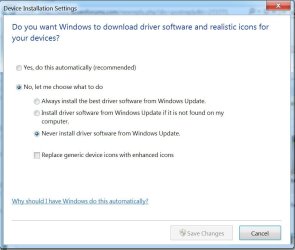
Just did a clean install of windows pro on new hdd. Told setup to only install important updates and auto updates in turned off. Searching this forum i found a few folks say "definitely let windows install all the drivers for MOB, devices, etc. they are the experts" while another post said "always use MOB site drivers, since they are often tweaked for exact MOB specs, no matter how old they are". So I'm at a crossroads wondering which to do. Asus software was a nightmare before. Granted, I did install almost all of it, and probably made it a mess (qfan, asusupdater, Volt something something allowing in OS O.C. tweaks, etc). Drivers from them didn't seem to be a problem though. I want to avoid any bloatware which comes along with driver packages sometimes.
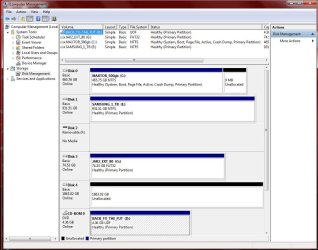
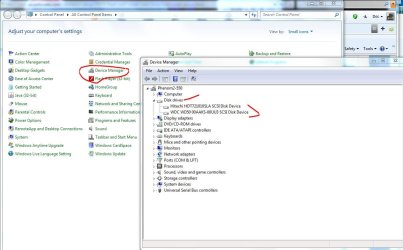
I have 1 yellow exclamation in PC properties (USB controller), but that's because everything is running on minimal drivers or no drivers. I did install windows update version of Realtek network card, and ATI display driver, but thats all. I have 3 hdds in the machine, new hdd (ST2000) with win, another new hdd unformatted, and original C: drive (to allow for file transfering, then I will yank it and convert into external for backup). Also have 2 dvd burners. Everything is visible to BIOS and Windows except unformatted ST2000 (will use for applications and data/media). I'm hoping once I do install drivers, however, that this drive will become visible.
Thanks in advance for any assistance you can provide. I'm really please to have found this site.
ps. i'm assuming my system specs will be visible as I filled it out completely during registration.
I have 1 yellow exclamation in PC properties (USB controller), but that's because everything is running on minimal drivers or no drivers. I did install windows update version of Realtek network card, and ATI display driver, but thats all. I have 3 hdds in the machine, new hdd (ST2000) with win, another new hdd unformatted, and original C: drive (to allow for file transfering, then I will yank it and convert into external for backup). Also have 2 dvd burners. Everything is visible to BIOS and Windows except unformatted ST2000 (will use for applications and data/media). I'm hoping once I do install drivers, however, that this drive will become visible.
Thanks in advance for any assistance you can provide. I'm really please to have found this site.
ps. i'm assuming my system specs will be visible as I filled it out completely during registration.
My Computer
At a glance
Windows 7 Professional 64 bitAMD Phenom II X6 1055T 2.8 GHz (3.51 over clo...Corsair 8 GB CMX4GX3M2A1600C9R (1333 mHz)Saphire Radeon 5830HD + Hauppauge WinTV-HVR-2...
- Computer type
- PC/Desktop
- Computer Manufacturer/Model Number
- Custom build
- OS
- Windows 7 Professional 64 bit
- CPU
- AMD Phenom II X6 1055T 2.8 GHz (3.51 over clocked)
- Motherboard
- Asus M4A87TD-EVO
- Memory
- Corsair 8 GB CMX4GX3M2A1600C9R (1333 mHz)
- Graphics Card(s)
- Saphire Radeon 5830HD + Hauppauge WinTV-HVR-2250 Dual Tuner
- Sound Card
- VIA VT1818 High Definition Audio 8-Channel, AMD Radeon HDMI
- Monitor(s) Displays
- 23" Samsung SyncMaster PX2370 + 47" LG 47LH90 LED HDTV
- Screen Resolution
- 1920x1080p
- Hard Drives
- Western Digital --> WD10EARS-00Y5B1 1 TB 5200 rpm (Backup)
Seagate --> ST2000DM001-1CH164 2 TB 7200 rpm (Media) Mirrored to
Seagate --> ST2000DM001-1CH164 2 TB 7200 rpm
BUSlink --> "USB2.0 Disk-On-The-Go/Lite" 18 GB mini HDD (Bootable Win 7 Insta
- PSU
- 850 WATT OCZ --> OCZ850GXSSLI RTL
- Case
- Cool Master Scout --> SGC-2000-KKN1-GP RT
- Cooling
- CM 140mm front & top, 120mm rear & 2x side, stock CPU fan
- Keyboard
- Razer Lycosa Mirror, Logitech MX3200 wireless
- Mouse
- Logitech G9x, Logitech MX3200 wireless
- Internet Speed
- 10 Mbps
- Antivirus
- Microsoft Security Essentials
- Browser
- Chrome & Internet Explorer 11
- Other Info
- Custom rig self build.
Recently upgraded for part time Media Center DVR duties.


 rb: Start :ar: Computer Management :ar: Disk Management