GPT Hard drive issues with installing Windows 7 Ultimate..

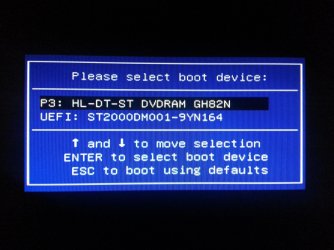
I had to go back into bios and enable boot menu. Though this is all I see in boot now, but the dvd drive name has changed?
 

Attachments

  • 2013-01-14 17.48.25.jpg
    2013-01-14 17.48.25.jpg
    862.3 KB · Views: 0

My Computer My Computer

At a glance

Winows 8Intel® Core™ i3 Processor4gig DDR3Intergrated Intel Graphics
Computer Manufacturer/Model Number
Packard Bell Imedia
OS
Winows 8
CPU
Intel® Core™ i3 Processor
Memory
4gig DDR3
Graphics Card(s)
Intergrated Intel Graphics
Hard Drives
2 x 1TB Sata 3
Well I went onto the acer forum about 2 hours ago and got this reply and came up with this!

Can you post a link to the thread.

I had to go back into bios and enable boot menu. Though this is all I see in boot now, but the dvd drive name has changed?

The HDD Drive should be first boot device.
 

My Computer My Computer

At a glance

ME/XP/Vista/Win7
OS
ME/XP/Vista/Win7
Is Secure Boot still disabled, non-UEFI HDD available now?

If so set DVD drive first to boot then HD, boot the normal Win7 installation DVD to see if it will install.

You may need to wipe the HD first with Clean Command followed by "Convert MBR" to make sure it's not GPT.
 

My Computer My Computer

At a glance

Winows 8Intel® Core™ i3 Processor4gig DDR3Intergrated Intel Graphics
Computer Manufacturer/Model Number
Packard Bell Imedia
OS
Winows 8
CPU
Intel® Core™ i3 Processor
Memory
4gig DDR3
Graphics Card(s)
Intergrated Intel Graphics
Hard Drives
2 x 1TB Sata 3
Will the Packard Bell Recovery DVD boot in uEFI mode?

Yes or No?

I dont have a recovery dvd the pc never came with one. I've made a driver back up disc and a system repair disk though. I have tried with 3 different usb sticks to make the back up but that always fails lol
 

My Computer My Computer

At a glance

Winows 8Intel® Core™ i3 Processor4gig DDR3Intergrated Intel Graphics
Computer Manufacturer/Model Number
Packard Bell Imedia
OS
Winows 8
CPU
Intel® Core™ i3 Processor
Memory
4gig DDR3
Graphics Card(s)
Intergrated Intel Graphics
Hard Drives
2 x 1TB Sata 3
Is Secure Boot still disabled, non-UEFI HDD available now?

If so set DVD drive first to boot then HD, boot the normal Win7 installation DVD to see if it will install.

You may need to wipe the HD first with Clean Command followed by "Convert MBR" to make sure it's not GPT.


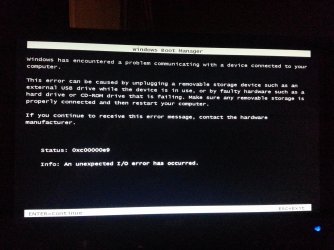
I tried to run the win 7 install dvd i had this msg
 

Attachments

  • 2013-01-14 19.20.40.jpg
    2013-01-14 19.20.40.jpg
    560.7 KB · Views: 6

My Computer My Computer

At a glance

Winows 8Intel® Core™ i3 Processor4gig DDR3Intergrated Intel Graphics
Computer Manufacturer/Model Number
Packard Bell Imedia
OS
Winows 8
CPU
Intel® Core™ i3 Processor
Memory
4gig DDR3
Graphics Card(s)
Intergrated Intel Graphics
Hard Drives
2 x 1TB Sata 3
Please answer my questions.


Right as far as i'm aware i had answered your Qs

I put a pic up of the boot menu with the dvd and the hdd showing, thats the only thing i can see in the bios bootlist and the boot menu. when i got into legacy i had to enable the bootmenu you again. I've tried the dvd install with win 7 disc and nothing
 

My Computer My Computer

At a glance

Winows 8Intel® Core™ i3 Processor4gig DDR3Intergrated Intel Graphics
Computer Manufacturer/Model Number
Packard Bell Imedia
OS
Winows 8
CPU
Intel® Core™ i3 Processor
Memory
4gig DDR3
Graphics Card(s)
Intergrated Intel Graphics
Hard Drives
2 x 1TB Sata 3
Is Secure Boot still disabled?

In HD/storage choices in BIOS, is there another non-UEFI HD choice to select, then can you add it to BIOS Boot order. Or is it already cued in BIOS Boot order with Secure Boot disabled and CSM set to Always.

What other CSM menu choices are avaiable?
 

My Computer My Computer

At a glance

Winows 8Intel® Core™ i3 Processor4gig DDR3Intergrated Intel Graphics
Computer Manufacturer/Model Number
Packard Bell Imedia
OS
Winows 8
CPU
Intel® Core™ i3 Processor
Memory
4gig DDR3
Graphics Card(s)
Intergrated Intel Graphics
Hard Drives
2 x 1TB Sata 3
Is Secure Boot still disabled?

In HD/storage choices in BIOS, is there another non-UEFI HD choice to select, then can you add it to BIOS Boot order. Or is it already cued in BIOS Boot order with Secure Boot disabled and CSM set to Always.

What other CSM menu choices are avaiable?

Yes secure boot is still disabled

i've took some pic's of what i see on the bios with CSM set at always
 

Attachments

  • 2013-01-14 19.41.35.jpg
    2013-01-14 19.41.35.jpg
    716.2 KB · Views: 10
  • 2013-01-14 19.41.44.jpg
    2013-01-14 19.41.44.jpg
    467.3 KB · Views: 4

My Computer My Computer

At a glance

Winows 8Intel® Core™ i3 Processor4gig DDR3Intergrated Intel Graphics
Computer Manufacturer/Model Number
Packard Bell Imedia
OS
Winows 8
CPU
Intel® Core™ i3 Processor
Memory
4gig DDR3
Graphics Card(s)
Intergrated Intel Graphics
Hard Drives
2 x 1TB Sata 3
Any other menu choices for Launch CSM?

Have you tried as suggested several days ago to Clean the HD to "convert MBR" then partition following step 2.2 in SSD - HDD Optimize for Windows Reinstallation to define an active partition which sometimes forces the installer to recognize it?

I would continue to research how to get your mobo to allow normal MBR install in Legacy mode. Otherwise I'd reset to defaults and pursue the EFI install with theog and further research there.

You'll need to set CSM to Never to again try booting UEFI disks even though it's never given you that option. Theog is trying to see if any EFI disk will boot.
 

My Computer My Computer

At a glance

ME/XP/Vista/Win7
OS
ME/XP/Vista/Win7

My Computer My Computer

At a glance

Winows 8Intel® Core™ i3 Processor4gig DDR3Intergrated Intel Graphics
Computer Manufacturer/Model Number
Packard Bell Imedia
OS
Winows 8
CPU
Intel® Core™ i3 Processor
Memory
4gig DDR3
Graphics Card(s)
Intergrated Intel Graphics
Hard Drives
2 x 1TB Sata 3
Is Secure Boot still disabled?

In HD/storage choices in BIOS, is there another non-UEFI HD choice to select, then can you add it to BIOS Boot order. Or is it already cued in BIOS Boot order with Secure Boot disabled and CSM set to Always.

What other CSM menu choices are avaiable?

Yes secure boot is still disabled

i've took some pic's of what i see on the bios with CSM set at always

P0 = your HDD
P3 = DVD drive (not in uEFI)
What is
P1
P2
?
 

My Computer My Computer

At a glance

ME/XP/Vista/Win7
OS
ME/XP/Vista/Win7

My Computer My Computer

At a glance

ME/XP/Vista/Win7
OS
ME/XP/Vista/Win7
Is Secure Boot still disabled?

In HD/storage choices in BIOS, is there another non-UEFI HD choice to select, then can you add it to BIOS Boot order. Or is it already cued in BIOS Boot order with Secure Boot disabled and CSM set to Always.

What other CSM menu choices are avaiable?

Yes secure boot is still disabled

i've took some pic's of what i see on the bios with CSM set at always

P0 = your HDD
P3 = DVD drive (not in uEFI)
What is
P1
P2
?

I dont know what p1 and 2 are i cant see them?
 

My Computer My Computer

At a glance

Winows 8Intel® Core™ i3 Processor4gig DDR3Intergrated Intel Graphics
Computer Manufacturer/Model Number
Packard Bell Imedia
OS
Winows 8
CPU
Intel® Core™ i3 Processor
Memory
4gig DDR3
Graphics Card(s)
Intergrated Intel Graphics
Hard Drives
2 x 1TB Sata 3
Back
Top