TWO PROBLEMS-urgent help needed

I cant log on to the internet with the ps3. The 3G is connected to the laptop,so yes I can log on to the internet on the laptop.

Edit: I am using the ethernet cable to connect the ps3 to the laptop.

Apparently Adobe CS3 could also be the reason for this bug. Further down this page some gave a possible fix to the problem. What do you guys think? I'm no expert on these things. It seems Bonjour is not that easy to get rid of.

http://social.technet.microsoft.com...g/thread/765aa1c6-dd9a-4447-9de0-aecc41498b04
 
Last edited:

My Computer

OS
Windows 7-Home Edition

My Computer

Computer type
Laptop
Computer Manufacturer/Model Number
HP ENVY 17-1150eg
OS
Windows 10 Pro x64 EN-GB
CPU
1.6 GHz Intel Core i7-720QM Processor
Memory
6 GB
Graphics Card(s)
ATI Mobility Radeon HD 5850 Graphics
Sound Card
Beats sound system with integrated subwoofer
Monitor(s) Displays
17" laptop display, 22" LED and 32" Full HD TV through HDMI
Screen Resolution
1600*900 (1), 1920*1080 (2&3)
Hard Drives
Internal: 2 x 500 GB SATA Hard Disk Drive 7200 rpm
External: 2TB for backups, 3TB USB3 network drive for media
Cooling
As Envy runs a bit warm, I have it on a Cooler Master pad
Keyboard
Logitech diNovo Media Desktop Laser (bluetooth)
Mouse
Logitech Performance Mouse MX
Internet Speed
50/10 Mbps VDSL
Antivirus
Windows Defender 4.3.9431.0
Browser
Maxthon 3.5.2., IE11

My Computer

OS
Windows 7-Home Edition
What's the make and the model of your laptop's Ethernet adapter? I just want to check if we need a cross over cable, modern gigabit adapters do no longer require it when connecting two devices.
 

My Computer

Computer type
Laptop
Computer Manufacturer/Model Number
HP ENVY 17-1150eg
OS
Windows 10 Pro x64 EN-GB
CPU
1.6 GHz Intel Core i7-720QM Processor
Memory
6 GB
Graphics Card(s)
ATI Mobility Radeon HD 5850 Graphics
Sound Card
Beats sound system with integrated subwoofer
Monitor(s) Displays
17" laptop display, 22" LED and 32" Full HD TV through HDMI
Screen Resolution
1600*900 (1), 1920*1080 (2&3)
Hard Drives
Internal: 2 x 500 GB SATA Hard Disk Drive 7200 rpm
External: 2TB for backups, 3TB USB3 network drive for media
Cooling
As Envy runs a bit warm, I have it on a Cooler Master pad
Keyboard
Logitech diNovo Media Desktop Laser (bluetooth)
Mouse
Logitech Performance Mouse MX
Internet Speed
50/10 Mbps VDSL
Antivirus
Windows Defender 4.3.9431.0
Browser
Maxthon 3.5.2., IE11
What's the make and the model of your laptop's Ethernet adapter? I just want to check if we need a cross over cable, modern gigabit adapters do no longer require it when connecting two devices.

I am at work right now. I'll have to get back to you after work(later). Thanks for the replies. It's really appreciated.

P.S. How do I check for the ethernet adapter?
 
Last edited:

My Computer

OS
Windows 7-Home Edition
Forget it, I was really stupid asking it. We can see it from your IPCONFIG data :p.

You seem to have a Broadcom NetXtreme Gigabit Ethernet. It should not need a cross over cable, even if the PS3's adapter is an older model, for it's enough when one of connected adapters has Auto-MDIX enabled. Gigabit adapters as yours have Auto-MDIX enabled by default.

That 0.0.0.0. default gateway is the problem, as you yourself already mentioned in your original post. I do not understand it could work, how you can still use the Internet.

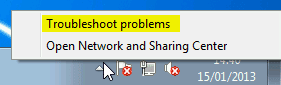
Let's check what the Windows Network Diagnostics has to say about this. Connect PS3 to laptop with ethernet cable, turn PS3 on, and then when connected to Internet on laptop, right click the network icon in notification area, select Troubleshoot problems:

Network_Diagnostics.png

Please post results here.

Kari
 

My Computer

Computer type
Laptop
Computer Manufacturer/Model Number
HP ENVY 17-1150eg
OS
Windows 10 Pro x64 EN-GB
CPU
1.6 GHz Intel Core i7-720QM Processor
Memory
6 GB
Graphics Card(s)
ATI Mobility Radeon HD 5850 Graphics
Sound Card
Beats sound system with integrated subwoofer
Monitor(s) Displays
17" laptop display, 22" LED and 32" Full HD TV through HDMI
Screen Resolution
1600*900 (1), 1920*1080 (2&3)
Hard Drives
Internal: 2 x 500 GB SATA Hard Disk Drive 7200 rpm
External: 2TB for backups, 3TB USB3 network drive for media
Cooling
As Envy runs a bit warm, I have it on a Cooler Master pad
Keyboard
Logitech diNovo Media Desktop Laser (bluetooth)
Mouse
Logitech Performance Mouse MX
Internet Speed
50/10 Mbps VDSL
Antivirus
Windows Defender 4.3.9431.0
Browser
Maxthon 3.5.2., IE11
Forget it, I was really stupid asking it. We can see it from your IPCONFIG data :p.

You seem to have a Broadcom NetXtreme Gigabit Ethernet. It should not need a cross over cable, even if the PS3's adapter is an older model, for it's enough when one of connected adapters has Auto-MDIX enabled. Gigabit adapters as yours have Auto-MDIX enabled by default.

That 0.0.0.0. default gateway is the problem, as you yourself already mentioned in your original post. I do not understand it could work, how you can still use the Internet.

Let's check what the Windows Network Diagnostics has to say about this. Connect PS3 to laptop with ethernet cable, turn PS3 on, and then when connected to Internet on laptop, right click the network icon in notification area, select Troubleshoot problems:

View attachment 250273

Please post results here.

Kari

I'll do that sir.
 

My Computer

OS
Windows 7-Home Edition
Not to get off the 0.0.0.0 subject because that is an issue, but when your connect your ps3 to the laptop and share internet through ICS. you're actually using the laptop as a router.

the ICS part of the adapter will have a static IP address 192.168.137.1 with netmask 255.255.255.0 (It would be that Ethernet adapter in this case). This ICS host will act as a DHCP server and assign other IP addresses in the 192.168.137.x/24 range to the PS3 or any other device connected to it.
 

My Computer

OS
Windows 7 Ultimate x64
the ICS part of the adapter will have a static IP address 192.168.137.1 with netmask 255.255.255.0 (It would be that Ethernet adapter in this case). This ICS host will act as a DHCP server and assign other IP addresses in the 192.168.137.x/24 range to the PS3 or any other device connected to it.
That's the problem here. PPP adapter (3G USB) has according to the ipconfig data DHCP disabled, and static IP. Ethernet has DHCP enabled but it's getting IP from wrong pool, 169.254.X.X (see for instance this article: Invalid IP Address 169.254.x.x - Microsoft Community).
 

My Computer

Computer type
Laptop
Computer Manufacturer/Model Number
HP ENVY 17-1150eg
OS
Windows 10 Pro x64 EN-GB
CPU
1.6 GHz Intel Core i7-720QM Processor
Memory
6 GB
Graphics Card(s)
ATI Mobility Radeon HD 5850 Graphics
Sound Card
Beats sound system with integrated subwoofer
Monitor(s) Displays
17" laptop display, 22" LED and 32" Full HD TV through HDMI
Screen Resolution
1600*900 (1), 1920*1080 (2&3)
Hard Drives
Internal: 2 x 500 GB SATA Hard Disk Drive 7200 rpm
External: 2TB for backups, 3TB USB3 network drive for media
Cooling
As Envy runs a bit warm, I have it on a Cooler Master pad
Keyboard
Logitech diNovo Media Desktop Laser (bluetooth)
Mouse
Logitech Performance Mouse MX
Internet Speed
50/10 Mbps VDSL
Antivirus
Windows Defender 4.3.9431.0
Browser
Maxthon 3.5.2., IE11
the OP never actually stated that he started the ICS before he posted the IPconfig /all output. So i figured he didnt start it yet.

I did notice the APIPA address and thats the main reason i figured it was not enabled.
 

My Computer

OS
Windows 7 Ultimate x64
We could easily show OP how to change default gateway on that 3G adapter, for I do not believe it is service provider's default. However, not knowing which service provider he has it could be we tamper which settings he is not allowed to change in his mobile data plan.

We can at least try if Network Diagnostics sees anything.
 

My Computer

Computer type
Laptop
Computer Manufacturer/Model Number
HP ENVY 17-1150eg
OS
Windows 10 Pro x64 EN-GB
CPU
1.6 GHz Intel Core i7-720QM Processor
Memory
6 GB
Graphics Card(s)
ATI Mobility Radeon HD 5850 Graphics
Sound Card
Beats sound system with integrated subwoofer
Monitor(s) Displays
17" laptop display, 22" LED and 32" Full HD TV through HDMI
Screen Resolution
1600*900 (1), 1920*1080 (2&3)
Hard Drives
Internal: 2 x 500 GB SATA Hard Disk Drive 7200 rpm
External: 2TB for backups, 3TB USB3 network drive for media
Cooling
As Envy runs a bit warm, I have it on a Cooler Master pad
Keyboard
Logitech diNovo Media Desktop Laser (bluetooth)
Mouse
Logitech Performance Mouse MX
Internet Speed
50/10 Mbps VDSL
Antivirus
Windows Defender 4.3.9431.0
Browser
Maxthon 3.5.2., IE11
Did the OP have to setup the PPP adapter manually? I'm wondering why its not listed under a wireless adapter.
 

My Computer

OS
Windows 7 Ultimate x64
Your username Sweemusicman1 is too long for me to type, so I just call you a The Man hereafter :cool:.

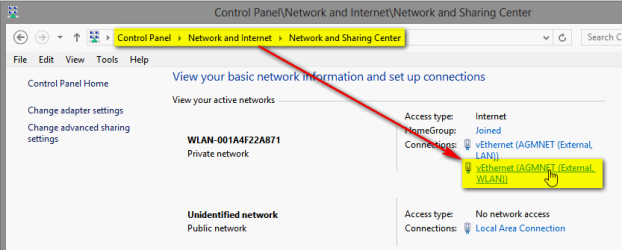
The Man, I am really interested to see how your IPv4 properties look. Please do like this when online with your 3G dongle (screenshots from Windows 8 but it's the same procedure in Windows 7):
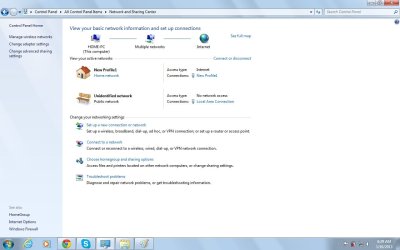
  • Control Panel > Network and Sharing Center, click your 3G connection link:
    .
    2013-01-15_161959.png
    .
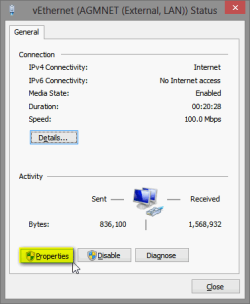
  • Click Properties:
    .
    2013-01-15_162040.png
    .
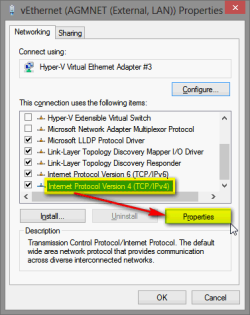
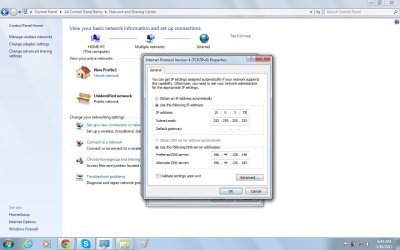
  • Select Internet Protocol Version 4 (TCP/IPv4) and click Properties:
    .
    2013-01-15_162156.png
    .
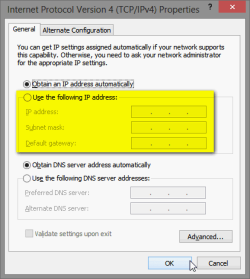
  • On the dialog that opens, please tell us what you have in the area I have highlighted, or post a screenshot showing this dialog:
    .
    2013-01-15_162341.png

Kari
 

My Computer

Computer type
Laptop
Computer Manufacturer/Model Number
HP ENVY 17-1150eg
OS
Windows 10 Pro x64 EN-GB
CPU
1.6 GHz Intel Core i7-720QM Processor
Memory
6 GB
Graphics Card(s)
ATI Mobility Radeon HD 5850 Graphics
Sound Card
Beats sound system with integrated subwoofer
Monitor(s) Displays
17" laptop display, 22" LED and 32" Full HD TV through HDMI
Screen Resolution
1600*900 (1), 1920*1080 (2&3)
Hard Drives
Internal: 2 x 500 GB SATA Hard Disk Drive 7200 rpm
External: 2TB for backups, 3TB USB3 network drive for media
Cooling
As Envy runs a bit warm, I have it on a Cooler Master pad
Keyboard
Logitech diNovo Media Desktop Laser (bluetooth)
Mouse
Logitech Performance Mouse MX
Internet Speed
50/10 Mbps VDSL
Antivirus
Windows Defender 4.3.9431.0
Browser
Maxthon 3.5.2., IE11
Your username Sweemusicman1 is too long for me to type, so I just call you a The Man hereafter :cool:.

The Man, I am really interested to see how your IPv4 properties look. Please do like this when online with your 3G dongle (screenshots from Windows 8 but it's the same procedure in Windows 7):

Kari


lol......So what do you want me to do next?
 

My Computer

OS
Windows 7-Home Edition
Do as I told in my previous post, tell what IPv4 properties look like.
 

My Computer

Computer type
Laptop
Computer Manufacturer/Model Number
HP ENVY 17-1150eg
OS
Windows 10 Pro x64 EN-GB
CPU
1.6 GHz Intel Core i7-720QM Processor
Memory
6 GB
Graphics Card(s)
ATI Mobility Radeon HD 5850 Graphics
Sound Card
Beats sound system with integrated subwoofer
Monitor(s) Displays
17" laptop display, 22" LED and 32" Full HD TV through HDMI
Screen Resolution
1600*900 (1), 1920*1080 (2&3)
Hard Drives
Internal: 2 x 500 GB SATA Hard Disk Drive 7200 rpm
External: 2TB for backups, 3TB USB3 network drive for media
Cooling
As Envy runs a bit warm, I have it on a Cooler Master pad
Keyboard
Logitech diNovo Media Desktop Laser (bluetooth)
Mouse
Logitech Performance Mouse MX
Internet Speed
50/10 Mbps VDSL
Antivirus
Windows Defender 4.3.9431.0
Browser
Maxthon 3.5.2., IE11
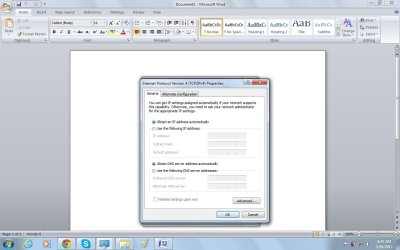
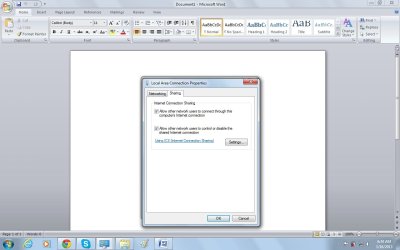
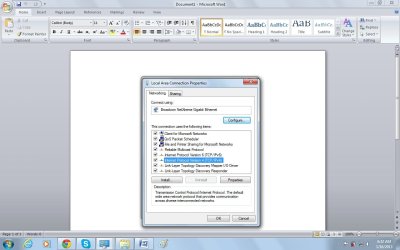
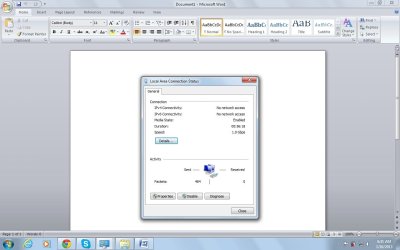
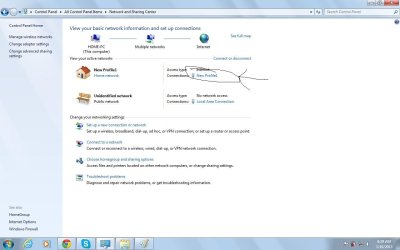
The pics is attached.
 

Attachments

  • 5.jpg
    5.jpg
    187.1 KB · Views: 4
  • 4.jpg
    4.jpg
    165.2 KB · Views: 3
  • 3.jpg
    3.jpg
    202.9 KB · Views: 3
  • 2.jpg
    2.jpg
    166.1 KB · Views: 2
  • 1.jpg
    1.jpg
    149.6 KB · Views: 3

My Computer

OS
Windows 7-Home Edition
Another problem also is that the IP address is changing constantly...
 

My Computer

OS
Windows 7-Home Edition
Another pic with numbers I normally use except for the default gateway number.
 

Attachments

  • 6.jpg
    6.jpg
    192.2 KB · Views: 4

My Computer

OS
Windows 7-Home Edition
You should do it on your profile 1 not your gigabit.

Your address is changing because its a public address that your getting though a 3g connection.
 

Attachments

  • 1.jpg
    1.jpg
    82.7 KB · Views: 1

My Computer

OS
Windows 7 Ultimate x64
Back
Top