Solved Urgent help needed. Windows boot manager

thefollower

New member
Local time
7:29 AM
Messages
48
I have university work to submit this week so this is a matter for urgency. I cannot lose my work but my pc is not working.

My Asus Ai suite ran an update to update my mother board and now my operating system will not boot. I get "a recent hardware or software change might be the cause".

It tells me to put my recovery disk in and repair my computer but it doesn't list my operating system. I tried going into command prompt and then listing partitions. I selected the 100mb partition tried again and didn't work. Then I tried the other partition on the drive... Also didn't work. It just won't list the damn operating system.

What can I do at this point please help. I am currently using my phone to type.... Sorry if my spelling sucks. I hate using my phone.
 

My Computer

Computer type
PC/Desktop
Computer Manufacturer/Model Number
custom build
OS
Windows 7 Ultimate 64Bit
CPU
Intel Core i7 4770k 3.5Ghz
Motherboard
ASUS Maximus Hero Vi
Memory
16GB
Graphics Card(s)
Nvidia 770 GTX
Monitor(s) Displays
Asus ProArt
Screen Resolution
1920 by 1200
Internet Speed
100MB/s
Download the Partition Wizard Bootable CD, and create a bootable CD.
Free download Magic Partition Manager Software, partition magic alternative, free partition magic, partition magic Windows 7 and server partition software - Partition Wizard Online

Boot the PC with the PW CD.
Take a camera pic of the PW window and paste it into your reply.
http://www.sevenforums.com/tutorials/9733-screenshots-files-upload-post-seven-forums.html

You will need to use another PC to download and create the bootable CD.
 

My Computer

Computer type
PC/Desktop
Computer Manufacturer/Model Number
home built
OS
Multi-Boot W7_Pro_x64 W8.1_Pro_x64 W10_Pro_x64 +Linux_VMs +Chromium_VM
CPU
AMD Athlon II x4 620
Motherboard
Gigabyte GA-MA785G-UD3H
Memory
6GB GSkill DDR2 800
Graphics Card(s)
AMD 4670 GPU + AMD 4200 IGP
Sound Card
on board Realtek ALC889A
Monitor(s) Displays
RCA 40" LCD TV, Insignia 32" LCD TV, HP 15" LCD monitor
Screen Resolution
1680 x 1050
Hard Drives
OCZ Vertex 3 120GB,
Samsung F3 1TB (3),
Several others - WD, Seagate, Hitachi, ...
PSU
Corsair 500 W
Case
Rosewill mid tower
Cooling
CM 90mm rifle
Keyboard
Gyration wireless, Logitech wireless, Dell USB wired
Mouse
Gyration wireless, Logitech wireless, V7 USB wired
Internet Speed
Spectrum - 100Mbps D / 10Mbps U
Antivirus
Avast, MBAM3, EMET, WinPatrol
Browser
Pale Moon, Firefox, IE
Other Info
2 multi-boot PC's
Mainly HTPC/Office/Gen purpose (no gaming).
Trendnet USB KVM.
LG DVD burner/Blue Ray Player.
Tray system for removable SATA backup drives.

Not currently OCd, under-volted.
I use Hybrid sleep, rarely re-boot or shutdown.

Hauppauge HD-PVR, Avermedia PCIe TV Tuner, Hauppauge PCI TV Tuner.
Can you see the OS when Repair Disk first loads? If not, change your harddisk to SATA port 0 or 1 (whichever is available first, check motherboard manual)
 

My Computer

Computer type
PC/Desktop
Computer Manufacturer/Model Number
Custom Build
OS
Windows 7 Ultimate x64 SP1
CPU
AMD Phenom 2 1090T
Motherboard
Gigabyte GA-890FXA-UD5
Memory
2x8GB Kingston HyperX Fury Black 1600Mhz Unganged
Graphics Card(s)
MSI GTX 970 Gaming 4G
Sound Card
Realtek On-Board HD 7.1 Audio / Logitech G35
Monitor(s) Displays
3xAcer GD245HQ
Screen Resolution
1920x1080
Hard Drives
Samsung 850 Pro 512GB SSD - OS /
WD Caviar Black SATA 3 - 1 TBx2 - Dynamic RAID 0 /
WD Caviar Green SATA 2 - 640GBx2 - Dynamic RAID 0 /
WD Caviar Green SATA 2 - 640GB - Internal Backup /
Seagate Barracude SATA 3 - 3TB - External Backup/ Sync
PSU
HighPower 1000W
Case
Cooler Master HAF 932
Cooling
Noctua NH-D14
Keyboard
Logitech G19
Mouse
Logitech G500
Internet Speed
100/4 Mbit Cable (100GB quota)
Antivirus
ZoneAlarm Extreme Security / MBAM Pro / MBAE Free / SAS Free
Browser
IE 11 - Firefox - Chrome
Other Info
Logitech F710/ G27/ G940/ Z5500 // TrackIR 5 // Nvidia 3D Surround Vision
Can you see the OS when Repair Disk first loads? If not, change your harddisk to SATA port 0 or 1 (whichever is available first, check motherboard manual)

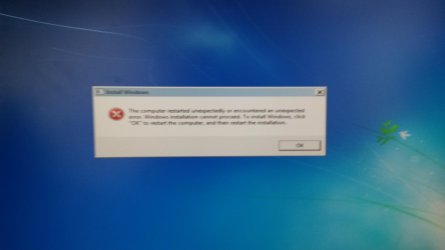
It just says unknown. I tried format my os drive and reinstalled but even that says the computer unexpectedly restarted please reinstall. I unplugged all my other drives so I only have my ssd plugged in which was always in the first port from when I first installed my os.

I got a blue screen of death when it restarted and launched windows for the first time. I'm fairly sure the motherboard update messed things up.
 

Attachments

  • 1433527849137145439460.jpg
    1433527849137145439460.jpg
    204.1 KB · Views: 3

My Computer

Computer type
PC/Desktop
Computer Manufacturer/Model Number
custom build
OS
Windows 7 Ultimate 64Bit
CPU
Intel Core i7 4770k 3.5Ghz
Motherboard
ASUS Maximus Hero Vi
Memory
16GB
Graphics Card(s)
Nvidia 770 GTX
Monitor(s) Displays
Asus ProArt
Screen Resolution
1920 by 1200
Internet Speed
100MB/s
Well, lets see what David asked first.

After that, I would make sure SSD is first. Where is the DVD drive installed at? Maybe that one gets the 1st port. I solved this issue like this, also helped another friend who had the issue here on the forums. But it won't help if harddisk is somehow damaged.
 

My Computer

Computer type
PC/Desktop
Computer Manufacturer/Model Number
Custom Build
OS
Windows 7 Ultimate x64 SP1
CPU
AMD Phenom 2 1090T
Motherboard
Gigabyte GA-890FXA-UD5
Memory
2x8GB Kingston HyperX Fury Black 1600Mhz Unganged
Graphics Card(s)
MSI GTX 970 Gaming 4G
Sound Card
Realtek On-Board HD 7.1 Audio / Logitech G35
Monitor(s) Displays
3xAcer GD245HQ
Screen Resolution
1920x1080
Hard Drives
Samsung 850 Pro 512GB SSD - OS /
WD Caviar Black SATA 3 - 1 TBx2 - Dynamic RAID 0 /
WD Caviar Green SATA 2 - 640GBx2 - Dynamic RAID 0 /
WD Caviar Green SATA 2 - 640GB - Internal Backup /
Seagate Barracude SATA 3 - 3TB - External Backup/ Sync
PSU
HighPower 1000W
Case
Cooler Master HAF 932
Cooling
Noctua NH-D14
Keyboard
Logitech G19
Mouse
Logitech G500
Internet Speed
100/4 Mbit Cable (100GB quota)
Antivirus
ZoneAlarm Extreme Security / MBAM Pro / MBAE Free / SAS Free
Browser
IE 11 - Firefox - Chrome
Other Info
Logitech F710/ G27/ G940/ Z5500 // TrackIR 5 // Nvidia 3D Surround Vision
The ssd is in the first port. Definitely. And I don't have another pc to try David's method.
 

My Computer

Computer type
PC/Desktop
Computer Manufacturer/Model Number
custom build
OS
Windows 7 Ultimate 64Bit
CPU
Intel Core i7 4770k 3.5Ghz
Motherboard
ASUS Maximus Hero Vi
Memory
16GB
Graphics Card(s)
Nvidia 770 GTX
Monitor(s) Displays
Asus ProArt
Screen Resolution
1920 by 1200
Internet Speed
100MB/s
If you are making that far into OS, try:

F8 menu while starting and chose "Last Known Good Configuration"
 

My Computer

Computer type
PC/Desktop
Computer Manufacturer/Model Number
Custom Build
OS
Windows 7 Ultimate x64 SP1
CPU
AMD Phenom 2 1090T
Motherboard
Gigabyte GA-890FXA-UD5
Memory
2x8GB Kingston HyperX Fury Black 1600Mhz Unganged
Graphics Card(s)
MSI GTX 970 Gaming 4G
Sound Card
Realtek On-Board HD 7.1 Audio / Logitech G35
Monitor(s) Displays
3xAcer GD245HQ
Screen Resolution
1920x1080
Hard Drives
Samsung 850 Pro 512GB SSD - OS /
WD Caviar Black SATA 3 - 1 TBx2 - Dynamic RAID 0 /
WD Caviar Green SATA 2 - 640GBx2 - Dynamic RAID 0 /
WD Caviar Green SATA 2 - 640GB - Internal Backup /
Seagate Barracude SATA 3 - 3TB - External Backup/ Sync
PSU
HighPower 1000W
Case
Cooler Master HAF 932
Cooling
Noctua NH-D14
Keyboard
Logitech G19
Mouse
Logitech G500
Internet Speed
100/4 Mbit Cable (100GB quota)
Antivirus
ZoneAlarm Extreme Security / MBAM Pro / MBAE Free / SAS Free
Browser
IE 11 - Firefox - Chrome
Other Info
Logitech F710/ G27/ G940/ Z5500 // TrackIR 5 // Nvidia 3D Surround Vision
If you are making that far into OS, try:

F8 menu while starting and chose "Last Known Good Configuration"

It doesn't find any. I formatted my ssd and reinstalled so there wouldn't be any available.

My ssd is reading as disk 0. So that must be slot 1 right?
 

My Computer

Computer type
PC/Desktop
Computer Manufacturer/Model Number
custom build
OS
Windows 7 Ultimate 64Bit
CPU
Intel Core i7 4770k 3.5Ghz
Motherboard
ASUS Maximus Hero Vi
Memory
16GB
Graphics Card(s)
Nvidia 770 GTX
Monitor(s) Displays
Asus ProArt
Screen Resolution
1920 by 1200
Internet Speed
100MB/s
It is not something to find, it loads the registry values from the last successful login(?). Do you get to the menu with that option?

You can also try Safe Mode (same menu screen)

44121d1262006739-advanced-boot-options-advanced_boot_options.jpg
 

My Computer

Computer type
PC/Desktop
Computer Manufacturer/Model Number
Custom Build
OS
Windows 7 Ultimate x64 SP1
CPU
AMD Phenom 2 1090T
Motherboard
Gigabyte GA-890FXA-UD5
Memory
2x8GB Kingston HyperX Fury Black 1600Mhz Unganged
Graphics Card(s)
MSI GTX 970 Gaming 4G
Sound Card
Realtek On-Board HD 7.1 Audio / Logitech G35
Monitor(s) Displays
3xAcer GD245HQ
Screen Resolution
1920x1080
Hard Drives
Samsung 850 Pro 512GB SSD - OS /
WD Caviar Black SATA 3 - 1 TBx2 - Dynamic RAID 0 /
WD Caviar Green SATA 2 - 640GBx2 - Dynamic RAID 0 /
WD Caviar Green SATA 2 - 640GB - Internal Backup /
Seagate Barracude SATA 3 - 3TB - External Backup/ Sync
PSU
HighPower 1000W
Case
Cooler Master HAF 932
Cooling
Noctua NH-D14
Keyboard
Logitech G19
Mouse
Logitech G500
Internet Speed
100/4 Mbit Cable (100GB quota)
Antivirus
ZoneAlarm Extreme Security / MBAM Pro / MBAE Free / SAS Free
Browser
IE 11 - Firefox - Chrome
Other Info
Logitech F710/ G27/ G940/ Z5500 // TrackIR 5 // Nvidia 3D Surround Vision
I don't know what to suggest.

In Post #1 you stated "I cannot lose my work but my pc is not working."
In Post #4 you stated "I tried format my os drive and reinstalled ..." (also post #8)

You don't have access to another PC.
Hopefully your data is not on the "C" drive and is still uncorrupted/not lost by what happened...
Don't connect your Data HD until you get the Windows Bootup issue fixed.

Explain exactly what you did to re-install.
Where did you get the "W7 re-install" DVD, or what did you use to re-install ?
Read this tutorial by Gregrocker, and compare it to what you did:
http://www.sevenforums.com/tutorials/219487-clean-reinstall-factory-oem-windows-7-a.html

Do you have a legitimate Win 7 install DVD ?
Do you have the PC manufacturers Recovery discs ?
Did you reinstall using the PC manufacturers "Recovery" option using the Recovery partition ?
 

My Computer

Computer type
PC/Desktop
Computer Manufacturer/Model Number
home built
OS
Multi-Boot W7_Pro_x64 W8.1_Pro_x64 W10_Pro_x64 +Linux_VMs +Chromium_VM
CPU
AMD Athlon II x4 620
Motherboard
Gigabyte GA-MA785G-UD3H
Memory
6GB GSkill DDR2 800
Graphics Card(s)
AMD 4670 GPU + AMD 4200 IGP
Sound Card
on board Realtek ALC889A
Monitor(s) Displays
RCA 40" LCD TV, Insignia 32" LCD TV, HP 15" LCD monitor
Screen Resolution
1680 x 1050
Hard Drives
OCZ Vertex 3 120GB,
Samsung F3 1TB (3),
Several others - WD, Seagate, Hitachi, ...
PSU
Corsair 500 W
Case
Rosewill mid tower
Cooling
CM 90mm rifle
Keyboard
Gyration wireless, Logitech wireless, Dell USB wired
Mouse
Gyration wireless, Logitech wireless, V7 USB wired
Internet Speed
Spectrum - 100Mbps D / 10Mbps U
Antivirus
Avast, MBAM3, EMET, WinPatrol
Browser
Pale Moon, Firefox, IE
Other Info
2 multi-boot PC's
Mainly HTPC/Office/Gen purpose (no gaming).
Trendnet USB KVM.
LG DVD burner/Blue Ray Player.
Tray system for removable SATA backup drives.

Not currently OCd, under-volted.
I use Hybrid sleep, rarely re-boot or shutdown.

Hauppauge HD-PVR, Avermedia PCIe TV Tuner, Hauppauge PCI TV Tuner.
I don't have that option in the list. My work is on a separate drive unplugged.

I am now getting BSOD "uncorrectable hardware error".

But it doesn't happen when in safe mode...keeps infinitely restarting. Safe mode with networking doesn't let me connect to Internet either.
 

My Computer

Computer type
PC/Desktop
Computer Manufacturer/Model Number
custom build
OS
Windows 7 Ultimate 64Bit
CPU
Intel Core i7 4770k 3.5Ghz
Motherboard
ASUS Maximus Hero Vi
Memory
16GB
Graphics Card(s)
Nvidia 770 GTX
Monitor(s) Displays
Asus ProArt
Screen Resolution
1920 by 1200
Internet Speed
100MB/s
try a system restore in safe mode, there should be a possible restore point right before AI suite installed. Or if you know what installed, you can manually try uninstalling.
 

My Computer

Computer type
PC/Desktop
Computer Manufacturer/Model Number
Custom Build
OS
Windows 7 Ultimate x64 SP1
CPU
AMD Phenom 2 1090T
Motherboard
Gigabyte GA-890FXA-UD5
Memory
2x8GB Kingston HyperX Fury Black 1600Mhz Unganged
Graphics Card(s)
MSI GTX 970 Gaming 4G
Sound Card
Realtek On-Board HD 7.1 Audio / Logitech G35
Monitor(s) Displays
3xAcer GD245HQ
Screen Resolution
1920x1080
Hard Drives
Samsung 850 Pro 512GB SSD - OS /
WD Caviar Black SATA 3 - 1 TBx2 - Dynamic RAID 0 /
WD Caviar Green SATA 2 - 640GBx2 - Dynamic RAID 0 /
WD Caviar Green SATA 2 - 640GB - Internal Backup /
Seagate Barracude SATA 3 - 3TB - External Backup/ Sync
PSU
HighPower 1000W
Case
Cooler Master HAF 932
Cooling
Noctua NH-D14
Keyboard
Logitech G19
Mouse
Logitech G500
Internet Speed
100/4 Mbit Cable (100GB quota)
Antivirus
ZoneAlarm Extreme Security / MBAM Pro / MBAE Free / SAS Free
Browser
IE 11 - Firefox - Chrome
Other Info
Logitech F710/ G27/ G940/ Z5500 // TrackIR 5 // Nvidia 3D Surround Vision
I don`t understand, if you just reinstalled windows, what is the problem ?

Can you get into the Bios ?

Did you set the Bios back to defaults by hitting F5 and saving then exiting ?
 

My Computer

Computer type
PC/Desktop
Computer Manufacturer/Model Number
Skylake Special #666
OS
Windows 10 Pro x64
CPU
Intel Core i7 6700K
Motherboard
Asus Sabertooth Z170 Mark 1
Memory
GSkill TridentZ RGB 16GB 3600 16-16-16-36
Graphics Card(s)
EVGA GTX 980 Ti SC x2
Sound Card
Realtek High Definition
Monitor(s) Displays
AOC G2460PG
Screen Resolution
1920 x 1080 144Hz
Hard Drives
Samsung 860 Pro 256GB, Seagate Barracuda 4TB x2
PSU
EVGA 1000 P2, EVGA White Custom Braided Cables
Case
Corsair Vengeance C70 Gunmetal Black
Cooling
Corsair H100i v2, Corsair ML120 x2, Thermal Grizzly Kryonaut
Keyboard
Logitech G910 Orion Spectrum
Mouse
Logitech G700s
Internet Speed
Verizon Fios Quantum Gateway 75/75
Antivirus
Windows Defender, Malwarebytes Free 3.8.3
Browser
Chrome
Other Info
Corsair SP120 x4, LG Blu-ray Drive, Durabrand HT-395 100 Watt Dolby Digital Amp, Corsair H2100 Wireless 7.1 Headset
I have fixed the issue.

I did reinstall windows 7 but it get BSOD on me. So i had to set jumpers on the motherboard. That seems to have fixed it. For some reason the motherboard update totally broke something with the motherboard. I probably didn't even need to reinstall windows 7 if i had known that was the issue but as is the case i usually assume software issue before hardware issue. :(

Problem is now solved.
 

My Computer

Computer type
PC/Desktop
Computer Manufacturer/Model Number
custom build
OS
Windows 7 Ultimate 64Bit
CPU
Intel Core i7 4770k 3.5Ghz
Motherboard
ASUS Maximus Hero Vi
Memory
16GB
Graphics Card(s)
Nvidia 770 GTX
Monitor(s) Displays
Asus ProArt
Screen Resolution
1920 by 1200
Internet Speed
100MB/s
Back
Top