Solved Identifying the screws to mount motherboard onto case

rezelute

New member
Member
Local time
12:00 AM
Messages
78
Hi,
I have a HAF plus case and it came with quite alot of screws, could someone please identify what each of these are used for? I am trying to screw my case onto my motherboard and my guess is the following but please let me know if im wrong:
20130115194314.jpg

From left:
1= Fan
2= Motherboard
3= Motherboard
4= Fan
When i built my old PC it used screw 2 (with large head) however in the new case it seems that screw 2 wont fit completely (it does go in but doesnt get to the bottom entirely) and that i should be using screw 3. Could someone just please confirm that? Im confused because screw 3 seems abit small to hold a motherboard.

The motherboard is an ASUS P8Z68 DELUXE/GEN3.

Thanks!
 

My Computer My Computer

At a glance

Windows 7 64-bitCore 2 Duo OC 4GHZ4MB DDR2GTX 460
OS
Windows 7 64-bit
CPU
Core 2 Duo OC 4GHZ
Motherboard
Asus P5Q SE Plus
Memory
4MB DDR2
Graphics Card(s)
GTX 460
Sound Card
Xonar D1
Monitor(s) Displays
LG 42 inch
Screen Resolution
1980x1020
Hello Rezelute,

3 looks more like a drive bay screw. It'll work though if it there's enough of the screw head holding down the motherboard, and it's not stripping the mount screw (left below).

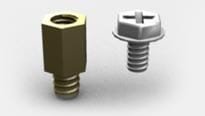
2 would be the motherboard screw (right below) . Double check that the mount screw (left below) is ok.

motherboardScrews.jpg

Hope this helps,
Shawn
 

My Computer My Computer

At a glance

64-bit Windows 11 Pro for WorkstationsIntel i7-8700K OC'd to 5 GHz64 GB (4x16GB) G.SKILL TridentZ RGB DDR4 3600...ASUS ROG-STRIX-GTX1080TI-O11G-GAMING
Computer type
PC/Desktop
Computer Manufacturer/Model Number
Self built custom
OS
64-bit Windows 11 Pro for Workstations
CPU
Intel i7-8700K OC'd to 5 GHz
Motherboard
ASUS ROG Maximus XI Formula Z390
Memory
64 GB (4x16GB) G.SKILL TridentZ RGB DDR4 3600 MHz
Graphics Card(s)
ASUS ROG-STRIX-GTX1080TI-O11G-GAMING
Sound Card
Integrated
Monitor(s) Displays
2 x Samsung Odyssey G7 27"
Screen Resolution
2560x1440
Hard Drives
1TB Samsung 990 PRO M.2,
4TB Samsung 990 PRO PRO M.2,
TerraMaster F8 SSD Plus NAS
PSU
Seasonic Prime Titanium 850W
Case
Thermaltake Core P3
Cooling
Corsair Hydro H115i
Keyboard
Logitech wireless K800
Mouse
Logitech MX Master 4
Internet Speed
2 Gb/s Download and 100 Mb/s Upload
Antivirus
Malwarebyte Anti-Malware Premium
Browser
Google Chrome
Other Info
Logitech Z625 speaker system,
Logitech BRIO 4K Pro webcam,
HP Color LaserJet Pro MFP M477fdn,
APC SMART-UPS RT 1000 XL - SURT1000XLI,
Galaxy S23 Plus phone
Thank you for reply Brink, what your saying makes sense however I have added two new images of the fittings:
This is the one that seems to fit fine:
20130115203744.jpg


This is the one you are talking about which seems to struggle to fit in:

20130115203717.jpg


I have tried screwing it the one you suggested too and there always seems to be abit of the screw that sticks out.
My bay drives have an automatic clip too so i dont think they require screws.
 

My Computer My Computer

At a glance

Windows 7 64-bitCore 2 Duo OC 4GHZ4MB DDR2GTX 460
OS
Windows 7 64-bit
CPU
Core 2 Duo OC 4GHZ
Motherboard
Asus P5Q SE Plus
Memory
4MB DDR2
Graphics Card(s)
GTX 460
Sound Card
Xonar D1
Monitor(s) Displays
LG 42 inch
Screen Resolution
1980x1020
The top pic is for your mobo
The lower picture is the black screw for mounting your gfx card etc to the case.
 

My Computer My Computer

At a glance

Windows 7 64bit home premiumI5 3570K4 x 4GB Crucial Ballistix Sport DDR3 1600 MhzGigabyte Geforce 660 TI
Computer Manufacturer/Model Number
Self built
OS
Windows 7 64bit home premium
CPU
I5 3570K
Motherboard
Gigabyte Z77-DS3H
Memory
4 x 4GB Crucial Ballistix Sport DDR3 1600 Mhz
Graphics Card(s)
Gigabyte Geforce 660 TI
Sound Card
creative x-fi
Monitor(s) Displays
Primary CiBox 22" Widescreen LCD ,Secondary Dell 22" Widescr
Screen Resolution
Both 1680 x 1050
Hard Drives
2 x 500G HD (SATA) 1 x 2 TB USB
PSU
Corsair HX 620W ATX2.2 Modular SLI Complient PSU
Case
Antec 900 Ultimate Gaming Case
Cooling
3xfront 1xside 1xrear blue fan, 1 200mm blue top fan 1
Keyboard
Trust ds-3200 Wireless keyboard and mouse
Mouse
Trust ds-3200 Wireless keyboard and mouse
Internet Speed
288 / 4000
Other Info
Creative Inspire 7.1 T7900 Speakers
Trust Graphics Tablet
I would have to see the screws up close and personal to be sure but my guess is if screw #2 bottoms out prematurely, it may have the wrong thread. It appears in the photo to have a tapered thread which would make it a sheet metal screw. The correct screw for mounting MOBOs to the traditional brass standoffs is a 6-32 screw and doesn't have to be very long although screws #2 and #3 both look a bit short (and the diameter of #3 looks a bit small based on fan screws usually being 6-32). Screw #1 (why do I sound like I'm hosting Let's Make a Deal?) is definitely too long. Screw #4 is probably also too long.

I just ran a 6/32 screw into a spare standoff I had knocking about and it bottomed out at a red hair over 3/16". I'm thinkin' the screw you use should be between 1/4" and 3/16" longer than the thickness of your MOBO (do not include the screw head in your measurement) to ensure enough thread goes inside the standoff to secure the board without bottoming out. If the screws you have are both too long and too short, head on down to your friendly neighborhood hardware store/home center and get the right length (I suggest you check the depth your standoffs have first; most cases use 6-32 thumbscrews to secure the side panels, btw). If you can't find black oxide, get plated steel ones and color the heads with a fine Sharpie felt pin (it actually works; I've done it before).

Edit. Ok, some posts have happened since I started posting. If screw #3's threads don't wobble around in the standoff, then it's probably the right diameter (just because it goes in doesn't always mean it fits correctly). What I said about length stands unless your illustration shows it bottomed out in the standoff, in which case that is probably the correct length.
 
Last edited:

My Computer My Computer

At a glance

Win 7 Ultimate 64 bitIntel i7-3930KKingston HyperX Genesis 32GB Kit (8x4GB Modul...MSI R7850 Twin Frozr 2GD5/OC Radeon HD 7850 2...
Computer type
PC/Desktop
Computer Manufacturer/Model Number
Custom Build
OS
Win 7 Ultimate 64 bit
CPU
Intel i7-3930K
Motherboard
ASUS P9X79 WS
Memory
Kingston HyperX Genesis 32GB Kit (8x4GB Modules) 1600MHz DDR
Graphics Card(s)
MSI R7850 Twin Frozr 2GD5/OC Radeon HD 7850 2GB 256-bit GDDR
Sound Card
Asus Xonar Essence STX
Monitor(s) Displays
3x Asus VG248QE 24", Vizio 32" TV
Screen Resolution
1920 x 1080, ?
Hard Drives
Samsung 128GB 840 Pro SSD (1),
Samsung 4TB 850 EVO SSDs (4)
Samsung 4TB 850 EVO SSDs (16) external backup drives used in 2.5" hot swap bays in the computer.
PSU
Corsair HX750w
Case
Antec Two Hundred v2 (modified)
Cooling
Cooler Master GeminII S524 120mm (fan replaced with a 140mm)
Keyboard
Logitech G510s
Mouse
Logitech M525 (two in use)
Internet Speed
=< 32Mbps down, 8Mbps up
Antivirus
AVAST!, MBAM, SAS, Spybot S&D (all but MBAM free) Glary Util
Browser
IE11
Other Info
LSI 9211-8i HBA card (8 SATA III ports), 2.5" & 3.5" Hot Swap Bays, HooToo HT-CR001 PCI-E to USB 3.0 Internal Hub + 6 Slot Card Reader, and LG Model CH12LS28 BD-ROM Optical Drive. Also, ScanSnap S1500 ADF duplexing scanner, Canon 9000F flat bed scanner, Corsair SP2500 2.1 speakers, Samsung CLP 415nw laser color printer, Cyberpower PP2200SW UPS
I had (and still have) a lot of screws and fittings that came with my current and previous cases. Many of the screws do look alike, but the threads on them are slightly different. Not enough to prevent the screws from being started, but quite often enough to prevent them from being fully screwed in. The easiest thing to do would be to take the required number of motherboard standoffs and pair them individually with the correct screws. The ones Shawn illustrated above are the ones you need, but bear in mind what I've said about screws being similar but different.
 

My Computer My Computer

At a glance

Windows 8.1 Pro RTM x64Intel Core-i5-3570K 4-core @ 3.4GHz (Ivy Brid...4 x 4GB DDR3-1600 Corsair Vengeance CMZ8GX3M2...MSI GeForce GTX770 Gaming OC 2GB
Computer type
PC/Desktop
Computer Manufacturer/Model Number
Dwarf Dwf/11/2012 r09/2013
OS
Windows 8.1 Pro RTM x64
CPU
Intel Core-i5-3570K 4-core @ 3.4GHz (Ivy Bridge) (OC 4.4GHz)
Motherboard
ASRock Z77 Extreme4-M
Memory
4 x 4GB DDR3-1600 Corsair Vengeance CMZ8GX3M2A1600C9B (16GB)
Graphics Card(s)
MSI GeForce GTX770 Gaming OC 2GB
Sound Card
Realtek High Definition on board solution (ALC 898)
Monitor(s) Displays
ViewSonic VA1912w Widescreen (VGA)
Screen Resolution
1440x900
Hard Drives
OCZ Agility 3 SSD 120GB SATA III x2 (RAID 0)
Samsung HD501LJ 500GB SATA II x2
Hitachi HDS721010CLA332 1TB SATA II
Iomega 1.5TB Ext USB 2.0
WD 2.0TB Ext USB 3.0
PSU
XFX Pro Series 850W Semi-Modular
Case
Gigabyte IF233
Cooling
1 x 120mm Front Inlet 1 x 120mm Rear Exhaust
Keyboard
Microsoft Comfort Curve Keyboard 3000 (USB)
Mouse
Microsoft Comfort Mouse 3000 for Business (USB)
Internet Speed
NetGear DG834Gv3 ADSL Modem/Router (Ethernet) ~4.0 Mb/s (O2)
Antivirus
Avast! 8.0.1497
Browser
IE 11
Other Info
Optical Drive: HL-DT-ST BD-RE BH10LS30 SATA Bluray
Lexmark S305 Printer/Scanner/Copier (USB)
WEI Score: 8.1/8.1/8.5/8.5/8.25
Asus Eee PC 1011PX Netbook (Windows 7 x86 Starter)
The top pic is for your mobo
The lower picture is the black screw for mounting your gfx card etc to the case.

Justin,

I agree with Roy. Use the screws in your top screenshot. You'll end up stripping the mount screws if you try to force using the screws in the lower screenshot.
 

My Computer My Computer

At a glance

64-bit Windows 11 Pro for WorkstationsIntel i7-8700K OC'd to 5 GHz64 GB (4x16GB) G.SKILL TridentZ RGB DDR4 3600...ASUS ROG-STRIX-GTX1080TI-O11G-GAMING
Computer type
PC/Desktop
Computer Manufacturer/Model Number
Self built custom
OS
64-bit Windows 11 Pro for Workstations
CPU
Intel i7-8700K OC'd to 5 GHz
Motherboard
ASUS ROG Maximus XI Formula Z390
Memory
64 GB (4x16GB) G.SKILL TridentZ RGB DDR4 3600 MHz
Graphics Card(s)
ASUS ROG-STRIX-GTX1080TI-O11G-GAMING
Sound Card
Integrated
Monitor(s) Displays
2 x Samsung Odyssey G7 27"
Screen Resolution
2560x1440
Hard Drives
1TB Samsung 990 PRO M.2,
4TB Samsung 990 PRO PRO M.2,
TerraMaster F8 SSD Plus NAS
PSU
Seasonic Prime Titanium 850W
Case
Thermaltake Core P3
Cooling
Corsair Hydro H115i
Keyboard
Logitech wireless K800
Mouse
Logitech MX Master 4
Internet Speed
2 Gb/s Download and 100 Mb/s Upload
Antivirus
Malwarebyte Anti-Malware Premium
Browser
Google Chrome
Other Info
Logitech Z625 speaker system,
Logitech BRIO 4K Pro webcam,
HP Color LaserJet Pro MFP M477fdn,
APC SMART-UPS RT 1000 XL - SURT1000XLI,
Galaxy S23 Plus phone
How much easier PC building would be if every screw required (motherboard, drive, add-on card, etc.) were exactly the same. It would save a lot of confusion.
 

My Computer My Computer

At a glance

Windows 8.1 Pro RTM x64Intel Core-i5-3570K 4-core @ 3.4GHz (Ivy Brid...4 x 4GB DDR3-1600 Corsair Vengeance CMZ8GX3M2...MSI GeForce GTX770 Gaming OC 2GB
Computer type
PC/Desktop
Computer Manufacturer/Model Number
Dwarf Dwf/11/2012 r09/2013
OS
Windows 8.1 Pro RTM x64
CPU
Intel Core-i5-3570K 4-core @ 3.4GHz (Ivy Bridge) (OC 4.4GHz)
Motherboard
ASRock Z77 Extreme4-M
Memory
4 x 4GB DDR3-1600 Corsair Vengeance CMZ8GX3M2A1600C9B (16GB)
Graphics Card(s)
MSI GeForce GTX770 Gaming OC 2GB
Sound Card
Realtek High Definition on board solution (ALC 898)
Monitor(s) Displays
ViewSonic VA1912w Widescreen (VGA)
Screen Resolution
1440x900
Hard Drives
OCZ Agility 3 SSD 120GB SATA III x2 (RAID 0)
Samsung HD501LJ 500GB SATA II x2
Hitachi HDS721010CLA332 1TB SATA II
Iomega 1.5TB Ext USB 2.0
WD 2.0TB Ext USB 3.0
PSU
XFX Pro Series 850W Semi-Modular
Case
Gigabyte IF233
Cooling
1 x 120mm Front Inlet 1 x 120mm Rear Exhaust
Keyboard
Microsoft Comfort Curve Keyboard 3000 (USB)
Mouse
Microsoft Comfort Mouse 3000 for Business (USB)
Internet Speed
NetGear DG834Gv3 ADSL Modem/Router (Ethernet) ~4.0 Mb/s (O2)
Antivirus
Avast! 8.0.1497
Browser
IE 11
Other Info
Optical Drive: HL-DT-ST BD-RE BH10LS30 SATA Bluray
Lexmark S305 Printer/Scanner/Copier (USB)
WEI Score: 8.1/8.1/8.5/8.5/8.25
Asus Eee PC 1011PX Netbook (Windows 7 x86 Starter)
Thank you all :) , I will use the top screw in my second screenshot and just give the motherboard a shake to see if its secured enough when i fit them all in.
 

My Computer My Computer

At a glance

Windows 7 64-bitCore 2 Duo OC 4GHZ4MB DDR2GTX 460
OS
Windows 7 64-bit
CPU
Core 2 Duo OC 4GHZ
Motherboard
Asus P5Q SE Plus
Memory
4MB DDR2
Graphics Card(s)
GTX 460
Sound Card
Xonar D1
Monitor(s) Displays
LG 42 inch
Screen Resolution
1980x1020
Dwarf i agree, I havent had any trouble in the past mounting motherboards but this is just confusing when everyone has their own view of how screw types should be different lol
 

My Computer My Computer

At a glance

Windows 7 64-bitCore 2 Duo OC 4GHZ4MB DDR2GTX 460
OS
Windows 7 64-bit
CPU
Core 2 Duo OC 4GHZ
Motherboard
Asus P5Q SE Plus
Memory
4MB DDR2
Graphics Card(s)
GTX 460
Sound Card
Xonar D1
Monitor(s) Displays
LG 42 inch
Screen Resolution
1980x1020
Just make sure that whichever screw you use projects sufficiently far enough through the motherboard in order to ensure that it has a good purchase in the standoff.
 

My Computer My Computer

At a glance

Windows 8.1 Pro RTM x64Intel Core-i5-3570K 4-core @ 3.4GHz (Ivy Brid...4 x 4GB DDR3-1600 Corsair Vengeance CMZ8GX3M2...MSI GeForce GTX770 Gaming OC 2GB
Computer type
PC/Desktop
Computer Manufacturer/Model Number
Dwarf Dwf/11/2012 r09/2013
OS
Windows 8.1 Pro RTM x64
CPU
Intel Core-i5-3570K 4-core @ 3.4GHz (Ivy Bridge) (OC 4.4GHz)
Motherboard
ASRock Z77 Extreme4-M
Memory
4 x 4GB DDR3-1600 Corsair Vengeance CMZ8GX3M2A1600C9B (16GB)
Graphics Card(s)
MSI GeForce GTX770 Gaming OC 2GB
Sound Card
Realtek High Definition on board solution (ALC 898)
Monitor(s) Displays
ViewSonic VA1912w Widescreen (VGA)
Screen Resolution
1440x900
Hard Drives
OCZ Agility 3 SSD 120GB SATA III x2 (RAID 0)
Samsung HD501LJ 500GB SATA II x2
Hitachi HDS721010CLA332 1TB SATA II
Iomega 1.5TB Ext USB 2.0
WD 2.0TB Ext USB 3.0
PSU
XFX Pro Series 850W Semi-Modular
Case
Gigabyte IF233
Cooling
1 x 120mm Front Inlet 1 x 120mm Rear Exhaust
Keyboard
Microsoft Comfort Curve Keyboard 3000 (USB)
Mouse
Microsoft Comfort Mouse 3000 for Business (USB)
Internet Speed
NetGear DG834Gv3 ADSL Modem/Router (Ethernet) ~4.0 Mb/s (O2)
Antivirus
Avast! 8.0.1497
Browser
IE 11
Other Info
Optical Drive: HL-DT-ST BD-RE BH10LS30 SATA Bluray
Lexmark S305 Printer/Scanner/Copier (USB)
WEI Score: 8.1/8.1/8.5/8.5/8.25
Asus Eee PC 1011PX Netbook (Windows 7 x86 Starter)
Thanks Dwarf yes it seems to have gone through entirely on every single screw so i guess it was just a different type of screws used for this case and board that im used to.
 

My Computer My Computer

At a glance

Windows 7 64-bitCore 2 Duo OC 4GHZ4MB DDR2GTX 460
OS
Windows 7 64-bit
CPU
Core 2 Duo OC 4GHZ
Motherboard
Asus P5Q SE Plus
Memory
4MB DDR2
Graphics Card(s)
GTX 460
Sound Card
Xonar D1
Monitor(s) Displays
LG 42 inch
Screen Resolution
1980x1020
I would have to see the screws up close and personal to be sure but my guess is if screw #2 bottoms out prematurely, it may have the wrong thread. It appears in the photo to have a tapered thread which would make it a sheet metal screw. The correct screw for mounting MOBOs to the traditional brass standoffs is a 6-32 screw and doesn't have to be very long although screws #2 and #3 both look a bit short (and the diameter of #3 looks a bit small based on fan screws usually being 6-32). Screw #1 (why do I sound like I'm hosting Let's Make a Deal?) is definitely too long. Screw #4 is probably also too long.

I just ran a 6/32 screw into a spare standoff I had knocking about and it bottomed out at a red hair over 3/16". I'm thinkin' the screw you use should be between 1/4" and 3/16" longer than the thickness of your MOBO (do not include the screw head in your measurement) to ensure enough thread goes inside the standoff to secure the board without bottoming out. If the screws you have are both too long and too short, head on down to your friendly neighborhood hardware store/home center and get the right length (I suggest you check the depth your standoffs have first; most cases use 6-32 thumbscrews to secure the side panels, btw). If you can't find black oxide, get plated steel ones and color the heads with a fine Sharpie felt pin (it actually works; I've done it before).

Edit. Ok, some posts have happened since I started posting. If screw #3's threads don't wobble around in the standoff, then it's probably the right diameter (just because it goes in doesn't always mean it fits correctly). What I said about length stands unless your illustration shows it bottomed out in the standoff, in which case that is probably the correct length.

My post has nothing to do with helping the OP, but just want to say that the above post made quite an impression on me. How many women do you know that can talk about sheet metal screws and various threads on them and make a post that long on the subject. My congratulations ma'am.
 

My Computer My Computer

At a glance

Windows 7 Home Premium 32-Bit - Build 7600 SP1Intel Core i3-2120 3.30GhzKingston 4 GB DDR3 1333 mhzAMD Radeon HD6670
Computer type
PC/Desktop
Computer Manufacturer/Model Number
Custom Build
OS
Windows 7 Home Premium 32-Bit - Build 7600 SP1
CPU
Intel Core i3-2120 3.30Ghz
Motherboard
Asus P8Z68-V LX Intel Z68 Socket H2 ATX
Memory
Kingston 4 GB DDR3 1333 mhz
Graphics Card(s)
AMD Radeon HD6670
Sound Card
Sound Blaster Audigy SE 24-Bit
Monitor(s) Displays
Asus VE228
Screen Resolution
1440 X 900
Hard Drives
OCZ Vertex 3 120 GB Sata 3 SSD ==
Kingston SH103/S3 120 G Hyper X 120 GB SSD ==
Western Digital 500 GB Caviar Green 7200 RPM ==
PSU
Corsair CX600M == 600 Watt
Case
NZXT Apollo - Silver with Clear Side Panel
Cooling
Three 120 mm Fans
Keyboard
Microsoft Natural 4000
Mouse
Microsoft Custom Optical 3000
Internet Speed
AT&T Fiber Optic Wireless Network
Antivirus
Microsoft Security Essentials
Browser
Chrome
Other Info
120 mm Blue LED Fan -- Three Blue LED Lazer Light Sticks
And why should it be so unusual for a woman to know about screws? There are more of us than you obviously realize.
 

My Computer My Computer

At a glance

Win 7 Ultimate 64 bitIntel i7-3930KKingston HyperX Genesis 32GB Kit (8x4GB Modul...MSI R7850 Twin Frozr 2GD5/OC Radeon HD 7850 2...
Computer type
PC/Desktop
Computer Manufacturer/Model Number
Custom Build
OS
Win 7 Ultimate 64 bit
CPU
Intel i7-3930K
Motherboard
ASUS P9X79 WS
Memory
Kingston HyperX Genesis 32GB Kit (8x4GB Modules) 1600MHz DDR
Graphics Card(s)
MSI R7850 Twin Frozr 2GD5/OC Radeon HD 7850 2GB 256-bit GDDR
Sound Card
Asus Xonar Essence STX
Monitor(s) Displays
3x Asus VG248QE 24", Vizio 32" TV
Screen Resolution
1920 x 1080, ?
Hard Drives
Samsung 128GB 840 Pro SSD (1),
Samsung 4TB 850 EVO SSDs (4)
Samsung 4TB 850 EVO SSDs (16) external backup drives used in 2.5" hot swap bays in the computer.
PSU
Corsair HX750w
Case
Antec Two Hundred v2 (modified)
Cooling
Cooler Master GeminII S524 120mm (fan replaced with a 140mm)
Keyboard
Logitech G510s
Mouse
Logitech M525 (two in use)
Internet Speed
=< 32Mbps down, 8Mbps up
Antivirus
AVAST!, MBAM, SAS, Spybot S&D (all but MBAM free) Glary Util
Browser
IE11
Other Info
LSI 9211-8i HBA card (8 SATA III ports), 2.5" & 3.5" Hot Swap Bays, HooToo HT-CR001 PCI-E to USB 3.0 Internal Hub + 6 Slot Card Reader, and LG Model CH12LS28 BD-ROM Optical Drive. Also, ScanSnap S1500 ADF duplexing scanner, Canon 9000F flat bed scanner, Corsair SP2500 2.1 speakers, Samsung CLP 415nw laser color printer, Cyberpower PP2200SW UPS
And why should it be so unusual for a woman to know about screws? There are more of us than you obviously realize.

Maybe I just live a sheltered life. I just not have run across anyone that could carry on a discussion such as yours. :)
 

My Computer My Computer

At a glance

Windows 7 Home Premium 32-Bit - Build 7600 SP1Intel Core i3-2120 3.30GhzKingston 4 GB DDR3 1333 mhzAMD Radeon HD6670
Computer type
PC/Desktop
Computer Manufacturer/Model Number
Custom Build
OS
Windows 7 Home Premium 32-Bit - Build 7600 SP1
CPU
Intel Core i3-2120 3.30Ghz
Motherboard
Asus P8Z68-V LX Intel Z68 Socket H2 ATX
Memory
Kingston 4 GB DDR3 1333 mhz
Graphics Card(s)
AMD Radeon HD6670
Sound Card
Sound Blaster Audigy SE 24-Bit
Monitor(s) Displays
Asus VE228
Screen Resolution
1440 X 900
Hard Drives
OCZ Vertex 3 120 GB Sata 3 SSD ==
Kingston SH103/S3 120 G Hyper X 120 GB SSD ==
Western Digital 500 GB Caviar Green 7200 RPM ==
PSU
Corsair CX600M == 600 Watt
Case
NZXT Apollo - Silver with Clear Side Panel
Cooling
Three 120 mm Fans
Keyboard
Microsoft Natural 4000
Mouse
Microsoft Custom Optical 3000
Internet Speed
AT&T Fiber Optic Wireless Network
Antivirus
Microsoft Security Essentials
Browser
Chrome
Other Info
120 mm Blue LED Fan -- Three Blue LED Lazer Light Sticks
Back
Top