Solved Image your system with free Macrium

So I gave Windows a 25 GB partition,
and Portable Applications a 4 GB partition,
and my non-portable applications and User data a 10 GB partition.


Alan, our last replies were posted almost simultaneously; With your Windows partition totaling 25GB, that's exactly what I'm talking about. How would an 'average joe' like me go about trimming off 10 gigs?
 

My Computer My Computer

At a glance

Windows 8.1 Pro with Media CenterIntel Core i7-860 processor, (8MB Cache, 2.80...8GB DDR3 SDRAM at 1333MHz-4x2GBnVidia GeForce GTS240, 1024MB GDDR3
Computer type
PC/Desktop
Computer Manufacturer/Model Number
Dell Studio XPS 8100
OS
Windows 8.1 Pro with Media Center
CPU
Intel Core i7-860 processor, (8MB Cache, 2.80GHz)
Motherboard
Dell (Chicony - DH57M01)
Memory
8GB DDR3 SDRAM at 1333MHz-4x2GB
Graphics Card(s)
nVidia GeForce GTS240, 1024MB GDDR3
Sound Card
OEM Integrated
Monitor(s) Displays
Dell ST2410, 24" Flat Panel Monitor
Hard Drives
256GB Samsung SSD 840 Pro, MZ-7PD256BW
Western Digital 1TB Caviar Blue, WD10EALX
Seagate Baracuda 750GB, ST3750528AS (OEM)
Western Digital 2TB Black, WD2003FZEX
PSU
OEM - Max Output Power 350W
Case
OEM
Cooling
OEM
let's me do differential and incremental backups
Differentials are better than incrementals.

The only downside to incrementals I've found is that one has to have all them in addition to the previous full backup present to be able to do a restoration. Incrementals backup only data changed or added since the last backup, be it a full backup or another incremental.

Differentials need only the last full backup and the latest differential to do a restoration. They backup only changes since the last full backup, even if other differentials were done before. The downside to differentials (as far as I can tell) is each one will be larger than the previous differential, eating up more and more disk space and taking more and more time to create.
 

My Computer My Computer

At a glance

Win 7 Ultimate 64 bitIntel i7-3930KKingston HyperX Genesis 32GB Kit (8x4GB Modul...MSI R7850 Twin Frozr 2GD5/OC Radeon HD 7850 2...
Computer type
PC/Desktop
Computer Manufacturer/Model Number
Custom Build
OS
Win 7 Ultimate 64 bit
CPU
Intel i7-3930K
Motherboard
ASUS P9X79 WS
Memory
Kingston HyperX Genesis 32GB Kit (8x4GB Modules) 1600MHz DDR
Graphics Card(s)
MSI R7850 Twin Frozr 2GD5/OC Radeon HD 7850 2GB 256-bit GDDR
Sound Card
Asus Xonar Essence STX
Monitor(s) Displays
3x Asus VG248QE 24", Vizio 32" TV
Screen Resolution
1920 x 1080, ?
Hard Drives
Samsung 128GB 840 Pro SSD (1),
Samsung 4TB 850 EVO SSDs (4)
Samsung 4TB 850 EVO SSDs (16) external backup drives used in 2.5" hot swap bays in the computer.
PSU
Corsair HX750w
Case
Antec Two Hundred v2 (modified)
Cooling
Cooler Master GeminII S524 120mm (fan replaced with a 140mm)
Keyboard
Logitech G510s
Mouse
Logitech M525 (two in use)
Internet Speed
=< 32Mbps down, 8Mbps up
Antivirus
AVAST!, MBAM, SAS, Spybot S&D (all but MBAM free) Glary Util
Browser
IE11
Other Info
LSI 9211-8i HBA card (8 SATA III ports), 2.5" & 3.5" Hot Swap Bays, HooToo HT-CR001 PCI-E to USB 3.0 Internal Hub + 6 Slot Card Reader, and LG Model CH12LS28 BD-ROM Optical Drive. Also, ScanSnap S1500 ADF duplexing scanner, Canon 9000F flat bed scanner, Corsair SP2500 2.1 speakers, Samsung CLP 415nw laser color printer, Cyberpower PP2200SW UPS
Generally Differentials get larger with time but I have seen cases where they are not. Don't ask me why, I don't know.
 

My Computer My Computer

At a glance

Microsoft Windows 7 Home Premium 64-bit Servi...Intel(R) Core(TM) i3 CPU M 330 @ 2.13GHz8 GB DDR3Intel(R) HD Graphics
Computer type
Laptop
Computer Manufacturer/Model Number
Hewlett-Packard/G62-107SA Notebook
OS
Microsoft Windows 7 Home Premium 64-bit Service Pack 1
CPU
Intel(R) Core(TM) i3 CPU M 330 @ 2.13GHz
Motherboard
Hewlett-Packard 1425
Memory
8 GB DDR3
Graphics Card(s)
Intel(R) HD Graphics
Sound Card
Realtek High Definition Audio
Monitor(s) Displays
Builtin
Screen Resolution
1366 x 768 x 32 bits (4294967296 colors) @ 60 Hz
Hard Drives
250 GB SATA Hard Disk Drive 7200 rpm
2TB Seagate GoFlex USB 2 Drive
1TB Iomega Prestige USB 2 Drive
1.5TB Iomega Prestige USB 2 Drive (Samsung)
2TB WD MyBook Live NAS.
Mouse
Logitech Anywhere MX
Internet Speed
152 Mbs download 10 Mbs upload
Antivirus
Norton 360
Browser
Chrome
Curious the direction this thread has gone. I mentioned the elusive problem I was having with MR to corroborate how an obscure hardware issue can cause MR to go wonky and now we are discussing the evils of data on the C: drive.

Although this thread is about Macrium it is useful to cover other areas that make imaging easier. Data doesn't really need imaging but an OS and programs do so it makes sense to separate them as much as possible.

While what you say is technically true, imaging remains the easiest way to backup data because keeping track of changes and deletions, as well as new data, is harder when just copying new data over to another disk. If maintaining a data base on a disk that never changes other than additions, then copying files for backups would work just fine and would be similar to cloning (cloning is something else that MR can do).

Frankly, I'm more concerned about losing data than I am the OS and programs. Although tedious and timeconsuming as all get out, an OS and programs can be rebuilt. Data, once gone, is usually gone forever. Being the lazy old broad I am, I prefer backing up everything.
 

My Computer My Computer

At a glance

Win 7 Ultimate 64 bitIntel i7-3930KKingston HyperX Genesis 32GB Kit (8x4GB Modul...MSI R7850 Twin Frozr 2GD5/OC Radeon HD 7850 2...
Computer type
PC/Desktop
Computer Manufacturer/Model Number
Custom Build
OS
Win 7 Ultimate 64 bit
CPU
Intel i7-3930K
Motherboard
ASUS P9X79 WS
Memory
Kingston HyperX Genesis 32GB Kit (8x4GB Modules) 1600MHz DDR
Graphics Card(s)
MSI R7850 Twin Frozr 2GD5/OC Radeon HD 7850 2GB 256-bit GDDR
Sound Card
Asus Xonar Essence STX
Monitor(s) Displays
3x Asus VG248QE 24", Vizio 32" TV
Screen Resolution
1920 x 1080, ?
Hard Drives
Samsung 128GB 840 Pro SSD (1),
Samsung 4TB 850 EVO SSDs (4)
Samsung 4TB 850 EVO SSDs (16) external backup drives used in 2.5" hot swap bays in the computer.
PSU
Corsair HX750w
Case
Antec Two Hundred v2 (modified)
Cooling
Cooler Master GeminII S524 120mm (fan replaced with a 140mm)
Keyboard
Logitech G510s
Mouse
Logitech M525 (two in use)
Internet Speed
=< 32Mbps down, 8Mbps up
Antivirus
AVAST!, MBAM, SAS, Spybot S&D (all but MBAM free) Glary Util
Browser
IE11
Other Info
LSI 9211-8i HBA card (8 SATA III ports), 2.5" & 3.5" Hot Swap Bays, HooToo HT-CR001 PCI-E to USB 3.0 Internal Hub + 6 Slot Card Reader, and LG Model CH12LS28 BD-ROM Optical Drive. Also, ScanSnap S1500 ADF duplexing scanner, Canon 9000F flat bed scanner, Corsair SP2500 2.1 speakers, Samsung CLP 415nw laser color printer, Cyberpower PP2200SW UPS
You are better off with a program designed to backup data such as Microsoft's SyncToy or the one I use, FreeFileSync. These have the benefits of incremental backups but not the fragility of incremental images.
 

My Computer My Computer

At a glance

Microsoft Windows 7 Home Premium 64-bit Servi...Intel(R) Core(TM) i3 CPU M 330 @ 2.13GHz8 GB DDR3Intel(R) HD Graphics
Computer type
Laptop
Computer Manufacturer/Model Number
Hewlett-Packard/G62-107SA Notebook
OS
Microsoft Windows 7 Home Premium 64-bit Service Pack 1
CPU
Intel(R) Core(TM) i3 CPU M 330 @ 2.13GHz
Motherboard
Hewlett-Packard 1425
Memory
8 GB DDR3
Graphics Card(s)
Intel(R) HD Graphics
Sound Card
Realtek High Definition Audio
Monitor(s) Displays
Builtin
Screen Resolution
1366 x 768 x 32 bits (4294967296 colors) @ 60 Hz
Hard Drives
250 GB SATA Hard Disk Drive 7200 rpm
2TB Seagate GoFlex USB 2 Drive
1TB Iomega Prestige USB 2 Drive
1.5TB Iomega Prestige USB 2 Drive (Samsung)
2TB WD MyBook Live NAS.
Mouse
Logitech Anywhere MX
Internet Speed
152 Mbs download 10 Mbs upload
Antivirus
Norton 360
Browser
Chrome
I have a 120 GB SSD for my C: drive. I put my data on a HDD. If I get a new program, I just install to the SSD, no streamlining. My SSD is about 35 GB. It is not that hard unless you just go crazy installing programs.
 

My Computer My Computer

At a glance

Windows 7 Home Premium 32-Bit - Build 7600 SP1Intel Core i3-2120 3.30GhzKingston 4 GB DDR3 1333 mhzAMD Radeon HD6670
Computer type
PC/Desktop
Computer Manufacturer/Model Number
Custom Build
OS
Windows 7 Home Premium 32-Bit - Build 7600 SP1
CPU
Intel Core i3-2120 3.30Ghz
Motherboard
Asus P8Z68-V LX Intel Z68 Socket H2 ATX
Memory
Kingston 4 GB DDR3 1333 mhz
Graphics Card(s)
AMD Radeon HD6670
Sound Card
Sound Blaster Audigy SE 24-Bit
Monitor(s) Displays
Asus VE228
Screen Resolution
1440 X 900
Hard Drives
OCZ Vertex 3 120 GB Sata 3 SSD ==
Kingston SH103/S3 120 G Hyper X 120 GB SSD ==
Western Digital 500 GB Caviar Green 7200 RPM ==
PSU
Corsair CX600M == 600 Watt
Case
NZXT Apollo - Silver with Clear Side Panel
Cooling
Three 120 mm Fans
Keyboard
Microsoft Natural 4000
Mouse
Microsoft Custom Optical 3000
Internet Speed
AT&T Fiber Optic Wireless Network
Antivirus
Microsoft Security Essentials
Browser
Chrome
Other Info
120 mm Blue LED Fan -- Three Blue LED Lazer Light Sticks
Generally Differentials get larger with time but I have seen cases where they are not. Don't ask me why, I don't know.

I'm thinkin' it depends on how many changes have occurred between backups. I was making weekly full backups and differentials between but that was taking too much time so I'm switching to montly full backups and incrementals whenever I add new data or make changes I can't afford to lose. The two incrementals I made this morning (I keep duplicate backups on two HDDs at home; a third is kept in a safe deposit box at my credit union and it gets rotated out no less than once a month) took only around fifteen minutes for both. Full backups take almost three hours.

I'm not worried about losing any of the incrementals between backups because I keep each full back up and its incrementals in it's own folder on the HDD it is stored on. I cross reference them with the associated xml file by naming the folder and xml with the date of the full back up (I add an a or b to the end of the date so I can keep the two backups separate). When I need more room on the HDD for another backup, I delete the oldest folder.
 

My Computer My Computer

At a glance

Win 7 Ultimate 64 bitIntel i7-3930KKingston HyperX Genesis 32GB Kit (8x4GB Modul...MSI R7850 Twin Frozr 2GD5/OC Radeon HD 7850 2...
Computer type
PC/Desktop
Computer Manufacturer/Model Number
Custom Build
OS
Win 7 Ultimate 64 bit
CPU
Intel i7-3930K
Motherboard
ASUS P9X79 WS
Memory
Kingston HyperX Genesis 32GB Kit (8x4GB Modules) 1600MHz DDR
Graphics Card(s)
MSI R7850 Twin Frozr 2GD5/OC Radeon HD 7850 2GB 256-bit GDDR
Sound Card
Asus Xonar Essence STX
Monitor(s) Displays
3x Asus VG248QE 24", Vizio 32" TV
Screen Resolution
1920 x 1080, ?
Hard Drives
Samsung 128GB 840 Pro SSD (1),
Samsung 4TB 850 EVO SSDs (4)
Samsung 4TB 850 EVO SSDs (16) external backup drives used in 2.5" hot swap bays in the computer.
PSU
Corsair HX750w
Case
Antec Two Hundred v2 (modified)
Cooling
Cooler Master GeminII S524 120mm (fan replaced with a 140mm)
Keyboard
Logitech G510s
Mouse
Logitech M525 (two in use)
Internet Speed
=< 32Mbps down, 8Mbps up
Antivirus
AVAST!, MBAM, SAS, Spybot S&D (all but MBAM free) Glary Util
Browser
IE11
Other Info
LSI 9211-8i HBA card (8 SATA III ports), 2.5" & 3.5" Hot Swap Bays, HooToo HT-CR001 PCI-E to USB 3.0 Internal Hub + 6 Slot Card Reader, and LG Model CH12LS28 BD-ROM Optical Drive. Also, ScanSnap S1500 ADF duplexing scanner, Canon 9000F flat bed scanner, Corsair SP2500 2.1 speakers, Samsung CLP 415nw laser color printer, Cyberpower PP2200SW UPS
It is not that hard unless you just go crazy installing programs.

That's my problem. I use my laptop for graphics design. video production and C# Programming. So lots of installed programs.
 

My Computer My Computer

At a glance

Microsoft Windows 7 Home Premium 64-bit Servi...Intel(R) Core(TM) i3 CPU M 330 @ 2.13GHz8 GB DDR3Intel(R) HD Graphics
Computer type
Laptop
Computer Manufacturer/Model Number
Hewlett-Packard/G62-107SA Notebook
OS
Microsoft Windows 7 Home Premium 64-bit Service Pack 1
CPU
Intel(R) Core(TM) i3 CPU M 330 @ 2.13GHz
Motherboard
Hewlett-Packard 1425
Memory
8 GB DDR3
Graphics Card(s)
Intel(R) HD Graphics
Sound Card
Realtek High Definition Audio
Monitor(s) Displays
Builtin
Screen Resolution
1366 x 768 x 32 bits (4294967296 colors) @ 60 Hz
Hard Drives
250 GB SATA Hard Disk Drive 7200 rpm
2TB Seagate GoFlex USB 2 Drive
1TB Iomega Prestige USB 2 Drive
1.5TB Iomega Prestige USB 2 Drive (Samsung)
2TB WD MyBook Live NAS.
Mouse
Logitech Anywhere MX
Internet Speed
152 Mbs download 10 Mbs upload
Antivirus
Norton 360
Browser
Chrome
I have a 120 GB SSD for my C: drive. I put my data on a HDD. If I get a new program, I just install to the SSD, no streamlining. My SSD is about 35 GB. It is not that hard unless you just go crazy installing programs.

That's what I will be doing with my SSD (128GB) when I build my next desktop. My current desktop (XP) doesn't have room for a second drive so I'm using an HDD with a separate C: partition (100GB) on it.
 

My Computer My Computer

At a glance

Win 7 Ultimate 64 bitIntel i7-3930KKingston HyperX Genesis 32GB Kit (8x4GB Modul...MSI R7850 Twin Frozr 2GD5/OC Radeon HD 7850 2...
Computer type
PC/Desktop
Computer Manufacturer/Model Number
Custom Build
OS
Win 7 Ultimate 64 bit
CPU
Intel i7-3930K
Motherboard
ASUS P9X79 WS
Memory
Kingston HyperX Genesis 32GB Kit (8x4GB Modules) 1600MHz DDR
Graphics Card(s)
MSI R7850 Twin Frozr 2GD5/OC Radeon HD 7850 2GB 256-bit GDDR
Sound Card
Asus Xonar Essence STX
Monitor(s) Displays
3x Asus VG248QE 24", Vizio 32" TV
Screen Resolution
1920 x 1080, ?
Hard Drives
Samsung 128GB 840 Pro SSD (1),
Samsung 4TB 850 EVO SSDs (4)
Samsung 4TB 850 EVO SSDs (16) external backup drives used in 2.5" hot swap bays in the computer.
PSU
Corsair HX750w
Case
Antec Two Hundred v2 (modified)
Cooling
Cooler Master GeminII S524 120mm (fan replaced with a 140mm)
Keyboard
Logitech G510s
Mouse
Logitech M525 (two in use)
Internet Speed
=< 32Mbps down, 8Mbps up
Antivirus
AVAST!, MBAM, SAS, Spybot S&D (all but MBAM free) Glary Util
Browser
IE11
Other Info
LSI 9211-8i HBA card (8 SATA III ports), 2.5" & 3.5" Hot Swap Bays, HooToo HT-CR001 PCI-E to USB 3.0 Internal Hub + 6 Slot Card Reader, and LG Model CH12LS28 BD-ROM Optical Drive. Also, ScanSnap S1500 ADF duplexing scanner, Canon 9000F flat bed scanner, Corsair SP2500 2.1 speakers, Samsung CLP 415nw laser color printer, Cyberpower PP2200SW UPS
So I gave Windows a 25 GB partition,
Each to their own. However, I would recommend to others substantially more than 25GB. On a 1TB spinner I'd go for 50-100GB. This gives you plenty of room for adding software you didn't envisage. After all, 50-100GB out of 1TB is not that great.
I also wonder how performance is affected if you run a partition close to capacity (maybe fragmentation issues)?
 

My Computer My Computer

At a glance

Windows 7x64 Home Premium SP1Intel i7 2600kG.Skill Ripjaws (DDR3-1600) 2x4GBNvidia GeForce GTS 450; Intel HD Graphics 300...
Computer type
PC/Desktop
Computer Manufacturer/Model Number
Own build
OS
Windows 7x64 Home Premium SP1
CPU
Intel i7 2600k
Motherboard
ASUS P8Z68 Deluxe
Memory
G.Skill Ripjaws (DDR3-1600) 2x4GB
Graphics Card(s)
Nvidia GeForce GTS 450; Intel HD Graphics 3000(GT2+)
Monitor(s) Displays
Dell Ultrasharp IPS panel U2311H, Samsung SyncMaster P2350
Screen Resolution
1920x1080
Hard Drives
Samsung 850 Pro SSD 256GB, Samsung SSD 840 120GB, Seagates 1TB Barracuda ST31000528AS x2
PSU
Seasonic M12II 520W
Case
Lian Li Lancool PC-K60
Cooling
Case: 1x120mm, 3x140mm CPU: Hyper 212+
Keyboard
Logitech MK520 (wireless)
Mouse
Logitech MK520
Internet Speed
6-7 Mbps
Antivirus
Norton Security Premium, Malwarebytes on 2 (MSE on 3rd PC)
Browser
FireFox
Other Info
Audio: Logitech Z523 2.1
I have 11 GB of used space in C:\
My 8 GB Pagefile resides on a separate HDD
I have less than 800 MB of Applications installed on my 10 GB D:\
and just under 800 MB of PORTABLE Applications installed on my 4 GB H:\

Amongst the Portable Applications is
20 MB for PDFX_Portable, which is much faster to load than the monster bloat Adobe Reader,
383 MB of PortableApps, which includes OpenOffice suite.

My very first P.C. had a 5.25" Floppy and a 20 MB HDD.
I learnt to be frugal.
 

My Computer My Computer

At a glance

Windows 7 Ultimate 64 bit SP1 x64AMD Phenom X4 95008 GBATI Radeon HD 4600 Series
Computer Manufacturer/Model Number
ASUSTeK Computer INC. M3A32-MVP DELUXE (CPU 1)
OS
Windows 7 Ultimate 64 bit SP1 x64
CPU
AMD Phenom X4 9500
Motherboard
ASUSTeK M3A32-MVP Deluxe (CPU 1)
Memory
8 GB
Graphics Card(s)
ATI Radeon HD 4600 Series
Sound Card
AMD High Definition Audio Device
Monitor(s) Displays
SyncMaster (1680x1050@60Hz)
Hard Drives
59GB OCZ-VERTEX2 ATA Device
+
977GB SAMSUNG HD103SJ ATA Device
+
625GB WDC WD6401AALS-00L3B2 ATA Device
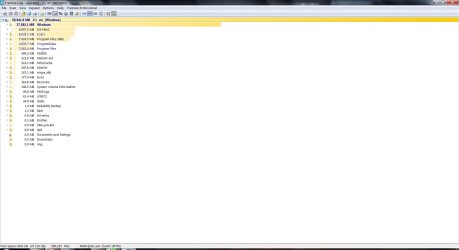
I'll add an additional comment because I think we are still within (just) the bounds of the thread. Here is perhaps another end of the spectrum to alan10. My OS partition (SSD) tree structure:
C-tree.jpg
I deliberately do not want my page file on another drive but for an SSD it could be substantially reduced but it doesn't get imaged anyway.
I do not have a hybernation file.
Some of my user data could be moved to my spinner. I only do this for large static data.
In the Windows folder is ~13GB Winsx.

So with a cleanup I'd still be looking at ~40GB on the SSD and 50GB on a spinner.
Imaging this is very manageable especially with USB3. A Macrium system image takes me ~10 minutes.

As a final comment, I also use the native Windows imaging and moving system files to another drive can cause headaches.
 

My Computer My Computer

At a glance

Windows 7x64 Home Premium SP1Intel i7 2600kG.Skill Ripjaws (DDR3-1600) 2x4GBNvidia GeForce GTS 450; Intel HD Graphics 300...
Computer type
PC/Desktop
Computer Manufacturer/Model Number
Own build
OS
Windows 7x64 Home Premium SP1
CPU
Intel i7 2600k
Motherboard
ASUS P8Z68 Deluxe
Memory
G.Skill Ripjaws (DDR3-1600) 2x4GB
Graphics Card(s)
Nvidia GeForce GTS 450; Intel HD Graphics 3000(GT2+)
Monitor(s) Displays
Dell Ultrasharp IPS panel U2311H, Samsung SyncMaster P2350
Screen Resolution
1920x1080
Hard Drives
Samsung 850 Pro SSD 256GB, Samsung SSD 840 120GB, Seagates 1TB Barracuda ST31000528AS x2
PSU
Seasonic M12II 520W
Case
Lian Li Lancool PC-K60
Cooling
Case: 1x120mm, 3x140mm CPU: Hyper 212+
Keyboard
Logitech MK520 (wireless)
Mouse
Logitech MK520
Internet Speed
6-7 Mbps
Antivirus
Norton Security Premium, Malwarebytes on 2 (MSE on 3rd PC)
Browser
FireFox
Other Info
Audio: Logitech Z523 2.1
Speaking of separating everything (OS/Apps and data), I'm curious to find out how whs and lehnerus2000 maintain their systems below 30GB (22GB in lehner's case).

I've been able to streamline my OS drive down to a current size of 33.25 GB. Are the two of you installing some programs on another drive or partition? Is that possible? Are there any general guidelines to follow if doing this?

I attached a snip of some (not all) programs that are currently installed on my C: drive that I might consider moving if this is possible/beneficial.
With a 'normal' set of programs installed (not games), you should easily stay below 25GB. First thing to do is to get rid of the hiberfile (unless you use hibernation). Next is to reduce the pagefile to 2GB. If you have e.g. 8GB of RAM, that saves you 14GB right there - with 4GB of RAM that would save 6GB.

Then I always run WinDirStat. On the colored picture you see immediately where the big chunks are. Just click on any colored chunk and it will tell you.
 

My Computer My Computer

At a glance

Vista, Windows7, Mint Mate, Zorin, Windows 8from 1.6GHz Duo to i7
Computer Manufacturer/Model Number
HP, Dell, Gateway, Toshiba - 4 laptops and 2 desktops
OS
Vista, Windows7, Mint Mate, Zorin, Windows 8
CPU
from 1.6GHz Duo to i7
Monitor(s) Displays
2x HP w2207
Hard Drives
5x HDD, 7x SSD, 12x Externals
Keyboard
with trackball - no mices
Mouse
Trackball mice
Internet Speed
DSL 6000
So I gave Windows a 25 GB partition,
Each to their own. However, I would recommend to others substantially more than 25GB. On a 1TB spinner I'd go for 50-100GB. This gives you plenty of room for adding software you didn't envisage. After all, 50-100GB out of 1TB is not that great.
I also wonder how performance is affected if you run a partition close to capacity (maybe fragmentation issues)?
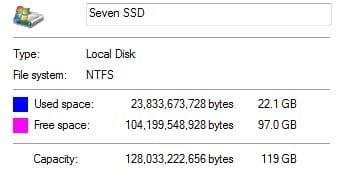
Michael, although I agree with you if your C is on a big spinner, on an SSD I would be less generous. Have a look at my C data size on this system - and that is typical of all my systems. It is only over 25GBs because I keep 7.5GBs for restore points. I always enable the restore points because sometimes they are handy to recover files that got created and lost 'in between' images. For the same reason I always enable restore points on the data partitions.
 

Attachments

  • 2013-01-15_2119.png
    2013-01-15_2119.png
    3.1 KB · Views: 5

My Computer My Computer

At a glance

Vista, Windows7, Mint Mate, Zorin, Windows 8from 1.6GHz Duo to i7
Computer Manufacturer/Model Number
HP, Dell, Gateway, Toshiba - 4 laptops and 2 desktops
OS
Vista, Windows7, Mint Mate, Zorin, Windows 8
CPU
from 1.6GHz Duo to i7
Monitor(s) Displays
2x HP w2207
Hard Drives
5x HDD, 7x SSD, 12x Externals
Keyboard
with trackball - no mices
Mouse
Trackball mice
Internet Speed
DSL 6000
SpaceSniffer, find lost disk space the easy way. Is another freeware that shows in graphical form what the drive has on it. No install, a stand-alone app.

I don't see any advantage of a separate OS partition on a single drive, unless I'm missing something simple. If the drive goes belly up it's all gone, save for the back ups.
Here is my SSD which has the OS and programs only. I have tow graphics program, Office and several others here. My data is on a 2nd 750GB spinner.

SD.JPG
I also have 6GB for restore, page files, but no hiberfil.
 

My Computer My Computer

At a glance

Windows 7 Ultimate X64 SP1Intel i5-2550K, Differing ~4.4-4.8GHz No buil...16GB G.Skill Sniper 1866MHz @ 2133MHz 2x8GBASUS GTX650TIB-DC2OC-2GD5, (650TI Boost)
Computer type
PC/Desktop
Computer Manufacturer/Model Number
Home Built Desktop By DataTech
OS
Windows 7 Ultimate X64 SP1
CPU
Intel i5-2550K, Differing ~4.4-4.8GHz No built in GPU
Motherboard
ASUS P8Z68-V PRO/GEN3
Memory
16GB G.Skill Sniper 1866MHz @ 2133MHz 2x8GB
Graphics Card(s)
ASUS GTX650TIB-DC2OC-2GD5, (650TI Boost)
Sound Card
Onboard Realtek 5-1
Monitor(s) Displays
Samsung P2570HD
Screen Resolution
1920x1080
Hard Drives
Samsung 840 Pro 256GB SSD for OS, 500GB Seagate Constellation (Enterprise drive) for Data
PSU
Corsair HX650W
Case
Inwin Dragon Rider
Cooling
Hyper 212 EVO w/two Noctua fans, push-pull, @1300 RPM
Keyboard
E-Z Eyes, bright yellow keys with large characters
Mouse
steelseries SENSEI Laser Pro Gaming
Internet Speed
48-51Mbs Mbs down, 11 Mbs up Xfinity Cable
Antivirus
Norton Internet Security 2013
Browser
IE 10, Opera, Pale Moon if needed
Other Info
4 case fans, LG BluRay-RE, ASUS DVD-RW, Mr. Fusion power supply, 1.21 gigawatts.
Wolfgang, I don't use restore points. If I reduced pagefile.sys and moved user data I may save ~14GB. All my installed apps need to be installed so the only thing left is the 13GB winsx which I think is large because of my installed applications. So I couldn't get anywhere near 25GB. I'd be interested in your views or others.

(PS: I use the old style structure of TreeSize to the more flashy WinDirStat).
 

My Computer My Computer

At a glance

Windows 7x64 Home Premium SP1Intel i7 2600kG.Skill Ripjaws (DDR3-1600) 2x4GBNvidia GeForce GTS 450; Intel HD Graphics 300...
Computer type
PC/Desktop
Computer Manufacturer/Model Number
Own build
OS
Windows 7x64 Home Premium SP1
CPU
Intel i7 2600k
Motherboard
ASUS P8Z68 Deluxe
Memory
G.Skill Ripjaws (DDR3-1600) 2x4GB
Graphics Card(s)
Nvidia GeForce GTS 450; Intel HD Graphics 3000(GT2+)
Monitor(s) Displays
Dell Ultrasharp IPS panel U2311H, Samsung SyncMaster P2350
Screen Resolution
1920x1080
Hard Drives
Samsung 850 Pro SSD 256GB, Samsung SSD 840 120GB, Seagates 1TB Barracuda ST31000528AS x2
PSU
Seasonic M12II 520W
Case
Lian Li Lancool PC-K60
Cooling
Case: 1x120mm, 3x140mm CPU: Hyper 212+
Keyboard
Logitech MK520 (wireless)
Mouse
Logitech MK520
Internet Speed
6-7 Mbps
Antivirus
Norton Security Premium, Malwarebytes on 2 (MSE on 3rd PC)
Browser
FireFox
Other Info
Audio: Logitech Z523 2.1

My Computer My Computer

At a glance

Vista, Windows7, Mint Mate, Zorin, Windows 8from 1.6GHz Duo to i7
Computer Manufacturer/Model Number
HP, Dell, Gateway, Toshiba - 4 laptops and 2 desktops
OS
Vista, Windows7, Mint Mate, Zorin, Windows 8
CPU
from 1.6GHz Duo to i7
Monitor(s) Displays
2x HP w2207
Hard Drives
5x HDD, 7x SSD, 12x Externals
Keyboard
with trackball - no mices
Mouse
Trackball mice
Internet Speed
DSL 6000
Even if you uninstall the programs, they leave their .dlls behind. No uninstaller touches those.
http://www.sevenforums.com/tutorials/132087-shadowexplorer-recover-lost-files-folders.html
Even revo Uninstaller - even then tha'ts only for 32 bit apps ? That seems crazy to me. So how do you do a cleanout I wonder?

Restore points have let me down more than once so I simply don't use them and rely on imaging.
I use all my installed applications. Admittedly some more than others.
 

My Computer My Computer

At a glance

Windows 7x64 Home Premium SP1Intel i7 2600kG.Skill Ripjaws (DDR3-1600) 2x4GBNvidia GeForce GTS 450; Intel HD Graphics 300...
Computer type
PC/Desktop
Computer Manufacturer/Model Number
Own build
OS
Windows 7x64 Home Premium SP1
CPU
Intel i7 2600k
Motherboard
ASUS P8Z68 Deluxe
Memory
G.Skill Ripjaws (DDR3-1600) 2x4GB
Graphics Card(s)
Nvidia GeForce GTS 450; Intel HD Graphics 3000(GT2+)
Monitor(s) Displays
Dell Ultrasharp IPS panel U2311H, Samsung SyncMaster P2350
Screen Resolution
1920x1080
Hard Drives
Samsung 850 Pro SSD 256GB, Samsung SSD 840 120GB, Seagates 1TB Barracuda ST31000528AS x2
PSU
Seasonic M12II 520W
Case
Lian Li Lancool PC-K60
Cooling
Case: 1x120mm, 3x140mm CPU: Hyper 212+
Keyboard
Logitech MK520 (wireless)
Mouse
Logitech MK520
Internet Speed
6-7 Mbps
Antivirus
Norton Security Premium, Malwarebytes on 2 (MSE on 3rd PC)
Browser
FireFox
Other Info
Audio: Logitech Z523 2.1
Opposite View

Although this thread is about Macrium it is useful to cover other areas that make imaging easier. Data doesn't really need imaging but an OS and programs do so it makes sense to separate them as much as possible.

I have the opposite opinion. :)

I am only concerned about my personal data.
Reinstalling all of my operating systems would take about an hour (LM14 - 13 minutes, W7 - 19 minutes, XP - 30 minutes), updating them would take a couple of hours and reinstalling the Windows 7 & XP programs would take about a day.

Trying to recreate and/or download >2TB of personal files would be impossible.

I've accumulated a lot of random stuff during the past 10 years.
For example, my TAFE handouts and exercises would be very difficult to replace.

That said, restoring an image is much quicker than reinstalling everything. :)

I create images (OS and data) every month before the Patch Tuesday updates.
I also create OS images, before I install programs that I'm not sure will perform the operations I require/expect.

I replaced Ubuntu 10 with Linux Mint 14 (on Monday) so I created new backup images of my primary HDD partitions yesterday. :)

Speaking of separating everything (OS/Apps and data), I'm curious to find out how whs and lehnerus2000 maintain their systems below 30GB (22GB in lehner's case).

I've been able to streamline my OS drive down to a current size of 33.25 GB. Are the two of you installing some programs on another drive or partition? Is that possible? Are there any general guidelines to follow if doing this?

I attached a snip of some (not all) programs that are currently installed on my C: drive that I might consider moving if this is possible/beneficial.

My W7 partition = ~22GB/40GB

I don't use Hibernation, so I have disabled the hiberfil.sys file (saving ~8GB).
My Page File has it's own partition (on a separate HDD).

I don't have any games installed on my physical machine.
I only have old games which are installed in an XP VM.
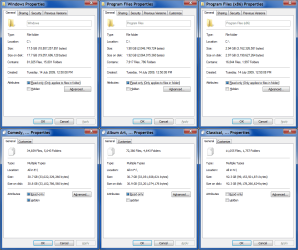
HDD Usage (2013-01-17).png
Most program installers allow you to specify a path, where the program will be installed (there are some exceptions, like Flash).
I never experienced any problems when I installed my programs on a separate partition.
IMO, if you have mainly XP programs you are probably better off using a separate partition.

When I reconfigured my system (last September) I decided to stop using a separate partition for my programs and I have experienced quite a few annoyances as a result.
I use a few programs that try to write ini files back to their install directories, which Windows 7 won't allow.

Moving programs is generally a PITA and can cause problems.
If you want to shift them, you should uninstall them and then reinstall them in the new location. :geek:

Some programs will just automatically install themselves to "C:\" in any case.

mad.png
 
Last edited:

My Computer My Computer

At a glance

W7 Ultimate SP1, LM19.2 MATE, W10 Home 1703, ...AMD Phenom II x6 1100T, 3.3 GHz12GB DDR3 1333 G-Skill (4GB x 2), G-Skill (2G...NVIDIA GeForce GTX 660
Computer type
PC/Desktop
Computer Manufacturer/Model Number
n/a
OS
W7 Ultimate SP1, LM19.2 MATE, W10 Home 1703, W10 Pro 1703 VM, #All 64 bit
CPU
AMD Phenom II x6 1100T, 3.3 GHz
Motherboard
ASUS M4A88T-M/USB3 (AM3)
Memory
12GB DDR3 1333 G-Skill (4GB x 2), G-Skill (2GB x 2)
Graphics Card(s)
NVIDIA GeForce GTX 660
Sound Card
Realtek?
Monitor(s) Displays
Samsung S23B350
Screen Resolution
1920x1080
Hard Drives
WD Green 2TB (SATA), WD Green 3TB (SATA), WD Blue 4TB (SATA), WD Blue 6TB (SATA)
PSU
Cooler Master
Case
Antec GX300 Tower
Cooling
3x Antec TRICOOL 120mm Fans
Mouse
Wired Optical
Internet Speed
DSL
Antivirus
Avast
Browser
Pale Moon (64 bit)
Other Info
2018-12-27 Upgraded HDDs
2015-12-10 Upgraded case, graphics card, storage
2015-08-15 Upgraded motherboard & RAM
2015-07-15 Upgraded LM17.1 to LM17.2
Even if you uninstall the programs, they leave their .dlls behind. No uninstaller touches those.
Even revo Uninstaller - even then tha'ts only for 32 bit apps ? That seems crazy to me. So how do you do a cleanout I wonder?

Restore points have let me down more than once so I simply don't use them and rely on imaging.
I use all my installed applications. Admittedly some more than others.
1. Yes, you never can get rid of a .dll once it landed on your system. Reason is simple. dlls are subroutines that can be used by any program. Once a .dll is installed by program A, a later installed program B may use it. If you were to uninstall the .dll when you are uninstalling program A, then program B would not function correctly any more.

2. Right, restore points for system restore are wacky. But they can be useful for file recovery. This is not 100% safe because restore points can be deleted by many events, but if you know your way around the shadowstorage, you can pretty much keep them.

3. I am sure you use all your installed programs - I do too. But we all download programs at times to see what they are and then later we get rid of them - but the .dlls stay. That's why it is better to test/inspect programs in a virtual machine. If that virtual machine becomes fat cat, you just get rid of the whole thing and start a new virtual machine. For that, of course you need an extra product key. I used to do that when the Win8 free pre-versions were around.
 

My Computer My Computer

At a glance

Vista, Windows7, Mint Mate, Zorin, Windows 8from 1.6GHz Duo to i7
Computer Manufacturer/Model Number
HP, Dell, Gateway, Toshiba - 4 laptops and 2 desktops
OS
Vista, Windows7, Mint Mate, Zorin, Windows 8
CPU
from 1.6GHz Duo to i7
Monitor(s) Displays
2x HP w2207
Hard Drives
5x HDD, 7x SSD, 12x Externals
Keyboard
with trackball - no mices
Mouse
Trackball mice
Internet Speed
DSL 6000
Back
Top