
Can I install free Macrium on another partition other than C

bawldiggle

GrayGhost2 ret.
Pro User
VIP
Local time
7:12 PM
Messages
895
Location
Australia
I have resized C partition on a new (unused) Lenovo laptop, so there is plenty of room for another partition on the system drive.

Q1: Can I install free Macrium on another partition (eg, X) to image C partition ?
Q2: Does macrium image itself if installed on system partition?

Q3: If free Macrium can be run from another partition (not a virtual drive) what format would the macrium partition have to be for the system to access Macrium (or however it works) ?

Q4: To access data or portable apps on another partition what format must those "sibling" partitions be ?

Thank you :)
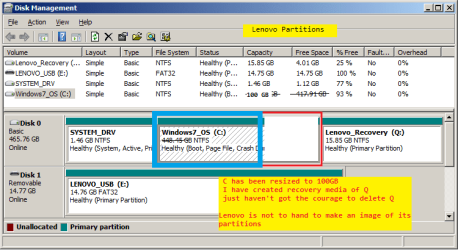
Lenovo Partitions - Copy.png
 

My Computer My Computer

At a glance

XP Pro (x86) | 7 HP (x86) & (x64) | 7 Pro (x64)
Computer type
PC/Desktop
Computer Manufacturer/Model Number
Toshiba, Lenovo (laptops) + 4 rigs
OS
XP Pro (x86) | 7 HP (x86) & (x64) | 7 Pro (x64)
You don't have to install Macrium on a partition other than C in order to make an image of C. I'd install it on C. Why not? My Macrium installation takes up 67 megabytes---1/16 of a GB.

Did you resize C only because you wanted to make space for a partition on which to save Macrium image files?

You DO have to STORE that image file somewhere other than C.

However---it doesn't make much sense to store an image of C anywhere on disc 0.

Why? Because if disc 0 fails, you would lose the image of C and not be able to restore it.

Additionally--an image of C alone won't help you. You need an image of both C and the System_drv partition because the System_drv partition is marked as "system" in your posted picture.

You can make a single image file containing both of those partitions or you can make separate image files of each partition. I'd probably just make a single image file. That file would be about half the size of the occupied space on C.

But store it somewhere other than drive 0--possibly on an external drive.

You could make another partition on disc 0 and store the image file there, but as I said that won't help you if the entire drive fails--which is one of the things you are trying to protect against. Yes, that would be better than nothing.

If it will fit, you might get away with storing it on the Lenovo Recovery partition, but I'd be spooked about that as it might interfere with that partition's operation as a recovery method. And it would still be on disc 0.
 

My Computer My Computer

At a glance

Windows 7 Home Premium SP1, 64-bitIntel Skylake i5-6600K, not overclocked8 GB HyperX DDR4-2666 (2 x 4 GB)none; graphics are integrated on CPU
Computer type
PC/Desktop
Computer Manufacturer/Model Number
Ignatz Special; 4 speed manual gearbox; factory air conditioning; one of one
OS
Windows 7 Home Premium SP1, 64-bit
CPU
Intel Skylake i5-6600K, not overclocked
Motherboard
AsRock Z170M Extreme 4, micro ATX
Memory
8 GB HyperX DDR4-2666 (2 x 4 GB)
Graphics Card(s)
none; graphics are integrated on CPU
Sound Card
onboard: Realtek ALC1150; external: USB Behringer UF0-202
Monitor(s) Displays
Dell S2340M 23 inch IPS
Screen Resolution
1600 x 900
Hard Drives
System: Crucial MX100 series SSD, 128 GB;
Data: Samsung Spinpoint 103SJ, 1 TB;
Backup: WD Caviar Green WD30EZRX-00D8PB0, 3 TB
PSU
Rosewill SilentNight 500 watt fanless, semi-modular
Case
Antec Solo II
Cooling
Noctua NH-U12S; Noctua F12 intake, Noctua S12A exhaust
Keyboard
Microsoft 200 6JH-00001 USB
Mouse
Dell or Microsoft optical wired; USB
Antivirus
Microsoft Security Essentials and Malwarebytes Premium
Browser
Pale Moon
Other Info
All fans PWM; speeds at idle: CPU circa 500 rpm; intake circa 600 rpm; exhaust circa 600 rpm; CPU temps 27 idle and 47 C load in a warm room (27 C/81 F) when running Intel Extreme Tuning Utility stress test.

My Computer My Computer

At a glance

Windows 10 Pro. 64/ version 1709 Windows 7 Pr...Intel i7-6800K @ 4.3Corsair Platinum 16 gig @2400EVGA GTX 1070 OC
Computer type
PC/Desktop
Computer Manufacturer/Model Number
Home made Desktop
OS
Windows 10 Pro. 64/ version 1709 Windows 7 Pro/64
CPU
Intel i7-6800K @ 4.3
Motherboard
ASUS X-99 Deluxe II
Memory
Corsair Platinum 16 gig @2400
Graphics Card(s)
EVGA GTX 1070 OC
Monitor(s) Displays
Asus 27" LED LCD/VE278Q
Screen Resolution
1920-1080 or 1280-720 HDMI
Hard Drives
INTEL SSD 730-240 Gb Sata 3.0/
PSU
EVGA Platium 1200W
Case
Phanteks Luxe Tempered Glass 8 fans/ one radiator
Cooling
XSPC/ Water Cooled CPU
Keyboard
Das 4 Professional
Mouse
Logitech M705/MX Anywhere 2-S
Internet Speed
100 mbits
Antivirus
Microsoft Security Essentials/ Malwarebytes Premium 3.0/ SAS
Browser
I.E. 11 default/Firefox/ ISP Time Warner Cable/Spectrum
Other Info
LG BluRay Burner/
Sound system-KLipsch-THX/
Icy Dock ssd Hot Swap bays.
On the "select destination location" page you can direct the installation to any folder.
 

My Computer My Computer

At a glance

Vista, Windows7, Mint Mate, Zorin, Windows 8from 1.6GHz Duo to i7
Computer Manufacturer/Model Number
HP, Dell, Gateway, Toshiba - 4 laptops and 2 desktops
OS
Vista, Windows7, Mint Mate, Zorin, Windows 8
CPU
from 1.6GHz Duo to i7
Monitor(s) Displays
2x HP w2207
Hard Drives
5x HDD, 7x SSD, 12x Externals
Keyboard
with trackball - no mices
Mouse
Trackball mice
Internet Speed
DSL 6000
I can't see all info for all partitions in the screen print in post #1.
I suggest posting a new unedited screen print of your maximized/resized Disk Management using these instructions:
http://www.sevenforums.com/tutorials/274797-disk-management-post-screen-capture-image.html

With Legacy BIOS/MBR you can only have 4 Primary partitions, or 3 Primary partitions and unlimited Logical partitions.
When creating a new partition, don't let it convert to DYNAMIC, that can cause problems.
If you create new partition(s) in the space you freed up, create them as Logical.

I suggest storing backups on multiple devices as any device can fail, including external drives.

Do you have External HD's you can use for backups ?
If not, your specs show 4 rigs, so you may have some options for backing up a PC to a different PC using "sharing".

EDIT:
Q4: To access data or portable apps on another partition what format must those "sibling" partitions be ?
I store all data and portable apps on a Logical partition, no problems here.
 
Last edited:

My Computer My Computer

At a glance

Multi-Boot W7_Pro_x64 W8.1_Pro_x64 W10_Pro_x6...AMD Athlon II x4 6206GB GSkill DDR2 800AMD 4670 GPU + AMD 4200 IGP
Computer type
PC/Desktop
Computer Manufacturer/Model Number
home built
OS
Multi-Boot W7_Pro_x64 W8.1_Pro_x64 W10_Pro_x64 +Linux_VMs +Chromium_VM
CPU
AMD Athlon II x4 620
Motherboard
Gigabyte GA-MA785G-UD3H
Memory
6GB GSkill DDR2 800
Graphics Card(s)
AMD 4670 GPU + AMD 4200 IGP
Sound Card
on board Realtek ALC889A
Monitor(s) Displays
RCA 40" LCD TV, Insignia 32" LCD TV, HP 15" LCD monitor
Screen Resolution
1680 x 1050
Hard Drives
OCZ Vertex 3 120GB,
Samsung F3 1TB (3),
Several others - WD, Seagate, Hitachi, ...
PSU
Corsair 500 W
Case
Rosewill mid tower
Cooling
CM 90mm rifle
Keyboard
Gyration wireless, Logitech wireless, Dell USB wired
Mouse
Gyration wireless, Logitech wireless, V7 USB wired
Internet Speed
Spectrum - 100Mbps D / 10Mbps U
Antivirus
Avast, MBAM3, EMET, WinPatrol
Browser
Pale Moon, Firefox, IE
Other Info
2 multi-boot PC's
Mainly HTPC/Office/Gen purpose (no gaming).
Trendnet USB KVM.
LG DVD burner/Blue Ray Player.
Tray system for removable SATA backup drives.

Not currently OCd, under-volted.
I use Hybrid sleep, rarely re-boot or shutdown.

Hauppauge HD-PVR, Avermedia PCIe TV Tuner, Hauppauge PCI TV Tuner.
Back
Top