
INT. SATA drives keep disappearing

Tsunamijhoe

New member
Member
Local time
3:48 AM
Messages
98
Hey guys

I have run into a new problem with my win7 box.

I have 20 harddrives in a win7 64b box i use as file storage, and i run flexraid on this. However, whenever the box is idle for an unspecified time, drives will dissapear.

IT is ALWAYS the same 2 drives,and they are connected to different controllers,1 is brand new,the other old.

I have tried changing cables,controllers,switched all the drives around, changed backplane on the drive cages,nothing seems to help.

I had drive dropout problems using my supermicro oac-saslpmv8,which i have now exchanged for an ibm 1015m flashed to IT mode, but the dropouts seem to continue,although different drives from when i used the supermicro.

All i can thing of that is the culprit,would be the power management in windows,as the drives in question are 2 different types WD20EARS and WD20EARX, i have disabled green function on the EARS with WDidle3,so power management should ONLY run in windows..

I have for the moment disabled win power man. to be certain this is the culprit,however,i do not like to have my drives spinning full speed when there is no traffic.

I have to shut down server completely, pull the drive,let windows boot,hot swap the drive in again,shutdown pc to get it running again. Mind you, my controller sees the drives fine,both the one connected to the IBM,and the drive connected to an Asrock 2 port SATA controller.

All hardware specs are in my signature

Anyone have any idea what the hell is happening?
 

My Computer My Computer

Computer type
PC/Desktop
Computer Manufacturer/Model Number
custom
OS
Windows 7 Ultimate SP1 64bit
CPU
Core I3 2100T/Core I5 750/Core I3 2120
Motherboard
ASRock Z77 Extreme4/Gigabyte GA-H55-UD3H/Asrock H61DEL
Memory
2x4GB 1600mhz/2x4GB 1600hmhz/2x4GB 1333mhz
Graphics Card(s)
onboard/onboard/ASUS HD7850-DC2-2GD5-V2
Sound Card
not active/onboard/onboard
Monitor(s) Displays
Philips 42"
Screen Resolution
1920x1080
Hard Drives
WD Red WD30EFRX
WD20EARX
WD20EARS
WD20EACS
PSU
Corsair GS700/Antec 500w Earth watts/Corsair TX650 V2
Case
Antec Twelve Hundred V3/2xAntec Sonata Elite
Cooling
generic
Keyboard
2xMS natural Ergonomic
Mouse
MS Wireless/logitech laser/steelseries Xai
Internet Speed
20/2mbit
Other Info
2x IBM serveraid 1015M IT Flashed 8xPort SATA
4x X-case 5in1 drive cages (norco rebranded)
Have you checked this setting in Power Management?:

Control Panel > Power Options > (For the power plan selected) Change Plan Settings > Change Advanced Plan Settings > Click + next to Hard Disks > Turn Off Hard Disk After: > and set that to "Never".
 

My Computer My Computer

Computer type
PC/Desktop
Computer Manufacturer/Model Number
Home Built - Jan 2013
OS
Windows 7 64 Bit Home Premium SP1
CPU
i7-3820
Motherboard
Asus P9X79-PRO - Bios 4608
Memory
GSkill F3-14900CL9Q - 16GB
Graphics Card(s)
EVGA GeForce GTX660 - Driver 352.86
Sound Card
On board Realtek ALC898
Monitor(s) Displays
Acer S271HL
Screen Resolution
1920 x 1080
Hard Drives
#1- Samsung 840 Pro Series
#2- Western Digital WD1002FAEX Sata3 Black
#3- Western Digital WD1002FAEX Sata3 Black
PSU
Corsair CMPSU-850TX-V2 - 850 watt (by Seasonic)
Case
Corsair Obsidian 550D
Cooling
Standard 3 120mm case fans, Cooler Master Hyper 212 EVO
Keyboard
MS KC-0405
Mouse
Intellimouse 5-button
Internet Speed
56 Mbits/Sec (on a good day)
Antivirus
Avast & Malwarebytes
Browser
Firefox
Other Info
Asus DVD - DRW-24B1ST 24X
Like i wrote in my original post, windows power management has been disabled completely for now, but this is not optimal for me,as i would like the drives to spin down when not in use..

I only disabled the power save for the sake of fault finding. Is there a solution to windows not mounting drives after sleep? If indeed it is win power man that is the culprit
 

My Computer My Computer

Computer type
PC/Desktop
Computer Manufacturer/Model Number
custom
OS
Windows 7 Ultimate SP1 64bit
CPU
Core I3 2100T/Core I5 750/Core I3 2120
Motherboard
ASRock Z77 Extreme4/Gigabyte GA-H55-UD3H/Asrock H61DEL
Memory
2x4GB 1600mhz/2x4GB 1600hmhz/2x4GB 1333mhz
Graphics Card(s)
onboard/onboard/ASUS HD7850-DC2-2GD5-V2
Sound Card
not active/onboard/onboard
Monitor(s) Displays
Philips 42"
Screen Resolution
1920x1080
Hard Drives
WD Red WD30EFRX
WD20EARX
WD20EARS
WD20EACS
PSU
Corsair GS700/Antec 500w Earth watts/Corsair TX650 V2
Case
Antec Twelve Hundred V3/2xAntec Sonata Elite
Cooling
generic
Keyboard
2xMS natural Ergonomic
Mouse
MS Wireless/logitech laser/steelseries Xai
Internet Speed
20/2mbit
Other Info
2x IBM serveraid 1015M IT Flashed 8xPort SATA
4x X-case 5in1 drive cages (norco rebranded)
I have not experience Windows not mounting drives after sleep. That is an unusual condition.

Disabling Windows power management is not the same as using Windows power management with the correct settings.
 

My Computer My Computer

Computer type
PC/Desktop
Computer Manufacturer/Model Number
Home Built - Jan 2013
OS
Windows 7 64 Bit Home Premium SP1
CPU
i7-3820
Motherboard
Asus P9X79-PRO - Bios 4608
Memory
GSkill F3-14900CL9Q - 16GB
Graphics Card(s)
EVGA GeForce GTX660 - Driver 352.86
Sound Card
On board Realtek ALC898
Monitor(s) Displays
Acer S271HL
Screen Resolution
1920 x 1080
Hard Drives
#1- Samsung 840 Pro Series
#2- Western Digital WD1002FAEX Sata3 Black
#3- Western Digital WD1002FAEX Sata3 Black
PSU
Corsair CMPSU-850TX-V2 - 850 watt (by Seasonic)
Case
Corsair Obsidian 550D
Cooling
Standard 3 120mm case fans, Cooler Master Hyper 212 EVO
Keyboard
MS KC-0405
Mouse
Intellimouse 5-button
Internet Speed
56 Mbits/Sec (on a good day)
Antivirus
Avast & Malwarebytes
Browser
Firefox
Other Info
Asus DVD - DRW-24B1ST 24X
I'm no expert in such matters but I do have some observation if I may.
How do you get 20 hard drives in your case? Post #1 Antec Twelve Hundred V3 Corsair GS700 Asrock H61DEL
What method do you use to hook up all 20 hard drives? Power and data harnesses.
What Windows 7/64 operating system are you using?
 

My Computer My Computer

Computer type
PC/Desktop
Computer Manufacturer/Model Number
Home made Desktop
OS
Windows 10 Pro. 64/ version 1709 Windows 7 Pro/64
CPU
Intel i7-6800K @ 4.3
Motherboard
ASUS X-99 Deluxe II
Memory
Corsair Platinum 16 gig @2400
Graphics Card(s)
EVGA GTX 1070 OC
Monitor(s) Displays
Asus 27" LED LCD/VE278Q
Screen Resolution
1920-1080 or 1280-720 HDMI
Hard Drives
INTEL SSD 730-240 Gb Sata 3.0/
PSU
EVGA Platium 1200W
Case
Phanteks Luxe Tempered Glass 8 fans/ one radiator
Cooling
XSPC/ Water Cooled CPU
Keyboard
Das 4 Professional
Mouse
Logitech M705/MX Anywhere 2-S
Internet Speed
100 mbits
Antivirus
Microsoft Security Essentials/ Malwarebytes Premium 3.0/ SAS
Browser
I.E. 11 default/Firefox/ ISP Time Warner Cable/Spectrum
Other Info
LG BluRay Burner/
Sound system-KLipsch-THX/
Icy Dock ssd Hot Swap bays.
I have not experience Windows not mounting drives after sleep. That is an unusual condition.

Disabling Windows power management is not the same as using Windows power management with the correct settings.

Which is why i am not sure it is windows power management that is the problem,but others have reported drives disappearing after sleep/idle for extended periods of time.

I have set hdd idle timer to 0 which is what i mean by disabled windows power management,for the sake of rooting out the problem.

I use the plan for best performance,then i disable all screen,network,hdd,screensaver timers. My box run headless so any form of screen timer is redundant.

So what would you suggest i use? If this is not the problem?


I'm no expert in such matters but I do have some observation if I may.
How do you get 20 hard drives in your case? Post #1 Antec Twelve Hundred V3 Corsair GS700 Asrock H61DEL
What method do you use to hook up all 20 hard drives? Power and data harnesses.
What Windows 7/64 operating system are you using?

See my specs
 

My Computer My Computer

Computer type
PC/Desktop
Computer Manufacturer/Model Number
custom
OS
Windows 7 Ultimate SP1 64bit
CPU
Core I3 2100T/Core I5 750/Core I3 2120
Motherboard
ASRock Z77 Extreme4/Gigabyte GA-H55-UD3H/Asrock H61DEL
Memory
2x4GB 1600mhz/2x4GB 1600hmhz/2x4GB 1333mhz
Graphics Card(s)
onboard/onboard/ASUS HD7850-DC2-2GD5-V2
Sound Card
not active/onboard/onboard
Monitor(s) Displays
Philips 42"
Screen Resolution
1920x1080
Hard Drives
WD Red WD30EFRX
WD20EARX
WD20EARS
WD20EACS
PSU
Corsair GS700/Antec 500w Earth watts/Corsair TX650 V2
Case
Antec Twelve Hundred V3/2xAntec Sonata Elite
Cooling
generic
Keyboard
2xMS natural Ergonomic
Mouse
MS Wireless/logitech laser/steelseries Xai
Internet Speed
20/2mbit
Other Info
2x IBM serveraid 1015M IT Flashed 8xPort SATA
4x X-case 5in1 drive cages (norco rebranded)
I don't have any useful suggestions because I have no experience with this kind of problem. I could throw out a WAG, but sometimes those are less than useless if you don't have some experience with the problem.

I suspect this has something to do with having 20 drives connected to the system. I take it you are running some kind of server? What drives drop out - internals or the ones in the cages?

Sometimes in these kinds of cases I (personally) like to reset everything to defaults (BIOS - Windows settings) and start over. Sometimes you can just tweak yourself off the rails.

Hang tight - I'm going to turn on the bat-signal.
 

My Computer My Computer

Computer type
PC/Desktop
Computer Manufacturer/Model Number
Home Built - Jan 2013
OS
Windows 7 64 Bit Home Premium SP1
CPU
i7-3820
Motherboard
Asus P9X79-PRO - Bios 4608
Memory
GSkill F3-14900CL9Q - 16GB
Graphics Card(s)
EVGA GeForce GTX660 - Driver 352.86
Sound Card
On board Realtek ALC898
Monitor(s) Displays
Acer S271HL
Screen Resolution
1920 x 1080
Hard Drives
#1- Samsung 840 Pro Series
#2- Western Digital WD1002FAEX Sata3 Black
#3- Western Digital WD1002FAEX Sata3 Black
PSU
Corsair CMPSU-850TX-V2 - 850 watt (by Seasonic)
Case
Corsair Obsidian 550D
Cooling
Standard 3 120mm case fans, Cooler Master Hyper 212 EVO
Keyboard
MS KC-0405
Mouse
Intellimouse 5-button
Internet Speed
56 Mbits/Sec (on a good day)
Antivirus
Avast & Malwarebytes
Browser
Firefox
Other Info
Asus DVD - DRW-24B1ST 24X
I don't have any useful suggestions because I have no experience with this kind of problem. I could throw out a WAG, but sometimes those are less than useless if you don't have some experience with the problem.

I suspect this has something to do with having 20 drives connected to the system. I take it you are running some kind of server? What drives drop out - internals or the ones in the cages?

Sometimes in these kinds of cases I (personally) like to reset everything to defaults (BIOS - Windows settings) and start over. Sometimes you can just tweak yourself off the rails.

Hang tight - I'm going to turn on the bat-signal.

Hehe, well this is where it gets "hinky" i had a lot of problems with drive dropouts on my old controller,which was a known problem for that controller,and why i bought a new one, the IBM serveraid 1015M flashed to IT mode, which has worked in the sense that the dropouts now occur on different drives from before..

And ALL Drives are in cages,only boot(c), parity(Y) and drive 5(H) and drive 10(M) are connected to mainboard sata connectors, drives 1-4 and 6-9 are connected to my new IBM 1015M, the rest are connected to the asrock SATA 2port pciE cards, and here is where it gets weird

Drive 1 (D) connected to IBM dropout when using drive power management (spindown timer in windows), as does drive 15 (R) connected to one of the asrock 2port SATA pciE cards,and since these 2 drives are not same type drive d is a WD20EARS and drive R is a WD20EARX,it gets weird,and why i am getting grey hairs why this happens.

Mind you, i solely use this "server" for my movie collection,and thus it is only on whenever i want to watch a movie,and i ofcourse could run it with hdd spindown timer set to 0,but there are periods when i run it for prolonged periods of time,and thus would like some sort of power save,mostly to save the drives from spinning full speed when no traffic is needed,and thus extend their life, it is not really because of the few bucks i save on power.

Hope this all makes sense. I know a great deal about pc´s and how they work,but this problem annoys the hell out of me
 

My Computer My Computer

Computer type
PC/Desktop
Computer Manufacturer/Model Number
custom
OS
Windows 7 Ultimate SP1 64bit
CPU
Core I3 2100T/Core I5 750/Core I3 2120
Motherboard
ASRock Z77 Extreme4/Gigabyte GA-H55-UD3H/Asrock H61DEL
Memory
2x4GB 1600mhz/2x4GB 1600hmhz/2x4GB 1333mhz
Graphics Card(s)
onboard/onboard/ASUS HD7850-DC2-2GD5-V2
Sound Card
not active/onboard/onboard
Monitor(s) Displays
Philips 42"
Screen Resolution
1920x1080
Hard Drives
WD Red WD30EFRX
WD20EARX
WD20EARS
WD20EACS
PSU
Corsair GS700/Antec 500w Earth watts/Corsair TX650 V2
Case
Antec Twelve Hundred V3/2xAntec Sonata Elite
Cooling
generic
Keyboard
2xMS natural Ergonomic
Mouse
MS Wireless/logitech laser/steelseries Xai
Internet Speed
20/2mbit
Other Info
2x IBM serveraid 1015M IT Flashed 8xPort SATA
4x X-case 5in1 drive cages (norco rebranded)
OS Windows 7 64bit// from your specs.
Window 7/64 ????
PRO, Home Premium What?
Have a nice day.
 

My Computer My Computer

Computer type
PC/Desktop
Computer Manufacturer/Model Number
Home made Desktop
OS
Windows 10 Pro. 64/ version 1709 Windows 7 Pro/64
CPU
Intel i7-6800K @ 4.3
Motherboard
ASUS X-99 Deluxe II
Memory
Corsair Platinum 16 gig @2400
Graphics Card(s)
EVGA GTX 1070 OC
Monitor(s) Displays
Asus 27" LED LCD/VE278Q
Screen Resolution
1920-1080 or 1280-720 HDMI
Hard Drives
INTEL SSD 730-240 Gb Sata 3.0/
PSU
EVGA Platium 1200W
Case
Phanteks Luxe Tempered Glass 8 fans/ one radiator
Cooling
XSPC/ Water Cooled CPU
Keyboard
Das 4 Professional
Mouse
Logitech M705/MX Anywhere 2-S
Internet Speed
100 mbits
Antivirus
Microsoft Security Essentials/ Malwarebytes Premium 3.0/ SAS
Browser
I.E. 11 default/Firefox/ ISP Time Warner Cable/Spectrum
Other Info
LG BluRay Burner/
Sound system-KLipsch-THX/
Icy Dock ssd Hot Swap bays.

My Computer My Computer

Computer type
PC/Desktop
Computer Manufacturer/Model Number
custom
OS
Windows 7 Ultimate SP1 64bit
CPU
Core I3 2100T/Core I5 750/Core I3 2120
Motherboard
ASRock Z77 Extreme4/Gigabyte GA-H55-UD3H/Asrock H61DEL
Memory
2x4GB 1600mhz/2x4GB 1600hmhz/2x4GB 1333mhz
Graphics Card(s)
onboard/onboard/ASUS HD7850-DC2-2GD5-V2
Sound Card
not active/onboard/onboard
Monitor(s) Displays
Philips 42"
Screen Resolution
1920x1080
Hard Drives
WD Red WD30EFRX
WD20EARX
WD20EARS
WD20EACS
PSU
Corsair GS700/Antec 500w Earth watts/Corsair TX650 V2
Case
Antec Twelve Hundred V3/2xAntec Sonata Elite
Cooling
generic
Keyboard
2xMS natural Ergonomic
Mouse
MS Wireless/logitech laser/steelseries Xai
Internet Speed
20/2mbit
Other Info
2x IBM serveraid 1015M IT Flashed 8xPort SATA
4x X-case 5in1 drive cages (norco rebranded)
Have you considered a power problem with those 2 drives? Not power management - 12v power for any 3.5" drives or (much more likely) 5v power to any 2.5" drives.
This is less likely when drives have their own power supply (external drives), more likely if they are in a powered rack, and much more likely if they get power from the motherboard.
You could check the connections, change the cables, and/or switch the ports to test.
 

My Computer My Computer

Computer type
PC/Desktop
Computer Manufacturer/Model Number
Home Built - Jan 2013
OS
Windows 7 64 Bit Home Premium SP1
CPU
i7-3820
Motherboard
Asus P9X79-PRO - Bios 4608
Memory
GSkill F3-14900CL9Q - 16GB
Graphics Card(s)
EVGA GeForce GTX660 - Driver 352.86
Sound Card
On board Realtek ALC898
Monitor(s) Displays
Acer S271HL
Screen Resolution
1920 x 1080
Hard Drives
#1- Samsung 840 Pro Series
#2- Western Digital WD1002FAEX Sata3 Black
#3- Western Digital WD1002FAEX Sata3 Black
PSU
Corsair CMPSU-850TX-V2 - 850 watt (by Seasonic)
Case
Corsair Obsidian 550D
Cooling
Standard 3 120mm case fans, Cooler Master Hyper 212 EVO
Keyboard
MS KC-0405
Mouse
Intellimouse 5-button
Internet Speed
56 Mbits/Sec (on a good day)
Antivirus
Avast & Malwarebytes
Browser
Firefox
Other Info
Asus DVD - DRW-24B1ST 24X
It definitely could be a power issue...from a hardware standpoint. That's usually been a sign of a dying PSU or drives that they drop off.
 

My Computer My Computer

OS
Windows 7 Ultimate x64 SP1
CPU
Intel Core i7-2600
Motherboard
Gigabyte GA-P67A-UD3P-B3
Memory
12 GB Patriot Extreme DDR3-1333
Graphics Card(s)
Nvidia GTX 470
Monitor(s) Displays
Dell UltraSharp 2209WA
Hard Drives
OCZ Agility3 240 GB, WD5001AALS, WD7501AALS
PSU
OCZ ModStream 700W
Case
CoolerMaster HAF 912 Advanced
Cooling
CoolerMaster Hyper 212 Plus
Have you considered a power problem with those 2 drives? Not power management - 12v power for any 3.5" drives or (much more likely) 5v power to any 2.5" drives.
This is less likely when drives have their own power supply (external drives), more likely if they are in a powered rack, and much more likely if they get power from the motherboard.
You could check the connections, change the cables, and/or switch the ports to test.

Well, unless my 700w single rail psu is too weak to drive this server,which i think not,as it can deliver 56amps, it isnt the power, also,i have changed connectors,cables and drive slots so many times to no avail. The PSU is brand new btw,and if power was an issue,shouldnt the power led´s on my drive cages go out also, if the drive was shutdown due to power?

I am almost 100% certain it is a conflict between windows power management and flexraid and/or the smart monitoring functions/programs i use, as the problem seem to have gone if power management is shut off when updating/validating my flexraid.
 

My Computer My Computer

Computer type
PC/Desktop
Computer Manufacturer/Model Number
custom
OS
Windows 7 Ultimate SP1 64bit
CPU
Core I3 2100T/Core I5 750/Core I3 2120
Motherboard
ASRock Z77 Extreme4/Gigabyte GA-H55-UD3H/Asrock H61DEL
Memory
2x4GB 1600mhz/2x4GB 1600hmhz/2x4GB 1333mhz
Graphics Card(s)
onboard/onboard/ASUS HD7850-DC2-2GD5-V2
Sound Card
not active/onboard/onboard
Monitor(s) Displays
Philips 42"
Screen Resolution
1920x1080
Hard Drives
WD Red WD30EFRX
WD20EARX
WD20EARS
WD20EACS
PSU
Corsair GS700/Antec 500w Earth watts/Corsair TX650 V2
Case
Antec Twelve Hundred V3/2xAntec Sonata Elite
Cooling
generic
Keyboard
2xMS natural Ergonomic
Mouse
MS Wireless/logitech laser/steelseries Xai
Internet Speed
20/2mbit
Other Info
2x IBM serveraid 1015M IT Flashed 8xPort SATA
4x X-case 5in1 drive cages (norco rebranded)
*UPDATE*
OK, so i tried to run a flexraid verify last night and ofcourse 12 hours in to the damn thing with 10% left to go, drive 15 again disappeared and flexraid crapped out with error,so i shutdown the server for the night, and this morning the box boots to black screen of death. I have to boot safe mode to get windows to appear.

I am getting really tired of this crap not working as intended, and i am running out of ideas of what this could be. Unfortunatly i do not have a different psu to try and change that,and i cant afford one for some time.

I am gonna re-install windows to try and see if this is the problem,i doubt it,but like i said,i am running out of ideas
 

My Computer My Computer

Computer type
PC/Desktop
Computer Manufacturer/Model Number
custom
OS
Windows 7 Ultimate SP1 64bit
CPU
Core I3 2100T/Core I5 750/Core I3 2120
Motherboard
ASRock Z77 Extreme4/Gigabyte GA-H55-UD3H/Asrock H61DEL
Memory
2x4GB 1600mhz/2x4GB 1600hmhz/2x4GB 1333mhz
Graphics Card(s)
onboard/onboard/ASUS HD7850-DC2-2GD5-V2
Sound Card
not active/onboard/onboard
Monitor(s) Displays
Philips 42"
Screen Resolution
1920x1080
Hard Drives
WD Red WD30EFRX
WD20EARX
WD20EARS
WD20EACS
PSU
Corsair GS700/Antec 500w Earth watts/Corsair TX650 V2
Case
Antec Twelve Hundred V3/2xAntec Sonata Elite
Cooling
generic
Keyboard
2xMS natural Ergonomic
Mouse
MS Wireless/logitech laser/steelseries Xai
Internet Speed
20/2mbit
Other Info
2x IBM serveraid 1015M IT Flashed 8xPort SATA
4x X-case 5in1 drive cages (norco rebranded)
How are your HDDs receiving power? Depending on how the power is being delivered, the HDDs may be getting a voltage drop at the drive that may be causing them to cut out, especially if the power is going through small cables, multiple splitters, connectors (even gold plated connectors can develop a high enough resistance to be problematic), and/or long cables, all of which increase resistance in the cables. At the voltages used, it doesn't take much resistance to cause a significant voltage drop, the 5v feed probably being the most sensitive to voltage drop. With 20 HDDs, the current draw could easily exceed 12A total. My Corsair PSU uses #18 cables, which is larger than most PSUs, and the SATA power cables have only four sockets on them. Most splitters and extensions I've seen are only #22-#26.

My case has room for only seven HDDs (six permanently installed and two hot swap bays) and an SDD. Still, I made up a single cable to feed the SDD and the six permanently installed HDDs. I kept it as short as possible and used #14 wire to avoid as much voltage drop as possible (appearance was a minor consideration). Each of the two swap bays has its own feed from the PSU since I read in a review that if they were on the same feed as the other drives, inserting a HDD would cause a voltage dip that would cause the other drives to drop out (I also used #14 for those cables but mostly because I already had a 100' spool of the stuff). I'm also using an HX750 to make sure the 5v rail was adequate even though only for just 8 drives.

Then again, it might be something else (such as the OS needs reinstalling) and I'm full of beans.

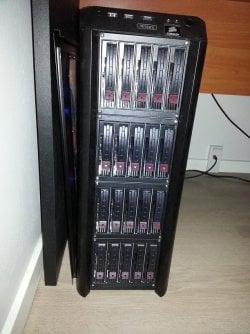
Out of curiosity, how are the HDDs connected to your OS? Are they in RAID groups? There are only so many drive letters available. Pictures of your setup would be nice (I'm also curious to see how you crammed all the HDD cages in a case designed for "only" 12 HDDs; it has to be pretty clever).
 

My Computer My Computer

Computer type
PC/Desktop
Computer Manufacturer/Model Number
Custom Build
OS
Win 7 Ultimate 64 bit
CPU
Intel i7-3930K
Motherboard
ASUS P9X79 WS
Memory
Kingston HyperX Genesis 32GB Kit (8x4GB Modules) 1600MHz DDR
Graphics Card(s)
MSI R7850 Twin Frozr 2GD5/OC Radeon HD 7850 2GB 256-bit GDDR
Sound Card
Asus Xonar Essence STX
Monitor(s) Displays
3x Asus VG248QE 24", Vizio 32" TV
Screen Resolution
1920 x 1080, ?
Hard Drives
Samsung 128GB 840 Pro SSD (1),
Samsung 4TB 850 EVO SSDs (4)
Samsung 4TB 850 EVO SSDs (16) external backup drives used in 2.5" hot swap bays in the computer.
PSU
Corsair HX750w
Case
Antec Two Hundred v2 (modified)
Cooling
Cooler Master GeminII S524 120mm (fan replaced with a 140mm)
Keyboard
Logitech G510s
Mouse
Logitech M525 (two in use)
Internet Speed
=< 32Mbps down, 8Mbps up
Antivirus
AVAST!, MBAM, SAS, Spybot S&D (all but MBAM free) Glary Util
Browser
IE11
Other Info
LSI 9211-8i HBA card (8 SATA III ports), 2.5" & 3.5" Hot Swap Bays, HooToo HT-CR001 PCI-E to USB 3.0 Internal Hub + 6 Slot Card Reader, and LG Model CH12LS28 BD-ROM Optical Drive. Also, ScanSnap S1500 ADF duplexing scanner, Canon 9000F flat bed scanner, Corsair SP2500 2.1 speakers, Samsung CLP 415nw laser color printer, Cyberpower PP2200SW UPS
How are your HDDs receiving power? Depending on how the power is being delivered, the HDDs may be getting a voltage drop at the drive that may be causing them to cut out, especially if the power is going through small cables, multiple splitters, connectors (even gold plated connectors can develop a high enough resistance to be problematic), and/or long cables, all of which increase resistance in the cables. At the voltages used, it doesn't take much resistance to cause a significant voltage drop, the 5v feed probably being the most sensitive to voltage drop. With 20 HDDs, the current draw could easily exceed 12A total. My Corsair PSU uses #18 cables, which is larger than most PSUs, and the SATA power cables have only four sockets on them. Most splitters and extensions I've seen are only #22-#26.

My case has room for only seven HDDs (six permanently installed and two hot swap bays) and an SDD. Still, I made up a single cable to feed the SDD and the six permanently installed HDDs. I kept it as short as possible and used #14 wire to avoid as much voltage drop as possible (appearance was a minor consideration). Each of the two swap bays has its own feed from the PSU since I read in a review that if they were on the same feed as the other drives, inserting a HDD would cause a voltage dip that would cause the other drives to drop out (I also used #14 for those cables but mostly because I already had a 100' spool of the stuff). I'm also using an HX750 to make sure the 5v rail was adequate even though only for just 8 drives.

Then again, it might be something else (such as the OS needs reinstalling) and I'm full of beans.

Out of curiosity, how are the HDDs connected to your OS? Are they in RAID groups? There are only so many drive letters available. Pictures of your setup would be nice (I'm also curious to see how you crammed all the HDD cages in a case designed for "only" 12 HDDs; it has to be pretty clever).

Since my psu is a single rail psu (recommended by unraid), my drive cages are all fed from 1 cable,with a 1sata -> 2molex converter,and each drive cage needs 2 molex to power 5 drives,i have no idea of the gauge of the wires,but like i mentioned this psu is rated for 52 amps, more than enough to power the 20 drives, which at max need 1,72amps on spinup,if it was the psu,wouldnt the power light on the drive cage also turn off when the drive was turned off?

I do not use hardware raid,i use flexraid (software solution) and each drive has its own drive letter, which is also why i flashed my sata controller to IT Mode,so it will act like a "dumb" sata passthrough controller instead of raid or jbod.

How i "crammed" 20 drives into this cage,simple enough, gut it,flatten 5.1/4inch drive tabs,insert 4x 5in1 drive cages,and voila 20 drive spots, with a ssd drive spot in bottom of case. This case is made for this,which is why it is so customizable, see image
 

Attachments

  • 2012-12-12 23.43.04.jpg
    2012-12-12 23.43.04.jpg
    84.7 KB · Views: 3

My Computer My Computer

Computer type
PC/Desktop
Computer Manufacturer/Model Number
custom
OS
Windows 7 Ultimate SP1 64bit
CPU
Core I3 2100T/Core I5 750/Core I3 2120
Motherboard
ASRock Z77 Extreme4/Gigabyte GA-H55-UD3H/Asrock H61DEL
Memory
2x4GB 1600mhz/2x4GB 1600hmhz/2x4GB 1333mhz
Graphics Card(s)
onboard/onboard/ASUS HD7850-DC2-2GD5-V2
Sound Card
not active/onboard/onboard
Monitor(s) Displays
Philips 42"
Screen Resolution
1920x1080
Hard Drives
WD Red WD30EFRX
WD20EARX
WD20EARS
WD20EACS
PSU
Corsair GS700/Antec 500w Earth watts/Corsair TX650 V2
Case
Antec Twelve Hundred V3/2xAntec Sonata Elite
Cooling
generic
Keyboard
2xMS natural Ergonomic
Mouse
MS Wireless/logitech laser/steelseries Xai
Internet Speed
20/2mbit
Other Info
2x IBM serveraid 1015M IT Flashed 8xPort SATA
4x X-case 5in1 drive cages (norco rebranded)
Ok, that is clever how you got all those drives in there. One concern that comes to mind is how cool are they running? It doesn't look there is much room for air to flow across them.

Just because the PSU has a single rail doesn't mean each socket can support the full amperage available. Per regulations, PSU cables are limited to no more than 20A each (many PSUs limit theirs to only 16A but methinks Corsair rate their sockets at 20A). You potentially can be drawing as much as 35A during spin-up (if you aren't set up for staggered spin-up) although that probably hasn't happened since the over current circuitry in the PSU would have cut the power to all drives. The HDD light doesn't really tell you much about the voltage going to the drive so the fact it stays on isn't really relevant here.

Based on what you have told me here, your drives are probably starving for juice and/or, possibly, are overheating. Even if you aren't exceeding the ampacity of your cables (a quick and dirty check would be to feel the wires while they are in operation to see if they are warm or not; they shouldn't be), you can still have enough voltage drop due to resistance to hamper the operation of your drives. The easiest (and cheapest) thing you can try would be to spread the load to more than one cable. You have two SATA power cables and two molex cables on that PSU and the wires on the PSU cables are #18 (that's good news, at least). If you aren't using the molex cables to power your case fans (which you probably are since Antec fans usually have a feed through four pin Molex connector instead of a more conventional three or four pin fan connector), you could run each cage of drives on a single cable. Although the resistance per cable set wouldn't change (unless you up the size of the wires on any extension cables), cutting the current flowing through each cable will reduce the voltage drop. Even running two cages on each PSU SATA power cable will be better than running all four off one cable.
 

My Computer My Computer

Computer type
PC/Desktop
Computer Manufacturer/Model Number
Custom Build
OS
Win 7 Ultimate 64 bit
CPU
Intel i7-3930K
Motherboard
ASUS P9X79 WS
Memory
Kingston HyperX Genesis 32GB Kit (8x4GB Modules) 1600MHz DDR
Graphics Card(s)
MSI R7850 Twin Frozr 2GD5/OC Radeon HD 7850 2GB 256-bit GDDR
Sound Card
Asus Xonar Essence STX
Monitor(s) Displays
3x Asus VG248QE 24", Vizio 32" TV
Screen Resolution
1920 x 1080, ?
Hard Drives
Samsung 128GB 840 Pro SSD (1),
Samsung 4TB 850 EVO SSDs (4)
Samsung 4TB 850 EVO SSDs (16) external backup drives used in 2.5" hot swap bays in the computer.
PSU
Corsair HX750w
Case
Antec Two Hundred v2 (modified)
Cooling
Cooler Master GeminII S524 120mm (fan replaced with a 140mm)
Keyboard
Logitech G510s
Mouse
Logitech M525 (two in use)
Internet Speed
=< 32Mbps down, 8Mbps up
Antivirus
AVAST!, MBAM, SAS, Spybot S&D (all but MBAM free) Glary Util
Browser
IE11
Other Info
LSI 9211-8i HBA card (8 SATA III ports), 2.5" & 3.5" Hot Swap Bays, HooToo HT-CR001 PCI-E to USB 3.0 Internal Hub + 6 Slot Card Reader, and LG Model CH12LS28 BD-ROM Optical Drive. Also, ScanSnap S1500 ADF duplexing scanner, Canon 9000F flat bed scanner, Corsair SP2500 2.1 speakers, Samsung CLP 415nw laser color printer, Cyberpower PP2200SW UPS
Ok, that is clever how you got all those drives in there. One concern that comes to mind is how cool are they running? It doesn't look there is much room for air to flow across them.

Just because the PSU has a single rail doesn't mean each socket can support the full amperage available. Per regulations, PSU cables are limited to no more than 20A each (many PSUs limit theirs to only 16A but methinks Corsair rate their sockets at 20A). You potentially can be drawing as much as 35A during spin-up (if you aren't set up for staggered spin-up) although that probably hasn't happened since the over current circuitry in the PSU would have cut the power to all drives. The HDD light doesn't really tell you much about the voltage going to the drive so the fact it stays on isn't really relevant here.

Based on what you have told me here, your drives are probably starving for juice and/or, possibly, are overheating. Even if you aren't exceeding the ampacity of your cables (a quick and dirty check would be to feel the wires while they are in operation to see if they are warm or not; they shouldn't be), you can still have enough voltage drop due to resistance to hamper the operation of your drives. The easiest (and cheapest) thing you can try would be to spread the load to more than one cable. You have two SATA power cables and two molex cables on that PSU and the wires on the PSU cables are #18 (that's good news, at least). If you aren't using the molex cables to power your case fans (which you probably are since Antec fans usually have a feed through four pin Molex connector instead of a more conventional three or four pin fan connector), you could run each cage of drives on a single cable. Although the resistance per cable set wouldn't change (unless you up the size of the wires on any extension cables), cutting the current flowing through each cable will reduce the voltage drop. Even running two cages on each PSU SATA power cable will be better than running all four off one cable.

Hmm,never thought about that. Gonna try that as soon as windows have re-installed. One thing though, why is it ALWAYS the same drives dropping out? And why does it only happen when the drives are active?

There are fans on each of the drive cages, i replaced the orginal ones for ones that are low noise which have also been recommend for this use on unraid forums, no drive EVER exceeds 43degrees centigrade at present time,and new studies actually show drives perform much better when running a little hot,i just read an article about it not 2 weeks ago,so it is DEFINITLY not a heat problem,also,i run the case with no side cover on,which also helps with airflow.

This is v2 of the ones i use, http://www.xcase.co.uk/product-p/caddy-53v2.htm i use v1,which is actually norco cages,rebranded to x-case. I know there has been some problems regarding the sata connectors on the backplanes of these cages, but i have exchanged these exactly for that reason.

*UPDATE*

OK,so now each drive cage is on its power own cable, with the first drive cage sharing power cable molex with the case top fan and back fan
 
Last edited:

My Computer My Computer

Computer type
PC/Desktop
Computer Manufacturer/Model Number
custom
OS
Windows 7 Ultimate SP1 64bit
CPU
Core I3 2100T/Core I5 750/Core I3 2120
Motherboard
ASRock Z77 Extreme4/Gigabyte GA-H55-UD3H/Asrock H61DEL
Memory
2x4GB 1600mhz/2x4GB 1600hmhz/2x4GB 1333mhz
Graphics Card(s)
onboard/onboard/ASUS HD7850-DC2-2GD5-V2
Sound Card
not active/onboard/onboard
Monitor(s) Displays
Philips 42"
Screen Resolution
1920x1080
Hard Drives
WD Red WD30EFRX
WD20EARX
WD20EARS
WD20EACS
PSU
Corsair GS700/Antec 500w Earth watts/Corsair TX650 V2
Case
Antec Twelve Hundred V3/2xAntec Sonata Elite
Cooling
generic
Keyboard
2xMS natural Ergonomic
Mouse
MS Wireless/logitech laser/steelseries Xai
Internet Speed
20/2mbit
Other Info
2x IBM serveraid 1015M IT Flashed 8xPort SATA
4x X-case 5in1 drive cages (norco rebranded)
Oh, wow! Not only did you have 20 HDDs on one cable but there also was four fans (one per cage) on it. I'm surprised any of the drives worked.

Not every HDD is going to have the same tolerances to low voltage so that may explain why the same ones have been dropping out.

Although I would prefer to keep them a bit cooler, 43°C max is a comfortable temperature to keep them at so I agree, heat isn't a problem.

Now that you have split up the power feeds, it's hurry up and wait to see if it helped. If not, I have another idea that won't cost anything but time to check.
 

My Computer My Computer

Computer type
PC/Desktop
Computer Manufacturer/Model Number
Custom Build
OS
Win 7 Ultimate 64 bit
CPU
Intel i7-3930K
Motherboard
ASUS P9X79 WS
Memory
Kingston HyperX Genesis 32GB Kit (8x4GB Modules) 1600MHz DDR
Graphics Card(s)
MSI R7850 Twin Frozr 2GD5/OC Radeon HD 7850 2GB 256-bit GDDR
Sound Card
Asus Xonar Essence STX
Monitor(s) Displays
3x Asus VG248QE 24", Vizio 32" TV
Screen Resolution
1920 x 1080, ?
Hard Drives
Samsung 128GB 840 Pro SSD (1),
Samsung 4TB 850 EVO SSDs (4)
Samsung 4TB 850 EVO SSDs (16) external backup drives used in 2.5" hot swap bays in the computer.
PSU
Corsair HX750w
Case
Antec Two Hundred v2 (modified)
Cooling
Cooler Master GeminII S524 120mm (fan replaced with a 140mm)
Keyboard
Logitech G510s
Mouse
Logitech M525 (two in use)
Internet Speed
=< 32Mbps down, 8Mbps up
Antivirus
AVAST!, MBAM, SAS, Spybot S&D (all but MBAM free) Glary Util
Browser
IE11
Other Info
LSI 9211-8i HBA card (8 SATA III ports), 2.5" & 3.5" Hot Swap Bays, HooToo HT-CR001 PCI-E to USB 3.0 Internal Hub + 6 Slot Card Reader, and LG Model CH12LS28 BD-ROM Optical Drive. Also, ScanSnap S1500 ADF duplexing scanner, Canon 9000F flat bed scanner, Corsair SP2500 2.1 speakers, Samsung CLP 415nw laser color printer, Cyberpower PP2200SW UPS
Oh, wow! Not only did you have 20 HDDs on one cable but there also was four fans (one per cage) on it. I'm surprised any of the drives worked.

Not every HDD is going to have the same tolerances to low voltage so that may explain why the same ones have been dropping out.

Although I would prefer to keep them a bit cooler, 43°C max is a comfortable temperature to keep them at so I agree, heat isn't a problem.

Now that you have split up the power feeds, it's hurry up and wait to see if it helped. If not, I have another idea that won't cost anything but time to check.

Hehe,actually i never thought about having all power consumers on 1 cable could be a potential risk for shutdowns or worse, which i why i love these forums,i learn something every time.

I am running a flexraid verify tonight,which is extremely hdd intensive,and will take about 12-14hrs,it if completes with no hiccups we might have solved the problem :-).

I am apprehensive though, as one boot up had 1 drive not mounted,but that could be due to windows not having installed the drivers correctly,as every bootup since all drives has been online,and all drives are reported by my sata controllers as present.

I will let you know sometime tomorrow if all goes well,and thank you so much for your help :-)
 

My Computer My Computer

Computer type
PC/Desktop
Computer Manufacturer/Model Number
custom
OS
Windows 7 Ultimate SP1 64bit
CPU
Core I3 2100T/Core I5 750/Core I3 2120
Motherboard
ASRock Z77 Extreme4/Gigabyte GA-H55-UD3H/Asrock H61DEL
Memory
2x4GB 1600mhz/2x4GB 1600hmhz/2x4GB 1333mhz
Graphics Card(s)
onboard/onboard/ASUS HD7850-DC2-2GD5-V2
Sound Card
not active/onboard/onboard
Monitor(s) Displays
Philips 42"
Screen Resolution
1920x1080
Hard Drives
WD Red WD30EFRX
WD20EARX
WD20EARS
WD20EACS
PSU
Corsair GS700/Antec 500w Earth watts/Corsair TX650 V2
Case
Antec Twelve Hundred V3/2xAntec Sonata Elite
Cooling
generic
Keyboard
2xMS natural Ergonomic
Mouse
MS Wireless/logitech laser/steelseries Xai
Internet Speed
20/2mbit
Other Info
2x IBM serveraid 1015M IT Flashed 8xPort SATA
4x X-case 5in1 drive cages (norco rebranded)
Back
Top