0xc000000f -- The boot selection failed because a required device is i

Conzo427

New member
Local time
3:42 PM
Messages
9
0xc000000f -- The boot selection failed because a required device is inaccessible.

I am receiving this error after installing a new hard drive in my Dell inspiron 15r N5010. I can get to windows upon fist installation of the OS but when I reboot I get this. Any ideas?
 

My Computer My Computer

At a glance

Windows 7 Home Premium
OS
Windows 7 Home Premium
Unplug all other HD's and peripherals,

Boot into BIOS setup, reset to defaults, save changes. If an EFI BIOS, enable Legacy BIOS, set DVD drive first to boot, HD second. Then set SATA controller to AHCI. Save changes and Exit.

Then boot into installer DVD or flash stick burned or written using tool and latest ISO for your licensed OS version here.

At first installer screen Press Shift + F10 to open a Command Box, type:

DISKPART
LIST DISK
SELECT DISK 0 (after confirming Windows 7 target HD #)
CLEAN
CREATE PARTITION PRIMARY SIZE=102400 (for 100gb partition, adjust as desired)
FORMAT FS=NTFS LABEL="WINDOWS 7"
ACTIVE
EXIT
EXIT

Next click Install Now, then Custom install to Clean Install Windows 7 to the partition you created. If it fails then report back at which step and the verbatim error message.

In addition read over these steps to understand the tools and methods which work best to get and maintain a perfect Clean Reinstall - Factory OEM Windows 7. The steps are the same for retail.

After install you can adjust partition size or Create new partitions for data, etc. in Disk Mgmt. We are creating the partition here to mark it Active which overcomes certain install failures.

 
Unplug all other HD's and peripherals,

Boot into BIOS setup, reset to defaults, save changes. If an EFI BIOS, enable Legacy BIOS, set DVD drive first to boot, HD second. Then set SATA controller to AHCI. Save changes and Exit.

Then boot into installer DVD or flash stick burned or written using tool and latest ISO for your licensed OS version here.

At first installer screen Press Shift + F10 to open a Command Box, type:

DISKPART
LIST DISK
SELECT DISK 0 (after confirming Windows 7 target HD #)
CLEAN
CREATE PARTITION PRIMARY SIZE=102400 (for 100gb partition, adjust as desired)
FORMAT FS=NTFS LABEL="WINDOWS 7"
ACTIVE
EXIT
EXIT

Next click Install Now, then Custom install to Clean Install Windows 7 to the partition you created. If it fails then report back at which step and the verbatim error message.

In addition read over these steps to understand the tools and methods which work best to get and maintain a perfect Clean Reinstall - Factory OEM Windows 7. The steps are the same for retail.

After install you can adjust partition size or Create new partitions for data, etc. in Disk Mgmt. We are creating the partition here to mark it Active which overcomes certain install failures.

Gregrocker, why are you so awesome? You have helped me solve several computer problems over the past week. Thank you.

I had been using my Dell Recovery DVD as I don't have a copy of the key. Should I proceed with downloading this ISO? I tried the "shift F-10" trick you mentioned from the first recovery screen but it did nothing. I see my options as obtaining a new windows 7 key/recovering the key I have and installing per your instructions or finding a way to get to a DOS prompt using the Dell Recovery disc's I had made when I purchased the PC.
 

My Computer My Computer

At a glance

Windows 7 Home Premium
OS
Windows 7 Home Premium
There is no reason whatsoever to buy a new key as you own the OS which came with the Dell for its life, and the key has no bearing on installation problems. You'd just be throwing away $100+ to buy a new key.

Recovery Disks are not the same as the installer. They are an image of the factory bloatware which is applied. If you don't have a disk labeled "Dell Reinstallation DVD" then download the ISO and burn the DVD from Steps 1 and 2 in Clean Reinstall - Factory OEM Windows 7. Follow those steps to get and keep a perfect install. If it fails again, then use the extra steps I gave above.

Dell can also send you the Reisntallation DVD since they have this policy. However it offers nothing extra from the latest official ISO download other than self-activation and a Dell logo on the System page. You can activate it yourself using the Product Key on COA sticker.
 
Yes, I am excited to have a boatware free version. I just need the key. I am installing from the recovery DVD again so that I can get into windows. I will I am hoping that I can somehow view the key so that I can write it down and use it to install the copy you had referred me to. Is this the correct approach?
 

My Computer My Computer

At a glance

Windows 7 Home Premium
OS
Windows 7 Home Premium
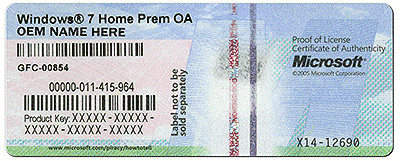
Duh, I guess the product key is on the bottom of the computer...
 

My Computer My Computer

At a glance

Windows 7 Home Premium
OS
Windows 7 Home Premium
Back
Top