Solved Wireless adapter not seeing networks

Masterick

New member
Local time
7:16 AM
Messages
6
Problem solved:

Okay guys, let me just go ahead and say I'm sorry for wasting everyones time.

I was cracking my head trying to find out what had changed on this last days since the wireless was working just fine last week, then after testing on ubuntu and seeing that even there it was not working I remembered, the god damn wireless adapter was not screwed in on the case, I was out of screws when I installed it, the thing was just not properly connected, that was all ! hah really sorry guys but thanks for the help !

On the last few days my adapter simply stopped showing any networks, even when the PC is next to the router.

It's an TP-Link TL-WN951N, ipconfig screen as requested, it's in portuguese but I assume the important bits are understandable, if needed I can provide an english screen.

mnVritX.png


What I've already tried.

Running the bat from the fixed thread
Uinstalling and reinstalling the drivers
Testing the atheros drivers directly, the most recent ones are able to see the networks but not connect to them.

PS: The router is working just fine when I use the wired connection.

PS²: Should also add that this happened a few days ago as well but I managed to "fix" it then by simply uinstalling/reinstalling the driver
 
Last edited:

My Computer My Computer

At a glance

Windows 7 Ultimate 64 bit
OS
Windows 7 Ultimate 64 bit
On the last few days my adapter simply stopped showing any networks, even when the PC is next to the router.

It's an TP-Link TL-WN951N, ipconfig screen as requested, it's in portuguese but I assume the important bits are understandable, if needed I can provide an english screen.

mnVritX.png


What I've already tried.

Running the bat from the fixed thread
Uinstalling and reinstalling the drivers
Testing the atheros drivers directly, the most recent ones are able to see the networks but not connect to them.

PS: The router is working just fine when I use the wired connection.

PS²: Should also add that this happened a few days ago as well but I managed to "fix" it then by simply uinstalling/reinstalling the driver

Hi there
try the simple solution first

I see from the IP that you are running the 802.11n protocol so does your Wifi adapter receive the protocol and the correct channels.

You might need to set your router to different channels etc.

Logon to the router via LAN --should have an address like 192.168.X.1 where X is usually 0,1 or 2 but can be anything.

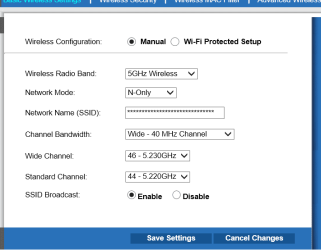
Get into Wifi settings and play around with the parameters -- I suggest you try the 2.4 GHZ band first -- even if you don't get a decent signal you should at least see if your Wifi card is working.

Just play around with settings until you find one that works in your area -- I see you probably are in Portugal or Brazil --both these countries have excellent IP providers and usually connecting isn't a problem --Enc screenshot -- your router should have some sort of similar panel to alter wifi settings.

(If you are in Angola or Mozambique then a different story !!).

Another solution -- I posted on the W8 Forum but the same settings apparently work in W7 -- I had a problem also of a computer SEEING another on the network but couldn't connect (Via Wifi --Lan cable was OK) so try this solution post 2 in the thread.

http://www.eightforums.com/network-...8-windows-8-computer-cant-see-w2k-server.html


Cheers
jimbo
 

Attachments

  • wifi.png
    wifi.png
    12 KB · Views: 6

My Computer My Computer

At a glance

Linux CENTOS 7 / various Windows OS'es and se...Intel i7 Intel i58GB, 16GBOn Motherboard
Computer type
PC/Desktop
Computer Manufacturer/Model Number
Custom built, several laptops HP/ASUS
OS
Linux CENTOS 7 / various Windows OS'es and servers
CPU
Intel i7 Intel i5
Memory
8GB, 16GB
Graphics Card(s)
On Motherboard
Sound Card
Realtek HD audio
Monitor(s) Displays
Apple Cinema display, Samsung LCD
Screen Resolution
1920 X 1080
Hard Drives
4 X 1TB SATA
Mouse
Toshiba wireless laser
Internet Speed
> 20MB up
On the last few days my adapter simply stopped showing any networks, even when the PC is next to the router.

It's an TP-Link TL-WN951N, ipconfig screen as requested, it's in portuguese but I assume the important bits are understandable, if needed I can provide an english screen.

mnVritX.png


What I've already tried.

Running the bat from the fixed thread
Uinstalling and reinstalling the drivers
Testing the atheros drivers directly, the most recent ones are able to see the networks but not connect to them.

PS: The router is working just fine when I use the wired connection.

PS²: Should also add that this happened a few days ago as well but I managed to "fix" it then by simply uinstalling/reinstalling the driver

Just because the wired Ethernet works doesn't mean the router won't require a reset in order to get the wireless working.

After the reset it's required that you retype all the wireless set up information, SSID, security password, etc.

From the ipconfig/all you aren't getting anything at all from the router.

If there are any third party anti virus software or firewalls they will need to be completely uninstalled, by far the most likely culprit in these cases. ;)
 
Last edited:

My Computer My Computer

At a glance

Windows 7 Ult, Windows 8.1 Pro,Q9650-4.275GHz, E8600 4.5GHz, E6750-3.8GHzG.Skill PC2 9600 1200Mhz 5 5 5 15 2TGTX480
Computer type
PC/Desktop
Computer Manufacturer/Model Number
Home built
OS
Windows 7 Ult, Windows 8.1 Pro,
CPU
Q9650-4.275GHz, E8600 4.5GHz, E6750-3.8GHz
Motherboard
Evga 780i FTW
Memory
G.Skill PC2 9600 1200Mhz 5 5 5 15 2T
Graphics Card(s)
GTX480
Sound Card
Asus Xonar D2
Monitor(s) Displays
HannsG
Screen Resolution
1680X1050
Hard Drives
GSkill Phoenix Pro 120GB SSD
PSU
ThermalTake Toughpower 1000Watt modular
Case
ThermalTake XaserV
Cooling
Xigmatek S1283
Keyboard
Logitech G15
Mouse
Logitech G9
Internet Speed
T1
You didn't specify if its just this device or all devices, or if this is the only device that has wireless.
 

My Computer My Computer

At a glance

Windows 7 Ultimate x64
OS
Windows 7 Ultimate x64
Hi there
try the simple solution first

I see from the IP that you are running the 802.11n protocol so does your Wifi adapter receive the protocol and the correct channels.

You might need to set your router to different channels etc.

Logon to the router via LAN --should have an address like 192.168.X.1 where X is usually 0,1 or 2 but can be anything.

Get into Wifi settings and play around with the parameters -- I suggest you try the 2.4 GHZ band first -- even if you don't get a decent signal you should at least see if your Wifi card is working.

Just play around with settings until you find one that works in your area -- I see you probably are in Portugal or Brazil --both these countries have excellent IP providers and usually connecting isn't a problem --Enc screenshot -- your router should have some sort of similar panel to alter wifi settings.

(If you are in Angola or Mozambique then a different story !!).

Another solution -- I posted on the W8 Forum but the same settings apparently work in W7 -- I had a problem also of a computer SEEING another on the network but couldn't connect (Via Wifi --Lan cable was OK) so try this solution post 2 in the thread.

Solved W2K3 Server can access W8 W8 computer cant see W2K server


Cheers
jimbo

Hey, thanks, tried both, no dice. I don't think the problem is in the router since I can access it through other devices, both wired and wireless.

You didn't specify if its just this device or all devices, or if this is the only device that has wireless.

Damn, sorry, completely forgot to add that information, it is indeed only this one that's not being able to connect through wireless to the router.
 

My Computer My Computer

At a glance

Windows 7 Ultimate 64 bit
OS
Windows 7 Ultimate 64 bit
Go into device manager and check for any yellow explication marks.

Click on start orb and search Device manager

If none are found. Find your wireless adapter in the list. Search for update. If not area available try rolling the update back.

Non of that helps you check the manufacturers page for the latest update and install it.
 

My Computer My Computer

At a glance

Windows 7 Ultimate x64
OS
Windows 7 Ultimate x64
Go into device manager and check for any yellow explication marks.

Click on start orb and search Device manager

If none are found. Find your wireless adapter in the list. Search for update. If not area available try rolling the update back.

Non of that helps you check the manufacturers page for the latest update and install it.

Already that, the TP-Link drivers and the atheros drivers. With the first ones I don't see any networks, with the second - recent - ones I can see the networks but can't connect to any of them, including mine(I even disabled security and reseted the router).
 

My Computer My Computer

At a glance

Windows 7 Ultimate 64 bit
OS
Windows 7 Ultimate 64 bit
Okay guys, let me just go ahead and say I'm sorry for wasting everyones time.

I was cracking my head trying to find out what had changed on this last days since the wireless was working just fine last week, then after testing on ubuntu and seeing that even there it was not working I remembered, the god damn wireless adapter was not screwed in on the case, I was out of screws when I installed it, the thing was just not properly connected, that was all ! hah really sorry guys but thanks for the help !
 

My Computer My Computer

At a glance

Windows 7 Ultimate 64 bit
OS
Windows 7 Ultimate 64 bit
No problem. Glad the issue was resolved.
 

My Computer My Computer

At a glance

Windows 7 Ultimate x64
OS
Windows 7 Ultimate x64
Back
Top