
Solved My Dell Inspiron has started stopping down unexpectedly- again

widestination

A bunch of White Rose
Local time
3:39 AM
Messages
18
Location
West Bengal
Guys please help. Actually this is a repost of an old thread of me, the problem being the same: http://www.sevenforums.com/performance-maintenance/200510-my-laptop-turns-off-unexpectedly.html

The problem is the laptop shuts down unexpectedly. I took the following steps:

  • Put a cheap usb cooling pad with 3 fans inside it
  • Changed the "Maximum Processor Power" to 85% and 80% for AC power and battery respectively. I read somewhere on net that it could help the laptop from overheating, though I'm not sure now whether heat is the only problem
  • Use a electrical blower to clean the vents of the laptop
But the problem persists. Surprisingly, it happens say 8 times out of 10 times, not 10 times out of 10! This makes me think that there is barely any hardware problem, but I can't say for sure.
Possiblity of processor overload and software compatibility issue are there. In that case, please suggest solutions as many as you think might help. I use Windows 7 Home Premium 64 bit as OS, FYI.


Thank you all in advance and a Happy New Year to all Windows 7 forum members and admins.
 

My Computer My Computer

At a glance

Windows 7 Home Premium 64bitIntel Core i38GB DDR3
Computer type
PC/Desktop
Computer Manufacturer/Model Number
Dell Inspiron N5010
OS
Windows 7 Home Premium 64bit
CPU
Intel Core i3
Motherboard
Intel
Memory
8GB DDR3
Screen Resolution
1366x768
Hard Drives
500 GB ATA
Browser
Google Chrome, Firefox (default), IE 11
When this happens to Dell laptops, I replace the stock thermal compound with a fresh application of Arctic Silver, after cleaning the top of the CPU and heatsink. I blow all dust and dirt off the cooling fins near the fan and run a program to run the fans at full speed at all times... It has always worked so far... I'm not affiliated with the software maker, just a satisfied customer. It's free...

I8kfanGUI - Software Informer. I8kfanGUI is a graphical Windows application to show the internal temperatures.
 

My Computer My Computer

At a glance

Microsoft Windows 8.1 Enterprise 64-bitIntel(R) Core(TM) i7-3770K CPU @ 4.7GHz (Over...32 GB 12800 DDR3 Crucial Ballistix SportNVIDIA GeForce GTX 660 SC x 2 (SLI) by EVGA
Computer type
PC/Desktop
Computer Manufacturer/Model Number
Intel DZ77GA-70K
OS
Microsoft Windows 8.1 Enterprise 64-bit
CPU
Intel(R) Core(TM) i7-3770K CPU @ 4.7GHz (Overclocked)
Motherboard
Intel Corporation DZ77GA-70K, 0066 BIOS version
Memory
32 GB 12800 DDR3 Crucial Ballistix Sport
Graphics Card(s)
NVIDIA GeForce GTX 660 SC x 2 (SLI) by EVGA
Sound Card
(1) Bluetooth Hands-free Audio (2) NVIDIA High Definition
Monitor(s) Displays
LG 27" HDMI
Screen Resolution
12920 x 1080 x 32 bits (4294967296 colors) @ 60Hz
Hard Drives
Intel 120GB SSD (ATA INTEL SSDSC2CT12 SCSI Disk Device)
Western Digital Caviar Black 64M cache 2TB 7200rpm (ATA WDC WD2002FAEX-0 SCSI Disk Device), 3 x WD 150Gb 10k Velociraptor hard drives in RAID 0 (testing)
PSU
Corsair 750w fully modular
Case
Corsair 650D with perforated side panel
Cooling
3 200mm case fans, Intel liquid cooling for CPU w 120mm fans
Keyboard
Logitech backlit
Mouse
Dell
Internet Speed
11Mbps DSL
Antivirus
Windows Defender, MalWareBytes Pro and CCleaner Pro
Browser
Chrome, IE and FireFox (latest versions)
Other Info
Windows Home Server 2011 with 10 clients at home
and run a program to run the fans at full speed at all times... It has always worked so far... I'm not affiliated with the software maker, just a satisfied customer. It's free...

:sarc:Questions..
  1. Does that software really work?
  2. What is its impact on other hardwares e.g. chipsets, RAM etc?
  3. My Windows says that the driver is not digitally signed. What to do for that?
 

My Computer My Computer

At a glance

Windows 7 Home Premium 64bitIntel Core i38GB DDR3
Computer type
PC/Desktop
Computer Manufacturer/Model Number
Dell Inspiron N5010
OS
Windows 7 Home Premium 64bit
CPU
Intel Core i3
Motherboard
Intel
Memory
8GB DDR3
Screen Resolution
1366x768
Hard Drives
500 GB ATA
Browser
Google Chrome, Firefox (default), IE 11
The Dell Community users forums, Laptop hardware section, would be a good place to go with this. There are those there that are familiar with specific model Dell's or know of global problems in certain models. The Dell forums are also users helping users.

Laptop - Dell Community
 

My Computer My Computer

At a glance

Windows 10 64 bitIntel i7 6700K16GB Corsair DominatorIntel CPU Graphics
Computer type
PC/Desktop
Computer Manufacturer/Model Number
My Own Build
OS
Windows 10 64 bit
CPU
Intel i7 6700K
Motherboard
ASUS ROG Maximus VIII Hero
Memory
16GB Corsair Dominator
Graphics Card(s)
Intel CPU Graphics
Sound Card
RealTek
Monitor(s) Displays
27" Dell S2719dgf
Screen Resolution
2560X1440
Hard Drives
1 TB Samsung 850 EVO SSD for Win 10 Pro
500GB Samsung 850 EVO SSD for Win 10 Insider
2 TB drive for backup
PSU
EVGA Supernova 750G2
Case
BeQuiet Silent Base 600
Cooling
Deepcool Captain 120EX
Keyboard
Microsoft Wireless 2000
Mouse
Microsoft wireless
Internet Speed
100 MB/sec (Cable)
Antivirus
Microsoft Defender and Malwarebytes
Browser
Edge/Firefox
Other Info
Cakewalk (Sonar) by BandLab and Studio One 4.1 Pro recording studio software. MOTU 896Mk3 Hybrid recording interface, Frontier Tranzport wireless control unit, Behringer X-Touch Control Surface.
Five USB connected optical drives for CD Audio production using Nero BurningROM
and run a program to run the fans at full speed at all times... It has always worked so far... I'm not affiliated with the software maker, just a satisfied customer. It's free...

:sarc:Questions..
  1. Does that software really work? Yes, it does!
  2. What is its impact on other hardwares e.g. chipsets, RAM etc? No impact, it simply runs the fan at a desired speed...
  3. My Windows says that the driver is not digitally signed. What to do for that? Install it anyway, it's fine...

Again, I'm not affiliated with the developer of the software but Ive been using this software on all of the Dell Inspiron and Latitude laptops I've worked on (20 or so) and it's worked well on every single one...
 

My Computer My Computer

At a glance

Microsoft Windows 8.1 Enterprise 64-bitIntel(R) Core(TM) i7-3770K CPU @ 4.7GHz (Over...32 GB 12800 DDR3 Crucial Ballistix SportNVIDIA GeForce GTX 660 SC x 2 (SLI) by EVGA
Computer type
PC/Desktop
Computer Manufacturer/Model Number
Intel DZ77GA-70K
OS
Microsoft Windows 8.1 Enterprise 64-bit
CPU
Intel(R) Core(TM) i7-3770K CPU @ 4.7GHz (Overclocked)
Motherboard
Intel Corporation DZ77GA-70K, 0066 BIOS version
Memory
32 GB 12800 DDR3 Crucial Ballistix Sport
Graphics Card(s)
NVIDIA GeForce GTX 660 SC x 2 (SLI) by EVGA
Sound Card
(1) Bluetooth Hands-free Audio (2) NVIDIA High Definition
Monitor(s) Displays
LG 27" HDMI
Screen Resolution
12920 x 1080 x 32 bits (4294967296 colors) @ 60Hz
Hard Drives
Intel 120GB SSD (ATA INTEL SSDSC2CT12 SCSI Disk Device)
Western Digital Caviar Black 64M cache 2TB 7200rpm (ATA WDC WD2002FAEX-0 SCSI Disk Device), 3 x WD 150Gb 10k Velociraptor hard drives in RAID 0 (testing)
PSU
Corsair 750w fully modular
Case
Corsair 650D with perforated side panel
Cooling
3 200mm case fans, Intel liquid cooling for CPU w 120mm fans
Keyboard
Logitech backlit
Mouse
Dell
Internet Speed
11Mbps DSL
Antivirus
Windows Defender, MalWareBytes Pro and CCleaner Pro
Browser
Chrome, IE and FireFox (latest versions)
Other Info
Windows Home Server 2011 with 10 clients at home
Hi widestination,

'Unexpected shut down' could be due to a 'hardware or a software issue'. Please share the following details for more clarity:
- Does the laptop produce 'fan noise' or get overheated before shutting down?
- For approximately how long does the laptop stay on, before shutting down?
- Please observe if the laptop shuts down more often, when 'multimedia intensive applications' are in use.
- Allow the laptop to stay in 'BIOS environment' for some time to see if it still shuts down. System is free from the interference/load of 'software' in 'BIOS'. System shutting down in this mode would point at a 'hardware related issue'. To enter 'BIOS', power off the laptop > Power it back on and repeatedly tap 'F2 key' at 'Dell splash screen' (BIOS home screen appears)

I also recommend you to run 'hardware diagnostics' to check 'hardware functionality'. You may refer to this 'web article' for detailed steps on 'running diagnostics': http://dell.to/OUGnqT

If no 'hardware issue' is detected, check 'CPU usage' (If possible, check the usage when you are suspecting a 'shut down'):
- Press < Ctrl + Del + Enter > together to launch 'Task Manager' > Click 'Processes' tab and capture details of program (s) with maximum CPU usage > Click 'Performance' tab to capture details of CPU usage details

If 'processor' does not appear 'overloaded', try a 'virus-scan'. System may 'shut down' due to an infection also. You may also check the 'current status' of 'security software' in the system.

Hope this helps. Do reply with the fndings; would be glad to assist.
 

My Computer My Computer

At a glance

Windows 7 64bit
OS
Windows 7 64bit
Hi Saurabh,

'Unexpected shut down' could be due to a 'hardware or a software issue'. Please share the following details for more clarity:
- Does the laptop produce 'fan noise' or get overheated before shutting down?
Overheated: Yes, but not always. Sometimes it shuts down on 38/39 deg cpu temp (as measured with Speedfan). Fan noise: Never had this issue. I am sure and double-checked that after your post. The fans make normal or no sound.
- For approximately how long does the laptop stay on, before shutting down?
Approx. 20-25 seconds normally. How bad is it because I think you wanted to know the time taken by all the processes to be ended by the OS?
- Please observe if the laptop shuts down more often, when 'multimedia intensive applications' are in use.
Most of the time this is the case! Programs like strategic games, Adobe softwares or even a movie shuts down the laptop most of the time, but again this is the case of 90%- in 10% of time this is not the case. One more thing I'd like to mention that the ugliest enemy of my laptop is none other than Google Chrome! I use it frequently but can't figure out why the process list shows around 12-14 chrome process instances. I use Chrome with 'Process-per-tab' now but tried 'Single-process' parameter also, no use!
- Allow the laptop to stay in 'BIOS environment' for some time to see if it still shuts down. System is free from the interference/load of 'software' in 'BIOS'. System shutting down in this mode would point at a 'hardware related issue'. To enter 'BIOS', power off the laptop > Power it back on and repeatedly tap 'F2 key' at 'Dell splash screen' (BIOS home screen appears)
I tried after reading your post. No issues at all.

I also recommend you to run 'hardware diagnostics' to check 'hardware functionality'. You may refer to this 'web article' for detailed steps on 'running diagnostics': http://dell.to/OUGnqT

Used CPU-z. Will try your link now.

If no 'hardware issue' is detected, check 'CPU usage' (If possible, check the usage when you are suspecting a 'shut down'):
- Press < Ctrl + Del + Enter > together to launch 'Task Manager' > Click 'Processes' tab and capture details of program (s) with maximum CPU usage > Click 'Performance' tab to capture details of CPU usage details

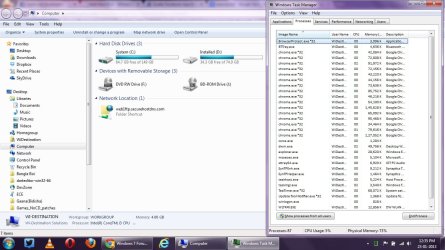
A screenshot is attached. Please see it. BTW, I have lowered the Max. processor Usage to 90% in the 'Balanced' power profile. Does that do any help in real? I have found no gain so far, hoping to have some gain. What do you say?

If 'processor' does not appear 'overloaded', try a 'virus-scan'. System may 'shut down' due to an infection also. You may also check the 'current status' of 'security software' in the system.

Fully checked with i) Avast 6 ii) Microsoft Security Essentials iii) Spybot -SD. Any other AV you suggest?
 

Attachments

  • processes_scrshot.jpg
    processes_scrshot.jpg
    137.8 KB · Views: 2

My Computer My Computer

At a glance

Windows 7 Home Premium 64bitIntel Core i38GB DDR3
Computer type
PC/Desktop
Computer Manufacturer/Model Number
Dell Inspiron N5010
OS
Windows 7 Home Premium 64bit
CPU
Intel Core i3
Motherboard
Intel
Memory
8GB DDR3
Screen Resolution
1366x768
Hard Drives
500 GB ATA
Browser
Google Chrome, Firefox (default), IE 11
and run a program to run the fans at full speed at all times... It has always worked so far... I'm not affiliated with the software maker, just a satisfied customer. It's free...

:sarc:Questions..
  1. Does that software really work? Yes, it does!
  2. What is its impact on other hardwares e.g. chipsets, RAM etc? No impact, it simply runs the fan at a desired speed...
  3. My Windows says that the driver is not digitally signed. What to do for that? Install it anyway, it's fine...

Again, I'm not affiliated with the developer of the software but Ive been using this software on all of the Dell Inspiron and Latitude laptops I've worked on (20 or so) and it's worked well on every single one...

Please consider providing a link from where I can have the fan software, digitally signed. I searched, all were digitally unsigned. And I don't know how to install a digitally unsigned software. Thank you in advance.
 

My Computer My Computer

At a glance

Windows 7 Home Premium 64bitIntel Core i38GB DDR3
Computer type
PC/Desktop
Computer Manufacturer/Model Number
Dell Inspiron N5010
OS
Windows 7 Home Premium 64bit
CPU
Intel Core i3
Motherboard
Intel
Memory
8GB DDR3
Screen Resolution
1366x768
Hard Drives
500 GB ATA
Browser
Google Chrome, Firefox (default), IE 11
Hi widestination,

Thank you for the response.

The system appears to shut down even at 'normal operating temperature'; doesn't seem like a an 'overheating issue'. Would still request you to observe the 'movement' of 'system fan'. Please double-check if the fan is functional.

I also recommend you to 'flash BIOS'. Before 'flashing the BIOS' please check the following:
- Battery should have 10% or greater charge; Adapter should be connected; No external devices should be connected; All other programs should be closed and documents saved
- Click Driver Details | Dell United States to download and install the latest BIOS
- Recheck results after the system restarts

Though it appears to be a 'software related' issue, would still like an update on the results of 'Hardware Diagnostics'.

Multiple instances of 'Google Chrome' are due to its 'multiple processes architecture'. It keeps (tabs, extensions, web apps, and plug-in) processes independent of each other.

Would also like to know if the laptop 'restarts itself' or stays 'shut down'. Would also suggest you to observe if it 'shuts down' on 'physical movement'.

'Inspiron n5010' has 2 'memory slots' (and 2 cards). You may also try to use the laptop with 1 memory chip at a time to see if that makes any difference. You may also try each card with both the 'memory slots' one by one. (This will help you isolate if 'memory slot' is the culprit). You may refer to the 'Service Manual' of 'Inspiron n5010': Documentation
Note: Please follow all safety precautions in the manual.

Hope this helps. Do reply with the findings; would be glad to assist.
 

My Computer My Computer

At a glance

Windows 7 64bit
OS
Windows 7 64bit
The system appears to shut down even at 'normal operating temperature'; doesn't seem like a an 'overheating issue'. Would still request you to observe the 'movement' of 'system fan'. Please double-check if the fan is functional.

The fan runs well. Checked it and no unusual behaviour was noticed.

I also recommend you to 'flash BIOS'. Before 'flashing the BIOS' please check the following:
- Battery should have 10% or greater charge; Adapter should be connected; No external devices should be connected; All other programs should be closed and documents saved
- Click Driver Details | Dell United States to download and install the latest BIOS
- Recheck results after the system restarts

BIOS is flashed with version you have mentioned. Can't flash BIOS twice with the same version; tried, but it said so.
Though it appears to be a 'software related' issue, would still like an update on the results of 'Hardware Diagnostics'.
Diagnosed with CPU-z and SppedFan. Please suggest any better way of h/w diagnosis.

Would also like to know if the laptop 'restarts itself' or stays 'shut down'. Would also suggest you to observe if it 'shuts down' on 'physical movement'.
It doesn't restart itself, it shuts down completely. Every time.

'Inspiron n5010' has 2 'memory slots' (and 2 cards). You may also try to use the laptop with 1 memory chip at a time to see if that makes any difference. You may also try each card with both the 'memory slots' one by one. (This will help you isolate if 'memory slot' is the culprit). You may refer to the 'Service Manual' of 'Inspiron n5010': Documentation
Note: Please follow all safety precautions in the manual.
Can this happen with a problem in physical memory and/or memory slot? Is this a 'DIY' process to check the nature of memory slots, because Dell guys barely come to my area! :cry:

You asked in your early post whether this happens with multimedia-specific programs, and I said 'yes, most of the time'. So what to do with it?
 

My Computer My Computer

At a glance

Windows 7 Home Premium 64bitIntel Core i38GB DDR3
Computer type
PC/Desktop
Computer Manufacturer/Model Number
Dell Inspiron N5010
OS
Windows 7 Home Premium 64bit
CPU
Intel Core i3
Motherboard
Intel
Memory
8GB DDR3
Screen Resolution
1366x768
Hard Drives
500 GB ATA
Browser
Google Chrome, Firefox (default), IE 11
Hi widestination,

You may also run the 'Dell Hardware Diagnostics'; please refer to the following 'web article': Run Built-In Diagnostics for Your System | Dell

If the basic 'Diagnostics' pass, you may also choose to run a 'Custom Test' on 'Memory Diagnostics':
- Run basic diagnostics (as above)
- After the completion of 'basic diagnostics' a prompt appears: 'Would you like to run the remaining memory tests' > Select 'No'
- Select option 'Boot to utility partition' > You should be able to select the option of 'Custom Test'
- Run 'Custom Test' on 'Hard Drive' and 'Memory' one by one > Capture errors if any

We may get 'conclusive results' with the 'hardware tests'; would be a better platform to explore other possibilities, once 'hardware aspect' is isolated.

Testing the memory cards manually, was only a suggestion. You may not do it if not comfortable. Apologies for not sharing that in my previous post.

Do reply with the findings; will take it further.
 

My Computer My Computer

At a glance

Windows 7 64bit
OS
Windows 7 64bit
In addition to the excellent suggestions provided, here are other Troubleshooting Steps for Windows 7.

If this is still the factory preinstall most tech enthusiasts will not run such a corrupt, bloated install with all the freeloaders on Win7's back, but instead choose to get the superior Clean Reinstall - Factory OEM Windows 7. If you stick with the steps given you'll have a perfect install better than 90% of users and better than a new PC considering all of the crapware larded onto them.

Until then you can also mitigate some of the bloatware's smothering effect using Clean Up Factory Bloatware
 
Back
Top