Album Art Screensaver on x64 system, fix it? Or any alternatives?

goja

Banned
Local time
4:28 PM
Messages
91
Hello,

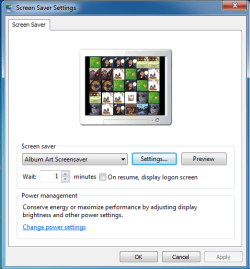
As part of all the (little) annoyance/incompatibility that comes with x64 windows, there's this one : the great app "Album Art Screensaver" that act just like the iTunes screensaver on Mac, doesn't work on W7 x64...

It install fine, when you go in screensaver settins it appear, you can configure it BUT windows doesn't "remember it" still showing NO SCREEN SAVER on the display setting page...

So this is clearly cause the file wasn't supposed to be in the SysWOW64 folder, and i think (maybe i'm wrong) that it's not hard to fix that, if you have little knowledge...

So just let me know, if you know about that, of if you got some alternatives... Thanks in advance!

;)
 

My Computer My Computer

At a glance

Ultimate x86 & x64
OS
Ultimate x86 & x64
if you right click a blank area of your desktop and select personalize, click the screen saver tab and see if it can be selected from there.
 

My Computer My Computer

At a glance

Microsoft Windows 7 Home Premium 64-bit 7600IIx4 amd athelon 635 processor2x2gbati radeon HD 5450
Computer Manufacturer/Model Number
Hewlett packard/p6512uk
OS
Microsoft Windows 7 Home Premium 64-bit 7600
CPU
IIx4 amd athelon 635 processor
Motherboard
FOXCONN 2AA9
Memory
2x2gb
Graphics Card(s)
ati radeon HD 5450
Sound Card
(1) Realtek High Definition Audio (2) AMD High Definition
Monitor(s) Displays
samsung lcd tv 32"
Screen Resolution
1360x 768
Hard Drives
(1) WDC WD10 01FAES-60Z2A0 SATA Disk Device (2) Maxtor OneTouch USB Device (3) ST310003 33AS USB Device (4) WD My Book 1111 USB Device
PSU
?
Cooling
air!
Keyboard
wireless hp
Mouse
wireless Hp,optical
Internet Speed
1.10mb/s
Antivirus
MSE
Browser
Firefox
Did it install in the SysWOW64 folder?
It should've installed in C:\Program Files (x86) I just downloaded it and installed it on a 64-bit system in VMware and it installed just fine and works just fine.

Jerry
1.PNG

2.PNG
 

My Computer My Computer

At a glance

Win 7 Pro x64 / Win 10 ProIntel(R) Core(TM) i7-3630QM CPU @ 2.40GHz12 GB(1) Intel(R) HD Graphics 4000 (2) NVIDIA GeFo...
Computer type
Laptop
Computer Manufacturer/Model Number
Sager NP9170
OS
Win 7 Pro x64 / Win 10 Pro
CPU
Intel(R) Core(TM) i7-3630QM CPU @ 2.40GHz
Motherboard
CLEVO P170EM
Memory
12 GB
Graphics Card(s)
(1) Intel(R) HD Graphics 4000 (2) NVIDIA GeForce GTX 675M
Sound Card
(1) Realtek High Definition Audio (2) Intel(R) Display Aud
Monitor(s) Displays
17.3
Screen Resolution
1920x1080
Hard Drives
(1) Samsung 860 EVO 500GB(OS) (1) Samsung 860 EVO 500GB(Data)
Keyboard
Backlite
Antivirus
MSE, Malwarebytes Pro
Browser
Firefox
Other Info
DESKTOP: Custom-built.
OS: Win 10 Pro x64.
CASE: Rosewill R5.
CPU: Intel I5 4670K CPU @ 3.40GHz.
CPU COOLER: Cool Master Hyper 212 EVO.
MOTHERBOARD: Asus Z87-A.
MEMORY: Kingston HyperX 2x4 GB.
GPU: Nvidia Geforce 650 TI.
PSU: Corsair TX750.
DRIVES: (1) Samsung 840 120 GB SSD (2) Western Digital blue 500 GB 7200 RPM.
It install fine, when you go in screensaver settins it appear, you can configure it BUT windows doesn't "remember it" still showing NO SCREEN SAVER on the display setting page...
You both didn't (fully) read my message... The app was of course installed in the x86 program files BUT the screen saver file is in SysWOW64 which is normal. Bongo, after you selected it and pressed ok, check the display setting windows at bottom right, screen saver shows NONE and wait 1minute : NOTHING WILL HAPPEN.
 

My Computer My Computer

At a glance

Ultimate x86 & x64
OS
Ultimate x86 & x64
Built-in Slideshow?

You could do this:

  • Duplicate your album art
  • Store it in a single folder
  • Use the built-in W7 "Photo" slideshow
 

My Computer My Computer

At a glance

W7 Ultimate SP1, LM19.2 MATE, W10 Home 1703, ...AMD Phenom II x6 1100T, 3.3 GHz12GB DDR3 1333 G-Skill (4GB x 2), G-Skill (2G...NVIDIA GeForce GTX 660
Computer type
PC/Desktop
Computer Manufacturer/Model Number
n/a
OS
W7 Ultimate SP1, LM19.2 MATE, W10 Home 1703, W10 Pro 1703 VM, #All 64 bit
CPU
AMD Phenom II x6 1100T, 3.3 GHz
Motherboard
ASUS M4A88T-M/USB3 (AM3)
Memory
12GB DDR3 1333 G-Skill (4GB x 2), G-Skill (2GB x 2)
Graphics Card(s)
NVIDIA GeForce GTX 660
Sound Card
Realtek?
Monitor(s) Displays
Samsung S23B350
Screen Resolution
1920x1080
Hard Drives
WD Green 2TB (SATA), WD Green 3TB (SATA), WD Blue 4TB (SATA), WD Blue 6TB (SATA)
PSU
Cooler Master
Case
Antec GX300 Tower
Cooling
3x Antec TRICOOL 120mm Fans
Mouse
Wired Optical
Internet Speed
DSL
Antivirus
Avast
Browser
Pale Moon (64 bit)
Other Info
2018-12-27 Upgraded HDDs
2015-12-10 Upgraded case, graphics card, storage
2015-08-15 Upgraded motherboard & RAM
2015-07-15 Upgraded LM17.1 to LM17.2
Seriously..? I mean, do you realise you're telling me to display tiny album art one by one as screen saver instead of the super iTunes typed screensaver (which i guess you've never seen)? Well sorry but NO i will certainly never do that even under torture :sick: I'm searching for ways to make the mentionned app works on x64, since there are no alternatives so far. I've got some idea but "take ownership" didn't work here so i can't try for now... Thanks for the help though. It just made me realise how poor the w7 slideshow is! :(
 

My Computer My Computer

At a glance

Ultimate x86 & x64
OS
Ultimate x86 & x64
You asked ...

Seriously..? I mean, do you realise you're telling me to display tiny album art one by one as screen saver instead of the super iTunes typed screensaver (which i guess you've never seen)? Well sorry but NO i will certainly never do that even under torture :sick: I'm searching for ways to make the mentionned app works on x64, since there are no alternatives so far. I've got some idea but "take ownership" didn't work here so i can't try for now... Thanks for the help though. It just made me realise how poor the w7 slideshow is! :(

You are correct, I do not have iTunes.

Why would I need it?
I've seen multiple posts on SevenForums about iTunes breaking Windows.

You asked for alternatives:
"Album Art Screensaver on x64 system, fix it? Or any alternatives?"

Sorry, but it's not my fault that you have tiny album art.
Most of mine is 700px x 700px or 1400px x 1400px.
 

My Computer My Computer

At a glance

W7 Ultimate SP1, LM19.2 MATE, W10 Home 1703, ...AMD Phenom II x6 1100T, 3.3 GHz12GB DDR3 1333 G-Skill (4GB x 2), G-Skill (2G...NVIDIA GeForce GTX 660
Computer type
PC/Desktop
Computer Manufacturer/Model Number
n/a
OS
W7 Ultimate SP1, LM19.2 MATE, W10 Home 1703, W10 Pro 1703 VM, #All 64 bit
CPU
AMD Phenom II x6 1100T, 3.3 GHz
Motherboard
ASUS M4A88T-M/USB3 (AM3)
Memory
12GB DDR3 1333 G-Skill (4GB x 2), G-Skill (2GB x 2)
Graphics Card(s)
NVIDIA GeForce GTX 660
Sound Card
Realtek?
Monitor(s) Displays
Samsung S23B350
Screen Resolution
1920x1080
Hard Drives
WD Green 2TB (SATA), WD Green 3TB (SATA), WD Blue 4TB (SATA), WD Blue 6TB (SATA)
PSU
Cooler Master
Case
Antec GX300 Tower
Cooling
3x Antec TRICOOL 120mm Fans
Mouse
Wired Optical
Internet Speed
DSL
Antivirus
Avast
Browser
Pale Moon (64 bit)
Other Info
2018-12-27 Upgraded HDDs
2015-12-10 Upgraded case, graphics card, storage
2015-08-15 Upgraded motherboard & RAM
2015-07-15 Upgraded LM17.1 to LM17.2
I agree that iTunes is crap (on Windows especially) but the iTunes screensaver, what i'm talking about, on Mac, is a great thing, and this app did the same thing WITHOUT iTunes ;)

Tiny or not it's not comparable, please check on youtube "Itunes screensaver" you'll see why i felt kind of irritated by your suggestion, this is A.R.T ... :)
 

My Computer My Computer

At a glance

Ultimate x86 & x64
OS
Ultimate x86 & x64
Aha

OK, so it's not actually a screensaver, it's a media player. :)

The closest built-in Windows feature is in WMC.
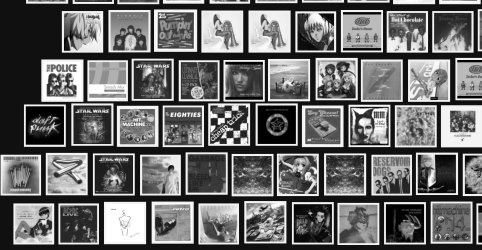
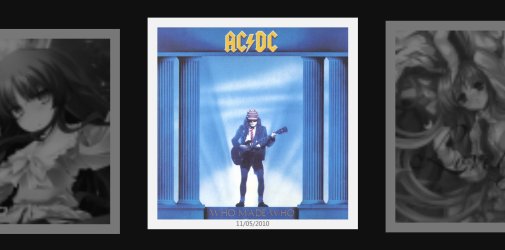
When you access the Music section, you can click on "Play Pictures" and WMC plays a zooming mosaic picture slideshow.
It continues if you leave it in the Music section (you don't have to be playing music).
WMC Slideshow.jpg
When it zooms in, the centred picture regains its colour.
WMC Slideshow 02.jpg
I don't use WMC myself.
I don't like:

  • How many services it starts
  • Its messy GUI
Looks like you are SOOL, until you can fix the problem with that iTunes "screensaver".
 

My Computer My Computer

At a glance

W7 Ultimate SP1, LM19.2 MATE, W10 Home 1703, ...AMD Phenom II x6 1100T, 3.3 GHz12GB DDR3 1333 G-Skill (4GB x 2), G-Skill (2G...NVIDIA GeForce GTX 660
Computer type
PC/Desktop
Computer Manufacturer/Model Number
n/a
OS
W7 Ultimate SP1, LM19.2 MATE, W10 Home 1703, W10 Pro 1703 VM, #All 64 bit
CPU
AMD Phenom II x6 1100T, 3.3 GHz
Motherboard
ASUS M4A88T-M/USB3 (AM3)
Memory
12GB DDR3 1333 G-Skill (4GB x 2), G-Skill (2GB x 2)
Graphics Card(s)
NVIDIA GeForce GTX 660
Sound Card
Realtek?
Monitor(s) Displays
Samsung S23B350
Screen Resolution
1920x1080
Hard Drives
WD Green 2TB (SATA), WD Green 3TB (SATA), WD Blue 4TB (SATA), WD Blue 6TB (SATA)
PSU
Cooler Master
Case
Antec GX300 Tower
Cooling
3x Antec TRICOOL 120mm Fans
Mouse
Wired Optical
Internet Speed
DSL
Antivirus
Avast
Browser
Pale Moon (64 bit)
Other Info
2018-12-27 Upgraded HDDs
2015-12-10 Upgraded case, graphics card, storage
2015-08-15 Upgraded motherboard & RAM
2015-07-15 Upgraded LM17.1 to LM17.2
It install fine, when you go in screensaver settins it appear, you can configure it BUT windows doesn't "remember it" still showing NO SCREEN SAVER on the display setting page...
You both didn't (fully) read my message... The app was of course installed in the x86 program files BUT the screen saver file is in SysWOW64 which is normal. Bongo, after you selected it and pressed ok, check the display setting windows at bottom right, screen saver shows NONE and wait 1minute : NOTHING WILL HAPPEN.

I will have you know I did read everything you wrote. We are all volunteering here trying to help others there is no reason to get upset.

Post some screenshots of how you are trying to set it up.
Use these tutorials for posting screenshots.
http://www.sevenforums.com/tutorials/9717-screenshot-paint.html
How to Use the Snipping Tool in Vista - Vista Forums
http://www.sevenforums.com/tutorials/9733-screenshots-files-upload-post-seven-forums.html

Like I said above it works for me I have it set on 1 min.

Jerry
Windows 7 64 bit - VMware Player (Non-commercial use only).png
 

My Computer My Computer

At a glance

Win 7 Pro x64 / Win 10 ProIntel(R) Core(TM) i7-3630QM CPU @ 2.40GHz12 GB(1) Intel(R) HD Graphics 4000 (2) NVIDIA GeFo...
Computer type
Laptop
Computer Manufacturer/Model Number
Sager NP9170
OS
Win 7 Pro x64 / Win 10 Pro
CPU
Intel(R) Core(TM) i7-3630QM CPU @ 2.40GHz
Motherboard
CLEVO P170EM
Memory
12 GB
Graphics Card(s)
(1) Intel(R) HD Graphics 4000 (2) NVIDIA GeForce GTX 675M
Sound Card
(1) Realtek High Definition Audio (2) Intel(R) Display Aud
Monitor(s) Displays
17.3
Screen Resolution
1920x1080
Hard Drives
(1) Samsung 860 EVO 500GB(OS) (1) Samsung 860 EVO 500GB(Data)
Keyboard
Backlite
Antivirus
MSE, Malwarebytes Pro
Browser
Firefox
Other Info
DESKTOP: Custom-built.
OS: Win 10 Pro x64.
CASE: Rosewill R5.
CPU: Intel I5 4670K CPU @ 3.40GHz.
CPU COOLER: Cool Master Hyper 212 EVO.
MOTHERBOARD: Asus Z87-A.
MEMORY: Kingston HyperX 2x4 GB.
GPU: Nvidia Geforce 650 TI.
PSU: Corsair TX750.
DRIVES: (1) Samsung 840 120 GB SSD (2) Western Digital blue 500 GB 7200 RPM.
You tested it on x64 system as virtual so... Do you press preview button? If so it's normal it works but If you wait the delay you set for screensaver to come it wouldn't. Ok I will make screenshots. I use x64 ultimate sp1. And the version of the app is last one I guess.
 

My Computer My Computer

At a glance

Ultimate x86 & x64
OS
Ultimate x86 & x64
Ok i've tried on a virtual Windows 7 : first it didn't work. Then i found another exe of the app, didn't know i had two... First one (the one on the website 1.0.1b13) is the one not worked. The other one 1.0.17 (dunno where i got that..) works.. On the virtual only!

I installed it on my local machine, it doesn't work... Makes me sick! I tested on a test account also (one that's empty, often problem on an account doesn't happen on new one..) i noticed one things : when you go in settings, in the "about" section, there's a year : It shows 2011 on the virtual system (weird as app's much older) and shows 2007 on local. Looks like a conflict, but what..?
 

My Computer My Computer

At a glance

Ultimate x86 & x64
OS
Ultimate x86 & x64
Well I installed it on my local machine I can confirm that you are right it does not work on local machine at least 64-bit I don't have a 32-bit computer, for some reason it breaks the screensaver when in personalization window it keep showing the red circle with a slash through it showing its disabled. I would've thought if it worked in the virtual machine it will work on it anywhere.

One thing I did do I went to C:\Windows\SysWOW64\Album Art Screensaver.scr right click on it then Send to> Desktop (create shortcut) and I was able to start it manually from that shortcut, I know it's not perfect but it does work that way.

Jerry
 

My Computer My Computer

At a glance

Win 7 Pro x64 / Win 10 ProIntel(R) Core(TM) i7-3630QM CPU @ 2.40GHz12 GB(1) Intel(R) HD Graphics 4000 (2) NVIDIA GeFo...
Computer type
Laptop
Computer Manufacturer/Model Number
Sager NP9170
OS
Win 7 Pro x64 / Win 10 Pro
CPU
Intel(R) Core(TM) i7-3630QM CPU @ 2.40GHz
Motherboard
CLEVO P170EM
Memory
12 GB
Graphics Card(s)
(1) Intel(R) HD Graphics 4000 (2) NVIDIA GeForce GTX 675M
Sound Card
(1) Realtek High Definition Audio (2) Intel(R) Display Aud
Monitor(s) Displays
17.3
Screen Resolution
1920x1080
Hard Drives
(1) Samsung 860 EVO 500GB(OS) (1) Samsung 860 EVO 500GB(Data)
Keyboard
Backlite
Antivirus
MSE, Malwarebytes Pro
Browser
Firefox
Other Info
DESKTOP: Custom-built.
OS: Win 10 Pro x64.
CASE: Rosewill R5.
CPU: Intel I5 4670K CPU @ 3.40GHz.
CPU COOLER: Cool Master Hyper 212 EVO.
MOTHERBOARD: Asus Z87-A.
MEMORY: Kingston HyperX 2x4 GB.
GPU: Nvidia Geforce 650 TI.
PSU: Corsair TX750.
DRIVES: (1) Samsung 840 120 GB SSD (2) Western Digital blue 500 GB 7200 RPM.
Yeah, i'm posting from my older install (cleaner..) on another partition and it refuse working here too...

Thanks for the tip and for helping, i'm still hoping someone with dev knowledge would try to have a look in it...

If that's possible! I guess it is? If not just have to find an app that starts what you want after 00xx inactivity.

I did some search on google and found some apps, but 1/ not free 2/ doesn't even work? It's called System Screensaver.
 

My Computer My Computer

At a glance

Ultimate x86 & x64
OS
Ultimate x86 & x64
ive no idea if this would work on win 7 but you could have a play to get the shortcut jerry tipped you to start when system idle

App's Apps - IdleStart

or search for similar apps.
maybe task scheduler could be made to work it after xx time idle
 

My Computer My Computer

At a glance

Microsoft Windows 7 Home Premium 64-bit 7600IIx4 amd athelon 635 processor2x2gbati radeon HD 5450
Computer Manufacturer/Model Number
Hewlett packard/p6512uk
OS
Microsoft Windows 7 Home Premium 64-bit 7600
CPU
IIx4 amd athelon 635 processor
Motherboard
FOXCONN 2AA9
Memory
2x2gb
Graphics Card(s)
ati radeon HD 5450
Sound Card
(1) Realtek High Definition Audio (2) AMD High Definition
Monitor(s) Displays
samsung lcd tv 32"
Screen Resolution
1360x 768
Hard Drives
(1) WDC WD10 01FAES-60Z2A0 SATA Disk Device (2) Maxtor OneTouch USB Device (3) ST310003 33AS USB Device (4) WD My Book 1111 USB Device
PSU
?
Cooling
air!
Keyboard
wireless hp
Mouse
wireless Hp,optical
Internet Speed
1.10mb/s
Antivirus
MSE
Browser
Firefox
Thanks, just after i posted previous post, i searched and found that app :) Also found Startich but less good...

Both miss an option to lock computer after launched app/sceensaver quit! Tried windows scheduler, it starts the screen saver... Windowed :confused:
 

My Computer My Computer

At a glance

Ultimate x86 & x64
OS
Ultimate x86 & x64
Ok just noticied a problem... While you watch a movie :confused: It'll start still...
 

My Computer My Computer

At a glance

Ultimate x86 & x64
OS
Ultimate x86 & x64

My Computer My Computer

At a glance

Microsoft Windows 7 Home Premium 64-bit 7600IIx4 amd athelon 635 processor2x2gbati radeon HD 5450
Computer Manufacturer/Model Number
Hewlett packard/p6512uk
OS
Microsoft Windows 7 Home Premium 64-bit 7600
CPU
IIx4 amd athelon 635 processor
Motherboard
FOXCONN 2AA9
Memory
2x2gb
Graphics Card(s)
ati radeon HD 5450
Sound Card
(1) Realtek High Definition Audio (2) AMD High Definition
Monitor(s) Displays
samsung lcd tv 32"
Screen Resolution
1360x 768
Hard Drives
(1) WDC WD10 01FAES-60Z2A0 SATA Disk Device (2) Maxtor OneTouch USB Device (3) ST310003 33AS USB Device (4) WD My Book 1111 USB Device
PSU
?
Cooling
air!
Keyboard
wireless hp
Mouse
wireless Hp,optical
Internet Speed
1.10mb/s
Antivirus
MSE
Browser
Firefox
I of course did contact him before posting... He's but using Windows anymore (went on the dark side!) So he won't won't find time for that.
 

My Computer My Computer

At a glance

Ultimate x86 & x64
OS
Ultimate x86 & x64
Back
Top