Changing drive letter back to c:\

acars12

New member
Local time
11:29 AM
Messages
2
I recently upgraded to the full version on win 7 pro. I installed it on a partition labeled D:\. After reloading my programs and double checking to make sure all work I deleted the partition that had win7 rc on it which was C:\ then expanded my d: partition to regain all my drive space. Now I only have 1 partition which is drive D:\. I want to change the drive letter to C:\ but will it screw up the registry entries for all my files and programs? Can I change D: to C: or should I just leave it.
When I boot up from my win7 install disc and choose the repair option it shows my disk as C: strange??
any ideas?
 

My Computer

Computer Manufacturer/Model Number
home built
OS
windows 7 pro 64bit
CPU
2.8ghz c2d e7400 intel
Motherboard
intel dg43nb
Memory
4g
Hard Drives
500g wd sata
Just leave it as is...unless you want to start all over again.
 

My Computer

Computer type
PC/Desktop
Computer Manufacturer/Model Number
Alienware Aurora ALX R4
OS
Windows 10 Pro (x64)
CPU
Intel Core i7-3930K (3.2GHz - 4.5GHz)
Motherboard
Alienware Aurora-R4 x79
Memory
4x Samsung 4GB PC3-12800 DDR3 (16GB 1600MHz)
Graphics Card(s)
Nvidia Geforce GTX 690
Sound Card
SteelSeries Siberia Elite
Monitor(s) Displays
Dell UltraSharp U3011
Screen Resolution
2560x1600
Hard Drives
Samsung 850 Pro 256 GB, Seagate 1TB Desktop Hybrid HDD, 2x Western Digital 4TB Green HDD
PSU
875W Some Dell PSU <.<
Case
Alienware Aurora ALX
Cooling
Custom Liquid Cooling (EK CPU & GPU blocks) dual EK 480RAD
Keyboard
Logitech G710+ Mechanical
Mouse
Logitech G700s
Internet Speed
Verizon Fios (50 mbps average)
Other Info
Server: Intel NUC D54250WYK: i5-4250U, 16GB, 256 GB mSATA, Windows Server 2012 R2
Are we sure of this?
 

My Computer

Computer Manufacturer/Model Number
home built
OS
windows 7 pro 64bit
CPU
2.8ghz c2d e7400 intel
Motherboard
intel dg43nb
Memory
4g
Hard Drives
500g wd sata
Are we sure of this?

Hey acars

you have 2 choices. First leave it. Second change it (and maybe have to do a clean install). Which would you like to do? Me Im not the cautious type.

Ken
 

My Computer

Computer Manufacturer/Model Number
HP Pavillion dv-7 1005 Tx
OS
Win 8 Release candidate 8400
CPU
[email protected]
Memory
4 gigs
Graphics Card(s)
Nvidia 9600M
Sound Card
HD built-in
Monitor(s) Displays
17" Wxga
Screen Resolution
1440x900
Cooling
none
Internet Speed
45Mb down 5Mb up
Got a good IMAGE backup tool? Recommend you do an image backup before trying to change it. :)
 

My Computer

OS
XP Pro & Vista Home Premium (x86); Windows Ultimate 7600 x64 Retail
Are we sure of this?

don't change it.

You'll screw up the install 100% positive!!

edit: and yes, all your registry entries and settings entries point to d:.

They won't know where to find it after you change to C:

Unless you want to change a couple of hundred thousands of registry entries, or do a clean install, don't change it.
 

My Computer

OS
Win7 Build 7600 x86
CPU
Pentium II 300MHz
Motherboard
Asus
Memory
32mb EDO RAM
Graphics Card(s)
Diamond Viper
Sound Card
Soundblaster 16
Monitor(s) Displays
14" AOC CRT 16K color
Screen Resolution
800x600
Hard Drives
300mb Quantum fireball
PSU
110 Watts
Cooling
Passive
Keyboard
Trust Ergonomic
Mouse
Generic
Internet Speed
256K u 128K d
I installed it on a partition labeled D:\.
I deleted the partition C:\
then expanded D: partition to regain all drive space.
Now have 1 partition D:\.

I want to change the drive letter to C:\
but will it screw up the registry entries for all my files and programs?
Can I change D: to C: or should I just leave it.
win7 install disc shows my disk as C:
I'm not saying here that you should change it or should not change it..

Rather, posting some random thoughts and questions.
Before actually doing anything, the disk image backup advice is an absolute must.

The OP should only have "Disk_0,Partition_1" IAW his posting.

The D: should just be a letter.
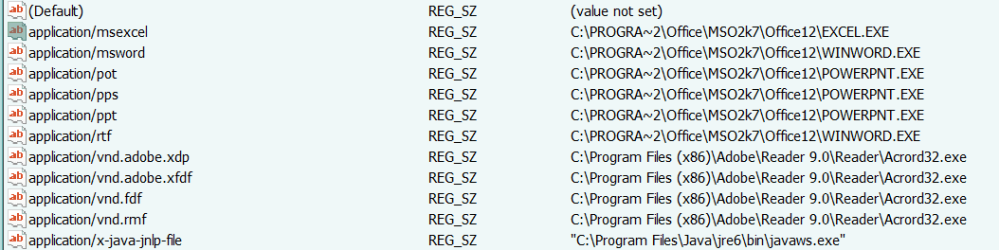
The 'registry' seems to be the main concern about this.
Note: this is not for others who have more than 1 partition, OP only,
since he did the actual deletion/merging:
Is this letter ( D: ), in fact, carried through your current 'registry'?
Can the OP be 100% sure about this? Can you post a pic?

For Others:
(Can a registry search be done to prove/disprove this?)
If his registry is carrying 'D:\' for items, how can the OS find them?
What mechanism is used here?

W7 says he is C: which should be 'Disk0_Partition_1',
all programs should now be on 'Disk0_Partition_1',
and the registry has pointers to D: ???

Somehow, this doesn't seem to jive right, to me.
It strikes me that if the OperatingSystem's "Disk Management" or "diskpart" allows OP to change the D: to C: (which it may or may not allow),
then the OperatingSystem should have the 'brains' to change all Registry-entries containing D:, to the new letter C: .
I thought that's what OSs are supposedly for, to keep track of things...

I believe that the letter D: is just that -- a letter.
Running 'diskpart' from the W7 booted DVD should confirm that.
Could you post a list of your "diskpart" output results?
i.e:
list disk
list volume

If there is a "D:" it should be the DVD drive.
If the OP Registry does have ( D: ) in it, then its more screwy than I could have ever imagined.
OTOH, I don't know a bloody thing about the Registry, that's why all the bloody dumb questions... :)
 

My Computer

Computer Manufacturer/Model Number
Gateway GT5056
OS
XP_Pro, W7_7201, W7RC.vhd, SciLinux5.3, Fedora12, Fedora9_2x, OpenSolaris_09-06
CPU
AMD 64x2
Motherboard
Yes
Memory
1 gig
Graphics Card(s)
Dunno
Sound Card
Realtek something
Monitor(s) Displays
Samsung SyncMaster 940MW w/TV
Screen Resolution
1280x1024
Hard Drives
250 GB WD, USB Seagate Freedesk 1.5 T
Internet Speed
Cable modem
Other Info
1 + 1 = 10b,
7 + 7 = 16o,
a + b = 15h.
The picture below is just a quickie. There are numerous other inclusions, even things like C\, C, (D\ D), and other oddities. Pointers, relative pointers...

Any installer or app can write to the registry. Many installers and apps include GOTO - to put it in perspective for you.

OP and Chuck - it is simply not a good idea. It is maybe the worst idea right after using 240 AC to speed up the PC. I will gladly assist in the recovery of this system at shop prices.
 

Attachments

  • 1ture.PNG
    1ture.PNG
    7.9 KB · Views: 520
You mean using 240 AC is not what they mean by increasing the RAM voltages? :confused:

Dang it, I knew there was a trick to it! I better go and change that post I made in another forum... ;)
 

My Computer

OS
XP Pro & Vista Home Premium (x86); Windows Ultimate 7600 x64 Retail
@ OP and ChuckR,

My advise to not do it, is not based on a guess.

I have tried it a few times on different OS's just for the fun of finding out if it could be done.

I even had the tools to go through registry and automatically change all instances of d: to c:

But there are a lot of registry pointers in hex numbers, and all kind of other numbered references that represent the bootdisk.

A lot of apps use ini files with references.
You would have to go through those also.

But before I ever got to the point of changing everything, my OS would go into all kinds of BSOD and errors.

I never made it through without wrecking my OS.


Is it impossible? No, probably not.

Is it worth the trouble? Definitely not!

Greetz
 

My Computer

OS
Win7 Build 7600 x86
CPU
Pentium II 300MHz
Motherboard
Asus
Memory
32mb EDO RAM
Graphics Card(s)
Diamond Viper
Sound Card
Soundblaster 16
Monitor(s) Displays
14" AOC CRT 16K color
Screen Resolution
800x600
Hard Drives
300mb Quantum fireball
PSU
110 Watts
Cooling
Passive
Keyboard
Trust Ergonomic
Mouse
Generic
Internet Speed
256K u 128K d
You mean using 240 AC is not what they mean by increasing the RAM voltages? :confused:

Dang it, I knew there was a trick to it! I better go and change that post I made in another forum... ;)

dang! and i've just paid good money for this!
 

Attachments

  • 22012009434.jpg
    22012009434.jpg
    98.8 KB · Views: 55

My Computer

Computer Manufacturer/Model Number
mickey megabyte 1234
OS
ultimate 64 sp1
CPU
i5 2500K [email protected]
Motherboard
MSI P67A-GD53
Memory
8 gigs GSkill Ripjaws 1600
Graphics Card(s)
amd hd6950
Sound Card
creative x-fi gamer
Monitor(s) Displays
samsung 24"
Screen Resolution
1920x1080
Hard Drives
ocz vertex 2e 60 gig, samsung f3 1tb, buffalo 2tb ext
PSU
antec 550
Case
antec three hundred
Cooling
i'm a cooling fan
Keyboard
saitek eclipse ii
Mouse
logitech g3
Internet Speed
about 4 Mbps
Other Info
i love win7
@ OP and ChuckR,

My advise to not do it, is not based on a guess.

I have tried it a few times on different OS's just for the fun of finding out if it could be done.

I even had the tools to go through registry and automatically change all instances of d: to c:

But there are a lot of registry pointers in hex numbers, and all kind of other numbered references that represent the bootdisk.

A lot of apps use ini files with references.
You would have to go through those also.

But before I ever got to the point of changing everything, my OS would go into all kinds of BSOD and errors.
I never made it through without wrecking my OS.

Is it impossible? No, probably not.
Is it worth the trouble? Definitely not!
Greetz
squonksc,
Thanks for the post - must have missed it somehow...

To me, its now a question of "How does he do that?"

Personally, I would also just leave it as it is, without 'trying' anything.

But now, given the situation and the 'facts', it just makes me wonder what the heck is going on here... :rolleyes:

One partition, Win 7 calls everyplace he's booted from as "C:" (even if XP calls it "R:"), etc. And Win 7 uses "D:"

Things don't 'jive' in my mind, so it would be interesting to try to understand whatever 'mechanism' he's operating under...

(Another M$ 'Unsolved mystery', I guess!)
Technet might have a blurb somewhere, regarding this, but I'm not gonna chase it down (not too soon, anyway)...
 

My Computer

Computer Manufacturer/Model Number
Gateway GT5056
OS
XP_Pro, W7_7201, W7RC.vhd, SciLinux5.3, Fedora12, Fedora9_2x, OpenSolaris_09-06
CPU
AMD 64x2
Motherboard
Yes
Memory
1 gig
Graphics Card(s)
Dunno
Sound Card
Realtek something
Monitor(s) Displays
Samsung SyncMaster 940MW w/TV
Screen Resolution
1280x1024
Hard Drives
250 GB WD, USB Seagate Freedesk 1.5 T
Internet Speed
Cable modem
Other Info
1 + 1 = 10b,
7 + 7 = 16o,
a + b = 15h.
Hey, just wanted to add a solution to this problem, since this post is one of the top google search results. I know it's an old thread, but people will see it, and it may be useful to someone.

I had to change the drive letter back to C after reinstalling windows and finding that some essential drivers assume the drive letter is C and therefore can never be installed. There is a super easy solution, and you can effectively change the drive letter back to C after reinstalling windows or whatever. Just create a symbolic link.

Right click My Computer, go to Computer Management, shrink a drive down 8MB, and create a new drive C:/.

Then just open the command prompt as administrator (type cmd into start menu, right click run as administrator), and and type commands like this, as necessary.

mklink /J "C:\Program Files" "D:\Program Files"
mklink /J "C:\Program Files (x86)" "D:\Program Files (x86)"
mklink /J "C:\Users" "D:\Users"
mklink /J "C:\Windows" "D:\Windows"

Sadly, it appears that it is not possible to go directly from D to C, but this will fix any program installation issues and works for all practical purposes. But at least this works immediately with no effort or risk.
 

My Computer

Computer type
PC/Desktop
OS
Windows 7 64
Back
Top