Direct X 11.1 not available for Win7, only Win8

I heard about this from an avid gamer who said this is how he is being pushed into Win8 even though he loves Win7 and doesn't want to downgrade.

He kept referring to latest DirectX so I thought he probably meant 12, but researching it I only found the story about 11.1. Is this some type of beta for 12, or does it become 11 once it's installed like a SP becomes Win7?
Far as i know win 7 has it complete when you install it with sp1
but it still shows up as using 10 anyway I would think it would be inputed into the video drivers more then it is being run in windows

Pretty much it's useless there trying to scam people like the African Lottery

Your screen shot shows Direct x 10 because that's all your video card will support. Mine shows the same thing but if I run dxdiag it shows Direct X 11

View attachment 252225
I know if i do that it will show up as dx11 my point of it is windows doesn't even reconize it on the general information and most people wouldn't know how to pull that tool up to make sure just saying
 

My Computer My Computer

At a glance

Windows 10 Home Premium 64bit sp1Intel I7-6700K @ 4.6 Ghz 1.344 volts everyday OC32GB G-Skill TridentZ 3200mhz 16-18-18-38 DDR4Sli Gigabyte Windforce GTX 980 G1
Computer type
PC/Desktop
Computer Manufacturer/Model Number
CoreI7-6700K MrFingerIII Special Builds
OS
Windows 10 Home Premium 64bit sp1
CPU
Intel I7-6700K @ 4.6 Ghz 1.344 volts everyday OC
Motherboard
Asrock Fatality K6 Z170 Socket 1151
Memory
32GB G-Skill TridentZ 3200mhz 16-18-18-38 DDR4
Graphics Card(s)
Sli Gigabyte Windforce GTX 980 G1
Sound Card
AC97 Creative Rage Tactic 3D Headphones Bluetooth
Monitor(s) Displays
27" Asus ROG Swift PG278Q G-Sync 48" Vizio Smart HD TV
Screen Resolution
2560x1440p 27"- 48" Currently Gaming at 2560x1440p Res 2K
Hard Drives
250GB Samsung Evo840SSD Seagate baracuda 500 GB WD Mybook 500Gb 1TB Seagate Barracuda
PSU
HX1050w Corsair Silver 80plus certified crosfire/sli
Case
Enthod Pro Full Tower
Cooling
Corsair H110i GT 280 mm High Performance WaterBlock
Keyboard
Logitech wireless keyboard
Mouse
Logitech wireless mouse
Internet Speed
Cox Cable 100+ mb
Antivirus
WebRoot Spysweeper with Antivirus
Browser
IE-10, Chrome, Opera
Other Info
My Other Rig is a AMD FX8320E @4.6Ghz 16GB Ballistic Sport Ram
Mobo Asrock Fatality 990FX 120GB OCZ SSD 1TB Seagate Barracuda Corsair H75 Cooling PSU Corsair CX750
GPU GTX Gigabyte 970G1
OK I got you now. Yeah your right, most people would look at that and then wonder why 11 isn't installed. I'm thinking the System info page is showing what version is being used and dxdiag shows what version is installed. My current video card only supports Directx 10
 

My Computer My Computer

At a glance

Windows 10 Education 64 bitAMD Phenom II X4 980 Black Edition Deneb 3.7GHz8GB 4GBx2 Kingston PC10600 DDR3 1333 MemoryZotac NVIDIA Geforce GT640 2 Gig DDR3 PCIe
Computer type
PC/Desktop
Computer Manufacturer/Model Number
Home Built
OS
Windows 10 Education 64 bit
CPU
AMD Phenom II X4 980 Black Edition Deneb 3.7GHz
Motherboard
Asus M4N68T-M V2 µATX Motherboard
Memory
8GB 4GBx2 Kingston PC10600 DDR3 1333 Memory
Graphics Card(s)
Zotac NVIDIA Geforce GT640 2 Gig DDR3 PCIe
Sound Card
VIA VT1708s High Definition Audio 8-channel Onboard
Monitor(s) Displays
22" LG E2242 1080p and 2 19" I-INC AG191D
Screen Resolution
1280x1024 - 1920x1080 - 1280x1024
Hard Drives
Crucial M100 256 GB SSD and 500 GB WD Blue SATA
PSU
Thermaltake TR 620
Case
Power Up Black ATX Mid-Tower Case
Cooling
Stock heatsink and fan
Keyboard
Logitech Wireless K350 Wave
Mouse
Logitech Wireless M570 Trackman Wheel
Internet Speed
80 Mbps Down 30 Mbps Up
Antivirus
Windows Defender
Browser
Internet Explorer 11
Other Info
HP DVD1040e Lightscribe - External USB2
Yes and that is why there is no point to go running out for win 8 unless you have a purpose for it and not just because of DX11.1
 

My Computer My Computer

At a glance

Windows 10 Home Premium 64bit sp1Intel I7-6700K @ 4.6 Ghz 1.344 volts everyday OC32GB G-Skill TridentZ 3200mhz 16-18-18-38 DDR4Sli Gigabyte Windforce GTX 980 G1
Computer type
PC/Desktop
Computer Manufacturer/Model Number
CoreI7-6700K MrFingerIII Special Builds
OS
Windows 10 Home Premium 64bit sp1
CPU
Intel I7-6700K @ 4.6 Ghz 1.344 volts everyday OC
Motherboard
Asrock Fatality K6 Z170 Socket 1151
Memory
32GB G-Skill TridentZ 3200mhz 16-18-18-38 DDR4
Graphics Card(s)
Sli Gigabyte Windforce GTX 980 G1
Sound Card
AC97 Creative Rage Tactic 3D Headphones Bluetooth
Monitor(s) Displays
27" Asus ROG Swift PG278Q G-Sync 48" Vizio Smart HD TV
Screen Resolution
2560x1440p 27"- 48" Currently Gaming at 2560x1440p Res 2K
Hard Drives
250GB Samsung Evo840SSD Seagate baracuda 500 GB WD Mybook 500Gb 1TB Seagate Barracuda
PSU
HX1050w Corsair Silver 80plus certified crosfire/sli
Case
Enthod Pro Full Tower
Cooling
Corsair H110i GT 280 mm High Performance WaterBlock
Keyboard
Logitech wireless keyboard
Mouse
Logitech wireless mouse
Internet Speed
Cox Cable 100+ mb
Antivirus
WebRoot Spysweeper with Antivirus
Browser
IE-10, Chrome, Opera
Other Info
My Other Rig is a AMD FX8320E @4.6Ghz 16GB Ballistic Sport Ram
Mobo Asrock Fatality 990FX 120GB OCZ SSD 1TB Seagate Barracuda Corsair H75 Cooling PSU Corsair CX750
GPU GTX Gigabyte 970G1
If my video card supports DX11,why am I seeing this?
Is my card even using DX11?


Greg
 

Attachments

  • DX version.jpg
    DX version.jpg
    245.9 KB · Views: 44

My Computer My Computer

At a glance

Windows 7 Pro 64 bit SP1i7 3770K @ 4.8 Ghz/1.288 VcoreCorsair Vengeance LP 4 x 4gig PC3-12800 @1600MhzEVGA GTX 670 FTW
Computer Manufacturer/Model Number
Home Built
OS
Windows 7 Pro 64 bit SP1
CPU
i7 3770K @ 4.8 Ghz/1.288 Vcore
Motherboard
Asus Sabertooth Z77
Memory
Corsair Vengeance LP 4 x 4gig PC3-12800 @1600Mhz
Graphics Card(s)
EVGA GTX 670 FTW
Sound Card
Creative X-Fi Titanium Fatal1ty Pro
Monitor(s) Displays
Asus VW266H 25.5" HDMI WS
Screen Resolution
1920 X 1200
Hard Drives
OCZ 128 gig Vertex 4 SSD
OCZ 250 gig Vertex 4 SSD
2 Seagate Barracuda-500/320 gig 7200.11
PSU
Seasonic X Series 1250W
Case
Cooler Master HAF X RC-942-KKN1
Cooling
Corsair H100i/ 4 Cougar Vortex PWM 1500rpm in push/pull
Keyboard
Microsoft Natural Ergonomic 4000
Mouse
Microsoft Optical
Internet Speed
50mbps
@ glc, I haven't look extensively into that screen so I can't say why it says 10 when Windows and your Video card is 11 but I wouldn't worry about it. BTW mine shows the same. Anyway the one to be concerned with is the DX report, which clearly shows 11.

@ Solarstarshines, I never hinted you put words in my mouth, I just wanted my statement clear in case others had questions as to my meaning. All is good :)

@ gregrocker, Not sure why your friend is so worried about being behind the gaming curve when there aren't any DX11.1 games or DX11.1 video card on the market yet. And as has been noted, it'll be a while before such game are released. I would tell him the panic is unwarranted.

Also, so everyone is clear... Windows 7 comes natively with DirectX 11, even with the service pack or any updates.
 

My Computer My Computer

At a glance

Windows 10 ProIntel Core i7-4770K (3.5Ghz)32 gig Corsair Dominator Platinum (4x8Gig)Sapphire Tri-X R9 Fury
Computer type
PC/Desktop
Computer Manufacturer/Model Number
Custom built by me.
OS
Windows 10 Pro
CPU
Intel Core i7-4770K (3.5Ghz)
Motherboard
Gigabyte G1 Sniper 5 (F10 Bios)
Memory
32 gig Corsair Dominator Platinum (4x8Gig)
Graphics Card(s)
Sapphire Tri-X R9 Fury
Sound Card
Soundblaster ZXR
Monitor(s) Displays
NEC PA242W 24" LCD Monitor
Screen Resolution
1920 x 1200
Hard Drives
Primary - Samsung 850 Pro (512gig), Samsung 840 Pro (256gig), 2TB WD Caviar Black.
PSU
EVGA Supernova 1000 G2
Case
Cooler Master HAF X
Cooling
Corsair H100i with Corsair Air Series SP120 Quiet Fans
Keyboard
Logitech Wireless Wave
Mouse
Logitech Performance MX
Internet Speed
High Speed Cable
Antivirus
Norton Security
Browser
IE11
Other Info
Memory Timings - 1866MHz @ 9-9-9-27-1T @ 1.5 volts
I think he was only making the point that the choice to stick with Win7 is being foreclosed somewhat for avid gamers who want to keep up with DirectX's latest versions.
 
I think he was only making the point that the choice to stick with Win7 is being foreclosed somewhat for avid gamers who want to keep up with DirectX's latest versions.

Yeah but as I said, I don't see it as anything but hype to push gamers towards the OS; hoping to push the panic button on people.

Anyway we all want the latest DX version, but I'm not so sure most gamers are going to jump ship for it, unless the entire OS lends itself to improved gaming performance over 7.

In short, if Windows 8 can improve overall gaming performance, that'll sell, not just the lure of DX11.1

At this point, though I have 8, I've not set it up to test gaming performance so I really can't say if it's a big improvement or not. However, I don't see (read) many gamers jumping because of DX11.1, because we know it's (DX11.1) fairly useless at this point in time.
 

My Computer My Computer

At a glance

Windows 10 ProIntel Core i7-4770K (3.5Ghz)32 gig Corsair Dominator Platinum (4x8Gig)Sapphire Tri-X R9 Fury
Computer type
PC/Desktop
Computer Manufacturer/Model Number
Custom built by me.
OS
Windows 10 Pro
CPU
Intel Core i7-4770K (3.5Ghz)
Motherboard
Gigabyte G1 Sniper 5 (F10 Bios)
Memory
32 gig Corsair Dominator Platinum (4x8Gig)
Graphics Card(s)
Sapphire Tri-X R9 Fury
Sound Card
Soundblaster ZXR
Monitor(s) Displays
NEC PA242W 24" LCD Monitor
Screen Resolution
1920 x 1200
Hard Drives
Primary - Samsung 850 Pro (512gig), Samsung 840 Pro (256gig), 2TB WD Caviar Black.
PSU
EVGA Supernova 1000 G2
Case
Cooler Master HAF X
Cooling
Corsair H100i with Corsair Air Series SP120 Quiet Fans
Keyboard
Logitech Wireless Wave
Mouse
Logitech Performance MX
Internet Speed
High Speed Cable
Antivirus
Norton Security
Browser
IE11
Other Info
Memory Timings - 1866MHz @ 9-9-9-27-1T @ 1.5 volts
glc, I haven't look extensively into that screen so I can't say why it says 10 when Windows and your Video card is 11 but I wouldn't worry about it. BTW mine shows the same. Anyway the one to be concerned with is the DX report, which clearly shows 11.

Thanks!

In short, if Windows 8 can improve overall gaming performance, that'll sell, not just the lure of DX11.1

That's what I would have to see before I jump ship.

Greg
 

My Computer My Computer

At a glance

Windows 7 Pro 64 bit SP1i7 3770K @ 4.8 Ghz/1.288 VcoreCorsair Vengeance LP 4 x 4gig PC3-12800 @1600MhzEVGA GTX 670 FTW
Computer Manufacturer/Model Number
Home Built
OS
Windows 7 Pro 64 bit SP1
CPU
i7 3770K @ 4.8 Ghz/1.288 Vcore
Motherboard
Asus Sabertooth Z77
Memory
Corsair Vengeance LP 4 x 4gig PC3-12800 @1600Mhz
Graphics Card(s)
EVGA GTX 670 FTW
Sound Card
Creative X-Fi Titanium Fatal1ty Pro
Monitor(s) Displays
Asus VW266H 25.5" HDMI WS
Screen Resolution
1920 X 1200
Hard Drives
OCZ 128 gig Vertex 4 SSD
OCZ 250 gig Vertex 4 SSD
2 Seagate Barracuda-500/320 gig 7200.11
PSU
Seasonic X Series 1250W
Case
Cooler Master HAF X RC-942-KKN1
Cooling
Corsair H100i/ 4 Cougar Vortex PWM 1500rpm in push/pull
Keyboard
Microsoft Natural Ergonomic 4000
Mouse
Microsoft Optical
Internet Speed
50mbps

My Computer My Computer

At a glance

Windows 10 Education 64 bitAMD Phenom II X4 980 Black Edition Deneb 3.7GHz8GB 4GBx2 Kingston PC10600 DDR3 1333 MemoryZotac NVIDIA Geforce GT640 2 Gig DDR3 PCIe
Computer type
PC/Desktop
Computer Manufacturer/Model Number
Home Built
OS
Windows 10 Education 64 bit
CPU
AMD Phenom II X4 980 Black Edition Deneb 3.7GHz
Motherboard
Asus M4N68T-M V2 µATX Motherboard
Memory
8GB 4GBx2 Kingston PC10600 DDR3 1333 Memory
Graphics Card(s)
Zotac NVIDIA Geforce GT640 2 Gig DDR3 PCIe
Sound Card
VIA VT1708s High Definition Audio 8-channel Onboard
Monitor(s) Displays
22" LG E2242 1080p and 2 19" I-INC AG191D
Screen Resolution
1280x1024 - 1920x1080 - 1280x1024
Hard Drives
Crucial M100 256 GB SSD and 500 GB WD Blue SATA
PSU
Thermaltake TR 620
Case
Power Up Black ATX Mid-Tower Case
Cooling
Stock heatsink and fan
Keyboard
Logitech Wireless K350 Wave
Mouse
Logitech Wireless M570 Trackman Wheel
Internet Speed
80 Mbps Down 30 Mbps Up
Antivirus
Windows Defender
Browser
Internet Explorer 11
Other Info
HP DVD1040e Lightscribe - External USB2
Just MS playing every card in their hand to try and force Windows 8 adoption, short of completely destroying Windows 7 and Windows XP. Nothing out of the ordinary.
 

My Computer My Computer

At a glance

Windows 7 Ultimate x64 SP1Intel Core i7 2700K @ 3.5GHz (TurboBoost disa...16GB (4x4GB) Kingston HyperX DDR3 1600MHz @ 1...Nvidia EVGA GeForce GTX 1060 6GB
Computer type
PC/Desktop
Computer Manufacturer/Model Number
N/A (custom-built)
OS
Windows 7 Ultimate x64 SP1
CPU
Intel Core i7 2700K @ 3.5GHz (TurboBoost disabled)
Motherboard
ASUS P8Z68-V/GEN3
Memory
16GB (4x4GB) Kingston HyperX DDR3 1600MHz @ 1333MHz
Graphics Card(s)
Nvidia EVGA GeForce GTX 1060 6GB
Sound Card
Realtek High Definition Audio (motherboard integrated)
Monitor(s) Displays
NEC Multisync EX231W
Screen Resolution
1920x1080 @ 60Hz via DVI-D
Hard Drives
2x Western Digital 1TB SATA3 Caviar Black Internal HDD // 1x WD 500GB USB 3.0 "My Passport Essential" External HDD // 1x WD 1TB USB 3.0 "My Passport Essential" External HDD // 2x WD 2TB USB 3.0 "My Passport Essential" External HDD
PSU
Corsair Professional Series Gold AX850
Case
Antec 300
Cooling
Air-cooling
Keyboard
Steelseries 6Gv2
Mouse
Steelseries Sensei RAW Glossy, Logitech M500
Internet Speed
DSL (AT&T)
Antivirus
Microsoft Security Essentials
Browser
Pale Moon, Mozilla Firefox 12, Opera 12, Chromium, IE9
Other Info
Virtual Machines (VirtualBox):
* Japanese Windows XP Professional SP3
* Japanese Windows 7 Professional SP1
New ideas is good but not always better. Just because someone sticks with the old one doesn't necessary mean their stuck in the mud. Just waiting for something better.


Exactly. A certain few keep inferring that we're mistaken or behind the times, and that we should embrace Microsoft's screw up as a Godsend. W8's interface belongs on tablets and phones, not on desktops.
If anyone is mistaken or behind the times, it's Microsoft for trying to shove their tablet interface down the throats of desktop users with their "one size fits all" self serving brainstorm.
 

My Computer My Computer

At a glance

Windows 7 Pro x64Intel I7 6700 3.40 GHz8GB
Computer type
PC/Desktop
Computer Manufacturer/Model Number
HP ProDesk 400 G3
OS
Windows 7 Pro x64
CPU
Intel I7 6700 3.40 GHz
Memory
8GB
Monitor(s) Displays
Samsung 21.5" LED
Hard Drives
1 TB
Keyboard
Ducky mechanical with PBT double shot keycaps.
.......Horses are great to ride - but for the majority of people the Car has supplanted the use of these for normal transport and powered ships have surplanted Sailboats.......
Cheers
jimbo


So in your opinion going from W7 to W8 is like going from riding horses to riding in cars, and moving up to powered ships from sail boats?

In an earlier post you referred to W7 on a "touch enabled device" as a "DOG", you even described it as "HORRENDOUS".
Actually jimbo I think that's a fair assessment, but lets be fair about this;

If "one size fits all" was a "DOG" and "HORRENDOUS" when it meant putting a desktop interface on a tablet,
why is it not equally a "DOG" and "HORRENDOUS" when MS's "one size fits all" now means putting a tablet interface on a desktop??

Why shouldn't they both have an interface suitable for the device?
The mistake was MS's, not ours. We're not choosing horses over cars, we're choosing common sense over "DOGS".
 
Last edited:

My Computer My Computer

At a glance

Windows 7 Pro x64Intel I7 6700 3.40 GHz8GB
Computer type
PC/Desktop
Computer Manufacturer/Model Number
HP ProDesk 400 G3
OS
Windows 7 Pro x64
CPU
Intel I7 6700 3.40 GHz
Memory
8GB
Monitor(s) Displays
Samsung 21.5" LED
Hard Drives
1 TB
Keyboard
Ducky mechanical with PBT double shot keycaps.
.......Horses are great to ride - but for the majority of people the Car has supplanted the use of these for normal transport and powered ships have surplanted Sailboats.......
Cheers
jimbo


So in your opinion going from W7 to W8 is like going from riding horses to riding in cars, and moving up to powered ships from sail boats?

In an earlier post you referred to W7 on a "touch enabled device" as a "DOG", you even described it as "HORRENDOUS".
Actually jimbo I think that's a fair assessment, but lets be fair about this;

If "one size fits all" was a "DOG" and "HORRENDOUS" when it meant putting a desktop interface on a tablet,
why is it not equally a "DOG" and "HORRENDOUS" when MS's "one size fits all" now means putting a tablet interface on a desktop??

Why shouldn't they both have an interface suitable for the device?
The mistake was MS's, not ours. We're not choosing horses over cars, we're choosing common sense over "DOGS".

Hi there
I can't really see how W8 is "Only" a tablet interface -- It's very simple not to have to use any metro application at all -- OK you need ONE click to get to the desktop and that's it -- you can easily arrange your applications to be pinned to desktop and taskbar just like W7.

The main difference is instead of clicking an ORB and being presented with a "classical menu" -- which don't let's kid ourselves either - can also be a mile long and have zillions and zillions of entries-- you have to click (or touch) the desktop icon in W8 same nr of keystrokes and some people might actually prefer working that way.

You can easily arrange it that after the initial boot you NEVER have to see the W8 start screen again -- you can pin things like Control panel, and shutdown cmds if you are scared of a right mouse click to power off the machine instead of using the menu to your desktop / task bar ( so at the worst with a little bit of desktop management) only TWO different sets of keys are needed. A lot of standard applications often have one or two keys changed after a release update.

I Hated it at first but if you actually slightly re-order you work it's quite logical and makes a lot of sense.

If you can also remember just three or four key combinations (not to hard for even the most diehard W7 supporter) Windows key + Q gets you straight into search so you can find and run anything not on your desktop or quick launch bar, Windows key + R brings up the Run cmd dialog and also a useful one windows key + comma (,) makes all windows transparent so you can see your desktop

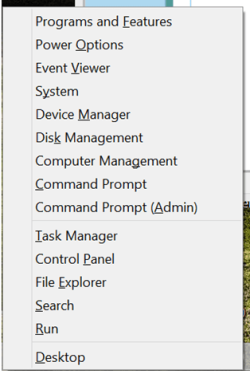
and finally a GOOD one for all you menu diehard fans Windows key + X brings up a little "classic menu" of some very nice quick features such as control panel, system management etc.

The Metro part - single tasking in full screen mode is a disaster - agreed -- I find this even on a mobile phone irritating when say you want to add an attachment to an email / facebook etc -- you virtually have to start again as these devices don't seem to have decent multi-tasking built in to the OS -- but with the power of these phones and tablets people will want this.

But again you don't have to use METRO at all if you don't want to.

A lot of the complaints against W8 are IMO grossly overdone. There are some very valid points that Ms needs to address but for 99.99% of typical home users I can't really see TOO much wrong with W8.

For the last 3 weeks now I've rarely used W7 -- the W8 system just seems so much snappier all ways round and I'm actually running it on a far less powerful machine than the one I have running W7.

I did have a learning curve and it was a pain to organise apps efficiently on desktop and taskbar - but once that was done I'm fine with it.

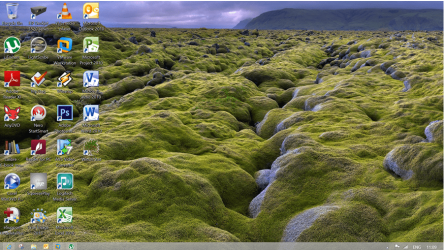
Enc screen shot of my W8 desktop -- almost identical to what I have in W7 - just missing the ORB of course, and the little popup menu you get when pressing the Windows key + X.


( And another little one for all those "Neat Freeks" who like minimal stuff on your desktop while working). - You can dynamically switch on and off desktop icons - so after you've launced an application say from your desktop just turn off desktop icons. !.

Cheers
jimbo
 

Attachments

  • minimenu.png
    minimenu.png
    22.3 KB · Views: 4
  • w8d.png
    w8d.png
    353.9 KB · Views: 8
Last edited:

My Computer My Computer

At a glance

Linux CENTOS 7 / various Windows OS'es and se...Intel i7 Intel i58GB, 16GBOn Motherboard
Computer type
PC/Desktop
Computer Manufacturer/Model Number
Custom built, several laptops HP/ASUS
OS
Linux CENTOS 7 / various Windows OS'es and servers
CPU
Intel i7 Intel i5
Memory
8GB, 16GB
Graphics Card(s)
On Motherboard
Sound Card
Realtek HD audio
Monitor(s) Displays
Apple Cinema display, Samsung LCD
Screen Resolution
1920 X 1080
Hard Drives
4 X 1TB SATA
Mouse
Toshiba wireless laser
Internet Speed
> 20MB up
So now the differences are almost nonexistent, but when it was W7 on your touch devices, the differences were
"HORRENDOUS"! W7 was a "DOG". Those were your descriptions, not mine.

W8 is fine for a mobile device since thats what it was designed for, but not a desktop.
I wouldn't even buy W8 for my wife! LOL
I bought her an IPAD. :D
 

My Computer My Computer

At a glance

Windows 7 Pro x64Intel I7 6700 3.40 GHz8GB
Computer type
PC/Desktop
Computer Manufacturer/Model Number
HP ProDesk 400 G3
OS
Windows 7 Pro x64
CPU
Intel I7 6700 3.40 GHz
Memory
8GB
Monitor(s) Displays
Samsung 21.5" LED
Hard Drives
1 TB
Keyboard
Ducky mechanical with PBT double shot keycaps.
Hi there
I can't really see how W8 is "Only" a tablet interface -- It's very simple not to have to use any metro application at all -- OK you need ONE click to get to the desktop and that's it -- you can easily arrange your applications to be pinned to desktop and taskbar just like W7.

The main difference is instead of clicking an ORB and being presented with a "classical menu" -- which don't let's kid ourselves either - can also be a mile long and have zillions and zillions of entries-- you have to click (or touch) the desktop icon in W8 same nr of keystrokes and some people might actually prefer working that way.

You can easily arrange it that after the initial boot you NEVER have to see the W8 start screen again -- you can pin things like Control panel, and shutdown cmds if you are scared of a right mouse click to power off the machine instead of using the menu to your desktop / task bar ( so at the worst with a little bit of desktop management) only TWO different sets of keys are needed. A lot of standard applications often have one or two keys changed after a release update.

I Hated it at first but if you actually slightly re-order you work it's quite logical and makes a lot of sense.

If you can also remember just three or four key combinations (not to hard for even the most diehard W7 supporter) Windows key + Q gets you straight into search so you can find and run anything not on your desktop or quick launch bar, Windows key + R brings up the Run cmd dialog and also a useful one windows key + comma (,) makes all windows transparent so you can see your desktop

and finally a GOOD one for all you menu diehard fans Windows key + X brings up a little "classic menu" of some very nice quick features such as control panel, system management etc.

The Metro part - single tasking in full screen mode is a disaster - agreed -- I find this even on a mobile phone irritating when say you want to add an attachment to an email / facebook etc -- you virtually have to start again as these devices don't seem to have decent multi-tasking built in to the OS -- but with the power of these phones and tablets people will want this.

But again you don't have to use METRO at all if you don't want to.

A lot of the complaints against W8 are IMO grossly overdone. There are some very valid points that Ms needs to address but for 99.99% of typical home users I can't really see TOO much wrong with W8.

For the last 3 weeks now I've rarely used W7 -- the W8 system just seems so much snappier all ways round and I'm actually running it on a far less powerful machine than the one I have running W7.

I did have a learning curve and it was a pain to organise apps efficiently on desktop and taskbar - but once that was done I'm fine with it.

Enc screen shot of my W8 desktop -- almost identical to what I have in W7 - just missing the ORB of course, and the little popup menu you get when pressing the Windows key + X.


( And another little one for all those "Neat Freeks" who like minimal stuff on your desktop while working). - You can dynamically switch on and off desktop icons - so after you've launced an application say from your desktop just turn off desktop icons. !.

Cheers
jimbo

When I see a post like this it reminds me of that "I will not eat green eggs and ham" story. Only in this case I did try the "green eggs and ham" on my desktop and didn't like it. ;)
 

My Computer My Computer

At a glance

Windows 10 Education 64 bitAMD Phenom II X4 980 Black Edition Deneb 3.7GHz8GB 4GBx2 Kingston PC10600 DDR3 1333 MemoryZotac NVIDIA Geforce GT640 2 Gig DDR3 PCIe
Computer type
PC/Desktop
Computer Manufacturer/Model Number
Home Built
OS
Windows 10 Education 64 bit
CPU
AMD Phenom II X4 980 Black Edition Deneb 3.7GHz
Motherboard
Asus M4N68T-M V2 µATX Motherboard
Memory
8GB 4GBx2 Kingston PC10600 DDR3 1333 Memory
Graphics Card(s)
Zotac NVIDIA Geforce GT640 2 Gig DDR3 PCIe
Sound Card
VIA VT1708s High Definition Audio 8-channel Onboard
Monitor(s) Displays
22" LG E2242 1080p and 2 19" I-INC AG191D
Screen Resolution
1280x1024 - 1920x1080 - 1280x1024
Hard Drives
Crucial M100 256 GB SSD and 500 GB WD Blue SATA
PSU
Thermaltake TR 620
Case
Power Up Black ATX Mid-Tower Case
Cooling
Stock heatsink and fan
Keyboard
Logitech Wireless K350 Wave
Mouse
Logitech Wireless M570 Trackman Wheel
Internet Speed
80 Mbps Down 30 Mbps Up
Antivirus
Windows Defender
Browser
Internet Explorer 11
Other Info
HP DVD1040e Lightscribe - External USB2
So now the differences are almost nonexistent, but when it was W7 on your touch devices, the differences were
"HORRENDOUS"! W7 was a "DOG". Those were your descriptions, not mine.

W8 is fine for a mobile device since thats what it was designed for, but not a desktop.
I wouldn't even buy W8 for my wife! LOL
I bought her an IPAD. :D

Hi there
you obviously haven't understood or don't want to understand what I've posted

Look at the your quote ".....................]So now the differences are almost nonexistent, but when it was W7 on your touch devices, the differences were
"HORRENDOUS"! W7 was a "DOG". Those were your descriptions, not mine. "

This means that on TOUCH DEVICES W7 was (and still is) a DOG.
For the rest it's fine -- I thought that was so bleedin' obvious from the post that it is self explanatory.

C'mon guy -- do you really think I'd say W7 is horrible if my W8 system runs almost the same as W7. --
Ok the English could be a bit better but the meaning seems to be perfectly clear - W8 can be made to run almost like W7 for people who want to use the "Classic desktop", and I still maintain W8 runs much more slickly on MY hardware (YMMV of course) and for Touch enabled devices it's a huge improvement over W7. Now if you don't like or care about touch that's fine - but the whole point of the post was to say that in general for loads of users the complaints against W8 are grossly overdone.

Finally it's everybody's choice --if you want to use W7 it's still available and will continue to be for years yet, if you want to switch that's a choice too -- and you can still use XP for another year too - although I think sourcing a retail copy would be a bit hard --still available on TechNet though.


Cheers
jimbo
 

My Computer My Computer

At a glance

Linux CENTOS 7 / various Windows OS'es and se...Intel i7 Intel i58GB, 16GBOn Motherboard
Computer type
PC/Desktop
Computer Manufacturer/Model Number
Custom built, several laptops HP/ASUS
OS
Linux CENTOS 7 / various Windows OS'es and servers
CPU
Intel i7 Intel i5
Memory
8GB, 16GB
Graphics Card(s)
On Motherboard
Sound Card
Realtek HD audio
Monitor(s) Displays
Apple Cinema display, Samsung LCD
Screen Resolution
1920 X 1080
Hard Drives
4 X 1TB SATA
Mouse
Toshiba wireless laser
Internet Speed
> 20MB up
Actually Jimbo, they were made of a compressed card material, something like very hard cardboard.

That's what I thought, but after all these years of thinking the fatality rate in a cardboard car must be huge..........I did a little research, I didn't have to look far.......The body was made of Duroplast.

'Duroplast is light, flexible, and strong. It is made of recycled material, cotton waste and phenol resins. Because it can be made in a press similar to shaping steel, it is more suitable for volume car production than fibreglass.
'


Code:
[URL]http://en.wikipedia.org/wiki/Duroplast[/URL]

All hail Wikipedia!
 

My Computer My Computer

At a glance

Windows 7 Ultimate x64 SP1Intel Core i5-2500K (3300.0 MHz)8 GBytes (Dual-Channel)NVIDIA GeForce GT 440
Computer type
PC/Desktop
Computer Manufacturer/Model Number
Asus V-P8H67E
OS
Windows 7 Ultimate x64 SP1
CPU
Intel Core i5-2500K (3300.0 MHz)
Motherboard
ASUSTeK Computer INC. V-P8H67E Rev 1.xx
Memory
8 GBytes (Dual-Channel)
Graphics Card(s)
NVIDIA GeForce GT 440
Sound Card
NVIDIA High Definition Audio(4x)
Monitor(s) Displays
Xerox XM7-20w
Hard Drives
1ST Drive) Toshiba DT01ACA050
2ND Drive) WDC WD500AVDS-63U7B1
PSU
G7 Power Extreme 680W
Case
Asus
Cooling
Case fan, CPU fan
Keyboard
Zalman KG-400G
Mouse
Logitech G300
Internet Speed
12 Mbps
Antivirus
Disk1 Eset Smart Security 6/Disk2 AVG Internet security 2014
Browser
Mozilla Firefox
Forget it. Not getting into cardboard cars or planes with plastic wings. :huh:
 
Forget it. Not getting into cardboard cars or planes with plastic wings. :huh:

I'm also missing how this relates to the DirectX 11.1 not available to 7 users thread :eek:
 

My Computer My Computer

At a glance

Windows 10 ProIntel Core i7-4770K (3.5Ghz)32 gig Corsair Dominator Platinum (4x8Gig)Sapphire Tri-X R9 Fury
Computer type
PC/Desktop
Computer Manufacturer/Model Number
Custom built by me.
OS
Windows 10 Pro
CPU
Intel Core i7-4770K (3.5Ghz)
Motherboard
Gigabyte G1 Sniper 5 (F10 Bios)
Memory
32 gig Corsair Dominator Platinum (4x8Gig)
Graphics Card(s)
Sapphire Tri-X R9 Fury
Sound Card
Soundblaster ZXR
Monitor(s) Displays
NEC PA242W 24" LCD Monitor
Screen Resolution
1920 x 1200
Hard Drives
Primary - Samsung 850 Pro (512gig), Samsung 840 Pro (256gig), 2TB WD Caviar Black.
PSU
EVGA Supernova 1000 G2
Case
Cooler Master HAF X
Cooling
Corsair H100i with Corsair Air Series SP120 Quiet Fans
Keyboard
Logitech Wireless Wave
Mouse
Logitech Performance MX
Internet Speed
High Speed Cable
Antivirus
Norton Security
Browser
IE11
Other Info
Memory Timings - 1866MHz @ 9-9-9-27-1T @ 1.5 volts
Back
Top