
To all nVidia users: turn off Stereoscopic 3D

This is strange because I'm running the 190.38 and the steroscopic 3D is turned off by default. Having no problems at all with mine.

Same here, default is off so it's not really a problem unless you have the hardware that requires it and you want to enable it.

Going back to the previous post, I have had the opposite problem with all the 190 drivers, my fan randomly goes to 0% and stays there and the temp goes over 100c, I have had to manually set the fan speed as a result, since then had no problems with these drivers and performance is definitely better for me with the 190 drivers.

The other weird thing I have noticed with all the 190 drivers is my clocks are always fluctuating even when the computer is idle.
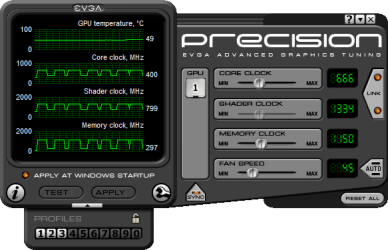
2009-08-18_014654.png
 

My Computer My Computer

At a glance

Windows 7 Ultimate Vista Ultimate x64Core 2 Duo E8500 3.16Ghz @ 3.8Ghz2x2Gigs Patriot PC2-6400 LLInno3D GeForce GTX260 216 SP
Computer Manufacturer/Model Number
Home Brew
OS
Windows 7 Ultimate Vista Ultimate x64
CPU
Core 2 Duo E8500 3.16Ghz @ 3.8Ghz
Motherboard
eVGA 750i FTW
Memory
2x2Gigs Patriot PC2-6400 LL
Graphics Card(s)
Inno3D GeForce GTX260 216 SP
Monitor(s) Displays
ASUS VW222U 22" 2ms Response time
Screen Resolution
1680x1050
Hard Drives
SATA 150GB
SATA II 250GB
USB IDE 750GB Ext.
PSU
HYTEC 600W & Thermaltake 650W Toughpower Power Exp
Case
Thermaltake Armor LCS (Liquid Cooling System)
Cooling
Liquid Cooling System
Keyboard
Logitech G15 Gaming Keyboard
Mouse
Logitech G9 Gaming Mouse
Same here, default is off so it's not really a problem unless you have the hardware that requires it and you want to enable it.

Going back to the previous post, I have had the opposite problem with all the 190 drivers, my fan randomly goes to 0% and stays there and the temp goes over 100c, I have had to manually set the fan speed as a result, since then had no problems with these drivers and performance is definitely better for me with the 190 drivers.

The other weird thing I have noticed with all the 190 drivers is my clocks are always fluctuating even when the computer is idle.

View attachment 23653

Strangely iv got it enabled by default(i dont own any 3d monitor and
gadgets) and every time i reinstall my 7en they are reenabled.

Yep, another conclusion: Nvidia drivers v190.38 are a fail!

Best if everyone come back to the good old 186...
 

My Computer My Computer

At a glance

Windows 7 SP1 x64Intel E8400 3.0 GHz4x1 Trascend DDR2 800 MhzGainward 8800GT 512 Mb
Computer type
PC/Desktop
Computer Manufacturer/Model Number
Custom
OS
Windows 7 SP1 x64
CPU
Intel E8400 3.0 GHz
Motherboard
Gigabyte EP45-DS3R
Memory
4x1 Trascend DDR2 800 Mhz
Graphics Card(s)
Gainward 8800GT 512 Mb
Sound Card
Realtek HD Audio 889A
Monitor(s) Displays
LG L204WS
Screen Resolution
1680x1050
Hard Drives
Intel 520 Series 120Gb SSD (System)
Western Digital 6400AAKS 640Gb (Data)
PSU
Cooler Master 650W
Case
Cooler Master Centurion 532
Cooling
2x 12 cm fans
Keyboard
Logitech Wave
Mouse
Logitech G5
Internet Speed
10 Mbit Cable Flat
Antivirus
NOD32 Smart Security
Browser
Google Chrome
News:Nvidia has fixed this issue with version 190.62(but for i see created a lot of others...)
So one bug less...update drives and continue work...or again disable the unnecessary service like i do:p
 

My Computer My Computer

At a glance

Windows 7 SP1 x64Intel E8400 3.0 GHz4x1 Trascend DDR2 800 MhzGainward 8800GT 512 Mb
Computer type
PC/Desktop
Computer Manufacturer/Model Number
Custom
OS
Windows 7 SP1 x64
CPU
Intel E8400 3.0 GHz
Motherboard
Gigabyte EP45-DS3R
Memory
4x1 Trascend DDR2 800 Mhz
Graphics Card(s)
Gainward 8800GT 512 Mb
Sound Card
Realtek HD Audio 889A
Monitor(s) Displays
LG L204WS
Screen Resolution
1680x1050
Hard Drives
Intel 520 Series 120Gb SSD (System)
Western Digital 6400AAKS 640Gb (Data)
PSU
Cooler Master 650W
Case
Cooler Master Centurion 532
Cooling
2x 12 cm fans
Keyboard
Logitech Wave
Mouse
Logitech G5
Internet Speed
10 Mbit Cable Flat
Antivirus
NOD32 Smart Security
Browser
Google Chrome
Back
Top