Installed Windows 7 Again but having Problem with Display

TheAJ

New member
Local time
2:07 PM
Messages
7
Hi,

I have:

Mother Board: A75MA-G55
Processor: A6-3650 AMD
GPU: MSI R6450 MD2GD3
Ram: 8 GB

The problem I'm facing is, It boots in CRT Monitor but as soon as Welcome Screen Comes it goes on HDMI.

CRT Monitor is of LG 700E
HDMI Display is Samsung 32 Inch LED

All the Drivers are Updated.

I was using this PC from last 1 Year but never faced this problem but today I installed Windows 7 again and facing this Problem.

It windows 7 64 Bit

Please let me know the solution

Thanks
 

My Computer My Computer

OS
Windows 7 64 Bit
How long have you been using this PC?

When you do a complete reinstall, it installs the original drivers -- unless you also go to the trouble to do Windows Updates and/or Driver Updates.

So, how do you know all the drivers are updated?
 

My Computer My Computer

Computer type
PC/Desktop
Computer Manufacturer/Model Number
Custom
OS
Win7 Pro 32-bit, Win8 Pro 32-bit
CPU
AMD Phenom II X6 1090T
Motherboard
Gigabyte
Memory
4GB ddr3 1300
Graphics Card(s)
AMD HD 4290 onboard
Sound Card
Builtin Realtek HD Audio
Monitor(s) Displays
Samsung 24" widescreen, LG 23" widescreen
Screen Resolution
1920x1200/1920x1080
Hard Drives
Kingston 256GB SSD
Keyboard
Logitech Illuminated Keyboard
Mouse
Logitech M705 wireless mouse
Antivirus
Norton Av 2013
Browser
IE v10
How long have you been using this PC?

When you do a complete reinstall, it installs the original drivers -- unless you also go to the trouble to do Windows Updates and/or Driver Updates.

So, how do you know all the drivers are updated?

I installed Windows 7 then installed GPU Driver Directly (Latest One)

I didn't installed any driver from the CD which I got with the GPU and Processor while purchasing.

What is the issue?
 

My Computer My Computer

OS
Windows 7 64 Bit
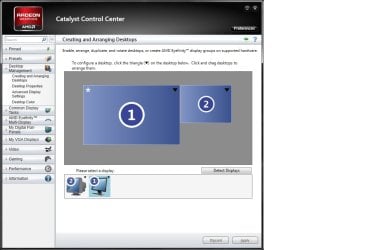
Since you have two monitors running, and are using an AMD graphics card, it will alway default to the HDMI monitor. You will have to go into the catalyst control center to extend the desktop or only have one or the other monitor running at a time. To extend the desktop, open CCC, expand "Desktop Management" and click "creating and Arranging Desktops". Under "Please select a display" choose your primary monitor via the upside down triangle and choose "extend the display" ( I think that's what it says).

ccc.jpg
 

My Computer My Computer

Computer Manufacturer/Model Number
Cranky's Rig
OS
Windows 7 Home Premium 64bit
CPU
Intel Core 2 Quad Q9550 (3329.0 MHz)
Motherboard
Asus P5Q Pro
Memory
Kingston Hyper X 1066Mhz (8GB)
Graphics Card(s)
XFX R7870 Black Edition OC
Sound Card
Asus Xonar DX
Monitor(s) Displays
Dell 2407WFP (24")
Screen Resolution
1920x1200
Hard Drives
OCZ Vertex 2 SSD (150GB)
PSU
Antec True Power Quattro 850W
Case
AZZA
Cooling
Arctic Cooling Freezer 7 Pro
Keyboard
Razer Black Widow
Mouse
Cyborg RAT 7
Internet Speed
30mbs
Other Info
Logitech Z-680 5.1 speakers
Logitech G13 Gamepad
Since you have two monitors running, and are using an AMD graphics card, it will alway default to the HDMI monitor. You will have to go into the catalyst control center to extend the desktop or only have one or the other monitor running at a time. To extend the desktop, open CCC, expand "Desktop Management" and click "creating and Arranging Desktops". Under "Please select a display" choose your primary monitor via the upside down triangle and choose "extend the display" ( I think that's what it says).

View attachment 253673

Hello,

I'm afraid because I guess you didn't understood my question.

I want to say that

From Boot Screen to Windows Logo it loads on CRT after that from Welcome screen it works display output on HDMI Display.

I want that It should only display on HDMI Display and I don't want to use CRT Display.
 

My Computer My Computer

OS
Windows 7 64 Bit
Are saying you don't want to use the CRT at all, and only use the HDMI or are you saying you only want the HDMI as your primary and use the CRT only as a secondary?
 

My Computer My Computer

Computer Manufacturer/Model Number
Cranky's Rig
OS
Windows 7 Home Premium 64bit
CPU
Intel Core 2 Quad Q9550 (3329.0 MHz)
Motherboard
Asus P5Q Pro
Memory
Kingston Hyper X 1066Mhz (8GB)
Graphics Card(s)
XFX R7870 Black Edition OC
Sound Card
Asus Xonar DX
Monitor(s) Displays
Dell 2407WFP (24")
Screen Resolution
1920x1200
Hard Drives
OCZ Vertex 2 SSD (150GB)
PSU
Antec True Power Quattro 850W
Case
AZZA
Cooling
Arctic Cooling Freezer 7 Pro
Keyboard
Razer Black Widow
Mouse
Cyborg RAT 7
Internet Speed
30mbs
Other Info
Logitech Z-680 5.1 speakers
Logitech G13 Gamepad
Are saying you don't want to use the CRT at all, and only use the HDMI or are you saying you only want the HDMI as your primary and use the CRT only as a secondary?

I DO NO WANT TO USE CRT.

I just want to use HDMI.
 

My Computer My Computer

OS
Windows 7 64 Bit
Do you get any display at all during boot if you only have the HDMI display connected?
 

My Computer My Computer

Computer type
PC/Desktop
Computer Manufacturer/Model Number
Dwarf Dwf/11/2012 r09/2013
OS
Windows 8.1 Pro RTM x64
CPU
Intel Core-i5-3570K 4-core @ 3.4GHz (Ivy Bridge) (OC 4.4GHz)
Motherboard
ASRock Z77 Extreme4-M
Memory
4 x 4GB DDR3-1600 Corsair Vengeance CMZ8GX3M2A1600C9B (16GB)
Graphics Card(s)
MSI GeForce GTX770 Gaming OC 2GB
Sound Card
Realtek High Definition on board solution (ALC 898)
Monitor(s) Displays
ViewSonic VA1912w Widescreen (VGA)
Screen Resolution
1440x900
Hard Drives
OCZ Agility 3 SSD 120GB SATA III x2 (RAID 0)
Samsung HD501LJ 500GB SATA II x2
Hitachi HDS721010CLA332 1TB SATA II
Iomega 1.5TB Ext USB 2.0
WD 2.0TB Ext USB 3.0
PSU
XFX Pro Series 850W Semi-Modular
Case
Gigabyte IF233
Cooling
1 x 120mm Front Inlet 1 x 120mm Rear Exhaust
Keyboard
Microsoft Comfort Curve Keyboard 3000 (USB)
Mouse
Microsoft Comfort Mouse 3000 for Business (USB)
Internet Speed
NetGear DG834Gv3 ADSL Modem/Router (Ethernet) ~4.0 Mb/s (O2)
Antivirus
Avast! 8.0.1497
Browser
IE 11
Other Info
Optical Drive: HL-DT-ST BD-RE BH10LS30 SATA Bluray
Lexmark S305 Printer/Scanner/Copier (USB)
WEI Score: 8.1/8.1/8.5/8.5/8.25
Asus Eee PC 1011PX Netbook (Windows 7 x86 Starter)
No. I just get A BLANK BLACK SCREEN. Then after few seconds it shows Welcome Screen of Windows 7.
 

My Computer My Computer

OS
Windows 7 64 Bit
It looks as though (forgive the pun) the HDMI output is not available until the graphics driver has loaded. In other words, the driver built-in to the card (which allows you to see screen information during POST and the early boot process) only permits VGA output.
 

My Computer My Computer

Computer type
PC/Desktop
Computer Manufacturer/Model Number
Dwarf Dwf/11/2012 r09/2013
OS
Windows 8.1 Pro RTM x64
CPU
Intel Core-i5-3570K 4-core @ 3.4GHz (Ivy Bridge) (OC 4.4GHz)
Motherboard
ASRock Z77 Extreme4-M
Memory
4 x 4GB DDR3-1600 Corsair Vengeance CMZ8GX3M2A1600C9B (16GB)
Graphics Card(s)
MSI GeForce GTX770 Gaming OC 2GB
Sound Card
Realtek High Definition on board solution (ALC 898)
Monitor(s) Displays
ViewSonic VA1912w Widescreen (VGA)
Screen Resolution
1440x900
Hard Drives
OCZ Agility 3 SSD 120GB SATA III x2 (RAID 0)
Samsung HD501LJ 500GB SATA II x2
Hitachi HDS721010CLA332 1TB SATA II
Iomega 1.5TB Ext USB 2.0
WD 2.0TB Ext USB 3.0
PSU
XFX Pro Series 850W Semi-Modular
Case
Gigabyte IF233
Cooling
1 x 120mm Front Inlet 1 x 120mm Rear Exhaust
Keyboard
Microsoft Comfort Curve Keyboard 3000 (USB)
Mouse
Microsoft Comfort Mouse 3000 for Business (USB)
Internet Speed
NetGear DG834Gv3 ADSL Modem/Router (Ethernet) ~4.0 Mb/s (O2)
Antivirus
Avast! 8.0.1497
Browser
IE 11
Other Info
Optical Drive: HL-DT-ST BD-RE BH10LS30 SATA Bluray
Lexmark S305 Printer/Scanner/Copier (USB)
WEI Score: 8.1/8.1/8.5/8.5/8.25
Asus Eee PC 1011PX Netbook (Windows 7 x86 Starter)
No. I just get A BLANK BLACK SCREEN. Then after few seconds it shows Welcome Screen of Windows 7.

So, how is this different from what you had before the reinstall?

Did you get the POST text on the HDMI display as well -- and now you don't?
 

My Computer My Computer

Computer type
PC/Desktop
Computer Manufacturer/Model Number
Custom
OS
Win7 Pro 32-bit, Win8 Pro 32-bit
CPU
AMD Phenom II X6 1090T
Motherboard
Gigabyte
Memory
4GB ddr3 1300
Graphics Card(s)
AMD HD 4290 onboard
Sound Card
Builtin Realtek HD Audio
Monitor(s) Displays
Samsung 24" widescreen, LG 23" widescreen
Screen Resolution
1920x1200/1920x1080
Hard Drives
Kingston 256GB SSD
Keyboard
Logitech Illuminated Keyboard
Mouse
Logitech M705 wireless mouse
Antivirus
Norton Av 2013
Browser
IE v10
Since the computer had the CRT originally, you will have to go to the same place I showed you, and instead of extending the display, make your HDMI the primary and disable the CRT. Once you have done that you should be able to disconnect the CRT, and only use the HDMI.
 

My Computer My Computer

Computer Manufacturer/Model Number
Cranky's Rig
OS
Windows 7 Home Premium 64bit
CPU
Intel Core 2 Quad Q9550 (3329.0 MHz)
Motherboard
Asus P5Q Pro
Memory
Kingston Hyper X 1066Mhz (8GB)
Graphics Card(s)
XFX R7870 Black Edition OC
Sound Card
Asus Xonar DX
Monitor(s) Displays
Dell 2407WFP (24")
Screen Resolution
1920x1200
Hard Drives
OCZ Vertex 2 SSD (150GB)
PSU
Antec True Power Quattro 850W
Case
AZZA
Cooling
Arctic Cooling Freezer 7 Pro
Keyboard
Razer Black Widow
Mouse
Cyborg RAT 7
Internet Speed
30mbs
Other Info
Logitech Z-680 5.1 speakers
Logitech G13 Gamepad
It looks as though (forgive the pun) the HDMI output is not available until the graphics driver has loaded. In other words, the driver built-in to the card (which allows you to see screen information during POST and the early boot process) only permits VGA output.

So what is the solution?

It was working before I re-installed Windows 7
 

My Computer My Computer

OS
Windows 7 64 Bit
So what is the solution?

It was working before I re-installed Windows 7
 

My Computer My Computer

OS
Windows 7 64 Bit
Back
Top