Cursor problems....very annoying behavior when writting text!

paulobao

New member
Member
VIP
Local time
10:08 AM
Messages
197
Hello,

Never happened before in the XP machine!
Now I have a Win7 - 64 bit laptop (Toshiba Tecra) and when I'm writing text (in a forum, in a text editor, etc) the cursor goes mad and jump to somewhere in the text that was already written and starts from there...! This is very annoying because I only see that the cursor is in the wrong place when it is so late (I mean the text is already messed...and I need to cut to put it at the end!)

Please help me..

I think I ever no virus (I run MSE and update 3x day!)


Thanks a lot,

paulo
 

My Computer

Computer Manufacturer/Model Number
Toshiba Tecra R840
OS
Windows 7 Professional 64 bit
CPU
I7 2640M
Memory
8 GB
Graphics Card(s)
AMD Radeo HD 6450M
Monitor(s) Displays
HD+ 14 inch
Hard Drives
HDD 500GB 7200 rpm
Finally, somebody else this is happening to! I noticed it right after I upgraded from XP to Win 7 32 bit on my Dell laptop. Does not happen when using applications, only on web pages. My browser is Firefox. I'm thinking it must be some bug in Windows.
 

My Computer

Computer Manufacturer/Model Number
Dell Vostro 1000
OS
Win 7 Home Premium 32 bit
Memory
2GB
Hard Drives
64GB Crucial SSD
I found someone else here where I work with this same issue :-(

Anyone else?

Any help will be much appreciated :)

Cheers,
paulo
 

My Computer

Computer Manufacturer/Model Number
Toshiba Tecra R840
OS
Windows 7 Professional 64 bit
CPU
I7 2640M
Memory
8 GB
Graphics Card(s)
AMD Radeo HD 6450M
Monitor(s) Displays
HD+ 14 inch
Hard Drives
HDD 500GB 7200 rpm
Hello,

Never happened before in the XP machine!
Now I have a Win7 - 64 bit laptop (Toshiba Tecra) and when I'm writing text (in a forum, in a text editor, etc) the cursor goes mad and jump to somewhere in the text that was already written and starts from there...! This is very annoying because I only see that the cursor is in the wrong place when it is so late (I mean the text is already messed...and I need to cut to put it at the end!)

Please help me..

I think I ever no virus (I run MSE and update 3x day!)


Thanks a lot,

paulo
Does this happen when you are using programs as well as when you are typing within a browser? Please give a few more details.
 

My Computer

Computer type
PC/Desktop
OS
Microsoft Windows 7 Home Premium 64-bit 7601 Multiprocessor Free Service Pack 1
CPU
Intel(R) Core(TM) i7-3770 CPU @ 3.40GHz
Motherboard
ASUSTeK COMPUTER INC. P8H77-M
Memory
8.00 GB
Graphics Card(s)
Intel(R) HD Graphics 4000
Sound Card
On Board
Monitor(s) Displays
Dell 24"
Screen Resolution
1920 x 1080
Hard Drives
(1) INTEL SSDSC2CT180A3 ATA Device (2) ST500DM002-1BD142 ATA Device (3) WDC WD3200AAKS-75L9A0 ATA Device (4) Generic- Compact Flash USB Device (5) Generic- MS/MS-Pro USB Device (6) Generic- SD/MMC USB Device (7) Generic- SM/xD-Picture USB
PSU
500w Corsair
Case
Cooler Master
Cooling
3 Fans
Keyboard
Logitech MK300
Mouse
Logitech WOM
Internet Speed
75Mb
Antivirus
Norton 360
Browser
Firefox, Opera, IE
Finally, somebody else this is happening to! I noticed it right after I upgraded from XP to Win 7 32 bit on my Dell laptop. Does not happen when using applications, only on web pages. My browser is Firefox. I'm thinking it must be some bug in Windows.
Please don't highjack somebody elses thread. Yours may be a totally different problem so to reply to both will get very confusing. Please start another thread giving as much detail as possible together with how you updated from Win XP to Win 7
 

My Computer

Computer type
PC/Desktop
OS
Microsoft Windows 7 Home Premium 64-bit 7601 Multiprocessor Free Service Pack 1
CPU
Intel(R) Core(TM) i7-3770 CPU @ 3.40GHz
Motherboard
ASUSTeK COMPUTER INC. P8H77-M
Memory
8.00 GB
Graphics Card(s)
Intel(R) HD Graphics 4000
Sound Card
On Board
Monitor(s) Displays
Dell 24"
Screen Resolution
1920 x 1080
Hard Drives
(1) INTEL SSDSC2CT180A3 ATA Device (2) ST500DM002-1BD142 ATA Device (3) WDC WD3200AAKS-75L9A0 ATA Device (4) Generic- Compact Flash USB Device (5) Generic- MS/MS-Pro USB Device (6) Generic- SD/MMC USB Device (7) Generic- SM/xD-Picture USB
PSU
500w Corsair
Case
Cooler Master
Cooling
3 Fans
Keyboard
Logitech MK300
Mouse
Logitech WOM
Internet Speed
75Mb
Antivirus
Norton 360
Browser
Firefox, Opera, IE
Sorry, but I didn't realize I was hijacking anything. I have the same issue and the same OS as the OP.
 

My Computer

Computer Manufacturer/Model Number
Dell Vostro 1000
OS
Win 7 Home Premium 32 bit
Memory
2GB
Hard Drives
64GB Crucial SSD
Sorry, but I didn't realize I was hijacking anything. I have the same issue and the same OS as the OP.
As we are not quite sure what the OP's issue is ie whether it is just in a browser or with all applications we can't really say you have the same problem but as you have this only when using Firefox try another browser and see if it happens!
 

My Computer

Computer type
PC/Desktop
OS
Microsoft Windows 7 Home Premium 64-bit 7601 Multiprocessor Free Service Pack 1
CPU
Intel(R) Core(TM) i7-3770 CPU @ 3.40GHz
Motherboard
ASUSTeK COMPUTER INC. P8H77-M
Memory
8.00 GB
Graphics Card(s)
Intel(R) HD Graphics 4000
Sound Card
On Board
Monitor(s) Displays
Dell 24"
Screen Resolution
1920 x 1080
Hard Drives
(1) INTEL SSDSC2CT180A3 ATA Device (2) ST500DM002-1BD142 ATA Device (3) WDC WD3200AAKS-75L9A0 ATA Device (4) Generic- Compact Flash USB Device (5) Generic- MS/MS-Pro USB Device (6) Generic- SD/MMC USB Device (7) Generic- SM/xD-Picture USB
PSU
500w Corsair
Case
Cooler Master
Cooling
3 Fans
Keyboard
Logitech MK300
Mouse
Logitech WOM
Internet Speed
75Mb
Antivirus
Norton 360
Browser
Firefox, Opera, IE
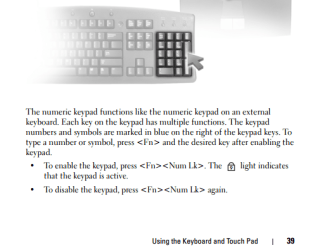
Ha a bit more thought on this one and as you both have laptops I think you might just be brushing the touchpad whilst you are typing. Try disableing the touchpad. You should be able to do this via your Fn keys. Re enable after you finish. For your Toshiba laptop try this:
Press and hold the “Fn” key. The Function key is located on the bottom row of the Tecra keyboard. Then:


Press the “F9” key in the top row of keys to disable the touchpad. When disabled, an icon of a touchpad with a “Prohibition” symbol over it is briefly displayed on the computer screen. Then


Release the “Fn” key to complete the process.
To re enable the touchpad just do the above procedure again!
md21gyk There are a number of different key combinations for Dell laptops. If you fill in your System specs and state your model I will post the key combination for you to use!
 

My Computer

Computer type
PC/Desktop
OS
Microsoft Windows 7 Home Premium 64-bit 7601 Multiprocessor Free Service Pack 1
CPU
Intel(R) Core(TM) i7-3770 CPU @ 3.40GHz
Motherboard
ASUSTeK COMPUTER INC. P8H77-M
Memory
8.00 GB
Graphics Card(s)
Intel(R) HD Graphics 4000
Sound Card
On Board
Monitor(s) Displays
Dell 24"
Screen Resolution
1920 x 1080
Hard Drives
(1) INTEL SSDSC2CT180A3 ATA Device (2) ST500DM002-1BD142 ATA Device (3) WDC WD3200AAKS-75L9A0 ATA Device (4) Generic- Compact Flash USB Device (5) Generic- MS/MS-Pro USB Device (6) Generic- SD/MMC USB Device (7) Generic- SM/xD-Picture USB
PSU
500w Corsair
Case
Cooler Master
Cooling
3 Fans
Keyboard
Logitech MK300
Mouse
Logitech WOM
Internet Speed
75Mb
Antivirus
Norton 360
Browser
Firefox, Opera, IE
Thank you, but I don't think the problem is me brushing the touchpad. I've had this laptop for five years and the problem arose only after upgrading to Win 7.
 

My Computer

Computer Manufacturer/Model Number
Dell Vostro 1000
OS
Win 7 Home Premium 32 bit
Memory
2GB
Hard Drives
64GB Crucial SSD
Thank you, but I don't think the problem is me brushing the touchpad. I've had this laptop for five years and the problem arose only after upgrading to Win 7.
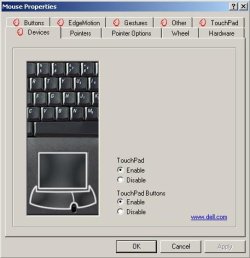
Just try the disabling idea. Here's a screenshot of how!
Touchpad.PNG
 

My Computer

Computer type
PC/Desktop
OS
Microsoft Windows 7 Home Premium 64-bit 7601 Multiprocessor Free Service Pack 1
CPU
Intel(R) Core(TM) i7-3770 CPU @ 3.40GHz
Motherboard
ASUSTeK COMPUTER INC. P8H77-M
Memory
8.00 GB
Graphics Card(s)
Intel(R) HD Graphics 4000
Sound Card
On Board
Monitor(s) Displays
Dell 24"
Screen Resolution
1920 x 1080
Hard Drives
(1) INTEL SSDSC2CT180A3 ATA Device (2) ST500DM002-1BD142 ATA Device (3) WDC WD3200AAKS-75L9A0 ATA Device (4) Generic- Compact Flash USB Device (5) Generic- MS/MS-Pro USB Device (6) Generic- SD/MMC USB Device (7) Generic- SM/xD-Picture USB
PSU
500w Corsair
Case
Cooler Master
Cooling
3 Fans
Keyboard
Logitech MK300
Mouse
Logitech WOM
Internet Speed
75Mb
Antivirus
Norton 360
Browser
Firefox, Opera, IE
Thank you, but I don't think the problem is me brushing the touchpad. I've had this laptop for five years and the problem arose only after upgrading to Win 7.

You haven't said how you upgraded from Win XP to Win 7?
 

My Computer

Computer type
PC/Desktop
OS
Microsoft Windows 7 Home Premium 64-bit 7601 Multiprocessor Free Service Pack 1
CPU
Intel(R) Core(TM) i7-3770 CPU @ 3.40GHz
Motherboard
ASUSTeK COMPUTER INC. P8H77-M
Memory
8.00 GB
Graphics Card(s)
Intel(R) HD Graphics 4000
Sound Card
On Board
Monitor(s) Displays
Dell 24"
Screen Resolution
1920 x 1080
Hard Drives
(1) INTEL SSDSC2CT180A3 ATA Device (2) ST500DM002-1BD142 ATA Device (3) WDC WD3200AAKS-75L9A0 ATA Device (4) Generic- Compact Flash USB Device (5) Generic- MS/MS-Pro USB Device (6) Generic- SD/MMC USB Device (7) Generic- SM/xD-Picture USB
PSU
500w Corsair
Case
Cooler Master
Cooling
3 Fans
Keyboard
Logitech MK300
Mouse
Logitech WOM
Internet Speed
75Mb
Antivirus
Norton 360
Browser
Firefox, Opera, IE
Hi,

Sorry for the delay!
Yes, it happens in applications too like in the a text document!
I do not use the keypad but a bluetooth mouse.

And this is a new laptop (with the original Win7-64 bit). I had another one running XP sp3 and never had this issue!

Thanks,
paulo
 

My Computer

Computer Manufacturer/Model Number
Toshiba Tecra R840
OS
Windows 7 Professional 64 bit
CPU
I7 2640M
Memory
8 GB
Graphics Card(s)
AMD Radeo HD 6450M
Monitor(s) Displays
HD+ 14 inch
Hard Drives
HDD 500GB 7200 rpm
Hi,

Sorry for the delay!
Yes, it happens in applications too like in the a text document!
I do not use the keypad but a bluetooth mouse.

And this is a new laptop (with the original Win7-64 bit). I had another one running XP sp3 and never had this issue!

Thanks,
paulo
Is the touchpad on your laptop disabled?
 

My Computer

Computer type
PC/Desktop
OS
Microsoft Windows 7 Home Premium 64-bit 7601 Multiprocessor Free Service Pack 1
CPU
Intel(R) Core(TM) i7-3770 CPU @ 3.40GHz
Motherboard
ASUSTeK COMPUTER INC. P8H77-M
Memory
8.00 GB
Graphics Card(s)
Intel(R) HD Graphics 4000
Sound Card
On Board
Monitor(s) Displays
Dell 24"
Screen Resolution
1920 x 1080
Hard Drives
(1) INTEL SSDSC2CT180A3 ATA Device (2) ST500DM002-1BD142 ATA Device (3) WDC WD3200AAKS-75L9A0 ATA Device (4) Generic- Compact Flash USB Device (5) Generic- MS/MS-Pro USB Device (6) Generic- SD/MMC USB Device (7) Generic- SM/xD-Picture USB
PSU
500w Corsair
Case
Cooler Master
Cooling
3 Fans
Keyboard
Logitech MK300
Mouse
Logitech WOM
Internet Speed
75Mb
Antivirus
Norton 360
Browser
Firefox, Opera, IE
Thanks, but this laptop doesn't even have a numeric keypad.
 

My Computer

Computer Manufacturer/Model Number
Dell Vostro 1000
OS
Win 7 Home Premium 32 bit
Memory
2GB
Hard Drives
64GB Crucial SSD
Thank you, but I don't think the problem is me brushing the touchpad. I've had this laptop for five years and the problem arose only after upgrading to Win 7.

You haven't said how you upgraded from Win XP to Win 7?

I purchased a legitimate upgrade disc and used it to do a clean install of Win 7.
 

My Computer

Computer Manufacturer/Model Number
Dell Vostro 1000
OS
Win 7 Home Premium 32 bit
Memory
2GB
Hard Drives
64GB Crucial SSD

My Computer

Computer type
PC/Desktop
OS
Microsoft Windows 7 Home Premium 64-bit 7601 Multiprocessor Free Service Pack 1
CPU
Intel(R) Core(TM) i7-3770 CPU @ 3.40GHz
Motherboard
ASUSTeK COMPUTER INC. P8H77-M
Memory
8.00 GB
Graphics Card(s)
Intel(R) HD Graphics 4000
Sound Card
On Board
Monitor(s) Displays
Dell 24"
Screen Resolution
1920 x 1080
Hard Drives
(1) INTEL SSDSC2CT180A3 ATA Device (2) ST500DM002-1BD142 ATA Device (3) WDC WD3200AAKS-75L9A0 ATA Device (4) Generic- Compact Flash USB Device (5) Generic- MS/MS-Pro USB Device (6) Generic- SD/MMC USB Device (7) Generic- SM/xD-Picture USB
PSU
500w Corsair
Case
Cooler Master
Cooling
3 Fans
Keyboard
Logitech MK300
Mouse
Logitech WOM
Internet Speed
75Mb
Antivirus
Norton 360
Browser
Firefox, Opera, IE
Hi,

No, it was not disabled! But now I disabled it....let's see :-)

Thanks for the tips,

paulo
 

My Computer

Computer Manufacturer/Model Number
Toshiba Tecra R840
OS
Windows 7 Professional 64 bit
CPU
I7 2640M
Memory
8 GB
Graphics Card(s)
AMD Radeo HD 6450M
Monitor(s) Displays
HD+ 14 inch
Hard Drives
HDD 500GB 7200 rpm
Hi md2lgyk,

The erratic cursor movement may be due to missing/corrupt 'Touch pad drivers'. Did you install the 'Dell Touch pad' drivers after migrating to 'Windows 7'? Please confirm the current status in 'Device Manager'. Prior to installing the driver, 'Device Manager' registers a 'generic PS/2 device entry'. Installing the driver changes the entry, as shown below:

1.JPG 2.JPG

In either case, you may try updating the drivers using the following link:Driver Details | Dell United States
- Follow through to complete the installation

Note: 'Vostro 1000' is tested to work with 'Windows XP / Vista 32 bit'. The driver that I've shared may/may not optimally work with 'Windows 7' and may cause compatibility issues.

Once the driver is installed, you may also want to work with the 'Touch pad settings':
- Click 'Start icon' > Type 'Mouse' in 'Search Programs and Files' text-box > Tap 'Enter' (Refer to the image below)
3.JPG

Hope this helps. Do reply with the findings; would be glad to assist.
 

My Computer

OS
Windows 7 64bit
Why? That has no effect on the touchpad.

Little point in me responding to this thread if you are not prepared to try the suggestions! BTW very, very few laptops have a numeric keypad, that's why you have the Fn key. I suggest you read up on "How to use the FN key on a laptop"!
 

My Computer

Computer type
PC/Desktop
OS
Microsoft Windows 7 Home Premium 64-bit 7601 Multiprocessor Free Service Pack 1
CPU
Intel(R) Core(TM) i7-3770 CPU @ 3.40GHz
Motherboard
ASUSTeK COMPUTER INC. P8H77-M
Memory
8.00 GB
Graphics Card(s)
Intel(R) HD Graphics 4000
Sound Card
On Board
Monitor(s) Displays
Dell 24"
Screen Resolution
1920 x 1080
Hard Drives
(1) INTEL SSDSC2CT180A3 ATA Device (2) ST500DM002-1BD142 ATA Device (3) WDC WD3200AAKS-75L9A0 ATA Device (4) Generic- Compact Flash USB Device (5) Generic- MS/MS-Pro USB Device (6) Generic- SD/MMC USB Device (7) Generic- SM/xD-Picture USB
PSU
500w Corsair
Case
Cooler Master
Cooling
3 Fans
Keyboard
Logitech MK300
Mouse
Logitech WOM
Internet Speed
75Mb
Antivirus
Norton 360
Browser
Firefox, Opera, IE
Back
Top