Windows Explorer not working: left pane freezes and can't browse files

madasco

New member
Local time
1:56 AM
Messages
11
Dear All:

I have been experiencing an annoying issue in Windows (Windows Ultimate 64 bits, Home premium 64 bits and Windows 8 Pro 64 bits) min

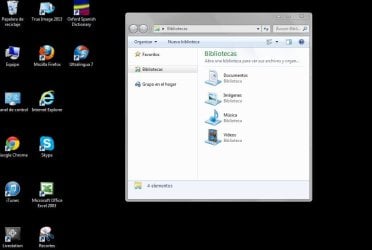
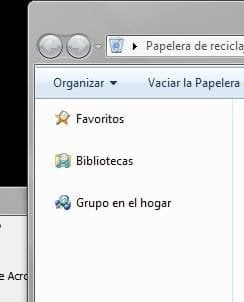
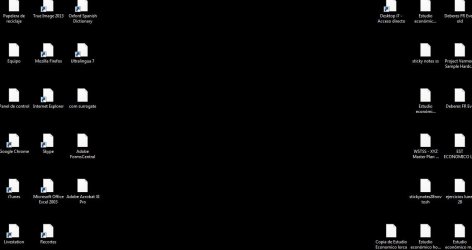
After working well for a few minutes, the windows explorer freezes upon launch, only displaying the "favorites", "libraries" and "homegroup" icons in the left pane. The elements in the mentioned icons cannot be accessed and sometimes they have a magnifying glass on them and the icons on the desktop are blank.

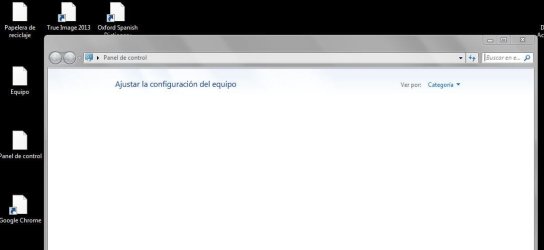
Also, Control Panel windows is often empty after this error takes place.

This issue often, but not necessarily, comes about when i try to check the properties of a file, with windows explorer freezing immediately.

I have reinstalled Windows 7 twice to no avail.

Anyone has ideas on how to fix this? It's rendering my two laptops unusable.
Highly appreciate any useful advice.

Thank you,
Madasco
 

Attachments

  • error explorer & desktop icons.JPG
    error explorer & desktop icons.JPG
    49.4 KB · Views: 8
  • error windows explorer.JPG
    error windows explorer.JPG
    52.2 KB · Views: 9
Last edited:

My Computer My Computer

At a glance

Windows Ultimate x64
OS
Windows Ultimate x64

My Computer My Computer

At a glance

Microsoft Windows 7 Home Premium 64-bit 7601 ...Intel(R) Core(TM) i7-3770 CPU @ 3.40GHz8.00 GBIntel(R) HD Graphics 4000
Computer type
PC/Desktop
OS
Microsoft Windows 7 Home Premium 64-bit 7601 Multiprocessor Free Service Pack 1
CPU
Intel(R) Core(TM) i7-3770 CPU @ 3.40GHz
Motherboard
ASUSTeK COMPUTER INC. P8H77-M
Memory
8.00 GB
Graphics Card(s)
Intel(R) HD Graphics 4000
Sound Card
On Board
Monitor(s) Displays
Dell 24"
Screen Resolution
1920 x 1080
Hard Drives
(1) INTEL SSDSC2CT180A3 ATA Device (2) ST500DM002-1BD142 ATA Device (3) WDC WD3200AAKS-75L9A0 ATA Device (4) Generic- Compact Flash USB Device (5) Generic- MS/MS-Pro USB Device (6) Generic- SD/MMC USB Device (7) Generic- SM/xD-Picture USB
PSU
500w Corsair
Case
Cooler Master
Cooling
3 Fans
Keyboard
Logitech MK300
Mouse
Logitech WOM
Internet Speed
75Mb
Antivirus
Norton 360
Browser
Firefox, Opera, IE
Have you tried running sfc /scannow? When you say you have re installed Windows twice did you do a clean installing by following this tutorial:
http://www.sevenforums.com/tutorials/219487-clean-reinstall-factory-oem-windows-7-a.html#post1839164

Thank you, Mitchell65!

I reinstalled the system to factory settings with the original recovery disks, then got read of most of TOSHIBA's applications and other bloatware and installed my usual software (Office, Itunes... nothing uncommon)

I have tried your sfc /scannow suggestion, but the computer performs is so fast that I cannot get any feedback. The screen dissapears after the process is completed.

I have not had the windows explorer issue today, but I have had a COM SURROGATE error, which also came up very often in my previous installations. I'm going to post about it in another thread.

Will come back here if I experience the windows explorer issue again.

Thanks for your help!
 

My Computer My Computer

At a glance

Windows Ultimate x64
OS
Windows Ultimate x64
Well, it seems that the issue is still there, as I have had it again.

It's so annoying and renders my computer unusable as I cannot browse files nor use the control panel and who knows what else...

Any ideas of what my be happening?

Thanks!!!
 

Attachments

  • com surrogate.JPG
    com surrogate.JPG
    14.7 KB · Views: 38
  • aaa.JPG
    aaa.JPG
    39.1 KB · Views: 0
  • aaa2.JPG
    aaa2.JPG
    29.9 KB · Views: 1
Last edited:

My Computer My Computer

At a glance

Windows Ultimate x64
OS
Windows Ultimate x64
Then I think I would do a clean install using the tutorial mentioned above but you may wish to wait in case others have a better idea!
 

My Computer My Computer

At a glance

Microsoft Windows 7 Home Premium 64-bit 7601 ...Intel(R) Core(TM) i7-3770 CPU @ 3.40GHz8.00 GBIntel(R) HD Graphics 4000
Computer type
PC/Desktop
OS
Microsoft Windows 7 Home Premium 64-bit 7601 Multiprocessor Free Service Pack 1
CPU
Intel(R) Core(TM) i7-3770 CPU @ 3.40GHz
Motherboard
ASUSTeK COMPUTER INC. P8H77-M
Memory
8.00 GB
Graphics Card(s)
Intel(R) HD Graphics 4000
Sound Card
On Board
Monitor(s) Displays
Dell 24"
Screen Resolution
1920 x 1080
Hard Drives
(1) INTEL SSDSC2CT180A3 ATA Device (2) ST500DM002-1BD142 ATA Device (3) WDC WD3200AAKS-75L9A0 ATA Device (4) Generic- Compact Flash USB Device (5) Generic- MS/MS-Pro USB Device (6) Generic- SD/MMC USB Device (7) Generic- SM/xD-Picture USB
PSU
500w Corsair
Case
Cooler Master
Cooling
3 Fans
Keyboard
Logitech MK300
Mouse
Logitech WOM
Internet Speed
75Mb
Antivirus
Norton 360
Browser
Firefox, Opera, IE
Have you run sfc /scannow ?

Instructions are below.
 

My Computer My Computer

At a glance

Windows 10 Pro x64Intel Core i7 6700KGSkill TridentZ RGB 16GB 3600 16-16-16-36EVGA GTX 980 Ti SC x2
Computer type
PC/Desktop
Computer Manufacturer/Model Number
Skylake Special #666
OS
Windows 10 Pro x64
CPU
Intel Core i7 6700K
Motherboard
Asus Sabertooth Z170 Mark 1
Memory
GSkill TridentZ RGB 16GB 3600 16-16-16-36
Graphics Card(s)
EVGA GTX 980 Ti SC x2
Sound Card
Realtek High Definition
Monitor(s) Displays
AOC G2460PG
Screen Resolution
1920 x 1080 144Hz
Hard Drives
Samsung 860 Pro 256GB, Seagate Barracuda 4TB x2
PSU
EVGA 1000 P2, EVGA White Custom Braided Cables
Case
Corsair Vengeance C70 Gunmetal Black
Cooling
Corsair H100i v2, Corsair ML120 x2, Thermal Grizzly Kryonaut
Keyboard
Logitech G910 Orion Spectrum
Mouse
Logitech G700s
Internet Speed
Verizon Fios Quantum Gateway 75/75
Antivirus
Windows Defender, Malwarebytes Free 3.8.3
Browser
Chrome
Other Info
Corsair SP120 x4, LG Blu-ray Drive, Durabrand HT-395 100 Watt Dolby Digital Amp, Corsair H2100 Wireless 7.1 Headset
hi guys,

i have the same issue. did sfc . no change
this is happening to control panel as well. can go by hit the path on run. but some files icons are not loading too


this is started yesterday as i turned on computer after 10 th of Feb
any help?
this is the image
 

Attachments

  • 1.png
    1.png
    24 KB · Views: 2

My Computer My Computer

At a glance

professorial
OS
professorial
Thanks, mitchell65 and AddRam.

I finally opted for restoring the software to its factory settings and I am not experiencing the issue anymore.
Of course, I lost a day and a half with updates and installs, but that's how things work.

I have installed most of the software I was using when the issue took place, but I haven't installed K-lite códecs, for instance. I read somewhere that COM SURROGATE errors, which maybe related to this matter, often come when using tweaking or códec software.

Anyway, my computers are working well now.
Thanks for your suggestions and good luck, arampath; I know this is a very annoying issue!
Cheers!
 

My Computer My Computer

At a glance

Windows Ultimate x64
OS
Windows Ultimate x64
Back
Top