freshly installed win 7 build 7601 - problems with running files (all)

arkcamon

New member
Local time
8:31 AM
Messages
12
Dear Friends in Seven forums.
I recently installed Windows 7 different versions of it home - professional - enterprise.
However I encounter this problem no matter which version is installed.
I cannot run *.exe files or any other type of file .
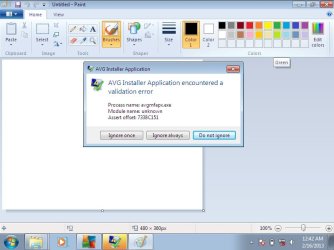
each time that I run a program an error pops up like this screen capture jpeg that I have attached to this tread. thank god paint was working. this is when I have not even installed any of drivers. before I thought maybe the drivers installations mess up with my system but apparently not.
before this When I was running the drivers installation CD it was OK with installing the majority of drivers . but as soon as I wanted to instal something from usb or the first time that I opened the IE. I encountered this type of problem. and the windows explorer automatically restarts it self.
please help me as I'm desperate and I need my computer working asap .
thank you very much\
Al
 

Attachments

  • windoes problem.jpg
    windoes problem.jpg
    47.3 KB · Views: 14

My Computer My Computer

At a glance

windows 7 professional - 64 bit
OS
windows 7 professional - 64 bit
I recently installed Windows 7 different versions of it home - professional - enterprise.

Lets start here:

1. Download and save this tool to your desktop:
http://go.microsoft.com/fwlink/?linkid=52012

2. Run the tool, and then click 'Copy' - ignore any errors if they appear

3. Use CTRL+V to paste the unedited results of the validation tool here in your next reply

Regards,
Golden
 

My Computer My Computer

At a glance

Windows 10 Pro x64 ; Xubuntu x64Intel i7 860 @ 2.80 GHz O/C'ed to 4.0GHz16GB Corsair Vengance DDR3 @ 661 MHz Dual Cha...EVGA NVidia GTX 560 1024MB
Computer type
PC/Desktop
Computer Manufacturer/Model Number
Golden Mk. I.4
OS
Windows 10 Pro x64 ; Xubuntu x64
CPU
Intel i7 860 @ 2.80 GHz O/C'ed to 4.0GHz
Motherboard
Gigabyte P55A-UD3R Rev.1. Award BIOS F13
Memory
16GB Corsair Vengance DDR3 @ 661 MHz Dual Channel (9-9-9-24)
Graphics Card(s)
EVGA NVidia GTX 560 1024MB
Sound Card
Realtek Integrated
Monitor(s) Displays
Dual Samsung SyncMaster 2494HS
Screen Resolution
1920*1080 and 1920*1080
Hard Drives
1*Samsung 840 EVO 120GB SSD;
1*OCZ Vertex 2 60GB SSD;
2*Samsung F3 SpinPoint 1TB in RAID0;
1*Samsung F1 SpinPoint 1TB;
2*Western Digital 1TB External USB 3.0
1*Western Digital 500GB External USB 3.0
1*Seagate 500GB External USB 2.0
PSU
Thermaltake ToughPower QFan 750W
Case
Thermaltake Element S VK60001W2Z
Cooling
Corsair H60 Water Cooling, 2*230mm and 2*80mm case fans
Keyboard
Logitech G110
Mouse
Logitech MX518
information

first of all I wanted to thank you because of the reply.
here it is the information that you asked :

Diagnostic Report (1.9.0027.0):
-----------------------------------------
Windows Validation Data-->

Validation Code: 0
Cached Online Validation Code: N/A, hr = 0xc004f012
Windows Product Key: *****-*****-*****-*****-2XQMP
Windows Product Key Hash: bHtCRU+CZC2cIrvppyidl3BfC0w=
Windows Product ID: 55041-147-3030107-86885
Windows Product ID Type: 6
Windows License Type: Volume MAK
Windows OS version: 6.1.7601.2.00010100.1.0.069
ID: {0809217A-35DB-4DF4-A9CC-8C522F691152}(1)
Is Admin: Yes
TestCab: 0x0
LegitcheckControl ActiveX: N/A, hr = 0x80070002
Signed By: N/A, hr = 0x80070002
Product Name: Windows 7 Professional E
Architecture: 0x00000009
Build lab: 7601.win7sp1_rtm.101119-1850
TTS Error:
Validation Diagnostic:
Resolution Status: N/A

Vista WgaER Data-->
ThreatID(s): N/A, hr = 0x80070002
Version: N/A, hr = 0x80070002

Windows XP Notifications Data-->
Cached Result: N/A, hr = 0x80070002
File Exists: No
Version: N/A, hr = 0x80070002
WgaTray.exe Signed By: N/A, hr = 0x80070002
WgaLogon.dll Signed By: N/A, hr = 0x80070002

OGA Notifications Data-->
Cached Result: N/A, hr = 0x80070002
Version: N/A, hr = 0x80070002
OGAExec.exe Signed By: N/A, hr = 0x80070002
OGAAddin.dll Signed By: N/A, hr = 0x80070002

OGA Data-->
Office Status: 109 N/A
OGA Version: N/A, 0x80070002
Signed By: N/A, hr = 0x80070002
Office Diagnostics: 025D1FF3-364-80041010_025D1FF3-229-80041010_025D1FF3-230-1_025D1FF3-517-80040154_025D1FF3-237-80040154_025D1FF3-238-2_025D1FF3-244-80070002_025D1FF3-258-3

Browser Data-->
Proxy settings:
User Agent: Mozilla/4.0 (compatible; MSIE 8.0; Win32)
Default Browser: N/A, hr=0x80070002
Download signed ActiveX controls: Prompt
Download unsigned ActiveX controls: Disabled
Run ActiveX controls and plug-ins: Allowed
Initialize and script ActiveX controls not marked as safe: Disabled
Allow scripting of Internet Explorer Webbrowser control: Disabled
Active scripting: Allowed
Script ActiveX controls marked as safe for scripting: Allowed

File Scan Data-->
File Mismatch: C:\Windows\system32\wat\watadminsvc.exe[Hr = 0x80070003]
File Mismatch: C:\Windows\system32\wat\npwatweb.dll[Hr = 0x80070003]
File Mismatch: C:\Windows\system32\wat\watux.exe[Hr = 0x80070003]
File Mismatch: C:\Windows\system32\wat\watweb.dll[Hr = 0x80070003]

Other data-->
Office Details: <GenuineResults><MachineData><UGUID>{0809217A-35DB-4DF4-A9CC-8C522F691152}</UGUID><Version>1.9.0027.0</Version><OS>6.1.7601.2.00010100.1.0.069</OS><Architecture>x64</Architecture><PKey>*****-*****-*****-*****-BBBBB</PKey><PID>55041-147-3030107-86885</PID><PIDType>6</PIDType><SID>S-1-5-21-3296122531-3912113726-2099028547</SID><SYSTEM><Manufacturer>CLEVO </Manufacturer><Model>P15xEMx</Model></SYSTEM><BIOS><Manufacturer>American Megatrends Inc.</Manufacturer><Version>4.6.5</Version><SMBIOSVersion major="2" minor="7"/><Date>20120906000000.000000+000</Date></BIOS><HWID>26B93607018400FE</HWID><UserLCID>0409</UserLCID><SystemLCID>0409</SystemLCID><TimeZone>Pacific Standard Time(GMT-08:00)</TimeZone><iJoin>0</iJoin><SBID><stat>3</stat><msppid></msppid><name></name><model></model></SBID><OEM/><GANotification/></MachineData><Software><Office><Result>109</Result><Products/><Applications/></Office></Software></GenuineResults>

Spsys.log Content: 0x80070002

Licensing Data-->
Software licensing service version: 6.1.7601.17514

Name: Windows(R) 7, ProfessionalE edition
Description: Windows Operating System - Windows(R) 7, VOLUME_MAK channel
Activation ID: 9abf5984-9c16-46f2-ad1e-7fe15931a8dd
Application ID: 55c92734-d682-4d71-983e-d6ec3f16059f
Extended PID: 55041-00172-147-303010-03-1033-7601.0000-0442013
Installation ID: 004180538625105743150431061791304172978485871094544233
Processor Certificate URL: http://go.microsoft.com/fwlink/?LinkID=88338
Machine Certificate URL: http://go.microsoft.com/fwlink/?LinkID=88339
Use License URL: http://go.microsoft.com/fwlink/?LinkID=88341
Product Key Certificate URL: http://go.microsoft.com/fwlink/?LinkID=88340
Partial Product Key: 2XQMP
License Status: Initial grace period
Time remaining: 39540 minute(s) (27 day(s))
Remaining Windows rearm count: 5
Trusted time: 2/16/2013 4:08:09 AM

Windows Activation Technologies-->
HrOffline: 0x00000000
HrOnline: N/A
HealthStatus: 0x0000000000000000
Event Time Stamp: N/A
ActiveX: Not Registered - 0x80040154
Admin Service: Not Registered - 0x80040154
HealthStatus Bitmask Output:


HWID Data-->
HWID Hash Current: MAAAAAEAAgABAAIAAAACAAAAAQABAAEAhFHGfzQ5EmwcLyBVftMSL4go/EVFvpZj

OEM Activation 1.0 Data-->
N/A

OEM Activation 2.0 Data-->
BIOS valid for OA 2.0: yes, but no SLIC table
Windows marker version: N/A
OEMID and OEMTableID Consistent: N/A
BIOS Information:
ACPI Table Name OEMID Value OEMTableID Value
APIC MIDERN MIDERN
FACP MIDERN MIDERN
HPET MIDERN MIDERN
MCFG MIDERN MIDERN
FPDT MIDERN MIDERN
ASF! INTEL HCG
SSDT SataRe SataTabl
DMAR INTEL SNB
SSDT SataRe SataTabl

 

My Computer My Computer

At a glance

windows 7 professional - 64 bit
OS
windows 7 professional - 64 bit
Where did you get this installation from?
 

My Computer My Computer

At a glance

Windows 10 Pro x64 ; Xubuntu x64Intel i7 860 @ 2.80 GHz O/C'ed to 4.0GHz16GB Corsair Vengance DDR3 @ 661 MHz Dual Cha...EVGA NVidia GTX 560 1024MB
Computer type
PC/Desktop
Computer Manufacturer/Model Number
Golden Mk. I.4
OS
Windows 10 Pro x64 ; Xubuntu x64
CPU
Intel i7 860 @ 2.80 GHz O/C'ed to 4.0GHz
Motherboard
Gigabyte P55A-UD3R Rev.1. Award BIOS F13
Memory
16GB Corsair Vengance DDR3 @ 661 MHz Dual Channel (9-9-9-24)
Graphics Card(s)
EVGA NVidia GTX 560 1024MB
Sound Card
Realtek Integrated
Monitor(s) Displays
Dual Samsung SyncMaster 2494HS
Screen Resolution
1920*1080 and 1920*1080
Hard Drives
1*Samsung 840 EVO 120GB SSD;
1*OCZ Vertex 2 60GB SSD;
2*Samsung F3 SpinPoint 1TB in RAID0;
1*Samsung F1 SpinPoint 1TB;
2*Western Digital 1TB External USB 3.0
1*Western Digital 500GB External USB 3.0
1*Seagate 500GB External USB 2.0
PSU
Thermaltake ToughPower QFan 750W
Case
Thermaltake Element S VK60001W2Z
Cooling
Corsair H60 Water Cooling, 2*230mm and 2*80mm case fans
Keyboard
Logitech G110
Mouse
Logitech MX518
I downloaded this version from my university site ( university of waterloo in canada ).
and it contains variety of different versions in it Enterprise, home, professional editions.
 

My Computer My Computer

At a glance

windows 7 professional - 64 bit
OS
windows 7 professional - 64 bit
OK. And how are you activating this volume licence?
 

My Computer My Computer

At a glance

Windows 10 Pro x64 ; Xubuntu x64Intel i7 860 @ 2.80 GHz O/C'ed to 4.0GHz16GB Corsair Vengance DDR3 @ 661 MHz Dual Cha...EVGA NVidia GTX 560 1024MB
Computer type
PC/Desktop
Computer Manufacturer/Model Number
Golden Mk. I.4
OS
Windows 10 Pro x64 ; Xubuntu x64
CPU
Intel i7 860 @ 2.80 GHz O/C'ed to 4.0GHz
Motherboard
Gigabyte P55A-UD3R Rev.1. Award BIOS F13
Memory
16GB Corsair Vengance DDR3 @ 661 MHz Dual Channel (9-9-9-24)
Graphics Card(s)
EVGA NVidia GTX 560 1024MB
Sound Card
Realtek Integrated
Monitor(s) Displays
Dual Samsung SyncMaster 2494HS
Screen Resolution
1920*1080 and 1920*1080
Hard Drives
1*Samsung 840 EVO 120GB SSD;
1*OCZ Vertex 2 60GB SSD;
2*Samsung F3 SpinPoint 1TB in RAID0;
1*Samsung F1 SpinPoint 1TB;
2*Western Digital 1TB External USB 3.0
1*Western Digital 500GB External USB 3.0
1*Seagate 500GB External USB 2.0
PSU
Thermaltake ToughPower QFan 750W
Case
Thermaltake Element S VK60001W2Z
Cooling
Corsair H60 Water Cooling, 2*230mm and 2*80mm case fans
Keyboard
Logitech G110
Mouse
Logitech MX518
well I don't know exactly .
during the installation I entered the product key, so during the first internet connection it will register itself automatically .
 

My Computer My Computer

At a glance

windows 7 professional - 64 bit
OS
windows 7 professional - 64 bit
Activation of MAK Licenses is through normal Internet or Telephone.

I suspect that the problem may be related to the time/date/region setting on the computer.
Your report shows your computer being set as Pacific time zone (GMT-8) - your IP address shows your time zone to be GMT-6.
Please check all related settings are correct (including year!)
 

My Computer My Computer

At a glance

Win 7 x64 Home Premium (and x86 VirtualBox VM...i3 370M/i7 6500U8GB - finally :)/8GBit's an i3, dude!/dual Intel&nVidia
Computer type
Laptop
Computer Manufacturer/Model Number
Asus K52F or Lenovo B51-80
OS
Win 7 x64 Home Premium (and x86 VirtualBox VM)/Win10
CPU
i3 370M/i7 6500U
Motherboard
Asus/Lenovo
Memory
8GB - finally :)/8GB
Graphics Card(s)
it's an i3, dude!/dual Intel&nVidia
Sound Card
onboard
Monitor(s) Displays
15.6" built-in
Screen Resolution
1366x768/1920x1080
Hard Drives
750GB Seagate internal
Sundry external drives attached to other computers on the local network
1TB SSD on the Lenovo
PSU
n/a
Internet Speed
as much as I can get - usually on a dongle/phone, so <1MB/s
Antivirus
MSE/Defender
Browser
IE11/12/Edge/Chrome/FF(if I must)
I don't think that the time difference is the problem because until yesterday I was in north america trying but I had the same problem.
 

My Computer My Computer

At a glance

windows 7 professional - 64 bit
OS
windows 7 professional - 64 bit
Please check it anyhow - it must be correct for your current location for activation and validation to properly occur.
 

My Computer My Computer

At a glance

Win 7 x64 Home Premium (and x86 VirtualBox VM...i3 370M/i7 6500U8GB - finally :)/8GBit's an i3, dude!/dual Intel&nVidia
Computer type
Laptop
Computer Manufacturer/Model Number
Asus K52F or Lenovo B51-80
OS
Win 7 x64 Home Premium (and x86 VirtualBox VM)/Win10
CPU
i3 370M/i7 6500U
Motherboard
Asus/Lenovo
Memory
8GB - finally :)/8GB
Graphics Card(s)
it's an i3, dude!/dual Intel&nVidia
Sound Card
onboard
Monitor(s) Displays
15.6" built-in
Screen Resolution
1366x768/1920x1080
Hard Drives
750GB Seagate internal
Sundry external drives attached to other computers on the local network
1TB SSD on the Lenovo
PSU
n/a
Internet Speed
as much as I can get - usually on a dongle/phone, so <1MB/s
Antivirus
MSE/Defender
Browser
IE11/12/Edge/Chrome/FF(if I must)
Hi everyone
I don't think that's the activation problem. I activated my windows and it says that I have a genuine copy of windows. but now when I open " my computer " the same type of windows problem pops up with these lines:

windows explorer encounteded a validation error
Process name : explorer.exe
Module name: shell.dll
Assert offset: 000000000051DC72

now I have no idea what it is it all about .
could you please help me I'm kinda super desperate now.
 

My Computer My Computer

At a glance

windows 7 professional - 64 bit
OS
windows 7 professional - 64 bit
Lets check the MGADIAG report again:

1. Download and save this tool to your desktop:
http://go.microsoft.com/fwlink/?linkid=52012

2. Run the tool, and then click 'Copy' - ignore any errors if they appear

3. Use CTRL+V to paste the unedited results of the validation tool here in your next reply
 

My Computer My Computer

At a glance

Windows 10 Pro x64 ; Xubuntu x64Intel i7 860 @ 2.80 GHz O/C'ed to 4.0GHz16GB Corsair Vengance DDR3 @ 661 MHz Dual Cha...EVGA NVidia GTX 560 1024MB
Computer type
PC/Desktop
Computer Manufacturer/Model Number
Golden Mk. I.4
OS
Windows 10 Pro x64 ; Xubuntu x64
CPU
Intel i7 860 @ 2.80 GHz O/C'ed to 4.0GHz
Motherboard
Gigabyte P55A-UD3R Rev.1. Award BIOS F13
Memory
16GB Corsair Vengance DDR3 @ 661 MHz Dual Channel (9-9-9-24)
Graphics Card(s)
EVGA NVidia GTX 560 1024MB
Sound Card
Realtek Integrated
Monitor(s) Displays
Dual Samsung SyncMaster 2494HS
Screen Resolution
1920*1080 and 1920*1080
Hard Drives
1*Samsung 840 EVO 120GB SSD;
1*OCZ Vertex 2 60GB SSD;
2*Samsung F3 SpinPoint 1TB in RAID0;
1*Samsung F1 SpinPoint 1TB;
2*Western Digital 1TB External USB 3.0
1*Western Digital 500GB External USB 3.0
1*Seagate 500GB External USB 2.0
PSU
Thermaltake ToughPower QFan 750W
Case
Thermaltake Element S VK60001W2Z
Cooling
Corsair H60 Water Cooling, 2*230mm and 2*80mm case fans
Keyboard
Logitech G110
Mouse
Logitech MX518
Diagnostic Report (1.9.0027.0):
-----------------------------------------
Windows Validation Data-->

Validation Code: 0
Cached Online Validation Code: N/A, hr = 0xc004f012
Windows Product Key: *****-*****-*****-*****-2XQMP
Windows Product Key Hash: bHtCRU+CZC2cIrvppyidl3BfC0w=
Windows Product ID: 55041-147-3030107-86885
Windows Product ID Type: 6
Windows License Type: Volume MAK
Windows OS version: 6.1.7601.2.00010100.1.0.069
ID: {0809217A-35DB-4DF4-A9CC-8C522F691152}(3)
Is Admin: Yes
TestCab: 0x0
LegitcheckControl ActiveX: N/A, hr = 0x80070002
Signed By: N/A, hr = 0x80070002
Product Name: Windows 7 Professional E
Architecture: 0x00000009
Build lab: 7601.win7sp1_rtm.101119-1850
TTS Error:
Validation Diagnostic:
Resolution Status: N/A

Vista WgaER Data-->
ThreatID(s): N/A, hr = 0x80070002
Version: N/A, hr = 0x80070002

Windows XP Notifications Data-->
Cached Result: N/A, hr = 0x80070002
File Exists: No
Version: N/A, hr = 0x80070002
WgaTray.exe Signed By: N/A, hr = 0x80070002
WgaLogon.dll Signed By: N/A, hr = 0x80070002

OGA Notifications Data-->
Cached Result: N/A, hr = 0x80070002
Version: N/A, hr = 0x80070002
OGAExec.exe Signed By: N/A, hr = 0x80070002
OGAAddin.dll Signed By: N/A, hr = 0x80070002

OGA Data-->
Office Status: 109 N/A
OGA Version: N/A, 0x80070002
Signed By: N/A, hr = 0x80070002
Office Diagnostics: 025D1FF3-364-80041010_025D1FF3-229-80041010_025D1FF3-230-1_025D1FF3-517-80040154_025D1FF3-237-80040154_025D1FF3-238-2_025D1FF3-244-80070002_025D1FF3-258-3

Browser Data-->
Proxy settings: N/A
User Agent: Mozilla/4.0 (compatible; MSIE 8.0; Win32)
Default Browser: N/A, hr=0x80070002
Download signed ActiveX controls: Prompt
Download unsigned ActiveX controls: Disabled
Run ActiveX controls and plug-ins: Allowed
Initialize and script ActiveX controls not marked as safe: Disabled
Allow scripting of Internet Explorer Webbrowser control: Disabled
Active scripting: Allowed
Script ActiveX controls marked as safe for scripting: Allowed

File Scan Data-->
File Mismatch: C:\Windows\system32\wat\watadminsvc.exe[Hr = 0x80070003]
File Mismatch: C:\Windows\system32\wat\npwatweb.dll[Hr = 0x80070003]
File Mismatch: C:\Windows\system32\wat\watux.exe[Hr = 0x80070003]
File Mismatch: C:\Windows\system32\wat\watweb.dll[Hr = 0x80070003]

Other data-->
Office Details: <GenuineResults><MachineData><UGUID>{0809217A-35DB-4DF4-A9CC-8C522F691152}</UGUID><Version>1.9.0027.0</Version><OS>6.1.7601.2.00010100.1.0.069</OS><Architecture>x64</Architecture><PKey>*****-*****-*****-*****-BBBBB</PKey><PID>55041-147-3030107-86885</PID><PIDType>6</PIDType><SID>S-1-5-21-3296122531-3912113726-2099028547</SID><SYSTEM><Manufacturer>CLEVO </Manufacturer><Model>P15xEMx</Model></SYSTEM><BIOS><Manufacturer>American Megatrends Inc.</Manufacturer><Version>4.6.5</Version><SMBIOSVersion major="2" minor="7"/><Date>20120906000000.000000+000</Date></BIOS><HWID>26B93607018400FE</HWID><UserLCID>0409</UserLCID><SystemLCID>0409</SystemLCID><TimeZone>Pacific Standard Time(GMT-08:00)</TimeZone><iJoin>0</iJoin><SBID><stat>3</stat><msppid></msppid><name></name><model></model></SBID><OEM/><GANotification/></MachineData><Software><Office><Result>109</Result><Products/><Applications/></Office></Software></GenuineResults>

Spsys.log Content: 0x80070002

Licensing Data-->
Software licensing service version: 6.1.7601.17514

Name: Windows(R) 7, ProfessionalE edition
Description: Windows Operating System - Windows(R) 7, VOLUME_MAK channel
Activation ID: 9abf5984-9c16-46f2-ad1e-7fe15931a8dd
Application ID: 55c92734-d682-4d71-983e-d6ec3f16059f
Extended PID: 55041-00172-147-303010-03-1033-7601.0000-0442013
Installation ID: 004026027271302443993826216062718565161850308030953060
Processor Certificate URL: http://go.microsoft.com/fwlink/?LinkID=88338
Machine Certificate URL: http://go.microsoft.com/fwlink/?LinkID=88339
Use License URL: http://go.microsoft.com/fwlink/?LinkID=88341
Product Key Certificate URL: http://go.microsoft.com/fwlink/?LinkID=88340
Partial Product Key: 2XQMP
License Status: Licensed
Remaining Windows rearm count: 5
Trusted time: 2/17/2013 2:03:28 AM

Windows Activation Technologies-->
HrOffline: 0x00000000
HrOnline: N/A
HealthStatus: 0x0000000000000000
Event Time Stamp: N/A
ActiveX: Not Registered - 0x80040154
Admin Service: Not Registered - 0x80040154
HealthStatus Bitmask Output:


HWID Data-->
HWID Hash Current: MAAAAAEAAgABAAIAAAABAAAAAgABAAEAhFHGfzQ5EmwcLyBVftMSL4go1BmenJZj

OEM Activation 1.0 Data-->
N/A

OEM Activation 2.0 Data-->
BIOS valid for OA 2.0: yes, but no SLIC table
Windows marker version: N/A
OEMID and OEMTableID Consistent: N/A
BIOS Information:
ACPI Table Name OEMID Value OEMTableID Value
APIC MIDERN MIDERN
FACP MIDERN MIDERN
HPET MIDERN MIDERN
MCFG MIDERN MIDERN
FPDT MIDERN MIDERN
ASF! INTEL HCG
SSDT SataRe SataTabl
DMAR INTEL SNB
SSDT SataRe SataTabl
 

My Computer My Computer

At a glance

windows 7 professional - 64 bit
OS
windows 7 professional - 64 bit

My Computer My Computer

At a glance

Windows 10 Pro (x64)Intel Core i7-3930K (3.2GHz - 4.5GHz)4x Samsung 4GB PC3-12800 DDR3 (16GB 1600MHz)Nvidia Geforce GTX 690
Computer type
PC/Desktop
Computer Manufacturer/Model Number
Alienware Aurora ALX R4
OS
Windows 10 Pro (x64)
CPU
Intel Core i7-3930K (3.2GHz - 4.5GHz)
Motherboard
Alienware Aurora-R4 x79
Memory
4x Samsung 4GB PC3-12800 DDR3 (16GB 1600MHz)
Graphics Card(s)
Nvidia Geforce GTX 690
Sound Card
SteelSeries Siberia Elite
Monitor(s) Displays
Dell UltraSharp U3011
Screen Resolution
2560x1600
Hard Drives
Samsung 850 Pro 256 GB, Seagate 1TB Desktop Hybrid HDD, 2x Western Digital 4TB Green HDD
PSU
875W Some Dell PSU <.<
Case
Alienware Aurora ALX
Cooling
Custom Liquid Cooling (EK CPU & GPU blocks) dual EK 480RAD
Keyboard
Logitech G710+ Mechanical
Mouse
Logitech G700s
Internet Speed
Verizon Fios (50 mbps average)
Other Info
Server: Intel NUC D54250WYK: i5-4250U, 16GB, 256 GB mSATA, Windows Server 2012 R2
thanks... since I have product key , do you know where can I download one ?
 

My Computer My Computer

At a glance

windows 7 professional - 64 bit
OS
windows 7 professional - 64 bit
File Scan Data-->
File Mismatch: C:\Windows\system32\wat\watadminsvc.exe[Hr = 0x80070003]
File Mismatch: C:\Windows\system32\wat\npwatweb.dll[Hr = 0x80070003]
File Mismatch: C:\Windows\system32\wat\watux.exe[Hr = 0x80070003]
File Mismatch: C:\Windows\system32\wat\watweb.dll[Hr = 0x80070003]

You are missing this update:

Description of the update for Windows Activation Technologies

Install it, and then create and upload a new MGADIAG report.

Regards,
Golden
 

My Computer My Computer

At a glance

Windows 10 Pro x64 ; Xubuntu x64Intel i7 860 @ 2.80 GHz O/C'ed to 4.0GHz16GB Corsair Vengance DDR3 @ 661 MHz Dual Cha...EVGA NVidia GTX 560 1024MB
Computer type
PC/Desktop
Computer Manufacturer/Model Number
Golden Mk. I.4
OS
Windows 10 Pro x64 ; Xubuntu x64
CPU
Intel i7 860 @ 2.80 GHz O/C'ed to 4.0GHz
Motherboard
Gigabyte P55A-UD3R Rev.1. Award BIOS F13
Memory
16GB Corsair Vengance DDR3 @ 661 MHz Dual Channel (9-9-9-24)
Graphics Card(s)
EVGA NVidia GTX 560 1024MB
Sound Card
Realtek Integrated
Monitor(s) Displays
Dual Samsung SyncMaster 2494HS
Screen Resolution
1920*1080 and 1920*1080
Hard Drives
1*Samsung 840 EVO 120GB SSD;
1*OCZ Vertex 2 60GB SSD;
2*Samsung F3 SpinPoint 1TB in RAID0;
1*Samsung F1 SpinPoint 1TB;
2*Western Digital 1TB External USB 3.0
1*Western Digital 500GB External USB 3.0
1*Seagate 500GB External USB 2.0
PSU
Thermaltake ToughPower QFan 750W
Case
Thermaltake Element S VK60001W2Z
Cooling
Corsair H60 Water Cooling, 2*230mm and 2*80mm case fans
Keyboard
Logitech G110
Mouse
Logitech MX518
Try running SFC and CHKDSK from a Repair Environment and see if they help....


Your best option in that case is to run the CHKDSK and SFC in offline mode from a Recovery Environment boot.

Reboot the computer, and tap the F8 key until you get the advanced boot menu up - one option should be 'Repair your computer'. Pick that one.

Log into your normal account.
You'll get a set of options - pick the Command Prompt one.
At the command prompt, type DIR C:\
- if we're lucky this will bring up a listing of your normal C: drive contents, including the Program Files folder(s) and the Windows folder.
If not, try D:\ or E:\ (etc. until you get the right letter)
then type the following command

CHKDSK <drive>: /R

and wait for it to complete - it could take a few hours, depending on the size of the drive.

Once complete, type

sfc /scannow /OFFBOOTDIR=<drive>:\ /OFFWINDIR=<drive>:\Windows

where <drive> is the letter you found above.

Wait for the command to complete. (make a note of the response!).

Once it has, type EXIT and the pick the option to reboot.


My Computer My Computer

At a glance

Win 7 x64 Home Premium (and x86 VirtualBox VM...i3 370M/i7 6500U8GB - finally :)/8GBit's an i3, dude!/dual Intel&nVidia
Computer type
Laptop
Computer Manufacturer/Model Number
Asus K52F or Lenovo B51-80
OS
Win 7 x64 Home Premium (and x86 VirtualBox VM)/Win10
CPU
i3 370M/i7 6500U
Motherboard
Asus/Lenovo
Memory
8GB - finally :)/8GB
Graphics Card(s)
it's an i3, dude!/dual Intel&nVidia
Sound Card
onboard
Monitor(s) Displays
15.6" built-in
Screen Resolution
1366x768/1920x1080
Hard Drives
750GB Seagate internal
Sundry external drives attached to other computers on the local network
1TB SSD on the Lenovo
PSU
n/a
Internet Speed
as much as I can get - usually on a dongle/phone, so <1MB/s
Antivirus
MSE/Defender
Browser
IE11/12/Edge/Chrome/FF(if I must)
I downloaded the KB971033 update and it says that the update is no applicable to my system.
 

My Computer My Computer

At a glance

windows 7 professional - 64 bit
OS
windows 7 professional - 64 bit
In that case, you downloaded the wrong version - you need the 64-bit x64 version.
 

My Computer My Computer

At a glance

Win 7 x64 Home Premium (and x86 VirtualBox VM...i3 370M/i7 6500U8GB - finally :)/8GBit's an i3, dude!/dual Intel&nVidia
Computer type
Laptop
Computer Manufacturer/Model Number
Asus K52F or Lenovo B51-80
OS
Win 7 x64 Home Premium (and x86 VirtualBox VM)/Win10
CPU
i3 370M/i7 6500U
Motherboard
Asus/Lenovo
Memory
8GB - finally :)/8GB
Graphics Card(s)
it's an i3, dude!/dual Intel&nVidia
Sound Card
onboard
Monitor(s) Displays
15.6" built-in
Screen Resolution
1366x768/1920x1080
Hard Drives
750GB Seagate internal
Sundry external drives attached to other computers on the local network
1TB SSD on the Lenovo
PSU
n/a
Internet Speed
as much as I can get - usually on a dongle/phone, so <1MB/s
Antivirus
MSE/Defender
Browser
IE11/12/Edge/Chrome/FF(if I must)
they have same name.... 86x and 64x both under KB971033
 

My Computer My Computer

At a glance

windows 7 professional - 64 bit
OS
windows 7 professional - 64 bit
Back
Top