Realtek Onboard HD Audio

bertles86

New member
Local time
1:03 PM
Messages
19
Hi folks,

I am running Windows 7, on an Abit IB9 mobo which has Realtek HD Audio on board.

I have just installed Skype and cannot get the sound playback in my headphones to work.

Sound plays fine in the 2.1 speakers

My mic works fine using the generic MS drivers from Win update.

I have tried various drivers from Realtek (R190 Vista, R211 Vista, R211 XP) but cannot get my headset to work!

PLEASE HELP!!!

P.S. If you need more info about my rig, it should be in my profile, otherwise just ask...
 

My Computer My Computer

Computer Manufacturer/Model Number
Custom
OS
W7
CPU
E6600
Motherboard
IB9
Memory
3GB DDR2
Graphics Card(s)
7600GS 512mb
Sound Card
Onboard Realtek HD
Monitor(s) Displays
19" Widescreen
Hard Drives
300gb Samsung Spinpoint
80gb Maxtor Diamond
PSU
Enermax 600W
Case
Lian-Li Silver Midi Tower
Cooling
Built in
Thanks for the reply Sassa, I followed the link, ticked the box, clickd Next and a plain white page comes up saying "Object Moved to Here" where "Here" is a URL, and it returns you to the same page in a loop...

Could you link me to the .rar/.zip?
 

My Computer My Computer

Computer Manufacturer/Model Number
Custom
OS
W7
CPU
E6600
Motherboard
IB9
Memory
3GB DDR2
Graphics Card(s)
7600GS 512mb
Sound Card
Onboard Realtek HD
Monitor(s) Displays
19" Widescreen
Hard Drives
300gb Samsung Spinpoint
80gb Maxtor Diamond
PSU
Enermax 600W
Case
Lian-Li Silver Midi Tower
Cooling
Built in
Cheers mate!
 

My Computer My Computer

Computer Manufacturer/Model Number
Custom
OS
W7
CPU
E6600
Motherboard
IB9
Memory
3GB DDR2
Graphics Card(s)
7600GS 512mb
Sound Card
Onboard Realtek HD
Monitor(s) Displays
19" Widescreen
Hard Drives
300gb Samsung Spinpoint
80gb Maxtor Diamond
PSU
Enermax 600W
Case
Lian-Li Silver Midi Tower
Cooling
Built in
Ach but I'm afraid after installation, more problems!

In Control Panel > Sounds, Front Mic is "Not plugged in" even though it is and Headphones do not show in Playback devices only my Speakers...

So now neither headphones or mic work!

:(
 

My Computer My Computer

Computer Manufacturer/Model Number
Custom
OS
W7
CPU
E6600
Motherboard
IB9
Memory
3GB DDR2
Graphics Card(s)
7600GS 512mb
Sound Card
Onboard Realtek HD
Monitor(s) Displays
19" Widescreen
Hard Drives
300gb Samsung Spinpoint
80gb Maxtor Diamond
PSU
Enermax 600W
Case
Lian-Li Silver Midi Tower
Cooling
Built in
Uninstall all drivers first and then install the new one...
Best way to uninstall all drivers is in device manager, right click on sound device icon and choose uninstall,don't allow windows to install drivers, restart and install r2.30 only, don't install driver via windows update.
 

My Computer My Computer

OS
OS
Ach but I'm afraid after installation, more problems!

In Control Panel > Sounds, Front Mic is "Not plugged in" even though it is and Headphones do not show in Playback devices only my Speakers...

So now neither headphones or mic work!

:(
Does your control panel have the Realtek utility? It allows you to make assignments:

picture.php


You can check to see if sound ports have not been activated?

Robert
 

My Computer My Computer

OS
...
OK, I think my problem is the same. It is NOT solved BUT............
If I plug the headphone into the MIKE input I get a popup that asks what device I plugged in. If I select HEADPHONE, everything works like it did in XP -- except that the headphone is plugged into the mike port.


is yours the same?????????

definitely and issue.
 

My Computer My Computer

OS
windows 7
OK, I think my problem is the same. It is NOT solved BUT............
If I plug the headphone into the MIKE input I get a popup that asks what device I plugged in. If I select HEADPHONE, everything works like it did in XP -- except that the headphone is plugged into the mike port.


is yours the same?????????

definitely and issue.
If you have the Realtek utility pictured above, you can tell your sound system what output assignments to use.

Robert
 

My Computer My Computer

OS
...
Uninstall all drivers first and then install the new one...
Best way to uninstall all drivers is in device manager, right click on sound device icon and choose uninstall,don't allow windows to install drivers, restart and install r2.30 only, don't install driver via windows update.

Thanks Sassa, trouble is Windows installs it's drivers instantly when I reboot. How can I switch this off?

And iseeuu yes I had the Realtek manager with the drivers that didn't work, and only the the rear green output was lit up...
 

My Computer My Computer

Computer Manufacturer/Model Number
Custom
OS
W7
CPU
E6600
Motherboard
IB9
Memory
3GB DDR2
Graphics Card(s)
7600GS 512mb
Sound Card
Onboard Realtek HD
Monitor(s) Displays
19" Widescreen
Hard Drives
300gb Samsung Spinpoint
80gb Maxtor Diamond
PSU
Enermax 600W
Case
Lian-Li Silver Midi Tower
Cooling
Built in
Thanks Sassa, trouble is Windows installs it's drivers instantly when I reboot. How can I switch this off?

And iseeuu yes I had the Realtek manager with the drivers that didn't work, and only the the rear green output was lit up...
It is normal to install driver after reboot. Let Win install it's own driver and then install your driver.
 

My Computer My Computer

OS
OS
I had 2.27 from Gigabyte.
I installed 2.30 from above.
same thing
It isn't the same picture as shown and there is no output assignments.
it is set to mute speakers when headphone is plugged in and does - when it is plugged into mike and I tell it that it is a headphone. - the wiring has not changed.

Again, it reacts when I plug into the MIKE jack but not the HEADPHONE jack.
And I can set it to headphone when plugged into the mike jack and it works fine.
 

My Computer My Computer

OS
windows 7
I had 2.27 from Gigabyte.
I installed 2.30 from above.
same thing
It isn't the same picture as shown and there is no output assignments.
it is set to mute speakers when headphone is plugged in and does - when it is plugged into mike and I tell it that it is a headphone. - the wiring has not changed.

Again, it reacts when I plug into the MIKE jack but not the HEADPHONE jack.
And I can set it to headphone when plugged into the mike jack and it works fine.
OK This is the Windows Sound Utility:

picture.php


picture.php


picture.php


and does not have any way to make assignments, so either you don't have a Realtek sound utility installed with your drivers (which would be odd in that it auto detected your headphone and allowed you to assign that jack to your headphone) or you haven't found it yet?

Robert
 

My Computer My Computer

OS
...
Okay well I uninstall the drivers through DevMgr, rebooted, W7 reinstalled it's generic ones, I then installed 230 from the exe above and nada...

Below are screens of where I'm at now, any help would be much appreciated...as I cannot hear through my headset nor talk into the mic...and both the headset jacks are plugged in the front of my tower...

showi.gif

show2.gif
 

My Computer My Computer

Computer Manufacturer/Model Number
Custom
OS
W7
CPU
E6600
Motherboard
IB9
Memory
3GB DDR2
Graphics Card(s)
7600GS 512mb
Sound Card
Onboard Realtek HD
Monitor(s) Displays
19" Widescreen
Hard Drives
300gb Samsung Spinpoint
80gb Maxtor Diamond
PSU
Enermax 600W
Case
Lian-Li Silver Midi Tower
Cooling
Built in
Try right click and then enable...
 

My Computer My Computer

OS
OS
On the mic in the W7 Sound dialog? Apparently already is, only options is Disable...:confused:
 

My Computer My Computer

Computer Manufacturer/Model Number
Custom
OS
W7
CPU
E6600
Motherboard
IB9
Memory
3GB DDR2
Graphics Card(s)
7600GS 512mb
Sound Card
Onboard Realtek HD
Monitor(s) Displays
19" Widescreen
Hard Drives
300gb Samsung Spinpoint
80gb Maxtor Diamond
PSU
Enermax 600W
Case
Lian-Li Silver Midi Tower
Cooling
Built in
Okay well I uninstall the drivers through DevMgr, rebooted, W7 reinstalled it's generic ones, I then installed 230 from the exe above and nada...

Below are screens of where I'm at now, any help would be much appreciated...as I cannot hear through my headset nor talk into the mic...and both the headset jacks are plugged in the front of my tower...
Nice pics!!

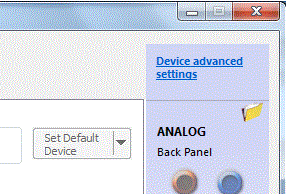
I am curious what choices you have from "Set Default Device" and "Device advanced settings?"

Untitled.png

Others have had success loading older drivers in "Compatibility Mode". Here is a tutorial on Compatibility Mode. I didn't notice in the thread history if you had considered installing older working drivers in compatibility mode?

Robert
 

My Computer My Computer

OS
...
Back
Top