tusharpatil001
New member
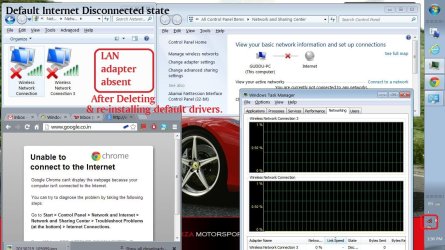
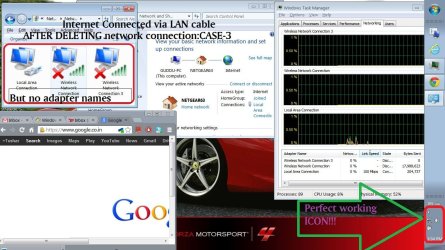
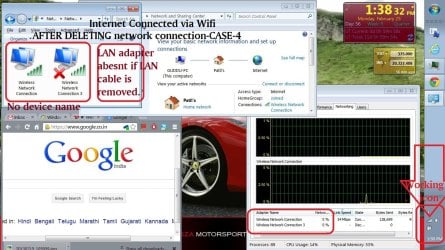
Red cross/Busy Blue circle sign on perfect working internet connection
Respected Sir,
Sevenforums,
HARDWARE- I have Win 7,Home Premium,64bit,Dell Inspiron 15R N5010.
My network adapters are: Realtek PCIe FE Family controller & DW1501 Wireless-N WLAN Half miniport adapter.
My ADSL modem + WIFI router is Netgear DGN2200v3 latest version of firmware v1.1.00.10_1.001.
PROBLEM- My network connection icon in task bar shows Red cross disconnected or revolving Blue Busy circle network on wired and wireless connection. But my internet connection works perfectly fine. Please suggest solution to enable network notification correctly. I will carry out every possible advise to enable correct network notification. Problem arise when I personally fiddled with router's security option like changing WPA2-PSK[AES] to WPA-PSK[TKIP] + WPA2-PSK[AES] and again back. icnic:
Right now is WPA-PSK[TKIP] + WPA2-PSK[AES]. I have connected my laptop to internet via LAN cable.
My Netgear DGN2200v3 provides WEP, WPA-PSK[TKIP], WPA2-PSK[AES], WPA-PSK[TKIP] + WPA2-PSK[AES], WPA/WPA2 Enterprise. Also please tell which type of network security option should I keep to avoid further conflict. So which should I choose?
I also have posted this issue in Microsoft community but didn't got expected reply nor solution, Please check this link about what Microsoft community answered:
Red X or Blue busy circle symbol on system tray connection icon even - Microsoft Community
I request Sevenforums to please clear my doubts and guide me till problem solves.
Thank you.
Respected Sir,
Sevenforums,
HARDWARE- I have Win 7,Home Premium,64bit,Dell Inspiron 15R N5010.
My network adapters are: Realtek PCIe FE Family controller & DW1501 Wireless-N WLAN Half miniport adapter.
My ADSL modem + WIFI router is Netgear DGN2200v3 latest version of firmware v1.1.00.10_1.001.
PROBLEM- My network connection icon in task bar shows Red cross disconnected or revolving Blue Busy circle network on wired and wireless connection. But my internet connection works perfectly fine. Please suggest solution to enable network notification correctly. I will carry out every possible advise to enable correct network notification. Problem arise when I personally fiddled with router's security option like changing WPA2-PSK[AES] to WPA-PSK[TKIP] + WPA2-PSK[AES] and again back.
icnic:Right now is WPA-PSK[TKIP] + WPA2-PSK[AES]. I have connected my laptop to internet via LAN cable.
My Netgear DGN2200v3 provides WEP, WPA-PSK[TKIP], WPA2-PSK[AES], WPA-PSK[TKIP] + WPA2-PSK[AES], WPA/WPA2 Enterprise. Also please tell which type of network security option should I keep to avoid further conflict. So which should I choose?
I also have posted this issue in Microsoft community but didn't got expected reply nor solution, Please check this link about what Microsoft community answered:
Red X or Blue busy circle symbol on system tray connection icon even - Microsoft Community
I request Sevenforums to please clear my doubts and guide me till problem solves.
Thank you.
Attachments

Last edited:
My Computer
At a glance
Windows 7 Home Premium 64 bitIntel(R) Core(TM) i5 CPU M 460 @ 2.53GHzDDR3-SDRAM-4GBATI Mobility Radeon HD 5650- 1 GB
- Computer type
- Laptop
- Computer Manufacturer/Model Number
- Dell Inspiron N5010-Laptop
- OS
- Windows 7 Home Premium 64 bit
- CPU
- Intel(R) Core(TM) i5 CPU M 460 @ 2.53GHz
- Motherboard
- Dell Inc. 0YXXJJ
- Memory
- DDR3-SDRAM-4GB
- Graphics Card(s)
- ATI Mobility Radeon HD 5650- 1 GB
- Sound Card
- IDT High Definition Audio Controller
- Monitor(s) Displays
- Generic PnP Monitor-1
- Screen Resolution
- 1366 x 768 (32-bit) (60 Hz)
- Hard Drives
- Western Digital-500 GB
- Cooling
- 1 CPU Fan
- Keyboard
- Standard PS/2 Keyboard
- Mouse
- Synaptics PS/2 Port TouchPad
- Internet Speed
- 1 mbps
- Other Info
- Dell Wireless 365 Bluetooth Module;Network Card - Realtek RTL8102E/RTL8103E Family PCI-E Fast Ethernet NIC (NDIS 6.20);Network Card - DW1501 Wireless-N WLAN Half-Mini Card


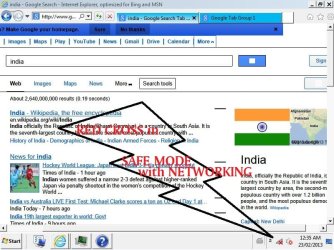



 What is this problem now ?