HDTV VGA issues?! Please help!

eatdirt13

New member
Local time
4:20 PM
Messages
6
Hi There I am having a problem with my windows 7 machine at the moment. I am running W7 Ultimate 64bit.

I am currently running 1600 x 1200 through HDMI which i believe is 720p as its my TV's native resolution. However i would prefer to use VGA and run 1920 x 1080!

I have all the latest CCC Drivers and updates, but when i restart windows, it goes black on the windows 'welcome' screen saying 'Mode Not Supported!'

This happened to me before when i had Vista, and i figured out that the problem was actually the refresh rate which had to be at 60hz not 59hz which is what most things were defaulting to, but even after forcing the refresh rate still no joy

Any help or advice on this would be highly appreciated as im just running round in circles with this!

Many Thanks

Matt
 
Last edited:

My Computer My Computer

At a glance

Windows 7Intel I7 940 @ 3.41 Ghz6GB DDR3ATi Radeon HD4870 x 2
OS
Windows 7
CPU
Intel I7 940 @ 3.41 Ghz
Motherboard
Asus P6T Deluxe
Memory
6GB DDR3
Graphics Card(s)
ATi Radeon HD4870 x 2
Sound Card
Onboard
Monitor(s) Displays
42" Samsung HD LCD TV
Hard Drives
500 GB
250 GB
PSU
850 W Thermaltake
Case
Lexa Black
Cooling
Akasa Nero Fan
Hi There I am having a problem with my windows 7 machine at the moment. I am running W7 Ultimate 64bit.

I am currently running 1600 x 1200 through HDMI which i believe is 720p as its my TV's native resolution. However i would prefer to use VGA and run 1920 x 1080!

I have all the latest CCC Drivers and updates, but when i restart windows, it goes black on the windows 'welcome' screen saying 'Mde Not Supported!'

This happened to me before when i had Vista, and i figured out that the problem was actually the refresh rate which had to be at 60hz not 59hz which is what most things were defaulting to, but even after forcing the refresh rate still no joy

Any help or advice on this would be highly appreciated as im just running round in circles with this!

Many Thanks

Matt

Hi Matt,

You can go under but not over your TV's native resolution.

Greetz
 

My Computer My Computer

At a glance

Win7 Build 7600 x86Pentium II 300MHz32mb EDO RAMDiamond Viper
OS
Win7 Build 7600 x86
CPU
Pentium II 300MHz
Motherboard
Asus
Memory
32mb EDO RAM
Graphics Card(s)
Diamond Viper
Sound Card
Soundblaster 16
Monitor(s) Displays
14" AOC CRT 16K color
Screen Resolution
800x600
Hard Drives
300mb Quantum fireball
PSU
110 Watts
Cooling
Passive
Keyboard
Trust Ergonomic
Mouse
Generic
Internet Speed
256K u 128K d
Thanks for the quick feedback! I know that is the case using HDMI, but the VGA to my TV works in 1920 by 1080 as i was using this resolution before and it was working fine. Its very strange this one.

Thanks Again
 

My Computer My Computer

At a glance

Windows 7Intel I7 940 @ 3.41 Ghz6GB DDR3ATi Radeon HD4870 x 2
OS
Windows 7
CPU
Intel I7 940 @ 3.41 Ghz
Motherboard
Asus P6T Deluxe
Memory
6GB DDR3
Graphics Card(s)
ATi Radeon HD4870 x 2
Sound Card
Onboard
Monitor(s) Displays
42" Samsung HD LCD TV
Hard Drives
500 GB
250 GB
PSU
850 W Thermaltake
Case
Lexa Black
Cooling
Akasa Nero Fan
Thanks for the quick feedback! I know that is the case using HDMI, but the VGA to my TV works in 1920 by 1080 as i was using this resolution before and it was working fine. Its very strange this one.

Thanks Again

What is the brand and type of your TV?
 

My Computer My Computer

At a glance

Win7 Build 7600 x86Pentium II 300MHz32mb EDO RAMDiamond Viper
OS
Win7 Build 7600 x86
CPU
Pentium II 300MHz
Motherboard
Asus
Memory
32mb EDO RAM
Graphics Card(s)
Diamond Viper
Sound Card
Soundblaster 16
Monitor(s) Displays
14" AOC CRT 16K color
Screen Resolution
800x600
Hard Drives
300mb Quantum fireball
PSU
110 Watts
Cooling
Passive
Keyboard
Trust Ergonomic
Mouse
Generic
Internet Speed
256K u 128K d
Hi,

I have a Samsung 40" HD LCD TV. Sorry i cant give you the model number at the moment as i am not with my computer.

Thanks
 

My Computer My Computer

At a glance

Windows 7Intel I7 940 @ 3.41 Ghz6GB DDR3ATi Radeon HD4870 x 2
OS
Windows 7
CPU
Intel I7 940 @ 3.41 Ghz
Motherboard
Asus P6T Deluxe
Memory
6GB DDR3
Graphics Card(s)
ATi Radeon HD4870 x 2
Sound Card
Onboard
Monitor(s) Displays
42" Samsung HD LCD TV
Hard Drives
500 GB
250 GB
PSU
850 W Thermaltake
Case
Lexa Black
Cooling
Akasa Nero Fan
Hi,

I have a Samsung 40" HD LCD TV. Sorry i cant give you the model number at the moment as i am not with my computer.

Thanks

Hi,

A 40" Samsung not having Full DH native resolution sounds highly unlikely to me.

Post back the model number when you're home.

Greetz
 

My Computer My Computer

At a glance

Win7 Build 7600 x86Pentium II 300MHz32mb EDO RAMDiamond Viper
OS
Win7 Build 7600 x86
CPU
Pentium II 300MHz
Motherboard
Asus
Memory
32mb EDO RAM
Graphics Card(s)
Diamond Viper
Sound Card
Soundblaster 16
Monitor(s) Displays
14" AOC CRT 16K color
Screen Resolution
800x600
Hard Drives
300mb Quantum fireball
PSU
110 Watts
Cooling
Passive
Keyboard
Trust Ergonomic
Mouse
Generic
Internet Speed
256K u 128K d
Hi There,

Sorry for the late reply had a busy afternoon!

My TV Model is a Samsung LE40A556P1F

Hope this helps

Thanks

Matt
 

My Computer My Computer

At a glance

Windows 7Intel I7 940 @ 3.41 Ghz6GB DDR3ATi Radeon HD4870 x 2
OS
Windows 7
CPU
Intel I7 940 @ 3.41 Ghz
Motherboard
Asus P6T Deluxe
Memory
6GB DDR3
Graphics Card(s)
ATi Radeon HD4870 x 2
Sound Card
Onboard
Monitor(s) Displays
42" Samsung HD LCD TV
Hard Drives
500 GB
250 GB
PSU
850 W Thermaltake
Case
Lexa Black
Cooling
Akasa Nero Fan
Hi There,

Sorry for the late reply had a busy afternoon!

My TV Model is a Samsung LE40A556P1F

Hope this helps

Thanks

Matt

Hi Matt,

I Found the manual.

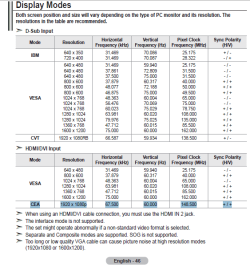
HDMI should be able to show 1920x1080 at 60hz full screen.

I do recommend HDMI or DVI over VGA, the difference in image quality is quite big.

I see you have an ATI 4870.
The ATI software's new UI really s*cks.

But there is a way to force HDMI on 1920x1080 at 60hz.
The option is actually called force... something.
(can't check now, wife is on HTPC)

Very well hidden in this stupid Catalyst UI, is also a slider to enable overscan, so you'll get the full screen covered.

It took me 20 minutes to find the option, and every time I have to look for it again, I'm lost. That's how intuitive it is.

But it is there, so search for it and you'll find it eventually.

Here's a list of your screen's settings.

hdmi.PNG
 

My Computer My Computer

At a glance

Win7 Build 7600 x86Pentium II 300MHz32mb EDO RAMDiamond Viper
OS
Win7 Build 7600 x86
CPU
Pentium II 300MHz
Motherboard
Asus
Memory
32mb EDO RAM
Graphics Card(s)
Diamond Viper
Sound Card
Soundblaster 16
Monitor(s) Displays
14" AOC CRT 16K color
Screen Resolution
800x600
Hard Drives
300mb Quantum fireball
PSU
110 Watts
Cooling
Passive
Keyboard
Trust Ergonomic
Mouse
Generic
Internet Speed
256K u 128K d
Hi,

I have actually tried running in 1080p through HDMI but the screen looks fuzzy and the colours are strange as if its trying to force too many pixels in horizontally if that makes sense.

Cheers

Matt
 

My Computer My Computer

At a glance

Windows 7Intel I7 940 @ 3.41 Ghz6GB DDR3ATi Radeon HD4870 x 2
OS
Windows 7
CPU
Intel I7 940 @ 3.41 Ghz
Motherboard
Asus P6T Deluxe
Memory
6GB DDR3
Graphics Card(s)
ATi Radeon HD4870 x 2
Sound Card
Onboard
Monitor(s) Displays
42" Samsung HD LCD TV
Hard Drives
500 GB
250 GB
PSU
850 W Thermaltake
Case
Lexa Black
Cooling
Akasa Nero Fan
Hi,

I have actually tried running in 1080p through HDMI but the screen looks fuzzy and the colours are strange as if its trying to force too many pixels in horizontally if that makes sense.

Cheers

Matt

Hi Matt,

The settings need to be exactly right.
I takes a lot of fiddling.

If you have a MSN account I might be able to help you easier while chatting in Messenger.

You can PM me the address and I will add you to my contacts.

greetz
 

My Computer My Computer

At a glance

Win7 Build 7600 x86Pentium II 300MHz32mb EDO RAMDiamond Viper
OS
Win7 Build 7600 x86
CPU
Pentium II 300MHz
Motherboard
Asus
Memory
32mb EDO RAM
Graphics Card(s)
Diamond Viper
Sound Card
Soundblaster 16
Monitor(s) Displays
14" AOC CRT 16K color
Screen Resolution
800x600
Hard Drives
300mb Quantum fireball
PSU
110 Watts
Cooling
Passive
Keyboard
Trust Ergonomic
Mouse
Generic
Internet Speed
256K u 128K d
Hi,

I just thought i would update this as i have tried just simply changing my resolution to 1920 x 1080 from 1600 x 1200, and its now saying 'Mode Not Supported'.

I have never had this problem before through HDMI, i can usually run 1080p but as i said in my previous post it looks weird.

Thanks

Matt

P.S - I tried forcing 60hz as well and it didnt want to know.
 

My Computer My Computer

At a glance

Windows 7Intel I7 940 @ 3.41 Ghz6GB DDR3ATi Radeon HD4870 x 2
OS
Windows 7
CPU
Intel I7 940 @ 3.41 Ghz
Motherboard
Asus P6T Deluxe
Memory
6GB DDR3
Graphics Card(s)
ATi Radeon HD4870 x 2
Sound Card
Onboard
Monitor(s) Displays
42" Samsung HD LCD TV
Hard Drives
500 GB
250 GB
PSU
850 W Thermaltake
Case
Lexa Black
Cooling
Akasa Nero Fan
Back
Top