SynTPEnh.exe won't open in startup

AhmedBarca

New member
Local time
11:35 AM
Messages
4
Location
Cairo, Egypt
Hello, everyone!

I have accidently disabled all the items in the Startup tab in System Configuration (msconfig.exe) and restarted my computer. I have enabled them all again, except some items, and restarted my computer again.

The items that I selected to open on statup did open except for Synaptics TouchPad V7.5 (SynTPEnh.exe). I have tried shutting down my computer and opening it again, but it didn't solve my problem. When I open Processes tab in Windows Task Manager, I find all my selected items except SynTPEnh.exe. In System Configuration, it clearly shows that it will open on startup as it is selected.

NR44yqK.jpg

How can I solve this problem?

Any help would be appreciated.
 

My Computer My Computer

At a glance

Windows 7 Home Basic 64-bit Operating SystemIntel(R) Core(TM) i3-2310M @2.10GHz
Computer type
Laptop
Computer Manufacturer/Model Number
HP
OS
Windows 7 Home Basic 64-bit Operating System
Graphics Card(s)
Intel(R) Core(TM) i3-2310M @2.10GHz
Hard Drives
Total size of hard disk(s) 465 GB
Disk partition (C:) 346 GB Free (450 GB Total)
Disk partition (D:) 2 GB Free (15 GB Total)
Antivirus
Windows Defender
Browser
Google Chrome
Semi-suspiciously, that entry has %programfiles% rather than a hard-coded path ("C:....") as the other entries have. I don't know where/when those % symbolic variables get set but maybe they get set after Windows has got the environment running.

IOW, go to START -> RUN and type in that %programfiles%... string exactly and see if it start/runs/stays running.
 

My Computer My Computer

At a glance

Windows 7AMD Phenom II X2 (dual-core)4Gintegrated ATI HD 4200
Computer type
PC/Desktop
Computer Manufacturer/Model Number
Custom
OS
Windows 7
CPU
AMD Phenom II X2 (dual-core)
Motherboard
GA-MA785GM-US2H
Memory
4G
Graphics Card(s)
integrated ATI HD 4200
Sound Card
integrated
Monitor(s) Displays
Samsung 24"
Screen Resolution
1920x1080
Hard Drives
1 SSD - Samsung 840 - 500 GB - OS and DATA partitions
1 SSD - Intel 320 - 120 GB (used for backups) - Misc/BACKUP
1 SATA HD - WD, 500 GB - BACKUP
PSU
Ultra X4 500W
Case
Ultra X-blaster
Keyboard
Microsoft Digital Media Pro
Mouse
Logitech WIRED!
Internet Speed
15 Mbps FIOS
Semi-suspiciously, that entry has %programfiles% rather than a hard-coded path ("C:....") as the other entries have. I don't know where/when those % symbolic variables get set but maybe they get set after Windows has got the environment running.

IOW, go to START -> RUN and type in that %programfiles%... string exactly and see if it start/runs/stays running.

Thanks for your reply.

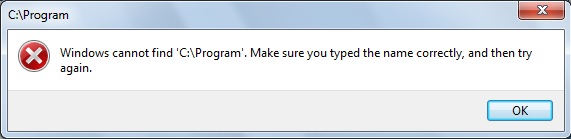
I've tried it and this message appeared.

buL9oY9.jpg
 

My Computer My Computer

At a glance

Windows 7 Home Basic 64-bit Operating SystemIntel(R) Core(TM) i3-2310M @2.10GHz
Computer type
Laptop
Computer Manufacturer/Model Number
HP
OS
Windows 7 Home Basic 64-bit Operating System
Graphics Card(s)
Intel(R) Core(TM) i3-2310M @2.10GHz
Hard Drives
Total size of hard disk(s) 465 GB
Disk partition (C:) 346 GB Free (450 GB Total)
Disk partition (D:) 2 GB Free (15 GB Total)
Antivirus
Windows Defender
Browser
Google Chrome
Semi-suspiciously, that entry has %programfiles% rather than a hard-coded path ("C:....") as the other entries have. I don't know where/when those % symbolic variables get set but maybe they get set after Windows has got the environment running.

IOW, go to START -> RUN and type in that %programfiles%... string exactly and see if it start/runs/stays running.

Thanks for your reply.

I've tried it and this message appeared.


buL9oY9.jpg
So, from START and then the RUN box, you typed (or cut/pasted):

%programfiles%\Synaptics\SynTP\SynTPEnh.exe

exactly and you then got that popup? Seems the %programfiles% environment variable isn't being set correctly or is being overridden somewhere. Are you running 32 or 64-bit Windows 7?

Regardless, change the STARTUP to hard-code/duplicate the C:\Program Files\....rest of the path so you can't go wrong.
 

My Computer My Computer

At a glance

Windows 7AMD Phenom II X2 (dual-core)4Gintegrated ATI HD 4200
Computer type
PC/Desktop
Computer Manufacturer/Model Number
Custom
OS
Windows 7
CPU
AMD Phenom II X2 (dual-core)
Motherboard
GA-MA785GM-US2H
Memory
4G
Graphics Card(s)
integrated ATI HD 4200
Sound Card
integrated
Monitor(s) Displays
Samsung 24"
Screen Resolution
1920x1080
Hard Drives
1 SSD - Samsung 840 - 500 GB - OS and DATA partitions
1 SSD - Intel 320 - 120 GB (used for backups) - Misc/BACKUP
1 SATA HD - WD, 500 GB - BACKUP
PSU
Ultra X4 500W
Case
Ultra X-blaster
Keyboard
Microsoft Digital Media Pro
Mouse
Logitech WIRED!
Internet Speed
15 Mbps FIOS
So, from START and then the RUN box, you typed (or cut/pasted):

%programfiles%\Synaptics\SynTP\SynTPEnh.exe

exactly and you then got that popup? Seems the %programfiles% environment variable isn't being set correctly or is being overridden somewhere. Are you running 32 or 64-bit Windows 7?

Regardless, change the STARTUP to hard-code/duplicate the C:\Program Files\....rest of the path so you can't go wrong.

I'm actually using windows 7 64-bit. I've tried it and restarted my computer, but the problem is still there.
 

My Computer My Computer

At a glance

Windows 7 Home Basic 64-bit Operating SystemIntel(R) Core(TM) i3-2310M @2.10GHz
Computer type
Laptop
Computer Manufacturer/Model Number
HP
OS
Windows 7 Home Basic 64-bit Operating System
Graphics Card(s)
Intel(R) Core(TM) i3-2310M @2.10GHz
Hard Drives
Total size of hard disk(s) 465 GB
Disk partition (C:) 346 GB Free (450 GB Total)
Disk partition (D:) 2 GB Free (15 GB Total)
Antivirus
Windows Defender
Browser
Google Chrome
So, from START and then the RUN box, you typed (or cut/pasted):

%programfiles%\Synaptics\SynTP\SynTPEnh.exe

exactly and you then got that popup? Seems the %programfiles% environment variable isn't being set correctly or is being overridden somewhere. Are you running 32 or 64-bit Windows 7?

Regardless, change the STARTUP to hard-code/duplicate the C:\Program Files\....rest of the path so you can't go wrong.

I'm actually using windows 7 64-bit. I've tried it and restarted my computer, but the problem is still there.
Start > RUN and put in the C:\Program Files\Syn............... command to see if it runs.
 

My Computer My Computer

At a glance

Windows 7AMD Phenom II X2 (dual-core)4Gintegrated ATI HD 4200
Computer type
PC/Desktop
Computer Manufacturer/Model Number
Custom
OS
Windows 7
CPU
AMD Phenom II X2 (dual-core)
Motherboard
GA-MA785GM-US2H
Memory
4G
Graphics Card(s)
integrated ATI HD 4200
Sound Card
integrated
Monitor(s) Displays
Samsung 24"
Screen Resolution
1920x1080
Hard Drives
1 SSD - Samsung 840 - 500 GB - OS and DATA partitions
1 SSD - Intel 320 - 120 GB (used for backups) - Misc/BACKUP
1 SATA HD - WD, 500 GB - BACKUP
PSU
Ultra X4 500W
Case
Ultra X-blaster
Keyboard
Microsoft Digital Media Pro
Mouse
Logitech WIRED!
Internet Speed
15 Mbps FIOS
Start > RUN and put in the C:\Program Files\Syn............... command to see if it runs.

It opened, and it appears in Windows Task Manager. But still, when I open my computer it won't open unless I open it manually.
 

My Computer My Computer

At a glance

Windows 7 Home Basic 64-bit Operating SystemIntel(R) Core(TM) i3-2310M @2.10GHz
Computer type
Laptop
Computer Manufacturer/Model Number
HP
OS
Windows 7 Home Basic 64-bit Operating System
Graphics Card(s)
Intel(R) Core(TM) i3-2310M @2.10GHz
Hard Drives
Total size of hard disk(s) 465 GB
Disk partition (C:) 346 GB Free (450 GB Total)
Disk partition (D:) 2 GB Free (15 GB Total)
Antivirus
Windows Defender
Browser
Google Chrome
None of those items need to startup with Windows so I would uncheck them all. You'll need to first open HP Wireless to choose "Use independent wireless" to turn it off so you can configure Win7's superior built-in wireless. All of the HP utlities are crapware versions of better utilties built into Win7 which throttle and corrupt Win7.

Then in Control Panel>Programs and Features Uninstall the touchpad software and reboot. See if you have the features you need with the driver Win7 installs. If not import the driver software from the HP Support Downloads webpage for your model PC.

You have HP preinstalled Win7 which is the worst possible Win7 install. At the bare minimum you should Clean Up Factory Bloatware
but most tech enthusiasts won't run such a corrupt install but instead Clean Reinstall - Factory OEM Windows 7
 
Back
Top