Solved IE10 Scroll Bar Arrows not showing correctly.

TheOneBobbyGunn

New member
Pro User
Local time
2:36 PM
Messages
101
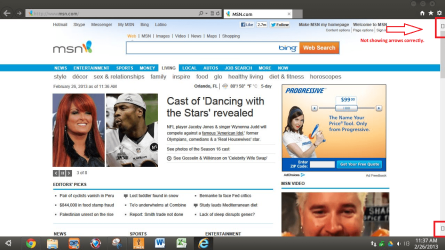
I just updated to IE10 RTM, and my scroll bar arrows are not showing correctly. This also happened with the RP, so I uninstalled that to go back to IE9. In IE9 I have no issues. The arrows show as arrows, but in IE10 they don't. I thought since IE10 is now final the arrows would be fixed, but they are not. It's not the theme I use either as I have gone back to the default Windows 7 theme, but it still is broke. I even reset the browser to default, and rebooted, disabled allowing themes to change things, but nothing fixes it. I would say it's my computer, but it is happening on two machines. One is a PC running W7 Ent 32bit, and one is a laptop running W7 Ult 64bit. Anyone have any ideas?
 

Attachments
  • IE10 Scroll Bar Arrows issue.png
    IE10 Scroll Bar Arrows issue.png
    258.1 KB · Views: 77

My Computer My Computer

At a glance

Windows 7 Ultimate
Computer type
Laptop
Computer Manufacturer/Model Number
Dell Inspiron
OS
Windows 7 Ultimate
I just updated to IE10 RTM, and my scroll bar arrows are not showing correctly. This also happened with the RP, so I uninstalled that to go back to IE9. In IE9 I have no issues. The arrows show as arrows, but in IE10 they don't. I thought since IE10 is now final the arrows would be fixed, but they are not. It's not the theme I use either as I have gone back to the default Windows 7 theme, but it still is broke. I even reset the browser to default, and rebooted, disabled allowing themes to change things, but nothing fixes it. I would say it's my computer, but it is happening on two machines. One is a PC running W7 Ent 32bit, and one is a laptop running W7 Ult 64bit. Anyone have any ideas?

Do the little boxes function as arrows?
 

My Computer My Computer

At a glance

Win 7 Ultimate 64 bitIntel i7-3930KKingston HyperX Genesis 32GB Kit (8x4GB Modul...MSI R7850 Twin Frozr 2GD5/OC Radeon HD 7850 2...
Computer type
PC/Desktop
Computer Manufacturer/Model Number
Custom Build
OS
Win 7 Ultimate 64 bit
CPU
Intel i7-3930K
Motherboard
ASUS P9X79 WS
Memory
Kingston HyperX Genesis 32GB Kit (8x4GB Modules) 1600MHz DDR
Graphics Card(s)
MSI R7850 Twin Frozr 2GD5/OC Radeon HD 7850 2GB 256-bit GDDR
Sound Card
Asus Xonar Essence STX
Monitor(s) Displays
3x Asus VG248QE 24", Vizio 32" TV
Screen Resolution
1920 x 1080, ?
Hard Drives
Samsung 128GB 840 Pro SSD (1),
Samsung 4TB 850 EVO SSDs (4)
Samsung 4TB 850 EVO SSDs (16) external backup drives used in 2.5" hot swap bays in the computer.
PSU
Corsair HX750w
Case
Antec Two Hundred v2 (modified)
Cooling
Cooler Master GeminII S524 120mm (fan replaced with a 140mm)
Keyboard
Logitech G510s
Mouse
Logitech M525 (two in use)
Internet Speed
=< 32Mbps down, 8Mbps up
Antivirus
AVAST!, MBAM, SAS, Spybot S&D (all but MBAM free) Glary Util
Browser
IE11
Other Info
LSI 9211-8i HBA card (8 SATA III ports), 2.5" & 3.5" Hot Swap Bays, HooToo HT-CR001 PCI-E to USB 3.0 Internal Hub + 6 Slot Card Reader, and LG Model CH12LS28 BD-ROM Optical Drive. Also, ScanSnap S1500 ADF duplexing scanner, Canon 9000F flat bed scanner, Corsair SP2500 2.1 speakers, Samsung CLP 415nw laser color printer, Cyberpower PP2200SW UPS
I just updated to IE10 RTM, and my scroll bar arrows are not showing correctly. This also happened with the RP, so I uninstalled that to go back to IE9. In IE9 I have no issues. The arrows show as arrows, but in IE10 they don't. I thought since IE10 is now final the arrows would be fixed, but they are not. It's not the theme I use either as I have gone back to the default Windows 7 theme, but it still is broke. I even reset the browser to default, and rebooted, disabled allowing themes to change things, but nothing fixes it. I would say it's my computer, but it is happening on two machines. One is a PC running W7 Ent 32bit, and one is a laptop running W7 Ult 64bit. Anyone have any ideas?

Do the little boxes function as arrows?

Yep. And it's actually not just scroll bar arrows. Even drop down menu arrows are squares too. All arrows are like that. Ugh...
 

My Computer My Computer

At a glance

Windows 7 Ultimate
Computer type
Laptop
Computer Manufacturer/Model Number
Dell Inspiron
OS
Windows 7 Ultimate
Sounds like a font issue. Are using a different theme than the default?
 

My Computer My Computer

At a glance

Win 7 Ultimate 64 bitIntel i7-3930KKingston HyperX Genesis 32GB Kit (8x4GB Modul...MSI R7850 Twin Frozr 2GD5/OC Radeon HD 7850 2...
Computer type
PC/Desktop
Computer Manufacturer/Model Number
Custom Build
OS
Win 7 Ultimate 64 bit
CPU
Intel i7-3930K
Motherboard
ASUS P9X79 WS
Memory
Kingston HyperX Genesis 32GB Kit (8x4GB Modules) 1600MHz DDR
Graphics Card(s)
MSI R7850 Twin Frozr 2GD5/OC Radeon HD 7850 2GB 256-bit GDDR
Sound Card
Asus Xonar Essence STX
Monitor(s) Displays
3x Asus VG248QE 24", Vizio 32" TV
Screen Resolution
1920 x 1080, ?
Hard Drives
Samsung 128GB 840 Pro SSD (1),
Samsung 4TB 850 EVO SSDs (4)
Samsung 4TB 850 EVO SSDs (16) external backup drives used in 2.5" hot swap bays in the computer.
PSU
Corsair HX750w
Case
Antec Two Hundred v2 (modified)
Cooling
Cooler Master GeminII S524 120mm (fan replaced with a 140mm)
Keyboard
Logitech G510s
Mouse
Logitech M525 (two in use)
Internet Speed
=< 32Mbps down, 8Mbps up
Antivirus
AVAST!, MBAM, SAS, Spybot S&D (all but MBAM free) Glary Util
Browser
IE11
Other Info
LSI 9211-8i HBA card (8 SATA III ports), 2.5" & 3.5" Hot Swap Bays, HooToo HT-CR001 PCI-E to USB 3.0 Internal Hub + 6 Slot Card Reader, and LG Model CH12LS28 BD-ROM Optical Drive. Also, ScanSnap S1500 ADF duplexing scanner, Canon 9000F flat bed scanner, Corsair SP2500 2.1 speakers, Samsung CLP 415nw laser color printer, Cyberpower PP2200SW UPS
Yes I am currently, but it did it even when I switched back to the system default. I even un-patched the theme files, and ran sfc /scannow to fix/replace/restore anything that may have been causing it, but it still does it.
 

My Computer My Computer

At a glance

Windows 7 Ultimate
Computer type
Laptop
Computer Manufacturer/Model Number
Dell Inspiron
OS
Windows 7 Ultimate
I just wanted to chime in that I am also having this problem. It does seem cosmetic so it's mostly just an annoyance.
 

My Computer My Computer

At a glance

Win7 Pro 64 bit2.4 Ghz core 2 duo4 GBNvido gforce 140m
Computer type
PC/Desktop
Computer Manufacturer/Model Number
Dell
OS
Win7 Pro 64 bit
CPU
2.4 Ghz core 2 duo
Memory
4 GB
Graphics Card(s)
Nvido gforce 140m
just fine here
USTdQTX.jpg
 

My Computer My Computer

At a glance

Windows 7 SP1 Ultimate x86
OS
Windows 7 SP1 Ultimate x86
I just wanted to chime in that I am also having this problem. It does seem cosmetic so it's mostly just an annoyance.

Thank you! I'm not glad you're having the same issue, but at least I know I'm not alone. Yeah it is cosmetic, but I would like to fix it for sure. I'm trying everything I can think of. It's the oddest thing since it's only IE10. I went back again to IE9, and they are normal, but updated again, and they are back to the squares.
 

My Computer My Computer

At a glance

Windows 7 Ultimate
Computer type
Laptop
Computer Manufacturer/Model Number
Dell Inspiron
OS
Windows 7 Ultimate

My Computer My Computer

At a glance

Windows 7 Ultimate
Computer type
Laptop
Computer Manufacturer/Model Number
Dell Inspiron
OS
Windows 7 Ultimate

My Computer My Computer

At a glance

Win7 Pro 64 bit2.4 Ghz core 2 duo4 GBNvido gforce 140m
Computer type
PC/Desktop
Computer Manufacturer/Model Number
Dell
OS
Win7 Pro 64 bit
CPU
2.4 Ghz core 2 duo
Memory
4 GB
Graphics Card(s)
Nvido gforce 140m

My Computer My Computer

At a glance

Windows 7 Ultimate
Computer type
Laptop
Computer Manufacturer/Model Number
Dell Inspiron
OS
Windows 7 Ultimate
Has anyone found a solution to this? Apparently you need the Segoe UI font.

The KB patch in the MS Community topic says "already installed" for me. I have missing checkbox symbols and scrollbar arrows now since updating to IE10. :|

Could someone with a working version send me the font maybe?
 

My Computer My Computer

At a glance

Windows 7 Ultimate x64Intel Core I7 3960X Hex Core 4ghz16 GB Corsair VengeanceGeforce GTX 590 3GB
OS
Windows 7 Ultimate x64
CPU
Intel Core I7 3960X Hex Core 4ghz
Motherboard
Gigabyte X79-UD3
Memory
16 GB Corsair Vengeance
Graphics Card(s)
Geforce GTX 590 3GB
Cooling
Corsair H80
Same problem here and affecting Notepad as it cannot update the history regarding recent opening of files and host of other apps.Really regret about it.Sulk!!!!!
 

My Computer My Computer

At a glance

Windows 7 Home Premium 64bitIntel Core 2 Duo T6600 2.2 GHz 800MHz4GBNvidia Geforce G105M
Computer type
Laptop
Computer Manufacturer/Model Number
Acer Aspire 4736G
OS
Windows 7 Home Premium 64bit
CPU
Intel Core 2 Duo T6600 2.2 GHz 800MHz
Motherboard
Intel PM65
Memory
4GB
Graphics Card(s)
Nvidia Geforce G105M
Hard Drives
Toshiba MK5055GSX 99FKS993S LBAS 976773167
Antivirus
AVG Free AV 2015
Browser
IE & Chrome
Back
Top