Solved Is it possible to have your home network desktops on 1 monitor?

Tsunamijhoe

New member
Hey guys

I currently have 3 pc´s (win 7 ultimate 64bit) on my home network,and was wondering if it is possible to have all 3 or at least 2 desktops showing on 1 HD flat screen?

I used to have 3 different monitors,but i am now only using a 42" philips 1080p HD flat screen as my "monitor" and it works fine,i am just tired of using the remote to switch between hdmi to see the different desktops, and since i run 2 instances of a program on 2 different pc´s i would like to be able to run both on same monitor,so i instantly can do changes to both instances without having to switch hdmi.

Possible? If so,how do i do it?

Thank you
 

My Computer

Computer type
PC/Desktop
Computer Manufacturer/Model Number
custom
OS
Windows 7 Ultimate SP1 64bit
CPU
Core I3 2100T/Core I5 750/Core I3 2120
Motherboard
ASRock Z77 Extreme4/Gigabyte GA-H55-UD3H/Asrock H61DEL
Memory
2x4GB 1600mhz/2x4GB 1600hmhz/2x4GB 1333mhz
Graphics Card(s)
onboard/onboard/ASUS HD7850-DC2-2GD5-V2
Sound Card
not active/onboard/onboard
Monitor(s) Displays
Philips 42"
Screen Resolution
1920x1080
Hard Drives
WD Red WD30EFRX
WD20EARX
WD20EARS
WD20EACS
PSU
Corsair GS700/Antec 500w Earth watts/Corsair TX650 V2
Case
Antec Twelve Hundred V3/2xAntec Sonata Elite
Cooling
generic
Keyboard
2xMS natural Ergonomic
Mouse
MS Wireless/logitech laser/steelseries Xai
Internet Speed
20/2mbit
Other Info
2x IBM serveraid 1015M IT Flashed 8xPort SATA
4x X-case 5in1 drive cages (norco rebranded)
So you want to control 2 pc's? You want to do it using 1 screen, 1 mouse and 1 keyboard?

You can use teamviewer for that. Or crossloop (but you have to confirm each time you make connection to other computer and each time a new connection code). Teamviewer is the way to go.
 

My Computer

Computer type
Laptop
Computer Manufacturer/Model Number
ACER ASPIRE 5742G
OS
Microsoft Windows 7 Home Premium 64-bits 7601 Multiprocessor Free Service Pack 1
CPU
Intel(R) Core(TM) i3 CPU M 370 @ 2.40GHz
Motherboard
Acer Aspire 5742G
Memory
4,00 GB
Graphics Card(s)
ATI Mobility Radeon HD 5400 Series
Sound Card
(1) AMD High Definition Audio Device (2) Realtek High Defi
Screen Resolution
1366 x 768 x 32 bits (4294967296 colors) @ 60 Hz
Hard Drives
WDC WD5000BEVT-22ZAT0
So you want to control 2 pc's? You want to do it using 1 screen, 1 mouse and 1 keyboard?

You can use teamviewer for that. Or crossloop (but you have to confirm each time you make connection to other computer and each time a new connection code). Teamviewer is the way to go.

I will be using seperate mice and keyboards,so i only need the desktops to show on same monitor on same hdmi connector.

Teamviewer seems to be just another "remote desktop" is this the only way to do it? I can make it work using the built in remote desktop in my windows,but i have to setup everything again as it gives me the windows default desktop,not the desktop i have on the machine i want to run programs from
 

My Computer

Computer type
PC/Desktop
Computer Manufacturer/Model Number
custom
OS
Windows 7 Ultimate SP1 64bit
CPU
Core I3 2100T/Core I5 750/Core I3 2120
Motherboard
ASRock Z77 Extreme4/Gigabyte GA-H55-UD3H/Asrock H61DEL
Memory
2x4GB 1600mhz/2x4GB 1600hmhz/2x4GB 1333mhz
Graphics Card(s)
onboard/onboard/ASUS HD7850-DC2-2GD5-V2
Sound Card
not active/onboard/onboard
Monitor(s) Displays
Philips 42"
Screen Resolution
1920x1080
Hard Drives
WD Red WD30EFRX
WD20EARX
WD20EARS
WD20EACS
PSU
Corsair GS700/Antec 500w Earth watts/Corsair TX650 V2
Case
Antec Twelve Hundred V3/2xAntec Sonata Elite
Cooling
generic
Keyboard
2xMS natural Ergonomic
Mouse
MS Wireless/logitech laser/steelseries Xai
Internet Speed
20/2mbit
Other Info
2x IBM serveraid 1015M IT Flashed 8xPort SATA
4x X-case 5in1 drive cages (norco rebranded)
So you want to control 2 pc's? You want to do it using 1 screen, 1 mouse and 1 keyboard?

You can use teamviewer for that. Or crossloop (but you have to confirm each time you make connection to other computer and each time a new connection code). Teamviewer is the way to go.

I will be using seperate mice and keyboards,so i only need the desktops to show on same monitor on same hdmi connector.

Teamviewer seems to be just another "remote desktop" is this the only way to do it? I can make it work using the built in remote desktop in my windows,but i have to setup everything again as it gives me the windows default desktop,not the desktop i have on the machine i want to run programs from

built-in win7 remote desktop doesn't do what you want! It doesn't clone the current screen, but acts as a user login.
 

My Computer

Computer type
Laptop
Computer Manufacturer/Model Number
ACER ASPIRE 5742G
OS
Microsoft Windows 7 Home Premium 64-bits 7601 Multiprocessor Free Service Pack 1
CPU
Intel(R) Core(TM) i3 CPU M 370 @ 2.40GHz
Motherboard
Acer Aspire 5742G
Memory
4,00 GB
Graphics Card(s)
ATI Mobility Radeon HD 5400 Series
Sound Card
(1) AMD High Definition Audio Device (2) Realtek High Defi
Screen Resolution
1366 x 768 x 32 bits (4294967296 colors) @ 60 Hz
Hard Drives
WDC WD5000BEVT-22ZAT0
So you want to control 2 pc's? You want to do it using 1 screen, 1 mouse and 1 keyboard?

You can use teamviewer for that. Or crossloop (but you have to confirm each time you make connection to other computer and each time a new connection code). Teamviewer is the way to go.

I will be using seperate mice and keyboards,so i only need the desktops to show on same monitor on same hdmi connector.

Teamviewer seems to be just another "remote desktop" is this the only way to do it? I can make it work using the built in remote desktop in my windows,but i have to setup everything again as it gives me the windows default desktop,not the desktop i have on the machine i want to run programs from

built-in win7 remote desktop doesn't do what you want! It doesn't clone the current screen, but acts as a user login.

What does teamwiever do then? As i can see it also requires login and whatnot. If cloning the desktop,will i be able to run programs and change settings and everything?

I got it running fine using remote desktop,i can even use only 1 mice and keyboard which is REALLY nice,so if this way works for me,i am happy.

I am curious though, what is the difference between remote desktop and cloning desktop?
 

My Computer

Computer type
PC/Desktop
Computer Manufacturer/Model Number
custom
OS
Windows 7 Ultimate SP1 64bit
CPU
Core I3 2100T/Core I5 750/Core I3 2120
Motherboard
ASRock Z77 Extreme4/Gigabyte GA-H55-UD3H/Asrock H61DEL
Memory
2x4GB 1600mhz/2x4GB 1600hmhz/2x4GB 1333mhz
Graphics Card(s)
onboard/onboard/ASUS HD7850-DC2-2GD5-V2
Sound Card
not active/onboard/onboard
Monitor(s) Displays
Philips 42"
Screen Resolution
1920x1080
Hard Drives
WD Red WD30EFRX
WD20EARX
WD20EARS
WD20EACS
PSU
Corsair GS700/Antec 500w Earth watts/Corsair TX650 V2
Case
Antec Twelve Hundred V3/2xAntec Sonata Elite
Cooling
generic
Keyboard
2xMS natural Ergonomic
Mouse
MS Wireless/logitech laser/steelseries Xai
Internet Speed
20/2mbit
Other Info
2x IBM serveraid 1015M IT Flashed 8xPort SATA
4x X-case 5in1 drive cages (norco rebranded)
I will be using seperate mice and keyboards,so i only need the desktops to show on same monitor on same hdmi connector.

Teamviewer seems to be just another "remote desktop" is this the only way to do it? I can make it work using the built in remote desktop in my windows,but i have to setup everything again as it gives me the windows default desktop,not the desktop i have on the machine i want to run programs from

built-in win7 remote desktop doesn't do what you want! It doesn't clone the current screen, but acts as a user login.

What does teamwiever do then? As i can see it also requires login and whatnot. If cloning the desktop,will i be able to run programs and change settings and everything?

I got it running fine using remote desktop,i can even use only 1 mice and keyboard which is REALLY nice,so if this way works for me,i am happy.

I am curious though, what is the difference between remote desktop and cloning desktop?
You arfe running win7 remote desktop client. But what is running on other machine (server) to accept the connection?
 

My Computer

Computer type
Laptop
Computer Manufacturer/Model Number
ACER ASPIRE 5742G
OS
Microsoft Windows 7 Home Premium 64-bits 7601 Multiprocessor Free Service Pack 1
CPU
Intel(R) Core(TM) i3 CPU M 370 @ 2.40GHz
Motherboard
Acer Aspire 5742G
Memory
4,00 GB
Graphics Card(s)
ATI Mobility Radeon HD 5400 Series
Sound Card
(1) AMD High Definition Audio Device (2) Realtek High Defi
Screen Resolution
1366 x 768 x 32 bits (4294967296 colors) @ 60 Hz
Hard Drives
WDC WD5000BEVT-22ZAT0
built-in win7 remote desktop doesn't do what you want! It doesn't clone the current screen, but acts as a user login.

What does teamwiever do then? As i can see it also requires login and whatnot. If cloning the desktop,will i be able to run programs and change settings and everything?

I got it running fine using remote desktop,i can even use only 1 mice and keyboard which is REALLY nice,so if this way works for me,i am happy.

I am curious though, what is the difference between remote desktop and cloning desktop?
You arfe running win7 remote desktop client. But what is running on other machine (server) to accept the connection?

Uhhmm, nothing. I have 3 pc´s all named ***-INET , ***-SERVER , ***-GAMES and i just made users on the machine from which i wanted to connect. On the ***-GAMES i made users for ***-INET and ***-SERVER gave them passwords,and from my ***-INET i just right clicked the ***-GAMES and connect using remote desktop using the user and pass i assigned,and voila i could now control everything on that pc from my ***-INET machine,which is what i needed to do.

However,if there is an easier way,i am all eyes?
 

My Computer

Computer type
PC/Desktop
Computer Manufacturer/Model Number
custom
OS
Windows 7 Ultimate SP1 64bit
CPU
Core I3 2100T/Core I5 750/Core I3 2120
Motherboard
ASRock Z77 Extreme4/Gigabyte GA-H55-UD3H/Asrock H61DEL
Memory
2x4GB 1600mhz/2x4GB 1600hmhz/2x4GB 1333mhz
Graphics Card(s)
onboard/onboard/ASUS HD7850-DC2-2GD5-V2
Sound Card
not active/onboard/onboard
Monitor(s) Displays
Philips 42"
Screen Resolution
1920x1080
Hard Drives
WD Red WD30EFRX
WD20EARX
WD20EARS
WD20EACS
PSU
Corsair GS700/Antec 500w Earth watts/Corsair TX650 V2
Case
Antec Twelve Hundred V3/2xAntec Sonata Elite
Cooling
generic
Keyboard
2xMS natural Ergonomic
Mouse
MS Wireless/logitech laser/steelseries Xai
Internet Speed
20/2mbit
Other Info
2x IBM serveraid 1015M IT Flashed 8xPort SATA
4x X-case 5in1 drive cages (norco rebranded)
What does teamwiever do then? As i can see it also requires login and whatnot. If cloning the desktop,will i be able to run programs and change settings and everything?

I got it running fine using remote desktop,i can even use only 1 mice and keyboard which is REALLY nice,so if this way works for me,i am happy.

I am curious though, what is the difference between remote desktop and cloning desktop?
You arfe running win7 remote desktop client. But what is running on other machine (server) to accept the connection?

Uhhmm, nothing. I have 3 pc´s all named ***-INET , ***-SERVER , ***-GAMES and i just made users on the machine from which i wanted to connect. On the ***-GAMES i made users for ***-INET and ***-SERVER gave them passwords,and from my ***-INET i just right clicked the ***-GAMES and connect using remote desktop using the user and pass i assigned,and voila i could now control everything on that pc from my ***-INET machine,which is what i needed to do.

However,if there is an easier way,i am all eyes?
There's a difference! What if you log on as a different user as is currently logged on on remote system?
 

My Computer

Computer type
Laptop
Computer Manufacturer/Model Number
ACER ASPIRE 5742G
OS
Microsoft Windows 7 Home Premium 64-bits 7601 Multiprocessor Free Service Pack 1
CPU
Intel(R) Core(TM) i3 CPU M 370 @ 2.40GHz
Motherboard
Acer Aspire 5742G
Memory
4,00 GB
Graphics Card(s)
ATI Mobility Radeon HD 5400 Series
Sound Card
(1) AMD High Definition Audio Device (2) Realtek High Defi
Screen Resolution
1366 x 768 x 32 bits (4294967296 colors) @ 60 Hz
Hard Drives
WDC WD5000BEVT-22ZAT0
I am not sure i follow? I dont need to be logged in on any other pc at a time,i am only human,and can only use 1 pc at a time :-).

All 3 pc´s are all in the same room 2 feet apart,so i just swap 1 keyboard for the other if the need arises to log in to the other system..

How do i clone the desktop,and what is the difference from remote desktop?
 

My Computer

Computer type
PC/Desktop
Computer Manufacturer/Model Number
custom
OS
Windows 7 Ultimate SP1 64bit
CPU
Core I3 2100T/Core I5 750/Core I3 2120
Motherboard
ASRock Z77 Extreme4/Gigabyte GA-H55-UD3H/Asrock H61DEL
Memory
2x4GB 1600mhz/2x4GB 1600hmhz/2x4GB 1333mhz
Graphics Card(s)
onboard/onboard/ASUS HD7850-DC2-2GD5-V2
Sound Card
not active/onboard/onboard
Monitor(s) Displays
Philips 42"
Screen Resolution
1920x1080
Hard Drives
WD Red WD30EFRX
WD20EARX
WD20EARS
WD20EACS
PSU
Corsair GS700/Antec 500w Earth watts/Corsair TX650 V2
Case
Antec Twelve Hundred V3/2xAntec Sonata Elite
Cooling
generic
Keyboard
2xMS natural Ergonomic
Mouse
MS Wireless/logitech laser/steelseries Xai
Internet Speed
20/2mbit
Other Info
2x IBM serveraid 1015M IT Flashed 8xPort SATA
4x X-case 5in1 drive cages (norco rebranded)
I am not sure i follow? I dont need to be logged in on any other pc at a time,i am only human,and can only use 1 pc at a time :-).

All 3 pc´s are all in the same room 2 feet apart,so i just swap 1 keyboard for the other if the need arises to log in to the other system..

How do i clone the desktop,and what is the difference from remote desktop?
Best tool to cone and remote control is teamviewer.

win7 remote desktop is a tool to remotely logon...
 

My Computer

Computer type
Laptop
Computer Manufacturer/Model Number
ACER ASPIRE 5742G
OS
Microsoft Windows 7 Home Premium 64-bits 7601 Multiprocessor Free Service Pack 1
CPU
Intel(R) Core(TM) i3 CPU M 370 @ 2.40GHz
Motherboard
Acer Aspire 5742G
Memory
4,00 GB
Graphics Card(s)
ATI Mobility Radeon HD 5400 Series
Sound Card
(1) AMD High Definition Audio Device (2) Realtek High Defi
Screen Resolution
1366 x 768 x 32 bits (4294967296 colors) @ 60 Hz
Hard Drives
WDC WD5000BEVT-22ZAT0
... I have 3 pc´s all named ***-INET , ***-SERVER , ***-GAMES and i just made users on the machine from which i wanted to connect. On the ***-GAMES i made users for ***-INET and ***-SERVER gave them passwords,and from my ***-INET i just right clicked the ***-GAMES and connect using remote desktop using the user and pass i assigned,and voila i could now control everything on that pc from my ***-INET machine,which is what i needed to do.

However,if there is an easier way,i am all eyes?
You have different users for each machine? Why not log in to the machines as the same user? I have quite a few machines on my network and I log into them all as the same user. That's an easier way to me.
 

My Computer

Computer type
PC/Desktop
Computer Manufacturer/Model Number
Home Built desktop, Dell G15 5511 Gaming laptop,MS Surface Pro 7 tablet
OS
W10 Pro desktop, W11 laptop, W11 Pro tablet (all 64-bit)
CPU
3.7Ghz 8700K i7, i7-11800H, i7-1065G7
Motherboard
ASUS TUF Z370-Pro Gaming in desktop
Memory
16G desktop, 16G laptop, 4G tablet
Graphics Card(s)
AMD Radeon RX580, RTX 3060, Intel Iris Plus
Sound Card
High Definition Audio (Built-in to mobo)
Monitor(s) Displays
Samsung U32J59 32" (2x), 15.6", 12"
Screen Resolution
3840x2160, 3840x2160, 1920x1080, 2160x1440
Hard Drives
500G SSD for OS; 2T, 10T & 15T HDDs for Data on Desktop, 1TB SSD laptop, 128G SSD tablet.
PSU
Corsair CX 750M
Case
Antec 100
Cooling
CM 212+
Keyboard
IBM Model M - used continuously since 1986
Mouse
Microsoft Pro IntelliMouse
Internet Speed
400M down 8M up
Antivirus
Windows Defender
Browser
FireFox
Other Info
Built my first computer (8Mhz 8088cpu, 640K RAM, 20MB HDD, 2 360K floppy drives) in 1985 and have been building them for myself, relatives and friends ever since.
... I have 3 pc´s all named ***-INET , ***-SERVER , ***-GAMES and i just made users on the machine from which i wanted to connect. On the ***-GAMES i made users for ***-INET and ***-SERVER gave them passwords,and from my ***-INET i just right clicked the ***-GAMES and connect using remote desktop using the user and pass i assigned,and voila i could now control everything on that pc from my ***-INET machine,which is what i needed to do.

However,if there is an easier way,i am all eyes?
You have different users for each machine? Why not log in to the machines as the same user? I have quite a few machines on my network and I log into them all as the same user. That's an easier way to me.

Hmm,good question.. Is the machine name the same as the user? When i enabled the remote desktop it said "my name" was already allowed to login,whatever that means, and during install of windows where you have to put in the network name and such,i always put "my name" and then the machine name.

But even if i have same name on all machines,when i try and use remote desktop so i can control the other machine,it asks for password of which there is none, which is why i made a new user with password on the machines from which i need the desktop
 

My Computer

Computer type
PC/Desktop
Computer Manufacturer/Model Number
custom
OS
Windows 7 Ultimate SP1 64bit
CPU
Core I3 2100T/Core I5 750/Core I3 2120
Motherboard
ASRock Z77 Extreme4/Gigabyte GA-H55-UD3H/Asrock H61DEL
Memory
2x4GB 1600mhz/2x4GB 1600hmhz/2x4GB 1333mhz
Graphics Card(s)
onboard/onboard/ASUS HD7850-DC2-2GD5-V2
Sound Card
not active/onboard/onboard
Monitor(s) Displays
Philips 42"
Screen Resolution
1920x1080
Hard Drives
WD Red WD30EFRX
WD20EARX
WD20EARS
WD20EACS
PSU
Corsair GS700/Antec 500w Earth watts/Corsair TX650 V2
Case
Antec Twelve Hundred V3/2xAntec Sonata Elite
Cooling
generic
Keyboard
2xMS natural Ergonomic
Mouse
MS Wireless/logitech laser/steelseries Xai
Internet Speed
20/2mbit
Other Info
2x IBM serveraid 1015M IT Flashed 8xPort SATA
4x X-case 5in1 drive cages (norco rebranded)
So you want to control 2 pc's? You want to do it using 1 screen, 1 mouse and 1 keyboard?

You can use teamviewer for that. Or crossloop (but you have to confirm each time you make connection to other computer and each time a new connection code). Teamviewer is the way to go.


Hi there
One possible way would be if your monitor has several inputs

I have TV, DVI, HDMI1, HDMI2, RGB(standard VGA monitor type connection).

Plug your computers into different inputs and simply use the remote when you want to switch to a different computer.

Note though when you are using HDMI inputs - the sound will be transmitted via the HDMI connection to the monitor so you'll get the sound of the computer you are currently looking at on the monitor.

For different sounds -- you can use one computer on VGA (RGB) and use the audio out from your computer to your sound device.

I have two sound inputs on my sound device -- I take one from the monitor (when using the HDMI input) and the 2nd one via the output sound from the computer I'm using the VGA input with.

I don't need to look at both computers at the same time of course.

This method DOES need two mice and two keyboards.

Another solution is to RDP to the second /third / fourth computer -- you don't need to have a monitor connected to it in order to use RDP.

Advantage of THIS method is that if you have a LARGE monitor you can window them and see all the desktops at the same time -- and control with ONE keyboard and ONE Mouse.

Cheers
jimbo
 
Last edited:

My Computer

Computer type
PC/Desktop
Computer Manufacturer/Model Number
Custom built, several laptops HP/ASUS
OS
Linux CENTOS 7 / various Windows OS'es and servers
CPU
Intel i7 Intel i5
Memory
8GB, 16GB
Graphics Card(s)
On Motherboard
Sound Card
Realtek HD audio
Monitor(s) Displays
Apple Cinema display, Samsung LCD
Screen Resolution
1920 X 1080
Hard Drives
4 X 1TB SATA
Mouse
Toshiba wireless laser
Internet Speed
> 20MB up
I am not sure i follow? I dont need to be logged in on any other pc at a time,i am only human,and can only use 1 pc at a time :-).

All 3 pc´s are all in the same room 2 feet apart,so i just swap 1 keyboard for the other if the need arises to log in to the other system..

How do i clone the desktop,and what is the difference from remote desktop?
Best tool to cone and remote control is teamviewer.

win7 remote desktop is a tool to remotely logon...

Hi there

Remote in this context means ANOTHER computer -- can be even on the SAME DESK if you want.
It does NOT mean that the computer you wish to access has to be OUTSIDE your LAN but it could be of course.

RDP works fine -- on a LOCAL LAN just select the computer name and it will work OK.

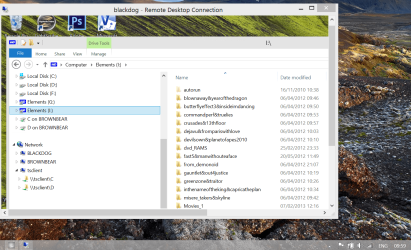
Here's a screenshot of TWO computers BROWNBEAR and a RDP session established to BLACKDOG which is on my local LAN and connected via WIRELESS.

If you have direct LAN connections set the display to the highest resolution for your remote sessions --and you can capture background remote desktop themes too. Set to Full screen which you can also "Window" and enable remote resources such as disks etc to be available for your session.

Forget things like Teamviewer - especially when dealing with computers on LOCAL LANS / HJOME NETWORKS.


Cheers
jimbo
 

Attachments

  • remote.png
    remote.png
    1.6 MB · Views: 5

My Computer

Computer type
PC/Desktop
Computer Manufacturer/Model Number
Custom built, several laptops HP/ASUS
OS
Linux CENTOS 7 / various Windows OS'es and servers
CPU
Intel i7 Intel i5
Memory
8GB, 16GB
Graphics Card(s)
On Motherboard
Sound Card
Realtek HD audio
Monitor(s) Displays
Apple Cinema display, Samsung LCD
Screen Resolution
1920 X 1080
Hard Drives
4 X 1TB SATA
Mouse
Toshiba wireless laser
Internet Speed
> 20MB up
I am not sure i follow? I dont need to be logged in on any other pc at a time,i am only human,and can only use 1 pc at a time :-).

All 3 pc´s are all in the same room 2 feet apart,so i just swap 1 keyboard for the other if the need arises to log in to the other system..

How do i clone the desktop,and what is the difference from remote desktop?
Best tool to cone and remote control is teamviewer.

win7 remote desktop is a tool to remotely logon...

Hi there

Remote in this context means ANOTHER computer -- can be even on the SAME DESK if you want.
It does NOT mean that the computer you wish to access has to be OUTSIDE your LAN but it could be of course.

RDP works fine -- on a LOCAL LAN just select the computer name and it will work OK.

Here's a screenshot of TWO computers BROWNBEAR and a RDP session established to BLACKDOG which is on my local LAN and connected via WIRELESS.

If you have direct LAN connections set the display to the highest resolution for your remote sessions --and you can capture background remote desktop themes too. Set to Full screen which you can also "Window" and enable remote resources such as disks etc to be available for your session.

Forget things like Teamviewer - especially when dealing with computers on LOCAL LANS / HJOME NETWORKS.


Cheers
jimbo

Yeah, i use Remote desktop now,and it works fine for my current need,as i use a 42" flatscreen,i can have 3 active desktops no problem :-),so i will mark this thread as solved..

Thank you all for your input
 

My Computer

Computer type
PC/Desktop
Computer Manufacturer/Model Number
custom
OS
Windows 7 Ultimate SP1 64bit
CPU
Core I3 2100T/Core I5 750/Core I3 2120
Motherboard
ASRock Z77 Extreme4/Gigabyte GA-H55-UD3H/Asrock H61DEL
Memory
2x4GB 1600mhz/2x4GB 1600hmhz/2x4GB 1333mhz
Graphics Card(s)
onboard/onboard/ASUS HD7850-DC2-2GD5-V2
Sound Card
not active/onboard/onboard
Monitor(s) Displays
Philips 42"
Screen Resolution
1920x1080
Hard Drives
WD Red WD30EFRX
WD20EARX
WD20EARS
WD20EACS
PSU
Corsair GS700/Antec 500w Earth watts/Corsair TX650 V2
Case
Antec Twelve Hundred V3/2xAntec Sonata Elite
Cooling
generic
Keyboard
2xMS natural Ergonomic
Mouse
MS Wireless/logitech laser/steelseries Xai
Internet Speed
20/2mbit
Other Info
2x IBM serveraid 1015M IT Flashed 8xPort SATA
4x X-case 5in1 drive cages (norco rebranded)
Back
Top